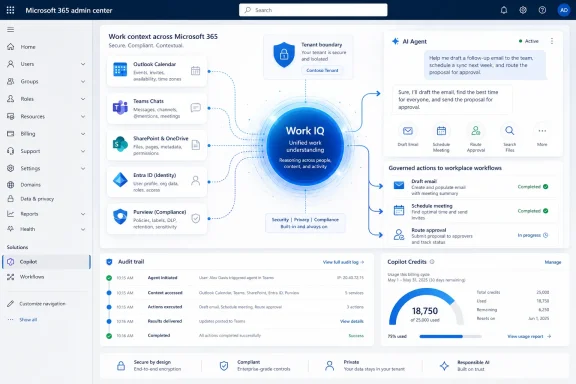
Microsoft is positioning Work IQ as the shared intelligence layer behind Microsoft 365 Copilot and AI agents, using Microsoft Graph data from Teams, Outlook, Office files, meetings, calendars, and business apps to make workplace AI more contextual across an organization. The important point is not that Microsoft has invented another Copilot feature. It is that the company is trying to turn the messy exhaust of office life into an operating layer for agents. If Copilot’s first era was about bringing a chatbot into Word, Outlook, and Teams, Work IQ is Microsoft’s argument that the next era depends on whether AI can understand the organization before it tries to act inside it.
Work IQ is not being sold as a standalone product, and that is precisely why it matters. Microsoft’s description is deliberately infrastructural: a shared intelligence layer that lets Copilot and agents reason over organizational work data, rather than a new button that users can discover on the ribbon.
That framing is useful because it separates Work IQ from the usual productivity software theater. There is no grand deployment moment, no new app icon, and no obvious before-and-after interface change. Instead, Microsoft is describing a behind-the-scenes system that makes AI output better by giving it richer context about people, projects, relationships, documents, meetings, deadlines, and prior decisions.
For IT pros, that should sound both promising and familiar. Enterprise software has been promising to understand “how work gets done” for decades, usually by asking workers to tag, file, classify, and update systems they would rather avoid. The difference now is that Microsoft is betting large language models and Microsoft Graph can infer more of that structure from the normal byproducts of work.
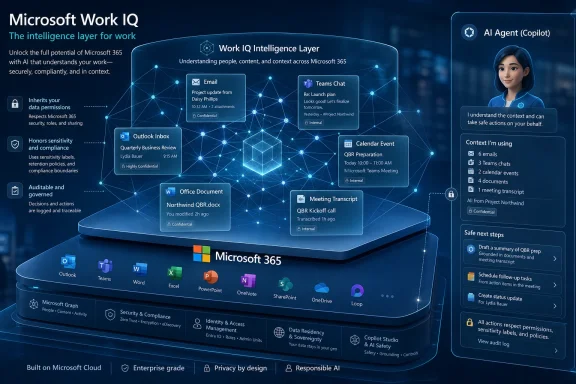
That is the thesis underneath Work IQ: the company believes the organization itself is becoming a queryable substrate. Email threads, Teams chats, meeting transcripts, shared files, calendar metadata, and line-of-business records are no longer just content repositories. They are signals for an AI system that wants to know who matters, what changed, what is due, and what should happen next.
That was always going to be a ceiling on adoption. A lawyer, product manager, finance analyst, engineer, or support lead should not need to explain their job, project, stakeholders, and recent history every time they ask an assistant for help. If the AI system lives inside the work environment but cannot remember the shape of the work, it remains a clever visitor rather than a useful colleague.
Work IQ is Microsoft’s answer to that limitation. The company says the layer helps Copilot tailor responses to a user’s role and responsibilities, understand frequent collaborators, surface relevant deliverables, notice deadlines, and intuit next steps. That is a meaningful shift from “answer my question” toward “understand why I am asking.”
The risk is that Microsoft’s language can make this sound smoother than enterprise reality. Work data is often duplicated, stale, overshared, undershared, mislabeled, politically sensitive, or trapped in departmental silos. The promise of Work IQ depends not only on AI inference, but on whether the underlying tenant is healthy enough for inference to be trusted.
Still, the direction is clear. Microsoft does not want Copilot to be judged only by model quality or prompt fluency. It wants Copilot to be judged by how well it exploits the data gravity of Microsoft 365.
Microsoft’s claim is that Work IQ helps Copilot treat Outlook less like a pile of messages and more like a record of work over time. A thread summary becomes more valuable when it can identify decision points, action owners, unresolved issues, and connections to meetings or documents. Calendar assistance becomes more useful when it can draw on previous interactions with the same participants and the material that surrounded similar meetings.
That matters because Microsoft does not need to radically redesign Outlook for AI to change the experience. If Copilot can more accurately infer what a user needs before a meeting, after a meeting, or in the middle of an overloaded inbox, the application can feel different without looking different.
This is also where Microsoft’s strategy becomes harder for competitors to copy. A generic AI assistant can summarize pasted text. A browser extension can inspect a page. But an assistant that understands the user’s mailbox, calendar, Teams history, documents, organizational relationships, and permissions sits inside a much deeper moat.
The catch is that Outlook’s usefulness as an AI source depends heavily on organizational habits. If decisions happen in private chats, meetings go unrecorded, documents are scattered, and permissions are chaotic, Work IQ will inherit that mess. Microsoft can improve the reasoning layer, but it cannot magically turn bad information hygiene into institutional memory.
For employees, that is an obvious win. The difference between a generic answer and a useful answer is often not the model; it is context. A sales lead preparing for a customer meeting, an engineer reviewing a design discussion, or an HR partner drafting a policy note all need the AI to understand role, audience, history, and constraints.
For administrators and security teams, persistent memory raises harder questions. What exactly is remembered, how is it represented, how long does it last, how can it be corrected, and how does it interact with retention, discovery, and compliance obligations? Microsoft’s public framing emphasizes that Work IQ works within existing Microsoft 365 protection boundaries, but the operational details will matter enormously in regulated environments.
There is also a human factor. Workers may like AI that remembers their projects; they may be less comfortable with AI that appears to remember patterns they never explicitly gave it. The line between helpful continuity and unsettling surveillance is not a technical boundary. It is a trust boundary.
That trust will depend on transparency, controls, and organizational culture. If employees understand what Copilot can use and why, Work IQ may feel like a competent assistant. If they discover it only when an agent surfaces something unexpected, it may feel like another opaque workplace monitoring system, even if Microsoft’s architecture honors permissions.
Microsoft is explicitly tying Work IQ to agent development through Copilot Studio, Microsoft Foundry, APIs, and Model Context Protocol servers. The argument is that builders should not need to wire every agent separately into calendar data, meeting records, mailboxes, files, and collaboration signals. Instead, agents can connect to a contextual layer that already understands the work graph.
That is a powerful architectural claim. It lowers the cost of building agents that are not trapped inside one narrow workflow. A project-management agent, for example, becomes more useful if it can identify stakeholders from meeting history, find the latest documents, review related threads, and highlight upcoming commitments without the developer handcrafting every connector.
But it also changes the risk profile. The more context an agent can access, the more important it becomes to define identity, scope, consent, logging, and revocation. Microsoft says Work IQ does not bypass existing governance and that agents generally see only what is explicitly shared with them. That is the right principle, but the proof will be in how cleanly organizations can administer it at scale.
The key shift is that agent governance cannot be treated as an afterthought. Once agents are allowed to reason across mail, meetings, files, and business systems, they become participants in the information environment. They need lifecycle management, auditability, least-privilege access, and clear ownership just like any other enterprise application.
That inheritance model is sensible because it keeps governance anchored where administrators already work. It also avoids the nightmare scenario of a parallel AI permissions universe. If Work IQ had its own independent access model, every enterprise deployment would become a reconciliation exercise between old permissions and new intelligence.
But inheritance cuts both ways. If a SharePoint site is overshared, if Teams sprawl has gone unchecked, if sensitivity labels are inconsistently applied, or if old files remain broadly accessible, Work IQ may faithfully amplify those mistakes. AI does not merely retrieve information; it makes connections, summarizes implications, and increases the chance that dormant data becomes operationally visible.
This is why Microsoft’s own framing should be read as a warning as much as a sales pitch. Work IQ rewards disciplined tenants. It also exposes sloppy ones.
The practical work for administrators is therefore not “turn on Work IQ” so much as prepare the environment that Work IQ will read. Access reviews, label hygiene, retention policies, recording practices, SharePoint governance, Teams lifecycle management, and agent identity controls become prerequisites for trustworthy AI, not merely compliance chores.
The ambition is a shared business ontology. That phrase can sound like consultant fog, but the underlying idea is straightforward: the AI system should understand that people, projects, accounts, metrics, documents, processes, meetings, and decisions are connected. It should be able to relate a KPI to the work that produced it, or a customer issue to the people and artifacts involved in resolving it.
This is where Microsoft’s enterprise strategy becomes more interesting than another Copilot feature launch. The company is trying to make its cloud estate behave like a context engine. Microsoft 365 holds the collaboration layer, Fabric holds the analytical layer, Foundry provides the builder layer, and Copilot becomes the interface through which that combined intelligence is consumed.
That strategy also explains why Microsoft is leaning so hard into agents. Agents are the workload that justifies connecting all these layers. A dashboard can show a number, and a document assistant can summarize a file, but an agent is supposed to interpret a goal, gather context, decide what matters, and take steps across systems.
If Microsoft succeeds, the center of gravity in enterprise software shifts again. The winning platform is not simply the one that stores the data or hosts the apps. It is the one that can interpret the work graph safely enough for companies to let AI act on it.
But this is also where readers should keep their skepticism close. “Quality” and “satisfaction” are not the same as productivity, and productivity itself is notoriously difficult to measure in knowledge work. A better summary may save five minutes, prevent a missed action item, or reduce cognitive load; it may also encourage more meetings, more messages, and more AI-generated sludge.
The most credible version of Microsoft’s argument is not that Work IQ automatically makes everyone more productive. It is that context improves the odds that AI assistance is relevant enough to be used repeatedly. Adoption is a necessary precondition for productivity, and relevance is a necessary precondition for adoption.
This distinction matters because AI in the workplace has already moved past novelty. Employees have seen demos. They have watched generated text appear in documents and emails. What they now need is output that understands the task well enough to reduce work rather than create review work.
Work IQ is Microsoft’s attempt to solve that gap. It does not eliminate the need for human judgment, but it may reduce the amount of manual briefing required before AI becomes useful.
That means admins should resist treating Work IQ as magic. The system can reason only over data that exists, is accessible, and is governed correctly. If meetings are not transcribed, documents are locked away in personal storage, Teams channels are poorly structured, or business-critical context lives outside Microsoft 365, the intelligence layer will have blind spots.
There is also a cultural dependency. Microsoft’s own internal account notes that making meetings AI-enabled and allowing self-service collaboration data can improve what Work IQ can ground on. That is not a trivial change for organizations with strict recording norms, legal constraints, or cautious employee populations.
The tension is obvious: better AI wants more usable work data, while better governance often means more deliberate restriction. Mature organizations will need to find the balance rather than pretending the trade-off does not exist.
The near-term winners may be departments with repeatable collaboration patterns and manageable risk: project management offices, sales operations, customer success, internal IT, finance planning, and product teams. The hardest deployments may be in legal, HR, executive communications, and regulated workflows where context is valuable precisely because it is sensitive.
That is not a new lesson, but AI makes the consequences more visible. In the pre-agent world, bad permissions often stayed hidden until a user stumbled into the wrong document. In the agentic world, a system designed to connect dots may connect dots across places humans rarely looked.
The same is true for information quality. AI can summarize a meeting transcript, but it cannot know that the meeting was politically performative unless the surrounding signals make that clear. It can find the latest file, but only if versioning and storage habits make “latest” a meaningful concept. It can identify stakeholders, but only if collaboration patterns reflect reality rather than org-chart theater.
This is why Work IQ should push organizations toward data realism. The AI layer will not merely reveal what companies know. It will reveal how badly they have organized what they know.
Microsoft, naturally, presents this as an opportunity. It is one. But it is also an audit by other means.
The most important takeaways are therefore operational rather than inspirational:
 Microsoft Is Rebranding Context as Infrastructure
Work IQ is not being sold as a standalone product, and that is precisely why it matters. Microsoft’s description is deliberately infrastructural: a shared intelligence layer that lets Copilot and agents reason over organizational work data, rather than a new button that users can discover on the ribbon.That framing is useful because it separates Work IQ from the usual productivity software theater. There is no grand deployment moment, no new app icon, and no obvious before-and-after interface change. Instead, Microsoft is describing a behind-the-scenes system that makes AI output better by giving it richer context about people, projects, relationships, documents, meetings, deadlines, and prior decisions.
For IT pros, that should sound both promising and familiar. Enterprise software has been promising to understand “how work gets done” for decades, usually by asking workers to tag, file, classify, and update systems they would rather avoid. The difference now is that Microsoft is betting large language models and Microsoft Graph can infer more of that structure from the normal byproducts of work.
That is the thesis underneath Work IQ: the company believes the organization itself is becoming a queryable substrate. Email threads, Teams chats, meeting transcripts, shared files, calendar metadata, and line-of-business records are no longer just content repositories. They are signals for an AI system that wants to know who matters, what changed, what is due, and what should happen next.
The Copilot Story Moves Past the Blank Prompt
The first wave of workplace generative AI was defined by the blank prompt. Users were told that Copilot could summarize, draft, rewrite, brainstorm, and analyze, but much of the experience still depended on the employee knowing how to ask and what context to provide.That was always going to be a ceiling on adoption. A lawyer, product manager, finance analyst, engineer, or support lead should not need to explain their job, project, stakeholders, and recent history every time they ask an assistant for help. If the AI system lives inside the work environment but cannot remember the shape of the work, it remains a clever visitor rather than a useful colleague.
Work IQ is Microsoft’s answer to that limitation. The company says the layer helps Copilot tailor responses to a user’s role and responsibilities, understand frequent collaborators, surface relevant deliverables, notice deadlines, and intuit next steps. That is a meaningful shift from “answer my question” toward “understand why I am asking.”
The risk is that Microsoft’s language can make this sound smoother than enterprise reality. Work data is often duplicated, stale, overshared, undershared, mislabeled, politically sensitive, or trapped in departmental silos. The promise of Work IQ depends not only on AI inference, but on whether the underlying tenant is healthy enough for inference to be trusted.
Still, the direction is clear. Microsoft does not want Copilot to be judged only by model quality or prompt fluency. It wants Copilot to be judged by how well it exploits the data gravity of Microsoft 365.
Outlook Shows Why the Interface Is No Longer the Product
Outlook is the perfect test case because email is where useful context and corporate entropy collide. An inbox contains decisions, obligations, negotiations, political signals, attachments, exceptions, and half-forgotten commitments. It also contains newsletters, automated alerts, stale chains, and messages that should have been Teams chats.Microsoft’s claim is that Work IQ helps Copilot treat Outlook less like a pile of messages and more like a record of work over time. A thread summary becomes more valuable when it can identify decision points, action owners, unresolved issues, and connections to meetings or documents. Calendar assistance becomes more useful when it can draw on previous interactions with the same participants and the material that surrounded similar meetings.
That matters because Microsoft does not need to radically redesign Outlook for AI to change the experience. If Copilot can more accurately infer what a user needs before a meeting, after a meeting, or in the middle of an overloaded inbox, the application can feel different without looking different.
This is also where Microsoft’s strategy becomes harder for competitors to copy. A generic AI assistant can summarize pasted text. A browser extension can inspect a page. But an assistant that understands the user’s mailbox, calendar, Teams history, documents, organizational relationships, and permissions sits inside a much deeper moat.
The catch is that Outlook’s usefulness as an AI source depends heavily on organizational habits. If decisions happen in private chats, meetings go unrecorded, documents are scattered, and permissions are chaotic, Work IQ will inherit that mess. Microsoft can improve the reasoning layer, but it cannot magically turn bad information hygiene into institutional memory.
Persistent Memory Is the Feature Users Wanted and Admins Feared
Microsoft’s most consequential Work IQ claim may be persistent understanding: Copilot and agents should not require users to repeatedly explain who they are, what they do, and what they are working on. In plain English, the AI should remember the professional context that makes its answers useful.For employees, that is an obvious win. The difference between a generic answer and a useful answer is often not the model; it is context. A sales lead preparing for a customer meeting, an engineer reviewing a design discussion, or an HR partner drafting a policy note all need the AI to understand role, audience, history, and constraints.
For administrators and security teams, persistent memory raises harder questions. What exactly is remembered, how is it represented, how long does it last, how can it be corrected, and how does it interact with retention, discovery, and compliance obligations? Microsoft’s public framing emphasizes that Work IQ works within existing Microsoft 365 protection boundaries, but the operational details will matter enormously in regulated environments.
There is also a human factor. Workers may like AI that remembers their projects; they may be less comfortable with AI that appears to remember patterns they never explicitly gave it. The line between helpful continuity and unsettling surveillance is not a technical boundary. It is a trust boundary.
That trust will depend on transparency, controls, and organizational culture. If employees understand what Copilot can use and why, Work IQ may feel like a competent assistant. If they discover it only when an agent surfaces something unexpected, it may feel like another opaque workplace monitoring system, even if Microsoft’s architecture honors permissions.
Agents Need Context More Than Chatbots Do
The Work IQ story becomes more important when it moves from Copilot chat into agents. A chatbot can be forgiven for giving a thin answer. An agent that takes action with thin context can create real operational risk.Microsoft is explicitly tying Work IQ to agent development through Copilot Studio, Microsoft Foundry, APIs, and Model Context Protocol servers. The argument is that builders should not need to wire every agent separately into calendar data, meeting records, mailboxes, files, and collaboration signals. Instead, agents can connect to a contextual layer that already understands the work graph.
That is a powerful architectural claim. It lowers the cost of building agents that are not trapped inside one narrow workflow. A project-management agent, for example, becomes more useful if it can identify stakeholders from meeting history, find the latest documents, review related threads, and highlight upcoming commitments without the developer handcrafting every connector.
But it also changes the risk profile. The more context an agent can access, the more important it becomes to define identity, scope, consent, logging, and revocation. Microsoft says Work IQ does not bypass existing governance and that agents generally see only what is explicitly shared with them. That is the right principle, but the proof will be in how cleanly organizations can administer it at scale.
The key shift is that agent governance cannot be treated as an afterthought. Once agents are allowed to reason across mail, meetings, files, and business systems, they become participants in the information environment. They need lifecycle management, auditability, least-privilege access, and clear ownership just like any other enterprise application.
Governance Is the Real Deployment Plan
Microsoft’s most reassuring claim is that Work IQ does not introduce a new security model. It inherits permissions, sensitivity labels, access policies, tenant controls, and compliance boundaries from the source systems. In theory, the AI layer can only surface or act on information the user, or agent identity acting for the user, is already allowed to access.That inheritance model is sensible because it keeps governance anchored where administrators already work. It also avoids the nightmare scenario of a parallel AI permissions universe. If Work IQ had its own independent access model, every enterprise deployment would become a reconciliation exercise between old permissions and new intelligence.
But inheritance cuts both ways. If a SharePoint site is overshared, if Teams sprawl has gone unchecked, if sensitivity labels are inconsistently applied, or if old files remain broadly accessible, Work IQ may faithfully amplify those mistakes. AI does not merely retrieve information; it makes connections, summarizes implications, and increases the chance that dormant data becomes operationally visible.
This is why Microsoft’s own framing should be read as a warning as much as a sales pitch. Work IQ rewards disciplined tenants. It also exposes sloppy ones.
The practical work for administrators is therefore not “turn on Work IQ” so much as prepare the environment that Work IQ will read. Access reviews, label hygiene, retention policies, recording practices, SharePoint governance, Teams lifecycle management, and agent identity controls become prerequisites for trustworthy AI, not merely compliance chores.
The IQ Stack Is Microsoft’s Bid to Own the Enterprise Knowledge Layer
Work IQ is only one part of Microsoft’s broader “IQ” architecture. Microsoft also talks about Fabric IQ and Foundry IQ, with each layer aimed at a different slice of enterprise intelligence. Work IQ focuses on productivity and collaboration context; Fabric IQ brings reasoning to structured analytical data; Foundry IQ supports builders creating agents that span these worlds.The ambition is a shared business ontology. That phrase can sound like consultant fog, but the underlying idea is straightforward: the AI system should understand that people, projects, accounts, metrics, documents, processes, meetings, and decisions are connected. It should be able to relate a KPI to the work that produced it, or a customer issue to the people and artifacts involved in resolving it.
This is where Microsoft’s enterprise strategy becomes more interesting than another Copilot feature launch. The company is trying to make its cloud estate behave like a context engine. Microsoft 365 holds the collaboration layer, Fabric holds the analytical layer, Foundry provides the builder layer, and Copilot becomes the interface through which that combined intelligence is consumed.
That strategy also explains why Microsoft is leaning so hard into agents. Agents are the workload that justifies connecting all these layers. A dashboard can show a number, and a document assistant can summarize a file, but an agent is supposed to interpret a goal, gather context, decide what matters, and take steps across systems.
If Microsoft succeeds, the center of gravity in enterprise software shifts again. The winning platform is not simply the one that stores the data or hosts the apps. It is the one that can interpret the work graph safely enough for companies to let AI act on it.
The Productivity Pitch Has a Measurement Problem
Microsoft says its internal IT organization, Microsoft Digital, saw improvements in Copilot quality and user satisfaction even during periods when underlying content did not materially change. That is a plausible and important claim: better context can produce better answers without more documents or more training material.But this is also where readers should keep their skepticism close. “Quality” and “satisfaction” are not the same as productivity, and productivity itself is notoriously difficult to measure in knowledge work. A better summary may save five minutes, prevent a missed action item, or reduce cognitive load; it may also encourage more meetings, more messages, and more AI-generated sludge.
The most credible version of Microsoft’s argument is not that Work IQ automatically makes everyone more productive. It is that context improves the odds that AI assistance is relevant enough to be used repeatedly. Adoption is a necessary precondition for productivity, and relevance is a necessary precondition for adoption.
This distinction matters because AI in the workplace has already moved past novelty. Employees have seen demos. They have watched generated text appear in documents and emails. What they now need is output that understands the task well enough to reduce work rather than create review work.
Work IQ is Microsoft’s attempt to solve that gap. It does not eliminate the need for human judgment, but it may reduce the amount of manual briefing required before AI becomes useful.
Windows Shops Should Read This as a Tenant Health Story
For WindowsForum readers, the Work IQ announcement is not just a Microsoft 365 Copilot story. It is a tenant architecture story, an identity story, and an operational readiness story. The organizations that benefit most will likely be the ones that already have disciplined Microsoft 365 governance and clear data ownership.That means admins should resist treating Work IQ as magic. The system can reason only over data that exists, is accessible, and is governed correctly. If meetings are not transcribed, documents are locked away in personal storage, Teams channels are poorly structured, or business-critical context lives outside Microsoft 365, the intelligence layer will have blind spots.
There is also a cultural dependency. Microsoft’s own internal account notes that making meetings AI-enabled and allowing self-service collaboration data can improve what Work IQ can ground on. That is not a trivial change for organizations with strict recording norms, legal constraints, or cautious employee populations.
The tension is obvious: better AI wants more usable work data, while better governance often means more deliberate restriction. Mature organizations will need to find the balance rather than pretending the trade-off does not exist.
The near-term winners may be departments with repeatable collaboration patterns and manageable risk: project management offices, sales operations, customer success, internal IT, finance planning, and product teams. The hardest deployments may be in legal, HR, executive communications, and regulated workflows where context is valuable precisely because it is sensitive.
The Work IQ Era Will Reward the Boring Admin Work
The least glamorous tasks in Microsoft 365 administration are about to become more valuable. Permissions cleanup, labeling, lifecycle policies, identity governance, audit logging, data loss prevention, and SharePoint architecture may determine whether Work IQ is a breakthrough or a liability.That is not a new lesson, but AI makes the consequences more visible. In the pre-agent world, bad permissions often stayed hidden until a user stumbled into the wrong document. In the agentic world, a system designed to connect dots may connect dots across places humans rarely looked.
The same is true for information quality. AI can summarize a meeting transcript, but it cannot know that the meeting was politically performative unless the surrounding signals make that clear. It can find the latest file, but only if versioning and storage habits make “latest” a meaningful concept. It can identify stakeholders, but only if collaboration patterns reflect reality rather than org-chart theater.
This is why Work IQ should push organizations toward data realism. The AI layer will not merely reveal what companies know. It will reveal how badly they have organized what they know.
Microsoft, naturally, presents this as an opportunity. It is one. But it is also an audit by other means.
The Concrete Shape of Microsoft’s Bet
Work IQ is still wrapped in Microsoft’s polished language of intelligence layers, digital colleagues, and future-of-work acceleration. Underneath that language, the practical message is more specific: Copilot and agents are only as valuable as the context they can safely use.The most important takeaways are therefore operational rather than inspirational:
- Work IQ is not a separate app, but an intelligence layer behind Microsoft 365 Copilot and agents that uses organizational work signals to improve context.
- Microsoft is using Work IQ to move Copilot from generic assistance toward role-aware, project-aware, and relationship-aware responses.
- The agent story is more consequential than the chatbot story because agents need broad context to act usefully and narrow permissions to act safely.
- Work IQ inherits Microsoft 365 governance controls, which makes existing tenant hygiene central to whether the system is trustworthy.
- Fabric IQ and Foundry IQ show that Microsoft wants a broader enterprise intelligence stack spanning productivity data, analytical data, and agent development.
- Organizations should prepare by improving access controls, labeling, meeting and transcript policies, collaboration architecture, and agent identity management before expecting AI gains at scale.
References
- Primary source: Microsoft
Published: 2026-05-21T15:50:07.921544
How Work IQ is supercharging our AI usage at Microsoft - Inside Track Blog
Read how Work IQ, a shared intelligence layer that can reason across our rich workplace data, is improving our Copilot and agent experiences at Microsoft.www.microsoft.com - Official source: learn.microsoft.com
Work IQ overview | Microsoft Learn
Learn how Work IQ provides production-ready workplace intelligence for agents, with chat, context, tools, and workspaces accessible via A2A, MCP, and REST APIs on a usage-based pricing model.learn.microsoft.com - Related coverage: windowscentral.com
Microsoft Copilot Wave 3 adds AI agents and E7 Frontier Suite | Windows Central
Microsoft Copilot is rolling out more agentic AI control and model support in a new subscription tier for Microsoft 365.www.windowscentral.com - Related coverage: itpro.com
Everything you need to know about the new E7 Microsoft 365 tier, including features, pricing, and release date | IT Pro
The new premium bundle for Microsoft 365 adds AI capabilities to traditional tierswww.itpro.com - Related coverage: news.cognizant.com
Cognizant and Microsoft Expand Partnership to Advance AI Transformation and Frontier Firm Experiences - Dec 18, 2025
PDF documentnews.cognizant.com
- Official source: cdn-dynmedia-1.microsoft.com
- Official source: techcommunity.microsoft.com
- Related coverage: isg.sitefinity.cloud
MSFT Blueprint 2026
Business people join puzzle pieces in office. Concept of teamwork and partnership. double exposure with light effectsisg.sitefinity.cloud