

Microsoft is turning the abstract promise of AI fluency into a practical 90-day workplace plan, and the timing is deliberate: employees are under pressure to learn fast, managers are trying to separate hype from value, and career paths are being rewritten in real time. The new Microsoft Signal guide, built around ideas from Ryan Roslansky and Aneesh Raman’s book Open to Work: How to Get Ahead in the Age of AI, argues that workers do not need to master every model, tool, or technical concept before they begin. Instead, the message is more urgent and more accessible: start with your own tasks, use Microsoft 365 Copilot where it can remove friction, and reinvest saved time into the human skills that still differentiate great work from merely automated output.
The workplace AI story has moved quickly from novelty to expectation. In 2023, many professionals were still experimenting with chatbots on the side, asking them to rewrite emails, summarize documents, or explain spreadsheet formulas. By 2024 and 2025, the conversation had shifted into boardrooms, HR departments, productivity suites, and job descriptions, where AI skills became less of a bonus and more of a baseline signal that a worker could adapt.
Microsoft and LinkedIn sit at a strategic intersection in this transition. Microsoft owns the productivity layer used by millions of organizations, while LinkedIn observes labor-market signals such as skills, hiring patterns, career pivots, and professional conversations. That combination makes the company’s latest 90-day framework more than a motivational career checklist; it is also a window into how Microsoft wants workers and employers to normalize AI-assisted work inside everyday business routines.
The new guide reflects a broader evolution in Microsoft’s AI strategy. Early Copilot messaging focused on helping users draft, summarize, and search faster inside Word, Excel, Outlook, PowerPoint, and Teams. The newer framing is wider: AI is not simply a feature inside an app, but a layer of work that can help people reorganize tasks, document impact, build agents, and rethink career direction.
There is also a cultural subtext. Many employees still feel uneasy about AI because using it can feel like admitting that part of their work is replaceable. Microsoft’s 90-day plan tries to flip that anxiety into agency by asking workers to decide what should be automated, what should be co-created, and what should remain unmistakably human.
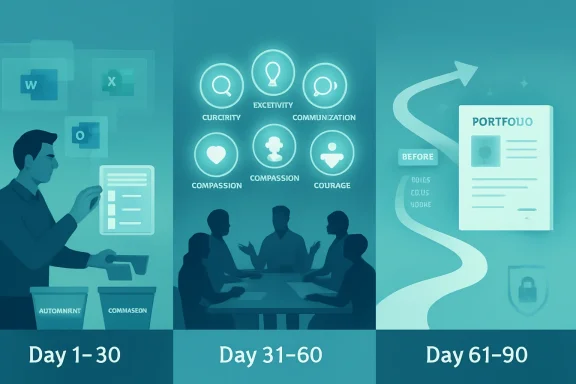
The framework asks workers to list recurring tasks and sort them into three buckets: work AI can do alone, work that benefits from human-AI collaboration, and work that depends on uniquely human judgment. That classification is deceptively powerful. It gives employees permission to stop treating every task as equally valuable.
The most productive users of AI are not necessarily those who prompt most often. They are the ones who learn where AI reduces drag without reducing accountability. That is why the 90-day structure feels less like a productivity hack and more like a personal operating model.
Key task categories include:
The first month is therefore about developing a daily loop. Try AI on one familiar task, judge the output, refine the prompt, and keep a note of what helped. That cycle builds confidence because it treats AI as a working partner that improves through use, not as a magic system that must be trusted blindly.
The group-learning element is equally important. Microsoft suggests that peers compare prompts, share outcomes, and even create prompt libraries or simple agents. This turns private experimentation into organizational learning, which is essential because workplace AI gains compound when teams standardize what works.
A useful first-month sequence might look like this:
Creativity also changes meaning in this environment. It is no longer only the ability to produce a blank-page idea. It becomes the ability to combine AI-generated options with lived experience, customer knowledge, business constraints, and taste. That kind of synthesis is still deeply human.
Courage may be the most underrated skill in the list. Workers need courage to admit what they do not know, challenge poor AI outputs, redesign familiar routines, and have honest conversations with managers about how roles are changing. Without courage, AI adoption can become quiet, fragmented, and defensive.
The second 30 days should focus on deliberate practice:
The three questions in the final phase are intentionally reflective: Why do you work, what do you uniquely do, and where are you going? Those questions may sound philosophical, but they have concrete workplace value. They help employees avoid becoming passive recipients of automation and instead become active designers of their next role.
For managers, this phase also provides a new kind of performance conversation. Rather than asking only what an employee delivered, leaders can ask what the employee learned to automate, where judgment improved the outcome, and which higher-impact work became possible. That makes AI fluency part of development rather than surveillance.
By the end of 90 days, workers should be able to describe:
This creates a different workflow from consumer chatbots. A worker preparing for a meeting does not simply ask for generic advice. They can ask for a summary of relevant documents, unresolved issues from recent Teams conversations, and likely follow-up actions. The more work already lives in Microsoft 365, the more valuable that context becomes.
For WindowsForum readers, the operating system angle matters too. Microsoft’s long-term vision is not just Copilot in a browser tab, but AI woven across Windows, Microsoft 365, Edge, Teams, and enterprise identity. That makes the PC a more active participant in work rather than a passive container for apps.
Common Copilot use cases in the 90-day journey include:
For example, a team might create an agent that monitors project updates, summarizes blockers, drafts a weekly status report, and flags missing decisions. Another might build an HR policy agent that answers employee questions from approved documents. In both cases, the worker’s role shifts from producing every artifact manually to configuring, supervising, and improving the system.
This is where Microsoft’s “Frontier Firm” narrative enters the picture. The company has described leading organizations as those moving beyond pilots and toward broader deployment of AI and agents. Whether that label becomes common business language is less important than the underlying point: the competitive advantage goes to organizations that redesign workflows, not those that merely buy licenses.
Agent-based work introduces new responsibilities:
The old enterprise search problem was that employees could not find what they needed. The new Copilot problem can be the opposite: employees may suddenly find information that was technically accessible but not appropriately governed. Organizations preparing for AI need to clean up overshared sites, outdated files, unclear permissions, and unmanaged repositories.
This is why IT departments should treat AI fluency as both a people initiative and an information architecture initiative. Training employees to prompt well is helpful, but it will not compensate for messy data governance. Copilot’s usefulness depends on the quality, security, and relevance of the content it can access.
Enterprises should prioritize:
For job seekers, the final 30 days may be especially valuable. AI can help analyze job descriptions, identify skill gaps, draft targeted resumes, prepare interview answers, and summarize career achievements. But the strongest candidates will personalize those outputs rather than submit generic AI-polished material.
There is a risk that AI makes everyone’s application materials sound the same. That raises the value of specificity. Workers who can describe concrete projects, measurable outcomes, and human judgment will have an edge over those who rely on polished but empty language.
Practical personal uses include:
Google can argue from collaboration and cloud-native workflows. OpenAI can argue from model quality and general-purpose flexibility. Salesforce can argue from customer data and business processes. Microsoft argues from the installed base of Windows, Office, Teams, Outlook, SharePoint, and enterprise identity.
The company’s real objective is to make Copilot feel like the default interface for work. If users begin their day by asking Copilot what changed, what matters, what needs action, and what can be delegated, Microsoft gains a central role in workplace attention. That is an enormously valuable position.
Competitive pressure will likely focus on:
For workers, the opportunity is to build a portfolio of AI-assisted outcomes. The most compelling career stories will include before-and-after examples: a reporting process shortened, a meeting workflow clarified, a customer response improved, or a project risk identified sooner. Evidence will matter more than buzzwords.
Watch these developments closely:
Source: Microsoft Source Work smarter in 90 days: A real-world guide to using AI
 Background
The workplace AI story has moved quickly from novelty to expectation. In 2023, many professionals were still experimenting with chatbots on the side, asking them to rewrite emails, summarize documents, or explain spreadsheet formulas. By 2024 and 2025, the conversation had shifted into boardrooms, HR departments, productivity suites, and job descriptions, where AI skills became less of a bonus and more of a baseline signal that a worker could adapt.Microsoft and LinkedIn sit at a strategic intersection in this transition. Microsoft owns the productivity layer used by millions of organizations, while LinkedIn observes labor-market signals such as skills, hiring patterns, career pivots, and professional conversations. That combination makes the company’s latest 90-day framework more than a motivational career checklist; it is also a window into how Microsoft wants workers and employers to normalize AI-assisted work inside everyday business routines.
The new guide reflects a broader evolution in Microsoft’s AI strategy. Early Copilot messaging focused on helping users draft, summarize, and search faster inside Word, Excel, Outlook, PowerPoint, and Teams. The newer framing is wider: AI is not simply a feature inside an app, but a layer of work that can help people reorganize tasks, document impact, build agents, and rethink career direction.
There is also a cultural subtext. Many employees still feel uneasy about AI because using it can feel like admitting that part of their work is replaceable. Microsoft’s 90-day plan tries to flip that anxiety into agency by asking workers to decide what should be automated, what should be co-created, and what should remain unmistakably human.
The 90-Day Plan Is Really a Work Redesign Framework
The headline promise is simple: become more confident with AI in 90 days. But the structure is less about speed-running a software tutorial and more about redesigning the relationship between tasks, tools, and career identity. Microsoft’s framework breaks the process into three phases: build a base, deepen human skills, and chart a future path.From Tool Adoption to Task Awareness
The strongest part of the plan is its insistence that workers begin with a task inventory rather than a tool menu. That matters because most AI adoption programs fail when they start with generic enthusiasm instead of the actual work people do every day. A customer support manager, a financial analyst, a teacher, and a product marketer may all use Copilot, but they will not use it in the same way.The framework asks workers to list recurring tasks and sort them into three buckets: work AI can do alone, work that benefits from human-AI collaboration, and work that depends on uniquely human judgment. That classification is deceptively powerful. It gives employees permission to stop treating every task as equally valuable.
The most productive users of AI are not necessarily those who prompt most often. They are the ones who learn where AI reduces drag without reducing accountability. That is why the 90-day structure feels less like a productivity hack and more like a personal operating model.
Key task categories include:
- Routine work such as summaries, status reports, scheduling, and first drafts
- Collaborative work such as analysis, brainstorming, planning, and content refinement
- Human-centered work such as trust-building, negotiation, ethical judgment, and leadership
- Career-shaping work such as documenting impact, pitching new responsibilities, and exploring new roles
- Learning work such as prompt practice, peer sharing, and industry scanning
Days 1–30: Build a Base Without Overcomplicating the Technology
The first 30 days are intentionally modest. Microsoft’s guide does not ask workers to become prompt engineers, build complex agents, or redesign an entire department. It asks them to pick real tasks, test Copilot in a narrow context, and observe what changes.Why Small Starts Matter
This is a practical answer to a common adoption problem: AI tools are powerful, but broad possibility can produce paralysis. If an employee opens Copilot and asks, What can you do for me?, the answer is almost too large to be useful. If the same employee asks Copilot to summarize a meeting into three decisions and two follow-up actions, the value is immediate.The first month is therefore about developing a daily loop. Try AI on one familiar task, judge the output, refine the prompt, and keep a note of what helped. That cycle builds confidence because it treats AI as a working partner that improves through use, not as a magic system that must be trusted blindly.
The group-learning element is equally important. Microsoft suggests that peers compare prompts, share outcomes, and even create prompt libraries or simple agents. This turns private experimentation into organizational learning, which is essential because workplace AI gains compound when teams standardize what works.
A useful first-month sequence might look like this:
- List the 12 tasks that consume the most recurring time.
- Sort each task into automation, collaboration, or human-only categories.
- Choose one low-risk task for daily Copilot experimentation.
- Record what the AI handled well and where it required correction.
- Share one useful prompt or workflow with colleagues each week.
Days 31–60: The Human Skills Become the Strategy
The second phase shifts from tooling to identity. Roslansky and Raman emphasize five durable human skills: curiosity, creativity, communication, compassion, and courage. Calling these “soft skills” now feels outdated, because in an AI-saturated workplace they become the hard edge of differentiation.The Five Skills That Resist Automation
AI can generate ideas, but curiosity decides which questions are worth asking. AI can draft language, but communication determines whether a message lands with the right audience at the right moment. AI can simulate empathy in text, but compassion requires accountability, context, and genuine concern for people affected by decisions.Creativity also changes meaning in this environment. It is no longer only the ability to produce a blank-page idea. It becomes the ability to combine AI-generated options with lived experience, customer knowledge, business constraints, and taste. That kind of synthesis is still deeply human.
Courage may be the most underrated skill in the list. Workers need courage to admit what they do not know, challenge poor AI outputs, redesign familiar routines, and have honest conversations with managers about how roles are changing. Without courage, AI adoption can become quiet, fragmented, and defensive.
The second 30 days should focus on deliberate practice:
- Curiosity: Ask better questions before asking for faster answers.
- Creativity: Use AI to generate options, then apply judgment and taste.
- Communication: Rewrite AI output for audience, tone, and business context.
- Compassion: Consider who benefits and who may be harmed by automation.
- Courage: Raise concerns, propose experiments, and own the learning curve.
Days 61–90: Turn AI Use Into a Career Narrative
The final phase asks workers to connect AI fluency to career direction. By days 61 through 90, the goal is not just to use Copilot more often. The goal is to explain how your work has changed, what impact that change created, and where you want to go next.From Hidden Productivity to Visible Impact
This is a crucial shift because many employees use AI privately without translating that use into professional capital. They may save time, improve drafts, or make better decisions, but if that improvement remains invisible, it may not influence promotions, role design, or team strategy. Microsoft’s framework encourages workers to document the story.The three questions in the final phase are intentionally reflective: Why do you work, what do you uniquely do, and where are you going? Those questions may sound philosophical, but they have concrete workplace value. They help employees avoid becoming passive recipients of automation and instead become active designers of their next role.
For managers, this phase also provides a new kind of performance conversation. Rather than asking only what an employee delivered, leaders can ask what the employee learned to automate, where judgment improved the outcome, and which higher-impact work became possible. That makes AI fluency part of development rather than surveillance.
By the end of 90 days, workers should be able to describe:
- Which tasks changed because of AI assistance
- Which outputs improved in speed, quality, consistency, or clarity
- Which human skills grew because time was redirected
- Which workflows still require caution because of risk or ambiguity
- Which new opportunities now feel realistic because capacity increased
Microsoft 365 Copilot Is the Workplace Layer Microsoft Wants to Own
The 90-day plan is tool-agnostic in spirit, but it is unmistakably built around Microsoft 365 Copilot. That is no accident. Microsoft’s biggest AI opportunity is not only selling models; it is embedding AI into the apps where knowledge work already happens.Why Context Is Copilot’s Advantage
Copilot’s strategic value comes from context. In enterprise environments, it can work across Microsoft 365 apps and, when properly licensed and governed, draw on organizational data that a user already has permission to access. That means AI assistance can be grounded in emails, meetings, documents, chats, calendars, and files rather than isolated prompts.This creates a different workflow from consumer chatbots. A worker preparing for a meeting does not simply ask for generic advice. They can ask for a summary of relevant documents, unresolved issues from recent Teams conversations, and likely follow-up actions. The more work already lives in Microsoft 365, the more valuable that context becomes.
For WindowsForum readers, the operating system angle matters too. Microsoft’s long-term vision is not just Copilot in a browser tab, but AI woven across Windows, Microsoft 365, Edge, Teams, and enterprise identity. That makes the PC a more active participant in work rather than a passive container for apps.
Common Copilot use cases in the 90-day journey include:
- Summarizing long email threads, documents, or meeting notes
- Drafting first versions of messages, reports, decks, and project updates
- Preparing agendas, briefing notes, and stakeholder summaries
- Analyzing lists, plans, and spreadsheet-style information
- Rewriting content for tone, clarity, brevity, or executive audience
- Documenting personal impact for reviews, manager conversations, or LinkedIn posts
AI Agents Move the Conversation Beyond Prompts
The Microsoft Signal guide briefly mentions building an AI agent to send a weekly report, but that small example points to a much bigger shift. Microsoft’s broader workplace research increasingly frames the future around human-agent teams, where employees do not just prompt AI tools but supervise digital assistants that perform repeatable work.From Assistant to Digital Coworker
An AI assistant waits for a question. An AI agent can be designed around a goal, a workflow, a data source, or a business process. That distinction matters because agents move AI from isolated productivity boosts into operational redesign.For example, a team might create an agent that monitors project updates, summarizes blockers, drafts a weekly status report, and flags missing decisions. Another might build an HR policy agent that answers employee questions from approved documents. In both cases, the worker’s role shifts from producing every artifact manually to configuring, supervising, and improving the system.
This is where Microsoft’s “Frontier Firm” narrative enters the picture. The company has described leading organizations as those moving beyond pilots and toward broader deployment of AI and agents. Whether that label becomes common business language is less important than the underlying point: the competitive advantage goes to organizations that redesign workflows, not those that merely buy licenses.
Agent-based work introduces new responsibilities:
- Scoping what the agent should and should not do
- Grounding the agent in trusted knowledge sources
- Testing outputs across normal and edge-case scenarios
- Monitoring performance, errors, and user feedback
- Escalating sensitive decisions to humans
- Retiring agents that no longer produce reliable value
Enterprise Impact: Governance Is the Difference Between Confidence and Chaos
For enterprises, Microsoft’s 90-day plan is useful only if employees have permission, training, and guardrails. AI adoption without governance can create data leakage, inconsistent outputs, compliance problems, and shadow IT. AI adoption with too much friction can cause workers to retreat to unsanctioned tools.The Governance Layer Matters
Microsoft’s enterprise pitch rests heavily on identity, permissions, compliance, and data protection. In practical terms, this means Copilot experiences should respect existing access controls, sensitivity labels, and tenant boundaries. That architecture is vital because AI can make information easier to find, summarize, and recombine, which also means poor permissions become more dangerous.The old enterprise search problem was that employees could not find what they needed. The new Copilot problem can be the opposite: employees may suddenly find information that was technically accessible but not appropriately governed. Organizations preparing for AI need to clean up overshared sites, outdated files, unclear permissions, and unmanaged repositories.
This is why IT departments should treat AI fluency as both a people initiative and an information architecture initiative. Training employees to prompt well is helpful, but it will not compensate for messy data governance. Copilot’s usefulness depends on the quality, security, and relevance of the content it can access.
Enterprises should prioritize:
- Permission hygiene across SharePoint, Teams, OneDrive, and connected repositories
- Sensitivity labeling for confidential, regulated, and business-critical material
- Clear AI usage policies that explain approved tools and prohibited behaviors
- Prompt and response auditing where compliance obligations require oversight
- Role-based training for employees, managers, admins, and developers
- Human review standards for high-impact or externally facing outputs
Consumer Impact: Career Resilience Becomes a Personal Responsibility
For individual workers, especially those outside large enterprises, the guide lands differently. Not everyone has access to the full Microsoft 365 Copilot experience, formal AI training, or a manager who knows how to evaluate AI-assisted work. But the 90-day structure still offers a practical path.AI Fluency Without an Enterprise Program
Consumers, freelancers, students, job seekers, and small-business owners can adapt the framework by focusing on task awareness and portfolio evidence. The point is not whether every user has the same Copilot license. The point is whether they can identify repetitive work, use AI responsibly, and show improved outcomes.For job seekers, the final 30 days may be especially valuable. AI can help analyze job descriptions, identify skill gaps, draft targeted resumes, prepare interview answers, and summarize career achievements. But the strongest candidates will personalize those outputs rather than submit generic AI-polished material.
There is a risk that AI makes everyone’s application materials sound the same. That raises the value of specificity. Workers who can describe concrete projects, measurable outcomes, and human judgment will have an edge over those who rely on polished but empty language.
Practical personal uses include:
- Auditing your weekly work to identify repetitive tasks
- Building a prompt library for recurring professional needs
- Practicing interview answers with AI feedback
- Comparing your skills against job descriptions
- Drafting career stories that remain personal and evidence-based
- Learning industry terminology faster when changing roles
Competitive Implications: Microsoft Is Selling a Work Philosophy, Not Just Software
Microsoft’s guide is also a competitive maneuver. The AI productivity market includes Google Workspace with Gemini, OpenAI’s ChatGPT for business users, Anthropic’s Claude, Salesforce’s agentic platforms, Slack-based AI features, Notion, Zoom, and many vertical tools. Microsoft’s advantage is distribution, but distribution alone does not guarantee deep adoption.The Battle for the Daily Workflow
The 90-day framework helps Microsoft compete at the behavioral level. It tells workers when to use AI, how to think about tasks, and how to talk about career value. That is more powerful than simply announcing features because it gives customers a script for habit formation.Google can argue from collaboration and cloud-native workflows. OpenAI can argue from model quality and general-purpose flexibility. Salesforce can argue from customer data and business processes. Microsoft argues from the installed base of Windows, Office, Teams, Outlook, SharePoint, and enterprise identity.
The company’s real objective is to make Copilot feel like the default interface for work. If users begin their day by asking Copilot what changed, what matters, what needs action, and what can be delegated, Microsoft gains a central role in workplace attention. That is an enormously valuable position.
Competitive pressure will likely focus on:
- Model quality and whether Copilot responses feel consistently useful
- Pricing and whether organizations can justify broad licensing
- Integration depth across productivity, CRM, ERP, and custom systems
- Trust around data protection, auditing, and administrative controls
- Agent ecosystems that let businesses automate specialized workflows
- User experience that makes AI feel natural rather than bolted on
Strengths and Opportunities
The strongest aspect of Microsoft’s 90-day AI guide is that it treats workplace transformation as a human process supported by technology, not a technology rollout that humans must endure. It gives employees a manageable starting point, gives managers a language for coaching, and gives organizations a way to connect Copilot adoption with career development. That combination matters because AI anxiety is often highest when expectations are vague.- Practical sequencing makes the plan approachable for workers who feel overwhelmed.
- Task bucketing helps people distinguish automation from collaboration and judgment.
- Human skills are treated as strategic assets rather than sentimental leftovers.
- Peer learning turns isolated experiments into shared team capability.
- Career storytelling helps employees convert AI use into visible professional value.
- Copilot integration gives Microsoft a natural path from guidance to daily workflow.
- Agent readiness prepares workers for the next phase of human-AI collaboration.
Risks and Concerns
The risks are equally real. AI can save time, but it can also intensify workloads if leaders simply fill every reclaimed hour with more tasks. It can improve access to information, but it can also expose weak permissions and create false confidence in flawed summaries. The Microsoft plan is strongest when paired with governance, psychological safety, and honest measurement; without those, AI fluency can become another vague demand placed on already stretched employees.- Productivity pressure may rise if saved time is treated only as capacity for more work.
- Unequal access could widen gaps between employees with premium tools and those without them.
- Overreliance may weaken judgment if workers stop checking AI-generated claims.
- Data exposure can increase when organizations have poor permission hygiene.
- Generic output may flood workplaces with polished but low-value content.
- Manager misuse could turn AI adoption into surveillance rather than development.
- Job anxiety may deepen if leaders talk about automation without role redesign.
Looking Ahead
Microsoft’s 90-day guide is best understood as an early manual for a new workplace norm. The next phase of AI at work will not be defined only by who can write the cleverest prompt. It will be defined by who can redesign routines, supervise agents, protect data, and combine machine speed with human accountability.What Comes Next for Workers and IT Teams
For IT leaders, the priority is to make AI safe enough and useful enough that employees do not feel forced into shadow tools. That means pairing Copilot rollout plans with data governance, training, support channels, and clear rules for sensitive work. It also means measuring adoption by workflow improvement, not just license activation.For workers, the opportunity is to build a portfolio of AI-assisted outcomes. The most compelling career stories will include before-and-after examples: a reporting process shortened, a meeting workflow clarified, a customer response improved, or a project risk identified sooner. Evidence will matter more than buzzwords.
Watch these developments closely:
- Copilot agent adoption inside Teams, SharePoint, and business workflows
- AI skill verification and how platforms like LinkedIn represent practical fluency
- Enterprise governance tools for permissions, labeling, auditing, and agent control
- Manager training for evaluating AI-assisted performance fairly
- Role redesign as routine tasks shift from humans to supervised systems
Source: Microsoft Source Work smarter in 90 days: A real-world guide to using AI
