

Microsoft’s next big Windows strategy is obvious the moment you click the taskbar: the operating system is being recast as a platform where AI agents not only answer questions, but do work for you — autonomously, persistently, and with explicit OS-level controls. The new taskbar integration — an “Ask Copilot” entry that can spawn Microsoft 365 Copilot or third‑party agents which run in the background, surface progress via badges, and expose a compact interaction window — is the visible start of what Microsoft calls an “agentic OS.”
Microsoft’s push toward an agentic Windows is more than a marketing rebrand; it’s an architectural shift that layers three capabilities into the OS: multimodal input (voice and vision), a runtime for autonomous agents that can perform multi‑step tasks, and a set of platform primitives that govern discovery, permissions, and isolation. The company has already published engineering notes and blog posts describing the Model Context Protocol (MCP) support, the Agent Workspace containment model, and preview gating through Windows Insider and Copilot Labs. This is not just “Copilot in a new skin.” It’s a two‑track strategy:
Adoption will hinge on trust: strong, auditable controls; transparent privacy practices; robust signing and revocation for agents; and a community and standards ecosystem around MCP that prioritizes safety. For now, organizations should pilot with care, insist on visibility and governance, and treat the agentic OS as a platform upgrade that requires the same rigor as any other major endpoint capability.
Source: The Verge Microsoft is turning Windows into an ‘agentic OS,’ starting with the taskbar
 Background / Overview
Microsoft’s push toward an agentic Windows is more than a marketing rebrand; it’s an architectural shift that layers three capabilities into the OS: multimodal input (voice and vision), a runtime for autonomous agents that can perform multi‑step tasks, and a set of platform primitives that govern discovery, permissions, and isolation. The company has already published engineering notes and blog posts describing the Model Context Protocol (MCP) support, the Agent Workspace containment model, and preview gating through Windows Insider and Copilot Labs. This is not just “Copilot in a new skin.” It’s a two‑track strategy:- A broadly available, cloud‑backed Copilot experience that augments search and productivity in Windows.
- A hardware‑gated, low‑latency on‑device tier — Copilot+ / Copilot Plus PCs — that runs small models locally on an NPU to deliver private, instant features. Microsoft’s Copilot+ spec targets NPUs in the 40+ TOPS range for those richer local experiences.
What Microsoft announced (the essentials)
Taskbar agents and Ask Copilot
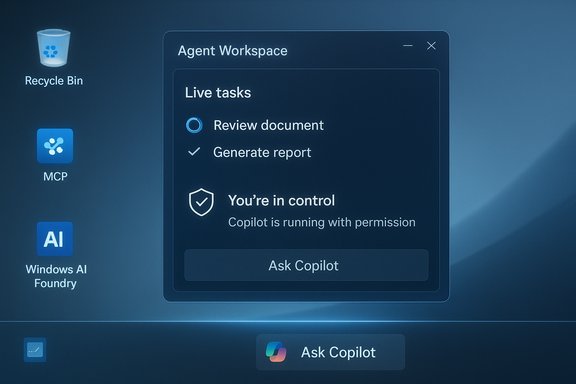
- Taskbar integration: A persistent “Ask Copilot” entry in the taskbar doubles as a fast file-and‑settings search and a conversation starter for Copilot, plus an agent launcher for third‑party assistants. Agents run as first‑class entities in the OS and provide live status via the taskbar icon (progress badges, attention markers, completion ticks).
Copilot Actions and Agent Workspace
- Copilot Actions: An experimental agentic capability that translates natural‑language outcomes into sequences of UI interactions — open a set of files, extract tables, assemble a report, or fill and submit web forms — and executes them inside a contained runtime. Actions are designed to be visible and interruptible, showing step‑by‑step progress.
- Agent Workspace: A sandboxed, policy‑controlled desktop session where agents run under separate, low‑privilege agent accounts to keep agent actions auditable and distinct from the logged‑in user. Microsoft describes it as lighter than a full VM but stronger than in‑session automation.
Model Context Protocol (MCP) and Windows AI Foundry
- MCP support: Windows is adding MCP integration so agents can discover tools and services in a standardized way. Microsoft’s intent: make agent-to-tool communication reliable, discoverable, and auditable via a curated MCP registry and mediated access.
- Windows AI Foundry: A runtime and developer platform to host on‑device models and provide a local registry for discoverable agent tools. MCP plus local model runtimes are the plumbing that enable agents to call file-system adapters, cloud connectors, and other “tools” without full system access.
The hybrid compute model and Copilot+ PCs
- Hybrid approach: Small language models (SLMs) and vision components run locally on Copilot+ NPUs for latency and privacy, while cloud Copilot services perform heavier reasoning and cross‑service enrichment. Microsoft’s Copilot+ PC spec explicitly targets NPUs capable of 40+ TOPS to unlock the richest local features.
Privacy, security, and admin controls
- Opt‑in and control: Agentic features are off by default; a central “Experimental agentic features” toggle in Settings must be enabled (typically by an admin) to provision agent accounts and runtime on a device. Agents require signing, explicit permission to access folders, and visible progress so users can pause or take control.
How the pieces fit together: an operational walkthrough
- User intent — e.g., “Extract the tables from my invoices and create an Excel summary” — is expressed to Copilot via Ask Copilot or a voice command.
- Copilot plans the steps and requests permission to access the relevant folders and connectors. If approved, Copilot spawns a signed agent.
- The agent is provisioned into an Agent Workspace and runs as a distinct Windows account. Its UI appears as a compact floating window and a taskbar icon; the rest of the desktop remains usable.
- The agent executes UI-level interactions (click, type, scroll) or calls MCP‑exposed tools and local model routines to complete the multi‑step workflow, logging its actions for auditing.
- When finished (or if the agent needs help), the taskbar icon updates — a green tick for complete, yellow exclamation for intervention — and the user can take over or revoke access.
Why Microsoft thinks this is necessary (the promise)
- Productivity compression: Many workflows are fragmentary: copy/paste across apps, manual extraction of tables, or repetitive configuration chores. Agents are designed to compress those multi‑step workflows into a single instruction, saving time and reducing context switches.
- Contextual intelligence: By combining Copilot Vision (screen awareness), voice, and local file access, agents can provide context‑aware assistance — not just answers, but outcome‑oriented actions.
- Privacy and latency tradeoffs: Copilot+ NPUs allow on‑device inference for latency‑sensitive and privacy‑sensitive tasks; cloud models remain available for heavier reasoning. This hybrid model aims to give users both speed and choice.
What is new for developers and enterprise IT
- Developer primitives: MCP, Windows AI Foundry, and agent signing create a new surface for ISVs and integrators to create MCP servers and agent behaviors that are discoverable by the OS. Microsoft is surfacing hooks in Copilot Studio and developer docs to adopt MCP for tool integration.
- Enterprise management: Agent accounts, per‑agent privileges, and OS‑level toggles enable IT to control agent provisioning, audit actions, and revoke agents centrally — a necessary set of controls for enterprise safety. Microsoft also promises Intune and Entra hooks for governance, though many of these enterprise integrations are still in preview or “coming soon.”
Strengths: what Microsoft gets right (so far)
- Platform-level controls: Treating agents as OS principals (agent accounts + Agent Workspace) is a pragmatic security architecture. By separating agent identity from the human user, Windows makes agent actions auditable and manageable by existing OS security primitives.
- Opt-in defaults: Experiments are gated behind explicit toggles and require administrative enablement, which reduces the risk of surprise or stealthy telemetry.
- Hybrid compute realism: Recognizing the limits of on‑device models and keeping cloud models in the loop is realistic. The Copilot+ hardware tier avoids overpromising on what NPUs can do today while delivering low‑latency wins where feasible.
- Developer interoperability: MCP, if implemented securely, promises an industry‑level standard to reduce fragile UI scraping and brittle integrations — a measurable upgrade for agent composition.
Risks and open questions (what to watch closely)
- Expanded attack surface: Agents that can click, type, and access files introduce a new class of privileged automation. If an agent is compromised, its ability to perform UI actions and call MCP tools could be weaponized. Microsoft insists on signing and revocation, but supply‑chain and certificate‑based attacks remain a concern.
- MCP security challenges: MCP makes tool discovery easier — and that convenience can be a vector for prompt injection, token exfiltration, or tool poisoning. Microsoft has proposed mediation and a curated MCP registry, but MCP’s safety model will need continual hardening in the wild.
- UI automation fragility: Mapping natural language to sequences of clicks and keystrokes is inherently brittle across app updates, localization, or unusual UI states. The Agent Workspace mitigates some user‑session risk, but it does not eliminate fragility or error modes that could cause data loss or inconsistent operations.
- Hardware and entitlement fragmentation: Copilot+ gating (40+ TOPS NPUs) creates a two‑tier Windows landscape: some features run locally and privately only on new hardware, while others fall back to cloud services. That fragmentation will complicate support and procurement decisions for enterprises.
- Privacy and telemetry complexity: Even with local spotting and session‑bound vision, many useful actions will escalate to cloud models. Clear, user‑friendly explanations of what is processed locally, what is sent to the cloud, and what Microsoft stores or indexes are essential. Current messaging emphasizes opt‑in and session consent, but operational transparency will be tested in enterprise deployments.
- Unverifiable or early claims: A few items reported in press coverage — notably hardware‑accelerated BitLocker slated “next year” and Sysmon functionality integrated into Windows in early 2026 — appear in media briefings but lack corroborating technical documentation at the time of writing. These items should be treated as tentative until Microsoft publishes official blog or documentation confirming schedules and technical details.
Practical checklist for IT leaders and security teams
- Treat agentic features as a distinct platform capability. Evaluate using a controlled pilot ring before broad enablement.
- Confirm policy controls for the Experimental agentic features toggle (Settings → System → AI components → Agent tools) and ensure administrative enablement is required on managed devices.
- Audit and log: ensure agent accounts’ activity is captured in central logging (Event Log, SIEM) and that agent actions are tagged and auditable.
- Validate MCP server access and token handling. Use network controls and EDR/AV rules to monitor MCP flows and block suspicious MCP tool registrations.
- Apply least privilege: restrict agent scope to known folders and only grant additional permissions via explicit approval workflows.
- Vendor & supply‑chain controls: require agent signing and maintain an allowlist for third‑party agents in enterprise environments.
- User training: teach users to recognize agent UIs, taskbar badges, and how to pause/takeover agent work; include agent actions in incident response tabletop exercises.
Developer opportunities and pitfalls
- Opportunities:
- Build MCP servers that expose enterprise systems (ticketing, RM, ERP) as agent‑friendly tools to enable novel automation.
- Create third‑party agents that integrate with Microsoft 365 and line‑of‑business apps using the Agent Workspace model.
- Deliver on‑device model optimizations for the Copilot+ tier to win low‑latency, privacy‑first experiences.
- Pitfalls:
- Avoid hard‑coding UI flows; prefer tool‑based MCP integrations to reduce fragility.
- Plan for revocation and rolling key management; certificate lifecycles for agents must be operationally sustainable.
- Expect complex QA across Windows builds, regional UIs, and hardware variability.
The public reaction and broader market context
The “agentic OS” phrase crystallized a debate online: many users and admins are excited about delegated automation, while others are wary that agentic features add complexity, telemetry, and potential for intrusive default behavior. Social and tech press reactions have ranged from cautious optimism to outright resistance, reflecting deep trust and value questions about modern OS design. Microsoft’s reorganization of Windows engineering and its public messaging aim to show this is a platform‑level initiative rather than a point feature, but public trust will need to be earned through transparent controls and robust security track records. Meanwhile, standards movement momentum (MCP and related tooling) and Microsoft’s investment in Copilot Studio and Windows AI Foundry give developers a powerful set of building blocks. Yet the NLWeb vulnerability episode and other early security findings serve as reminders: rapid innovation in agentic infrastructures must be matched with aggressive security validation and adversarial testing.Final analysis: a pragmatic verdict
Microsoft’s agentic OS vision is a necessary evolution of the desktop for a world where users expect assistants to do more than explain — they must execute. The technical architecture shows an awareness of the core challenges: identity separation, auditable actions, and a hybrid compute model that balances privacy with capability. Those are meaningful design choices that make delegated automation practical at scale. But the promise depends on execution. The major open questions are operational: can Microsoft and the ecosystem make MCP safe and resistant to prompt/tool attacks; will agent signing and revocation be bulletproof; can enterprises realistically manage a two‑tier hardware landscape without fracturing user experience; and will Microsoft be transparent about what data is kept, where, and for how long? Until those questions are answered with documentation and production telemetries, organizations should approach agentic features with cautious pilots, strict controls, and active monitoring.Conclusion
Turning Windows into an “agentic OS” is Microsoft’s bet on the next decade of productivity: an operating system that can see, listen, and act. The early building blocks — taskbar agents, Ask Copilot, Agent Workspaces, MCP, and Copilot+ hardware — are coherent and grounded in realistic hybrid compute tradeoffs. They deliver clear upside for automation and accessibility, while also introducing a new operational and security burden that enterprises and consumer users must manage.Adoption will hinge on trust: strong, auditable controls; transparent privacy practices; robust signing and revocation for agents; and a community and standards ecosystem around MCP that prioritizes safety. For now, organizations should pilot with care, insist on visibility and governance, and treat the agentic OS as a platform upgrade that requires the same rigor as any other major endpoint capability.
Source: The Verge Microsoft is turning Windows into an ‘agentic OS,’ starting with the taskbar
