

Microsoft’s latest “native apps are back” moment is not just a developer-culture slogan. It is an admission that Windows 11’s app model has spent too long confusing developer convenience with user experience, and that the bill has finally come due in RAM, latency, inconsistency, and trust. If Microsoft is serious about a native revival, the company is not merely polishing the Start menu or swapping one framework for another; it is trying to restore the idea that Windows software should feel like it belongs on Windows.
The immediate spark is small: David Fowler, a distinguished engineer at Microsoft closely associated with .NET and ASP.NET Core, posted that “native apps are back.” Taken alone, that could be read as developer enthusiasm, the kind of ambient platform boosterism that appears whenever a new runtime, SDK, or conference keynote needs oxygen. But it landed after Microsoft Partner Architect Rudy Huyn had already signaled a more concrete effort: a team focused on Windows apps and experiences that are, in his words, “100% native.”
That phrase matters because Windows users have developed a finely tuned radar for almost native. They know when an app is a webpage in a blazer. They know when a settings panel looks modern but scrolls like a browser tab. They know when an inbox app launches with the ceremony of a web service rather than the immediacy of local software.
For years, Microsoft’s answer to this problem was essentially pluralism. Win32, UWP, WPF, WinUI, Electron, WebView2, PWAs, React Native, and whatever else developers could ship were all allowed to coexist under the broad tent of “Windows apps.” That openness helped keep Windows commercially relevant, but it also made the operating system feel less like a platform with a point of view and more like a container for whatever won the internal shipping argument that quarter.
The result is a Windows 11 that can look beautiful in screenshots and still feel oddly provisional in daily use. The rounded corners, Mica surfaces, centered taskbar, and Fluent iconography suggest a coherent design system. Then a web-wrapped app opens, eats half a gigabyte doing very little, ignores expected Windows behaviors, or breaks when offline, and the spell is gone.
A company maintaining apps across Windows, macOS, iOS, Android, and the web does not wake up eager to maintain a bespoke Windows codebase. It wants one design system, one authentication flow, one deployment pipeline, one analytics stack, and one team that can move quickly. A PWA or Electron app is not necessarily elegant, but it is legible to management.
Microsoft also encouraged this outcome. The modern Microsoft Store became more permissive, and that was broadly a good thing. The old dream that developers would flock to one blessed Windows app model had failed repeatedly. Letting developers bring Win32 apps, PWAs, unpackaged apps, and alternative commerce systems into the Store made Windows less hostile to reality.
But there was a trade. When every app model is welcome, the platform’s center of gravity weakens. The Store can become safer and more useful while also filling with apps that do not demonstrate what makes Windows distinct. If users increasingly encounter web shells where they expected desktop software, the Store’s success becomes ambiguous: more apps, less confidence.
The WhatsApp example is so potent because it is familiar. Users remember when a native Windows client felt lighter, more integrated, and more respectful of system resources. When that gives way to a WebView2-based experience that can sit idle while consuming hundreds of megabytes of memory, the issue stops being ideological. It becomes visible in Task Manager.
Discord, Teams, Outlook, Copilot, Clipchamp, and countless third-party tools all sit somewhere in the broader debate over web technology on the desktop. Some are Electron apps, some use WebView, some are PWAs, some are hybrids, and some have changed architecture over time. The common user complaint is not that JavaScript exists. It is that too many Windows apps now behave as though the PC is just a kiosk for cloud UI.
That matters especially on mainstream hardware. A $2,000 workstation can hide many sins. An 8GB laptop bought for school, office work, or family use cannot. When several “desktop” apps are each carrying browser-like overhead, Windows feels heavier than it should, and users do not care whether the blame belongs to Chromium, WebView2, Electron, a bad memory leak, or a product team that chose convenience over discipline.
This is where Microsoft’s problem becomes strategic. Apple’s platform pitch has always leaned heavily on integration: native frameworks, consistent controls, predictable energy behavior, and a strong sense that apps are part of the operating system’s culture. Microsoft’s pitch has been breadth: Windows runs everything. That remains powerful, but breadth alone is not enough when the everyday experience feels inconsistent.
Windows does not need to become macOS. Its messiness is part of its utility. But Windows 11 does need to stop making the native experience feel optional in the places Microsoft controls.
The Start menu is the perfect symbol. Users do not experience it as an “app.” They experience it as Windows itself. If that surface is slow, inconsistent, or built on layers that feel detached from the rest of the shell, users do not blame a framework; they blame the OS. Reports that Microsoft is moving Start menu components toward WinUI are therefore more than implementation trivia. They suggest the company understands that system surfaces must earn a higher standard than ordinary apps.
WebView2 can be the right answer. PWAs can be useful. Electron enabled a generation of cross-platform desktop tools that might otherwise never have existed. Visual Studio Code, for all the grumbling it inspires among native purists, became one of the most important developer tools in the world partly because web technologies gave it reach, extensibility, and velocity.
The real problem is not that web technology appears in Windows apps. The problem is that it too often appears where it has no user-facing justification. If an app is primarily a document editor, chat client, media shell, settings panel, or AI assistant, users expect it to launch quickly, respect OS conventions, work predictably offline where applicable, and avoid behaving like a browser session with a Start menu icon.
The distinction is important because Microsoft cannot simply ban web apps from Windows. Nor should it. The web is too central to modern software, and Windows’ value has always included its tolerance for multiple app models. But Microsoft can set a higher bar for its own software and make native development feel like the path of least resistance rather than a nostalgic act of craftsmanship.
That requires more than speeches. It requires tooling, templates, documentation, samples, performance budgets, Store visibility, and internal accountability. If Microsoft says native apps are back while continuing to ship marquee experiences as heavy web wrappers, users will treat the slogan as one more episode in Windows’ long-running framework theater.
Native AOT is central to that story. Ahead-of-time compilation allows .NET applications to be published as native binaries rather than relying on just-in-time compilation at startup. The practical promise is straightforward: faster launch, lower memory overhead, and fewer deployment dependencies. For command-line tools, services, and some app categories, that can be transformative.
The desktop story is more complicated. Native AOT is not a magic wand that turns every .NET GUI app into a tiny C++ binary. Reflection-heavy libraries, dynamic loading patterns, XAML frameworks, data access layers, and third-party dependencies can all complicate the picture. Developers who have lived through Microsoft’s previous app-platform pivots are right to demand working samples, not slogans.
Still, the timing is not accidental. Microsoft now has a modern Windows UI framework in WinUI 3, a broader Windows App SDK story, and a maturing .NET runtime that can plausibly argue for native-feeling performance without asking every developer to return to raw Win32 or C++. That is a better foundation than the UWP era, when Microsoft’s app model was tied to a Store strategy and sandboxing vision that many traditional desktop developers never accepted.
The winning formula may not be one framework. It may be a hierarchy of expectations. System surfaces should be native. Inbox utilities should be native unless there is a compelling reason otherwise. Performance-sensitive consumer apps should have native paths. Cross-platform web wrappers should remain welcome, but not be treated as the default embodiment of modern Windows software.
Users notice the contradictions. They see Outlook move toward a web-based future. They see Copilot behave less like a tight shell feature and more like a packaged service endpoint. They see Clipchamp and other modern inbox experiences that may fit Microsoft’s cloud strategy but do not always feel like first-class Windows software. They see Settings still carrying the sediment of multiple eras, with old Control Panel surfaces lurking beneath modern pages.
This is why the “100% native” language is risky. It creates a clear standard. That is useful internally, because clear standards can drive product decisions. But it also invites users to audit every Microsoft app and shell surface for hypocrisy.
If Microsoft wants this to work, it should start where the user’s emotional return is highest. The Start menu, taskbar, File Explorer, Settings, Photos, Notepad, Paint, Terminal, PowerToys-adjacent utilities, and core system dialogs shape the daily impression of Windows more than almost anything else. Some of those are already modernized to varying degrees. Others remain uneven. The priority should not be novelty; it should be making the OS feel fast, local, and coherent.
The company also needs to treat memory usage as a design feature. Windows users have been trained to open Task Manager not as an emergency tool but as a truth serum. If a “simple” app idles at several hundred megabytes, the user concludes that nobody cared. Native apps will not automatically be efficient, but they remove one common excuse.
That history makes developers rationally skeptical. When Microsoft says “build native,” the obvious reply is: native with what, for how long, and at what cost?
WinUI 3 has improved, but it has also carried a reputation for gaps, rough edges, and documentation that did not always match developer needs. Windows App SDK has a sensible mission: give desktop developers access to modern Windows APIs without forcing them into the old UWP bargain. But a sensible mission is not enough. Developers need confidence that the framework will be maintained, that bugs will be fixed, that designers will have proper tooling, that packaging will not become a maze, and that Microsoft’s own flagship apps will prove the model at scale.
The company’s 2025 move toward opening more of the Windows App SDK and WinUI conversation helped, but trust in platform development compounds slowly. Microsoft cannot merely announce a native renaissance. It has to behave consistently for several years.
There are concrete ways to do that:
The Store’s openness was a necessary correction. Microsoft’s earlier attempts to force a new app model through Store exclusivity alienated developers and failed to displace the traditional Windows software ecosystem. Letting more kinds of apps into the Store made it useful again.
But the Store now needs a quality language users can understand. “Available in the Microsoft Store” should not merely mean that an app passed a packaging and policy process. It should help users understand whether an app is native, web-based, offline-capable, background-efficient, accessible, Arm-native, or integrated with Windows features such as notifications, share targets, widgets, jump lists, and file associations.
Microsoft does not need to shame web apps. It needs to label excellence. A native Windows app that launches instantly, respects light and dark mode, supports keyboard navigation, handles high-DPI displays properly, and idles quietly should be discoverable as such. If developers see that better Windows integration produces better placement, higher conversion, or stronger user trust, the platform has leverage.
The danger is that Microsoft turns “native” into another badge with fuzzy enforcement. Users have seen enough marketing labels. They need outcomes. If the Store says an app is optimized for Windows 11, that should mean something measurable.
Because AI increases the need for trust in the local platform. If Windows is going to host agents that read context, manipulate files, summarize activity, automate tasks, and bridge local and cloud data, users will care intensely about responsiveness, permissions, transparency, and offline behavior. A sluggish web shell is annoying when it is a chat app. It is far more troubling when it becomes the face of system intelligence.
Native does not automatically mean private, safe, or trustworthy. A native app can be invasive, bloated, or badly designed. But native system integration gives Microsoft more control over boundaries, performance, accessibility, and lifecycle behavior. It also gives users the feeling that the capability belongs to their PC rather than merely visiting from a server.
Copilot is the test case. If Microsoft wants Copilot to be perceived as part of Windows, it cannot feel like a website that wandered into the shell. It must launch quickly, respect system conventions, use resources carefully, and degrade gracefully when connectivity or account state changes. Otherwise, the native-app revival will look like it applies to yesterday’s utilities while tomorrow’s strategic experiences remain web-first.
A Windows desktop is not just a viewport. It has files, windows, shortcuts, drag-and-drop, notifications, local search, shell extensions, accessibility APIs, input diversity, multi-monitor complexity, enterprise policy, offline work, and decades of user expectation. Apps that ignore those things may be cheaper to ship, but they make Windows feel less valuable.
Native Windows software, at its best, embraces that complexity and turns it into capability. It can feel immediate because it is not waiting for a bundled browser runtime to impersonate a desktop. It can feel consistent because it uses the controls, typography, and interaction models users already know. It can feel respectful because it consumes resources in proportion to what it is doing.
That is the fight Microsoft is re-entering. Not a fight against the web, exactly, but a fight against the flattening of all software into remote, memory-hungry, cross-platform sameness. Windows became dominant because it was the place where software could be powerful, local, varied, and deeply integrated. If Microsoft wants Windows 11 to feel renewed rather than merely updated, it has to recover that advantage.
That is why “native apps are back” is both promising and dangerous. It gives Windows fans a phrase they want to believe. It also gives them a standard by which to measure Microsoft’s seriousness.
If the company follows through, the payoff could be larger than a few lighter apps. A credible native push could make Windows development feel exciting again. It could give the Microsoft Store a quality story. It could make Windows on Arm more compelling. It could reassure enthusiasts and IT pros that Microsoft still understands the difference between a PC operating system and a cloud-service launcher.
But if the phrase becomes another seasonal slogan, users will remember that too. Windows does not lack technologies; it lacks consistency of conviction. The native-app revival will only matter if Microsoft turns it from a developer mood into a product discipline, one shipped app and one removed web wrapper at a time.
Source: Windows Latest Microsoft engineer says native apps are back, and it could finally revive Windows 11’s fight against web apps
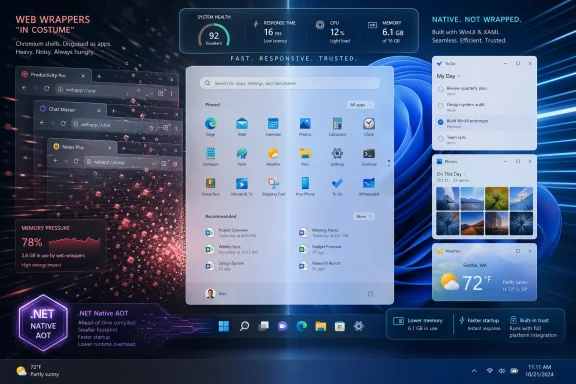 Microsoft’s Native Turn Is Really a Trust Repair Job
The immediate spark is small: David Fowler, a distinguished engineer at Microsoft closely associated with .NET and ASP.NET Core, posted that “native apps are back.” Taken alone, that could be read as developer enthusiasm, the kind of ambient platform boosterism that appears whenever a new runtime, SDK, or conference keynote needs oxygen. But it landed after Microsoft Partner Architect Rudy Huyn had already signaled a more concrete effort: a team focused on Windows apps and experiences that are, in his words, “100% native.”That phrase matters because Windows users have developed a finely tuned radar for almost native. They know when an app is a webpage in a blazer. They know when a settings panel looks modern but scrolls like a browser tab. They know when an inbox app launches with the ceremony of a web service rather than the immediacy of local software.
For years, Microsoft’s answer to this problem was essentially pluralism. Win32, UWP, WPF, WinUI, Electron, WebView2, PWAs, React Native, and whatever else developers could ship were all allowed to coexist under the broad tent of “Windows apps.” That openness helped keep Windows commercially relevant, but it also made the operating system feel less like a platform with a point of view and more like a container for whatever won the internal shipping argument that quarter.
The result is a Windows 11 that can look beautiful in screenshots and still feel oddly provisional in daily use. The rounded corners, Mica surfaces, centered taskbar, and Fluent iconography suggest a coherent design system. Then a web-wrapped app opens, eats half a gigabyte doing very little, ignores expected Windows behaviors, or breaks when offline, and the spell is gone.
Web Wrappers Won Because They Solved Microsoft’s Developer Problem
It is tempting to frame the rise of web apps as a betrayal of Windows users. That is emotionally satisfying, and in some cases fair, but it misses the reason the shift happened. Web wrappers won because they solved problems developers and platform owners actually had.A company maintaining apps across Windows, macOS, iOS, Android, and the web does not wake up eager to maintain a bespoke Windows codebase. It wants one design system, one authentication flow, one deployment pipeline, one analytics stack, and one team that can move quickly. A PWA or Electron app is not necessarily elegant, but it is legible to management.
Microsoft also encouraged this outcome. The modern Microsoft Store became more permissive, and that was broadly a good thing. The old dream that developers would flock to one blessed Windows app model had failed repeatedly. Letting developers bring Win32 apps, PWAs, unpackaged apps, and alternative commerce systems into the Store made Windows less hostile to reality.
But there was a trade. When every app model is welcome, the platform’s center of gravity weakens. The Store can become safer and more useful while also filling with apps that do not demonstrate what makes Windows distinct. If users increasingly encounter web shells where they expected desktop software, the Store’s success becomes ambiguous: more apps, less confidence.
The WhatsApp example is so potent because it is familiar. Users remember when a native Windows client felt lighter, more integrated, and more respectful of system resources. When that gives way to a WebView2-based experience that can sit idle while consuming hundreds of megabytes of memory, the issue stops being ideological. It becomes visible in Task Manager.
Discord, Teams, Outlook, Copilot, Clipchamp, and countless third-party tools all sit somewhere in the broader debate over web technology on the desktop. Some are Electron apps, some use WebView, some are PWAs, some are hybrids, and some have changed architecture over time. The common user complaint is not that JavaScript exists. It is that too many Windows apps now behave as though the PC is just a kiosk for cloud UI.
Windows 11 Cannot Win the Premium PC Argument With Browser Tabs in Costume
The native-app push arrives at an awkward but important time for Windows. Microsoft is trying to sell Windows 11 as a modern, polished, AI-capable operating system just as more users have become sensitive to performance regressions, background activity, and the sense that their local PC is less local than it used to be.That matters especially on mainstream hardware. A $2,000 workstation can hide many sins. An 8GB laptop bought for school, office work, or family use cannot. When several “desktop” apps are each carrying browser-like overhead, Windows feels heavier than it should, and users do not care whether the blame belongs to Chromium, WebView2, Electron, a bad memory leak, or a product team that chose convenience over discipline.
This is where Microsoft’s problem becomes strategic. Apple’s platform pitch has always leaned heavily on integration: native frameworks, consistent controls, predictable energy behavior, and a strong sense that apps are part of the operating system’s culture. Microsoft’s pitch has been breadth: Windows runs everything. That remains powerful, but breadth alone is not enough when the everyday experience feels inconsistent.
Windows does not need to become macOS. Its messiness is part of its utility. But Windows 11 does need to stop making the native experience feel optional in the places Microsoft controls.
The Start menu is the perfect symbol. Users do not experience it as an “app.” They experience it as Windows itself. If that surface is slow, inconsistent, or built on layers that feel detached from the rest of the shell, users do not blame a framework; they blame the OS. Reports that Microsoft is moving Start menu components toward WinUI are therefore more than implementation trivia. They suggest the company understands that system surfaces must earn a higher standard than ordinary apps.
The Web Was Never the Villain; Indiscipline Was
There is a lazy version of this debate that says web bad, native good. That argument is satisfying in a forum thread and insufficient in engineering terms.WebView2 can be the right answer. PWAs can be useful. Electron enabled a generation of cross-platform desktop tools that might otherwise never have existed. Visual Studio Code, for all the grumbling it inspires among native purists, became one of the most important developer tools in the world partly because web technologies gave it reach, extensibility, and velocity.
The real problem is not that web technology appears in Windows apps. The problem is that it too often appears where it has no user-facing justification. If an app is primarily a document editor, chat client, media shell, settings panel, or AI assistant, users expect it to launch quickly, respect OS conventions, work predictably offline where applicable, and avoid behaving like a browser session with a Start menu icon.
The distinction is important because Microsoft cannot simply ban web apps from Windows. Nor should it. The web is too central to modern software, and Windows’ value has always included its tolerance for multiple app models. But Microsoft can set a higher bar for its own software and make native development feel like the path of least resistance rather than a nostalgic act of craftsmanship.
That requires more than speeches. It requires tooling, templates, documentation, samples, performance budgets, Store visibility, and internal accountability. If Microsoft says native apps are back while continuing to ship marquee experiences as heavy web wrappers, users will treat the slogan as one more episode in Windows’ long-running framework theater.
.NET 10 Gives Microsoft a Better Technical Story Than It Had Before
The Fowler angle matters because this native revival is not just about WinUI aesthetics. It intersects with .NET’s own attempt to become a more credible option for fast, efficient, modern client software.Native AOT is central to that story. Ahead-of-time compilation allows .NET applications to be published as native binaries rather than relying on just-in-time compilation at startup. The practical promise is straightforward: faster launch, lower memory overhead, and fewer deployment dependencies. For command-line tools, services, and some app categories, that can be transformative.
The desktop story is more complicated. Native AOT is not a magic wand that turns every .NET GUI app into a tiny C++ binary. Reflection-heavy libraries, dynamic loading patterns, XAML frameworks, data access layers, and third-party dependencies can all complicate the picture. Developers who have lived through Microsoft’s previous app-platform pivots are right to demand working samples, not slogans.
Still, the timing is not accidental. Microsoft now has a modern Windows UI framework in WinUI 3, a broader Windows App SDK story, and a maturing .NET runtime that can plausibly argue for native-feeling performance without asking every developer to return to raw Win32 or C++. That is a better foundation than the UWP era, when Microsoft’s app model was tied to a Store strategy and sandboxing vision that many traditional desktop developers never accepted.
The winning formula may not be one framework. It may be a hierarchy of expectations. System surfaces should be native. Inbox utilities should be native unless there is a compelling reason otherwise. Performance-sensitive consumer apps should have native paths. Cross-platform web wrappers should remain welcome, but not be treated as the default embodiment of modern Windows software.
Microsoft Must Fix Its Own House Before Lecturing Developers
The hardest part of this shift is credibility. Microsoft cannot credibly ask Meta, Discord, Slack, Spotify, or any other major developer to invest more deeply in Windows-native experiences if Microsoft’s own apps continue to model the opposite behavior.Users notice the contradictions. They see Outlook move toward a web-based future. They see Copilot behave less like a tight shell feature and more like a packaged service endpoint. They see Clipchamp and other modern inbox experiences that may fit Microsoft’s cloud strategy but do not always feel like first-class Windows software. They see Settings still carrying the sediment of multiple eras, with old Control Panel surfaces lurking beneath modern pages.
This is why the “100% native” language is risky. It creates a clear standard. That is useful internally, because clear standards can drive product decisions. But it also invites users to audit every Microsoft app and shell surface for hypocrisy.
If Microsoft wants this to work, it should start where the user’s emotional return is highest. The Start menu, taskbar, File Explorer, Settings, Photos, Notepad, Paint, Terminal, PowerToys-adjacent utilities, and core system dialogs shape the daily impression of Windows more than almost anything else. Some of those are already modernized to varying degrees. Others remain uneven. The priority should not be novelty; it should be making the OS feel fast, local, and coherent.
The company also needs to treat memory usage as a design feature. Windows users have been trained to open Task Manager not as an emergency tool but as a truth serum. If a “simple” app idles at several hundred megabytes, the user concludes that nobody cared. Native apps will not automatically be efficient, but they remove one common excuse.
Developers Need a Reason to Believe This Pivot Will Last
Microsoft has a long history of asking Windows developers to follow it across bridges that later burned, moved, or quietly ended in a marsh. WinForms gave way to WPF, which gave way to Silverlight dreams, which gave way to Metro and WinRT, which gave way to UWP, which gave way to Project Reunion, which became Windows App SDK, while Win32 somehow remained the cockroach king of Windows application development.That history makes developers rationally skeptical. When Microsoft says “build native,” the obvious reply is: native with what, for how long, and at what cost?
WinUI 3 has improved, but it has also carried a reputation for gaps, rough edges, and documentation that did not always match developer needs. Windows App SDK has a sensible mission: give desktop developers access to modern Windows APIs without forcing them into the old UWP bargain. But a sensible mission is not enough. Developers need confidence that the framework will be maintained, that bugs will be fixed, that designers will have proper tooling, that packaging will not become a maze, and that Microsoft’s own flagship apps will prove the model at scale.
The company’s 2025 move toward opening more of the Windows App SDK and WinUI conversation helped, but trust in platform development compounds slowly. Microsoft cannot merely announce a native renaissance. It has to behave consistently for several years.
There are concrete ways to do that:
- Microsoft should ship high-quality sample apps that demonstrate real-world patterns such as authentication, offline storage, background tasks, notifications, accessibility, theming, and auto-update behavior.
- Microsoft should publish performance budgets for its own inbox apps and show that native rewrites are producing measurable improvements in launch time, memory use, and responsiveness.
- Microsoft should make Store discovery reward well-integrated Windows apps without punishing legitimate cross-platform software that still serves users well.
- Microsoft should give enterprise developers stable guidance that does not change every Build conference.
- Microsoft should ensure that Windows on Arm is treated as a first-class target for native app performance, not as an afterthought behind x64 compatibility.
The Store Can Become More Than a Distribution Compromise
The Microsoft Store sits at the center of this debate because it represents two different visions of Windows. In one vision, it is a safer, cleaner way to get software, especially for less technical users. In the other, it is a storefront filled with inconsistent app types that sometimes obscure what the user is actually installing.The Store’s openness was a necessary correction. Microsoft’s earlier attempts to force a new app model through Store exclusivity alienated developers and failed to displace the traditional Windows software ecosystem. Letting more kinds of apps into the Store made it useful again.
But the Store now needs a quality language users can understand. “Available in the Microsoft Store” should not merely mean that an app passed a packaging and policy process. It should help users understand whether an app is native, web-based, offline-capable, background-efficient, accessible, Arm-native, or integrated with Windows features such as notifications, share targets, widgets, jump lists, and file associations.
Microsoft does not need to shame web apps. It needs to label excellence. A native Windows app that launches instantly, respects light and dark mode, supports keyboard navigation, handles high-DPI displays properly, and idles quietly should be discoverable as such. If developers see that better Windows integration produces better placement, higher conversion, or stronger user trust, the platform has leverage.
The danger is that Microsoft turns “native” into another badge with fuzzy enforcement. Users have seen enough marketing labels. They need outcomes. If the Store says an app is optimized for Windows 11, that should mean something measurable.
AI Makes the Native Question More Urgent, Not Less
The irony of this native revival is that it comes as Microsoft is pushing Windows deeper into AI, cloud services, and agentic workflows. At first glance, that might seem to make native apps less important. If the future is assistants, web services, and cross-device continuity, why worry about whether an app is WinUI or WebView?Because AI increases the need for trust in the local platform. If Windows is going to host agents that read context, manipulate files, summarize activity, automate tasks, and bridge local and cloud data, users will care intensely about responsiveness, permissions, transparency, and offline behavior. A sluggish web shell is annoying when it is a chat app. It is far more troubling when it becomes the face of system intelligence.
Native does not automatically mean private, safe, or trustworthy. A native app can be invasive, bloated, or badly designed. But native system integration gives Microsoft more control over boundaries, performance, accessibility, and lifecycle behavior. It also gives users the feeling that the capability belongs to their PC rather than merely visiting from a server.
Copilot is the test case. If Microsoft wants Copilot to be perceived as part of Windows, it cannot feel like a website that wandered into the shell. It must launch quickly, respect system conventions, use resources carefully, and degrade gracefully when connectivity or account state changes. Otherwise, the native-app revival will look like it applies to yesterday’s utilities while tomorrow’s strategic experiences remain web-first.
The Best Windows Future Is Not Anti-Web; It Is Pro-PC
The right lesson from this moment is not that every Windows app should be rewritten in C++ or that PWAs should be banished from the Store. The lesson is that the PC still deserves software built with the PC in mind.A Windows desktop is not just a viewport. It has files, windows, shortcuts, drag-and-drop, notifications, local search, shell extensions, accessibility APIs, input diversity, multi-monitor complexity, enterprise policy, offline work, and decades of user expectation. Apps that ignore those things may be cheaper to ship, but they make Windows feel less valuable.
Native Windows software, at its best, embraces that complexity and turns it into capability. It can feel immediate because it is not waiting for a bundled browser runtime to impersonate a desktop. It can feel consistent because it uses the controls, typography, and interaction models users already know. It can feel respectful because it consumes resources in proportion to what it is doing.
That is the fight Microsoft is re-entering. Not a fight against the web, exactly, but a fight against the flattening of all software into remote, memory-hungry, cross-platform sameness. Windows became dominant because it was the place where software could be powerful, local, varied, and deeply integrated. If Microsoft wants Windows 11 to feel renewed rather than merely updated, it has to recover that advantage.
The Native Revival Will Be Judged in Milliseconds
The next phase should be brutally practical. Users will not judge Microsoft’s native turn by architecture diagrams or X posts. They will judge it by whether the Start menu opens faster, whether File Explorer stops hesitating, whether Settings feels like one app instead of three generations in a trench coat, whether Copilot idles politely, and whether inbox utilities stop behaving like websites with window chrome.That is why “native apps are back” is both promising and dangerous. It gives Windows fans a phrase they want to believe. It also gives them a standard by which to measure Microsoft’s seriousness.
If the company follows through, the payoff could be larger than a few lighter apps. A credible native push could make Windows development feel exciting again. It could give the Microsoft Store a quality story. It could make Windows on Arm more compelling. It could reassure enthusiasts and IT pros that Microsoft still understands the difference between a PC operating system and a cloud-service launcher.
But if the phrase becomes another seasonal slogan, users will remember that too. Windows does not lack technologies; it lacks consistency of conviction. The native-app revival will only matter if Microsoft turns it from a developer mood into a product discipline, one shipped app and one removed web wrapper at a time.
Source: Windows Latest Microsoft engineer says native apps are back, and it could finally revive Windows 11’s fight against web apps
