

Microsoft’s latest clarification on NTLM’s long-promised phase-out is both clearer and more cautious than many in the security community hoped: the company has laid out a phased roadmap that will push organizations away from NTLM, introduce Kerberos-first defaults and compatibility features, and — eventually — disable network NTLM by default in the next major Windows Server and matching client releases, but Microsoft will not remove NTLM from Windows entirely and still has not tied the final switch to a concrete calendar date.
NTLM (New Technology LAN Manager) is a legacy authentication protocol that has been part of Windows for decades. While Kerberos has been the preferred domain authentication mechanism in modern Active Directory environments for many years, NTLM persisted as a fallback and as the only option for a variety of legacy and disconnected scenarios. The protocol’s well-known weaknesses — weak cryptography in NTLMv1, susceptibility to pass‑the‑hash and relay attacks, and the ease with which offline attacks can recover credentials — have made NTLM an attractive exploitation vector for ransomware gangs and other attackers.
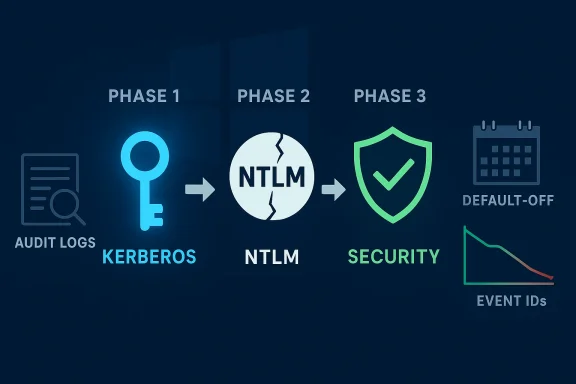
Microsoft’s public roadmap breaks the deprecation into three practical phases:
What auditing provides:
But the plan is not a magic switch. Administrators face months — if not years — of inventory work, application testing, vendor coordination, and detection tuning. Kerberos, while more secure in many respects than NTLM, brings its own operational and security considerations (notably Kerberoasting) that must be addressed in parallel.
Start auditing now, prioritize remediation for high‑value assets, and treat Microsoft’s phased timeline as a hardening opportunity rather than as a deadline to be deferred. The next Windows Server release may flip the default, but the real outcome that matters is whether your environment can survive and securely operate without NTLM — and that requires action from your team today.
Source: heise online Windows: Microsoft clarifies NTLM phase-out, but still no date
 Background / Overview
NTLM (New Technology LAN Manager) is a legacy authentication protocol that has been part of Windows for decades. While Kerberos has been the preferred domain authentication mechanism in modern Active Directory environments for many years, NTLM persisted as a fallback and as the only option for a variety of legacy and disconnected scenarios. The protocol’s well-known weaknesses — weak cryptography in NTLMv1, susceptibility to pass‑the‑hash and relay attacks, and the ease with which offline attacks can recover credentials — have made NTLM an attractive exploitation vector for ransomware gangs and other attackers.Microsoft’s public roadmap breaks the deprecation into three practical phases:
- Phase 1: Enhanced auditing and visibility (already available in Windows 11 24H2 and Windows Server 2025).
- Phase 2: Compatibility fixes delivered in the second half of 2026, including IAKerb and a Local Key Distribution Center (KDC) to eliminate common NTLM fallback scenarios.
- Phase 3: Default disablement of network NTLM in the next major Windows Server release and its associated client releases, while keeping NTLM present and re‑enableable through policy.
Why NTLM still matters — and why it’s dangerous
NTLM’s problems are not theoretical. The protocol has multiple, real-world weaknesses that attackers exploit routinely:- NTLMv1 cryptography is breakable. NTLMv1-derived hashes can be cracked quickly using precomputed rainbow tables or modern GPU-accelerated cracking tools, turning captured challenge-response data into recoverable credentials.
- Pass‑the‑hash (PtH) remains a live threat. Attackers who can harvest NTLM hashes from a compromised host can authenticate to other systems without knowing plaintext passwords.
- Relay and man‑in‑the‑middle weaknesses. NTLM’s design makes it susceptible to relaying authentication requests to other services, enabling lateral movement if SMB signing, LDAP channel binding, or Extended Protection for Authentication are not enforced.
- Operational exposure. Legacy applications, non-domain devices, local accounts, and services that hardcode NTLM or only support NTLM are still common in enterprise environments and in industrial or embedded systems where patches and upgrades are slow.
What Microsoft is changing — the roadmap explained
Microsoft’s plan is pragmatic and deliberately staged. The major elements administrators must understand are:Phase 1 — Visibility and auditing (current / rolling)
Microsoft shipped enhanced NTLM auditing capabilities in Windows 11 version 24H2 and Windows Server 2025. This phase is designed to give security teams the telemetry they need to map where NTLM is used in their environments so they can plan changes.What auditing provides:
- Event logging for NTLM usage to identify clients, services, and protocols relying on NTLM.
- A gated registry key and event IDs to move enforcement from Audit to Enforce mode for NTLMv1-derived cryptography on a controlled timeline.
Phase 2 — Compatibility fixes (target: second half of 2026)
Microsoft will introduce features intended to remove the most common reasons systems fall back to NTLM:- IAKerb — a Kerberos acceleration/assist mechanism that helps Kerberos succeed in scenarios where domain controller connectivity is limited.
- Local KDC (Local Key Distribution Center) — a capability to allow local account authentication without forcing NTLM fallback on modern systems.
- Core component updates — changes to Windows components so they negotiate Kerberos first, reducing cases where NTLM is selected due to hardcoded defaults.
Phase 3 — NTLM blocked by default (next major Windows Server)
In Microsoft’s words, network NTLM will be disabled by default in the next major Windows Server release and associated Windows client builds. Importantly:- NTLM will remain present in the OS and can be explicitly re‑enabled via policy for compatibility.
- The company will rely on telemetry gathered in Phases 1 and 2 to determine readiness and to shape the final switch.
- Some enforcement changes (for NTLMv1-derived cryptography) are already scheduled to move from audit to enforce defaults for certain configurations around October 2026 unless administrators have applied explicit settings.
The technical details you need to verify now
Several concrete technical points are essential for planning and have already been announced or documented:- NTLMv1 removal and enforcement timeline: Microsoft has removed the NTLMv1 protocol from modern builds but still needs to shut down remaining NTLMv1-derived cryptography in some scenarios. A registry gating key lets organizations remain in audit mode while they prepare for an enforcement default change that Microsoft has signaled could occur in October 2026 if no override is deployed.
- Credential Guard is a mitigation: Windows Credential Guard protects against many NTLMv1 legacy cryptography exposures; Microsoft recommends its deployment where feasible.
- Event IDs and logs to monitor: Audit and detection for NTLM and Kerberos abuses rely on specific Windows Event IDs (for example, Kerberos TGS request events and NTLM usage events). Teams must tune SIEMs and detection pipelines to look for operations like mass TGS requests, RC4 etype use, and anomalous NTLM flow.
- Kerberos still has risks (Kerberoasting): Replacing NTLM with Kerberos reduces several classes of attack but does not eliminate credential‑based attacks. Kerberoasting is a built-in Kerberos exploitation technique where service tickets are requested legitimately and then cracked offline to recover service account passwords.
Immediate actions for administrators — a practical checklist
Don’t wait for Microsoft’s final flip of the switch. Use the next 12–24 months to reduce NTLM reliance, harden Kerberos, and protect the operational environment.- Start with discovery
- Enable enhanced NTLM auditing on test devices and roll it to production in a controlled way.
- Create inventory lists that map every application, service, and device using NTLM. Focus on servers, multi‑function devices, appliances, and network equipment that may authenticate to Windows resources.
- Prioritize and categorize
- Classify NTLM usages by risk and difficulty of replacement: mission‑critical apps, removable workloads, IoT/OT devices, and local accounts.
- Identify services using network NTLM (SMB, RPC, HTTP/Negotiate fallbacks).
- Test compatibility fixes and features
- Lab‑test IAKerb and Local KDC as they become available in Insider or preview channels.
- Push core component updates in test rings to validate Kerberos-first negotiation behaviors.
- Strengthen Kerberos and service accounts
- Enforce strong, unique passwords for service accounts and prefer gMSA or managed identities where possible.
- Disable weak Kerberos encryption types (RC4) and prioritize AES-based etypes.
- Rotate high‑value service account credentials frequently.
- Harden authentication channels
- Enforce SMB signing, LDAP channel binding, and Extended Protection for Authentication.
- Deploy Windows Defender for Identity or comparable detections for relay and unusual authentication patterns.
- Enable Credential Guard where requirements permit.
- Implement blocking and fallback policies carefully
- Use targeted Block NTLM policies to test and break down dependency by group, OU, or IP range before mass enforcement.
- Maintain documented rollback and exception processes for those cases where NTLM must remain enabled temporarily.
- Monitor and detect Kerberos-specific threats
- Build detections for Kerberoasting indicators: spikes in TGS requests, use of RC4 encryption types, and abnormal service ticket extraction tools.
- Monitor Event IDs for TGS requests (4769), preauthentication failures (4771), and abnormal logon patterns.
- Communicate and coordinate
- Coordinate with application owners, vendors, and third‑party providers to validate Kerberos compatibility.
- Schedule maintenance windows for required application updates or API changes.
Compatibility pitfalls and operational risks
Microsoft’s plan acknowledges the reality that many environments still rely on NTLM, but the phased approach also surfaces several risks administrators must manage:- Legacy and hardcoded dependencies. Some third‑party applications and older appliances only support NTLM or use IP‑based authentication that Kerberos does not provide. These will need vendor cooperation, wrapping or isolation, or compensated controls.
- Disconnected or limited DC connectivity. Branch offices and air‑gapped systems that cannot reliably talk to a DC are the classic reason NTLM remains active. Local KDC and IAKerb aim to address this, but those features will require testing in each environment.
- Industrial control and medical devices. Embedded systems have slow upgrade cycles; removing NTLM by default could break critical operations if exceptions are not planned.
- Re‑enableable NTLM undermines “secure by default.” Keeping NTLM present and reenableable via policy is pragmatic, but it also allows organizations to defer remediation and creates a potential for future misconfigurations that reintroduce attack surface.
- Transition telemetry bias. Microsoft’s reliance on telemetry to decide readiness is sensible, but smaller organizations or highly isolated environments may not generate representative telemetry and could be left with poor guidance.
Hardening beyond protocol changes — what to do today
Shutting off NTLM by default reduces attack surface, but it is not a panacea. These operational hardening steps reduce exposure now and make a migration to Kerberos safer:- Credential hygiene: Replace long‑lived service account credentials with managed service accounts where possible. Enforce complex passwords and rotate them regularly.
- Least privilege and just‑in‑time access: Reduce the number of accounts that can request service tickets for high‑value SPNs.
- Segmentation and microperimeter controls: Isolate legacy services so a compromised host cannot freely reuse harvested NTLM hashes across critical systems.
- Endpoint protection and EDR telemetry: Monitor for credential harvesting tools (Mimikatz, Rubeus) and for abnormal LSASS access patterns.
- Patch and update cadence: Apply Microsoft’s Windows Server updates and ensure DNS, time sync, and KDC reachability are stable to avoid accidental fallbacks to NTLM.
- Use blocking policies in small, reversible scopes: Start by blocking NTLM for specific OUs or groups, measure and troubleshoot, then expand scope.
Critical takeaways — strengths and shortcomings of Microsoft’s approach
Microsoft’s plan offers several strengths that security teams should welcome:- Measured rollout with telemetry: The three‑phase plan ties enforcement to measurable outcomes, lowering the risk of catastrophic application breakage.
- Concrete compatibility features: IAKerb and Local KDC are precisely the sort of engineering responses needed to address known NTLM fallback scenarios.
- Preserving operational flexibility: Keeping NTLM re‑enableable via policy acknowledges the heterogeneity of enterprise environments and reduces the odds of accidental downtime.
- No firm date for final disablement. Microsoft’s provision that the final disablement occurs “with the next major Windows Server release” leaves organizations with uncertainty about when pressure to complete migrations will increase.
- Re‑enablement undermines urgency. The ability to turn NTLM back on by policy can encourage procrastination and leave long tails of risk.
- Partial mitigation of Kerberos risks. Replacing NTLM with Kerberos addresses many issues but leaves in place other credential attacks such as Kerberoasting; defenders must not conflate NTLM removal with complete identity security.
- Operational burden. The plan puts a heavy lifting and testing burden on administrators and application owners, especially in environments with many legacy dependencies.
Measuring success and what to report upstream
When implementing this migration, security teams should define clear metrics and show progress to leadership:- Reduction in NTLM authentication events per week/month.
- Number of systems moved to Kerberos-first negotiation.
- Count of high-value service accounts moved to gMSA or rotated and hardened.
- Time-to-remediate findings from NTLM auditing (average days).
- Number of applications requiring vendor remediation vs. isolated/segmented.
What to expect next and how to prepare for uncertainty
Microsoft has provided a credible engineering roadmap and tools, but the final timeline remains dependent on telemetry and readiness. Administrators should treat Microsoft’s roadmap as both an opportunity and a deadline:- Treat the second half of 2026 as the operational window for compatibility fixes to arrive; plan to trial IAKerb and Local KDC as soon as previews are available.
- Prepare for an eventual default-off posture in a future Windows Server release by ensuring end-to-end testing of your most critical authentication flows.
- Don’t rely on policy re‑enablement as a long‑term strategy; use it only as a controlled, temporary fallback while you remediate.
Final assessment: the right direction, but not the end of work
Microsoft’s clarified roadmap is an important and overdue move toward reducing a long-standing attack surface in Windows environments. The combination of enhanced auditing, compatibility engineering work (IAKerb and Local KDC), and a plan to disable network NTLM by default is the right high-level approach: measure, remediate, and then enforce.But the plan is not a magic switch. Administrators face months — if not years — of inventory work, application testing, vendor coordination, and detection tuning. Kerberos, while more secure in many respects than NTLM, brings its own operational and security considerations (notably Kerberoasting) that must be addressed in parallel.
Start auditing now, prioritize remediation for high‑value assets, and treat Microsoft’s phased timeline as a hardening opportunity rather than as a deadline to be deferred. The next Windows Server release may flip the default, but the real outcome that matters is whether your environment can survive and securely operate without NTLM — and that requires action from your team today.
Source: heise online Windows: Microsoft clarifies NTLM phase-out, but still no date
