
Microsoft has expanded Azure Migrate to support moving VMware virtual machines directly into Azure Local, giving IT teams a cloud‑managed, on‑premises migration path that preserves data residency, reduces pre‑migration setup, and introduces automation and IP retention features designed to minimize downtime and operational friction. This update — now documented as supported for Azure Local 2311.2+ and promoted from preview into broader availability — brings agentless discovery/replication, PowerShell scripting for mass automation, and options to retain static IP addresses for both Windows and Linux guests, while requiring a carefully validated target stack and network topology before cutover.
Azure Migrate’s new path to Azure Local gives enterprises a practical migration channel that aligns with Microsoft’s hybrid vision: keep sensitive data local, manage it from Azure, and modernize at a measured pace. With the right pilots, tooling, and governance in place, it’s a viable route out of costly or aging VMware estates — but it is not a zero‑effort silver bullet; the engineering work up front determines whether you realize the promised simplicity or face a protracted lift‑and‑refactor project.
Source: Petri IT Knowledgebase Azure Migrate Now Supports VMware VM Migration to Azure Local
 Background
Why this matters now
For organizations wrestling with the complexity of VMware estates, rising third‑party costs, or regulatory demands for local data residency, Azure Local positions Microsoft’s hybrid stack as an alternative to staying on VMware or lifting workloads to public Azure. Azure Migrate — Microsoft’s central migration hub — has historically focused on cloud migration; the new target option to move VMware VMs into Azure Local closes a practical gap for customers who want Azure‑consistent management and local control without rearchitecting applications. This capability reduces several traditional blockers to migration: agent deployment, heavy toolchain changes, and lengthy cutover windows.What Azure Local is, in one line
Azure Local (the evolved form of Azure Stack HCI) is a validated, Azure‑managed on‑premises HCI solution that runs Hyper‑V, Storage Spaces Direct (S2D), and integrates with Azure Arc for centralized governance; it’s billed as a way to keep workloads local while managing them from the Azure portal. The Azure Migrate to Azure Local flow effectively converts or rehosts VMware VMs into that Hyper‑V / S2D environment under Azure management.What changed: Azure Migrate → Azure Local (high level)
New capabilities introduced
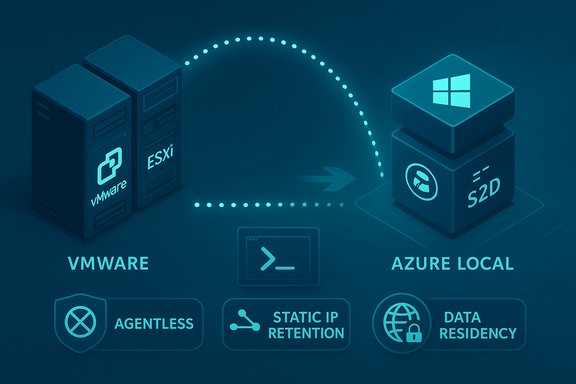
- Agentless discovery and replication for VMware: no need to install agents inside every guest before migration, simplifying large‑scale mobilizations.
- Data‑local replication: VM disks and application data are transferred directly from the VMware source to the Azure Local target; only metadata and replication state are stored in Azure storage accounts. This design supports sovereign data postures.
- Static IP retention for Windows and Linux guests: customers can preserve IP addressing when the target network and subnets allow it. This feature graduated from preview feedback to production options.
- PowerShell automation: full scripting support to orchestrate discovery, replication, and cutover operations at scale. This enables repeatable runbooks and CI/CD‑style migration flows.
- Enhanced compute and disk customization during migration: choose machine sizes and disk types to right‑size during the move rather than afterwards.
Architecture and migration flow
Core components
- Azure Migrate project (cloud control plane): orchestrates discovery and tracks replication and cutover operations.
- Azure Migrate source appliance (on VMware): deployed into the vCenter/ESXi environment to discover VMs and coordinate replication.
- Azure Migrate target appliance (on Azure Local): receives replicated data and provisions Hyper‑V VMs in the Azure Local cluster. The target must be registered with Azure Local’s resource provider and linked to an Arc Resource Bridge.
- Azure Storage (metadata only): used to store replication state and metadata, not guest disk contents, which is an important privacy and sovereignty distinction.
Migration phases (practical)
- Prepare: Validate prerequisites, register your Azure Local instance, create an Azure Migrate project and an Azure storage account.
- Discover: Deploy the source appliance in vCenter and discover workloads; build groups and dependency mappings to prioritize migrations.
- Replicate: Create and configure the target appliance on Azure Local, then replicate selected VMs. Test replication throughput and performance.
- Migrate & verify: Run test migrations, validate application functionality, then schedule cutover with minimal downtime. After cutover, decommission sources as appropriate.
System requirements and compatibility (verified)
The migration flow is constrained by specific compatibility requirements and versions that must be confirmed before starting:- VMware versions supported: vCenter and ESXi in supported ranges (documentation lists ESXi/vCenter versions commonly in the 6.5–8.0 family as supported for agentless migrations; confirm exact patch builds for your environment).
- Source appliance OS: the Azure Migrate source appliance commonly uses recent Windows Server builds (documentation references Windows Server 2022 builds for appliance support in comparable flows). Confirm the exact appliance image recommended in the portal.
- Target Azure Local version: the feature applies to Azure Local 2311.2 and later, and requires a properly configured Azure Arc Resource Bridge and logical network/storage mapping on the Azure Local instance.
- Network connectivity: source and target appliances must be able to communicate over the network (local VLANs, VPN, or secure tunnels). Private Link, ExpressRoute, or site‑to‑site VPNs may be required for some topologies.
- Tenant and project pairing: the Azure Migrate project must be in the same tenant as the Azure Local instance, and documentation describes a one‑to‑one pairing requirement between registered source and target appliances.
Key operational benefits
- Reduced pre‑migration work: agentless discovery and replication eliminates the need to install migration agents inside hundreds or thousands of VMs. This is a major time saver for large VMware estates.
- Data locality and sovereignty: because VM data flows directly from on‑prem VMware to Azure Local, organizations can meet stringent data residency and compliance constraints while still adopting Azure management tools.
- Minimal downtime techniques: replication occurs in the background and cutover is optimized to reduce outage windows; test migrations and staged cutovers are built into the workflow.
- Automation and repeatability: PowerShell support and group‑based migrations allow scripted, repeatable procedures suitable for large‑scale projects and CI/CD style migration pipelines.
- IP and configuration continuity: the ability to retain static IPs and customize compute/disk options during migration reduces the amount of post‑cutover reconfiguration. This is particularly valuable for legacy applications sensitive to IP changes.
Practical checklist and migration playbook
Follow this concise, stepwise playbook to move from assessment to production:- Inventory and dependency mapping: build a canonical inventory of VMs, OS versions, storage usage, and application dependencies. This prevents surprises during cutover and helps sequence migrations.
- Licensing and TCO modeling: compare three paths—stay on VMware (on‑prem), move to AVS (retain VMware stack), or replatform to Azure Local (Hyper‑V). Model per‑core host fees, guest licensing, and migration costs across 3–5 years.
- Pilot a representative app stack: choose a small but representative workload for the pilot to validate the full path and capture performance baselines.
- Network & IP design: map VLANs to target networks, ensure target subnets can accommodate preserved static IPs if needed, and test routing/firewall rules. Static IP retention requires that the target VNet/subnet accommodate the address.
- Test replications and failover: run test migrations, validate data integrity and application behavior, and practice failback procedures before any production cutovers.
- Automate with PowerShell: build reusable scripts for discovery, replication enablement, monitoring, and cutover. Store scripts in version control and include approval gates.
- Security and monitoring: onboard migrated VMs to Defender, Azure Monitor, and log analytics through Arc/Connected Machine agents; validate role‑based access controls for Run Command and automation features.
Risks, limits, and what to watch for
Replatforming vs retaining VMware
Migrating VMware VMs into an Azure Local Hyper‑V environment is a replatforming action: while the guest OS and apps move, the hypervisor and storage stack change. Organizations that rely on VMware‑specific features or operational tooling may prefer Azure VMware Solution (AVS) to retain VMware fidelity, at the cost of continuing VMware licensing and toolchain dependency. Evaluate whether your goal is to exit VMware or to simply move VMware workloads.Licensing and TCO complexity
Azure Local is billed per physical host core and interacts with Windows Server licensing (Azure Hybrid Benefit, SA exchange options). Transitional double‑billing, overlooked long‑term host fees, and the cost of re‑skilling staff are real TCO items that must be modeled. Vendor and partner claims about rapid migrations do not eliminate ongoing subscription economics.Storage and performance considerations
Azure Local uses S2D and may require different storage‑tuning and caching strategies than SAN‑backed VMware environments. Some customers report challenges with large disks, storage policies, and platform‑specific behavior during migration; test I/O and performance in pilot runs.Network and IP pitfalls
Retaining static IPs sounds attractive but can be complex if on‑prem subnets overlap or if the target VNet cannot accept the same addressing. The migration tooling supports static IP retention but it requires explicit planning and correct VNet/subnet configuration. Community reports show that static IP controls have evolved through preview phases — validate the current behavior before relying on it for cutover windows.Operational maturity and edge cases
Vendor messaging around “start in 30 minutes” should be treated as aspirational: discovery complexity, permissions scoping in vCenter, and network/service constraints often extend timelines. Common operational issues reported by practitioners include discovery permissions, credential mismatches, and edge guest OS behaviors (Linux distributions, large LVM layouts). Expect to invest time in discovery and validation.Tooling and partner ecosystem
Several migration and modernization partners are positioning added automation and pre‑migration services for Azure Local migrations. These partners provide accelerated discovery, dependency mapping, and replatforming automation that can reduce manual effort for complex estates. Comparing partner automation against Azure Migrate’s native flows is recommended: use a pilot to validate throughput, acceptance testing, and rollback behavior. Partners also help with hardware validation and Azure Local host sizing — critical items if you’re procuring Azure Local validated hardware from OEMs.Security, compliance and governance: what changes and what stays the same
- Data residency: VM disks remain local to the Azure Local instance; only metadata and replication state are stored in Azure storage. This design helps meet regulatory requirements that forbid offsite storage of protected data.
- Centralized governance: Azure Arc extends Azure policy, RBAC, update management, and monitoring to Azure Local instances, enabling a unified governance model. However, customers remain responsible for many operational controls (patching cadence, configuration baselines, identity controls).
- Hardened migration path: the migration process can be combined with Defender for Servers, Log Analytics, and network security groups, but teams must validate agent versions and post‑migration hardening tasks for each VM.
Final assessment and recommendation
Azure Migrate’s support for VMware → Azure Local is a meaningful, pragmatic addition for Microsoft‑centric organizations that want an Azure‑consistent on‑prem experience and need to preserve local data residency. The combination of agentless replication, PowerShell automation, static IP retention, and a cloud control plane makes large migrations more tractable than older, agent‑heavy approaches. For many shops, this reduces the friction of exiting VMware or consolidating distributed sites into an Azure‑aligned operating model. That said, success depends on disciplined discovery, realistic TCO modeling, and careful validation of storage, networking, and licensing assumptions. Organizations with heavy VMware tooling dependence or SAN‑specific features should weigh AVS (retain VMware control plane) versus replatforming to Azure Local (exit VMware, adopt Hyper‑V and S2D). Pilot early, automate repetitively, and build rollback plans into every migration wave.Quick reference: concise do’s and don’ts
- Do: Run a pilot with representative apps and test failback; validate performance and storage behavior.
- Do: Verify vCenter/ESXi build compatibility, Arc Resource Bridge configuration, and that the Azure Migrate project resides in the same tenant as the Azure Local instance.
- Do: Automate common tasks with PowerShell and version your migration runbooks.
- Don’t: Assume static IP retention will be seamless — confirm subnet mappings and test in a lab first.
- Don’t: Skip licensing and TCO modeling — per‑core host fees and guest licensing can change the long‑term economics.
Azure Migrate’s new path to Azure Local gives enterprises a practical migration channel that aligns with Microsoft’s hybrid vision: keep sensitive data local, manage it from Azure, and modernize at a measured pace. With the right pilots, tooling, and governance in place, it’s a viable route out of costly or aging VMware estates — but it is not a zero‑effort silver bullet; the engineering work up front determines whether you realize the promised simplicity or face a protracted lift‑and‑refactor project.
Source: Petri IT Knowledgebase Azure Migrate Now Supports VMware VM Migration to Azure Local
