

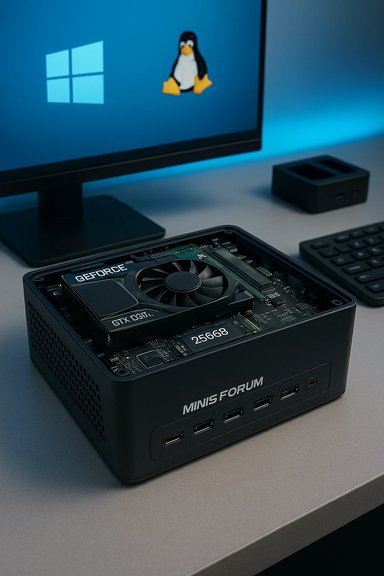
The EliteMini H31G is a compact, surprisingly capable mini PC that squeezes a discrete NVIDIA GTX 1050 Ti and a 9th‑generation Intel Core desktop CPU into a chassis slightly larger than an Intel NUC — and after hands‑on time the results are impressively pragmatic: it runs Windows 10 smoothly, handles common Linux desktop distros well, and provides a surprisingly serviceable platform for mid‑range gaming and video editing in a very small footprint.
Background / Overview
Minisforum positioned the EliteMini H31G as a mini workstation for users who want more than an integrated‑GPU NUC but still want the convenience of a tiny, VESA‑mountable desktop. The H31G’s biggest selling point is its inclusion of a discrete GPU — an NVIDIA GeForce GTX 1050 Ti with 4 GB GDDR5 memory — mated to Intel desktop processors from the Coffee Lake family (review units have ranged from the i5‑9500F to the i7‑9700F). That pairing lets the H31G deliver true GPU‑accelerated workflows and playable frame rates in many titles while remaining far smaller than a typical tower. This article summarizes hands‑on impressions from a recent BetaNews review, verifies the key technical claims against independent reviews and editorial coverage, and provides practical analysis for buyers — including upgrade tips, Linux compatibility notes, workstation and gaming expectations, and known risks you should factor into any purchase decision.Key specifications (verified)
Below are the hardware points that are most load‑bearing for performance and compatibility. These facts were checked against multiple independent reports and hands‑on reviews.- Processor: Intel 9th‑generation desktop CPU options — review units have been seen with the Intel Core i5‑9500F (6 cores, no integrated graphics) and the Core i7‑9700F (8 cores). The vendor and editorial reviews confirm these Coffee Lake desktop SKUs in H31G configurations.
- Graphics: NVIDIA GeForce GTX 1050 Ti, 4 GB GDDR5, soldered to the board. This is the discrete GPU the model ships with and is the main differentiator from small systems that rely on integrated graphics.
- Memory: Stock reviewer units often arrive with a single 8 GB SO‑DIMM (single‑channel), with two SO‑DIMM slots available for upgrades — the BetaNews review unit had a single 8 GB stick. Running dual‑channel RAM is an important optimization for CPU + GPU integrated bandwidth and general responsiveness.
- Storage: 2280 NVMe boot drive by default (256 GB in the unit tested), plus internal provision for a 2.5‑inch SATA drive and a 2242 M.2 SATA drive for additional storage/dual‑boot setups.
- Wireless: Intel AX200 Wi‑Fi 6 + Bluetooth 5.1 module — this is a mainstream, well supported Intel radio that tends to behave well on Windows and most modern Linux kernels.
- I/O highlights: multiple rear USB 3.0 Type‑A ports (four in the reviewed configuration), HDMI and mini‑DisplayPort outputs, Gigabit Ethernet. Notably, several reviewed units omit a front USB port and lack USB‑C in some SKUs — a modern omission that matters for Thunderbolt/USB4 or charging workflows.
Design, cooling and build quality
Small chassis, discrete GPU — engineering compromises
Fitting a discrete GPU into a mini box requires clear engineering tradeoffs. Minisforum’s H31G places the GTX 1050 Ti on the top side of the mainboard and uses a top intake grill with two small fans and a magnetic dust filter to manage air intake. Exhaust is routed out the rear; the case becomes noticeably warm under load but the thermal design keeps core temperatures within operating ranges during normal desktop tasks. The company even bundles a magnetic dust filter for the top grill to make maintenance easier. The downsides of the form factor are predictable: limited headroom for sustained thermal headroom (small fans spin faster under load), and some reviewers reported audible fan noise under long, heavy loads. In the BetaNews sample the fans were audible under full load but not “obnoxious”; TechRadar’s benchmarks confirm that the chassis manages to keep thermals under control while delivering near‑desktop performance bursts.Accessibility and serviceability
One of the H31G’s strong points is user‑serviceability. Opening the case requires removing four screws; inside you can replace the M.2 NVMe, add a 2.5‑inch SATA drive, and install a 2242 M.2 SATA SSD. The unit provides a plastic mounting bracket and a combined power/data cable for a 2.5‑inch drive, which simplifies adding storage or installing a separate Linux drive for dual‑boot setups. For buyers who value upgrade paths in small form factors, that’s an important plus.Ports, audio and I/O layout — practical notes
- Front: a red power button and a 3.5mm headset jack only in the BetaNews review unit — no front USB ports, which is a notable convenience omission.
- Sides: one side houses a microSD card reader and three dedicated 3.5mm jacks (line in, mic in, headphone out), in addition to the front headset jack — an unusual physical layout that gives a surprising number of analogue audio jacks.
- Rear: four USB 3.0 Type‑A ports, HDMI, mini‑DisplayPort, Gigabit Ethernet and the DC power jack. Many units lack USB‑C or Thunderbolt, which is a disappointment for buyers who want modern docks or high‑speed external NVMe enclosures without adapters. TechRadar’s review specifically notes the absence of USB‑C on some SKUs.
Real‑world performance: gaming, media and editing
Gaming and GPU workloads
Expectations should be pragmatic: the GTX 1050 Ti is a last‑generation entry‑level discrete GPU by modern standards, but in a mini PC it gives a clear and meaningful step up versus integrated graphics.- Mid‑tier esports and older AAA titles run well: Rocket League and Doom (2016) are pleasant at 1080p with good framerates at medium settings in reviewer testing. BetaNews confirms playable frame rates for that class of game, but cautions that maxing modern AAA titles is unrealistic on a 1050 Ti.
- Benchmarks from independent captures and community posts show 1080p performance in line with GTX 1050 Ti expectations — capable for esports titles and light graphical workloads, not a rival to modern 20/30/40/50‑series NVIDIA cards.
Video editing and media playback
BetaNews reported smooth DaVinci Resolve editing and exporting on the i5‑9500F + GTX 1050 Ti configuration tested — timelines, previews and renders were “handled brilliantly” in their day‑to‑day use. Editorial benchmarks (TechRadar / manuals) show the H31G can deliver respectable CPU and storage throughput for content workflows, helped by the NVMe boot drive. 4K60 media playback was also reported as stutter‑free in real use, provided valid HDMI/DisplayPort cabling is used. A practical note from BetaNews: the included HDMI cable in their box caused intermittent video signal dropouts; swapping to a higher‑quality cable solved the issue. That’s a simple troubleshooting step to keep in mind if you see mysterious HDMI glitches.Linux compatibility and multi‑boot
BetaNews tested Fedora installed to an added 2.5‑inch SATA SSD and found Linux ran very well. Because the H31G uses an Intel AX200 Wi‑Fi module, wireless generally works cleanly on modern kernels, and the AMD/Intel platform combination presents few driver headaches. For the NVIDIA GPU, BetaNews recommends POP!_OS for users who want an easier out‑of‑the‑box experience with NVIDIA proprietary drivers — a sensible recommendation for less‑tinkering users. Cross‑checks: community reports and other editorial coverage note the same pattern: Intel Wi‑Fi cards and mainstream NVIDIA cards are supported under contemporary distros provided you install the proprietary NVIDIA driver or use a distribution with curated NVIDIA support (e.g., Pop!_OS). That said, some community threads regarding Minisforum products mention sporadic issues (power or display instability) in a minority of user experiences, which suggests you should test your chosen Linux distribution before committing your primary workflow to it. Use a separate Linux drive when possible to avoid bootloader complications.Upgrade advice and configuration tips
- Start with dual‑channel RAM: choose 16 GB (2×8 GB) at purchase if you plan to game or do GPU‑accelerated editing. Dual‑channel memory increases GPU memory bandwidth and improves integrated system responsiveness relative to a single stick. BetaNews explicitly recommends a 16 GB dual‑channel configuration.
- Use separate drives for dual‑boot: the H31G supports a 2.5‑inch SATA drive plus M.2 NVMe; place Windows and Linux on different drives to keep installs simple and reduce bootloader risk.
- Prefer the i5‑9500F SKU for value: the BetaNews reviewer recommends the 6‑core i5‑9500F as a cost‑effective choice over the 8‑core i7‑9700F unless you specifically need the extra cores, because the i5 still provides strong single‑thread and multi‑thread responsiveness in many real workloads. Verify the SKU you’re buying — different sellers list different CPU options.
- Replace the included HDMI cable early if you see flakiness — BetaNews resolved intermittent video signal loss by swapping the cable. Keep a good quality HDMI 2.0+ cable on hand for 4K60 usage.
Strengths — why the H31G stands out
- Discrete GPU in a true mini: The GTX 1050 Ti is the defining differentiator; it makes the H31G useful as a compact gaming or GPU‑accelerated workstation that is still lightly portable.
- Serviceable upgradeability: The ability to add a 2.5‑inch SATA drive and M.2 drives without exotic disassembly gives the H31G a longer useful life than many sealed mini PCs.
- Linux friendliness: Intel Wi‑Fi and a common NVIDIA GPU mean many desktop Linux distros run well with a moderate amount of driver management — BetaNews confirmed Fedora and suggested Pop!_OS for ease of NVIDIA driver handling.
- Compact engineering: For users who want a desktop that disappears behind or under a monitor yet still edits video, plays games casually and supports multi‑monitor setups, the H31G is a compelling compromise.
Risks, caveats and things to verify before you buy
- No USB‑C on some SKUs: Lack of USB‑C/Thunderbolt can be a deal‑breaker for those who rely on docking stations, external NVMe enclosures or single‑cable monitor + power setups. Confirm the port list for your exact SKU.
- Thermal/noise tradeoffs: Small chassis means fans can get audible under sustained loads. If your workflow involves long, full‑tilt CPU/GPU runs (extended renders, long gaming sessions), expect elevated fan noise and potential thermal throttling. TechRadar’s hands‑on testing and other reports confirm fans are audible under load.
- Mixed community reliability reports: While many buyers are satisfied, community threads include reports of units with power cycles, black screens, or early failures. These appear to be a minority but are significant enough to advise cautious buying — check seller warranty, RMA policies and return windows before purchase. BetaNews did not encounter fatal issues in their sample, but community reports (Reddit threads) surface cautionary tales for some Minisforum product lines.
- SKU variability: Minisforum offers multiple EliteMini and DeskMini models; some reviews reference different chips and port configurations. Don’t assume every H31G or EliteMini SKU is identical — verify the product page and seller listing for the CPU, GPU, RAM configuration, and exact port map.
Who should buy the EliteMini H31G?
- Buyers who want a compact desktop with a little discrete GPU horsepower for esports, older AAA titles and GPU‑accelerated editing tasks.
- Linux enthusiasts who value a small, upgradeable machine that runs mainstream distros well (but who are comfortable installing the NVIDIA driver or using Pop!_OS).
- Users who prioritize space, portability and an upgrade path for storage and RAM over Thunderbolt/USB4 expansion.
Final verdict and practical buying checklist
The EliteMini H31G is an attractive small‑form‑factor option that fills a niche between integrated‑GPU mini PCs and larger discrete‑GPU towers. It’s not a performance monster by modern GPU standards, but the engineering to place a GTX 1050 Ti and a desktop Coffee Lake CPU into a compact chassis is impressive. For mixed use — light gaming, video editing, and a Linux dual‑boot — it’s a very practical machine that delivers more value than typical integrated mini PCs, provided you accept the portable‑chassis tradeoffs around cooling and ports. Before you buy, run through this checklist:- Confirm the exact SKU (CPU model, GPU, RAM size and configuration).
- Choose 2×8 GB (16 GB) RAM for dual‑channel performance if you plan to game or edit. BetaNews recommends 16 GB to avoid single‑channel penalties.
- Verify front port availability and whether USB‑C is present if you depend on modern docks.
- Consider adding a second internal drive for Linux or large media libraries — the internal 2.5‑inch bay is convenient for dual‑boot setups.
- Check the seller’s warranty and return policy; community posts show mixed experiences and warranty handling can be important.
The Minisforum EliteMini H31G demonstrates that mini PCs can be genuinely useful small workhorses when engineering choices are focused on practicality rather than headline specs. It packs a useful discrete GPU into a tiny chassis, runs Windows 10 and popular Linux distros well, and offers a user‑serviceable upgrade path for storage and memory. Buyers who prioritize compactness with decent GPU power — and who verify SKU, warranty and port needs up front — will find the H31G a very attractive piece of desktop hardware.
Source: BetaNews Minisforum EliteMini H31G Windows 10 and Linux PC impressions
