

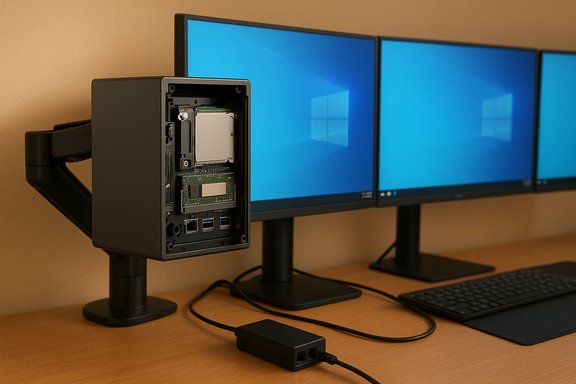
Minisforum’s compact DeskMini UM340 breaks from the crowd by bringing an AMD Ryzen mobile APU into a very small, highly upgradeable Windows 10 mini‑PC chassis — a tempting mix of portability, connectivity and user‑expandability for home offices, media centers and light creative work.
Background
Minisforum’s DeskMini series has carved a niche by delivering laptop‑class APUs in compact, VESA‑mountable boxes that prioritize real upgrade paths: SO‑DIMM memory slots, M.2 NVMe storage and a 2.5‑inch SATA bay. The UM340 is the brand’s AMD‑powered entry in that lineage, paired with a quad‑core Ryzen 5 3450U and Radeon Vega 8 integrated graphics. Factory SKUs launch with Windows 10 Pro and a small but useful collection of accessories — HDMI and DisplayPort cables plus a VESA mount — while pricing begins in the low‑to‑mid $500s depending on RAM and SSD configuration.The UM340’s headline claims are straightforward and appealing: laptop‑class CPU performance in a tiny, user‑serviceable chassis; triple 4K@60Hz display outputs (HDMI, DisplayPort and USB‑C); dual Gigabit Ethernet; dual SODIMM slots with advertised headroom for large RAM kits; and a combination of M.2 NVMe + 2.5" SATA storage options for flexible storage expansion.
Overview: what Minisforum is offering
Key hardware at a glance
- Processor: AMD Ryzen 5 3450U — 4 cores / 8 threads, base ~2.1 GHz, boost up to ~3.5 GHz, typical laptop 15 W class TDP.
- Graphics: AMD Radeon Vega 8 integrated GPU (vendor‑specified GPU clock around 1.2 GHz).
- Memory: Factory SKUs: 8GB (2×4GB) or 16GB (2×8GB) DDR4 in two SO‑DIMM slots; vendor materials state support for larger kits (advertised headroom up to 64GB on some Minisforum product pages for the family).
- Storage: M.2 2280 NVMe SSD options (256GB / 512GB) plus an internal 2.5‑inch SATA bay for expansion.
- Connectivity: HDMI 2.0, DisplayPort, USB‑C (DP Alt Mode) — each advertised as capable of 4K@60Hz; USB 3.x Type‑A ports (mix of Gen1 and Gen2), dual RJ‑45 Gigabit Ethernet ports; Intel Wi‑Fi 6 AX200 + Bluetooth 5.1 preinstalled on shipped units.
- Power: DC 19V / 3A adapter included.
- OS: Windows 10 Pro preinstalled (retail SKUs); unit is reported to be Linux‑friendly for users who prefer alternate OS installs or dual‑boot setups.
- Dimensions & weight: Very small footprint — roughly 128 × 127 × 46 mm and ~0.5 kg net weight — and VESA mount included.
Price points (initial SKUs)
- Base SKU (8GB + 256GB NVMe) — starting around $539.
- Mid SKU (16GB + 256GB) — around $559.
- Top SKU (16GB + 512GB) — around $599.
Why the UM340 matters: strengths and use cases
Compact, upgradeable, practical
One of the DeskMini series’ strongest selling points is real upgradeability in a small form factor. Minisforum keeps things user‑friendly:- Two SO‑DIMM slots mean you can upgrade memory later without tricky soldered RAM.
- A full‑size M.2 2280 slot plus a 2.5‑inch SATA bay let owners add bulk storage or a secondary OS drive.
- A VESA mount, included cables and a small power brick make the UM340 a natural pick for monitor‑back mounting or tight desk setups.
- A tidy home office PC: light productivity, many browser tabs, video conferencing, and Office apps handled comfortably.
- HTPC / living‑room PC: triple 4K outputs and hardware decode for modern codecs make the unit suitable for media playback and streaming duties.
- Light gaming / eSports at modest settings: Vega 8 is capable for older or less demanding titles at 1080p.
- Linux enthusiasts and dual‑boot setups: with separate NVMe and SATA bays you can run Windows and a Linux distribution on different drives without repartitioning (a common choice for hobbyists).
- Edge or kiosk deployments: small footprint, VESA mount, and dual ethernet ports work well for signage or small perimeter server tasks.
Connectivity and display flexibility
Triple‑output support — HDMI 2.0, DisplayPort and USB‑C with DP Alt Mode — is a key differentiator for a mini this size. The combination allows driving multiple monitors simultaneously (three 4K displays at 60Hz is the vendor claim), which is useful for multi‑tasking or small control desk setups.Dual RJ‑45 ports offer useful networking flexibility (e.g., separating local LAN traffic from internet access), and Wi‑Fi 6 via an Intel AX200 module is a welcome inclusion for wireless performance and stability.
Technical reality check and verification
The UM340 centers on the AMD Ryzen 5 3450U, a mobile APU from AMD’s Picasso family (Zen+ architecture). Verified technical characteristics of the 3450U that matter for buyers:- CPU cores/threads: 4 cores, 8 threads.
- Clocks: Base around 2.1 GHz and boost up to ~3.5 GHz (platform dependent).
- iGPU: Radeon Vega 8 — eight CUs (512 shaders), vendor clocking around 1.2 GHz.
- TDP: Typical 15 W envelope (system integrators can ship devices with slightly altered power limits).
- Memory controller: Dual‑channel DDR4 support (commonly paired with DDR4‑2400 in mobile SKUs).
What to verify before purchase
- Memory ceiling ambiguity. Minisforum marketing commonly advertises “support up to 64GB (32GB×2)” on many AMD mini models, but mobile APU memory controller listings in public CPU databases sometimes show official tested limits lower (e.g., 32GB). In practice, several mini PC manufacturers achieve 64GB by validating two 32GB SO‑DIMMs on the system board; this is often a vendor‑level decision (board design + BIOS support). Buyers should confirm the exact UM340 SKU and ask the seller or reseller whether the specific BIOS revision accepts 2×32GB modules before ordering large capacity RAM. Treat the 64GB claim as plausible but confirmable rather than guaranteed out of the box.
- USB‑C wiring and capabilities. USB‑C ports can be implementationally different: PD + DP Alt Mode + USB data, DP only, PD only, or power‑only. The UM340 advertises USB‑C capable of 4K@60Hz; verify whether the listed USB‑C on the SKU supports data + DP + PD simultaneously or whether compromises exist (some boxes wire the port for PD only or limit the bandwidth).
- Ethernet speed expectations. While some contemporary Minisforum models include 2.5GbE controllers on certain SKUs, UM340’s published materials list two Gigabit RJ‑45 ports. Confirm if you need multi‑gig speeds for large local file transfers — this unit appears to be standard Gigabit.
- Linux compatibility and drivers. Many buyers successfully run Linux on Minisforum hardware, but driver compatibility (particularly for Wi‑Fi modules, power management and suspend/resume) can vary across distros and kernels. If Linux is a requirement, check community posts, distro release notes and whether BIOS updates or vendor driver packages are recommended.
- Thermal and sustained performance. Tiny chassis limit thermal headroom. For short bursts the 3450U can boost near its peak clocks, but under sustained multi‑core loads thermal throttling will reduce long‑run throughput compared to bigger systems with more robust cooling. If you plan long renders or heavy compile jobs, consider higher‑TDP machines.
Deep dive: performance expectations
CPU and everyday tasks
The Ryzen 5 3450U provides competent multi‑threaded performance for its power class. Expect:- Excellent responsiveness for web browsing, productivity suites, and remote collaboration tools.
- Comfortable multi‑tab browsing and simultaneous background services (sync, cloud backups).
- Good compile times for small to medium codebases; for prolonged heavy compiling, thermal limits will matter.
Integrated GPU — realistic gaming and media
Radeon Vega 8 is the workhorse integrated GPU here:- Great for media playback, hardware decoding and low‑complexity graphics tasks. Expect smooth 4K video playback with modern codecs when the system has the appropriate hardware decoders and drivers.
- For gaming the Vega 8 is capable of older or less demanding titles at 1080p with medium/low settings (eSports titles and indie games are realistic). Don’t expect modern AAA titles at playable frame rates at high settings.
- For light GPU‑accelerated editing (simple timelines, previews), Vega 8 helps, but for heavy multi‑layer 4K color grading or long renders a discrete GPU or cloud render farm remains the faster option.
Storage and responsiveness
A fast M.2 NVMe boot drive is a major usability win in such compact systems. Adding a secondary NVMe or a 2.5" SATA drive for larger media libraries or virtual machines is straightforward and extends useful lifespan.Design, build and I/O practicalities
Form factor and build quality
Minisforum usually outfits DeskMini devices with a mostly metal or metal‑accented case and a press‑and‑pop design to reach internal components easily. The UM340 is sized to be unobtrusive and VESA‑mountable. That makes it ideal for clean desk installations and kiosk/POC deployments.I/O layout to watch
- USB port mix and placement matter for some docking scenarios; check front vs. rear layout if you plan to connect microphones, webcams or external drives.
- The inclusion of a digital mic input and a 3.5mm jack offers straightforward audio capture and playback options for conferencing.
- Clear CMOS button accessible externally is a nice touch for troubleshooting.
Risks and caveats
- Thermal throttling under sustained load. Small chassis = limited cooling. Expect short‑burst peformance to be stronger than sustained all‑core performance for long tasks.
- Memory support uncertainty. Vendor marketing across the DeskMini family often states “supports up to 64GB,” but confirmation per SKU and BIOS revision is advised before investing in high‑capacity RAM.
- USB‑C capability nuance. Not all Type‑C implementations are created equal; check whether the port supports DP Alt Mode + data + PD simultaneously.
- Driver and OS lifecycle risk. Preinstalled Windows 10 Pro is fine for many users, but Microsoft’s longer‑term push to Windows 11 and later means buyers who want the newest OS features should explicitly check Windows 11 compatibility (TPM / Secure Boot requirements) or be prepared to upgrade later.
- Warranty and seller channels. Minisforum sells from its own store and via resellers; warranty terms and return policies vary by channel. Confirm shipping, duty/tax responsibilities and local warranty specifics before ordering.
Practical buying checklist
- Pick the right SKU: Start with 16GB if you can — modern multitasking and browser usage are RAM‑heavy.
- Confirm memory ceiling if you plan to buy 2×32GB: Ask the seller or verify the BIOS release notes for 64GB validation.
- Validate the USB‑C wiring: If you intend to use USB‑C for video and charging, verify PD & DP Alt Mode support on the specific product page.
- Decide storage plan: If you want two operating systems, use separate drives (one NVMe for Windows, one SATA or secondary NVMe for Linux) to simplify installs and firmware/boot management.
- Check Wi‑Fi module & Linux drivers: If you will run Linux, confirm the AX200 behaves with your preferred distribution or be ready to update kernels/firmware.
- Examine return policy and warranty: Make sure 30‑day returns and any two‑year warranties apply for your region or reseller.
Alternatives and where the UM340 fits
If you’re shopping for a mini PC, the UM340 targets buyers who value a blend of compactness and upgradeability on an AMD platform. Alternatives to consider:- Intel‑based mini PCs that prioritize single‑thread burst performance and sometimes offer Thunderbolt/USB4 if that matters.
- Other Minisforum models (UM350, UM560, etc. that trade different APUs and port mixes — compare port maps carefully.
- Competitors like GMKtec, Geekom and Beelink that sometimes offer similar expandability with different tradeoffs (e.g., dual NVMe, 2.5GbE, or newer Ryzen generations).
Conclusion
The DeskMini UM340 keeps Minisforum’s value proposition alive: laptop‑class AMD performance squeezed into a tiny, serviceable chassis with sensible I/O and real, user‑accessible upgrade paths. It’s an attractive option for users who want a compact Windows 10 PC that can serve as a home office hub, media center, or lightweight content‑creation box — and who value the ability to upgrade RAM and storage over time.That said, prospective buyers should treat some vendor claims with reasonable caution: confirm large RAM compatibility per SKU and BIOS, check the exact USB‑C feature set, and weigh thermal limits against the intended workload. For those who do their homework, the UM340 offers a strong blend of price, performance and flexibility that keeps a mini‑PC useful and serviceable for years.
Source: BetaNews Minisforum launches AMD Ryzen-powered DESKMINI UM340 Windows 10 mini PC
