

Legacy ASP.NET applications still powering revenue and core business functions are increasingly creating a strategic drag: higher cloud bills, brittle scaling patterns, slower delivery cycles, and rising security risk. The headline claim that enterprises must move to ASP.NET Core on modern .NET releases is sound — but the migration story is nuanced. This feature explains what CIOs and CTOs should really know: the verified technical facts, the measurable business case, practical migration pathways, and the real risks you must budget for before signing the statement of work.
Enterprises adopted ASP.NET on the .NET Framework for decades because it delivered stability, mature tooling, and Windows-first integration. Over the last six years the .NET ecosystem has transformed: Microsoft unified the platform into a single, cross‑platform .NET and invested heavily in performance, cloud readiness, and developer productivity in ASP.NET Core. The result is a modern runtime — cross‑platform, container‑friendly, and optimized for cloud-native patterns — that changes how teams build and operate web backends. Industry benchmarks and vendor guidance now show substantial throughput and cost advantages for modern .NET stacks.
At the same time, claims that “Microsoft has ended support for .NET Framework” require careful qualification. Microsoft’s support policy shows that recent .NET Framework releases such as .NET Framework 4.8.1 remain supported as components of Windows, and lifecycle dates vary by version and the Windows release they ship with. Some older Framework releases have reached end‑of‑support, but the statement that .NET Framework as a whole is obsolete is misleading. Treat any assertion about “end of support” as version‑specific and verify the exact runtime and Windows lifecycle in your inventory.
The ISHIR piece we reviewed positions migration as a business transformation and recommends architectural-first approaches. That framing is useful; just ensure vendor claims are validated against your estate and that you demand transparent, testable ROI metrics.
Do not accept absolute claims (for example, “Microsoft has ended .NET Framework support” or “you will always save 40%”) without verifying the exact versions and running a PoC. Use modern tools (Upgrade Assistant, try‑convert, YARP, OpenTelemetry) as accelerators — not as magic bullets. Plan migrations as multi‑quarter, risk‑managed transformation programs with measurable KPIs: cost per thousand requests, mean response time, deployment lead time, and security posture.
If you lead platform decisions, make three commitments before work begins: collect the data, run representative benchmarks, and require transparent, testable ROI from any vendor proposal. With those guardrails, moving from legacy ASP.NET to ASP.NET Core is less a leap of faith and more a predictable modernization that delivers measurable business outcomes.
Source: Security Boulevard ASP.NET to .NET Core Migration: What CIOs and CTOs Need to Know
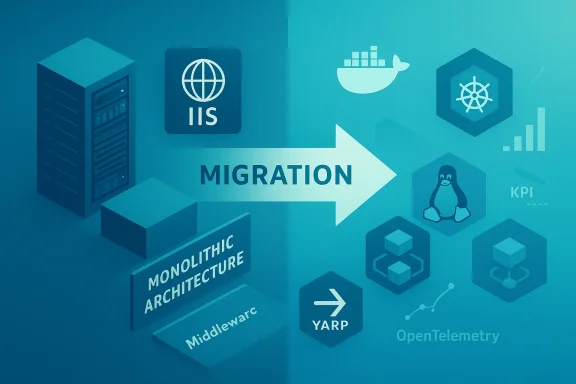 Background
Enterprises adopted ASP.NET on the .NET Framework for decades because it delivered stability, mature tooling, and Windows-first integration. Over the last six years the .NET ecosystem has transformed: Microsoft unified the platform into a single, cross‑platform .NET and invested heavily in performance, cloud readiness, and developer productivity in ASP.NET Core. The result is a modern runtime — cross‑platform, container‑friendly, and optimized for cloud-native patterns — that changes how teams build and operate web backends. Industry benchmarks and vendor guidance now show substantial throughput and cost advantages for modern .NET stacks.At the same time, claims that “Microsoft has ended support for .NET Framework” require careful qualification. Microsoft’s support policy shows that recent .NET Framework releases such as .NET Framework 4.8.1 remain supported as components of Windows, and lifecycle dates vary by version and the Windows release they ship with. Some older Framework releases have reached end‑of‑support, but the statement that .NET Framework as a whole is obsolete is misleading. Treat any assertion about “end of support” as version‑specific and verify the exact runtime and Windows lifecycle in your inventory.
Why enterprise leaders are accelerating ASP.NET → .NET migrations
The business drivers (short list)
- Infrastructure cost reduction: Running modern .NET on Linux containers removes Windows Server licensing and often lowers VM/container footprint, producing material savings in large estates. Vendor analyses and cloud prescriptive guidance show typical infrastructure reductions in the tens of percent range for refactored workloads. Real customer studies cite savings in the 30–45% band when workloads shift away from Windows+SQL Server license-included instances — results depend on licensing, cloud provider, and degree of refactoring.
- Performance and scalability: ASP.NET Core and the Kestrel server have been a primary focus for .NET performance engineering. Independent framework benchmarks demonstrate orders‑of‑magnitude improvements in synthetic throughput and large, reproducible gains in realistic API tests. Expect significant RPS improvements versus legacy ASP.NET in many scenarios; the exact multiplier depends on workload profile, serialization patterns, and I/O characteristics.
- Developer velocity: Modern .NET introduces minimal‑API patterns, a smaller middleware surface, built‑in dependency injection, and cleaner SDK-style projects. These changes reduce boilerplate and test friction; teams commonly report faster feature cycles after adopting the modern stack. Industry case studies and practitioner reports back these productivity claims.
- Security and ecosystem: Moving to actively maintained runtimes simplifies patching and makes current libraries and security tooling available. However, “moving to Core fixes all security problems” is an over‑claim — new attack surfaces exist (for example, recent Kestrel and reverse‑proxy CVEs show that modern stacks need good patching and threat modelling). Treat migration as an opportunity to modernize security practices, not as an automatic fix.
The numbers you should trust — verified claims and where they came from
- Performance: Independent framework benchmark rounds show ASP.NET Core at the top of plaintext and JSON throughput tests in recent rounds and large increases between older .NET Core releases and modern .NET 8/9 results. These are synthetic maxima; realistic gains depend on app characteristics but frequently fall in the 3×–5× throughput improvement band for network‑bound APIs in real world comparisons. Use TechEmpower rounds and Microsoft performance posts to validate specific expectations for your workload.
- Cloud cost savings: Cloud provider guidance and vendor case studies suggest typical infrastructure savings of 20–45% when moving off Windows license‑included instances and adopting Linux containers or optimized VM classes. AWS prescriptive guidance and an IDC/Microsoft study on Linux workloads document material TCO benefits; your mileage will vary by Windows/SQL Server license position and cloud discounts. Always run a TCO model for your estate.
- Migration tooling: Microsoft and open‑source tools exist to accelerate porting. The two most referenced utilities are:
- dotnet try‑convert — a community Microsoft tool to convert old project files to SDK style (useful but not a full migration; archived/unsupported in places; good as a starting point).
- .NET Upgrade Assistant — a more comprehensive upgrade CLI/extension that scaffolds and guides porting steps for many app types (note tool status and telemetry docs before adoption). These tools reduce tedious work but do not remove architectural decisions.
ASP.NET (Classic) vs ASP.NET Core — practical, decision‑grade comparison
Key distinctions
- Platform: ASP.NET (System.Web) is Windows‑centric; ASP.NET Core is cross‑platform and container‑friendly. This means you can run Core on Linux containers, reducing Windows Server dependency and unlocking cloud-native hosting patterns.
- Hosting and server: Classic ASP.NET typically runs in IIS; ASP.NET Core defaults to Kestrel (often fronted by a reverse proxy like Nginx/Envoy or YARP). Kestrel is a high‑performance server tuned for modern workloads.
- Framework model: ASP.NET Core uses the modular middleware pipeline and SDK‑style projects; classic uses System.Web and more monolithic configuration. This makes Core easier to adopt in microservice and CI/CD patterns.
- Ecosystem and support: Modern .NET releases (even STS releases) receive frequent updates and performance improvements; some .NET Framework versions are out of support while others remain supported as part of Windows lifecycle. Verify specific runtime versions in your estate.
When staying on the Framework still makes sense
- When you have heavy investments in Windows‑only features (native Win32 interop embedded in the app, legacy COM integrations, or UI tech like WebForms) and a near‑term migration is unfeasible.
- When regulatory constraints or third‑party dependencies require a Windows Server environment for certified support.
Proven migration strategies — pick based on risk appetite and time horizon
There is no one‑size‑fits‑all. Below are three validated paths, with practical tradeoffs.1) Incremental replacement — the strangler pattern (recommended for mission‑critical systems)
- How it works: Put a reverse proxy (YARP or an edge proxy) in front of the system and route subsets of traffic to new ASP.NET Core services while legacy modules continue to run. This reduces blast radius and supports zero‑downtime evolution.
- When to choose: Large monoliths, non‑negotiable uptime, stepwise risk mitigation.
- Pros: Minimal service disruption; measurable rollouts; parallel testing.
- Cons: Operational complexity (hybrid tracing, cross‑stack observability) and temporary dual‑stack maintenance.
2) Refactor and port business logic
- How it works: Extract domain services into .NET Standard/.NET 8+ class libraries, replace System.Web dependencies with middleware, move data access to EF Core, and modernize authentication. Tools like Upgrade Assistant and try‑convert accelerate parts of this work but expect manual fixes for incompatible APIs.
- When to choose: Moderate technical debt, codebase with clear boundaries and high reuse value.
- Pros: Balanced risk/ROI, quicker wins, preserves domain knowledge.
- Cons: Can expose hidden coupling and require deeper testing than expected.
3) Full rebuild (cloud‑native transformation)
- How it works: Reimagine the application as microservices, containerize with Docker, orchestrate with Kubernetes (if needed), adopt event patterns and DDD to define service boundaries.
- When to choose: Architecture blocking business strategy (scale, global expansion, new product models), or the codebase is effectively unmaintainable.
- Pros: Max scalability, resilience, and modern DevOps alignment.
- Cons: Highest upfront cost and longer time to market. This is a product decision, not merely a port.
A structured 4‑phase roadmap (practical playbook)
- Assessment
- Inventory every app: target .NET version, dependencies, third‑party libraries, WebForms/WCF usage, authentication mechanisms, and OS constraints.
- Run automated tools as data inputs, not final answers: .NET Upgrade Assistant, dotnet try‑convert, and porting analyzers reveal breaking changes but do not replace architectural review.
- Score components by business value, complexity, and risk; build a PoC to validate assumptions.
- Foundation
- Establish CI/CD with GitHub Actions or Azure DevOps; integrate container builds and security scanning early.
- Create container images and CI pipelines before mass migration to avoid late operational surprises.
- Train teams on ASP.NET Core middleware, dependency injection, and container debugging.
- Execution (iterative)
- Migrate shared libraries and non‑UI components first.
- Implement feature flags, automated tests (xUnit), and end‑to‑end UX checks (Playwright).
- Use YARP for incremental routing during coexistence phases.
- Optimization & Go‑Live
- Add observability with OpenTelemetry and correlate traces across legacy and modern components. Tune Kestrel and resource limits for containers.
- Validate performance and cost using A/B benchmarking and load tests.
- Execute a blue/green or canary cutover and retire legacy environments after verification.
Common roadblocks and remedial playbook
- Unsupported project types: WebForms, WCF, and certain desktop UI elements require either a rewrite, replacement (Blazor/SPA), or in‑place migration using bridging strategies. Flag these early and quantify the rewrite cost.
- Hidden Windows dependencies: File system, registry, COM objects or IIS dependencies can block portability. Create compatibility wrappers and consider Windows containers as bridging targets if needed.
- Third‑party libraries: Some NuGet packages lack Core/.NET 8+ builds. Inventory, then either update, replace, or vendor‑patch as needed.
- Operational complexity: Observability across mixed stacks is hard. Instrument both sides with OpenTelemetry, centralize traces, and correlate via request‑id propagation.
- Security surprises: Modern stacks reduce certain OS‑level risks but introduce others (e.g., HTTP server parsing bugs). Keep a disciplined patch cadence and threat model new endpoints. Recent Kestrel and YARP advisories show this isn't theoretical.
Security and compliance: what changes and what to plan for
- Authentication: Migrate to ASP.NET Core Identity or federated identity systems (Azure AD, Okta, etc.). Legacy cookie‑based or Windows Integrated authentication patterns will need rework for cross‑platform deployments.
- Transport and edge: Kestrel + reverse proxy (YARP/Nginx) is a recommended modern stack; terminate TLS at the edge where possible and validate proxy configurations to avoid request‑smuggling risks exposed in recent CVEs.
- Observability: Deploy OpenTelemracing, metrics, and logs from day one of coexistence to avoid blind spots during migration.
- Patching and SBOMs: Implement automated dependency scanning, SBOM generation, and a documented upgrade policy for container base images and runtime patches.
Tools & patterns you should budget for (practical checklist)
- Conversion & assessment:
- .NET Upgrade Assistant (and its accompanying mappings/extensions).
- dotnet try‑convert as an initial project‑file converter.
- Routing & coexistence:
- YARP (Yet Another Reverse Proxy) or an established edge proxy for incremental routing.
- Observability:
- OpenTelemetry instrumentation and exporters (collect traces/metrics during migration).
- Container & orchestration:
- Docker images, container registries, and optionally Kubernetes (AKS/EKS/GKE) for scale.
- CI/CD and automation:
- GitHub Actions or Azure DevOps pipelines configured for build, container image scanning, and canary deployments.
Where agency and vendors add value — and where they don't
External partners (system integrators and migration specialists) provide:- Rapid assessment expertise and hidden‑dependency discovery,
- Automation for repetitive porting tasks,
- Shared learnings across industries (e.g., PCI‑sensitive payment platforms or high‑traffic e‑commerce migrations).
The ISHIR piece we reviewed positions migration as a business transformation and recommends architectural-first approaches. That framing is useful; just ensure vendor claims are validated against your estate and that you demand transparent, testable ROI metrics.
Practical checklist for CIOs and CTOs before approving migration budgets
- Inventory: Complete runtime and dependency inventory and tag components that use WebForms, WCF, or OS‑specific APIs.
- Business scoring: Score each module by revenue impact, security risk, and modernization urgency.
- PoC: Pick a single representative module and execute an end‑to‑end PoC that measures latency, throughput, memory, and cloud cost per million requests.
- TCO model: Build three scenarios — refactor, incremental, and rebuild — with realistic timelines and contingency.
- Observability plan: Ensure OpenTelemetry, centralized logging, and a rollback plan are in place before any traffic cutover.
- People & training: Allocate budget for developer enablement (Deep dives on ASP.NET Core, DI, middleware, container debugging).
- Security gating: Add a mandatory security sign‑off and patch cadence for all newly deployed containers/servers.
Final verdict: migrate — but measure, prioritize, and verify
ASP.NET Core and the modern .NET releases are functionally superior for cloud‑native, containerized, and high‑throughput workloads. Verified benchmarks and cloud studies corroborate the performance and cost advantages that proponents promote — but those advantages are conditional. They depend on realistic workload profiling, licensing posture, and the depth of architectural debt.Do not accept absolute claims (for example, “Microsoft has ended .NET Framework support” or “you will always save 40%”) without verifying the exact versions and running a PoC. Use modern tools (Upgrade Assistant, try‑convert, YARP, OpenTelemetry) as accelerators — not as magic bullets. Plan migrations as multi‑quarter, risk‑managed transformation programs with measurable KPIs: cost per thousand requests, mean response time, deployment lead time, and security posture.
If you lead platform decisions, make three commitments before work begins: collect the data, run representative benchmarks, and require transparent, testable ROI from any vendor proposal. With those guardrails, moving from legacy ASP.NET to ASP.NET Core is less a leap of faith and more a predictable modernization that delivers measurable business outcomes.
Source: Security Boulevard ASP.NET to .NET Core Migration: What CIOs and CTOs Need to Know
