

MSI’s Nano Pen arrives as a compact, pressure‑sensitive stylus that squeezes traditional inking features — 4,096 pressure levels, tilt recognition, and two interchangeable tips — together with a microphone for on‑device voice input to Microsoft Copilot, plus an unusual rapid‑charge trick intended for the grab‑and‑go workflow of the new Prestige Flip laptops announced at CES 2026.
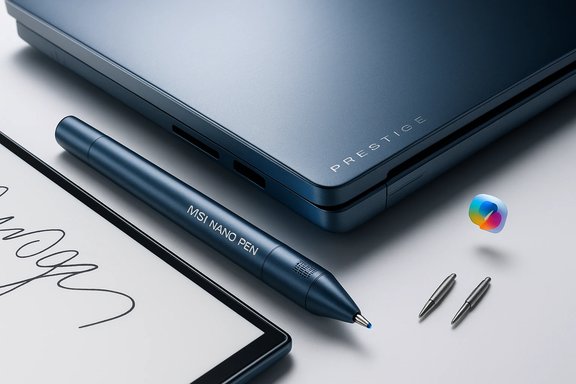
MSI introduced the refreshed Prestige family at CES 2026, positioning the Prestige 14 Flip and Prestige 16 Flip as lightweight, business‑focused 2‑in‑1s that bundle a new stylus called the MSI Nano Pen. The pen is integrated into a dedicated slot on the underside of Flip models so it’s always with the laptop; when docked it can charge, delivering extremely fast top‑ups that MSI highlights in its product announcement. MSI’s own accessory pages and reseller listings expand the technical picture: the pen is built to support Microsoft Pen Protocol (MPP) 2.0, exposes 4,096 discrete pressure levels, supports tilt, reports at 266 Hz, can hover up to 8–10 mm above the display, and weighs roughly 13.5 g. Retail pages and MSI’s product pages also detail two swappable nibs — one fine, one round — and list USB‑C charging as an option. This marks a deliberate attempt by MSI to combine conventional pen input fidelity with modern AI interaction — the pen contains a microphone and a button‑combination that triggers press‑to‑talk Copilot functionality — effectively blending stylus workflows and voice commands into the same accessory.
Source: TechRadar MSI’s Nano Pen brings pressure-sensitive drawing, tilt, and AI voice
 Background
MSI introduced the refreshed Prestige family at CES 2026, positioning the Prestige 14 Flip and Prestige 16 Flip as lightweight, business‑focused 2‑in‑1s that bundle a new stylus called the MSI Nano Pen. The pen is integrated into a dedicated slot on the underside of Flip models so it’s always with the laptop; when docked it can charge, delivering extremely fast top‑ups that MSI highlights in its product announcement. MSI’s own accessory pages and reseller listings expand the technical picture: the pen is built to support Microsoft Pen Protocol (MPP) 2.0, exposes 4,096 discrete pressure levels, supports tilt, reports at 266 Hz, can hover up to 8–10 mm above the display, and weighs roughly 13.5 g. Retail pages and MSI’s product pages also detail two swappable nibs — one fine, one round — and list USB‑C charging as an option. This marks a deliberate attempt by MSI to combine conventional pen input fidelity with modern AI interaction — the pen contains a microphone and a button‑combination that triggers press‑to‑talk Copilot functionality — effectively blending stylus workflows and voice commands into the same accessory. What the tech specs actually mean
Pressure sensitivity and tilt: how useful is 4,096 levels?
The headline figure — 4,096 pressure levels — is a common specification across modern MPP‑compatible pens and equates to 12‑bit pressure resolution. In practical terms, more pressure levels allow finer gradations in stroke width and opacity for digital brushes and handwriting recognition. That reduces “banding” in pressure response and improves control for shading, line tapering, and calligraphic strokes. MSI’s documentation and accessory listings advertise this capability as part of the Nano Pen’s spec set. Tilt detection complements pressure by allowing software to vary stroke behaviour based on the pen’s angle — think pencil‑style shading where the same tip produces broader marks when tilted. This is valuable for illustrators and designers working in apps that honour tilt (Adobe Fresco, Clip Studio Paint, many modern drawing tools). The Microsoft Pen Protocol (MPP) lineage means the Nano Pen’s tilt and pressure features are consistent with what other MPP 2.0 pens deliver. For context, MPP 2.0 has been the baseline for many OEM styluses and typically supports 4,096 levels plus tilt and palm rejection.Report rate and hover distance: responsiveness matters
MSI lists a 266 Hz report rate and a hover detection range of 8–10 mm. Report rate — how often the pen transmits positional data to the host — correlates with perceived responsiveness: higher rates reduce input latency and make quick strokes and fine details feel smoother. A 266 Hz polling cadence is brisk for active pens and will keep inking feeling immediate on a well‑tuned display and driver stack. Hover distance determines how far above the glass the pen can be detected before contact; 8–10 mm is on par with many active pens and gives apps a reliable “cursor” for brush placement and previewing. These figures are listed on MSI’s product pages and confirmed by official accessory specs.Weight, tips and ergonomics
At ~13.5 g, MSI bills the Nano Pen as ultra‑light, suitable for extended note‑taking and frequent handling. That weight aligns with other thin rechargeable styluses and helps reduce fatigue during long writing sessions. Two interchangeable nibs — a finer “fountain‑pen”‑style tip and a rounder “crayon” tip — provide simple on‑the‑fly tactile choices for writing versus broader sketching. Retail listings and MSI accessory documentation list these physical attributes.The AI voice angle: Copilot press‑to‑talk and workflow implications
A standout element of the Nano Pen is its built‑in microphone and a press‑combination that activates Microsoft Copilot voice input. MSI’s CES announcement frames this as a convenience: press both pen buttons to talk to Copilot, then switch back to pen input for inking, drawing, or note‑taking without moving to the laptop’s keyboard or a headset. This integration is explicitly cited by MSI and echoed in early hands‑on commentary. Practical benefits:- Faster multi‑modal input: dictation for long text blocks, pen for equations/diagrams, and voice for commands (e.g., “summarize these notes”).
- Hands‑reachable assistant: in tablet mode or when the laptop is used in stand/tent orientations, the pen gives a portable way to interact with Copilot without repositioning the PC.
- Streamlined meetings: quick voice commands to generate action items or transcriptions while sketching.
- Copilot’s behaviour depends on Microsoft’s software layer: some features are on‑device where hardware allows, others route to the cloud. This affects latency, privacy, and whether a Copilot subscription or Microsoft account is required for some functions. Users should confirm which Copilot features are local and which rely on cloud processing on their specific Prestige Flip SKU and region.
Charging behavior: marketing vs. reality
MSI’s headline claim for the Prestige Flip pen is startling: 15 seconds of docking gives up to 45 minutes of use and a full charge in 30 seconds when docked in the laptop’s slot. Those numbers appear in the official CES release and MSI’s product announcement materials. The same announcement also positions the pen as designed for fast top‑ups between tasks. MSI’s broader accessory pages and some retail materials list different battery figures for MSI’s standalone pen SKUs — sometimes citing tens of hours of productivity across different pen families — which suggests MSI sells multiple pen variants with different internal cells. That explains why third‑party early coverage described the Nano Pen in the Prestige Flip as having a very small battery (approximate hands‑on runtime reported at roughly an hour in one preview), but with the ability to gain meaningful runtime extremely quickly via the dock. In short: the fast‑charge claim for the Flip’s integrated pen is confirmed in MSI’s announcement, but overall usable runtime will depend on the pen variant and real‑world usage patterns. Readers should treat battery‑life marketing numbers as conditional and verify the specific SKU they intend to buy.How the Nano Pen compares with mainstream MPP styluses
MSI’s Nano Pen is squarely in the MPP 2.0 ecosystem. Comparison points with Microsoft’s Slim Pen family and other OEM MPP pens:- Pressure/tilt: 4,096 levels and tilt support are standard fare among modern MPP 2.0 pens and are matched by HP, Wacom‑OEM replacements, and Microsoft’s Surface Slim Pens. This means most contemporary creative apps will be able to use the pen’s full feature set when drivers/firmware are present.
- Latency & report rate: MSI’s 266 Hz is competitive; some pens report at 200–360 Hz depending on hardware and driver handling.
- Battery & charging: MSI’s fast‑top‑up approach (15s = 45min) is unusual and aimed at Flip buyers. By contrast, other pens usually prioritize larger battery capacities with longer run times between charges or wireless charging systems tied to keyboard docks. Verify whether the in‑device charging method applies to the specific Flip SKU you plan to buy.
- Microphone: the Nano Pen’s integrated mic for Copilot is a differentiator — most rival MPP pens do not include a dedicated voice input mic wired into the PC assistant experience.
Real‑world workflows and use cases
- Note‑taking and lecture capture: the pen’s light weight, low latency and MPP compatibility make it effective for handwriting that will be converted to text later, while Copilot can be used to summarize notes or extract action items.
- Sketching and ideation: the pressure and tilt features let concept artists and UX designers use the device for quick mockups. The two nib types let users switch between precise line work and broader shading without changing tools.
- Hybrid meetings: press‑to‑talk to Copilot for live transcription or quick queries while annotating slides with the pen.
- Accessibility: voice plus pen can speed input for users with mobility or dexterity limitations by combining modalities.
Risks, limitations and what MSI doesn’t solve
- App support and driver maturity
- Pressure and tilt are hardware capabilities; software must implement them. Expect variance between apps — some creative programs may need updates to fully utilise the pen’s tilt or nuanced pressure curves. Users should test their primary apps before committing to long professional projects.
- Battery ambiguity
- MSI’s product pages and the Prestige Flip announcement promote rapid charging and give mixed battery figures across different marketing materials. There are indications some MSI pen SKUs carry larger cells (multi‑hour/day runtime), while the Flip’s docked Nano Pen is optimized for fast top‑ups rather than long independent runtimes. Treat headline minutes‑per‑seconds claims as a convenience feature rather than a substitute for a pen with a large battery life.
- Privacy and Copilot behaviour
- The pen’s microphone triggers Copilot voice input; what happens to voice data depends on Copilot’s implementation on that machine — cloud vs local processing, and whether a Copilot subscription or account is necessary for specific features. Organizations and privacy‑minded individuals should confirm data handling policies and whether voice interactions are stored or transmitted externally.
- Physical durability and tip wear
- Fine nibs wear with heavy sketching; replaceable tips are welcome, but users who draw intensively may prefer a pen with easily sourced spare nibs or a thicker, more tactile tip.
- Compatibility across devices
- While MPP 2.0 is widely supported, not every Windows touchscreen will support the full feature set or the dock charging. Confirm that your intended laptop SKU is explicitly listed as compatible with MSI’s pen features before purchase.
Practical buying checklist
- Confirm whether the Prestige Flip model you’re considering ships with the Nano Pen variant that supports the advertised Copilot microphone and the fast‑charge dock. MSI’s CES materials and retail pages should show the exact bundle.
- Test pressure and tilt in your primary creative apps — not all apps behave identically with different pen firmware.
- Evaluate whether the rapid‑charge tradeoff (short independent battery life vs quick top‑ups) suits your workflow; if you frequently work away from the laptop and need long pen runtime, look for a pen with larger advertised endurance.
- Check Copilot availability and whether your region, account and subscription status unlock the voice features you expect. Confirm whether Copilot interactions are local or cloud‑processed if privacy is a concern.
Strengths and where MSI is taking pen input forward
- Integration: integrating a microphone and Copilot activation to a stylus is a forward‑looking idea for hybrid workflows; it reduces context switching and leverages voice for long text and commands while retaining the pen for precise ink and diagram work.
- Competitive inking specs: 4,096 pressure levels, tilt and a sub‑250–300 Hz report rate place the Nano Pen among the capable MPP‑compatible styluses available today. That means most serious note‑takers and many artists will find it responsive and precise when software support is present.
- Rapid top‑ups: the docking strategy (15 seconds = 45 minutes of use) is a clever solution for the mobile worker who needs to recharge between quick sessions rather than leaving the pen idle for hours in a bag. It’s an ergonomics play as much as a battery one.
Verdict: practical value for Windows users
MSI’s Nano Pen is a well‑engineered MPP 2.0 stylus that combines familiar, high‑fidelity inking capabilities with a distinctly modern twist: a built‑in microphone that links directly into the Copilot workflow and a docking system that emphasizes speed of charge rather than raw independent endurance. For the target buyer — a mobile professional or creator who uses a Prestige Flip in tablet or tent mode, values fast transitions between writing, sketching and dictation, and accepts that not every feature is handled locally — it’s an attractive, integrated solution. However, prospective buyers should verify:- the exact pen SKU bundled with their Flip model (to confirm battery and mic behaviour),
- app compatibility for pressure/tilt in their preferred creative tools, and
- Copilot feature availability and privacy settings on their machine.
Final thoughts
MSI’s Nano Pen reflects the next phase of laptop accessory thinking: not only improving pen fidelity with 4,096 pressure levels and tilt, but also rethinking interaction by embedding a microphone and Copilot activation directly in the stylus. The result is a tightly integrated experience for Prestige Flip buyers — one that emphasizes mobility, quick charge convenience, and hybrid pen+voice workflows. As with any rapidly evolving device class, the technical promises should be validated against real‑world app support, battery behaviour in daily use, and the exact hardware bundle shipped in your region. When those align, the Nano Pen delivers a practical, lightweight tool that both creatives and business users can integrate into modern Windows workflows.Source: TechRadar MSI’s Nano Pen brings pressure-sensitive drawing, tilt, and AI voice