

Microsoft’s short public line — that “Azure Linux includes this open‑source library and is therefore potentially affected” — is accurate as a product-level attestation, but it is not an exclusivity guarantee that no other Microsoft product or image could contain the same vulnerable component.
Microsoft’s MSRC vulnerability note you cited is common practice: when a vendor’s inventory process confirms a particular product contains an upstream open‑source component mapped to a CVE, the vendor will mark that product as “potentially affected” and publish remediation guidance. That message is important because it tells customers where Microsoft has already completed an inventory check. But it is equally important to understand what that phrasing does not mean. The statement is an attestation of what Microsoft has checked so far, not an explicit declaration that other Microsoft products cannot include the same library.
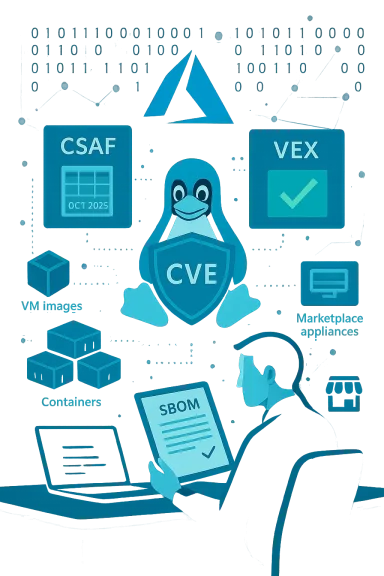
This article explains the practical meaning of Microsoft’s wording, why you should not assume Azure Linux is the only possible carrier of the vulnerable code, how to verify exposure across Microsoft artifacts you run, and operational steps to remediate, detect, and reduce risk while you wait for broader vendor attestations (CSAF/VEX) to catch up. It also examines Microsoft’s CSAF/VEX commitment and what that will — and will not — change for defenders.
Conclusion: treat the MSRC statement as a high‑priority tractable signal for Azure Linux, but continue to verify and remediate across the broader set of Microsoft artifacts you operate.
Source: MSRC Security Update Guide - Microsoft Security Response Center
 Background / Overview
Microsoft’s MSRC vulnerability note you cited is common practice: when a vendor’s inventory process confirms a particular product contains an upstream open‑source component mapped to a CVE, the vendor will mark that product as “potentially affected” and publish remediation guidance. That message is important because it tells customers where Microsoft has already completed an inventory check. But it is equally important to understand what that phrasing does not mean. The statement is an attestation of what Microsoft has checked so far, not an explicit declaration that other Microsoft products cannot include the same library.This article explains the practical meaning of Microsoft’s wording, why you should not assume Azure Linux is the only possible carrier of the vulnerable code, how to verify exposure across Microsoft artifacts you run, and operational steps to remediate, detect, and reduce risk while you wait for broader vendor attestations (CSAF/VEX) to catch up. It also examines Microsoft’s CSAF/VEX commitment and what that will — and will not — change for defenders.
What Microsoft’s “Azure Linux includes … potentially affected” line actually conveys
- It is an authoritative, product‑level inventory statement: Microsoft is saying that the specific Azure Linux images it publishes do include the upstream component mapped to the CVE and therefore those images are in scope for remediation actions. This makes Azure Linux a confirmed priority for customers who run those images.
- It is not an exclusivity certificate: the MSRC line does not assert that no other Microsoft product, image, or artifact will contain the same open‑source library. Microsoft’s public guidance and explanation of its VEX/CSAF rollout clarify that attestations are phased and product‑by‑product. Absence of a line for another product is simply an absence of attestation, not proof of absence.
- Microsoft is moving toward machine‑readable attestations (CSAF/VEX) to automate product impact statements, but the rollout began in October 2025 and is incremental. That means some product families will be inventoried sooner than others; defenders should assume there will be a lag between the upstream disclosure and complete vendor coverage.
Why other Microsoft artifacts could also include the same open‑source library
Open‑source components are redistributed widely across different artifact types and packaging channels. A single upstream library (for example, a MySQL client tool, a kernel module, or another packaged library) can appear in:- Azure VM marketplace images based on Linux distributions.
- Azure Marketplace partner appliances and third‑party ISV images.
- Microsoft‑published container base images, curated container images, or onboarding images for Azure Container Instances and AKS.
- Windows Subsystem for Linux (WSL) distribution images that include Linux userland packages.
- Managed services or platform toolchains that employ the upstream tool internally (for backups, migrations or admin tasks).
- Distributor rebuilds and vendor backports where the upstream package is recompiled under a different packaging name.
How to interpret “potentially affected” in a risk model
When Microsoft says “potentially affected,” teams should interpret it as a confirmation that:- Microsoft’s inventory process found the upstream component in the named product image.
- That product therefore needs remediation (patching, image rebuild, updated marketplace artifact).
- Other Microsoft artifacts remain in an unknown state until inventoried and attested; they must be verified by the customer.
- Immediate triage and remediation for the Microsoft product(s) already attested as affected (Azure Linux in this case).
- Artifact‑level inventory and verification across other Microsoft artifacts you run (images, containers, WSL distros, Marketplace appliances, managed offerings). Don’t assume Not‑Affected in the absence of a VEX declaration.
Practical verification checklist — confirm what you run, quickly
Below is a prioritized, defensible checklist to determine whether your Microsoft artifacts are affected, and how to verify and remediate.1) Inventory first (fast wins)
- Identify all Microsoft‑published artifacts you run that include Linux userland or upstream packages: Azure VM images, Marketplace appliances, curated containers, WSL distributions, Azure Marketplace images, partner images.
- Prioritize artifacts that are reachable from untrusted networks or that run backup/management tooling with elevated credentials.
2) Confirm package presence and version
- On running hosts, query the package manager and the tool itself:
- Debian/Ubuntu: dpkg -l | grep -E 'mysql|mariadb|<component-name>'
- RHEL/Fedora/CentOS/Amazon Linux: rpm -qa | grep -E 'mysql|mariadb|<component-name>'
- For specific binaries: toolname --version (for example, mysqldump --version) to get the exact upstream string.
- For containers: run a shell into the image or use static scanners (Trivy, Clair) to extract package lists and SBOMs. Rebuild images from known good bases if vulnerable packages are embedded.
3) Consult vendor attestations and SBOM/VEX artifacts
- Check Microsoft’s published CSAF/VEX records for the exact artifact IDs you run. If Microsoft publishes a “Not Affected” for a specific artifact ID and timestamp that matches your deployed artifact, you can treat that artifact as inventoried. But remember: VEX records are artifact‑specific — they must match the exact image, tag, or SKU you run.
4) Patch, rebuild, or remove
- If the package version you find maps to an affected upstream range, apply the vendor/distribution patch or rebuild the image with a patched base. For images that include the binary inside an immutable image, updating just the host is insufficient — you must rebuild and redeploy.
5) Managed offerings
- For managed database services or managed appliances, open a support ticket and ask whether the provider uses the vulnerable tool internally (for example, mysqldump) and whether they have applied mitigations. Managed services often patch on behalf of customers but schedules vary; get an explicit statement if you rely on that service.
Detection and hunting: what to look for if you suspect exploitation
Because many of these CVEs (and the example MSRC wording) involve client tooling or require high privileges, detection often focuses on anomalous or unauthorized use of tools rather than raw network exploit signatures. Useful telemetry and hunt signals include:- Process telemetry: unexpected mysqldump or equivalent tool invocations in automation contexts (CI/CD runners, cron jobs, backup containers).
- Command histories and audit trails: invocation timestamps that are out of hours, or runs initiated by automation accounts that shouldn’t run backups.
- Network flows: large, unexpected outbound transfers that coincide with a dump operation (SCP/SFTP, cloud object storage uploads).
- Crash logs and core dumps: if the CVE causes application or server crashes, collect crash artifacts and last client connection data for forensic correlation.
Remediation strategy and patching priorities
- Patch first for confirmed attested products: if Microsoft has declared Azure Linux as potentially affected, prioritize patching and updating those images immediately. Use vendor‑supplied packages where available and prefer distribution errata to avoid rebuild surprises.
- For other artifacts, follow the inventory/verify/patch cycle described above. Don’t assume a product is safe just because MSRC has not yet published a VEX entry for it.
- For immutable images or containers, rebuild from patched bases and redeploy; host packages alone will not fix embedded binaries.
- If immediate patching is impossible, use compensating controls:
- Restrict network access to management ports and admin subnets.
- Limit the number of accounts with elevated privileges and rotate stored credentials used by automation.
- Replace or disable unnecessary client binaries in multi‑tenant or exposed images.
How Microsoft’s CSAF/VEX rollout affects customers — what it will and will not do
Microsoft’s move to publish CSAF/VEX attestations (announced as beginning October 2025) is valuable — it makes product inventory signals machine‑readable and automatable for large organizations. But there are three key caveats customers must understand:- Rollout is phased: vendors typically roll out VEX/CSAF product coverage incrementally across product families. That means an attestation for Azure Linux today does not imply immediate coverage for Marketplace appliances, WSL images, container base images, or managed services.
- Artifact specificity: VEX records must match exact artifact identifiers (image tags, SKU numbers, or artifact IDs) to be relied upon in automated pipelines. A VEX saying “Not Affected” for one SKU won’t automatically cover a differently tagged image you pulled weeks earlier. Confirm artifact IDs and timestamps.
- Vendor attestations complement — not replace — customer verification: SBOMs, image scanning, and package queries remain essential. Treat VEX as an accelerant for automation and triage, but retain artifact‑level discovery in your inventory pipelines.
Concrete, step‑by‑step playbook (prioritized)
- Confirm Microsoft’s attestation applies to artifacts you run. If MSRC names Azure Linux for CVE‑2025‑50098, verify whether you use that exact Azure Linux image/SKU. If yes, schedule immediate remediation.
- Inventory every Microsoft‑published artifact you run that could contain the upstream component: Marketplace images, containers, WSL tarballs, partner appliances, AKS/ACI curated images. Use your CMDB, container registries, and orchestration manifests to locate them.
- Scan those artifacts for the component and exact package version. Use package manager queries, tool --version commands, and container scanners. For immutable images, extract metadata or SBOM and validate.
- If you find an affected package, patch the vendor package or rebuild the image from a patched base. Follow distribution advisories when available. For managed services, request a provider statement or open a support ticket.
- Apply compensating controls while patching: restrict admin network access, rotate and reduce privileges, monitor for anomalous tool use, and set alerts for repeated crashes or large unexpected data exports.
Critical caveats and verification discipline
- Absence of a Microsoft VEX entry is not proof that an artifact is not affected. Treat “no attestation” as unknown and verify.
- Vendor‑published CVE remediation guidance may reference upstream version ranges. If you manage distributions or images rebuilt by Microsoft or partners, verify the distro package mapping — the distribution package name and internal versioning can differ from upstream numbering. Use vendor errata and distribution trackers, not just upstream release notes.
- For CVEs that primarily affect client tooling (e.g., backup/migration tools), the operational risk may be a post‑compromise impact (an attacker who already has elevated credentials). Don’t deprioritize these CVEs: automation pipelines and backup scripts are common lateral‑movement vectors.
Final assessment and recommendations
- Short answer to your original question: No — Azure Linux being declared as “potentially affected” does not mean it is the only Microsoft product that could include the vulnerable open‑source library. Microsoft’s phrasing is a product‑scoped inventory declaration, not a universal exclusion of other artifacts. Customers must treat other Microsoft artifacts as unknown until they are inventoried and attested.
- Immediate actions for administrators:
- Patch confirmed Azure Linux images and any other Microsoft artifact that your verification shows is affected.
- Run the artifact inventory and verification checklist across all Microsoft‑published artifacts you run.
- Use CSAF/VEX attestations when present to automate triage, but do not rely solely on them in the interim.
- Longer‑term posture:
- Integrate SBOM and artifact verification into your CI/CD and deployment pipelines so the next time a vendor publishes a product‑level attestation you can rapidly confirm whether it applies to the exact artifacts you run.
- Treat vendor attestations as one input among many: combine them with your own scans, SBOMs, and runtime telemetry for a defensible, rapid response.
Conclusion: treat the MSRC statement as a high‑priority tractable signal for Azure Linux, but continue to verify and remediate across the broader set of Microsoft artifacts you operate.
Source: MSRC Security Update Guide - Microsoft Security Response Center
