

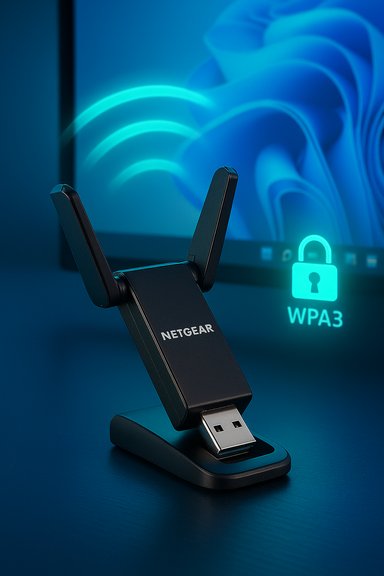
NETGEAR’s Nighthawk AXE3000 USB 3.0 adapter (A8000) brings Wi‑Fi 6E to Windows desktops and laptops in a tiny dongle — promising tri‑band AXE3000 performance (up to a combined 3 Gbps), a flip‑open antenna, USB 3.0 cradle, and WPA3 security — but real‑world returns depend heavily on drivers, OS support, and your router infrastructure.
Wi‑Fi 6E opened the 6 GHz band to consumer Wi‑Fi, adding wide, low‑interference channels that can dramatically reduce latency and congestion in dense environments. NETGEAR’s Nighthawk AXE3000 adapter (A8000) is a compact USB 3.0 solution aimed at users who want to upgrade an older PC to a tri‑band Wi‑Fi 6E client without opening a case for an M.2 card. The adapter is marketed as an “AXE3000” device — shorthand for the theoretical combined link rates across 2.4 GHz, 5 GHz and 6 GHz — and ships with a small adjustable cradle to improve placement and reception. This article summarizes the A8000’s published specifications, explains where its real‑world performance will come from (and where it won’t), and highlights notable strengths and risks based on vendor documentation, hands‑on community reports, and kernel/driver traces.
Technical specifications and vendor claims referenced in this article were cross‑checked with multiple retailer and vendor datasheets and with community kernel/driver traces; potential buyers are advised to confirm the latest NETGEAR driver revision and their OS/firmware compatibility before purchase.
Source: eTeknix NETGEAR Nighthawk WiFi 6E USB 3.0 WiFi Adapter
 Background / Overview
Wi‑Fi 6E opened the 6 GHz band to consumer Wi‑Fi, adding wide, low‑interference channels that can dramatically reduce latency and congestion in dense environments. NETGEAR’s Nighthawk AXE3000 adapter (A8000) is a compact USB 3.0 solution aimed at users who want to upgrade an older PC to a tri‑band Wi‑Fi 6E client without opening a case for an M.2 card. The adapter is marketed as an “AXE3000” device — shorthand for the theoretical combined link rates across 2.4 GHz, 5 GHz and 6 GHz — and ships with a small adjustable cradle to improve placement and reception. This article summarizes the A8000’s published specifications, explains where its real‑world performance will come from (and where it won’t), and highlights notable strengths and risks based on vendor documentation, hands‑on community reports, and kernel/driver traces.What NETGEAR claims (the headline specs)
- AXE3000 tri‑band throughput: Advertised as up to 3 Gbps aggregate (2.4 GHz = 600 Mbps, 5 GHz = 1,200 Mbps, 6 GHz = 1,200 Mbps).
- Interface: USB 3.0 (USB‑A) with an included cradle and USB cable for flexible placement and best performance on USB 3.x ports.
- Chipset: Community investigations and kernel patches indicate the adapter uses a MediaTek MT7921au family chipset (mt7921u driver support added to Linux kernels in patches referencing the A8000 device ID).
- OS compatibility: NETGEAR lists Windows 10 and Windows 11 compatibility, but notes that access to the 6 GHz band (Wi‑Fi 6E) typically requires a modern OS/drivers (Windows 11 is explicitly recommended/required to make full use of the 6 GHz lane in several vendor notes).
- Security: Supports WPA3, the modern Wi‑Fi security standard.
Hardware and chipset explained
What’s inside (and why it matters)
The A8000’s internals are important because adapter behavior — stability, feature support (hotspot, AP mode, MLO, advanced power management), and driver maturity — traces back to the chipset vendor.- Independent teardowns and multiple community traces indicate MediaTek’s MT79xx family lineage for the A8000, and the Linux kernel had to add a specific USB VID
 ID mapping to the mt7921u driver to make the adapter plug‑and‑play. That strongly suggests a MediaTek MT7921au variant is the silicon inside many retail A8000 units.
- MediaTek’s mt7921 driver stack has been evolving in both Windows vendor drivers and the Linux kernel. Early hardware/driver mismatches can produce intermittent disconnects, missing hotspot/AP modes, or device non‑recognition until vendors publish updated drivers. The kernel patches and community reports show that initial out‑of‑box behavior required driver updates to operate cleanly on non‑Netgear OSes.
Antenna and cradle
The flip‑open dual antenna and the USB cradle are practical design choices:- The cradle improves line‑of‑sight placement (USB ports at the back of a tower can choke RF) and can reduce interference from metal chassis. Vendor pages and product photos show a rotatable, high‑gain antenna array designed to give better reception than a stubby stick.
Theoretical speeds vs. real‑world throughput
Marketing math: AXE3000 = 3 Gbps aggregate
NETGEAR’s AXE3000 label is a simple sum of the theoretical maximums across each band (600 + 1200 + 1200 = 3000 Mbps). Retailers and datasheets repeat this. That’s useful as a marketing shorthand, but it’s not the throughput you should assume for a single file transfer or a single‑device test.What you should expect in practice
- Wireless link rates are theoretical maxima under ideal conditions. Real TCP/UDP application throughput is typically lower due to protocol overhead, environmental RF conditions, channel width, router/client driver implementations, and wired uplink constraints.
- Independent network testing across modern Wi‑Fi standards repeatedly shows sustained file‑transfer throughput well below headline link rates; expect a fraction of the aggregate PHY rate for single‑flow transfers. Studies of similar AXE/11ax devices show real file copies and NTttcp tests achieving tens to a few hundreds of megabytes per second depending on test conditions — not the summed 3 Gbps.
The 6 GHz caveat
- Many Wi‑Fi 6E USB client designs (including small USB dongles) limit 6 GHz operation to 80 MHz channels for thermal/antenna/driver reasons, which constrains the per‑band top speed. Some reviews noted the A8000’s 6 GHz performance is capped by 80 MHz channel width rather than wider 160/240/320 MHz options that higher‑end devices or embedded clients might use. That makes the 6 GHz top line similar to 5 GHz for this adapter.
Windows compatibility, drivers and the 6 GHz lane
OS and driver reality
- NETGEAR lists Windows 10 and Windows 11 as supported OSes for the adapter overall; however, full access to the 6 GHz band and advanced features often depends on driver and OS support, and many vendor notes and retailer pages recommend Windows 11 for 6 GHz usage. In short: the adapter can install on Windows 10, but expect 6 GHz functionality and the latest features to be best supported on Windows 11 with updated drivers.
Community experience — instability and driver pain points
- Community threads and Reddit posts document recurring issues: random disconnects, adapter becoming undetectable after sleep/hibernation, hotspot/AP mode not working under Windows, and services requiring driver reinstallation or port juggling to recover. These reports are significant because they point to real‑world reliability concerns beyond marketing specs. Some users report devices operating fine under Linux (with kernel patches or driver updates) but being flaky under Windows due to driver differences.
What to do before buying
- Confirm you have a USB 3.x port (for best throughput) and that your Windows 11 installation can accept the vendor driver.
- Check NETGEAR’s support page for the A8000 driver package and read recent release notes before purchasing — driver updates matter.
Security: WPA3 and best practices
- The adapter supports WPA3, which is the modern secure Wi‑Fi standard. That’s important for protecting devices on 6 GHz / Wi‑Fi 6E networks where operators increasingly require WPA3 or OWE. Use WPA3‑Personal for home networks when both router and client support it.
- Note: In mixed environments (some legacy devices), enabling strict WPA3-only SSIDs can cause compatibility issues; many real‑world deployments use WPA3 transition or separate SSIDs to preserve legacy device access. This is a router/network design consideration rather than an adapter limitation.
Installation and troubleshooting (practical steps)
- Use a USB 3.0 / 3.1 Gen1 port — ideally a rear I/O port directly on the motherboard (better power and fewer hubs). The adapter is USB‑powered and performs best with full USB 3.x bandwidth.
- Download the latest A8000 driver from NETGEAR’s official support page rather than relying on Windows Update alone. If an installer on the included media is older, fetch the latest revision.
- If you experience disconnects after sleep/hibernation: disable USB selective suspend in power options and disable power management for the USB hub in Device Manager as an interim workaround. Community posts highlight sleep as a common trigger for failures.
- If Windows fails to show the adapter or reports a registry/config error after a driver reinstall, try a full driver clean (remove the device, uninstall driver packages, reboot, then install vendor drivers) and update chipset/USB host controller drivers from the motherboard vendor.
- For Linux users: the mt7921u driver and kernel device ID patches were added to support the Netgear VID/PID, but you may need a recent kernel or backports package to ensure full functionality. Kernel patches exist that add the A8000 device mapping and improve compatibility.
- If you rely on AP/hotspot mode from your PC, verify the adapter + OS + drivers actually support hotspot/AP in your configuration — community reports indicate hotspot operation is not universally functional under Windows for this adapter at certain driver/OS combinations.
Strengths — where the adapter shines
- Plug‑and‑play Wi‑Fi 6E client for desktops and laptops without an internal M.2 slot, enabling access to cleaner 6 GHz channels when your router and OS support it. Good for upgrading older machines.
- Compact, portable form factor with a cradle for flexible placement — useful for traveling or switching between systems.
- WPA3 support gives you a modern security posture if your router and network are WPA3 ready.
- Affordable entry to tri‑band Wi‑Fi vs buying a new Wi‑Fi 6E laptop or replacing your motherboard/network card.
Risks and caveats — what could go wrong
- Driver maturity and reliability: Multiple user reports of disconnects, instability after sleep/hibernation, and variability in hotspot/AP behavior under Windows indicate drivers and power management are the primary risk area. Expect to spend time on driver updates and possibly RMA if you encounter flaky hardware.
- 6 GHz limitations: Some A8000 units appear limited to 80 MHz channel width on 6 GHz, which reduces the per‑band top speed compared to what a full 160+ MHz client might achieve. That means the adapter’s 6 GHz top‑line numbers can be conservative compared with the highest‑end Wi‑Fi 6E clients.
- Marketing vs. reality: “2.5x faster than Wi‑Fi 5” or “up to 3 Gbps” are aggregate or theoretical claims. Real single‑device throughput will be narrower and influenced by router channel width, interference, uplink capacity, and client driver implementation — plan on realistic throughput well under headline figures.
- Hotspot/AP expectations: Linux users report better hotspot compatibility in some cases; Windows users have reported hotspot features not working reliably. If you need a reliable software hotspot/AP function from your PC, verify the exact driver/OS combination first.
- User experience variability: Early firmware/driver releases sometimes shipped with VID/PID oddities requiring kernel patches or driver updates — a sign that inventory and revision differences could produce mixed experiences for customers.
Who should buy the A8000 (use cases)
- Users with an older desktop or laptop that lacks integrated Wi‑Fi 6E and who want a simple, non‑internal upgrade to access tri‑band networks.
- People who want a portable USB adapter to carry between systems (for travel, LAN events, or flaky built‑in wireless).
- Buyers who are comfortable troubleshooting drivers or who can test return/RMA options if they see instability.
- People needing absolute, turnkey reliability for mission‑critical production systems (competitive players, live streaming rigs) where a wired connection or proven internal PCIe/MB‑integrated adapter is preferable.
- Users who expect 3 Gbps sustained transfers from a single PC‑to‑server test — the adapter is unlikely to deliver the aggregated marketing figure for single‑flow tasks.
Final verdict — balanced conclusion
NETGEAR’s Nighthawk AXE3000 (A8000) USB 3.0 Wi‑Fi 6E adapter fills a clear market niche: a portable, relatively affordable route to tri‑band Wi‑Fi for Windows PCs. The documented AXE3000 specification and WPA3 support check the right boxes on paper, and the flip‑open antenna plus cradle provide sensible ergonomics for a USB dongle. Retail and vendor datasheets consistently list the 600/1200/1200 Mbps band breakdown and the USB 3.0 interface, which match the marketed promise. However, real value depends heavily on software and driver maturity. Community and kernel traces clearly show a MediaTek MT7921au lineage and an early need for targeted driver/device support patches. Multiple first‑hand reports of disconnects and hotspot limitations under Windows are substantial red flags for buyers seeking a zero‑maintenance upgrade. If you rely on a rock‑solid wireless link, a wired Ethernet connection or a proven internal/PCIe client remains the safer play. Bottom line: buy the A8000 if you want a compact, upgradeable path to Wi‑Fi 6E and you are willing to apply driver updates and troubleshoot if necessary. Treat the 3 Gbps figure as a theoretical maximum headline; expect real‑world throughput to be meaningfully lower and driven by router/channel/driver realities. If low maintenance and absolute reliability matter most, prioritize a wired connection or a higher‑end, well‑validated client solution that explicitly supports wider 6 GHz channels and has a proven driver pedigree.Technical specifications and vendor claims referenced in this article were cross‑checked with multiple retailer and vendor datasheets and with community kernel/driver traces; potential buyers are advised to confirm the latest NETGEAR driver revision and their OS/firmware compatibility before purchase.
Source: eTeknix NETGEAR Nighthawk WiFi 6E USB 3.0 WiFi Adapter
