

Nitrux 5.1 lands as a deliberate, highly opinionated Linux distribution update — not a Windows 11 replacement in the conventional sense, but a polished, Wayland-first alternative that will tempt users tired of Windows’ hardware gating, opaque updates, and inconsistent performance.
Nitrux has steadily carved out a niche as an opinionated, immutable Linux distribution that prioritizes a controlled, predictable desktop experience. Early releases in the 5.x series swapped KDE Plasma for Hyprland and embraced a Wayland-first architecture. With 5.1 the project doubles down: it adds a formal Hardware Compatibility Validation Layer (HCVL), standardizes kernels across images, reshapes fundamentals like scheduling and DNS handling, and tightens system hardening and user-facing tools.
This release is pitched to users who care about determinism, modern hardware support, and a curated software stack — and to those frustrated with Windows 11’s update model or its escalating hardware requirements. Unlike generic “Windows replacement” pitches, Nitrux 5.1 does not try to be everything for everyone. It intentionally narrows supported scenarios to reduce surprises and improve stability.
Potential downsides include compatibility issues on networks that rely on DHCP-provided DNS (corporate networks, captive portals, or certain enterprise VPNs). For home users with older routers, forcing 5 GHz can reduce connectivity range. Nitrux’s defaults are privacy-forward but may require manual adjustments in corner cases.
This is a defensible move toward evidence-based authentication policy. However, organizations with legacy compliance requirements or bespoke security policies may need to re-evaluate their stance before deploying these defaults broadly.
Other security hardenings include:
However, this release is unlikely to be a mass-market replacement for Windows 11. Its gating mechanisms, UEFI-only requirement, and removal of legacy fallbacks intentionally exclude a large segment of Windows users who depend on backward compatibility, broad peripheral support, or virtualization-first workflows.
For Windows 11 holdouts looking for a clear alternative: Nitrux 5.1 is a compelling, well-engineered option — but it is a choice that requires realistic expectations and careful testing. The right approach is pragmatic: evaluate on a live USB, verify UEFI and GPU support, and only migrate once core workflows are proven to work on your hardware.
Nitrux 5.1 is not trying to replace Windows 11 for everyone; it wants to be the best possible choice for a clearly defined set of modern users. For that audience, it delivers meaningful, carefully executed improvements — and for those who value predictability and performance over absolute compatibility, it may be exactly the temptation they’ve been waiting for.
Source: BetaNews Nitrux 5.1 isn't trying to replace Windows 11, but it might tempt you anyway
 Background
Nitrux has steadily carved out a niche as an opinionated, immutable Linux distribution that prioritizes a controlled, predictable desktop experience. Early releases in the 5.x series swapped KDE Plasma for Hyprland and embraced a Wayland-first architecture. With 5.1 the project doubles down: it adds a formal Hardware Compatibility Validation Layer (HCVL), standardizes kernels across images, reshapes fundamentals like scheduling and DNS handling, and tightens system hardening and user-facing tools.This release is pitched to users who care about determinism, modern hardware support, and a curated software stack — and to those frustrated with Windows 11’s update model or its escalating hardware requirements. Unlike generic “Windows replacement” pitches, Nitrux 5.1 does not try to be everything for everyone. It intentionally narrows supported scenarios to reduce surprises and improve stability.
Overview of what’s new in Nitrux 5.1
- Kernel and base: CachyOS-patched Linux kernel 6.18.2 as the unified kernel across ISO images; Liquorix kernel removed.
- Desktop: Hyprland 0.52.2 as the compositor, with visual refinements (window blur, new Waybar island-style UI, refined keybindings).
- Hardware validation: New Hardware Compatibility Validation Layer (HCVL) that verifies CPU, graphics stack, virtualization status, and other environment properties at boot/installer time.
- Scheduler & power: Default process scheduler changed to SCX, with dynamic switching based on power source; new userland daemon for dynamic power profile adjustments.
- Networking & privacy: NetworkManager configured to use dnscrypt-proxy by default and to ignore DHCP-provided DNS; background Wi‑Fi scanning limited; Bluetooth pairing hardened.
- Audio/media: PipeWire tuned to a low-latency profile; Bluetooth restricted to high‑quality codecs and disallowed insecure pairing.
- Firewall & GUI: firewalld replaces UFW as default, paired with a Wayland-friendly GUI named Cinderward.
- IO & storage: New block-level I/O scheduler called ADIOS (Adaptive Deadline I/O Scheduler) intended to reduce storage latency on modern devices.
- Services & tools: Native WireGuard client (Wirecloak), NX Battery Notify and NX Dynamic PPD daemons, improved NX AppHub (1.0.0), and an overhauled Nitrux Update Tool System (v2.2.7).
- Deprecations: Legacy BIOS boot support removed, Liquorix kernel dropped, several older/unmaintained services removed in the push toward a Wayland-first, UEFI/modern hardware baseline.
Why the Hardware Compatibility Validation Layer matters
What HCVL does
The Hardware Compatibility Validation Layer (HCVL) is a gatekeeper run early during the installer or boot process to determine whether a machine fits the project’s operational envelope. Instead of allowing installation to proceed on unsupported hardware and chasing down failures later, HCVL:- Verifies CPU features and expected instruction sets.
- Confirms the graphics stack is compatible with Hyprland and the selected ISO (Mesa vs NVIDIA build).
- Detects virtualized environments and low-resource setups, flagging unsupported configurations preemptively.
- Intercepts attempts to use older package managers or unmanaged binaries that could destabilize the immutable layout, offering alternatives.
Strengths
- Predictable behavior: By refusing to run in environments it wasn’t designed for, the distro avoids classically hard-to-debug problems caused by unsupported hardware or mismatched stacks.
- Improved supportability: If a machine fails HCVL checks, the installer reports why, making troubleshooting and compatibility assessment more straightforward.
- System integrity: Preventing certain unmanaged modifications reduces the likelihood of user actions breaking atomic-update semantics or read-only root expectations.
Risks and trade-offs
- Exclusionary by design: Users with older hardware, certain virtual machine environments, or niche peripherals will be blocked from installing or will face significant friction. That’s intentional, but it narrows adoption.
- Enterprise and lab friction: Organizations that rely on legacy imaging, thin clients, or specialized VMs may find the gating unacceptable without tooling to opt-out.
- False positives: Any automated compatibility check risks incorrectly flagging borderline-but-usable systems. Troubleshooting such false positives could be confusing for newcomers.
- User empowerment vs protection: Intercepting package managers or binaries prevents breakage, but advanced users may feel constrained if they can’t easily override the checks.
Kernel, scheduling, and performance: a closer look
CachyOS-patched Linux 6.18.2
Nitrux 5.1 ships a single, unified kernel for both ISO builds: Linux 6.18.2 patched with CachyOS adjustments. This consolidates testing and reduces fragmentation across editions.- Benefits: a recent LTS kernel with performance and hardware enablement updates; patches tuned by CachyOS/ferreo aim at responsiveness.
- Caveat: downstream patches diverging from mainline can complicate long-term maintenance and backporting security fixes; users must watch kernel patch provenance and update cadence.
SCX scheduler and ADIOS I/O scheduler
- SCX is introduced as the default process scheduler. It’s configured to dynamically adjust behavior when the system runs on AC power versus battery, aiming to balance performance and power efficiency automatically.
- ADIOS (Adaptive Deadline I/O Scheduler) is a new block-layer I/O scheduler designed to reduce storage latency on modern SSDs and NVMe devices by dynamically adapting priorities and deadlines.
The Hyprland desktop and visual polish
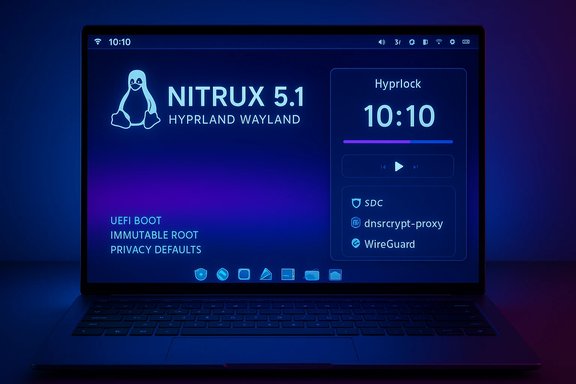
Nitrux continues its Hyprland-first direction with Hyprland 0.52.2, accompanied by:- An updated Waybar using a floating “island” layout for modules.
- Hyprlock updates to display battery and MPRIS media info on lock screen.
- Crystal Dock refinements and smaller gaps for a denser, modern look.
- New keybindings for restarting components and quick screenshots.
Networking, DNS, and privacy defaults
Nitrux 5.1 makes deliberate choices that favor privacy and predictability:- dnscrypt-proxy is the default DNS handler; NetworkManager is configured to ignore DHCP-provided DNS servers and to disable dhcpcd when appropriate. The dispatcher can dynamically change dnscrypt relays.
- Background Wi‑Fi scanning is disabled and the 5 GHz band is preferred for Wi‑Fi interfaces.
- PipeWire receives a tuned low-latency profile.
- Bluetooth (BlueZ) is hardened: resolvable private addresses enabled, “Just Works” silent pairing blocked, and legacy insecure pairing rejected; the headset role and gateway usage are limited to avoid falling back to low-quality codecs.
Potential downsides include compatibility issues on networks that rely on DHCP-provided DNS (corporate networks, captive portals, or certain enterprise VPNs). For home users with older routers, forcing 5 GHz can reduce connectivity range. Nitrux’s defaults are privacy-forward but may require manual adjustments in corner cases.
Security, authentication, and the NIST influence
Nitrux 5.1 revises password policies to align with modern guidance: forced complexity and mandatory rotation have been replaced by emphasis on length and entropy. The project references updated NIST guidance (SP 800‑63 revision 4), which argues against frequent forced rotation and complex composition rules that encourage predictable password patterns.This is a defensible move toward evidence-based authentication policy. However, organizations with legacy compliance requirements or bespoke security policies may need to re-evaluate their stance before deploying these defaults broadly.
Other security hardenings include:
- Hardened PAM configuration.
- BlueZ Bluetooth security improvements.
- ELF signature validation for AppBoxes to reduce execution of non-binaries.
- Restricting or blocking ancient/unused network protocols by default.
Firewall changes: UFW out, firewalld + Cinderward in
Nitrux replaces UFW with firewalld as the default firewall engine and ships a Wayland-friendly GUI called Cinderward developed with MauiKit.- firewalld offers dynamic runtime policy changes, rich zone-based configuration, and better integration with systemd/openRC-managed services.
- Cinderward provides a user-friendly, Wayland-compatible management UI aimed at everyday rule handling.
NX AppHub, Update Tool, and application sandboxing
NX AppHub reaches version 1.0.0 in this release, focusing on improved sandboxing, desktop integration, and safer cleanup of stale integration entries. Notable improvements:- Better bubblewrap and Firejail profile handling and safer quoting.
- ELF signature validation for AppBoxes.
- Robust error handling and sanitized desktop file integration to avoid stale aliases.
- Notification improvements for install/remove events.
- File locking to prevent concurrent updater instances.
- Improved recovery logic, safer rescue modes, and use of Magic SysRq for forced syncs during reboots when necessary.
- Removal of a restore command; emphasis on update/rescue/self-update flows.
Removals and compatibility changes: what’s gone
Nitrux 5.1 continues removing legacy components to reduce surface area and complexity:- Legacy BIOS (non-UEFI) boot support removed — installations now require UEFI.
- Liquorix kernel no longer provided; CachyOS-patched 6.18.2 is the single kernel.
- Older package managers, services, and virtualization-specific drivers that previously caused fragility are deprecated or blocked by HCVL.
- Several older network protocols and Bluetooth legacy behaviors are disabled.
Who should consider switching from Windows 11?
Nitrux 5.1 positions itself as an alternative for specific Windows 11 user profiles:- Users frustrated with Windows 11’s rolling updates, telemetry, or hardware gating.
- Power users who want a lightweight, keyboard-driven Wayland experience with explicit control over scheduling, power, and privacy defaults.
- Laptop users who value battery-health notifications and dynamic power-profile switching.
- Users with modern UEFI hardware, recent GPUs (Intel/AMD with Mesa or NVIDIA open-source support), and at least moderate technical comfort to adjust low-level settings.
- Casual users who expect broad out-of-the-box support for every legacy peripheral.
- Machines that cannot boot in UEFI mode or require old BIOS boot.
- Virtualized desktop deployments where HCVL will likely flag the environment as unsupported.
- Enterprise deployments with strict legacy management tooling and imaging workflows.
Migration and installation guidance
For Windows 11 users evaluating Nitrux 5.1, a careful migration plan mitigates most risks:- Back up everything: full-image backup of Windows and user files.
- Try the live ISO first: use a USB live session to test hardware, graphics, Wi‑Fi, and peripherals. HCVL may block installs; a live session lets you preview behavior without committing.
- Verify UEFI and Secure Boot: Nitrux 5.1 requires UEFI firmware; check Secure Boot handling and any vendor-specific Secure Boot keys.
- Choose the right ISO: one image targets Intel/AMD/Mesa stacks; the other targets systems where the open-source NVIDIA kernel module is preferable.
- Test basic workflows: web browsing, VPN via Wirecloak, audio via PipeWire, and battery behavior.
- Plan dual-boot if needed: since legacy BIOS is unsupported, set up UEFI dual-boot carefully and ensure partitioning is UEFI-compliant.
- Expect a learning curve: Hyprland, Wayland, AppBoxes/NX AppHub, and firewalld require a bit of adaptation compared to Windows paradigms.
Strengths and standout engineering choices
- Opinionated consistency: By validating hardware and narrowing supported environments, Nitrux reduces variability that commonly causes regressions.
- Modern defaults for privacy and audio: dnscrypt-proxy, PipeWire tuning, and stricter Bluetooth defaults are positive moves for privacy and media quality.
- Improved update resilience: The Update Tool’s safeguards lower the risk of concurrent update corruption or mistaken restores.
- Wayland-native UI tools: Cinderward and MauiKit-based utilities show attention to the Wayland ecosystem’s constraints and opportunities.
- Focused performance tuning: SCX scheduler and ADIOS I/O scheduler show that Nitrux intends to squeeze every bit of responsiveness from modern hardware.
Risks, longer-term concerns, and operational caveats
- Narrow support envelope: The distribution’s strict hardware expectations will frustrate users with older or unconventional hardware and limit broader community adoption.
- Maintenance burden of patched kernels: CachyOS patches and specialized I/O schedulers add maintenance overhead and may complicate rapid security backports unless upstreamed or carefully maintained.
- Potential network compatibility headaches: Forcing dnscrypt-proxy and ignoring DHCP DNS can break captive portals or corporate networks that rely on DHCP-provided DNS for local services.
- Wayland ecosystem mismatch: Some legacy applications and X11-only tools may require additional wrappers or XWayland compatibility layers; these can introduce edge-case bugs.
- Learning curve for non-Linux users: Hyprland and the immutable design are powerful but demand a higher level of user engagement than the average Windows desktop.
Final analysis: who wins with Nitrux 5.1?
Nitrux 5.1 is a technically coherent, tightly controlled Linux distribution release that will appeal to a distinct audience: users who value a modern, deterministic desktop on fairly recent hardware and who are comfortable with Wayland and opinionated defaults. For these users, Nitrux promises speed, privacy-forward networking defaults, safer updates, and improved battery and I/O responsiveness.However, this release is unlikely to be a mass-market replacement for Windows 11. Its gating mechanisms, UEFI-only requirement, and removal of legacy fallbacks intentionally exclude a large segment of Windows users who depend on backward compatibility, broad peripheral support, or virtualization-first workflows.
For Windows 11 holdouts looking for a clear alternative: Nitrux 5.1 is a compelling, well-engineered option — but it is a choice that requires realistic expectations and careful testing. The right approach is pragmatic: evaluate on a live USB, verify UEFI and GPU support, and only migrate once core workflows are proven to work on your hardware.
Nitrux 5.1 is not trying to replace Windows 11 for everyone; it wants to be the best possible choice for a clearly defined set of modern users. For that audience, it delivers meaningful, carefully executed improvements — and for those who value predictability and performance over absolute compatibility, it may be exactly the temptation they’ve been waiting for.
Source: BetaNews Nitrux 5.1 isn't trying to replace Windows 11, but it might tempt you anyway
