

Nitrux 5 arrives as a clear break with the past: the project has dropped its KDE/Plasma–based NX Desktop in favor of a Hyprland‑centric Wayland setup, rebuilt its update and immutability tooling, and published two kernel‑flavored ISOs tuned for different GPU stacks — a release that asks Windows 11‑weary users to rethink what a modern desktop can be.
Windows has been the default desktop for the vast majority of mainstream users for decades, but growing complaints about increasing system requirements, intrusive updates, and device lifecycles have driven a steady interest in Linux as a practical alternative. The end‑of‑support timelines (and the costs of extended support) for older Windows releases simply sharpen that conversation.
Nitrux, a long‑running independent distribution that positions itself as an immutable, user‑focused desktop using AppImages and OpenRC, has steadily evolved since its early Ubuntu roots into a Debian‑powered, experimental project that emphasizes a curated application model and a lightweight, highly tweakable visual identity. The Nitrux 5.0.0 release is the most dramatic pivot yet: a new default compositor, refreshed system tooling designed for immutable upgrades, and explicit kernel choices for GPU compatibility.
Note on claims and verification: the technical claims in this article — Hyprland as the default desktop, the availability of Liquorix and CachyOS kernel variants, NX Overlayroot, and the Nitrux Update Tool System — are documented on the Nitrux project pages and covered independently by multiple Linux news outlets; where the evidence differs (for example, occasional descriptions of whether Nitrux is “Ubuntu‑based” versus “Debian‑based”), the official Nitrux website identifies the distribution as built from Debian, so that is the authoritative framing. If you plan to move a critical workflow off Windows, treat Nitrux 5 as a candidate for careful evaluation: test hardware compatibility, validate your applications, and confirm your backup and restore procedures before committing to a full switch.
Source: BetaNews Say goodbye to Microsoft Windows 11 and hello to Nitrux Linux 5
 Background
Windows has been the default desktop for the vast majority of mainstream users for decades, but growing complaints about increasing system requirements, intrusive updates, and device lifecycles have driven a steady interest in Linux as a practical alternative. The end‑of‑support timelines (and the costs of extended support) for older Windows releases simply sharpen that conversation.Nitrux, a long‑running independent distribution that positions itself as an immutable, user‑focused desktop using AppImages and OpenRC, has steadily evolved since its early Ubuntu roots into a Debian‑powered, experimental project that emphasizes a curated application model and a lightweight, highly tweakable visual identity. The Nitrux 5.0.0 release is the most dramatic pivot yet: a new default compositor, refreshed system tooling designed for immutable upgrades, and explicit kernel choices for GPU compatibility.
What changed in Nitrux 5 — the highlights
A new desktop: Hyprland replaces KDE Plasma
- Nitrux 5 ships with Hyprland as the default compositor and workspace, moving away from its long‑standing KDE Plasma / NX Desktop customization layer.
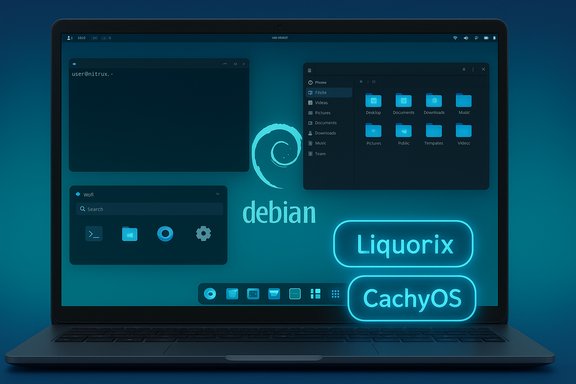
- The Hyprland setup is paired with a small, Wayland‑native toolchain: greetd (login), Waybar (panel), Wlogout (logout menu), Crystal Dock (dock), and Wofi (app launcher). This forms a minimalist, Wayland‑first desktop that favors responsiveness and customizability over the full‑feature Plasma experience.
Two kernel variants: Liquorix and Cachy/CachyOS
- Nitrux 5 offers two ISO variants: one built around the Liquorix kernel (recommended for AMD); another built around CachyOS/Cachy‑flavored kernels (recommended for NVIDIA). The release uses Linux kernel 6.17 as the base. This provides distinct optimizations and driver expectations for different GPU vendors.
Immutability and updates: NX Overlayroot and Nitrux Update Tool System (NUTS)
- The release foregrounds NX Overlayroot, Nitrux’s approach to keeping the root filesystem effectively immutable with an overlay that makes upgrades and rollbacks manageable.
- Complementing immutability, the Nitrux Update Tool System (sometimes referred to as NUTS) automates backups of the root directory (SquashFS), downloads updated ISO artifacts (BitTorrent or other mirrors), applies updates with rsync, and supports rollbacks using locally saved SquashFS snapshots or XFS utilities. This design is intended to enable OTA‑style system updates on an immutable base without manual reinstallation.
UI and usability polish
- Nitrux 5 includes updated MauiKit apps, Index file manager, PipeWire audio stack, Flatpak support, and UI refinements such as a tidier bar, a fresh dock layout, and streamlined notifications and display management utilities tuned for Wayland.
- The distribution is being trimmed of legacy components the team felt were no longer consistent with the new Hyprland direction, making the default image lighter and more coherent.
Upgrade path: fresh install recommended
- The team explicitly recommends a fresh install from the new live media for users who want a stable Nitrux 5 environment. There is no automatic in‑place upgrade path from older Nitrux (3.x) to 5.0; while the Update Tool can aid some scenarios, Nitrux 5 is a major rebase and is treated as a disruptive release.
Why this matters: a practical read on the technical changes
Hyprland and Wayland: speed, tiling, and a smaller runtime
Hyprland is a modern, tiling‑capable Wayland compositor with a strong focus on performance and customization. Its adoption in Nitrux signals a conscious shift away from a heavyweight DE such as KDE Plasma to something more modular:- Responsiveness: Tilings and compositor optimizations can feel snappier — windows are managed more aggressively and animations are typically lighter.
- Customizability: Hyprland configurations are usually text‑driven and targeted at power users; Nitrux’s work aims to give newcomers friendly default settings while keeping advanced knobs available.
- Smaller runtime: A minimal Wayland stack reduces the number of services that run by default, which aligns with Nitrux’s immutable, predictable approach.
Kernel choices: a pragmatic vendor split
By publishing two kernel‑flavored ISOs, Nitrux acknowledges that a one‑size‑fits‑all kernel often produces friction on hybrid GPU systems or with vendor‑specific driver expectations:- Liquorix is tuned for interactive responsiveness and remains popular with AMD and general‑purpose users.
- CachyOS/Cachy kernels are increasingly used for improved responsiveness with certain NVIDIA workflows, and Nitrux recommends the Cachy‑flavored ISO for NVIDIA cards.
Immutability + upgrade tooling = fewer surprises (if you accept the model)
Immutable root filesystems simplify system integrity and rollback plans, but they also change the user’s mental model for upgrades and local tweaks:- Benefits: Easier rollbacks, stronger resistance to accidental or malicious root changes, and a clearer path for reproducible releases.
- Tradeoffs: Replacing common administrative patterns (editing files under / and expecting them to persist) requires education and tooling. Nitrux addresses this with NUTS and overlayroot, but the workflow is still different from a traditional mutable Debian system.
Installation, compatibility, and migration: a realistic playbook
Fresh install strongly recommended
Nitrux 5 is designed as a major rebase. The project recommends installing from the new live image rather than attempting in‑place upgrades from older 3.x installs. If you rely on a current Nitrux machine, plan a full backup and test the installer on non‑critical hardware first.Application ecosystem and how to run Windows apps
Nitrux doubles down on portable packaging and containerization:- AppImage is the primary distribution model for many end‑user desktop applications in Nitrux, keeping packages self‑contained and easy to run.
- Flatpak support is present for sandboxed desktop apps.
- Distrobox is available for containerized workflows, allowing users to run packages from other distributions without breaking the immutable base.
Hardware to watch
- Intel/AMD: Generally well supported with the Liquorix ISO and standard Mesa stacks included.
- NVIDIA: Nitrux’s NVIDIA guidance is explicit: use the Cachy/CachyOS ISO variant for a better experience, but be prepared to manage proprietary driver versions and consider kernel/driver matching if you rely on GPU‑heavy workloads.
Strengths: where Nitrux 5 stands out
- Clear, opinionated direction. Switching to Hyprland and pruning legacy bits signals a sharper identity: lean Wayland desktop + immutable base rather than an attempt to be “KDE‑plus.” That makes the distribution easier to describe and to support.
- Robust update architecture for immutable systems. NX Overlayroot plus the Nitrux Update Tool System provides a sensible rollback story and a replicable upgrade procedure that reduces “bricked by an update” anxiety when handled correctly.
- Two kernel flavors reduce friction. Packaging Liquorix and Cachy options removes a frequent pain point for users who previously had to trial kernels to suit their GPUs.
- Modern Wayland toolset out of the box. For users who want to embrace Wayland and tiling workflows, Nitrux now presents a ready‑to‑use, curated environment that avoids hours of manual compositor wiring.
Risks and tradeoffs: what to be careful about
- Hyprland maturity and edge cases. Hyprland’s pace of development is fast, but the ecosystem is still less mature than the KDE Plasma stack. Expect occasional regressions, especially with exotic GPUs or third‑party driver combinations — community threads already document graphical artifacts in some configurations. If you need rock‑solid, zero‑touch desktop behavior across widely varying hardware, factor troubleshooting time into your migration plan.
- No smooth in‑place upgrade path. The absence of a supported direct upgrade from older Nitrux versions to 5.0 means migrations will require fresh installs and data migrations — a significant cost for people with heavily customized machines. Carefully test restores and consider image backups before proceeding.
- Learning curve for immutability. Users accustomed to editing root files or installing system packages in the traditional way will need to adapt to overlayroot semantics and the NUTS workflow. That’s a one‑time investment, but it’s real.
- App compatibility gaps. Some Windows‑centric workflows and proprietary drivers or vendor utilities won’t be available natively. This is a consideration for creative and enterprise users dependent on vendor‑supplied, Windows‑only software.
A pragmatic migration checklist (for Windows users thinking about Nitrux 5)
- Backup: Create a full disk image (or at minimum backup /home and important configs).
- Test on spare hardware or a VM: Boot the live ISO and validate Wi‑Fi, display, GPU acceleration, and peripherals.
- Choose the ISO carefully: Liquorix ISO for AMD/Intel setups; Cachy/CachyOS ISO for NVIDIA rigs.
- Learn the update model: Read the Nitrux Update Tool System docs and practice creating and restoring a SquashFS backup.
- Prepare app migration: Identify Windows apps that must be replaced, retired, or run in a VM/proton/wine/Distrobox container.
- Plan rollback: Keep the live media and a tested restore plan until you’re confident in daily workflows.
Conclusion: who should try Nitrux 5 — and who should wait
Nitrux 5 will be compelling to users who:- Want a lightweight, modern Wayland desktop that’s intentionally opinionated.
- Appreciate immutability and the safety of snapshot/rollback‑style updates.
- Are comfortable troubleshooting tricky GPU/driver issues and learning a new desktop model.
- Professionals dependent on Windows‑only software or vendor drivers.
- People who need a guaranteed zero‑downtime, corporate‑grade desktop without any experimentation.
- Those uncomfortable with a fresh‑install migration or with significant manual configuration.
Note on claims and verification: the technical claims in this article — Hyprland as the default desktop, the availability of Liquorix and CachyOS kernel variants, NX Overlayroot, and the Nitrux Update Tool System — are documented on the Nitrux project pages and covered independently by multiple Linux news outlets; where the evidence differs (for example, occasional descriptions of whether Nitrux is “Ubuntu‑based” versus “Debian‑based”), the official Nitrux website identifies the distribution as built from Debian, so that is the authoritative framing. If you plan to move a critical workflow off Windows, treat Nitrux 5 as a candidate for careful evaluation: test hardware compatibility, validate your applications, and confirm your backup and restore procedures before committing to a full switch.
Source: BetaNews Say goodbye to Microsoft Windows 11 and hello to Nitrux Linux 5
