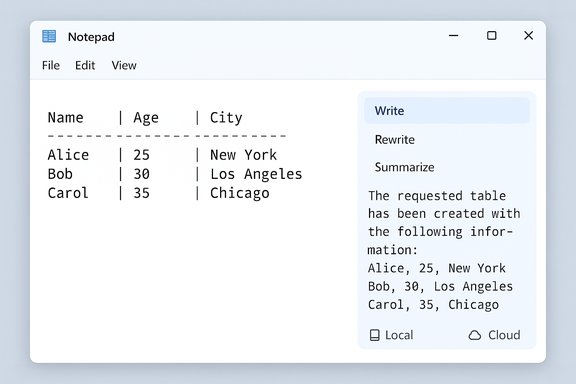
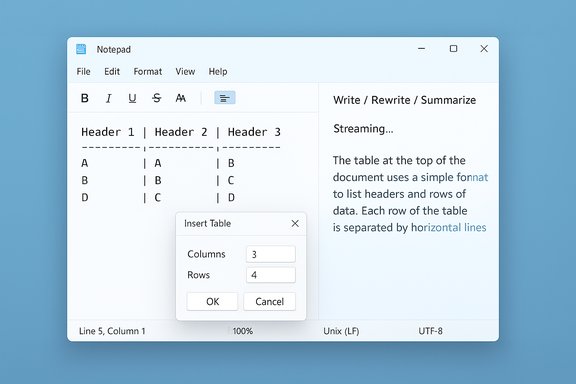
Microsoft has quietly pushed another round of changes to Notepad on Windows 11 — and this time the little text editor has gained two features that explain why some users now worry it’s drifting away from its minimalist roots: native table support and streaming AI writing tools. The changes are rolling to Windows Insiders in the Canary and Dev channels as part of Notepad version 11.2510.6.0, and they pair a deceptively useful formatting convenience with an expansion of on‑device and cloud AI behaviors that reshape how the app is used and how it performs.
Key takeaways:
Notepad’s path forward will be determined by user feedback and telemetry. Microsoft is soliciting feedback through the Feedback Hub for Insiders; expect more iteration, toggles to control AI and formatting behavior, and likely further segmentation of local vs cloud capabilities as the Copilot ecosystem matures. The fundamental tension remains: evolving a decades‑old, beloved utility to meet modern expectations without losing the things that made it valuable in the first place.
Source: TechRadar https://www.techradar.com/computing...-bolstered-ai-powers-and-not-everyones-happy/
 Background
Notepad’s long evolution from tiny utility to capable editor
Notepad began life as the quintessential lightweight plain‑text editor: tiny executable, near‑instant open time, and no bells or whistles. Over recent Windows 11 development cycles, Microsoft has steadily added features to the inbox apps — and Notepad has been no exception. What was once single‑purpose has been layered with formatting toggles, Markdown support, and now a visual table inserter and AI capabilities that compose, rewrite, and summarize text. That progression is deliberate: Microsoft is consolidating small, formerly separate features into modernized inbox apps to cover more use cases without shipping separate niche tools. The recent Insider notes call the additions “expanded formatting support with tables” and “streaming results for AI text features” for Notepad.Why this update matters now
There are three practical reasons this particular update matters:- It changes Notepad’s role in the everyday workflow: users who previously reserved Notepad for quick plain text edits now find a small but meaningful set of structured‑text features inside the same app.
- It tightens Notepad to Microsoft’s broader Copilot/AI story. Some features run locally on Copilot+ hardware, while others still rely on cloud models, subscription credits, and a Microsoft account.
- It follows the removal of WordPad from the OS, which removes an intermediate rich‑text tool and amplifies the significance of any capabilities added to Notepad. The removal of WordPad from Windows 11 24H2 has left Notepad as the nearest built‑in option for many scenarios that used to fall between Notepad and Word.
What’s new: tables in Notepad
How tables work in the new Notepad
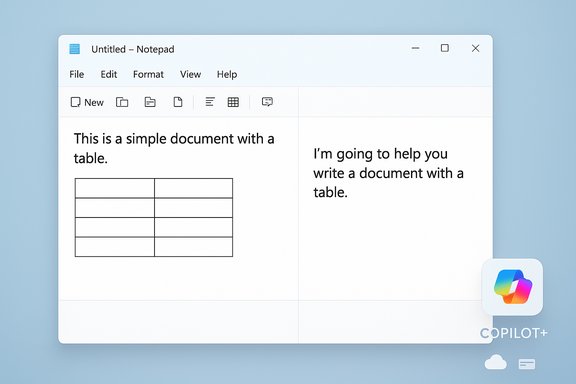
The new Notepad adds a Table option in the formatting toolbar and allows table insertion via a simple visual grid selector. You choose width/height visually, insert the block into the document, and then use right‑click context commands or the toolbar to add or remove rows and columns. When Notepad’s formatting is disabled, the table persists as Markdown (pipe‑separated rows) so the content remains portable and human‑readable. This is explicitly positioned as lightweight table formatting — a convenience for short structured notes rather than a spreadsheet replacement.- Key capabilities:
- Visual grid picker for quick insertion.
- Right‑click and toolbar editing to add/remove rows and columns.
- Markdown fallback when formatting is turned off.
Strengths and immediate use cases
Tables in Notepad are an ideal fit for short tasks: jotting down comparison grids, checklists with columns, small logs, or embedding a simple two‑column key/value list. The feature is fast to use and keeps the file readable as plain text if formatting is disabled, which preserves compatibility with tools and scripts that parse Markdown or plain text.Limitations to keep in mind
This is not a spreadsheet engine. There are no formulas, sorting, filtering, or data‑type awareness. Expect simple layout and structure — excellent for readable notes, inadequate for numeric analysis. The feature intentionally targets quick structure, not data manipulation.What’s new: streaming AI features
Write, Rewrite, and Summarize — and what “streaming results” means
Notepad’s AI trio — Write, Rewrite, and Summarize — now produce streaming results in the preview pane. Streaming makes partial output appear progressively rather than waiting for a full response, letting users start reading or editing the AI output sooner. That change affects perceived responsiveness and workflow: you can iterate on a draft while the model continues to produce content. Microsoft explicitly calls out streaming support for these tools in the latest Insider release notes.A key caveat: Rewrite streaming is currently gated to Copilot+ local processing
The most consequential constraint is that streaming for Rewrite is limited — for now — to results generated locally on Copilot+ PCs. In practical terms that means you only get streamed rewrite previews on hardware certified to run local on‑device models (machines with an NPU and Copilot+ certification). Other AI behaviors may fall back to cloud processing and will not stream in the same way. This creates a split experience between devices that can run local models and those that cannot.Account and subscription gating
Microsoft’s release notes and accompanying coverage clarify that use of Write/Rewrite/Summarize in Notepad requires signing in with a Microsoft account. Where cloud models are used, the request may consume AI credits associated with Microsoft 365 subscriptions or free monthly credit allotments; Copilot+ local inference can, in certain cases, allow local operation without subscription credits. The hybrid model — local when possible, cloud when desired — is flexible but also introduces complexity and potential billing considerations for heavier users.Technical context: Copilot+ hardware and the local AI path
What Copilot+ means in practice
Copilot+ PCs are a hardware class Microsoft certifies to support on‑device AI processing. Typical Copilot+ devices ship with a dedicated NPU (Neural Processing Unit) capable of many trillions of operations per second (TOPS). Examples from current Copilot+ devices show NPUs in the 40 to 45 TOPS class on many modern Ultrabook and Arm‑based SKUs, and OEM device pages list the NPU capability as a selling point. In short: local Notepad AI is feasible on new Copilot+ hardware, but older or uncertified machines will rely on cloud inference.Real‑world implications
- Performance: local inference yields lower latency and reduces network dependency.
- Privacy: on‑device models mean selected text need not be uploaded to Microsoft’s cloud.
- Battery and thermals: running models locally has a nontrivial energy and thermal footprint; laptop testing should be used to validate impact on battery life and heat.
- Parity: local models are often smaller or intentionally conservative in capability, so cloud models may still be superior for complex tasks.
Why some users are unhappy — and where the complaints have merit
The “bloat” argument
For decades, Notepad served one clear purpose: ultra‑lightweight editing. The addition of visual tables and AI features — especially streaming AI integration and account gating — has provoked vocal pushback from users who prefer a tiny, fast editor with few dependencies. Critics argue:- Feature creep makes the app load slower and increases the surface area for bugs.
- Reliance on Microsoft accounts and cloud credits is at odds with a simple local text editor model.
- Notepad risks becoming a “jack of all trades, master of none” compared with specialized editors (for example, code editors, markdown apps, or spreadsheets).
The privacy and control concerns
The hybrid local/cloud AI model introduces new questions:- What data is sent to the cloud if a user selects cloud models?
- How are AI credits metered and displayed to end users?
- Does the streamed preview include any telemetry that could reveal sensitive context?
Usability fragmentation
The Copilot+ gating produces fragmentation: two users on the same OS and app version can have dramatically different experiences because one device streams rewrite previews locally while another waits for cloud responses. That inconsistency makes it harder for help desks, documentation writers, and mainstream tutorials to describe a single Notepad experience.Strengths and clear benefits
Practical usefulness for quick tasks
Despite the controversy, these are genuinely useful additions for many people. Tables address a persistent pain point: capturing small structured bits of data without opening a heavier app. Streaming AI gives a more conversational drafting experience and reduces wait time when generating text, which helps ideation and quick edits.Local AI advantages
Where Copilot+ hardware is available, local AI can offer:- Faster responses and interactive previews with lower latency.
- Reduced cloud usage and potential cost savings if some workflows remain local.
- Offline capability for basic summarization and rewriting.
Risks, trade‑offs, and coordination costs
Performance and resource trade‑offs
Adding features increases executable size, memory footprint, and potential background services. The cost is not merely storage; it can affect start time, responsiveness on low‑end devices, and system resource competition. Organizations that maintain minimal builds or locked‑down images must weigh whether the updated Notepad fits their baseline.Licensing and subscription complexity
Cloud‑backed capabilities draw from Microsoft’s AI credit model. That means:- Some AI operations may consume credits from a Microsoft 365 subscription or a free allotment.
- Users may need to sign into Microsoft accounts to unlock full cloud behavior.
- Admins must understand how credits are consumed across devices and accounts.
Fragmented experience across device fleets
The Copilot+ or non‑Copilot+ divide will make consistent training, troubleshooting, and documentation more difficult. IT staff will need to test features across representative hardware to validate performance, power draw, and functional parity.Practical guidance for users and IT administrators
For individual users
- If you love Notepad for its speed and simplicity: turn off new formatting/AI features in Notepad’s settings or continue using a lean alternative (third‑party minimal editors are plentiful).
- If you use Copilot+ hardware and want offline summarization: test the local model performance on your device and watch for battery/thermal impact.
- If you rely on strict privacy constraints: assume cloud models may send content to Microsoft unless you explicitly choose local inference and confirm the device qualifies.
For IT administrators and decision makers
- Inventory devices for Copilot+ certification and NPUs.
- Evaluate how AI credits and Microsoft account requirements map to corporate Microsoft 365 licensing.
- Update acceptable‑use and data‑handling policies before enabling cloud AI features in business environments.
- Pilot the Notepad update on a small hardware matrix to measure thermal, battery, and responsiveness implications.
The bigger picture: Notepad, WordPad’s demise, and Microsoft’s inbox strategy
Microsoft’s product consolidation over the last few years — culminating in the removal of WordPad from Windows 11 24H2 — leaves Notepad as the default lightweight editor with an expanded feature set. Industry coverage and documentation confirmed WordPad’s removal and positioning of Notepad and Word as Microsoft’s recommended in‑box options for plain text and rich documents respectively. The absence of WordPad creates a vacuum that Notepad now partly fills, intentionally or not. This is consistent with a broader trend: inbox apps are being reborn as multipurpose utilities that can do more without forcing users into the full Office ecosystem. The trade‑off is that the simplicity of older utilities erodes as more capabilities — particularly AI — are added.Final analysis: balancing utility, minimalism, and platform strategy
Notepad’s latest update is a small but symbolic moment for Windows. On one hand, native tables and faster AI previews make Notepad more useful for the modern user who expects quick structure and instant drafting help. On the other hand, the additions accelerate a shift away from the tiny, no‑friction editor many users loved.Key takeaways:
- Utility wins: For many users, tables and streaming AI are practical and welcome. They reduce friction for common note‑taking and small writing tasks.
- Fragmentation and complexity: The Copilot+ gating, Microsoft account requirements, and cloud credit model introduce fragmentation and administrative overhead.
- Performance and privacy trade‑offs: Local inference mitigates some privacy concerns and latency, but it raises questions about battery, thermal, and model parity with cloud offerings.
- Product strategy matters: The removal of WordPad magnifies Notepad’s role. Microsoft is steering the inbox apps toward overlapping territories that used to be handled by multiple tools.
Notepad’s path forward will be determined by user feedback and telemetry. Microsoft is soliciting feedback through the Feedback Hub for Insiders; expect more iteration, toggles to control AI and formatting behavior, and likely further segmentation of local vs cloud capabilities as the Copilot ecosystem matures. The fundamental tension remains: evolving a decades‑old, beloved utility to meet modern expectations without losing the things that made it valuable in the first place.
Source: TechRadar https://www.techradar.com/computing...-bolstered-ai-powers-and-not-everyones-happy/