Notepad Gains Tables and Streaming AI in Windows 11 Insider

  • Thread Author
Microsoft has quietly pushed another round of changes to Notepad on Windows 11 — and this time the little text editor has gained two features that explain why some users now worry it’s drifting away from its minimalist roots: native table support and streaming AI writing tools. The changes are rolling to Windows Insiders in the Canary and Dev channels as part of Notepad version 11.2510.6.0, and they pair a deceptively useful formatting convenience with an expansion of on‑device and cloud AI behaviors that reshape how the app is used and how it performs.

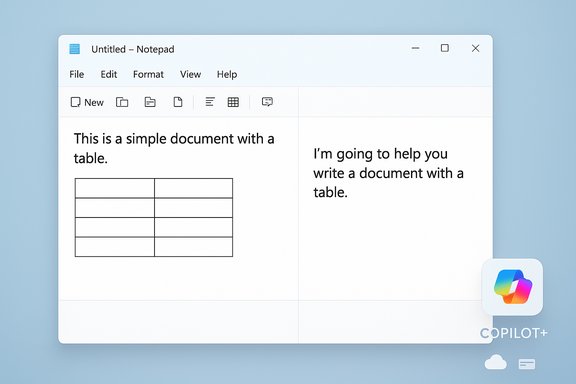
A Notepad window split into two panels: left text with a table, right text.Background​

Notepad’s long evolution from tiny utility to capable editor​

Notepad began life as the quintessential lightweight plain‑text editor: tiny executable, near‑instant open time, and no bells or whistles. Over recent Windows 11 development cycles, Microsoft has steadily added features to the inbox apps — and Notepad has been no exception. What was once single‑purpose has been layered with formatting toggles, Markdown support, and now a visual table inserter and AI capabilities that compose, rewrite, and summarize text. That progression is deliberate: Microsoft is consolidating small, formerly separate features into modernized inbox apps to cover more use cases without shipping separate niche tools. The recent Insider notes call the additions “expanded formatting support with tables” and “streaming results for AI text features” for Notepad.

Why this update matters now​

There are three practical reasons this particular update matters:
  • It changes Notepad’s role in the everyday workflow: users who previously reserved Notepad for quick plain text edits now find a small but meaningful set of structured‑text features inside the same app.
  • It tightens Notepad to Microsoft’s broader Copilot/AI story. Some features run locally on Copilot+ hardware, while others still rely on cloud models, subscription credits, and a Microsoft account.
  • It follows the removal of WordPad from the OS, which removes an intermediate rich‑text tool and amplifies the significance of any capabilities added to Notepad. The removal of WordPad from Windows 11 24H2 has left Notepad as the nearest built‑in option for many scenarios that used to fall between Notepad and Word.

What’s new: tables in Notepad​

How tables work in the new Notepad​

The new Notepad adds a Table option in the formatting toolbar and allows table insertion via a simple visual grid selector. You choose width/height visually, insert the block into the document, and then use right‑click context commands or the toolbar to add or remove rows and columns. When Notepad’s formatting is disabled, the table persists as Markdown (pipe‑separated rows) so the content remains portable and human‑readable. This is explicitly positioned as lightweight table formatting — a convenience for short structured notes rather than a spreadsheet replacement.
  • Key capabilities:
  • Visual grid picker for quick insertion.
  • Right‑click and toolbar editing to add/remove rows and columns.
  • Markdown fallback when formatting is turned off.

Strengths and immediate use cases​

Tables in Notepad are an ideal fit for short tasks: jotting down comparison grids, checklists with columns, small logs, or embedding a simple two‑column key/value list. The feature is fast to use and keeps the file readable as plain text if formatting is disabled, which preserves compatibility with tools and scripts that parse Markdown or plain text.

Limitations to keep in mind​

This is not a spreadsheet engine. There are no formulas, sorting, filtering, or data‑type awareness. Expect simple layout and structure — excellent for readable notes, inadequate for numeric analysis. The feature intentionally targets quick structure, not data manipulation.

What’s new: streaming AI features​

Write, Rewrite, and Summarize — and what “streaming results” means​

Notepad’s AI trio — Write, Rewrite, and Summarize — now produce streaming results in the preview pane. Streaming makes partial output appear progressively rather than waiting for a full response, letting users start reading or editing the AI output sooner. That change affects perceived responsiveness and workflow: you can iterate on a draft while the model continues to produce content. Microsoft explicitly calls out streaming support for these tools in the latest Insider release notes.

A key caveat: Rewrite streaming is currently gated to Copilot+ local processing​

The most consequential constraint is that streaming for Rewrite is limited — for now — to results generated locally on Copilot+ PCs. In practical terms that means you only get streamed rewrite previews on hardware certified to run local on‑device models (machines with an NPU and Copilot+ certification). Other AI behaviors may fall back to cloud processing and will not stream in the same way. This creates a split experience between devices that can run local models and those that cannot.

Account and subscription gating​

Microsoft’s release notes and accompanying coverage clarify that use of Write/Rewrite/Summarize in Notepad requires signing in with a Microsoft account. Where cloud models are used, the request may consume AI credits associated with Microsoft 365 subscriptions or free monthly credit allotments; Copilot+ local inference can, in certain cases, allow local operation without subscription credits. The hybrid model — local when possible, cloud when desired — is flexible but also introduces complexity and potential billing considerations for heavier users.

Technical context: Copilot+ hardware and the local AI path​

What Copilot+ means in practice​

Copilot+ PCs are a hardware class Microsoft certifies to support on‑device AI processing. Typical Copilot+ devices ship with a dedicated NPU (Neural Processing Unit) capable of many trillions of operations per second (TOPS). Examples from current Copilot+ devices show NPUs in the 40 to 45 TOPS class on many modern Ultrabook and Arm‑based SKUs, and OEM device pages list the NPU capability as a selling point. In short: local Notepad AI is feasible on new Copilot+ hardware, but older or uncertified machines will rely on cloud inference.

Real‑world implications​

  • Performance: local inference yields lower latency and reduces network dependency.
  • Privacy: on‑device models mean selected text need not be uploaded to Microsoft’s cloud.
  • Battery and thermals: running models locally has a nontrivial energy and thermal footprint; laptop testing should be used to validate impact on battery life and heat.
  • Parity: local models are often smaller or intentionally conservative in capability, so cloud models may still be superior for complex tasks.

Why some users are unhappy — and where the complaints have merit​

The “bloat” argument​

For decades, Notepad served one clear purpose: ultra‑lightweight editing. The addition of visual tables and AI features — especially streaming AI integration and account gating — has provoked vocal pushback from users who prefer a tiny, fast editor with few dependencies. Critics argue:
  • Feature creep makes the app load slower and increases the surface area for bugs.
  • Reliance on Microsoft accounts and cloud credits is at odds with a simple local text editor model.
  • Notepad risks becoming a “jack of all trades, master of none” compared with specialized editors (for example, code editors, markdown apps, or spreadsheets).
Those critiques reflect a real tension between function expansion and the original Notepad ethos. The removal of WordPad intensifies the issue because Microsoft removed an intermediate option and seems to be repurposing Notepad to cover more ground.

The privacy and control concerns​

The hybrid local/cloud AI model introduces new questions:
  • What data is sent to the cloud if a user selects cloud models?
  • How are AI credits metered and displayed to end users?
  • Does the streamed preview include any telemetry that could reveal sensitive context?
Microsoft documents the general account and credit requirements, but granular telemetry and model‑behavior details remain opaque to end users and administrators. For enterprises, the mixed availability of local inference (Copilot+ only) complicates governance and compliance planning.

Usability fragmentation​

The Copilot+ gating produces fragmentation: two users on the same OS and app version can have dramatically different experiences because one device streams rewrite previews locally while another waits for cloud responses. That inconsistency makes it harder for help desks, documentation writers, and mainstream tutorials to describe a single Notepad experience.

Strengths and clear benefits​

Practical usefulness for quick tasks​

Despite the controversy, these are genuinely useful additions for many people. Tables address a persistent pain point: capturing small structured bits of data without opening a heavier app. Streaming AI gives a more conversational drafting experience and reduces wait time when generating text, which helps ideation and quick edits.

Local AI advantages​

Where Copilot+ hardware is available, local AI can offer:
  • Faster responses and interactive previews with lower latency.
  • Reduced cloud usage and potential cost savings if some workflows remain local.
  • Offline capability for basic summarization and rewriting.
Those are tangible benefits for journalists, knowledge workers, and privacy‑conscious users who own certified hardware.

Risks, trade‑offs, and coordination costs​

Performance and resource trade‑offs​

Adding features increases executable size, memory footprint, and potential background services. The cost is not merely storage; it can affect start time, responsiveness on low‑end devices, and system resource competition. Organizations that maintain minimal builds or locked‑down images must weigh whether the updated Notepad fits their baseline.

Licensing and subscription complexity​

Cloud‑backed capabilities draw from Microsoft’s AI credit model. That means:
  • Some AI operations may consume credits from a Microsoft 365 subscription or a free allotment.
  • Users may need to sign into Microsoft accounts to unlock full cloud behavior.
  • Admins must understand how credits are consumed across devices and accounts.
For teams with tight budgets or for users who intentionally avoid vendor cloud services, that creates administrative and financial overhead.

Fragmented experience across device fleets​

The Copilot+ or non‑Copilot+ divide will make consistent training, troubleshooting, and documentation more difficult. IT staff will need to test features across representative hardware to validate performance, power draw, and functional parity.

Practical guidance for users and IT administrators​

For individual users​

  • If you love Notepad for its speed and simplicity: turn off new formatting/AI features in Notepad’s settings or continue using a lean alternative (third‑party minimal editors are plentiful).
  • If you use Copilot+ hardware and want offline summarization: test the local model performance on your device and watch for battery/thermal impact.
  • If you rely on strict privacy constraints: assume cloud models may send content to Microsoft unless you explicitly choose local inference and confirm the device qualifies.

For IT administrators and decision makers​

  • Inventory devices for Copilot+ certification and NPUs.
  • Evaluate how AI credits and Microsoft account requirements map to corporate Microsoft 365 licensing.
  • Update acceptable‑use and data‑handling policies before enabling cloud AI features in business environments.
  • Pilot the Notepad update on a small hardware matrix to measure thermal, battery, and responsiveness implications.

The bigger picture: Notepad, WordPad’s demise, and Microsoft’s inbox strategy​

Microsoft’s product consolidation over the last few years — culminating in the removal of WordPad from Windows 11 24H2 — leaves Notepad as the default lightweight editor with an expanded feature set. Industry coverage and documentation confirmed WordPad’s removal and positioning of Notepad and Word as Microsoft’s recommended in‑box options for plain text and rich documents respectively. The absence of WordPad creates a vacuum that Notepad now partly fills, intentionally or not. This is consistent with a broader trend: inbox apps are being reborn as multipurpose utilities that can do more without forcing users into the full Office ecosystem. The trade‑off is that the simplicity of older utilities erodes as more capabilities — particularly AI — are added.

Final analysis: balancing utility, minimalism, and platform strategy​

Notepad’s latest update is a small but symbolic moment for Windows. On one hand, native tables and faster AI previews make Notepad more useful for the modern user who expects quick structure and instant drafting help. On the other hand, the additions accelerate a shift away from the tiny, no‑friction editor many users loved.
Key takeaways:
  • Utility wins: For many users, tables and streaming AI are practical and welcome. They reduce friction for common note‑taking and small writing tasks.
  • Fragmentation and complexity: The Copilot+ gating, Microsoft account requirements, and cloud credit model introduce fragmentation and administrative overhead.
  • Performance and privacy trade‑offs: Local inference mitigates some privacy concerns and latency, but it raises questions about battery, thermal, and model parity with cloud offerings.
  • Product strategy matters: The removal of WordPad magnifies Notepad’s role. Microsoft is steering the inbox apps toward overlapping territories that used to be handled by multiple tools.
If the goal is to make Windows 11 better at casual creation and capture, this update advances that goal. If the goal is to preserve a tiny, universally fast text editor with no external dependencies, users and administrators will need to take explicit steps to preserve that experience — whether by disabling features, retaining older Notepad builds, or using alternative lightweight editors.

Notepad’s path forward will be determined by user feedback and telemetry. Microsoft is soliciting feedback through the Feedback Hub for Insiders; expect more iteration, toggles to control AI and formatting behavior, and likely further segmentation of local vs cloud capabilities as the Copilot ecosystem matures. The fundamental tension remains: evolving a decades‑old, beloved utility to meet modern expectations without losing the things that made it valuable in the first place.
Source: TechRadar https://www.techradar.com/computing...-bolstered-ai-powers-and-not-everyones-happy/
 

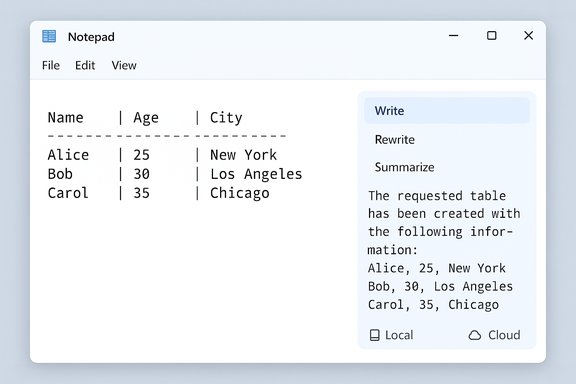
Notepad window showing a Name-Age-City table: Alice 25 New York; Bob 30 Los Angeles; Carol 35 Chicago.
Microsoft has quietly expanded Notepad into a more structured, AI-aware writing surface: the latest Insider build of Notepad for Windows 11 adds native support for tables and introduces streaming AI responses for the app’s Write, Rewrite, and Summarize tools — changes that shift Notepad away from being a strictly minimal scratchpad and toward a lightweight, Markdown-first editor with on-device AI capabilities.

Background / Overview​

Notepad’s evolution over the last year has been steady: what began as a plain-text utility now supports lightweight formatting, Markdown rendering, and AI-assisted text tools. The newest update, delivered as Notepad version 11.2510.6.0, is being distributed to Windows Insiders in the Canary and Dev channels as Microsoft tests the features before broader rollout. The company’s announcement identifies two headline features in this flight — table support inside the formatting layer and streaming generation for the app’s AI text commands. These additions are intentionally modest in scope but notable in signal: Microsoft is continuing to fold Markdown-first formatting and Copilot-backed AI primitives into Windows’ inbox apps. The table feature is implemented on top of Notepad’s formatting layer rather than by embedding a fully featured spreadsheet engine, while streaming AI behavior is aimed at reducing perceived latency and making AI interactions feel more immediate.

What’s new: Tables in Notepad​

How tables work (two complementary workflows)​

Notepad’s table support is built around a Markdown-first approach: the app renders and manipulates pipe-delimited Markdown table markup while exposing a visual editor. Users can create tables in two ways:
  • Use the new Table button on the formatting toolbar to visually insert a table and choose dimensions.
  • Type standard Markdown table syntax (pipe-separated columns with a header separator) and let Notepad render that markup as an editable table in formatted view.
When a table is present, users can add or remove rows and columns through the right-click context menu or the Table menu in the toolbar. Importantly, Notepad preserves the underlying Markdown text; toggling formatting off reveals the original pipe-delimited markup, which keeps files portable and repository-friendly.

Intended use and limitations​

The implementation is a convenience for structured notes, not a replacement for Excel or Google Sheets. Notepad’s tables lack spreadsheet features such as:
  • formulas and functions,
  • sorting and filtering,
  • pivoting or aggregation,
  • merged cells or advanced cell types.
Microsoft’s design deliberately favors readability and portability rather than numerical analysis or heavy data manipulation. Treat these tables as fast, human-readable grids for checklists, short comparison matrices, configuration snippets, or README-style documentation.

What this means for everyday workflows​

  • Quick capture: Create small lookup tables, configuration mappings, and comparison grids without launching a larger editor.
  • Documentation: Inline tables in notes and README files remain plain-text friendly for source control.
  • Minimal context switching: Save the friction of opening Word or Excel for trivial structured data.

What’s new: Streaming AI responses in Notepad​

The change in behavior​

Previously Notepad’s AI tools — Write, Rewrite, and Summarize — waited until the full result was produced before showing output. The new update shifts to streaming responses, where partial output appears incrementally (word- or token-by-token) as the model generates text. This reduces perceived latency and gives users an early preview that they can react to or iterate on faster.

Local vs cloud execution: Copilot+ distinction​

A key nuance is how streaming is delivered depending on execution context:
  1. Rewrite streaming is currently limited to local inference on Copilot+ PCs (systems certified for on-device Copilot capabilities). On such hardware, the rewriting operation can stream as the on-device model generates text, improving responsiveness and keeping data local to the device when local execution is used.
  2. Write and Summarize may stream from the cloud when the cloud endpoint supports incremental output, but their behavior still depends on network latency and server-side handling. In other words, streaming for cloud-generated responses is conditional on the cloud path and can vary by region, infrastructure, and service state.
All AI features in Notepad require the user to be signed in with a Microsoft account.

UX and safety implications of streaming​

Streaming improves responsiveness, but it also introduces a different interaction surface:
  • Viewers see partial output that may change before the model finishes, which can be confusing if early tokens are later revised or removed.
  • Streaming reveals early model behavior — including mistakes, biases, or hallucinations — before final moderation or post-processing completes.
  • For sensitive text, local generation (on Copilot+ hardware) can reduce the risk of sending content to cloud endpoints, but it is not an absolute privacy guarantee — model provisioning, telemetry, and updates may still involve network activity.

Verification of claims and cross-checking​

Key claims in Microsoft’s announcement are confirmed by multiple independent outlets and community reporting, including both Microsoft’s official Windows Insider Blog and independent tech publications. The following claims are corroborated across at least two independent sources:
  • The Notepad update is packaged as version 11.2510.6.0 and is rolling out to Insiders in Canary and Dev channels.
  • Tables can be inserted via a toolbar Table button or typed as Markdown, and are editable via context and toolbar menus; the underlying data remains Markdown markup when formatting is toggled off.
  • Streaming responses are enabled for Write, Rewrite, and Summarize; streaming for Rewrite is limited to on-device generation on Copilot+ PCs. All AI features require signing into a Microsoft account.
Where claims are ambiguous or not explicitly specified by Microsoft — for example, a firm public release date for all users or exact per-device performance trade-offs — those items remain unverified and should be treated cautiously until Microsoft publishes a formal commercial rollout schedule or technical guidance. Public reporting suggests a staged rollout but does not provide a guaranteed calendar for non-Insider channels.

Practical guidance — how to use the new features​

  1. Ensure you are running a Windows Insider Preview build on the Dev or Canary channel and update Notepad to see the new features.
  2. To insert a table visually: enable lightweight formatting and click the Table icon on the formatting toolbar; drag/select an initial grid size or enter rows/columns as prompted.
  3. To author in Markdown: type pipe-delimited table markup (|) and a header separator (---); toggle formatting on to see the rendered table.
  4. Edit tables inline using the right-click context menu to add or remove rows and columns, or use the Table menu on the toolbar.
  5. For AI tasks: select text (for Rewrite or Summarize) or use the Write command; expect partial streaming output to appear as the model generates. If you’re on a Copilot+ PC, Rewrite streaming may be local and lower-latency. Sign in with a Microsoft account to enable these features.

Security, privacy, and enterprise considerations​

Data governance and DLP implications​

The move to embed AI into Notepad — and to support local model execution on Copilot+ hardware — creates practical governance questions for IT teams:
  • Data loss prevention (DLP) policies must account for new local and cloud AI execution paths. If an enterprise relies on cloud DLP rules, on-device inference could create a blind spot unless administrators explicitly control or restrict local AI features.
  • Telemetry and model updates: even on-device models typically require occasional provisioning or updates from Microsoft; organizations should evaluate how those updates are delivered and whether update telemetry is acceptable within their policies.

Privacy tradeoffs: local vs cloud​

  • Local inference (Copilot+ PCs) reduces the chance that raw text leaves the device and can be a meaningful privacy advantage for drafts and sensitive notes, but it is not a full privacy panacea.
  • Cloud-based processing may still be used for more capable models or where local hardware is not available; cloud paths have the usual cloud privacy and compliance considerations.

Recommendations for administrators​

  • Audit which devices are Copilot+ certified and consider flighting Notepad’s AI features in a controlled pilot before broad deployment.
  • Use group policies or MDM controls (when Microsoft provides them) to restrict AI features for sensitive user groups until DLP controls are validated.
  • Update internal guidance and user training to include the behavior of streaming output (partial results may change), and remind users not to rely on raw AI output without verification.

Community reaction and the “Notepad identity” debate​

The changes have provoked a predictable division of opinion. Longtime users praise the convenience of small structured data and faster AI-assisted editing, while purists and privacy-conscious users worry about feature bloat and the steady expansion of AI into historically minimal tools. A few persistent themes in community feedback:
  • Nostalgia for the original, distraction-free Notepad is strong; many critics view the additions as unnecessary complexity for a tool that succeeded precisely because it was simple.
  • Supporters point to Markdown compatibility and the preservation of plain-text markup, noting that portability and version-control friendliness remain intact.
  • Concerns about trust and telemetry persist, especially when AI features require account sign-in and potentially cloud processing.
Those debates are not purely rhetorical: they will influence how Microsoft designs future inbox-app updates and how IT organizations choose to adopt or block feature flights.

Technical trade-offs and performance considerations​

  • On-device inference can improve latency and privacy, but it consumes local resources (CPU, GPU, NPU), which could impact battery life and thermals on portable devices. Organizations should measure thermal and battery behavior in pilot fleets before widespread adoption.
  • The Markdown-first table rendering is light on memory and compatible with version control, but users should not expect robust performance with very large tables; Notepad is not optimized for thousands of rows and cells.
  • Streaming from cloud endpoints depends on server support for incremental delivery; regional performance and network conditions will affect how quickly partial tokens are presented.

Where Microsoft could improve the experience​

  • Provide granular enterprise controls for AI behaviors (local vs cloud processing), with clear options for admins to allow, disallow, or audit local inference on Copilot+ hardware.
  • Publish concrete guidance on table size limits and performance characteristics so users understand the practical envelope of the feature.
  • Add explicit UI affordances that indicate streamed content is partial and may be revised, reducing confusion when partial outputs are displayed mid-generation.
  • Clarify subscription or licensing implications for higher-capability cloud models in Notepad workflows; ambiguity about gating or premium tiers has caused confusion in other app integrations.

Conclusion​

Notepad’s new table support and streaming AI responses mark another step in Microsoft’s strategy to embed lightweight formatting and AI assistance into everyday Windows utilities. The changes are pragmatic and well-scoped: tables are a Markdown-first convenience that preserve plain-text portability, and streaming reduces perceived AI latency while introducing new UX and safety considerations. The update is rolling out first to Windows Insiders (Canary and Dev channels) as Notepad 11.2510.6.0, with broader availability to follow on a staged basis that Microsoft has not tied to a fixed calendar. For individual users, the new features bring useful shortcuts for short structured data and faster AI-assisted editing. For enterprises and privacy-conscious users, the changes raise important questions about DLP, telemetry, and the balance between cloud and on-device processing. Organizations should pilot these features, validate their governance posture, and prepare policies that reflect the app’s evolving capabilities.
Ultimately, this update highlights a broader trend: even the simplest tools are becoming nodes in a hybrid AI ecosystem, and users and administrators alike must weigh convenience against the new operational and privacy trade-offs that follow.

Source: hi-Tech.ua Notepad in Windows 11 will start supporting tables
 

Windows 11’s humble Notepad has taken another step away from its austere origins: Microsoft has begun rolling out a Notepad update that adds native table creation and editing alongside faster, streaming AI responses for the app’s Write/Rewrite/Summarize tools. The change is small on the surface — a Table button in the formatting toolbar and a few right‑click menu options — but it signals a broader shift in Windows’ inbox tools toward richer, Markdown‑friendly authoring and tighter Copilot integration. This piece explains what changed, verifies the technical details, breaks down how the features work in practice, evaluates performance and privacy trade‑offs, and offers practical guidance for Windows users and administrators who want to adopt (or avoid) the new capabilities.

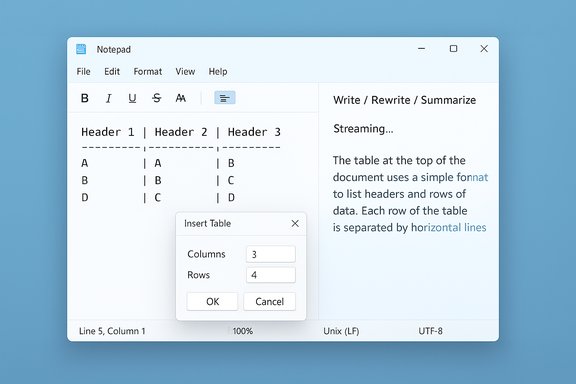
Notepad-style window with a 3x4 Insert Table dialog and sample grid.Background / Overview​

Notepad isn’t the same program it was a few years ago. Microsoft has incrementally added features that were once the province of richer apps: a lightweight formatting layer that supports bold/italic/links and Markdown, tabs, spellcheck, and an initial set of generative tools (Write, Rewrite, Summarize). The latest release continues that trajectory by introducing table support (visual insertion + Markdown mapping) and streaming AI output (partial tokens appear as models generate text). Both features are live first for Windows Insiders in the Canary and Dev channels as Notepad version 11.2510.6.0. This rollout is deliberate and staged: Microsoft is soliciting Feedback Hub responses from Insiders while smoothing the UX and compatibility surface before any broad consumer delivery. Expect the features to reach general Windows 11 devices in the weeks following Insiders feedback, rather than an immediate mass release.

What’s new: tables in Notepad​

A quick summary of the table feature​

  • A new Table button appears in Notepad’s formatting toolbar when lightweight formatting is enabled.
  • You can insert tables visually by selecting dimensions from a grid or open an “Insert table” dialog to type exact rows/columns.
  • Notepad also recognizes Markdown-style tables (pipe-delimited rows with a header separator) and will render those as editable tables while formatting is enabled.
  • Table editing supports inserting and deleting rows and columns, selecting an entire row/column/table, and commands like Fit columns to window width.
This is explicitly a Markdown‑first, formatting‑layer feature: the formatted view is a visual grid, but the underlying document remains plain-text Markdown when formatting is toggled off. That preserves portability and the ability to open or diff files using plain-text tools. Microsoft’s own update notes and independent reporting agree on this hybrid approach.

What the tables can — and can’t — do​

Notepad’s tables are handy for short, human‑readable grids: meeting notes, simple inventories, README snippets, and quick side‑by‑side comparisons. But this is not a spreadsheet engine:
  • There are no formulas, no sorting/filtering, no pivot capabilities, no merged cells, and no advanced data types.
  • Not designed for large datasets — performance and usability will degrade far sooner than in Excel or dedicated table editors.
  • Interoperability with Excel or complex workflows will be basic (copy/paste may preserve text or formatted table depending on paste target).
These limitations matter: Notepad’s table support reduces friction for small tasks, but it does not replace Excel, Google Sheets, or specialized CSV editors.

What’s new: streaming AI for Write / Rewrite / Summarize​

Notepad’s generative features have been reworked to present results incrementally as the model produces them, instead of waiting for a completed block of text. That streaming behavior reduces perceived latency and gives users an early preview they can react to or edit sooner. Streaming is especially noticeable on on‑device runs where the model can generate quickly and locally. Important implementation nuances:
  • Rewrite streaming is currently limited to results produced locally on Copilot+ certified PCs (machines with an NPU and the ability to run on‑device models). Cloud‑generated Rewrite results may not stream in the same low‑latency way in this preview.
  • Write and Summarize may also stream, but their smoothness depends on cloud/server token streaming and network throughput.
  • Using these AI features requires signing in with a Microsoft account. Some behaviors around credits, subscription gating, or on‑device model availability depend on account and hardware status; the access model is nuanced.
Streaming makes the interaction feel more conversational and allows faster iteration, but it raises moderation and privacy considerations (partial output appears before any final filtering completes).

Verifying the facts: what we checked and where​

To avoid repeating rumors or half‑remembered detail, the most load‑bearing claims were cross‑checked across Microsoft’s Windows Insider post and multiple independent outlets:
  • Microsoft’s official Windows Insider announcement names Notepad (version 11.2510.6.0), confirms tables and streaming AI, and lists the Canary and Dev channels as the initial recipients. This is the primary, authoritative confirmation.
  • Coverage and hands‑on impressions from outlets such as Windows Central and The Verge corroborate the toolbar UX, Markdown mapping, and the streaming behavior for AI features, and they discuss the Copilot+/on‑device nuance.
  • Community writeups and forum threads mirror Microsoft’s details and provide additional practical notes about discoverability and how table editing and AI streaming behave in real use.
Where statements are less stable (subscription rules, exact rollout timing to mainstream users, or the precise hardware profile required for Copilot+ on‑device execution), that is explicitly flagged below. The core technical claims — feature names, build number, channels — are verified against Microsoft’s announcement.

How to use Notepad’s tables and AI (practical steps)​

These steps reflect the current preview UI and the Markdown mapping behavior.
  • Enable lightweight formatting (if not already on): open Notepad and toggle formatting from the toolbar or Settings.
  • Insert a table visually:
  • Click the Table button on the formatting toolbar.
  • Use the small grid picker to choose initial rows × columns (e.g., 3×4), or open Insert table dialog to type an exact size and press Insert.
  • Insert a table by Markdown:
  • Type a pipe-delimited table:
  • Example:Column AColumn B
    Item 1Value
  • Notepad will render that Markdown as an editable table when formatting is enabled.
  • Edit a table:
  • Right‑click inside the table or use the Table menu to insert/delete rows and columns, select a row/column/table, or choose Fit columns to window width to stretch the table to the editor width.
  • Use AI features:
  • Highlight text and select Rewrite to rephrase; or place the cursor and use Write or Summarize from the Copilot/AI toolbar.
  • Watch partial output stream into the document as it’s generated. For Rewrite, streaming is fastest on Copilot+ machines running models locally.
If you prefer a minimal Notepad, formatting and Copilot options can be toggled off in Settings — but note toggles generally hide the UI and do not always remove integrated functionality entirely (for example, some AI hooks or telemetry may remain unless explicitly disabled at the OS/policy level).

Strengths and practical benefits​

  • Reduced context switching: Small, structured notes and quick comparisons can remain inside Notepad instead of jumping to Word or Excel, which can save time and friction for routine tasks.
  • Markdown-first portability: Because tables are implemented as Markdown under the hood, Notepad preserves plain-text compatibility — files remain readable and suitable for source control or other Markdown-aware editors. This is a thoughtful design for power users and developers.
  • Faster AI iteration: Streaming AI responses reduce perceived latency and make AI features feel interactive, especially on hardware that supports local model inference. For quick rewrites or summaries, this can markedly improve workflow speed.
  • Optionality: Microsoft continues to provide toggles to hide formatting and AI features for users who want a simpler Notepad experience. That preserves a degree of backward compatibility for minimalists.

Risks, trade‑offs, and unanswered questions​

Notepad’s incremental evolution introduces several practical and policy considerations:
  • Feature creep vs. app identity. Notepad’s core appeal has been speed and minimalism. Each added control (toolbars, tables, AI) complicates the UI and shifts expectations. Users who rely on Notepad as a lean scratchpad may object to the steady accretion of features that feel like bloat. Community backlash around similar changes has already been documented.
  • Privacy and data residency. Streaming responses that are generated in the cloud involve server-side processing; even partial streaming could surface data to remote services before final moderation. On‑device Copilot+ runs keep text local — a privacy benefit — but are limited to specific hardware. The precise boundary of what is always local vs. cloud-dependent varies by feature and device, and users should verify their settings and account status before processing sensitive data.
  • Subscription and credits complexity. Some Microsoft AI features are gated by account type, Microsoft 365 subscriptions, or AI credits. Reporting on which Notepad features are free vs. subscription-only is mixed; Microsoft’s documentation ties some AI behaviors to account sign-in, and third‑party coverage notes nuances. This is an area where claims can be misinterpreted; treat statements about “free” or “paid” availability cautiously until Microsoft publishes explicit entitlement and billing details for the specific features you intend to use. Flagged as area requiring verification.
  • Moderation and partial output. Streaming displays partial model output before any final filtering completes. That can produce incomplete or unsafe suggestions that would otherwise be blocked in a final output; users and admins should be aware of this when using AI to handle external or sensitive content.
  • Enterprise controls and compliance. Organizations that enforce strict data flows or restrict cloud services will need policies and possibly Group Policy or MDM controls to manage Notepad behavior, particularly where the app can call cloud AI services. The UI toggles are user-facing; enterprise policy knobs are still the recommended control plane for administrators.

Performance: will all these features slow Notepad down?​

Early hands‑on reports indicate that table insertion and basic formatting are lightweight operations that don’t appreciably impact responsiveness for typical Notepad use. Notepad was intentionally engineered as a WinUI 3 app with a focused rendering pipeline, and small tables are cheap to render. Independent testing and user reports so far describe the table and formatting features as not causing meaningful CPU or memory spikes during normal use. That said, AI features are variable:
  • On‑device Copilot+ runs can be very fast and low-latency, but only on hardware with NPUs and model support.
  • Cloud-based AI depends on network speed, queueing, and server-side throughput; streaming can mask some delays but not eliminate them.
  • Large tables (hundreds of rows) or heavy copy/paste operations may still slow the app, and Notepad is not optimized for heavy tabular workloads.
For environments where resource predictability is essential, test the Notepad build you plan to deploy — Insiders builds can change — and consider restricting AI features via settings or policy for low-capacity devices.

Practical recommendations​

  • If you want to try the features now: enroll a test machine in the Windows Insider Canary or Dev channel, update Notepad to 11.2510.6.0, and experiment with tables and AI on non‑production text. Microsoft has asked Insiders to submit feedback.
  • If you prefer a minimal Notepad: toggle off formatting and Copilot options in Notepad Settings. For enterprise deployments, use Group Policy/MDM to manage AI and cloud connectivity at scale.
  • For sensitive content: prefer on‑device Copilot+ generation where possible; otherwise, treat cloud AI results as external processing and avoid pasting confidential material into AI flows until you confirm policy and data handling rules.
  • For serious tabular work: continue using Excel, Google Sheets, or a dedicated CSV editor. Use Notepad’s tables for short, human‑readable grids only.
  • Stay informed: the feature set is in preview and may change. Verify entitlement and subscription details on Microsoft’s support pages before assuming a capability is free or always available.

Final analysis: why this matters for Windows users​

Notepad’s new table support is emblematic of a broader product decision: fold more capability into inbox apps to reduce context switching and keep quick tasks inside Windows. The Markdown‑first design balances visual convenience with plain‑text portability — a pragmatic compromise that benefits both casual users and developers who care about source control and diffs. The addition of streaming AI tightens the integration between local device capabilities and cloud services, making Notepad feel more like a lightweight authoring surface than a mere scratchpad. That said, there are real trade‑offs. Feature creep can erode Notepad’s identity as a fast, minimal tool. Streaming AI introduces privacy and moderation considerations. And the user experience will diverge based on hardware (Copilot+ devices vs. older PCs) and account/subscription entitlements. These are not fatal flaws, but they are meaningful trade‑offs users and IT teams should weigh.
For everyday Windows users who rely on Notepad dozens of times per day, the addition of tables and faster AI is likely to be a net positive: small conveniences that save time without forcing a heavier app into the workflow. For minimalists and security‑conscious organizations, the ability to hide features and control access mitigates the biggest risks — provided admins are proactive about policy and testing.
Notepad’s new tables and streaming AI are a tidy, practical enhancement that also function as a signaling event: Windows’ oldest app is evolving to support the kinds of quick, structured, AI‑assisted tasks users now expect. The right balance between convenience and control will determine whether this change is welcomed as thoughtful evolution or remembered as feature creep. The rollout is still in preview; monitor Microsoft’s Insider updates and test the build before relying on these features in production workflows.
Source: Windows Latest Windows 11 Notepad now lets you create tables like in Microsoft Word, and it's free
 

Back
Top