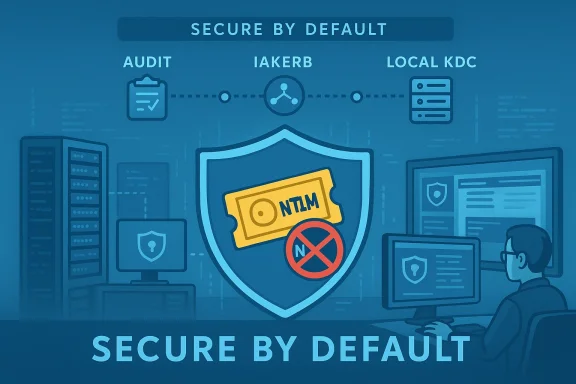
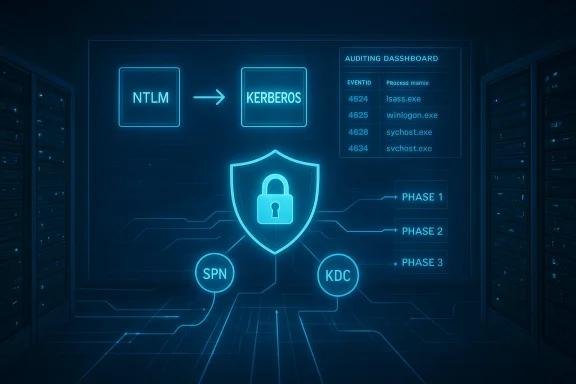
Microsoft’s long-running allowance for NTLM-based authentication is finally being reworked into history: the company has laid out a phased plan to clamp down on Network NTLM and push Windows environments toward Kerberos-first authentication, a move that promises real security gains but will require careful planning across enterprises that still rely on legacy behaviors and devices.
NTLM (New Technology LAN Manager) was introduced in 1993 as a simple, password-based challenge/response protocol. For decades it served as a practical fallback when Kerberos-based authentication wasn’t available—useful in mixed environments, offline scenarios, or when applications used IP addresses or lacked Service Principal Names (SPNs). But the protocol’s design makes it an increasingly untenable security foundation in modern networks.
This three-step approach — visibility, mitigation features, then secure-by-default configuration — gives organizations a runway to adapt, though it also imposes a responsibility to act.
Key technical advantages of Kerberos:
However, this is not an overnight project for enterprise IT. The path to a secure-by-default Windows estate requires:
The end of NTLM as a default network authentication mechanism will be a landmark change for Windows security. It’s long overdue, it is achievable, and it will materially reduce a class of attacks that has plagued organizations for years — provided IT teams use the breathing room Microsoft is offering now to inventory, remediate, and modernize their identity surfaces before defaults change.
Source: Red Hot Cyber Goodbye to NTLM! Microsoft is moving towards a new era of authentication with Kerberos
 Background: why NTLM must go
NTLM (New Technology LAN Manager) was introduced in 1993 as a simple, password-based challenge/response protocol. For decades it served as a practical fallback when Kerberos-based authentication wasn’t available—useful in mixed environments, offline scenarios, or when applications used IP addresses or lacked Service Principal Names (SPNs). But the protocol’s design makes it an increasingly untenable security foundation in modern networks.- NTLM transmits data that can be relayed or reused. Unlike Kerberos, NTLM’s challenge/response model allows attackers to capture and relay authentication artifacts — a technique exploited in NTLM relay attacks.
- Attack techniques matured. Security research has exposed a string of coercion and relay scenarios that allow adversaries to force servers to authenticate to malicious endpoints and then relay those credentials to critical services such as Active Directory Certificate Services (AD CS). Notable examples include the PetitPotam family of techniques and other coercion methods; these have repeatedly been leveraged to escalate privileges and attain domain takeover.
- Pass-the-hash and credential theft remain practical. Tools and threat actor playbooks that capture NTLM hashes and re-use them (pass-the-hash) continue to yield lateral movement and privilege escalation in breached networks.
Microsoft’s three-phase transition: what’s changing and when
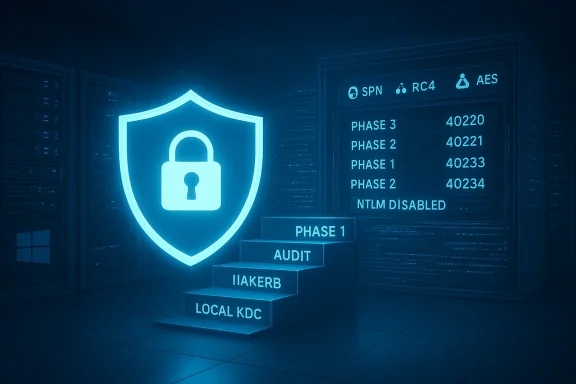
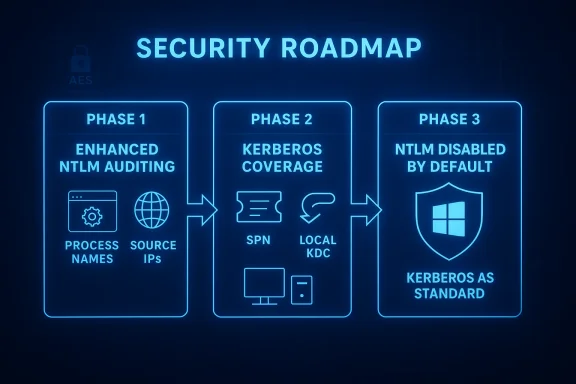
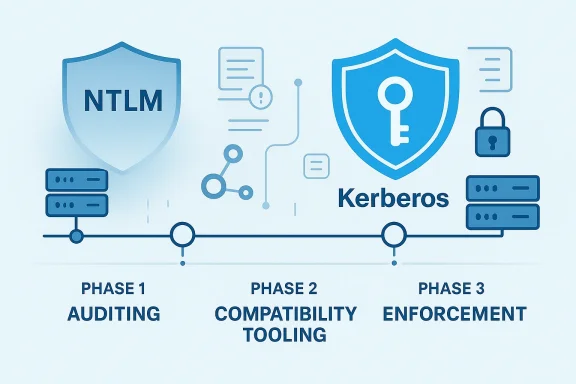
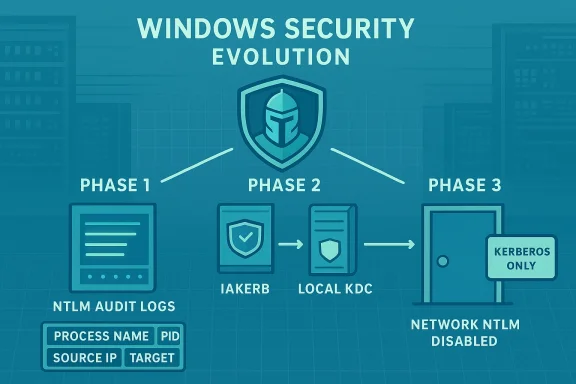
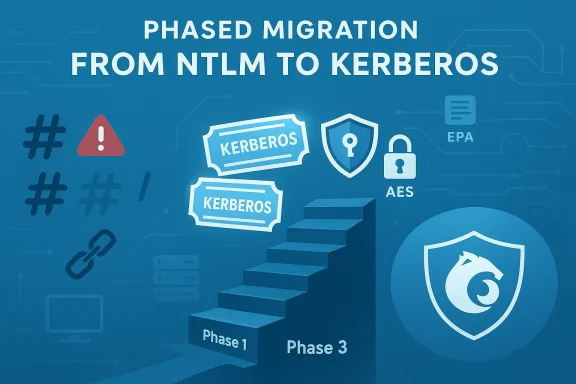
Microsoft has published a staged roadmap to move Windows toward a Kerberos-first future. The plan is structured to reduce operational disruption while eliminating the legacy NTLM attack surface.Phase 1 — Visibility and auditing (already rolling out)
Phase 1 focuses on giving administrators the tools to discover where NTLM is still used. Enhanced NTLM auditing capabilities were integrated into recent releases, so organizations can:- Catalog services and accounts that generate NTLM authentication.
- See which processes and services are responsible for NTLM calls.
- Identify cross-forest, local-account, or IP-based behaviors that cause Kerberos fallback.
Phase 2 — Kerberos coverage for legacy scenarios (second half of 2026)
Phase 2 addresses the practical reasons Windows historically fell back to NTLM. Microsoft plans to deliver two major capabilities to extend Kerberos reach:- IAKerb (Initial and Pass Through Authentication Using Kerberos): This mechanism helps Kerberos work in more diverse network topologies by allowing Kerberos messages to be passed or proxied in situations where direct Kerberos exchanges or traditional discovery (DNS, Netlogon) would fail. It aims to remove the need to fall back to NTLM when clients and servers are separated by network constraints or when direct contact with a domain controller is difficult.
- Local KDC (local Key Distribution Center): A small, local Kerberos KDC implementation on endpoints that allows local accounts and certain offline or partially-connected scenarios to use Kerberos-style tickets (with modern ciphers such as AES) instead of falling back to NTLM.
Phase 3 — Network NTLM disabled by default (future major release)
The final phase is a major, default configuration change: network NTLM authentication will be disabled by default in a future major Windows Server and matching Windows client release. NTLM will remain present for explicit re-enablement by policy, but the out-of-the-box behavior will prefer Kerberos and block network NTLM unless an administrator opts otherwise.This three-step approach — visibility, mitigation features, then secure-by-default configuration — gives organizations a runway to adapt, though it also imposes a responsibility to act.
What Kerberos brings to the table (and why it matters)
Kerberos is not new to Windows — it has been the default authentication protocol for domain-joined machines for many years. What’s changing is Windows’ tolerance for fallback to NTLM.Key technical advantages of Kerberos:
- Ticket-based authentication: Clients obtain Ticket Granting Tickets (TGTs) from a KDC and then request service tickets for specific services. Tickets are cryptographically bound and time-limited, reducing replay and credential-theft risks.
- Mutual authentication: Kerberos supports mutual authentication so clients can validate service identity, closing attack channels that rely on impersonation.
- Stronger cryptography and ephemeral tokens: Modern Kerberos implementations use AES and can limit ticket lifetimes, reducing exposure windows.
- No password exchange across the network: Kerberos avoids sending password-equivalent material that NTLM challenge/response flows can leak.
The attack landscape that pushed Microsoft’s decision
Over the last several years the security community documented multiple practical NTLM-based attacks that make default NTLM usage risky:- NTLM relay (coercion) attacks. Techniques such as PetitPotam exploit benign RPC or protocol behaviors to force servers (including domain controllers and certificate servers) to authenticate to attacker-controlled endpoints. Those authentication artifacts can then be relayed to acquire certificates or perform privileged actions.
- ShadowCoerce and similar vectors. Researchers showed how obscure RPC interfaces — not commonly monitored — could be abused to coerce authentication in the same family as PetitPotam.
- Continued pass-the-hash and credential reuse. NTLM hash theft remains an effective technique for lateral movement, especially where NTLM is present and accepted across services.
Operational impact: what admins must expect
Disabling network NTLM by default will produce real-world friction unless organizations prepare. Expect these categories of impact:- Legacy applications and appliances. Many older applications, network appliances, scanners, MFPs, or specialized servers still use NTLM or rely on IP-based authentication or hard-coded endpoints lacking SPNs. Those will likely fail authentication when NTLM is blocked.
- Cross-forest and trust complexities. One-way trusts, legacy domains, and cross-domain authentication flows may use NTLM in edge cases. Admins must validate cross-domain access patterns.
- Local account and service scenarios. Systems that rely on local accounts, or local services that historically used NTLM to authenticate to local resources, may need reconfiguration to use Local KDC or other supported Kerberos options.
- Human and process impact. Helpdesks, scripted automation, and scheduled tasks that authenticate with NTLM flows must be identified and updated.
A practical migration roadmap for IT teams
This is not a binary switch you flip at 3 AM. A methodical, phased approach will reduce outages and security exposure.- Inventory and measure NTLM usage (Phase 1 actions).
- Enable enhanced NTLM auditing in your Windows 11 24H2 and Windows Server 2025+ estates.
- Collect logs centrally (SIEM, Defender for Identity, or Event Hubs) and map sources: which machines, services, users, and service names generate NTLM.
- Prioritize high-risk assets (domain controllers, certificate servers, Exchange, LDAP endpoints, critical file shares).
- Remediate high-risk servers and services.
- Harden Exchange, AD CS, and LDAP with EPA, channel binding, and SMB signing where applicable.
- Apply relevant Microsoft hotfixes and baseline configurations to close known coercion vectors.
- Test Kerberos-first behavior in a controlled lab.
- Create a test network that mirrors production topology, including cross-forest trust scenarios and legacy devices.
- Evaluate the impact of enabling SMB NTLM blocking in the SMB client and server stacks; use exception lists as needed.
- Identify and update legacy clients and appliances.
- Replace or patch devices that cannot use Kerberos or negotiate with modern security packages.
- Where replacement isn’t immediately possible, use targeted policy exceptions and network segmentation to reduce exposure.
- Deploy Phase 2 features when available.
- Plan to adopt IAKerb and Local KDC once production-ready builds are available (Microsoft indicated a rollout target in H2 2026).
- Pilot these features on a subset of devices to validate resolution of offline, local-account, and topology-constrained fallbacks.
- Implement policy and hardening.
- Gradually move from detection to blocking: use per-service NTLM blocking rather than a blanket network ban where needed.
- Ensure administrators know how to re-enable NTLM where absolutely necessary and log such decisions.
- Communicate, train, and document.
- Update runbooks, incident playbooks, and helpdesk scripts.
- Train SOC and operations teams to recognize Kerberos failures vs. NTLM-related errors and to respond accordingly.
Controls and features you should be using now
- NTLM auditing and event extension. Capture which service and process initiated NTLM auth to reduce false positives and to pinpoint remediation targets.
- SMB NTLM blocking. Modern SMB clients can refuse to offer NTLM; use this in test groups to assess compatibility. Exception lists are available to mitigate breakage during rollout.
- Extended Protection for Authentication (EPA). Enforce protocol-level protections on services like Exchange and AD CS to block relays.
- LDAP channel binding and SMB signing. Enabling these reduces the risk of NTLM coercion.
- Network segmentation. Isolate legacy devices to minimize the blast radius while migrating them off NTLM.
Realistic timeline and expectations
Microsoft has published target windows for the major milestones:- The auditing and visibility improvements are already available in recent releases (Windows 11 24H2 and Windows Server 2025).
- Microsoft has stated that Phase 2 capabilities (IAKerb, Local KDC) are scheduled to appear in the second half of 2026 for supported server and client builds.
- Phase 3 — disabling network NTLM by default — is planned for a future major Windows Server release and associated client ships; the company emphasizes NTLM will remain re-enableable by policy to avoid unexpected outages.
Risks and caveats — what can go wrong
- Operational outages. A blunt, mass disabling of NTLM will almost certainly cause immediate authentication failures for legacy endpoints and third-party applications that lack Kerberos support.
- Incomplete telemetry. Even with improved auditing, corner cases exist — obscure RPC interfaces, third-party services, or devices with intermittent connectivity may still use NTLM in ways that are hard to detect without thorough testing.
- Policy complexity and shadow exceptions. Relying on per-server or per-service NTLM exceptions creates a maintenance burden. Over time, exceptions can accumulate and erode the security posture if not audited.
- Supply-chain and appliance gaps. Hardware or SaaS providers that embed legacy Windows auth in their products may not have near-term upgrades, requiring compensating controls or replacements.
- Human error in configuration. Misapplied blocking policies could inadvertently lock out management accounts or remote services; strong test-and-rollout procedures are essential.
Why not just keep NTLM and live with the risk?
Some organizations will choose to defer changes — re-enabling NTLM by policy is an available stopgap. But the strategic trade-offs are stark:- Keeping NTLM widely available is effectively accepting a broad, well-understood attack surface that has been repeatedly weaponized.
- As Microsoft hardens client and server defaults and as the ecosystem shifts to Kerberos-first expectations, the administrative and security costs of clinging to NTLM will grow.
- Threat actors will continue to develop coercion and relay techniques against any remaining NTLM-enabled surface, making incremental remediation both prudent and necessary.
Final verdict: a necessary but delicate evolution
Microsoft’s plan to shift Windows to a Kerberos-first model is a positive change from a security perspective. The staged approach — inventory, deliver mitigations, then change defaults — reflects a pragmatic attempt to balance security with compatibility. The inclusion of tools such as SMB NTLM blocking, IAKerb, and Local KDC shows Microsoft understands the real-world reasons NTLM persisted and is investing to remove them without breaking enterprise workloads.However, this is not an overnight project for enterprise IT. The path to a secure-by-default Windows estate requires:
- disciplined telemetry collection,
- careful testing with legacy systems and third-party appliances,
- a structured remediation program, and
- a governance model to manage exceptions and regressions.
Checklist: first actions for IT teams this week
- Enable enhanced NTLM auditing in your Windows 11 24H2 and Windows Server 2025+ environments.
- Start a focused inventory: list devices, services, and apps that still use NTLM.
- Harden Exchange, AD CS, and LDAP endpoints with EPA and channel binding where supported.
- Build a test lab that mirrors production cross-domain and offline scenarios for Kerberos validation.
- Evaluate SMB NTLM blocking in a sandbox and prepare exception lists for devices that cannot switch.
- Communicate change windows to application owners and procurement teams so replacement and upgrade paths can be scheduled.
The end of NTLM as a default network authentication mechanism will be a landmark change for Windows security. It’s long overdue, it is achievable, and it will materially reduce a class of attacks that has plagued organizations for years — provided IT teams use the breathing room Microsoft is offering now to inventory, remediate, and modernize their identity surfaces before defaults change.
Source: Red Hot Cyber Goodbye to NTLM! Microsoft is moving towards a new era of authentication with Kerberos