

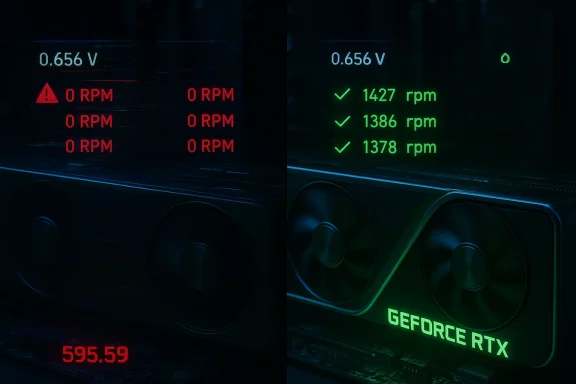
NVIDIA has quietly issued GeForce Game Ready Driver 595.71 to address a serious fan-control regression introduced by the short‑lived 595.59 update — a bug that community testing and user reports indicate could leave one or more GPU fans undetected or not spinning, increasing the risk of overheating on RTX 30, 40, and 50‑series cards.
The 595.xx driver branch was rolled out to coincide with recent game launches and feature pushes, notably optimizations for Resident Evil Requiem and support for Marathon with DLSS and NVIDIA Reflex. Hours after 595.59 became publicly available, user reports across vendor forums, hardware communities, and monitoring‑tool logs showed inconsistent fan sensor reporting, ignored manual fan curves, and, in some extreme cases, fans failing to ramp or spin at all. NVIDIA removed 595.59 from distribution and advised affected users to roll back to driver 591.86 while engineers investigated the fault. The new 595.71 release, dated March 2, 2026, lists fixes that directly reference the 595.59 fan monitoring and fan‑spin problems and restores expected behavior for affected systems.
Note: where the community reports describe physical fans not spinning, those accounts are user testimony and crowd‑sourced troubleshooting; NVIDIA’s release notes confirm the regression and list fixes, but the company has not published a low‑level root‑cause write‑up for exactly what in 595.59 caused the interaction to fail on affected systems. Treat community claims as actionable signals to verify on your own system rather than as definitive proof of universal failure modes.
Organizations that maintain large fleets of GPU machines should treat driver updates like firmware changes: schedule them, test on representative hardware, and proceed with staged rollouts. Home users who prefer to "keep current" should be aware that the bleeding edge can sometimes cut.
Until the ecosystem collectively reduces the chance of similar regressions, the practical rule is simple: when a driver touches fundamental control surfaces (fan control, voltage, vBIOS interaction), treat the update as a firmware change — test, stage, and proceed cautiously.
Source: Tom's Hardware Nvidia releases new GeForce 595.71 driver to fix serious fan control bug — new update resolves issues for RTX 30, 40, and 50-series GPUs that reportedly stopped some fans from working
 Background
The 595.xx driver branch was rolled out to coincide with recent game launches and feature pushes, notably optimizations for Resident Evil Requiem and support for Marathon with DLSS and NVIDIA Reflex. Hours after 595.59 became publicly available, user reports across vendor forums, hardware communities, and monitoring‑tool logs showed inconsistent fan sensor reporting, ignored manual fan curves, and, in some extreme cases, fans failing to ramp or spin at all. NVIDIA removed 595.59 from distribution and advised affected users to roll back to driver 591.86 while engineers investigated the fault. The new 595.71 release, dated March 2, 2026, lists fixes that directly reference the 595.59 fan monitoring and fan‑spin problems and restores expected behavior for affected systems.What happened: a short timeline
- NVIDIA publishes GeForce 595.59 as a Game Ready release tied to recent game launches.
- Community and vendor monitoring tools (HWiNFO, GPU‑Z, vendor utilities) begin showing discrepancies: multiple‑fan GPUs reporting a single fan, manual curves applying only to one fan header.
- Some users report that under load one or more fans did not spin, despite rising temperatures.
- NVIDIA pulls 595.59, issues rollback guidance (reverting to 591.86), and promises an engineered fix.
- NVIDIA publishes GeForce 595.71 with explicit bug fixes addressing the 595.59 fan detection and fan spinning issues, plus several game‑facing fixes.
Why this matters: cooling is not optional
Modern GPUs operate at high power and depend on active cooling to maintain thermal and electrical limits. When a driver sits at a low level of the stack and improperly interacts with hardware monitoring or fan-control APIs, software can accidentally:- misread tachometer sensors (report fewer fans than exist),
- fail to pass fan curve instructions to the correct fan headers, or
- send commands that leave fan controllers in a non‑spinning state.
What NVIDIA's 595.71 release actually fixes
The official release notes for 595.71 explicitly list two items that directly address the regression introduced in 595.59:- HW monitoring utilities not detecting all fans on the GPU (the sensor‑reporting issue).
- One or more fans not spinning on GPUs after driver update (the more severe symptom that could leave cards undercooled).
Independent corroboration and community signals
Multiple hardware outlets and community threads documented the issue, reported rollback advice, and covered the new 595.71 release. Community feedback since the 595.71 rollout has been mixed: many users report that the fan detection and spin failures are resolved, while an active subset continues to post performance anomalies or other stability complaints after installing 595.71. That mixed reception suggests the principal regression was addressed but that downstream issues — either unrelated bugs or hardware/firmware edge cases — may persist for some configurations.Note: where the community reports describe physical fans not spinning, those accounts are user testimony and crowd‑sourced troubleshooting; NVIDIA’s release notes confirm the regression and list fixes, but the company has not published a low‑level root‑cause write‑up for exactly what in 595.59 caused the interaction to fail on affected systems. Treat community claims as actionable signals to verify on your own system rather than as definitive proof of universal failure modes.
Technical anatomy: how a driver can break fan control
Graphics drivers interface with GPU firmware, device‑level power management, and operating system APIs to present sensors and control hardware. The following technical channels are commonly involved:- GPU firmware/vBIOS exposes fan tachometer and PWM control registers. The driver reads and writes to these registers to query speed and set duty cycles.
- Vendor‑specific utilities (MSI Afterburner, ASUS GPU Tweak, EVGA Precision) and universal hardware monitoring tools (HWiNFO, GPU‑Z) query the driver or low‑level APIs for sensor values and fan control.
- Windows WMI or vendor kernel modules can propagate sensor readings to userland.
Immediate advice for users (practical, safety‑first)
If you installed 595.59, 595.71, or any recent GeForce driver and are worried about fan health or system stability, follow these steps in this order. These instructions prioritize safety and verification.- Inspect the fans physically at idle:
- With the PC powered on and at desktop, observe each card fan physically for motion. Some multi‑fan cards idle at very low RPMs; look closely or gently feel for airflow at the exhaust.
- Check sensor reporting:
- Open a trusted monitoring tool (HWiNFO is recommended for detailed sensor readouts) and confirm the number of fans reported and the RPM values.
- If sensors report only one fan or RPMs near zero while temps are elevated:
- Immediately stop stressing the GPU. Close games and GPU‑heavy apps, and consider shutting the system down until you can further investigate.
- Roll back if you see suspicious behavior:
- NVIDIA advised rolling back to driver 591.86 after the 595.59 withdrawal. Use the GeForce Experience app to roll back, or uninstall the driver via Windows Device Manager and reinstall the earlier driver package.
- Use a clean uninstall if problems persist:
- If standard rollback doesn’t help, perform a clean uninstall using Display Driver Uninstaller (DDU) in Windows Safe Mode, then install a known stable driver (591.86 or another version you previously verified).
- Avoid stress tests until you confirm fans respond:
- Don’t run FurMark, OCCT, or prolonged GPU workloads if fans aren’t reliably responding; those tests can force rapid thermal rises.
- Report and gather data:
- If you experienced a failure, capture logs, screenshots of sensor readings, and the driver version. Report to the NVIDIA Driver Feedback forum and to your GPU vendor so they can correlate firmware/hardware variants.
- If you rely on third‑party control utilities:
- Temporarily uninstall tools like MSI Afterburner to rule out interaction problems, or reset any vendor fan‑profiles to defaults before retesting.
How to verify a fix on your system (safe checklist)
- Cold boot, clean driver state: after a DDU clean, install 595.71 and restart.
- Compare fan counts: check HWiNFO before and after the install to confirm all fan headers appear.
- Low‑load ramp test: run a short (1–2 minute) GPU load that is modest — e.g., a benchmark scene or an in‑game benchmark — while watching fan RPM and GPU temperature. Stop immediately if RPMs fail to rise while temps climb.
- Vendor utility check: open the board partner utility and ensure manual fan curves apply to each fan header and persist across reboots.
- Longer runtime: after initial checks, run a medium load test for 10–15 minutes to confirm sustained behavior.
What this incident says about NVIDIA’s release processes
There are three structural observations worth calling out:- Release cadence tied to game launches increases the pressure to ship quickly. Game‑timed driver releases often add new features and fixes under deadlines that can compress QA windows.
- Driver complexity is rising. Supporting DLSS generations, frame generation, path tracing, and a broad hardware matrix (notebooks, desktops, many AIB variants) creates a combinatorial test burden.
- Regression detection is still reliant on both automated testing and community feedback. The swift reporting from users and monitoring‑tool logs accelerated detection and mitigation, but the regression still reached public distribution.
Strengths in NVIDIA’s response — and limits
Strengths:- Rapid removal: NVIDIA removed 595.59 from official distribution quickly once the reports accumulated, preventing further installs at scale.
- Targeted fix: The 595.71 release specifically calls out fixes for the 595.59 monitoring and fan spin issues.
- Transparency in release notes: The vendor explicitly lists the fixed items, enabling users and third‑party tooling to cross‑check behavior.
- No published root‑cause technical analysis: NVIDIA’s notes fix the symptoms but do not explain the underlying code or regression cause; that limits community learning and may leave firmware/partner edge cases unaddressed.
- Residual reports after 595.71: New driver releases often surface previously latent edge cases; community threads show some users still reporting performance and stability anomalies after 595.71.
- QA pressure: Releasing driver builds aligned with major game launches can create scheduling pressure that elevates the chance of regressions.
How GPU vendors, developers, and power users should respond
- GPU vendors (AIB partners) should coordinate regression testing with NVIDIA on builds that touch fan controllers and sensor enumeration. That includes validating all multi‑fan designs across common OS/tooling stacks.
- Game developers and studio QA teams should include a hardware regression check in their GPU/driver validation matrix for title‑linked driver releases.
- Power users and system builders should keep a tested stable driver image available and consider delaying large driver updates around critical workloads (e.g., production renders, live streams) until early adopter feedback coalesces.
- Monitoring and observability tooling vendors must harden how they map sensor IDs across driver versions to better detect enumeration regressions and avoid masking hardware faults.
Longer‑term implications: trust, telemetry, and the cost of convenience
Driver updates are presented as a convenience and route to new features, but each update is effectively a low‑level patch to the control plane of a complex hardware system. The cost of a buggy driver is not merely an annoyance; it can be a risk to hardware longevity and to user workflows that rely on predictable behavior.Organizations that maintain large fleets of GPU machines should treat driver updates like firmware changes: schedule them, test on representative hardware, and proceed with staged rollouts. Home users who prefer to "keep current" should be aware that the bleeding edge can sometimes cut.
Troubleshooting FAQ (short)
- Q: I installed 595.59; what should I do now?
A: Revert to a stable driver (NVIDIA advised 591.86), verify fan and temperature behavior, and only reinstall 595.71 after confirming your system reports and spins all fans normally. - Q: My monitoring tools show only one fan but the card has three — is it broken?
A: Not necessarily. It may be a driver enumeration issue. Do a physical check, compare multiple monitoring tools, and roll back the driver to confirm baseline behavior. - Q: Should I run GPU stress tests to verify cooling?
A: Only after you confirm fans spin under low/medium load. Do not run extended stress tests if RPMs remain low while temps climb. - Q: My third‑party tool still shows odd fan behavior after 595.71. What next?
A: Reset or uninstall third‑party utilities, ensure vendor firmware (vBIOS) is up to date, and report logs to both NVIDIA and your GPU vendor.
Final assessment and recommendation
NVIDIA’s quick retraction of 595.59 and the targeted 595.71 replacement show responsiveness, but the incident also underscores the fragility of complex hardware‑software stacks and the outsized impact of low‑level regressions. For users: prioritize safety, verify fans and sensors after driver changes, and keep a tested rollback plan. For NVIDIA and partners: this should be a prompt to expand hardware‑level regression suites, improve AIB coordination, and consider longer QA lead times for driver releases tied to major game launches.Until the ecosystem collectively reduces the chance of similar regressions, the practical rule is simple: when a driver touches fundamental control surfaces (fan control, voltage, vBIOS interaction), treat the update as a firmware change — test, stage, and proceed cautiously.
Source: Tom's Hardware Nvidia releases new GeForce 595.71 driver to fix serious fan control bug — new update resolves issues for RTX 30, 40, and 50-series GPUs that reportedly stopped some fans from working
