

O&O Software released O&O ShutUp10 3.0.1076 on May 20, 2026, for Windows 10 and Windows 11, adding a new Premium edition that can monitor privacy settings in the background and automatically restore user-defined choices after Windows or application changes later. The release turns a long-running portable privacy tweaker into something closer to a policy-enforcement product. That is a meaningful shift, because the old bargain was simple: run the tool, flip the switches, and remember to check again after Microsoft moved the furniture. Premium changes the pitch from control to persistence, and that is where both its appeal and its risk live.
For years, O&O ShutUp10++ has occupied a familiar corner of the Windows ecosystem: useful, blunt, portable, and slightly outside the comfort zone of administrators who prefer Group Policy, Intune, or documented registry baselines. Its purpose has always been easy to explain. Windows exposes dozens of privacy, telemetry, app-access, update, search, Edge, and convenience settings across too many panes, policies, and defaults; ShutUp10++ gathers many of them into one interface and labels them in human language.
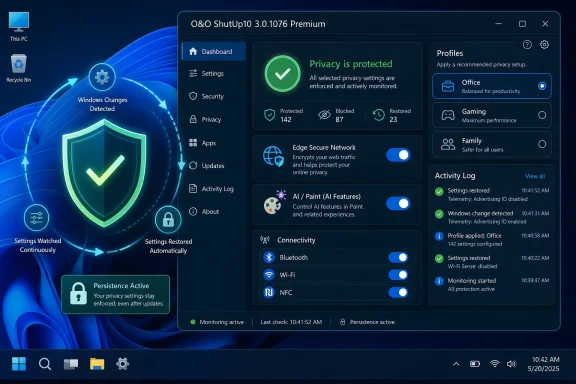
Version 3.0.1076 keeps that identity but adds a more ambitious commercial layer. The free version remains available for manual changes, while the new Premium edition introduces profiles, a background service, automatic protection, activity logging, statistics, onboarding, and import/export for privacy configurations. O&O is no longer merely saying, “Here are the switches.” It is saying, “We will keep the switches where you put them.”
That distinction matters because Windows has become a moving target. Feature updates, cumulative updates, app updates, Edge changes, Copilot-era additions, and new “experiences” can alter the privacy surface without presenting the user with a clean before-and-after ledger. Some of these changes are benign defaults catching up with new features. Others feel, to privacy-sensitive users, like settings drift dressed up as product improvement.
The new Premium tier is a response to that drift. It implicitly acknowledges what many Windows power users have learned the hard way: privacy hardening is not a single afternoon’s work. It is maintenance.
That will resonate with users who have spent years rechecking telemetry, advertising, search, Edge, app permissions, update behavior, and “suggested content” settings after major Windows changes. Microsoft often frames these defaults as helpful personalization, service quality, or security-adjacent convenience. Critics experience the same defaults as a kind of recurring negotiation in which the operating system periodically asks for more leeway.
The Premium model packages that frustration into a product. Profiles such as Office, Gaming, Family, and Total Data Protection suggest O&O is trying to avoid the old all-or-nothing trap. A gaming machine, a child’s laptop, a home-office PC, and a lockdown-minded workstation do not need identical privacy settings, and aggressive hardening can break conveniences people actually want.
That is the right instinct. The challenge is that automatic remediation can be as dangerous as automatic reset if users do not understand what is being enforced. A privacy tool that silently restores a setting may be doing exactly what the user asked. It may also be fighting a legitimate configuration change made by an administrator, a support technician, a security baseline, or the user six months later.
Edge Secure Network is a particularly telling item. A browser-level VPN-like feature may be useful for some users, but it also represents another layer of traffic handling inside a Microsoft-controlled experience. Privacy-focused users often prefer to choose their own VPN provider, browser, DNS setup, and network policy rather than inherit one through Edge.
The hardware and connectivity toggles also speak to a broader trend. NFC, Miracast, WWAN, Wi-Fi Direct, and Bluetooth pairing are convenience features, but each expands the attack surface or the ways a device may interact with nearby systems. Most home users will never think about those switches. Many admins do, especially in shared workspaces, schools, regulated environments, or devices that travel.
Optional updates are another pressure point. Preview updates can deliver fixes early, but they can also introduce regressions before the broader Patch Tuesday audience receives them. Giving users an easier way to disable optional and preview updates fits ShutUp10++’s long-standing philosophy: Windows should not assume every user wants to participate at the edge of Microsoft’s servicing pipeline.
The Windows privacy debate used to be dominated by telemetry, advertising IDs, location, Cortana, and app permissions. Those still matter, but the center of gravity has shifted toward AI-assisted features, account nudges, cloud-connected search, and promotional surfaces built into default applications. A tool like ShutUp10++ now has to care not only about what Windows reports back, but also about how Windows increasingly mediates local activity through cloud-aware services.
That makes “local AI functions” a deceptively important phrase. Microsoft’s AI strategy spans on-device processing, cloud models, app-level features, search integration, and Copilot-branded experiences. Users may accept one category and reject another. A privacy tool that treats all AI features as a single villain will be too crude; a tool that breaks them out into understandable controls has a better chance of being useful.
Paint is a good example. Generative fill and Cocreator features are not the same as operating-system telemetry, but they still raise questions about prompts, images, cloud processing, account requirements, and user expectations. If a simple graphics utility becomes a gateway to AI services, privacy tools will naturally follow it there.
Instead, the split appears to be manual control versus continuous enforcement. The free version remains the tool for users who want to review settings, apply recommended changes, create a restore point, and move on. Premium is for users who want the configuration to survive the churn.
That is a defensible line, but it changes the emotional contract. A free portable utility feels like a toolbox. A background service feels like an agent. The former is something you run; the latter is something you trust.
Trust is the currency here. Privacy utilities ask for elevated privileges and modify sensitive parts of the system. They may touch policies, registry values, services, app permissions, update settings, browser features, and account-related behaviors. O&O has a long track record in Windows utilities, but Premium still asks users to accept a permanent resident process whose job is to keep altering Windows back into a preferred shape.
This is where the old “just disable everything” attitude breaks down. Some settings are low-risk annoyances, such as hiding promotional surfaces. Others can affect updates, security features, account behavior, app functionality, device discovery, gaming captures, wireless projection, Bluetooth pairing, or enterprise compliance. Privacy is not always free of operational cost.
The new editing mode for advanced users and its explanation dialog suggest O&O knows this. The tool needs to serve two audiences that often want opposite things. Beginners want recommended settings and plain-language safety guidance. Advanced users want to see and manipulate the underlying machinery without being slowed down by guardrails.
That dual audience is hard to satisfy. If the recommendations are too cautious, privacy hardliners will dismiss them. If they are too aggressive, ordinary users will break features and blame the tool, Windows, or both. Premium’s profiles may help, but profiles are only as good as the assumptions behind them.
But ShutUp10++ should not be confused with Group Policy, mobile device management, Microsoft Intune, configuration baselines, or security compliance tooling. It can be useful in labs, home offices, small environments, break/fix scenarios, and unmanaged machines. In a managed fleet, though, an independently enforcing privacy utility can become another source of configuration conflict.
The risk is not theoretical. If Intune applies one setting, a security baseline applies another, a user imports a ShutUp10++ profile, and Premium restores that profile after detecting a change, the endpoint can become a battlefield of well-intentioned automation. The activity log may help diagnose this, but it does not eliminate the architectural problem.
For administrators, the healthier way to read this release is as a signal. Users want durable privacy choices. They do not want settings that quietly revert after updates. They do not want AI and cloud features slipping into workflows without clear consent. If official management tooling does not make those preferences easy to express, third-party tools will fill the gap.
Microsoft’s problem is that the Windows settings model often feels like a maze. Privacy, diagnostics, advertising, search, Edge, widgets, accounts, app permissions, optional experiences, and AI features are spread across interfaces, policies, browsers, inbox apps, and update channels. The result is not just complexity. It is a trust deficit.
When a third-party utility can make users feel more in control than the operating system’s own settings app, that is a product-design indictment. Microsoft has improved transparency in some areas over the years, but the company also keeps adding surfaces that promote accounts, cloud services, recommendations, and AI features. Each addition may be defensible in isolation. Together, they create the impression of a platform that must be continuously restrained.
That impression is why Premium may find an audience. It gives users a standing answer to a standing anxiety: “Will Windows undo this later?” O&O is betting that enough people will pay not merely to change settings, but to stop thinking about them.
A manual privacy tool belongs to the old servicing world. You ran it after installing Windows, maybe ran it again after a feature update, and hoped nothing important shifted in between. A background enforcement tool belongs to the new one. It assumes change is constant and treats configuration as something that must be observed.
That is conceptually similar to configuration management, though aimed at consumers and power users rather than enterprise architects. The best version of this idea is transparent, reversible, logged, and respectful of user intent. The worst version becomes yet another opaque agent making changes in the background.
O&O appears to be trying to land on the right side of that divide with activity logging, optional notifications, profiles, export/import, and an undo button in profile management. Those are not decorative features. They are the difference between enforcement and mystery.
Secure Boot has become more visible as Microsoft and hardware vendors continue tightening platform security expectations. Certificate state, boot trust, firmware behavior, and OS-level hardening are no longer niche topics confined to enterprise security teams. Enthusiasts and home users increasingly encounter them when upgrading hardware, enabling Windows features, installing alternative operating systems, or troubleshooting update requirements.
Still, this is another place where the tool’s scope expands. The more ShutUp10++ reaches beyond privacy into security posture, update control, hardware radios, browser services, AI features, and system policy cleanup, the more it becomes a general Windows control surface. That may be useful, but it also demands careful wording. Not every “off” switch is a privacy win, and not every enabled feature is surveillance.
The best privacy software helps users make distinctions. It does not merely validate suspicion.
Users do not generally pay because a tool has one more switch for NFC or Edge. They pay because the maintenance burden is annoying. They pay because they do not want to revisit settings after every cumulative update. They pay because Windows 11, Edge, Copilot-era features, and inbox apps increasingly blur the line between local preference and cloud service participation.
That does not mean every user needs Premium. For many people, the free version remains enough. Run it, review the recommendations, avoid the most aggressive settings unless you understand the trade-offs, and revisit it after major Windows changes. For those users, the new release is a bigger, more modern ShutUp10++ with better accessibility, reorganized menus, improved status display, online help, and new controls.
Premium is for a narrower but real audience: people who already know they will keep fighting settings drift. The question is whether they would rather do that manually or delegate it to another background component.
That makes the changelog feel unusually current. Edge Secure Network, Paint AI features, local AI controls, Bing search integration, preview updates, and Microsoft account nudges are not legacy Windows 10 complaints. They are the everyday texture of Windows in 2026.
The safest reading is also the most pragmatic one:
 O&O Turns a One-Shot Tweaker Into a Watchdog
For years, O&O ShutUp10++ has occupied a familiar corner of the Windows ecosystem: useful, blunt, portable, and slightly outside the comfort zone of administrators who prefer Group Policy, Intune, or documented registry baselines. Its purpose has always been easy to explain. Windows exposes dozens of privacy, telemetry, app-access, update, search, Edge, and convenience settings across too many panes, policies, and defaults; ShutUp10++ gathers many of them into one interface and labels them in human language.Version 3.0.1076 keeps that identity but adds a more ambitious commercial layer. The free version remains available for manual changes, while the new Premium edition introduces profiles, a background service, automatic protection, activity logging, statistics, onboarding, and import/export for privacy configurations. O&O is no longer merely saying, “Here are the switches.” It is saying, “We will keep the switches where you put them.”
That distinction matters because Windows has become a moving target. Feature updates, cumulative updates, app updates, Edge changes, Copilot-era additions, and new “experiences” can alter the privacy surface without presenting the user with a clean before-and-after ledger. Some of these changes are benign defaults catching up with new features. Others feel, to privacy-sensitive users, like settings drift dressed up as product improvement.
The new Premium tier is a response to that drift. It implicitly acknowledges what many Windows power users have learned the hard way: privacy hardening is not a single afternoon’s work. It is maintenance.
The Premium Tier Exists Because Windows Keeps Changing the Deal
The most important thing about this release is not the number of new toggles, though there are plenty of them. It is the introduction of automatic enforcement. Premium can apply recommended settings or a user-defined configuration, then continue watching for changes and restore the chosen state when Windows or related components re-enable something.That will resonate with users who have spent years rechecking telemetry, advertising, search, Edge, app permissions, update behavior, and “suggested content” settings after major Windows changes. Microsoft often frames these defaults as helpful personalization, service quality, or security-adjacent convenience. Critics experience the same defaults as a kind of recurring negotiation in which the operating system periodically asks for more leeway.
The Premium model packages that frustration into a product. Profiles such as Office, Gaming, Family, and Total Data Protection suggest O&O is trying to avoid the old all-or-nothing trap. A gaming machine, a child’s laptop, a home-office PC, and a lockdown-minded workstation do not need identical privacy settings, and aggressive hardening can break conveniences people actually want.
That is the right instinct. The challenge is that automatic remediation can be as dangerous as automatic reset if users do not understand what is being enforced. A privacy tool that silently restores a setting may be doing exactly what the user asked. It may also be fighting a legitimate configuration change made by an administrator, a support technician, a security baseline, or the user six months later.
The Changelog Shows Where Windows Anxiety Has Moved
The new controls in 3.0.1076 tell a story about modern Windows. The additions include the ability to disable Edge Secure Network, Xbox Game Bar and Game DVR, NFC, wireless display, cellular broadband, Wi-Fi Direct, Bluetooth pairing, and optional updates including preview updates. That is not merely a privacy list; it is a map of Windows as a connected, cloud-attached, cross-device platform.Edge Secure Network is a particularly telling item. A browser-level VPN-like feature may be useful for some users, but it also represents another layer of traffic handling inside a Microsoft-controlled experience. Privacy-focused users often prefer to choose their own VPN provider, browser, DNS setup, and network policy rather than inherit one through Edge.
The hardware and connectivity toggles also speak to a broader trend. NFC, Miracast, WWAN, Wi-Fi Direct, and Bluetooth pairing are convenience features, but each expands the attack surface or the ways a device may interact with nearby systems. Most home users will never think about those switches. Many admins do, especially in shared workspaces, schools, regulated environments, or devices that travel.
Optional updates are another pressure point. Preview updates can deliver fixes early, but they can also introduce regressions before the broader Patch Tuesday audience receives them. Giving users an easier way to disable optional and preview updates fits ShutUp10++’s long-standing philosophy: Windows should not assume every user wants to participate at the edge of Microsoft’s servicing pipeline.
AI Settings Are Now Part of the Privacy Baseline
The improvements list is just as revealing as the additions. O&O calls out changes around Microsoft Paint’s Cocreator and AI-powered image filling, Microsoft account sign-in icons, local AI function control, Bing integration in Windows Search, taskbar search display, and news or “interesting topics” in the taskbar. This is the privacy-tool equivalent of a seismograph: it records where the platform is moving.The Windows privacy debate used to be dominated by telemetry, advertising IDs, location, Cortana, and app permissions. Those still matter, but the center of gravity has shifted toward AI-assisted features, account nudges, cloud-connected search, and promotional surfaces built into default applications. A tool like ShutUp10++ now has to care not only about what Windows reports back, but also about how Windows increasingly mediates local activity through cloud-aware services.
That makes “local AI functions” a deceptively important phrase. Microsoft’s AI strategy spans on-device processing, cloud models, app-level features, search integration, and Copilot-branded experiences. Users may accept one category and reject another. A privacy tool that treats all AI features as a single villain will be too crude; a tool that breaks them out into understandable controls has a better chance of being useful.
Paint is a good example. Generative fill and Cocreator features are not the same as operating-system telemetry, but they still raise questions about prompts, images, cloud processing, account requirements, and user expectations. If a simple graphics utility becomes a gateway to AI services, privacy tools will naturally follow it there.
Free Still Matters, But Free Is No Longer the Whole Story
O&O’s decision to keep the free version functional is important. ShutUp10++ built its reputation partly because it was portable, did not require installation, and did not arrive wrapped in the kind of bundling behavior that makes users distrust “system utility” software. If the free edition had suddenly become crippleware, the new Premium tier would have looked like a bait-and-switch.Instead, the split appears to be manual control versus continuous enforcement. The free version remains the tool for users who want to review settings, apply recommended changes, create a restore point, and move on. Premium is for users who want the configuration to survive the churn.
That is a defensible line, but it changes the emotional contract. A free portable utility feels like a toolbox. A background service feels like an agent. The former is something you run; the latter is something you trust.
Trust is the currency here. Privacy utilities ask for elevated privileges and modify sensitive parts of the system. They may touch policies, registry values, services, app permissions, update settings, browser features, and account-related behaviors. O&O has a long track record in Windows utilities, but Premium still asks users to accept a permanent resident process whose job is to keep altering Windows back into a preferred shape.
The Restore Point Button Is Still Not a Substitute for Understanding
ShutUp10++ has long encouraged users to create a System Restore point before applying changes, and that remains sensible. The 3.0.1076 changelog also includes a notable correction: factory reset previously left policy registry keys that could block Windows updates. That fix is a reminder that privacy tools do not operate in a sandbox. Their changes can have durable consequences.This is where the old “just disable everything” attitude breaks down. Some settings are low-risk annoyances, such as hiding promotional surfaces. Others can affect updates, security features, account behavior, app functionality, device discovery, gaming captures, wireless projection, Bluetooth pairing, or enterprise compliance. Privacy is not always free of operational cost.
The new editing mode for advanced users and its explanation dialog suggest O&O knows this. The tool needs to serve two audiences that often want opposite things. Beginners want recommended settings and plain-language safety guidance. Advanced users want to see and manipulate the underlying machinery without being slowed down by guardrails.
That dual audience is hard to satisfy. If the recommendations are too cautious, privacy hardliners will dismiss them. If they are too aggressive, ordinary users will break features and blame the tool, Windows, or both. Premium’s profiles may help, but profiles are only as good as the assumptions behind them.
The Enterprise Lesson Is Not to Replace Policy With a Utility
For IT pros, the temptation is obvious. Here is a tool that can apply privacy settings, export and import profiles, run a background enforcement service, and log activity. That sounds, at first glance, like lightweight endpoint governance for smaller shops that do not have the time or licensing stack for full management.But ShutUp10++ should not be confused with Group Policy, mobile device management, Microsoft Intune, configuration baselines, or security compliance tooling. It can be useful in labs, home offices, small environments, break/fix scenarios, and unmanaged machines. In a managed fleet, though, an independently enforcing privacy utility can become another source of configuration conflict.
The risk is not theoretical. If Intune applies one setting, a security baseline applies another, a user imports a ShutUp10++ profile, and Premium restores that profile after detecting a change, the endpoint can become a battlefield of well-intentioned automation. The activity log may help diagnose this, but it does not eliminate the architectural problem.
For administrators, the healthier way to read this release is as a signal. Users want durable privacy choices. They do not want settings that quietly revert after updates. They do not want AI and cloud features slipping into workflows without clear consent. If official management tooling does not make those preferences easy to express, third-party tools will fill the gap.
Microsoft’s Problem Is Not That Privacy Tools Exist
It is tempting to frame tools like ShutUp10++ as anti-Microsoft software. That is too simple. Many users who run these tools are not trying to abandon Windows; they are trying to stay on Windows while removing the parts they find intrusive, noisy, or administratively inconvenient.Microsoft’s problem is that the Windows settings model often feels like a maze. Privacy, diagnostics, advertising, search, Edge, widgets, accounts, app permissions, optional experiences, and AI features are spread across interfaces, policies, browsers, inbox apps, and update channels. The result is not just complexity. It is a trust deficit.
When a third-party utility can make users feel more in control than the operating system’s own settings app, that is a product-design indictment. Microsoft has improved transparency in some areas over the years, but the company also keeps adding surfaces that promote accounts, cloud services, recommendations, and AI features. Each addition may be defensible in isolation. Together, they create the impression of a platform that must be continuously restrained.
That impression is why Premium may find an audience. It gives users a standing answer to a standing anxiety: “Will Windows undo this later?” O&O is betting that enough people will pay not merely to change settings, but to stop thinking about them.
A Privacy Tool Becomes Part of the Servicing Cycle
The most consequential part of Premium may be its background service. Windows servicing is no longer an occasional event; it is the operating rhythm of the platform. Monthly updates, preview updates, feature enablement packages, Store app updates, Edge updates, Defender updates, and cloud-driven feature rollouts can change behavior without the drama of a full OS upgrade.A manual privacy tool belongs to the old servicing world. You ran it after installing Windows, maybe ran it again after a feature update, and hoped nothing important shifted in between. A background enforcement tool belongs to the new one. It assumes change is constant and treats configuration as something that must be observed.
That is conceptually similar to configuration management, though aimed at consumers and power users rather than enterprise architects. The best version of this idea is transparent, reversible, logged, and respectful of user intent. The worst version becomes yet another opaque agent making changes in the background.
O&O appears to be trying to land on the right side of that divide with activity logging, optional notifications, profiles, export/import, and an undo button in profile management. Those are not decorative features. They are the difference between enforcement and mystery.
The Secure Boot Indicator Is a Small Feature With a Larger Message
Among the additions, the Secure Boot certificate status indicator may seem like an odd fit for a privacy utility. It is not a telemetry toggle, an app permission, or a Microsoft account nudge. Yet its inclusion makes sense in the broader identity O&O is building: a Windows trust dashboard for users who do not want to spelunk through firmware and system tools.Secure Boot has become more visible as Microsoft and hardware vendors continue tightening platform security expectations. Certificate state, boot trust, firmware behavior, and OS-level hardening are no longer niche topics confined to enterprise security teams. Enthusiasts and home users increasingly encounter them when upgrading hardware, enabling Windows features, installing alternative operating systems, or troubleshooting update requirements.
Still, this is another place where the tool’s scope expands. The more ShutUp10++ reaches beyond privacy into security posture, update control, hardware radios, browser services, AI features, and system policy cleanup, the more it becomes a general Windows control surface. That may be useful, but it also demands careful wording. Not every “off” switch is a privacy win, and not every enabled feature is surveillance.
The best privacy software helps users make distinctions. It does not merely validate suspicion.
The Real Upgrade Is Persistence, Not Another Toggle
The concrete changes in 3.0.1076 are useful, but the release will be remembered for the product-line shift. O&O has introduced a premium business model around what was previously a notably free utility, and it has chosen persistence as the paid feature. That is a revealing choice.Users do not generally pay because a tool has one more switch for NFC or Edge. They pay because the maintenance burden is annoying. They pay because they do not want to revisit settings after every cumulative update. They pay because Windows 11, Edge, Copilot-era features, and inbox apps increasingly blur the line between local preference and cloud service participation.
That does not mean every user needs Premium. For many people, the free version remains enough. Run it, review the recommendations, avoid the most aggressive settings unless you understand the trade-offs, and revisit it after major Windows changes. For those users, the new release is a bigger, more modern ShutUp10++ with better accessibility, reorganized menus, improved status display, online help, and new controls.
Premium is for a narrower but real audience: people who already know they will keep fighting settings drift. The question is whether they would rather do that manually or delegate it to another background component.
The 3.0.1076 Release Draws a Line Between Tweaking and Governance
This release is not just “O&O added a paid tier.” It is a sign that Windows customization has matured into a form of personal governance. Users are no longer merely changing how the taskbar looks or whether Cortana answers. They are defining boundaries around data flow, AI participation, browser services, device radios, optional updates, and account integration.That makes the changelog feel unusually current. Edge Secure Network, Paint AI features, local AI controls, Bing search integration, preview updates, and Microsoft account nudges are not legacy Windows 10 complaints. They are the everyday texture of Windows in 2026.
The safest reading is also the most pragmatic one:
- O&O ShutUp10 3.0.1076 introduces a Premium edition built around profiles, a background service, automatic protection, activity logging, and persistent setting enforcement.
- The free edition remains useful for manual privacy changes and continues to support Windows 10 and Windows 11 across x86, x64, and ARM systems.
- The new controls reflect modern Windows pressure points, including Edge services, AI features, Xbox capture tools, wireless connectivity, Bluetooth pairing, and optional preview updates.
- Automatic enforcement is powerful but should be used carefully on managed PCs, because it can conflict with administrator policies or other configuration tools.
- The correction for factory reset leaving update-blocking policy keys is a reminder that privacy utilities can have lasting system-level effects.
- The release’s real message is that users increasingly want Windows privacy settings to persist across updates, not merely exist in a settings pane.
References
- Primary source: Neowin
Published: 2026-05-20T16:20:07.527708
O&O ShutUp10 3.0.1076 released with new premium tier | Neowin
With O&O ShutUp10 you have full control over which functions under Windows 10/11 you wish to use, and you decide when the passing on of your data goes too far. www.neowin.net
- Related coverage: oo-software.com
Was ist neu - O&O Software GmbH
Änderungen in den jeweiligen Versionen (Changelog) Version 3.1 Version 3.1.1104 veröffentlicht am 17.06.2026 Hinzugefügt Option „Nicht erneut anzeigen“ für die Wiederherstellungspunkt-Eingabeaufforderung Strg+F-Tastenkombination für Such-/Filterfunktion Erkennung und Verbindung von...www.oo-software.com
- Related coverage: tweakhound.com
O&O ShutUp10 Updated - TweakHound
Optimize your computing experience, Performance, Tweak, Tweaker, Tweaking Windows, Tweak Guides, Tweakguides, Privacy, Security, Computer How-to, fix computer, Computer news and information, Windows Xp, Windows 7, Windows 10, Linuxwww.tweakhound.com - Related coverage: oo-shutup10.com
Download O&O ShutUp10++ Free Privacy Tool for Windows (2026)
Download O&O ShutUp10++ free. Disable Windows telemetry, Copilot, and tracking. Portable privacy tool for Windows 10/11. No install needed.oo-shutup10.com - Related coverage: ghacks.net
O&O ShutUp10++ update released - gHacks Tech News
O&O ShutUp10++ is a privacy application for Windows 10 and Windows 11 devices, which we have followed ever since its first release for Windows 10. www.ghacks.net
- Related coverage: computerbase.de
O&O ShutUp10++: Antispy-Tool mit neuer GUI erstmals für Windows 11 - ComputerBase
Mit einer vollständig überarbeiteten Benutzeroberfläche (GUI) und unter neuem Namen ist das Antispy-Tool O&O ShutUp10++ v1.9 erschienen.www.computerbase.de
- Related coverage: manuals.oo-software.com
