

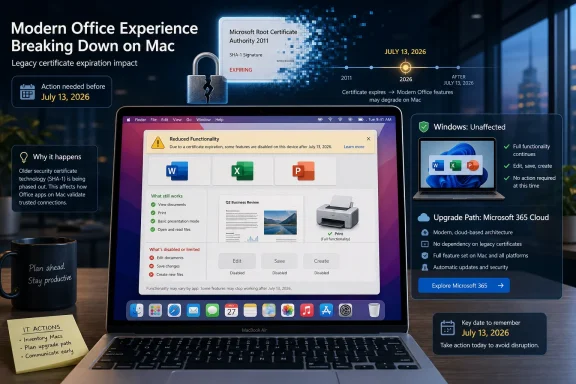
Microsoft says that starting July 13, 2026, some Office and Microsoft 365 apps on macOS, iPhone, and iPad will fall into reduced functionality mode if they cannot be updated to versions that meet Microsoft’s newer certificate and operating-system requirements. That is not the same as Microsoft killing every copy of Office 2019 everywhere, but for Office 2019 for Mac users, the distinction may feel academic. Their apps may still open and print documents, yet the paid-for suite’s useful work — editing, saving, and creating files — is the part Microsoft says will stop. The real story is not a single date on a support page; it is the shrinking space left for software that was sold as something you could keep.
The viral version of this story is easy to summarize and easier to rage-share: Microsoft is supposedly killing Office 2019 on July 13, 2026, remotely blocking installations, and turning a “lifetime” license into a subscription sales funnel. That framing overreaches in one important way. Microsoft’s own documentation says the July 2026 certificate problem applies to Office and Microsoft 365 apps on macOS and iOS, not to Windows or Android.
That caveat matters, especially for a WindowsForum audience. Office 2019 on Windows is not being newly “bricked” on July 13, 2026, according to the support material Microsoft has published. The Windows version already reached the end of support on October 14, 2025, and Microsoft’s language around that product has long been the familiar end-of-life boilerplate: no more security fixes, no more bug fixes, no more support, with continued use at the customer’s risk.
But caveats should not become camouflage. For Office 2019 for Mac, Microsoft’s document is blunt enough to deserve scrutiny. Office 2019 for Mac reached end of support on October 10, 2023, cannot be updated to the required version, and Microsoft says the July 2026 reduced-functionality issue cannot be resolved by reinstalling or updating that product.
That is a meaningful change in the ordinary consumer understanding of a one-time software purchase. A perpetual license was never a promise of perpetual patches, but buyers reasonably expected the installed application to keep performing its basic job as long as the operating system and hardware allowed it. When the app can open a document but no longer save edits, the line between “unsupported” and “disabled” becomes more than semantic.
For many users, however, viewing and printing are not why Office was purchased. Word without editing, Excel without saving, and PowerPoint without creating new decks are not productivity applications in the ordinary sense. They are document viewers wearing the skins of applications people once bought to do work.
Microsoft’s recommended escape routes are predictable. Users can update their operating system, update their Office apps where possible, use Microsoft 365 on the web, move to a newer one-time Office release where supported, or subscribe to Microsoft 365. For Microsoft 365 subscribers and Office 2021 users on sufficiently modern Apple devices, that may be a nuisance rather than a cliff.
For Office 2019 for Mac owners, the cliff is built into the support page. Microsoft says the product cannot be updated to the required version. That leaves the user with a paid license that survives as account history but not as a functioning editor.
The company can argue, with some justification, that certificates expire, security models evolve, and old clients cannot be supported forever. But that argument lands differently when the product was sold as a non-subscription alternative. A perpetual license that depends on a remote validation chain the vendor later lets expire is perpetual only in the narrowest legal sense.
Still, Windows users should pay attention because the same design philosophy is spreading through the software stack. Activation, cloud identity, update channels, online templates, connected features, AI assistants, storage prompts, and account-based entitlement checks all make modern productivity software less like a boxed tool and more like a controlled endpoint. The operating system may be local, but the permission structure increasingly lives elsewhere.
Office 2019 for Windows already sits outside support. That means no security updates for newly discovered vulnerabilities, no official technical help, and no guarantee that future Windows changes will preserve compatibility. In practical terms, many copies may continue running for years; in risk terms, they have moved into the same category as any unsupported business-critical software.
That distinction is familiar to sysadmins. Unsupported does not mean inoperable. It means the organization now owns the risk, the compensating controls, the compatibility testing, and the awkward conversation after the next document-parsing vulnerability lands in the wild.
The Mac certificate issue adds another layer. It shows that even when software is locally installed, a vendor-controlled entitlement mechanism can become the point of failure. Windows users may not face this exact July 2026 event, but they live in the same licensing era.
Office 2019 arrived in September 2018 as a compromise product for customers who did not want Office as a subscription. It was never Microsoft’s preferred future. Even then, the company positioned perpetual Office as a narrower release, without the continuous feature stream of Microsoft 365, and with a shorter support runway than many long-time Office buyers had come to expect.
The commercial gravity was obvious. Microsoft 365 turns Office from a major upgrade cycle into recurring revenue. It gives Microsoft predictable cash flow, easier telemetry, faster feature deployment, tighter identity integration, and a cleaner path to bundling cloud storage, Teams, Copilot, security services, and administrative controls.
Customers bought Office 2019 for the opposite reason. They wanted bounded cost, bounded change, and bounded dependency. They were not necessarily anti-cloud zealots; many were households, schools, small offices, consultants, and budget-constrained organizations that had a simple requirement: open the same documents tomorrow with the same tools bought yesterday.
The July 2026 Mac issue exposes the weakness in that bargain. A one-time purchase can still be dependent on infrastructure that the buyer does not control. The software may be installed locally, but the right to use it remains technically mediated.
Modern software has blurred that line. Subscription checks, cloud licensing, certificate validation, signed update channels, and identity-bound features make the act of running an application dependent on an ecosystem. When that ecosystem changes, old software can degrade not because the local binary is incapable of working, but because the surrounding trust machinery no longer blesses it.
Microsoft’s language is careful. The company is not saying your files are unsafe or that the documents disappear. It says affected users can still open and print. That is a legally and technically important distinction.
But productivity software is not purchased merely to preserve the right to look at old files. If a spreadsheet cannot be edited and saved, the user’s workflow has been broken. If a local government office, small business, or nonprofit has machines that still run Office 2019 for Mac because the hardware and the workload were stable, Microsoft’s answer is effectively migration.
This is why the anger has traction even where the viral headline is sloppy. Users are not only reacting to a support deadline. They are reacting to the realization that “unsupported” can now be enforced through functional degradation.
The subscription model is not automatically bad. For many users, Microsoft 365 is a better product than Office 2019 ever was. It includes ongoing updates, cloud storage, cross-device access, collaboration features, security improvements, and a constant stream of fixes. For businesses, the administrative and compliance story can be stronger than scattered perpetual installs.
But subscriptions change the customer’s leverage. A customer who bought Office every six or seven years could decide when the upgrade was worth it. A subscriber pays continuously, accepts continuous change, and lives with the possibility of plan reshuffling, feature gating, storage nudges, AI bundling, and price increases.
That shift matters most for the people Microsoft’s marketing tends to smooth over: the retired user with a stable Mac, the volunteer treasurer keeping spreadsheets, the sole proprietor sending invoices, the small office that bought perpetual licenses because subscriptions were one more monthly bill. These users are not edge cases in the moral economy of software ownership. They are exactly the people perpetual licenses were supposed to serve.
The Mac certificate deadline tells them the old deal has conditions they may not have understood. They bought a product, but they also bought into a validation system. That system now has an expiration date.
But Office 2024 is not the old boxed-software universe restored. It is a modern perpetual license living inside a modern service ecosystem. It has a fixed support lifecycle, platform requirements, account-based installation flows, and fewer guarantees than many customers intuitively associate with the word “own.”
For IT departments, the realistic comparison is not nostalgia versus greed. It is risk, cost, and control. Microsoft 365 may reduce some risks while increasing dependency. Office LTSC and perpetual releases may reduce change velocity while increasing lifecycle pressure. LibreOffice or other alternatives may lower licensing costs while raising document fidelity and training issues.
The practical answer will differ by environment. A school district with Microsoft identity already embedded may accept Microsoft 365 as the least-bad operational choice. A small business with light document needs may decide that a newer perpetual Office license buys enough time. A home user with simple documents may finally decide that LibreOffice, Apple’s iWork apps, or web-based tools are good enough.
The key is to stop treating “one-time purchase” as a synonym for “outside the vendor’s reach.” In 2026, that is no longer a safe assumption.
The Office 2019 for Mac issue is especially annoying because it can hide in low-volume corners of an estate. A company may have standardized on Microsoft 365 for Windows while leaving a handful of Macs on older perpetual Office builds. Those machines may belong to executives, designers, finance staff, or users who are least tolerant of surprise workflow failures.
The July 13, 2026 date gives administrators time, but not an excuse to wait. The inventory question is specific: which Macs are running Office 2019, which are running Office 2021, which are on Microsoft 365, which operating-system versions are present, and which devices cannot move to macOS 12 or later? That is not difficult work, but it is exactly the sort of work that becomes expensive when discovered after the deadline.
The document-handling risk is also broader than Office itself. Unsupported productivity apps are attractive targets because documents remain a common delivery vehicle for phishing, macros, embedded content, and exploit chains. Even if a business is willing to tolerate feature stagnation, tolerating unpatched document software is a different decision.
This is where Microsoft’s position is strongest. The company can credibly argue that unsupported Office clients are a security and reliability liability. The problem is that a sound lifecycle argument becomes harder to accept when the remedy so neatly aligns with recurring revenue.
That dynamic is not unique to Microsoft. Apple’s own ecosystem is full of OS-version gates, notarization changes, security requirements, and App Store constraints. The difference is that Office sits at the center of work that users often consider platform-neutral. A Word document is supposed to be portable; the software used to edit it is increasingly less so.
For Office 2021 and Microsoft 365 users on Apple devices, Microsoft’s advice is straightforward: update the OS, then update the apps. For users on hardware that cannot update far enough, the alternatives become web apps, newer hardware, or different software. For Office 2019 for Mac users, even newer macOS does not appear to save the old suite because the app itself cannot be updated to the required version.
That creates the most combustible version of the ownership dispute. The blocker is not necessarily that the user’s Mac cannot run a word processor. It is that the version of Word they bought cannot satisfy the licensing and certificate conditions Microsoft now requires.
A platform lifecycle story becomes a licensing story, and then a trust story. That is why this has escaped the boundaries of ordinary support documentation.
Office is different because Office is more ordinary. Photoshop is a professional tool for a narrower market. Word and Excel are civic infrastructure in everything but name. They sit in homes, churches, schools, courts, clinics, municipalities, small businesses, and government departments.
That scale changes the politics of software ownership. When a creative tool becomes subscription-only, professionals may grumble and pass the cost along. When a general-purpose office suite turns the screws on legacy perpetual use, the effect is felt by people who never thought of themselves as participants in a platform strategy.
Microsoft has not moved as aggressively as Adobe in abolishing perpetual licensing. That restraint is worth acknowledging. Office 2024 exists, and volume-licensed long-term servicing editions remain part of the enterprise landscape.
But the center of gravity is unmistakable. Microsoft’s innovation, marketing, pricing energy, AI integration, and administrative tooling all orbit Microsoft 365. Perpetual Office remains available, but it increasingly feels like a side road with toll booths ahead.
That practical control is what is fading. A disc, a serial number, and an offline installer gave users a kind of rough autonomy. Activation servers weakened it. Account-bound installers weakened it further. Cloud-connected features, expiring certificates, and subscription entitlements turn that autonomy into an implementation detail the vendor can revise.
The Office 2019 for Mac dispute sits precisely at that fault line. Microsoft can say the license still exists, the files remain accessible, and the product is long out of support. Users can reply that a license to view but not edit is not what they understood themselves to have purchased.
Both statements can be true, which is why the issue is bigger than one support article. The law may treat this as a license lifecycle. The customer experiences it as a product losing its core function.
That gap is where regulatory and consumer-protection fights are likely to grow. As cars, games, smart-home devices, creative tools, and office suites all become dependent on remote services, the old language of sale and ownership becomes less descriptive of reality. Buyers are being asked to accept access as ownership while vendors reserve the technical power to narrow that access later.
Certificates also exist for reasons. Trust chains expire, cryptographic standards evolve, and vendors cannot preserve every old validation path forever without increasing operational and security complexity. A world where every ancient client remains fully blessed indefinitely is not a serious security model.
But security arguments can become all-purpose solvents for user rights. If every vendor-controlled shutdown is justified by risk, buyers have no stable expectations. The right balance should distinguish between ending updates, warning users, blocking unsafe network behavior, and disabling the core local functions of paid software.
Microsoft’s handling of this event would look better if the company offered a clearer perpetual-license bridge for Office 2019 for Mac owners. A discounted upgrade, a long-term offline validation tool, or a transparent technical explanation of why editing must be disabled would not satisfy everyone, but it would acknowledge the ownership expectation Microsoft benefited from when it sold the product.
Instead, the public message effectively points users toward newer software or Microsoft 365. That may be rational lifecycle management. It also looks exactly like the subscription funnel critics accuse Microsoft of building.
That nuance matters because bad information produces bad spending. A Windows user who reads the viral headline may buy a Microsoft 365 subscription unnecessarily out of fear that Office 2019 will stop launching in July 2026. A Mac user who dismisses the story as internet outrage may wake up to read-only Office apps and a workday full of migration chores.
For households, the practical choice is simple but not painless. If Office 2019 for Mac is still in use, assume it is living on borrowed time for editing and saving. Export important templates, verify that documents open cleanly in alternative tools, and decide whether the next step is Office 2024, Microsoft 365, the web apps, or a non-Microsoft suite.
For small businesses, the decision should be documented. If you stay on unsupported Office, say why, limit exposure, and understand the risk. If you move to Microsoft 365, budget for recurring cost and account administration. If you choose perpetual Office again, calendar the next support deadline on the day of purchase.
For larger IT shops, this should become part of asset management rather than a one-off help desk bulletin. Query installations, segment by platform, compare OS eligibility, and communicate the difference between end of support and reduced functionality. Users do not need a lecture on certificates; they need to know whether they can save a document on July 14, 2026.
 The Headline Is Too Broad, but the Grievance Is Real
The viral version of this story is easy to summarize and easier to rage-share: Microsoft is supposedly killing Office 2019 on July 13, 2026, remotely blocking installations, and turning a “lifetime” license into a subscription sales funnel. That framing overreaches in one important way. Microsoft’s own documentation says the July 2026 certificate problem applies to Office and Microsoft 365 apps on macOS and iOS, not to Windows or Android.That caveat matters, especially for a WindowsForum audience. Office 2019 on Windows is not being newly “bricked” on July 13, 2026, according to the support material Microsoft has published. The Windows version already reached the end of support on October 14, 2025, and Microsoft’s language around that product has long been the familiar end-of-life boilerplate: no more security fixes, no more bug fixes, no more support, with continued use at the customer’s risk.
But caveats should not become camouflage. For Office 2019 for Mac, Microsoft’s document is blunt enough to deserve scrutiny. Office 2019 for Mac reached end of support on October 10, 2023, cannot be updated to the required version, and Microsoft says the July 2026 reduced-functionality issue cannot be resolved by reinstalling or updating that product.
That is a meaningful change in the ordinary consumer understanding of a one-time software purchase. A perpetual license was never a promise of perpetual patches, but buyers reasonably expected the installed application to keep performing its basic job as long as the operating system and hardware allowed it. When the app can open a document but no longer save edits, the line between “unsupported” and “disabled” becomes more than semantic.
Microsoft’s Certificate Problem Becomes a Trust Problem
Microsoft describes the July 2026 issue as a certificate expiration and validation problem. The certificate is used to validate Office licenses, and once the affected apps fall out of the supported update path, the software can enter reduced functionality mode. That mode is not a crash, a deletion, or a file lockout; Microsoft says users can still open, view, and print files.For many users, however, viewing and printing are not why Office was purchased. Word without editing, Excel without saving, and PowerPoint without creating new decks are not productivity applications in the ordinary sense. They are document viewers wearing the skins of applications people once bought to do work.
Microsoft’s recommended escape routes are predictable. Users can update their operating system, update their Office apps where possible, use Microsoft 365 on the web, move to a newer one-time Office release where supported, or subscribe to Microsoft 365. For Microsoft 365 subscribers and Office 2021 users on sufficiently modern Apple devices, that may be a nuisance rather than a cliff.
For Office 2019 for Mac owners, the cliff is built into the support page. Microsoft says the product cannot be updated to the required version. That leaves the user with a paid license that survives as account history but not as a functioning editor.
The company can argue, with some justification, that certificates expire, security models evolve, and old clients cannot be supported forever. But that argument lands differently when the product was sold as a non-subscription alternative. A perpetual license that depends on a remote validation chain the vendor later lets expire is perpetual only in the narrowest legal sense.
Windows Users Should Not Ignore a Mac-Specific Warning
It would be tempting for Windows users to treat this as an Apple-platform mess. The affected July 2026 support page explicitly says Windows and Android are not affected by this certificate expiration. That should stop the lazier panic: Microsoft has not announced that Office 2019 for Windows will stop editing documents on July 13, 2026.Still, Windows users should pay attention because the same design philosophy is spreading through the software stack. Activation, cloud identity, update channels, online templates, connected features, AI assistants, storage prompts, and account-based entitlement checks all make modern productivity software less like a boxed tool and more like a controlled endpoint. The operating system may be local, but the permission structure increasingly lives elsewhere.
Office 2019 for Windows already sits outside support. That means no security updates for newly discovered vulnerabilities, no official technical help, and no guarantee that future Windows changes will preserve compatibility. In practical terms, many copies may continue running for years; in risk terms, they have moved into the same category as any unsupported business-critical software.
That distinction is familiar to sysadmins. Unsupported does not mean inoperable. It means the organization now owns the risk, the compensating controls, the compatibility testing, and the awkward conversation after the next document-parsing vulnerability lands in the wild.
The Mac certificate issue adds another layer. It shows that even when software is locally installed, a vendor-controlled entitlement mechanism can become the point of failure. Windows users may not face this exact July 2026 event, but they live in the same licensing era.
“Lifetime” Was Always a Marketing Word with an Asterisk
The word “lifetime” has done extraordinary work in software retail. It suggests permanence without specifying whose life is being measured: the buyer’s, the product’s, the device’s, the activation server’s, the certificate chain’s, or the vendor’s patience. In boxed-software days, the ambiguity was less visible because the bits on the disc and the product key in the sleeve could often outlive official support by a decade.Office 2019 arrived in September 2018 as a compromise product for customers who did not want Office as a subscription. It was never Microsoft’s preferred future. Even then, the company positioned perpetual Office as a narrower release, without the continuous feature stream of Microsoft 365, and with a shorter support runway than many long-time Office buyers had come to expect.
The commercial gravity was obvious. Microsoft 365 turns Office from a major upgrade cycle into recurring revenue. It gives Microsoft predictable cash flow, easier telemetry, faster feature deployment, tighter identity integration, and a cleaner path to bundling cloud storage, Teams, Copilot, security services, and administrative controls.
Customers bought Office 2019 for the opposite reason. They wanted bounded cost, bounded change, and bounded dependency. They were not necessarily anti-cloud zealots; many were households, schools, small offices, consultants, and budget-constrained organizations that had a simple requirement: open the same documents tomorrow with the same tools bought yesterday.
The July 2026 Mac issue exposes the weakness in that bargain. A one-time purchase can still be dependent on infrastructure that the buyer does not control. The software may be installed locally, but the right to use it remains technically mediated.
End of Support Used to Mean Risk; Now It Can Mean Reduced Function
The old end-of-support model was unpleasant but legible. A vendor stopped patching a product, users could keep running it, and the consequences accumulated over time. Security risk rose, compatibility worsened, and support desks became less sympathetic, but the software did not usually wake up one morning and decide that saving files was above its pay grade.Modern software has blurred that line. Subscription checks, cloud licensing, certificate validation, signed update channels, and identity-bound features make the act of running an application dependent on an ecosystem. When that ecosystem changes, old software can degrade not because the local binary is incapable of working, but because the surrounding trust machinery no longer blesses it.
Microsoft’s language is careful. The company is not saying your files are unsafe or that the documents disappear. It says affected users can still open and print. That is a legally and technically important distinction.
But productivity software is not purchased merely to preserve the right to look at old files. If a spreadsheet cannot be edited and saved, the user’s workflow has been broken. If a local government office, small business, or nonprofit has machines that still run Office 2019 for Mac because the hardware and the workload were stable, Microsoft’s answer is effectively migration.
This is why the anger has traction even where the viral headline is sloppy. Users are not only reacting to a support deadline. They are reacting to the realization that “unsupported” can now be enforced through functional degradation.
The Subscription Push Is Obvious Because Microsoft Keeps Saying It Quietly
Microsoft does not need to say “subscribe or else” for the direction of travel to be clear. Its support pages point users toward Microsoft 365 on the web, Microsoft 365 subscriptions, newer Office releases, and newer operating systems. That is sensible support guidance from Microsoft’s perspective, but it also channels every legacy inconvenience into the same commercial destination.The subscription model is not automatically bad. For many users, Microsoft 365 is a better product than Office 2019 ever was. It includes ongoing updates, cloud storage, cross-device access, collaboration features, security improvements, and a constant stream of fixes. For businesses, the administrative and compliance story can be stronger than scattered perpetual installs.
But subscriptions change the customer’s leverage. A customer who bought Office every six or seven years could decide when the upgrade was worth it. A subscriber pays continuously, accepts continuous change, and lives with the possibility of plan reshuffling, feature gating, storage nudges, AI bundling, and price increases.
That shift matters most for the people Microsoft’s marketing tends to smooth over: the retired user with a stable Mac, the volunteer treasurer keeping spreadsheets, the sole proprietor sending invoices, the small office that bought perpetual licenses because subscriptions were one more monthly bill. These users are not edge cases in the moral economy of software ownership. They are exactly the people perpetual licenses were supposed to serve.
The Mac certificate deadline tells them the old deal has conditions they may not have understood. They bought a product, but they also bought into a validation system. That system now has an expiration date.
Office 2024 Is an Escape Hatch, Not a Return to the Old World
Microsoft still sells one-time-purchase Office. Office 2024 exists, and for users who dislike subscriptions, it is the obvious upgrade path if their hardware and operating system meet the requirements. That matters because the story is not as simple as “Microsoft has abolished perpetual Office.”But Office 2024 is not the old boxed-software universe restored. It is a modern perpetual license living inside a modern service ecosystem. It has a fixed support lifecycle, platform requirements, account-based installation flows, and fewer guarantees than many customers intuitively associate with the word “own.”
For IT departments, the realistic comparison is not nostalgia versus greed. It is risk, cost, and control. Microsoft 365 may reduce some risks while increasing dependency. Office LTSC and perpetual releases may reduce change velocity while increasing lifecycle pressure. LibreOffice or other alternatives may lower licensing costs while raising document fidelity and training issues.
The practical answer will differ by environment. A school district with Microsoft identity already embedded may accept Microsoft 365 as the least-bad operational choice. A small business with light document needs may decide that a newer perpetual Office license buys enough time. A home user with simple documents may finally decide that LibreOffice, Apple’s iWork apps, or web-based tools are good enough.
The key is to stop treating “one-time purchase” as a synonym for “outside the vendor’s reach.” In 2026, that is no longer a safe assumption.
Sysadmins Will See a Lifecycle Incident, Not Just a Consumer Outrage
Enterprise IT has spent years learning that software lifecycles are not paperwork. They are operational facts. When a product exits support, the security team sees exposure, the help desk sees ticket ambiguity, procurement sees emergency spending, and line-of-business teams see disruption where they expected continuity.The Office 2019 for Mac issue is especially annoying because it can hide in low-volume corners of an estate. A company may have standardized on Microsoft 365 for Windows while leaving a handful of Macs on older perpetual Office builds. Those machines may belong to executives, designers, finance staff, or users who are least tolerant of surprise workflow failures.
The July 13, 2026 date gives administrators time, but not an excuse to wait. The inventory question is specific: which Macs are running Office 2019, which are running Office 2021, which are on Microsoft 365, which operating-system versions are present, and which devices cannot move to macOS 12 or later? That is not difficult work, but it is exactly the sort of work that becomes expensive when discovered after the deadline.
The document-handling risk is also broader than Office itself. Unsupported productivity apps are attractive targets because documents remain a common delivery vehicle for phishing, macros, embedded content, and exploit chains. Even if a business is willing to tolerate feature stagnation, tolerating unpatched document software is a different decision.
This is where Microsoft’s position is strongest. The company can credibly argue that unsupported Office clients are a security and reliability liability. The problem is that a sound lifecycle argument becomes harder to accept when the remedy so neatly aligns with recurring revenue.
Apple Hardware Makes the Squeeze Feel Sharper
The Apple angle matters because macOS support is itself a moving target. Microsoft supports Office on recent macOS versions, Apple drops older Macs from new macOS releases, and users with otherwise functional hardware can get trapped between both companies’ lifecycle policies. A Mac that feels perfectly usable for writing, spreadsheets, and email can become ineligible for the software update that keeps Office fully functional.That dynamic is not unique to Microsoft. Apple’s own ecosystem is full of OS-version gates, notarization changes, security requirements, and App Store constraints. The difference is that Office sits at the center of work that users often consider platform-neutral. A Word document is supposed to be portable; the software used to edit it is increasingly less so.
For Office 2021 and Microsoft 365 users on Apple devices, Microsoft’s advice is straightforward: update the OS, then update the apps. For users on hardware that cannot update far enough, the alternatives become web apps, newer hardware, or different software. For Office 2019 for Mac users, even newer macOS does not appear to save the old suite because the app itself cannot be updated to the required version.
That creates the most combustible version of the ownership dispute. The blocker is not necessarily that the user’s Mac cannot run a word processor. It is that the version of Word they bought cannot satisfy the licensing and certificate conditions Microsoft now requires.
A platform lifecycle story becomes a licensing story, and then a trust story. That is why this has escaped the boundaries of ordinary support documentation.
Adobe Showed the Destination, but Office Makes It Mainstream
Comparisons to Adobe are inevitable. Creative Cloud trained an entire industry to accept that professional software could become a subscription by default. Designers who once bought boxed versions of Photoshop and Illustrator gradually moved into a world where access, updates, fonts, cloud assets, and collaboration lived behind recurring payments.Office is different because Office is more ordinary. Photoshop is a professional tool for a narrower market. Word and Excel are civic infrastructure in everything but name. They sit in homes, churches, schools, courts, clinics, municipalities, small businesses, and government departments.
That scale changes the politics of software ownership. When a creative tool becomes subscription-only, professionals may grumble and pass the cost along. When a general-purpose office suite turns the screws on legacy perpetual use, the effect is felt by people who never thought of themselves as participants in a platform strategy.
Microsoft has not moved as aggressively as Adobe in abolishing perpetual licensing. That restraint is worth acknowledging. Office 2024 exists, and volume-licensed long-term servicing editions remain part of the enterprise landscape.
But the center of gravity is unmistakable. Microsoft’s innovation, marketing, pricing energy, AI integration, and administrative tooling all orbit Microsoft 365. Perpetual Office remains available, but it increasingly feels like a side road with toll booths ahead.
The Legal Meaning of Ownership Is Losing to the Technical Meaning of Access
Software ownership has always been more limited than consumers liked to imagine. Most users bought licenses, not property in the software itself. The vendor retained copyright, imposed terms, restricted copying, and defined permitted use. The “own it” feeling came from practical control, not legal purity.That practical control is what is fading. A disc, a serial number, and an offline installer gave users a kind of rough autonomy. Activation servers weakened it. Account-bound installers weakened it further. Cloud-connected features, expiring certificates, and subscription entitlements turn that autonomy into an implementation detail the vendor can revise.
The Office 2019 for Mac dispute sits precisely at that fault line. Microsoft can say the license still exists, the files remain accessible, and the product is long out of support. Users can reply that a license to view but not edit is not what they understood themselves to have purchased.
Both statements can be true, which is why the issue is bigger than one support article. The law may treat this as a license lifecycle. The customer experiences it as a product losing its core function.
That gap is where regulatory and consumer-protection fights are likely to grow. As cars, games, smart-home devices, creative tools, and office suites all become dependent on remote services, the old language of sale and ownership becomes less descriptive of reality. Buyers are being asked to accept access as ownership while vendors reserve the technical power to narrow that access later.
The Security Argument Deserves Respect, but Not a Blank Check
It is too easy to dismiss Microsoft’s position as pure rent-seeking. Old Office clients really are risky. Document parsers are complex, attackers love file formats, and unsupported software becomes more dangerous with every month that passes without patches. In managed environments, running unpatched Office should require a conscious exception, not inertia.Certificates also exist for reasons. Trust chains expire, cryptographic standards evolve, and vendors cannot preserve every old validation path forever without increasing operational and security complexity. A world where every ancient client remains fully blessed indefinitely is not a serious security model.
But security arguments can become all-purpose solvents for user rights. If every vendor-controlled shutdown is justified by risk, buyers have no stable expectations. The right balance should distinguish between ending updates, warning users, blocking unsafe network behavior, and disabling the core local functions of paid software.
Microsoft’s handling of this event would look better if the company offered a clearer perpetual-license bridge for Office 2019 for Mac owners. A discounted upgrade, a long-term offline validation tool, or a transparent technical explanation of why editing must be disabled would not satisfy everyone, but it would acknowledge the ownership expectation Microsoft benefited from when it sold the product.
Instead, the public message effectively points users toward newer software or Microsoft 365. That may be rational lifecycle management. It also looks exactly like the subscription funnel critics accuse Microsoft of building.
The July 2026 Date Should Change Upgrade Planning Now
For individual users, the immediate task is not to panic; it is to identify what is actually installed. Office 2019 for Windows is in a different position from Office 2019 for Mac. Office 2021 for Mac is in a different position from Office 2019 for Mac. Microsoft 365 on an updatable Mac is in a different position from Microsoft 365 on hardware stuck behind the required OS level.That nuance matters because bad information produces bad spending. A Windows user who reads the viral headline may buy a Microsoft 365 subscription unnecessarily out of fear that Office 2019 will stop launching in July 2026. A Mac user who dismisses the story as internet outrage may wake up to read-only Office apps and a workday full of migration chores.
For households, the practical choice is simple but not painless. If Office 2019 for Mac is still in use, assume it is living on borrowed time for editing and saving. Export important templates, verify that documents open cleanly in alternative tools, and decide whether the next step is Office 2024, Microsoft 365, the web apps, or a non-Microsoft suite.
For small businesses, the decision should be documented. If you stay on unsupported Office, say why, limit exposure, and understand the risk. If you move to Microsoft 365, budget for recurring cost and account administration. If you choose perpetual Office again, calendar the next support deadline on the day of purchase.
For larger IT shops, this should become part of asset management rather than a one-off help desk bulletin. Query installations, segment by platform, compare OS eligibility, and communicate the difference between end of support and reduced functionality. Users do not need a lecture on certificates; they need to know whether they can save a document on July 14, 2026.
The Real Lesson Is Hidden in the Fine Print
Microsoft’s July 2026 Office change is not the universal Office 2019 death sentence some headlines claim, but it is a sharp warning about what modern software ownership has become. The facts are narrower than the outrage. The implications are wider than the support page.- Office 2019 for Windows is not covered by Microsoft’s July 13, 2026 macOS and iOS certificate warning, though it already left support on October 14, 2025.
- Office 2019 for Mac is the product facing the hardest outcome because Microsoft says it cannot be updated to the required version.
- Affected Apple-platform users should expect reduced functionality mode, meaning they can open and print files but cannot edit, save, or create them.
- Microsoft 365 and Office 2021 users on Apple devices may be able to avoid the problem by updating both the operating system and the Office apps, assuming their hardware supports the required OS.
- The safest planning assumption is that perpetual Office now means a fixed lifecycle, not indefinite practical control.
- The broader risk is not one expired certificate but the growing dependence of local software on remote validation, account entitlement, and vendor-controlled update paths.
References
- Primary source: appel-aura-ecologie.fr
Published: 2026-06-02T06:12:13.342144
- Official source: support.microsoft.com
End of support for Office 2016 and Office 2019 | Microsoft Support
Support for Office 2016 and Office 2019 ended on October 14, 2025. All of your Office 2016 and Office 2019 apps will continue to function, but you could be exposed to security risks. Upgrade to Microsoft 365. support.microsoft.com
- Official source: learn.microsoft.com

Microsoft Office 2019 - Microsoft Lifecycle
Microsoft Office 2019 follows the Fixed Lifecycle Policy.learn.microsoft.com - Official source: microsoft.com
End of support for Windows 10, Windows 8.1, and Windows 7 | Microsoft Windows
Make a smooth transition to Windows 11 from your unsupported operating system with help from Microsoft. Enjoy the benefits of upgrading to a Windows 11 PC.www.microsoft.com
- Related coverage: windowscentral.com
- Related coverage: 3ds.com
T76-2025 - Microsoft Office 2016 & 2019 End of Life
Microsoft has announced that support for Microsoft Office 2016 and Microsoft Office 2019 has ended on October 14, 2025. There will be no extension and no extended security updates provided after this date. See Microsoft’s official statement for further details.www.3ds.com

- Related coverage: pcworld.com

The Microsoft Store versions of Office apps are being discontinued
If you're using Office apps installed from the Microsoft Store, you'll want to switch to the other type sooner than later. www.pcworld.com
- Related coverage: appleinsider.com

Microsoft is killing Office 2019 for Mac and iPhone, and you can't do much about it
Microsoft will be effectively bricking the standalone Office 2019 for Mac, iPad, and iPhone users on July 13, 2026. There's not much you can do about it, other than buy again, or subscribe to Office 365.appleinsider.com
- Official source: marketingassets.microsoft.com
- Related coverage: ashgabattimes.com
- Official source: download.microsoft.com