

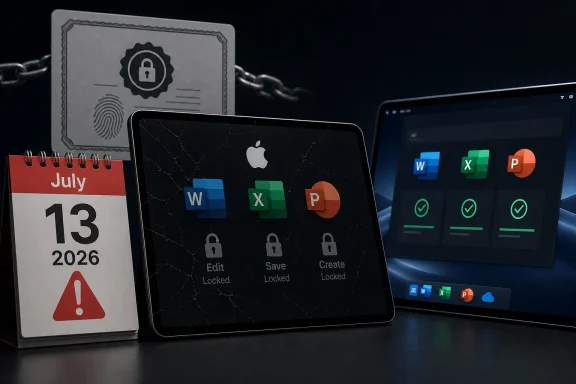
Microsoft says Office apps on macOS, iPhone, and iPad may enter reduced functionality mode on July 13, 2026, with Office 2019 users on Apple devices losing the ability to edit, save, or create files because the product will not receive the certificate update that newer Office builds get. The practical result is blunt: a paid, perpetual Office suite that still opens documents will become a read-and-print tool on Apple hardware. This is not a security breach, not a cloud outage, and not a mysterious Apple platform failure. It is a lifecycle decision colliding with the modern reality that “offline” desktop software is rarely as offline as buyers once believed.
The awkwardness is that Microsoft is technically within the boundaries of its support policy while still creating a result that feels hostile to the people most likely to have bought Office 2019 for exactly the opposite reason. Perpetual Office customers tend to be the users who wanted to avoid subscription churn, feature churn, and the feeling that their productivity suite answers to a vendor dashboard somewhere in Redmond. Now they are being reminded that licensing infrastructure, code-signing expectations, app-store-era trust chains, and support deadlines can turn a one-time purchase into a timed dependency.
The immediate trigger is a certificate expiration. Microsoft’s support notice says that, starting July 13, some users of Word, Excel, PowerPoint, Outlook, and OneNote on Apple devices may find that the apps can open and print files but cannot edit, save, or create new ones. Microsoft calls that reduced functionality mode, a phrase familiar to anyone who has dealt with unactivated or unlicensed Office installations.
For Microsoft 365 and Office 2021 users, the company’s remedy is straightforward: update the device and update Office. The renewed certificate arrives through the normal update channel, and the apps continue working. That is the easy case, and it is the case Microsoft would prefer everyone focus on.
Office 2019 is the hard case because it is already outside mainstream support on the Mac. Microsoft stopped supporting Office 2019 for Mac on October 10, 2023, which means the product is not scheduled to receive the update needed to keep full functionality alive after the certificate change. The company is not saying your documents disappear, and it is not saying the apps stop launching. It is saying the editing path is no longer available.
That distinction matters legally and technically. It may not matter emotionally. To a user who bought Office 2019 to write a novel, manage household finances, keep a small business invoicing system alive, or avoid a monthly Microsoft 365 bill, “you can still print” is not a satisfying definition of continued access.
But plausible engineering explanations do not erase product responsibility. If a license-verification mechanism can cause a locally installed productivity suite to lose editing capability years after purchase, that mechanism is part of the product’s real lifecycle. It is not merely plumbing. It is a dependency that customers were effectively buying into whether or not the box, invoice, or download page made that dependence obvious.
Microsoft’s position is that unsupported software does not receive the update. That is ordinary lifecycle management. The uncomfortable part is the consequence: unsupported does not merely mean “no new features” or “no security fixes.” In this case it means a core capability that existed yesterday may stop working tomorrow because the trust material embedded in, or required by, the application has aged out.
That is the line users will argue over. Is this an unavoidable expiration of a security and licensing mechanism? Or is it an avoidable decision not to provide a narrow compatibility update for a product Microsoft no longer wants to maintain? The most honest answer is that it can be both. Microsoft can be following its support calendar and still be choosing not to make a customer-friendly exception.
That is a major shift from the old desktop-software era. A copy of Office 2003 or Office 2007 could become unsafe, obsolete, and awkward, but it often remained stubbornly usable long after Microsoft wanted anyone to touch it. Files opened. Toolbars appeared. The software might complain, but it generally did not wake up one day and decide editing was no longer permitted because a licensing certificate had crossed a date boundary.
The Mac version of Office has always had a more complicated relationship with platform churn. Apple changes operating-system requirements aggressively, deprecates old frameworks, and pushes developers toward newer signing, notarization, and distribution practices. Microsoft, for its part, has to maintain Office across Windows, macOS, iOS, iPadOS, the web, and cloud services. That complexity makes support windows more meaningful than they were in the boxed-software era.
Still, Office 2019 is not ancient in the way many users understand the word. It is a 2018-era product, bought by people who may reasonably expect a word processor and spreadsheet app to remain useful for longer than a phone upgrade cycle. The gap between vendor lifecycle logic and customer intuition is where the anger is coming from.
That will make the episode feel even more arbitrary to mixed-platform households and businesses. A user may have the same generation of Office on a Windows PC and a Mac, only to see the Mac installation become view-only while the Windows copy continues to function. From a technical standpoint, different platforms can have different licensing implementations and certificate dependencies. From a customer standpoint, it looks like the same product behaving by different rules.
For IT administrators, that difference is both a relief and a headache. It limits the blast radius, but it also means inventory matters. The relevant question is not simply “Do we still have Office 2019?” It is “Do we still have Office 2019 on Macs, iPads, or iPhones used for actual editing?”
That is a harder question in many environments than it should be. Small businesses often have unmanaged Macs running old perpetual Office licenses. Schools and nonprofits may have a patchwork of donated hardware, legacy installs, and users who quietly depend on local Office rather than the web apps. The machines most likely to be affected are not always the ones neatly represented in a modern endpoint-management console.
This is the central advantage Microsoft has been selling for years. The subscription suite is not frozen in amber. It gets security updates, compatibility work, cloud integration, and licensing maintenance. When a trust-chain issue appears, Microsoft can push a supported update and move on.
But the Office 2019 cutoff also hands Microsoft’s critics an easy talking point. Every time a perpetual product loses practical functionality while the subscription product sails through, users hear the same message: pay monthly or accept degradation. That may not be the intent of every engineering decision, but it is the market signal.
The irony is that Microsoft does still sell non-subscription Office. Office 2024 exists for customers who want a one-time purchase, and Office 2021 users are covered for this particular update. Yet the arc is unmistakable. The safest place to be in Microsoft’s ecosystem is inside the continuously serviced subscription channel, and everything outside that channel carries more operational friction each year.
When a word processor loses editing capability, the trust violation feels intimate. The user is not merely losing access to a feature. They are losing confidence that the tools around their own files will behave predictably over time.
Microsoft can fairly say that Office 2019 is unsupported. It can fairly say that users should move to a supported product. It can fairly say that old operating systems and old applications create security and compatibility risks. All of that is true, and none of it fully answers the customer who says: I paid once because I wanted this tool to keep working without becoming a service relationship.
That expectation may be increasingly unrealistic, but vendors helped create it. “Perpetual” has always meant the right to use a version, not the right to receive indefinite maintenance. But most buyers do not parse licensing language like procurement lawyers. They understand perpetual as not rented. When the software becomes functionally dependent on a renewable certificate, the distinction between owned and rented becomes harder to defend in plain English.
For most real Office usage, it is not enough. Word without editing is a viewer. Excel without editing is a report reader. PowerPoint without creation or modification is a presentation archive. Outlook and OneNote become especially awkward because their value depends on ongoing interaction, not static file viewing.
The phrase also obscures timing. This is not a gradual feature deprecation where users notice one integration after another fading away. It is a date-driven cliff. On July 12, the affected installation may still be part of someone’s daily workflow. On July 13, it may no longer perform the task that justified its existence.
That is why the next month matters. The people most exposed are not enthusiasts reading Microsoft support notes; they are users who discover the problem only when a document refuses to save. For them, the certificate story will arrive as an explanation after the disruption, not as a warning before it.
That is where enterprise and education environments will feel the squeeze. Managed fleets can push Office updates, but they cannot magically make old hardware eligible for current Apple operating systems. A certificate update can therefore become a hardware-refresh trigger, particularly in organizations that stretched device lifespans for budget reasons.
For Office 2019 users, the official path is more severe. They can move to Microsoft 365, buy a newer perpetual Office release, use the web apps where appropriate, or switch to another suite. None of those options is the same as preserving the product they already bought.
There are practical mitigations, of course. Users can export critical files, test alternatives, and confirm whether any Windows machines remain available for legacy Office editing. But those are workarounds around a vendor boundary. The core fact remains: Office 2019 on Apple devices is not getting the certificate update needed to preserve editing.
The most obvious targets are executive assistants, finance staff, legal teams, researchers, and anyone who works with complex Word or Excel files outside browser-based workflows. These are the users most likely to have local Office muscle memory and the least patience for discovering that a document can be opened but not saved.
There is also a communications job here. The message should not be framed as “Microsoft is bricking Office,” because that invites a political argument before the operational facts are handled. It should be framed as: old Office builds on Apple devices have a certificate-related deadline, supported versions need updates, and Office 2019 for Mac will not retain editing after that date.
That language is less satisfying than outrage, but it is more useful. The goal for administrators is not to adjudicate Microsoft’s product philosophy. It is to keep users from losing working time and to make sure any forced purchase or migration is deliberate rather than panicked.
Vendors like Microsoft would argue that this is exactly why support pages, lifecycle policies, and update requirements exist. That is true in the formal sense. But the consumer and small-business market does not operate like a procurement office with lifecycle calendars and migration budgets.
There is a transparency gap between “this product no longer receives updates” and “this product may lose the ability to edit files on a supported platform because a certificate cannot be refreshed.” The second statement is much more consequential. It is also the kind of consequence that should be visible before customers are forced into a decision.
Microsoft is not alone here. The industry has normalized dependencies that remain invisible until they expire. Certificates, activation servers, API endpoints, identity providers, app-store requirements, cloud sync engines, and telemetry-gated feature flags all sit beneath the surface of software that users still think of as local. The Office 2019 case is simply a particularly vivid example because the affected action is so basic: edit the document in front of you.
The problem is that Office compatibility is not an abstract preference. It is a business requirement for many workflows. Word documents with tracked changes, Excel models with complex formatting or macros, PowerPoint decks tuned for corporate templates, and Outlook-heavy mail environments can make “just switch suites” an oversimplification.
That is why the anger around Office 2019 will not automatically translate into mass abandonment. Many users will grumble and buy Office 2024 or subscribe to Microsoft 365 because the cost of leaving is higher than the cost of staying. Microsoft knows this, and so do its customers.
The more interesting question is whether each episode like this nudges a few more people toward browser-first workflows, open formats, or lighter tools. Not everyone can leave Office. But more users may decide that a local perpetual Office license no longer provides the independence they thought they were buying.
Microsoft’s Office 2019 cutoff on Apple devices is not the death of perpetual software, but it is another reminder that perpetual no longer means simple, isolated, or immune from vendor infrastructure. The industry has spent years turning applications into continuously validated, continuously serviced endpoints, and now one of the world’s most familiar desktop suites is showing users what that bargain looks like when support runs out. The next fight will not be about whether updates are necessary; it will be about whether vendors owe customers a softer landing when the machinery underneath a “one-time purchase” reaches its expiration date.
The awkwardness is that Microsoft is technically within the boundaries of its support policy while still creating a result that feels hostile to the people most likely to have bought Office 2019 for exactly the opposite reason. Perpetual Office customers tend to be the users who wanted to avoid subscription churn, feature churn, and the feeling that their productivity suite answers to a vendor dashboard somewhere in Redmond. Now they are being reminded that licensing infrastructure, code-signing expectations, app-store-era trust chains, and support deadlines can turn a one-time purchase into a timed dependency.
 The Perpetual License Meets the Certificate Clock
The immediate trigger is a certificate expiration. Microsoft’s support notice says that, starting July 13, some users of Word, Excel, PowerPoint, Outlook, and OneNote on Apple devices may find that the apps can open and print files but cannot edit, save, or create new ones. Microsoft calls that reduced functionality mode, a phrase familiar to anyone who has dealt with unactivated or unlicensed Office installations.For Microsoft 365 and Office 2021 users, the company’s remedy is straightforward: update the device and update Office. The renewed certificate arrives through the normal update channel, and the apps continue working. That is the easy case, and it is the case Microsoft would prefer everyone focus on.
Office 2019 is the hard case because it is already outside mainstream support on the Mac. Microsoft stopped supporting Office 2019 for Mac on October 10, 2023, which means the product is not scheduled to receive the update needed to keep full functionality alive after the certificate change. The company is not saying your documents disappear, and it is not saying the apps stop launching. It is saying the editing path is no longer available.
That distinction matters legally and technically. It may not matter emotionally. To a user who bought Office 2019 to write a novel, manage household finances, keep a small business invoicing system alive, or avoid a monthly Microsoft 365 bill, “you can still print” is not a satisfying definition of continued access.
Microsoft’s Explanation Is Plausible, but It Is Not Exculpatory
There is a temptation to treat this as a simple villain story: Microsoft flicks a switch and pushes perpetual-license users into a subscription. That reading is too clean. Apple platforms are stricter than they used to be, Office licensing is more interconnected than it used to be, and certificate-based trust is a normal part of modern software distribution.But plausible engineering explanations do not erase product responsibility. If a license-verification mechanism can cause a locally installed productivity suite to lose editing capability years after purchase, that mechanism is part of the product’s real lifecycle. It is not merely plumbing. It is a dependency that customers were effectively buying into whether or not the box, invoice, or download page made that dependence obvious.
Microsoft’s position is that unsupported software does not receive the update. That is ordinary lifecycle management. The uncomfortable part is the consequence: unsupported does not merely mean “no new features” or “no security fixes.” In this case it means a core capability that existed yesterday may stop working tomorrow because the trust material embedded in, or required by, the application has aged out.
That is the line users will argue over. Is this an unavoidable expiration of a security and licensing mechanism? Or is it an avoidable decision not to provide a narrow compatibility update for a product Microsoft no longer wants to maintain? The most honest answer is that it can be both. Microsoft can be following its support calendar and still be choosing not to make a customer-friendly exception.
Office 2019 Was Already Living on Borrowed Time
Office 2019 for Mac was never going to be a forever product, even if the phrase “one-time purchase” encouraged some users to think in those terms. Microsoft’s perpetual Office releases have fixed support windows, and the company has been steadily narrowing the practical distinction between standalone Office and Microsoft 365. The standalone versions still exist, but they increasingly live downstream from the same servicing assumptions that shape the subscription product.That is a major shift from the old desktop-software era. A copy of Office 2003 or Office 2007 could become unsafe, obsolete, and awkward, but it often remained stubbornly usable long after Microsoft wanted anyone to touch it. Files opened. Toolbars appeared. The software might complain, but it generally did not wake up one day and decide editing was no longer permitted because a licensing certificate had crossed a date boundary.
The Mac version of Office has always had a more complicated relationship with platform churn. Apple changes operating-system requirements aggressively, deprecates old frameworks, and pushes developers toward newer signing, notarization, and distribution practices. Microsoft, for its part, has to maintain Office across Windows, macOS, iOS, iPadOS, the web, and cloud services. That complexity makes support windows more meaningful than they were in the boxed-software era.
Still, Office 2019 is not ancient in the way many users understand the word. It is a 2018-era product, bought by people who may reasonably expect a word processor and spreadsheet app to remain useful for longer than a phone upgrade cycle. The gap between vendor lifecycle logic and customer intuition is where the anger is coming from.
Apple Devices Take the Hit, Not Windows PCs
One of the stranger parts of this story is its platform specificity. Microsoft’s notice concerns Office and Microsoft 365 apps on macOS and iOS. According to the reporting and Microsoft’s own support framing, the reduced-functionality problem tied to this certificate expiration applies to Apple devices, not Windows installations of Office 2019.That will make the episode feel even more arbitrary to mixed-platform households and businesses. A user may have the same generation of Office on a Windows PC and a Mac, only to see the Mac installation become view-only while the Windows copy continues to function. From a technical standpoint, different platforms can have different licensing implementations and certificate dependencies. From a customer standpoint, it looks like the same product behaving by different rules.
For IT administrators, that difference is both a relief and a headache. It limits the blast radius, but it also means inventory matters. The relevant question is not simply “Do we still have Office 2019?” It is “Do we still have Office 2019 on Macs, iPads, or iPhones used for actual editing?”
That is a harder question in many environments than it should be. Small businesses often have unmanaged Macs running old perpetual Office licenses. Schools and nonprofits may have a patchwork of donated hardware, legacy installs, and users who quietly depend on local Office rather than the web apps. The machines most likely to be affected are not always the ones neatly represented in a modern endpoint-management console.
The Subscription Argument Gets a Gift It Did Not Earn
Microsoft 365 looks good in this story because it gets the fix. That does not mean Microsoft 365 is inherently virtuous; it means the subscription model aligns with continuous servicing. If you are paying for software that is expected to update constantly, a certificate refresh is just another Tuesday.This is the central advantage Microsoft has been selling for years. The subscription suite is not frozen in amber. It gets security updates, compatibility work, cloud integration, and licensing maintenance. When a trust-chain issue appears, Microsoft can push a supported update and move on.
But the Office 2019 cutoff also hands Microsoft’s critics an easy talking point. Every time a perpetual product loses practical functionality while the subscription product sails through, users hear the same message: pay monthly or accept degradation. That may not be the intent of every engineering decision, but it is the market signal.
The irony is that Microsoft does still sell non-subscription Office. Office 2024 exists for customers who want a one-time purchase, and Office 2021 users are covered for this particular update. Yet the arc is unmistakable. The safest place to be in Microsoft’s ecosystem is inside the continuously serviced subscription channel, and everything outside that channel carries more operational friction each year.
The Real Cost Is Trust in “Bought” Software
The debate over Office 2019 will not be limited to people who still run Office 2019. It touches a broader anxiety about software ownership. Users have grown accustomed to streaming libraries changing, smart-home devices losing cloud backends, and games depending on authentication servers. Productivity software used to feel different because documents are personal, local, and often economically important.When a word processor loses editing capability, the trust violation feels intimate. The user is not merely losing access to a feature. They are losing confidence that the tools around their own files will behave predictably over time.
Microsoft can fairly say that Office 2019 is unsupported. It can fairly say that users should move to a supported product. It can fairly say that old operating systems and old applications create security and compatibility risks. All of that is true, and none of it fully answers the customer who says: I paid once because I wanted this tool to keep working without becoming a service relationship.
That expectation may be increasingly unrealistic, but vendors helped create it. “Perpetual” has always meant the right to use a version, not the right to receive indefinite maintenance. But most buyers do not parse licensing language like procurement lawyers. They understand perpetual as not rented. When the software becomes functionally dependent on a renewable certificate, the distinction between owned and rented becomes harder to defend in plain English.
Reduced Functionality Is a Polite Phrase for a Serious Break
Microsoft’s term “reduced functionality mode” softens the impact. It sounds like a degraded state, not a lockout. Technically, that is accurate: users can still open, view, and print files. In some narrow cases, that may be enough.For most real Office usage, it is not enough. Word without editing is a viewer. Excel without editing is a report reader. PowerPoint without creation or modification is a presentation archive. Outlook and OneNote become especially awkward because their value depends on ongoing interaction, not static file viewing.
The phrase also obscures timing. This is not a gradual feature deprecation where users notice one integration after another fading away. It is a date-driven cliff. On July 12, the affected installation may still be part of someone’s daily workflow. On July 13, it may no longer perform the task that justified its existence.
That is why the next month matters. The people most exposed are not enthusiasts reading Microsoft support notes; they are users who discover the problem only when a document refuses to save. For them, the certificate story will arrive as an explanation after the disruption, not as a warning before it.
The Upgrade Path Is Simple Only If Your Hardware Is Simple
For Office 2021 and Microsoft 365 users, Microsoft’s fix sounds tidy: update macOS or iOS, then update Office. The minimum platform details matter because not every Apple device in the field can run the required newer operating systems. A user with a supported Office license but an older Mac, iPad, or iPhone may still face a hardware problem masquerading as a software update.That is where enterprise and education environments will feel the squeeze. Managed fleets can push Office updates, but they cannot magically make old hardware eligible for current Apple operating systems. A certificate update can therefore become a hardware-refresh trigger, particularly in organizations that stretched device lifespans for budget reasons.
For Office 2019 users, the official path is more severe. They can move to Microsoft 365, buy a newer perpetual Office release, use the web apps where appropriate, or switch to another suite. None of those options is the same as preserving the product they already bought.
There are practical mitigations, of course. Users can export critical files, test alternatives, and confirm whether any Windows machines remain available for legacy Office editing. But those are workarounds around a vendor boundary. The core fact remains: Office 2019 on Apple devices is not getting the certificate update needed to preserve editing.
IT Departments Should Treat This as an Asset-Discovery Drill
For administrators, the Office 2019 certificate cutoff is less a technical mystery than an inventory test. Any organization with Macs should identify Office versions, operating-system versions, update channels, and ownership models before mid-July. Waiting for tickets on July 13 is the expensive way to learn which users still depend on standalone Office.The most obvious targets are executive assistants, finance staff, legal teams, researchers, and anyone who works with complex Word or Excel files outside browser-based workflows. These are the users most likely to have local Office muscle memory and the least patience for discovering that a document can be opened but not saved.
There is also a communications job here. The message should not be framed as “Microsoft is bricking Office,” because that invites a political argument before the operational facts are handled. It should be framed as: old Office builds on Apple devices have a certificate-related deadline, supported versions need updates, and Office 2019 for Mac will not retain editing after that date.
That language is less satisfying than outrage, but it is more useful. The goal for administrators is not to adjudicate Microsoft’s product philosophy. It is to keep users from losing working time and to make sure any forced purchase or migration is deliberate rather than panicked.
The Small Print Was Always Part of the Product
This episode also exposes a weakness in how software lifecycles are sold. Support dates are usually published somewhere, but they are rarely experienced as part of the buying decision. A customer purchasing a perpetual Office license sees a feature set, a price, and maybe a vague promise of compatibility. The operational meaning of “support ends October 10, 2023” becomes clear only when something breaks after that date.Vendors like Microsoft would argue that this is exactly why support pages, lifecycle policies, and update requirements exist. That is true in the formal sense. But the consumer and small-business market does not operate like a procurement office with lifecycle calendars and migration budgets.
There is a transparency gap between “this product no longer receives updates” and “this product may lose the ability to edit files on a supported platform because a certificate cannot be refreshed.” The second statement is much more consequential. It is also the kind of consequence that should be visible before customers are forced into a decision.
Microsoft is not alone here. The industry has normalized dependencies that remain invisible until they expire. Certificates, activation servers, API endpoints, identity providers, app-store requirements, cloud sync engines, and telemetry-gated feature flags all sit beneath the surface of software that users still think of as local. The Office 2019 case is simply a particularly vivid example because the affected action is so basic: edit the document in front of you.
The Alternatives Are Real, but Compatibility Still Rules
Some users will use this as the moment to leave Microsoft Office. Apple’s Pages, Numbers, and Keynote are good enough for many home users. LibreOffice remains the most obvious open-source alternative for people who want local productivity software without a subscription. Google Workspace and Microsoft’s own web apps cover plenty of lightweight editing scenarios.The problem is that Office compatibility is not an abstract preference. It is a business requirement for many workflows. Word documents with tracked changes, Excel models with complex formatting or macros, PowerPoint decks tuned for corporate templates, and Outlook-heavy mail environments can make “just switch suites” an oversimplification.
That is why the anger around Office 2019 will not automatically translate into mass abandonment. Many users will grumble and buy Office 2024 or subscribe to Microsoft 365 because the cost of leaving is higher than the cost of staying. Microsoft knows this, and so do its customers.
The more interesting question is whether each episode like this nudges a few more people toward browser-first workflows, open formats, or lighter tools. Not everyone can leave Office. But more users may decide that a local perpetual Office license no longer provides the independence they thought they were buying.
The July Deadline Turns Office 2019 Into a Planning Problem
The concrete advice is not complicated, which is partly why the situation is so frustrating. Users have a date, a platform boundary, and a product boundary. The mistake would be treating this as a vague future annoyance rather than a near-term cutoff.- Office 2019 users on macOS, iPad, and iPhone should assume that editing, saving, and creating files will stop working in those apps after July 13, 2026.
- Office 2021 and Microsoft 365 users on Apple devices should update both the operating system and the Office apps before the deadline.
- Organizations should inventory Macs and iPads for Office version, OS version, and whether users actually edit Office files locally.
- Users with older Apple hardware should verify that the device can run the operating-system versions needed for supported Office updates.
- Anyone depending on Office 2019 for critical documents should test a migration path now rather than waiting for reduced functionality mode to appear.
Microsoft’s Office 2019 cutoff on Apple devices is not the death of perpetual software, but it is another reminder that perpetual no longer means simple, isolated, or immune from vendor infrastructure. The industry has spent years turning applications into continuously validated, continuously serviced endpoints, and now one of the world’s most familiar desktop suites is showing users what that bargain looks like when support runs out. The next fight will not be about whether updates are necessary; it will be about whether vendors owe customers a softer landing when the machinery underneath a “one-time purchase” reaches its expiration date.
References
- Primary source: XDA
Published: Thu, 11 Jun 2026 03:26:00 GMT
Loading…
www.xda-developers.com - Official source: support.microsoft.com
Update Microsoft 365 or Office on your macOS or iOS device - Microsoft Support
 support.microsoft.com
- Official source: learn.microsoft.com

Certificate update for Microsoft 365 apps on managed macOS and iOS devices - Microsoft 365 Apps
A licensing update for Microsoft 365 apps on macOS and iOSlearn.microsoft.com - Related coverage: techspot.com

Microsoft Office 2019 for Mac will no longer edit documents after July 13
Microsoft recently warned Office users on Apple devices that older versions of the company's productivity apps running on outdated operating systems will lose the ability to edit... www.techspot.com
- Related coverage: windowscentral.com
“You can’t edit Office 2019 for Mac after July 13.” Microsoft blames certificates, but critics call it obsolescence | Windows Central
Office 2019 for Mac will stop letting you edit documents in apps like Microsoft Word and Excel.www.windowscentral.com - Related coverage: macrumors.com

Microsoft Office 2019 for Mac Will Soon Stop Letting You Edit Documents
Microsoft will prevent Office 2019 for Mac owners from editing their documents from July 13, a restriction the company is attributing to the productivity suite's expiring digital certificate. The Office 2019 apps affected include Word, Excel, PowerPoint, Outlook, and OneNote. Once the... www.macrumors.com
- Related coverage: devdigest.org

Microsoft Office 2019 for Mac Forced to View-Only July 2026
Microsoft will remotely degrade perpetually-licensed Office 2019 for Mac and iOS to view-only mode on July 13, 2026, due to an expiring license-validation certidevdigest.org
- Official source: cdn-dynmedia-1.microsoft.com
- Official source: microsoft.com