

Sixteen years after it shipped, a tiny Microsoft mouse taught a large operating system a lesson about character encodings — and left a one‑line compatibility hack buried in Windows’ Bluetooth stack to prove it.
In 2006 Microsoft released the Microsoft Wireless Notebook Presenter Mouse 8000, a hybrid travel mouse with buttons and a laser pointer aimed at people who gave slide presentations. The device otherwise behaved like an ordinary Bluetooth peripheral — except for one surprising internal choice: its advertised Bluetooth name contained a registered‑trademark symbol (®) encoded not as UTF‑8, but as a single CP1252 (Windows‑1252) byte. That single byte made the entire name violate the Bluetooth specification’s expectation for UTF‑8, and when Windows tightened its validation the device started to misbehave. Raymond Chen of Microsoft explained the story on his blog, and engineers fixed the problem with a narrow compatibility mapping inside the Bluetooth drivers. This sounds like a punchline — and it is, partly — but it’s also an instructive, real‑world case study in how small legacy choices in firmware and tooling can ripple up into system‑level compatibility and security decisions. The rest of this article walks through the technical details, explains why the bug mattered, shows how Microsoft patched it, and draws practical lessons for device makers, driver authors, and IT administrators.
That strategy — targeted, minimal, and documented exceptions — is common in system software. It prevents the “blast radius” of a single broken vendor mistake from creating widespread breakage when the OS improves correctness or security checks.
Microsoft’s pragmatic resolution — a pinpoint compatibility entry inside the Bluetooth stack — preserved user experience without broadly weakening validation. The event is a practical reminder for hardware and firmware engineers: encoding choices matter, tests matter, and when you must fix messy field reality, make the fix small, explicit, and auditable.
(Accounts of the incident and the precise technical details are drawn from the Microsoft developer explanation and corroborating industry coverage, with the UTF‑8 and Unicode byte values verified against the Unicode/encoding specifications mentioned above. Some internal driver implementation details remain non‑auditable without source access; those points are flagged above as insider claims rather than binary‑level proofs.
Source: PC Gamer My new favorite deep Windows lore: Microsoft once broke its Bluetooth driver code by sticking a ® symbol in the name of its own mouse
 Background
In 2006 Microsoft released the Microsoft Wireless Notebook Presenter Mouse 8000, a hybrid travel mouse with buttons and a laser pointer aimed at people who gave slide presentations. The device otherwise behaved like an ordinary Bluetooth peripheral — except for one surprising internal choice: its advertised Bluetooth name contained a registered‑trademark symbol (®) encoded not as UTF‑8, but as a single CP1252 (Windows‑1252) byte. That single byte made the entire name violate the Bluetooth specification’s expectation for UTF‑8, and when Windows tightened its validation the device started to misbehave. Raymond Chen of Microsoft explained the story on his blog, and engineers fixed the problem with a narrow compatibility mapping inside the Bluetooth drivers. This sounds like a punchline — and it is, partly — but it’s also an instructive, real‑world case study in how small legacy choices in firmware and tooling can ripple up into system‑level compatibility and security decisions. The rest of this article walks through the technical details, explains why the bug mattered, shows how Microsoft patched it, and draws practical lessons for device makers, driver authors, and IT administrators.Overview: the technical error, in plain terms
What was encoded wrong, and why that breaks things
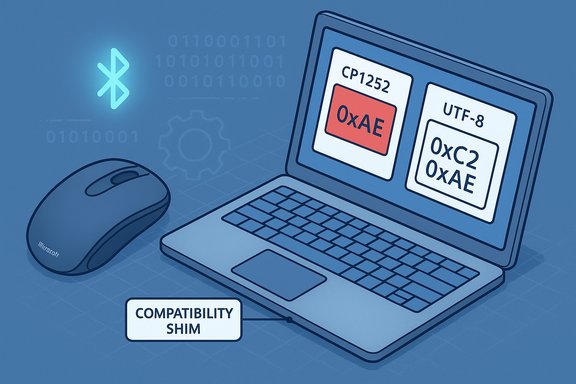
Bluetooth device names are considered human-readable strings in the protocol and — critically — they are expected to be encoded as UTF‑8. When a device advertises a name over Bluetooth (via the “local name” or the device name characteristic), the bytes in that field must form a valid UTF‑8 sequence; stacks and user interfaces interpret those bytes as UTF‑8. The Bluetooth Core Specification and the Bluetooth Core Specification Supplement expressly treat the local name / device name as a UTF‑8 string. The Presenter Mouse 8000 used a single byte, 0xAE, to represent the registered‑trademark sign. In legacy Windows encodings such as CP1252 (Windows‑1252), the code point 0xAE maps to U+00AE (the ® symbol). But in UTF‑8, U+00AE must be encoded as the two‑byte sequence 0xC2 0xAE. A lone 0xAE byte in a UTF‑8 stream is a continuation byte that lacks the necessary leading byte (0xC2). A strict UTF‑8 parser therefore treats the entire name field as invalid, not merely as “mistranslated.” That invalidation can cause higher layers to reject or ignore the attribute — in short, the device’s name could cause the connection or discovery code to fail.Encoding comparison at a glance
- CP1252 (Windows‑1252): 0xAE → ® (U+00AE)
- UTF‑8: ® (U+00AE) → 0xC2 0xAE
- A single 0xAE in a UTF‑8 stream is not a valid standalone character; it’s a continuation byte and breaks validation.
What happened inside Windows: a compatibility shim
Why a big OS doesn’t just “forgive” broken devices
Operating systems face a daily trade‑off between strictness and compatibility. Strict parsing enforces the spec and reduces the chance of weird inputs causing downstream misbehavior or security problems. But real‑world devices sometimes ship with broken descriptors; users — and enterprise deployments — expect their hardware to keep working. Historically, Windows has favored careful compatibility engineering: narrow, auditable shims that repair specific, known bad inputs rather than making the whole parser permissive. Raymond Chen describes exactly this approach in his explanation of the mouse incident. Microsoft’s Bluetooth team chose the surgical option: when the Bluetooth stack sees a device that reports the exact malformed name that the Presenter Mouse shipped with, the stack substitutes the corrected, valid name. That substitution is driven by a small, explicit compatibility table inside the driver described by Chen as “Devices that report their names wrong (and the correct name to use).” According to the account, that table currently contains a single entry for this Presenter Mouse model.How this preserves functionality
A targeted name substitution lets the rest of the Bluetooth logic treat the device as if it had sent a clean UTF‑8 name. Pairing UIs present a readable label, pairing logic matches devices correctly, and older units in the field keep working after Windows tightened validation. It’s a tiny change that protects the user experience without making the entire Bluetooth stack lax in its parsing rules.That strategy — targeted, minimal, and documented exceptions — is common in system software. It prevents the “blast radius” of a single broken vendor mistake from creating widespread breakage when the OS improves correctness or security checks.
Security and maintenance trade‑offs
The risks of forgiving malformed input
Making parsers permissive can hide a wider problem: attackers often exploit parsing inconsistencies. Accepting or attempting to “repair” arbitrary malformed fields introduces ambiguity and potentially widens the attack surface. Two concrete risks:- Spoofing: If name normalization is too generous, it's conceivable that an adversary could craft a malformed name whose normalized result impersonates another device.
- Parser confusion: Repair code handling malformed sequences can itself have bugs that a strictly‑validating parser would never see.
Maintenance burden and technical debt
Compatibility tables compile into long‑term maintenance obligations. Each entry must be preserved across refactors, retraced in code reviews, and kept documented so future maintainers do not remove a line that “looks wrong.” Over many years these lists can grow large and inscrutable unless care is taken to keep them minimal and tracked. Microsoft’s decision to limit the Bluetooth table to a single entry — if that remains true — is an explicit attempt to balance user needs with long‑term code hygiene. Chen’s writeup states the table “currently has only one entry,” but note that without inspecting source code or symbolized binaries the exact contents of shipped driver binaries cannot be independently verified. That particular statement should be treated as a reliable eye‑witness account from a Microsoft insider, yet not a binary audit.How device makers and firmware teams should read this story
This story is less a joke and more a checklist.- Encode human‑readable protocol fields as UTF‑8 by default. The Bluetooth spec, device manufacturer SDKs, and modern tooling assume this. Deviating from UTF‑8 is a compatibility landmine.
- Avoid legacy code‑page shortcuts in firmware build systems. A copy/paste from a Windows toolchain or an IDE that assumes CP1252 is precisely the origin of this class of error.
- Add end‑to‑end tests that perform strict parsing of advertised fields. Unit tests that assert that the advertised “local name” is valid UTF‑8 and that the device name characteristic decodes correctly will catch this earlier.
- Provide a firmware update path for fielded devices. When billions of host instances rely on a device to work, being able to patch firmware is a huge win.
Practical implications for IT administrators and users
If your organization runs older peripherals, you should be aware of the following operational realities:- Some vintage devices may rely on driver‑side compatibility shims that are invisible to administrators. If those shims are removed or refactored in a future OS update, the devices may stop working.
- When a device stops pairing after a Windows update, check whether the manufacturer still supports firmware updates. If not, compatibility tables or third‑party drivers may be the only mitigation.
- In environments where device identity matters (e.g., device enrollment, MDM maps), don’t rely solely on the human‑readable name as a canonical identifier. Prefer hardware identifiers, MAC addresses, or vendor/product IDs where possible.
Why this is both funny and important
There’s an irresistible tiny‑universe charm to the idea that a legal department’s insistence on sprinkling a ® into a product name would cost engineering a headache years later. Raymond Chen’s blog frames it with a wry “Thanks, Legal Department” line that captures the corporate reality: product text is legal text, and legal text travels into firmware images and embedded strings. The humor, though, belies a real lesson: encoding conventions travel with artifacts, and they can create long‑lasting coupling between legal copy, firmware build tools, and protocol validation code.Technical verification and cross‑checks
To avoid repeating mistakes or propagating myths, here are the core verifiable facts and how they were confirmed:- Bluetooth device name fields are intended to be UTF‑8 encoded. This is stated in the Bluetooth Core Specification and the Core Specification Supplement (the local name and device name characteristics are UTF‑8/utf8s fields).
- The registered‑trademark sign (U+00AE) is encoded in UTF‑8 as the two bytes 0xC2 0xAE. That is the canonical Unicode encoding of U+00AE.
- CP1252 (Windows‑1252) maps 0xAE to the registered sign, meaning firmware or tooling that writes 0xAE as a single byte will be creating CP1252 output, not UTF‑8. The mismatch is concrete and deterministic — a single byte difference that breaks UTF‑8 validation.
- Raymond Chen, a long‑time Microsoft developer and the author of “The Old New Thing” blog, described the specific problem (the mouse sending 0xAE instead of 0xC2 0xAE) and the mitigation (a compatibility table inside the Bluetooth drivers). His explanation is the primary public account of Microsoft’s internal decision. Chen explicitly states the table “currently has only one entry.” That claim originates with Chen and is currently the best available public account of the driver’s behavior; however, it is an insider explanation rather than a binary code inspection.
A checklist for developers and firmware teams
- Always emit protocol strings as UTF‑8; add CI checks to assert that strings in firmware images decode as UTF‑8.
- Avoid relying on platform default encodings during build steps (for instance, don’t let a Windows tool save a literal string using CP1252 unless explicitly intended).
- Provide firmware update instructions for fielded devices and make it easy for users to update.
- Use multiple identifiers for device identity in UIs and management systems — do not treat the human‑readable name as authoritative for security‑sensitive decisions.
- When designing host stacks, prefer narrow, auditable quirk lists over global permissiveness to balance compatibility and security.
Conclusion
A misplaced ® in a mouse name is an enchanting anecdote because it reduces a long, complicated surface of compatibility engineering to a single, humanly‑recognizable token. But the real value of the story is less comic and more instructive: it demonstrates how encoding, tooling, legal copy, and firmware intersect, and how a single byte can force large, distributed systems into a hard decision between strict correctness and user‑facing compatibility.Microsoft’s pragmatic resolution — a pinpoint compatibility entry inside the Bluetooth stack — preserved user experience without broadly weakening validation. The event is a practical reminder for hardware and firmware engineers: encoding choices matter, tests matter, and when you must fix messy field reality, make the fix small, explicit, and auditable.
(Accounts of the incident and the precise technical details are drawn from the Microsoft developer explanation and corroborating industry coverage, with the UTF‑8 and Unicode byte values verified against the Unicode/encoding specifications mentioned above. Some internal driver implementation details remain non‑auditable without source access; those points are flagged above as insider claims rather than binary‑level proofs.
Source: PC Gamer My new favorite deep Windows lore: Microsoft once broke its Bluetooth driver code by sticking a ® symbol in the name of its own mouse
