

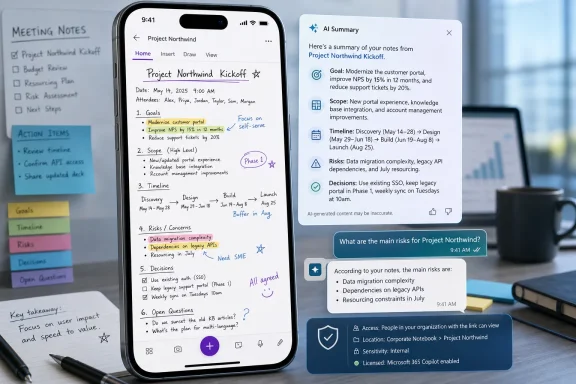
Microsoft has updated Microsoft 365 Roadmap item 422324 to show that OneNote Mobile for iPhone will add Copilot-powered page summaries and note-based Q&A in July 2026, after previously marking the feature as rolling out by mistake. The correction is small in the bureaucracy of Microsoft 365 release management, but the feature itself points to a larger shift: OneNote is being repositioned from a passive notebook into an AI-indexed work surface. For iPhone users, the promise is simple enough — summarize long pages and ask questions inside the app — but for IT teams, the real story is licensing, data access, and whether Copilot can make old notes useful without making governance harder.
The immediate news is a status change, not a launch. Microsoft says the OneNote Mobile feature remains in development, with general availability expected in July 2026 for iOS users in the Worldwide standard multi-tenant cloud. The company also acknowledged that it had “inadvertently” marked the roadmap item as rolling out and has now corrected the entry.
That admission matters because the Microsoft 365 Roadmap has become a kind of unofficial weather map for enterprise change. Admins, trainers, help desks, and adoption leads watch it to decide when to prepare documentation, update support scripts, and warn users that something new may appear in the apps they already use. When an item is mistakenly marked as rolling out, it can trigger premature planning — or worse, confusion among users who expect a button that does not yet exist.
Still, the correction does not change Microsoft’s intent. Copilot is coming deeper into OneNote Mobile on iPhone, and the new experience is designed around two familiar AI actions: generating a concise summary of a longer page and answering user questions based on the notes in front of them. That may sound incremental, but in OneNote’s world, incremental can be consequential.
OneNote is where many organizations keep the messy middle of work: meeting notes, project scraps, training notes, customer observations, pasted screenshots, handwritten ideas, and half-finished plans. Unlike Word documents or PowerPoint decks, OneNote pages often are not polished artifacts. They are closer to a running memory cache, and that is exactly the kind of material Microsoft wants Copilot to turn into something searchable, digestible, and actionable.
Copilot changes that expectation. If summary and Q&A work well on iPhone, the mobile app becomes more than a place to store notes until the “real work” begins. It becomes a place where the user can interrogate the notebook while standing in a hallway, riding between meetings, or preparing for a call without opening a laptop.
That is the strategic value of this roadmap item. Microsoft is not merely adding another Copilot icon to another app. It is trying to collapse the distance between capture and comprehension. The moment a page becomes long enough to be annoying, Copilot is supposed to compress it; the moment a notebook becomes difficult to scan, Copilot is supposed to answer the obvious question: what did we decide, what did I miss, and what should I do next?
That vision is especially relevant to iPhone because mobile productivity is often constrained by attention rather than processor speed. Reading a sprawling OneNote page on a phone is a poor experience even when the app performs perfectly. A good summary can make that page usable. A good Q&A feature can make it navigable.
That messiness is precisely why OneNote is valuable. It is also why AI features in OneNote are harder to judge than AI features in Word. A Word document usually declares its purpose. A OneNote page may contain a project plan, three unrelated reminders, a pasted email, a customer quote, and a doodle from a whiteboard session. If Copilot reduces that to a bland “this page discusses project updates,” users will ignore it.
The useful version of this feature needs to do more than produce fluent prose. It needs to preserve decisions, surface uncertainty, distinguish tasks from background notes, and avoid inventing structure where none exists. A summary that is graceful but wrong is worse than no summary at all, because it gives users confidence at the exact moment they should be checking the source.
Q&A raises the stakes further. When users ask a question inside OneNote, they are not asking for a generic web answer. They are asking Copilot to reason over personal or organizational memory. The expected answer is grounded in the page, not in a plausible pattern of text. If the page says the deployment deadline moved to August, Copilot must not infer July because the previous section mentioned July.
That distinction is important. Users do not spend all day in pristine documents. They spend time in chat threads, notes, calendars, email drafts, meeting recaps, file previews, and mobile apps. Microsoft’s advantage is the density of those surfaces across Microsoft 365. The challenge is making Copilot feel less like a bolted-on chatbot and more like a contextual tool that understands why the user opened that surface in the first place.
OneNote is an unusually revealing test case because it sits between personal productivity and enterprise knowledge management. It is personal enough that users treat it casually, but connected enough that organizations must care about compliance, retention, sharing, and access. Copilot in OneNote therefore has to satisfy two audiences at once: the employee who wants faster recall and the administrator who wants predictable boundaries.
That tension is not new, but mobile makes it sharper. The more useful Copilot becomes on a phone, the more likely users are to rely on it in real time. That can be a productivity win, but it also makes mistakes more operationally significant. A bad summary read at a desk may be corrected before a meeting. A bad summary read in a cab on the way to a customer site may shape the conversation before anyone checks the notebook.
For enterprise IT, “rolling out” implies that the feature may begin appearing in tenants, that support desks may receive tickets, and that admins may need to verify policy settings. “In development” means something very different: watch the space, but do not assume availability. Confusing those states creates noise in environments already dealing with a steady stream of Copilot changes.
The problem is amplified by the uneven nature of Microsoft 365 feature delivery. A capability may arrive first for certain licenses, regions, clients, app versions, or release rings. It may appear for some users before others. It may require a current mobile app build or a service-side switch. A roadmap status is not a guarantee that any given user can tap a button today.
That is why this correction is useful, even if it is inconvenient. It resets expectations around July 2026 rather than implying an active rollout at the end of June. For admins, the sensible response is to treat the item as imminent but not present: prepare communications, monitor Message Center updates, check licensing assumptions, and resist promising users that the feature exists until it actually appears in the OneNote iPhone app.
That matters because OneNote has a broad user base. Many people use it casually, including students, small-business workers, frontline staff, and personal Microsoft account holders. If Summary and Q&A appear only for a subset of paid Copilot users, the feature may create a visible split between those who have AI assistance inside their notes and those who only have the traditional notebook.
For enterprises, that split is manageable but politically awkward. Copilot features tend to generate demand once users see colleagues using them. A manager who can summarize a dense meeting page on an iPhone may expect the same from the rest of the team. If only certain roles have licenses, IT will need a clear explanation that this is not an app-version problem or an iOS problem; it is an entitlement and policy problem.
Microsoft’s broader commercial strategy is obvious enough. The company wants Copilot to become a reason to buy higher-value Microsoft 365 subscriptions and add-ons. Embedding Copilot into everyday apps like OneNote makes that value easier to demonstrate, but it also makes the boundaries more visible when users hit them.
If Copilot is limited to the current page, the risk profile is narrower. If it can reason across a notebook, other accessible files, or broader Microsoft 365 content depending on the experience, admins need to understand those boundaries before users begin treating answers as authoritative. Microsoft’s support material for Copilot in OneNote already frames the assistant as a tool that can answer questions about notes and, in some contexts, use other Microsoft 365 content the user can access. That is powerful, but it makes permissions hygiene more important.
The old Microsoft 365 rule still applies: Copilot generally does not create access that was not already there, but it can make existing access much easier to exploit. Overshared notebooks, stale project spaces, and permissive OneDrive or SharePoint links become more consequential when an AI assistant can summarize and retrieve their contents on demand.
For security teams, this is the familiar Copilot governance problem in miniature. Before turning users loose on AI-powered note retrieval, organizations should review sharing practices, sensitivity labels, retention policies, and mobile app management. A notebook that felt low-risk when buried in a user’s personal workspace may feel different when its contents can be summarized from a phone in seconds.
For students, the obvious use case is turning long lecture notes into study summaries and asking clarifying questions before an exam. For project managers, it is pulling decisions and action items out of sprawling meeting pages. For consultants and field workers, it is quickly finding what a customer said last quarter without rereading every page in a section. For executives, it is catching up on a briefing notebook before walking into a meeting.
The mobile angle also fits how notes are consumed. People often capture notes on a laptop but review them on a phone. They skim while moving between contexts. A short, fluent summary can turn OneNote from an archive into a briefing tool. Q&A can turn it into a lightweight memory assistant.
The best version of this feature will not replace careful reading. It will reduce the number of times careful reading is necessary. That is the productivity bargain Microsoft is selling: use AI to get oriented quickly, then open the original note when the answer matters enough to verify.
That is where Microsoft needs to be careful with interface design. Users should be able to move easily from a summary back to the underlying note. Answers should make it obvious when they are grounded in the current page versus broader content. If Copilot cannot find the answer, it should say so plainly rather than producing a plausible guess.
This is not merely a philosophical concern. Notes often contain provisional information. A page may include a decision that was later reversed, a task assigned before a reorganization, or a pasted quote without context. Human readers naturally notice some of those signals. AI systems can miss them, especially when asked to produce a clean answer.
For regulated industries, the issue becomes sharper. A summarized notebook page could influence decisions in legal, healthcare, finance, or HR contexts. Organizations that allow Copilot in OneNote should train users to treat summaries as aids, not records. The record remains the note itself, with all its timestamps, context, and imperfections.
That advantage is also a constraint. Consumer note apps can move quickly and tolerate rough edges. Microsoft has to bring AI features into a product used by schools, governments, law firms, hospitals, and Fortune 500 companies. The company must make OneNote feel modern without breaking the trust model that made it acceptable in the first place.
The July 2026 iPhone feature is therefore part of a larger modernization effort. OneNote cannot remain only a digital binder while the rest of Microsoft 365 becomes conversational. If users can ask Outlook, Teams, Word, and the Microsoft 365 Copilot app to explain their work, they will expect the same from the place where they keep raw notes.
But there is a subtle product risk here. OneNote’s charm has always been its looseness. It does not force users into databases, templates, or rigid document structures. If Copilot becomes the main way users experience their notebooks, Microsoft may gradually privilege notes that are AI-readable over notes that are human-natural. That could make OneNote more powerful while nudging users toward a more structured, less personal style of note-taking.
For WindowsForum readers, this is a useful reminder that Microsoft 365 is no longer a Windows-centered ecosystem in the old sense. The Windows PC remains central to many workflows, but Microsoft’s most important productivity bets are increasingly service-first and cross-platform. If the user’s work identity lives in Microsoft 365, Microsoft wants Copilot available wherever the user happens to be — Windows, web, Mac, iPad, iPhone, or Android.
That does not diminish Windows; it changes its role. Windows becomes one endpoint among several for Microsoft’s cloud productivity layer. OneNote on iPhone getting Copilot summary and Q&A is not a side quest. It is a sign that Microsoft sees mobile access to organizational knowledge as part of the core Copilot experience.
Android users will reasonably ask when they get parity. The submitted roadmap item is iOS-specific, and Microsoft’s release sequencing across mobile platforms can vary. Admins supporting mixed-device fleets should avoid assuming that iPhone availability means immediate Android availability unless Microsoft publishes a separate roadmap item or message confirming it.
The first step is inventorying how OneNote is used. Some companies use it casually; others rely on shared notebooks for project operations, team knowledge, onboarding, and customer work. The more important the notebooks, the more important it is to review ownership, sharing, and retention before Copilot makes that content easier to query.
The second step is communications. Users should know that roadmap availability does not equal tenant availability, and that Copilot experiences may depend on licensing, app version, account type, and admin policy. A short internal note in July could prevent a wave of “missing feature” tickets.
The third step is training users on verification. A good adoption message should not simply say “Copilot can summarize your notes.” It should say “Copilot can help you get oriented, but you should open the source note before acting on sensitive, contractual, legal, financial, or personnel information.” That may sound cautious, but it is the difference between responsible AI use and magical thinking.
 Microsoft Corrects the Roadmap, but the Direction Is Clear
The immediate news is a status change, not a launch. Microsoft says the OneNote Mobile feature remains in development, with general availability expected in July 2026 for iOS users in the Worldwide standard multi-tenant cloud. The company also acknowledged that it had “inadvertently” marked the roadmap item as rolling out and has now corrected the entry.That admission matters because the Microsoft 365 Roadmap has become a kind of unofficial weather map for enterprise change. Admins, trainers, help desks, and adoption leads watch it to decide when to prepare documentation, update support scripts, and warn users that something new may appear in the apps they already use. When an item is mistakenly marked as rolling out, it can trigger premature planning — or worse, confusion among users who expect a button that does not yet exist.
Still, the correction does not change Microsoft’s intent. Copilot is coming deeper into OneNote Mobile on iPhone, and the new experience is designed around two familiar AI actions: generating a concise summary of a longer page and answering user questions based on the notes in front of them. That may sound incremental, but in OneNote’s world, incremental can be consequential.
OneNote is where many organizations keep the messy middle of work: meeting notes, project scraps, training notes, customer observations, pasted screenshots, handwritten ideas, and half-finished plans. Unlike Word documents or PowerPoint decks, OneNote pages often are not polished artifacts. They are closer to a running memory cache, and that is exactly the kind of material Microsoft wants Copilot to turn into something searchable, digestible, and actionable.
The iPhone Is No Longer Just a Capture Device
For years, mobile OneNote has mostly been treated as a convenient capture endpoint. You jot something down, paste a link, take a photo, scan a whiteboard, or check a notebook while away from your desk. The heavy lifting — organizing, writing, exporting, and presenting — has usually happened later on a larger screen.Copilot changes that expectation. If summary and Q&A work well on iPhone, the mobile app becomes more than a place to store notes until the “real work” begins. It becomes a place where the user can interrogate the notebook while standing in a hallway, riding between meetings, or preparing for a call without opening a laptop.
That is the strategic value of this roadmap item. Microsoft is not merely adding another Copilot icon to another app. It is trying to collapse the distance between capture and comprehension. The moment a page becomes long enough to be annoying, Copilot is supposed to compress it; the moment a notebook becomes difficult to scan, Copilot is supposed to answer the obvious question: what did we decide, what did I miss, and what should I do next?
That vision is especially relevant to iPhone because mobile productivity is often constrained by attention rather than processor speed. Reading a sprawling OneNote page on a phone is a poor experience even when the app performs perfectly. A good summary can make that page usable. A good Q&A feature can make it navigable.
Copilot’s Real Test Is the Messiness of Notes
Summarizing a clean document is one thing. Summarizing a OneNote page is another. OneNote content can be structurally chaotic: typed paragraphs beside pasted tables, screenshots mixed with handwriting, meeting fragments, task tags, embedded files, and sections that made sense only to the person who wrote them six months ago.That messiness is precisely why OneNote is valuable. It is also why AI features in OneNote are harder to judge than AI features in Word. A Word document usually declares its purpose. A OneNote page may contain a project plan, three unrelated reminders, a pasted email, a customer quote, and a doodle from a whiteboard session. If Copilot reduces that to a bland “this page discusses project updates,” users will ignore it.
The useful version of this feature needs to do more than produce fluent prose. It needs to preserve decisions, surface uncertainty, distinguish tasks from background notes, and avoid inventing structure where none exists. A summary that is graceful but wrong is worse than no summary at all, because it gives users confidence at the exact moment they should be checking the source.
Q&A raises the stakes further. When users ask a question inside OneNote, they are not asking for a generic web answer. They are asking Copilot to reason over personal or organizational memory. The expected answer is grounded in the page, not in a plausible pattern of text. If the page says the deployment deadline moved to August, Copilot must not infer July because the previous section mentioned July.
Microsoft’s Copilot Strategy Moves From Apps to Surfaces
The OneNote Mobile update fits a broader Microsoft pattern. Copilot began as a branded assistant inside flagship Office apps, then became a cross-app layer, and now is being pushed into the smaller surfaces where work actually accumulates. The company’s pitch is no longer just “Copilot can write a document.” It is “Copilot can meet you wherever the work already is.”That distinction is important. Users do not spend all day in pristine documents. They spend time in chat threads, notes, calendars, email drafts, meeting recaps, file previews, and mobile apps. Microsoft’s advantage is the density of those surfaces across Microsoft 365. The challenge is making Copilot feel less like a bolted-on chatbot and more like a contextual tool that understands why the user opened that surface in the first place.
OneNote is an unusually revealing test case because it sits between personal productivity and enterprise knowledge management. It is personal enough that users treat it casually, but connected enough that organizations must care about compliance, retention, sharing, and access. Copilot in OneNote therefore has to satisfy two audiences at once: the employee who wants faster recall and the administrator who wants predictable boundaries.
That tension is not new, but mobile makes it sharper. The more useful Copilot becomes on a phone, the more likely users are to rely on it in real time. That can be a productivity win, but it also makes mistakes more operationally significant. A bad summary read at a desk may be corrected before a meeting. A bad summary read in a cab on the way to a customer site may shape the conversation before anyone checks the notebook.
The Roadmap Correction Is a Reminder That “Rolling Out” Is Not a Deployment Plan
Microsoft’s apology for prematurely marking the feature as rolling out is easy to dismiss as housekeeping. It should not be. In the Microsoft 365 world, rollout language carries operational meaning, even if Microsoft’s own roadmap pages warn that dates are estimates and subject to change.For enterprise IT, “rolling out” implies that the feature may begin appearing in tenants, that support desks may receive tickets, and that admins may need to verify policy settings. “In development” means something very different: watch the space, but do not assume availability. Confusing those states creates noise in environments already dealing with a steady stream of Copilot changes.
The problem is amplified by the uneven nature of Microsoft 365 feature delivery. A capability may arrive first for certain licenses, regions, clients, app versions, or release rings. It may appear for some users before others. It may require a current mobile app build or a service-side switch. A roadmap status is not a guarantee that any given user can tap a button today.
That is why this correction is useful, even if it is inconvenient. It resets expectations around July 2026 rather than implying an active rollout at the end of June. For admins, the sensible response is to treat the item as imminent but not present: prepare communications, monitor Message Center updates, check licensing assumptions, and resist promising users that the feature exists until it actually appears in the OneNote iPhone app.
Licensing Will Decide Whether This Feels Like a Feature or an Upsell
The roadmap item lists Microsoft Copilot for Microsoft 365 and OneNote as the relevant products, which is a clue that this is not simply a free OneNote enhancement for every iPhone user. Microsoft’s Copilot licensing has become more segmented over time, and organizations should assume that the full in-app Copilot experience will depend on eligible Microsoft 365 Copilot licensing and tenant configuration.That matters because OneNote has a broad user base. Many people use it casually, including students, small-business workers, frontline staff, and personal Microsoft account holders. If Summary and Q&A appear only for a subset of paid Copilot users, the feature may create a visible split between those who have AI assistance inside their notes and those who only have the traditional notebook.
For enterprises, that split is manageable but politically awkward. Copilot features tend to generate demand once users see colleagues using them. A manager who can summarize a dense meeting page on an iPhone may expect the same from the rest of the team. If only certain roles have licenses, IT will need a clear explanation that this is not an app-version problem or an iOS problem; it is an entitlement and policy problem.
Microsoft’s broader commercial strategy is obvious enough. The company wants Copilot to become a reason to buy higher-value Microsoft 365 subscriptions and add-ons. Embedding Copilot into everyday apps like OneNote makes that value easier to demonstrate, but it also makes the boundaries more visible when users hit them.
Admins Should Read This as a Data Access Story
Every Copilot feature in a productivity app is also a data access feature. Summary and Q&A in OneNote may sound harmless because the user is asking about their own notes, but the practical question is what content Copilot can see, how it grounds responses, and which organizational controls apply.If Copilot is limited to the current page, the risk profile is narrower. If it can reason across a notebook, other accessible files, or broader Microsoft 365 content depending on the experience, admins need to understand those boundaries before users begin treating answers as authoritative. Microsoft’s support material for Copilot in OneNote already frames the assistant as a tool that can answer questions about notes and, in some contexts, use other Microsoft 365 content the user can access. That is powerful, but it makes permissions hygiene more important.
The old Microsoft 365 rule still applies: Copilot generally does not create access that was not already there, but it can make existing access much easier to exploit. Overshared notebooks, stale project spaces, and permissive OneDrive or SharePoint links become more consequential when an AI assistant can summarize and retrieve their contents on demand.
For security teams, this is the familiar Copilot governance problem in miniature. Before turning users loose on AI-powered note retrieval, organizations should review sharing practices, sensitivity labels, retention policies, and mobile app management. A notebook that felt low-risk when buried in a user’s personal workspace may feel different when its contents can be summarized from a phone in seconds.
The User Benefit Is Real, Especially for Long-Lived Notebooks
It is easy to be cynical about another Copilot feature, but OneNote is one of the places where AI assistance genuinely makes sense. Long notebooks age poorly. They accumulate context faster than users can maintain them. Search helps if you remember the right keyword; summaries help when you do not know what you are looking for yet.For students, the obvious use case is turning long lecture notes into study summaries and asking clarifying questions before an exam. For project managers, it is pulling decisions and action items out of sprawling meeting pages. For consultants and field workers, it is quickly finding what a customer said last quarter without rereading every page in a section. For executives, it is catching up on a briefing notebook before walking into a meeting.
The mobile angle also fits how notes are consumed. People often capture notes on a laptop but review them on a phone. They skim while moving between contexts. A short, fluent summary can turn OneNote from an archive into a briefing tool. Q&A can turn it into a lightweight memory assistant.
The best version of this feature will not replace careful reading. It will reduce the number of times careful reading is necessary. That is the productivity bargain Microsoft is selling: use AI to get oriented quickly, then open the original note when the answer matters enough to verify.
The Risk Is That Fluent Summaries Become False Certainty
The danger is not that Copilot will be useless. The danger is that it will be useful enough to be trusted too quickly. AI summaries are seductive because they impose order on disorder. In a notebook full of fragments, even a mediocre summary can feel like clarity.That is where Microsoft needs to be careful with interface design. Users should be able to move easily from a summary back to the underlying note. Answers should make it obvious when they are grounded in the current page versus broader content. If Copilot cannot find the answer, it should say so plainly rather than producing a plausible guess.
This is not merely a philosophical concern. Notes often contain provisional information. A page may include a decision that was later reversed, a task assigned before a reorganization, or a pasted quote without context. Human readers naturally notice some of those signals. AI systems can miss them, especially when asked to produce a clean answer.
For regulated industries, the issue becomes sharper. A summarized notebook page could influence decisions in legal, healthcare, finance, or HR contexts. Organizations that allow Copilot in OneNote should train users to treat summaries as aids, not records. The record remains the note itself, with all its timestamps, context, and imperfections.
Microsoft Is Making OneNote More Competitive by Making It Less Like Notes
The modern note-taking market has moved aggressively toward AI. Notion, Evernote, Google, Apple, and a crowd of smaller tools have all chased some version of summarization, semantic search, and chat-with-your-notes. Microsoft’s advantage is not that it invented the concept. It is that OneNote already sits inside Microsoft 365, where work identity, file permissions, enterprise management, and collaboration are already established.That advantage is also a constraint. Consumer note apps can move quickly and tolerate rough edges. Microsoft has to bring AI features into a product used by schools, governments, law firms, hospitals, and Fortune 500 companies. The company must make OneNote feel modern without breaking the trust model that made it acceptable in the first place.
The July 2026 iPhone feature is therefore part of a larger modernization effort. OneNote cannot remain only a digital binder while the rest of Microsoft 365 becomes conversational. If users can ask Outlook, Teams, Word, and the Microsoft 365 Copilot app to explain their work, they will expect the same from the place where they keep raw notes.
But there is a subtle product risk here. OneNote’s charm has always been its looseness. It does not force users into databases, templates, or rigid document structures. If Copilot becomes the main way users experience their notebooks, Microsoft may gradually privilege notes that are AI-readable over notes that are human-natural. That could make OneNote more powerful while nudging users toward a more structured, less personal style of note-taking.
The iOS-First Detail Should Not Be Overlooked
The roadmap item is specifically for iPhone, not a generic mobile announcement. That focus may reflect implementation timing rather than strategy, but it is still notable. Microsoft’s productivity apps have long treated iOS as a first-class platform, particularly for enterprise users whose phones are often iPhones even when their desktops run Windows.For WindowsForum readers, this is a useful reminder that Microsoft 365 is no longer a Windows-centered ecosystem in the old sense. The Windows PC remains central to many workflows, but Microsoft’s most important productivity bets are increasingly service-first and cross-platform. If the user’s work identity lives in Microsoft 365, Microsoft wants Copilot available wherever the user happens to be — Windows, web, Mac, iPad, iPhone, or Android.
That does not diminish Windows; it changes its role. Windows becomes one endpoint among several for Microsoft’s cloud productivity layer. OneNote on iPhone getting Copilot summary and Q&A is not a side quest. It is a sign that Microsoft sees mobile access to organizational knowledge as part of the core Copilot experience.
Android users will reasonably ask when they get parity. The submitted roadmap item is iOS-specific, and Microsoft’s release sequencing across mobile platforms can vary. Admins supporting mixed-device fleets should avoid assuming that iPhone availability means immediate Android availability unless Microsoft publishes a separate roadmap item or message confirming it.
The Practical Work Starts Before July
Organizations interested in this feature should not wait until the button appears. The preparation is less about training users to tap “Summarize” and more about making sure the environment around OneNote is ready for AI-assisted recall.The first step is inventorying how OneNote is used. Some companies use it casually; others rely on shared notebooks for project operations, team knowledge, onboarding, and customer work. The more important the notebooks, the more important it is to review ownership, sharing, and retention before Copilot makes that content easier to query.
The second step is communications. Users should know that roadmap availability does not equal tenant availability, and that Copilot experiences may depend on licensing, app version, account type, and admin policy. A short internal note in July could prevent a wave of “missing feature” tickets.
The third step is training users on verification. A good adoption message should not simply say “Copilot can summarize your notes.” It should say “Copilot can help you get oriented, but you should open the source note before acting on sensitive, contractual, legal, financial, or personnel information.” That may sound cautious, but it is the difference between responsible AI use and magical thinking.
The Notebook Becomes a Briefing Room
This is the concrete shape of the change: OneNote on iPhone is being prepared to behave less like a static notebook and more like a mobile briefing room. That does not make the feature revolutionary on its own, but it does make it part of a meaningful shift in how Microsoft expects people to use their accumulated work.- Microsoft’s roadmap correction means the OneNote Mobile iPhone Summary and Q&A feature is not currently rolling out and is instead planned for general availability in July 2026.
- The feature is intended to let eligible users generate concise summaries of longer OneNote pages and ask questions directly within their notes.
- The roadmap item applies to iOS, the Worldwide standard multi-tenant cloud, General Availability release, OneNote, and Microsoft Copilot for Microsoft 365.
- Administrators should treat the update as a licensing, governance, and mobile-management issue rather than merely a new app button.
- Users should treat Copilot summaries and answers as navigation aids that point back to the underlying notes, not as replacements for the original record.
- The broader significance is that Microsoft is pushing Copilot into the informal workspaces where organizational memory is created before it becomes a formal document.
References
- Primary source: Microsoft 365 Roadmap
Published: 2026-06-30T22:57:58.6723014Z
Loading…
www.microsoft.com - Official source: support.microsoft.com
Welcome to Copilot in OneNote | Microsoft Support
Learn about the features and benefits of Microsoft’s AI-powered Copilot in OneNote.support.microsoft.com - Official source: techcommunity.microsoft.com
Copilot in OneNote now understands more of your notes | Microsoft Community Hub
Copilot in OneNote now understands images, tables, and more to deliver richer, more accurate insights from your notes. techcommunity.microsoft.com
- Official source: learn.microsoft.com
Release Notes for Microsoft 365 Copilot | Microsoft Learn
Lists the features that reach General Availability in each release of Microsoft 365 Copilot.learn.microsoft.com - Related coverage: linkedin.com
Loading…
www.linkedin.com - Related coverage: howtogeek.com
Copilot Is Invading the OneNote Mobile Apps
Turn your voice into notes, or notes into a Q&A. www.howtogeek.com
- Related coverage: m365admin.handsontek.net
Loading…
m365admin.handsontek.net - Related coverage: windowscentral.com
Microsoft 365 Copilot Chat summarized confidential emails | Windows Central
Microsoft confirms a Copilot bug that exposed and summarized confidential emails, bypassing security policies.www.windowscentral.com - Official source: cdn-dynmedia-1.microsoft.com
Loading…
cdn-dynmedia-1.microsoft.com - Related coverage: rsmus.com
Loading…
rsmus.com