
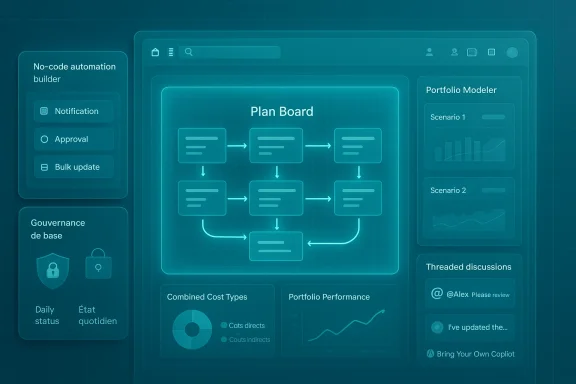
OnePlan’s February 2026 product update delivers a clear, practical set of enhancements aimed at reducing everyday friction for enterprise portfolio teams: no‑code Work Plan automations and stricter baseline governance to protect schedule integrity, a centralized Plan Files App with Microsoft Teams integration to shrink context switching, financial controls such as Combined Cost Types and daily status locks for tighter month‑end accuracy, faster scenario modeling in Portfolio Modeler, threaded collaboration features, and early native language support for French and Spanish — plus a Bring Your Own Copilot option that lets organizations seed plans via their own Microsoft Copilot environment.
OnePlan bills itself as a Strategic Portfolio Management (SPM) platform designed to connect strategy, finance, resources, and work in a single system. The vendor published formal release notes on February 6, 2026 and supported those notes with a press distribution in the following days, making the package public in early February.
The February release is tightly consistent with OnePlan’s recent positioning as a migration destination for organizations moving off Microsoft Project Online: the company’s OnePlan NextGen PPM and migration tooling make the platform a practical choice for Microsoft‑centric estates, and the February feature set doubles down on operational governance, Teams/SharePoint integration, and Copilot compatibility that enterprises care about during migration and steady‑state operations.
What’s different in this release is not a single headline AI breakthrough but an accumulation of admin‑centric, productivity‑oriented capabilities designed to reduce reconciliation work, protect audit trails, accelerate common workflow steps, and improve adoption for non‑English speakers. The vendor frames the release as “removing friction” — practical improvements intended to speed time to value rather than a platform pivot.
Why it matters: these automations take routine PMO chores out of spreadsheets and manual scripts and embed them into the SPM layer, which reduces human error and enables consistent operational patterns across portfolios. Practical examples include automated month‑end status nudges, approvals for scope changes, and automatic creation of post‑mortem tasks when a milestone slips.
Why it matters: enterprise PMOs frequently struggle with conflicting edits, undocumented baseline changes, and unreliable historical comparisons. By moving baseline and daily‑close controls into the platform with RBAC‑style enforcement, OnePlan gives PMOs concrete levers to enforce disciplined close cycles.
Why it matters: connecting documents and plans in the same UX is a straightforward adoption accelerator for organizations that already rely on Microsoft Teams and SharePoint. Reducing the number of tabs and places to look for artifacts shortens briefings and improves the signal‑to‑noise ratio in deliverable reviews.
Why it matters: many portfolio decisions require a clear, consolidated cost view that includes labor and non‑labor elements. Consolidated cost types, if mapped correctly, reduce the reconciliation burden and provide faster, more confident tradeoff analysis for portfolio leaders.
Why it matters: decision velocity is often bottlenecked by tooling that is slow to render scenarios. Performance improvements paired with prebuilt visualization idioms let PMOs run more “what if” analyses and shorten approval cycles. That said, independent load testing remains advisable for very large estates.
Why it matters: focused, in‑context conversations reduce meeting time and accelerate decision throughput — especially when paired with document linking and the Files App. It’s a small UX change with outsized practical value.
Why it matters: native language UIs reduce onboarding friction and day‑to‑day cognitive load, a non‑trivial adoption factor for multinational rollouts. However, Beta status means translation completeness and corner‑case behavior should be validated in pilot groups before broad deployment.
Why it matters: Copilot‑driven plan seeding can remove the tedium of initial schedule building and enforce consistent structure across intake requests. That said, integrating Copilot raises operational questions around telemetry, DLP, and audit trails that must be answered before broad enablement.
Why it matters: robust connectors shorten cutover windows and reduce bespoke scripting during migration. Region selection is particularly important for enterprises that must respect data residency and compliance boundaries.
Independent reporting and analyst commentary (as reflected in trade coverage and the file package available to this newsroom) echo OnePlan’s framing: the release emphasizes administrative controls, Teams‑centric collaboration, financial consolidation, Copilot‑driven plan creation, and early multilingual readiness. Those independent summaries also flag the same open questions around Copilot telemetry, translation maturity, and automation safety.
Practical verification: enterprises should validate specific behaviors in a staging tenant. For example, confirm that Combined Cost Types map to your chart‑of‑accounts logic, that baseline permissions create the expected audit trail, and that Copilot‑created plans include identifiable provenance so you can audit AI‑driven edits. The vendor’s support documentation provides the technical walk‑throughs and configuration steps needed to test these behaviors before production roll‑out.
That said, the most transformative elements — Bring Your Own Copilot and multi‑language support — come with qualifications. Copilot integration introduces compliance and telemetry questions that require explicit vendor documentation and SIEM integration. Language support is useful but Beta; localization completeness must be validated by native users. No‑code automations accelerate work but raise the need for operational safeguards (dry runs, reversible actions, and clear logging). These are governance, procurement, and testing issues — not technical blockers — but they are essential to getting long‑term value without costly mistakes.
If you are responsible for delivering a program of work, approach the update as a capability‑enablement play: pilot with clear acceptance criteria, instrument the platform for observability, and insist on vendor commitments for audit logs, runbooks, and remediation timelines. With that discipline, the February 2026 release is a meaningful step toward reducing manual work and improving portfolio decision velocity — provided organizations pair capability enablement with governance and testing.
OnePlan’s February release shows how relatively modest, well‑targeted product investments — governance controls, focused automations, better integration with native collaboration tools, and language readiness — can translate into practical productivity gains for enterprise delivery teams. The technical details are published in OnePlan’s release notes and product blog and repeated in press distribution; procurement, security, finance, and PMO leads should validate the behaviors identified in this article in a non‑production tenant before wide adoption. With careful piloting and governance, organizations stand to capture meaningful reductions in reconciliation work, clearer audit trails, and faster, more predictable portfolio planning cycles.
Source: The Malaysian Reserve https://themalaysianreserve.com/202...ration-and-french-spanish-language-readiness/
 Background / Overview
OnePlan bills itself as a Strategic Portfolio Management (SPM) platform designed to connect strategy, finance, resources, and work in a single system. The vendor published formal release notes on February 6, 2026 and supported those notes with a press distribution in the following days, making the package public in early February.The February release is tightly consistent with OnePlan’s recent positioning as a migration destination for organizations moving off Microsoft Project Online: the company’s OnePlan NextGen PPM and migration tooling make the platform a practical choice for Microsoft‑centric estates, and the February feature set doubles down on operational governance, Teams/SharePoint integration, and Copilot compatibility that enterprises care about during migration and steady‑state operations.
What’s different in this release is not a single headline AI breakthrough but an accumulation of admin‑centric, productivity‑oriented capabilities designed to reduce reconciliation work, protect audit trails, accelerate common workflow steps, and improve adoption for non‑English speakers. The vendor frames the release as “removing friction” — practical improvements intended to speed time to value rather than a platform pivot.
What’s new — feature breakdown
No‑code Work Plan Automations (Beta)
OnePlan’s Work Plan automations provide a visual, no‑code builder that creates triggers based on schedule dates, item changes, or arbitrary conditions. Actions include notifications, status requests, bulk updates to fields, creation/copying of follow‑on items (risks, issues, lessons learned), approval routing, and action chaining. Automations can be applied at scope levels ranging from a single plan to organization‑wide policy.Why it matters: these automations take routine PMO chores out of spreadsheets and manual scripts and embed them into the SPM layer, which reduces human error and enables consistent operational patterns across portfolios. Practical examples include automated month‑end status nudges, approvals for scope changes, and automatic creation of post‑mortem tasks when a milestone slips.
Baseline Governance and Day‑Level Status Locks
The release introduces explicit Baseline Permissions that let administrators control who can create the first baseline and who can update subsequent ones. In parallel, daily status date locks allow teams to close costs and status through a chosen day, preventing back‑dated edits that commonly corrupt period‑end reports. Together these controls strengthen auditability and preserve schedule history for variance analysis.Why it matters: enterprise PMOs frequently struggle with conflicting edits, undocumented baseline changes, and unreliable historical comparisons. By moving baseline and daily‑close controls into the platform with RBAC‑style enforcement, OnePlan gives PMOs concrete levers to enforce disciplined close cycles.
Plan Files App — centralized documents + Teams integration
A new Plan Files App centralizes plan‑related documents and links. Teams can add links from multiple repositories, browse Microsoft Teams folders, and open documents directly from within OnePlan. Membership synchronization with Teams is continuous to ensure access is kept current. The feature aims to reduce context switching between plans and file stores.Why it matters: connecting documents and plans in the same UX is a straightforward adoption accelerator for organizations that already rely on Microsoft Teams and SharePoint. Reducing the number of tabs and places to look for artifacts shortens briefings and improves the signal‑to‑noise ratio in deliverable reviews.
Financial Controls: Combined Cost Types and Reporting Improvements
Combined Cost Types let finance and delivery teams automatically consolidate two cost views (for example Actuals + Estimate To Complete) into a single, always‑current perspective. This minimizes manual reconciliation between systems or spreadsheets. Reporting now pulls in non‑labor data as well, expanding visibility into full portfolio performance.Why it matters: many portfolio decisions require a clear, consolidated cost view that includes labor and non‑labor elements. Consolidated cost types, if mapped correctly, reduce the reconciliation burden and provide faster, more confident tradeoff analysis for portfolio leaders.
Portfolio Modeler Enhancements
The Portfolio Modeler gains built‑in dashboards for side‑by‑side scenario comparisons and performance improvements designed to reduce load times on large portfolios. The aim is to make scenario planning quicker and more interactive so leaders can iterate tradeoffs without waiting on long refresh cycles.Why it matters: decision velocity is often bottlenecked by tooling that is slow to render scenarios. Performance improvements paired with prebuilt visualization idioms let PMOs run more “what if” analyses and shorten approval cycles. That said, independent load testing remains advisable for very large estates.
Collaboration: threaded replies, @mentions, focused comment view
Discussion threads now support threaded replies and @User mentions, with a dedicated comment/thread view that keeps conversations attached to specific work items. This improves clarity in conversations and reduces the chance that important context gets lost in email threads or disconnected chats.Why it matters: focused, in‑context conversations reduce meeting time and accelerate decision throughput — especially when paired with document linking and the Files App. It’s a small UX change with outsized practical value.
Multi‑Language (Beta): French and Spanish support
The release delivers native UI translations for French and Spanish under a Beta label. Menus, labels, messages, and feature names are translated, enabling teams in francophone or hispanophone regions to use the product in their preferred language. OnePlan notes further languages are planned for future releases.Why it matters: native language UIs reduce onboarding friction and day‑to‑day cognitive load, a non‑trivial adoption factor for multinational rollouts. However, Beta status means translation completeness and corner‑case behavior should be validated in pilot groups before broad deployment.
Bring Your Own Copilot — AI‑driven plan creation
OnePlan introduces a “Bring Your Own Copilot” capability that enables organizations to use their Microsoft Copilot setup to create plans. The Copilot‑based workflow can generate an initial schedule and align prompts to internal processes and terminology, helping standardize intake and reduce repetitive setup tasks.Why it matters: Copilot‑driven plan seeding can remove the tedium of initial schedule building and enforce consistent structure across intake requests. That said, integrating Copilot raises operational questions around telemetry, DLP, and audit trails that must be answered before broad enablement.
Integrations, connectors, and migration tooling
Power Automate connector updates include region selection support and Work Plan actions (create/edit tasks, load task data), improving global automation compatibility. OnePlan also reports incremental reliability improvements to Jira, Planner Premium, and OneConnect migration tooling — consistent with its push to ease migrations from Project Online.Why it matters: robust connectors shorten cutover windows and reduce bespoke scripting during migration. Region selection is particularly important for enterprises that must respect data residency and compliance boundaries.
Independent verification and sourcing
Key claims in the release (release timing, feature list, and high‑level behavior) are corroborated in OnePlan’s own February product blog and the vendor’s official release notes, and were distributed through press channels. The release notes were published on February 6, 2026 and the press distribution followed in the week after; OnePlan’s blog and support documentation list the same features and behavioral summaries.Independent reporting and analyst commentary (as reflected in trade coverage and the file package available to this newsroom) echo OnePlan’s framing: the release emphasizes administrative controls, Teams‑centric collaboration, financial consolidation, Copilot‑driven plan creation, and early multilingual readiness. Those independent summaries also flag the same open questions around Copilot telemetry, translation maturity, and automation safety.
Practical verification: enterprises should validate specific behaviors in a staging tenant. For example, confirm that Combined Cost Types map to your chart‑of‑accounts logic, that baseline permissions create the expected audit trail, and that Copilot‑created plans include identifiable provenance so you can audit AI‑driven edits. The vendor’s support documentation provides the technical walk‑throughs and configuration steps needed to test these behaviors before production roll‑out.
Strengths — what enterprises will appreciate
- Admin‑first governance: Baseline permissions and day‑level status locks directly address long‑standing audit and close process problems that PMOs face. These are not cosmetic UI tweaks; they are process controls with measurable downstream value for financial accuracy.
- Practical automations: The no‑code automation builder is purpose‑built for common PMO needs (status nudges, approvals, follow‑on item generation). Because automations can be scoped, they support both centralized governance and local agility.
- Tighter Microsoft ecosystem fit: Teams folder browsing, Power Automate region awareness, and Copilot compatibility make OnePlan more attractive to Microsoft‑centric organizations by reducing integration friction and preserving organizational investments in Microsoft 365.
- Reduced reconciliation work: Combined Cost Types and improved reporting that includes non‑labor data allow finance teams to see consolidated views without juggling spreadsheets, which can materially shorten finance close cycles.
- Localization as an adoption lever: Native French and Spanish support — even in Beta — is a pragmatic nod to global deployments where UI language is a gating factor for adoption. Multilingual UI support can reduce training overhead and confusion for distributed teams.
Risks, limitations, and open questions
- Copilot governance and telemetry: Bring Your Own Copilot is useful, but enterprises must confirm what Copilot logs are produced, how prompt and plan data are stored, and which telemetry is available for security monitoring. The release notes describe the feature but do not enumerate audit schemas or retention policies; procurement teams should require explicit documentation.
- Automation safety nets: No‑code automations accelerate both useful changes and potential mistakes. Organizations should verify whether automations have dry‑run modes, per‑run logging, role‑based approvals, and rollback semantics before enabling update‑capable automations in production. The vendor’s documentation lists actions and scope but does not otherwise detail rollback behavior; test this during pilots.
- Localization maturity (Beta): Beta translations often miss corner cases like error messages, admin text, and custom labels. Enterprises should pilot French and Spanish UX paths with native speakers and maintain a translation issue tracker for vendor remediation. Do not assume production parity at initial rollout.
- Scale/performance assurances: OnePlan reports faster Portfolio Modeler and Resource Plan performance, but independent load testing and customer telemetry will validate real‑world behavior on very large portfolios. Buyers should request benchmarks or run their own scale tests with production‑sized datasets.
- Vendor claims require verification: Statements such as “more than 500 companies worldwide” and partner awards are vendor assertions; procurement teams should request industry or region‑specific references and documented migration outcomes where possible.
Recommended rollout approach — pragmatic pilot checklist
- Select pilot scope:
- 2–4 representative portfolios (small, medium, large).
- 1–2 user groups with native French or Spanish speakers.
- Include PMO, finance, security, and legal stakeholders.
- Baseline governance validation:
- Configure baseline permission sets and run change scenarios.
- Verify audit logs reproduce expected historical baselines and variance reports.
- Automations dry run:
- Start with notifications/status‑request automations in read‑only mode.
- Progress to update actions only after logs, rollback, and approval paths are validated.
- Files + Teams integration:
- Install Plan Files App in a non‑production tenant.
- Configure Teams folder sync and confirm permission mapping.
- Copilot guardrails:
- Define who may use Bring Your Own Copilot.
- Draft allowed prompt templates and confirm Copilot logging and DLP coverage.
- Request documentation for data residency and access logs from OnePlan and Microsoft.
- Financial reconciliation:
- Configure Combined Cost Types in a test plan.
- Reconcile against accounting system exports at month‑end to validate mapping logic.
- Localization QA:
- Task native speakers to perform end‑to‑end scenarios and collect translation/UX issues.
- Maintain a remediation tracker for vendor fixes.
- Performance/load testing:
- Execute modeler scenario comparisons and resource planning computations with production‑sized datasets.
- Observe load times, API usage, and connector throughput (Power Automate, Jira).
- Procurement checklist:
- Require documentation on automation logs, Copilot telemetry, data residency, SLA support windows, and runbooks for disabling automations and recovering plan states.
Practical implications for PMOs and IT leaders
- PMOs should view this release as a toolset to strengthen governance and automate repetitive PMO functions. With proper pilot discipline, organizations can shorten close cycles, reduce spreadsheet dependence, and improve plan hygiene.
- IT and security teams must treat Copilot integration and automation features as new operational surfaces. Integrate Copilot telemetry with existing SIEM/SOAR tools, apply sensitivity labeling to connectors, and insist on DLP coverage for any Copilot workspace that touches production data.
- Finance teams should leverage Combined Cost Types and the expanded reporting to collapse reconciliation work, but must validate mappings against general ledger exports to ensure month‑end parity.
- Global rollouts should prioritize language pilots: early French and Spanish support is valuable but still Beta; treating localization as an explicit acceptance criterion will prevent surprises in adoption metrics.
Final assessment — value versus caution
OnePlan’s February 2026 release is a pragmatic, operationally focused update tailored to enterprise PMOs and Microsoft‑centric organizations. The release’s strengths are its administrative controls, practical no‑code automations, tighter Teams/SharePoint integration, and cost consolidation features — each addressing recurring, measurable pain points in portfolio governance and finance. For organizations migrating off Project Online, these enhancements reduce friction in cutovers and improve readiness for steady‑state execution.That said, the most transformative elements — Bring Your Own Copilot and multi‑language support — come with qualifications. Copilot integration introduces compliance and telemetry questions that require explicit vendor documentation and SIEM integration. Language support is useful but Beta; localization completeness must be validated by native users. No‑code automations accelerate work but raise the need for operational safeguards (dry runs, reversible actions, and clear logging). These are governance, procurement, and testing issues — not technical blockers — but they are essential to getting long‑term value without costly mistakes.
If you are responsible for delivering a program of work, approach the update as a capability‑enablement play: pilot with clear acceptance criteria, instrument the platform for observability, and insist on vendor commitments for audit logs, runbooks, and remediation timelines. With that discipline, the February 2026 release is a meaningful step toward reducing manual work and improving portfolio decision velocity — provided organizations pair capability enablement with governance and testing.
OnePlan’s February release shows how relatively modest, well‑targeted product investments — governance controls, focused automations, better integration with native collaboration tools, and language readiness — can translate into practical productivity gains for enterprise delivery teams. The technical details are published in OnePlan’s release notes and product blog and repeated in press distribution; procurement, security, finance, and PMO leads should validate the behaviors identified in this article in a non‑production tenant before wide adoption. With careful piloting and governance, organizations stand to capture meaningful reductions in reconciliation work, clearer audit trails, and faster, more predictable portfolio planning cycles.
Source: The Malaysian Reserve https://themalaysianreserve.com/202...ration-and-french-spanish-language-readiness/
