

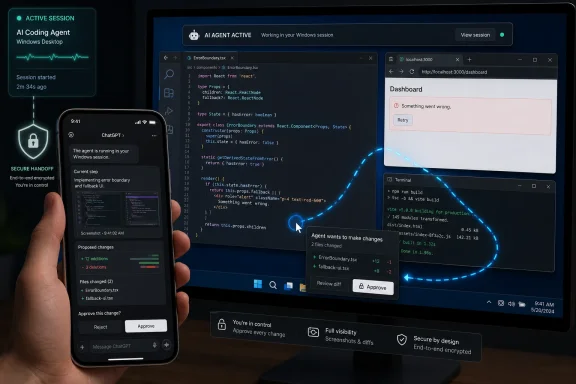
OpenAI added Windows computer use and phone-based control to Codex on May 29, 2026, letting the Codex desktop app operate visible Windows apps while users supervise work from ChatGPT on iPhone or Android. The move is less about one more coding-assistant feature than about where OpenAI thinks developer work is going: away from the prompt box and into the actual machine. For Windows users, that is both overdue and awkward. Codex can now touch the desktop, but it still has to borrow the user’s active session to do it.
The important change is not that Codex can write code. That was already the old story. The new story is that Codex is being positioned as an agent that can cross the boundary between code, terminal output, screenshots, app windows, and human approval.
That matters because developer work rarely happens in a single pane. A bug report may start in a browser, get reproduced in a desktop app, require inspection in an IDE, generate a diff, and end with a test run in a terminal. Traditional coding assistants have been strongest when the work can be represented as text. GUI automation gives Codex a way to participate when the truth is on the screen rather than in a file.
Windows support is therefore a strategic milestone, even if the feature arrives with visible limitations. Windows is where a huge share of enterprise development, testing, internal tooling, installer validation, and line-of-business app work still happens. A coding agent that cannot operate Windows is not useless, but it is boxed out of a large part of the real-world workflow.
OpenAI’s framing is careful. Codex is not being sold as a silent worker that takes over your PC indefinitely. It is being sold as a supervised assistant that can act locally, show its work, ask for approvals, and continue while the user steps away. That distinction is not just marketing. It is the line between a useful agent and a security incident waiting to happen.
That difference matters because “computer use” is not a generic capability once it hits the desktop. It depends on permissions, session state, display handling, app isolation, and the expectations users have for foreground control. A Mac and a Windows PC may both have windows, buttons, menus, and text fields, but the security and session models around those surfaces are not interchangeable.
On Windows, Codex operates on the active desktop. That is the practical constraint that should be printed in large type above every demo. If Codex is clicking through an installer, poking at a browser, or reproducing a bug in a GUI, the user cannot casually keep using that same logged-in session as if nothing is happening.
That is why the feature is best understood as a handoff rather than a background service. You give Codex the surface, you monitor or step away, and then you take the machine back. For short, deliberate tasks, that can be powerful. For a normal workday in which the same PC is already saturated with Teams, Outlook, browsers, terminals, and admin consoles, it is more complicated.
The obvious examples are GUI testing, installer checks, bug reproduction, and small workflow validations. A developer can ask Codex to launch an app, follow reproduction steps, observe the failure, make a code change, rebuild, and try again. In theory, that closes a loop that previously required a human to shuttle between “please write code” and “now let me see whether the app still breaks.”
But the active desktop turns this into a scheduled activity. If Codex is using the screen, it owns the screen. That will feel natural to anyone who has watched a remote support technician take over a session, but it is a very different experience from a cloud agent running tests on a remote machine.
The upside is transparency. The user can see what the agent is doing because the agent is doing it in front of them. The downside is displacement. The user is no longer multitasking on that Windows session; they are lending it to Codex.
For enthusiasts, this may be acceptable and even fun. For IT departments, it raises planning questions. A developer laptop is often a primary workstation, not a disposable automation node. If agentic desktop work becomes routine, organizations may need separate test machines, virtual desktops, dev boxes, or dedicated Windows sessions that can be safely handed to automation.
That is a meaningful shift. The phone is not doing the development work; the Windows machine is. The phone becomes a control tower. It lets the human remain in the approval loop while the agent continues on the host where the repository, app, credentials, environment, and desktop state already exist.
This is a more credible mobile development story than pretending that serious work is going to happen inside a tiny on-screen keyboard. Developers do not want to build a Windows app from a phone. They may, however, want to approve a test run while commuting, ask Codex to try another reproduction path while at lunch, or review a screenshot before a meeting.
The limitation is obvious: the connected machine still has to be connected. It must be awake, online, signed in, and available to Codex long enough for the task to complete. If the PC sleeps, loses network access, signs out, or hits an unexpected prompt, the mobile layer cannot magically preserve the workflow.
That makes this less like cloud CI and more like remote supervision of a local robot. The phone gives you reach. It does not eliminate the dependency on the Windows box.
The earlier choice in many automation systems was crude: either the agent needed constant command approvals, or it received broad access and became too risky for comfort. OpenAI’s newer direction tries to carve out a middle path in which Codex can act locally while still operating inside narrower boundaries.
That safety model will matter more than benchmark scores. A coding assistant that writes a clever patch is useful. A coding assistant that can click through your machine, run commands, and interact with signed-in apps is in a different trust category. The product has to answer not only “Can it do the task?” but “What can it touch, what can it infer, what can it exfiltrate, and when does the human regain control?”
Windows administrators will immediately think in policy terms. Can this be managed? Can it be disabled? Can app access be scoped? Can logs be retained? Can approvals be audited? Can a user accidentally give Codex access to an internal system that was never meant to be automated by a third-party agent?
Those are not paranoid questions. They are the questions that separate a clever demo from enterprise deployment.
Installer testing is one example. Many Windows applications still involve wizards, permission prompts, upgrade paths, file associations, services, shell integrations, and post-install configuration screens. Some of that can be automated through scripts, but a surprising amount of validation remains visual and procedural. An agent that can step through the experience and report back with screenshots has obvious value.
Bug reproduction is another. Users often describe failures as sequences: open this dialog, click that tab, paste this value, resize the window, switch focus, then watch the crash. These are the kinds of reports that are painful to translate into automated tests. Codex computer use gives developers a way to turn some of those reports into supervised agent runs.
Internal tools may be the biggest category. Enterprises are full of admin portals, legacy desktop apps, half-modernized workflows, and private web interfaces where the API is missing, undocumented, or politically unavailable. An agent that can operate the interface can bridge gaps that code generation alone cannot.
But this is also where caution is most warranted. Internal tools often carry permissions that exceed what a developer realizes. A human clicking through a portal has judgment, context, and hesitation. An agent needs constraints that make its mistakes survivable.
That change alters the failure modes. A bad remote desktop session is usually a human making a mistake at a distance. A bad agentic session may involve the model misreading a screen, clicking the wrong control, accepting a prompt it should have questioned, or continuing with an assumption that no human would have made.
The phone workflow sharpens this distinction. When the user is reviewing Codex from mobile, they may be glancing at screenshots and approving steps in fragments of attention. That is convenient, but it also creates a risk of rubber-stamp supervision. The more routine approvals become, the less meaningful they may be.
Good agent design has to fight that tendency. Approvals should be requested when they matter, not constantly enough to train users into reflexively tapping yes. Screenshots and diffs should be clear enough to support judgment. Terminal output should be summarized without hiding the details that matter.
If OpenAI gets that balance right, mobile supervision can be a strength. If it gets it wrong, the phone becomes a thin layer of consent over actions users do not really understand.
Windows is not a neutral territory in this race. It is Microsoft’s operating system, Microsoft’s enterprise base, and the place where Copilot is supposed to feel inevitable. Yet OpenAI is building a workflow in which ChatGPT mobile and Codex desktop become the user-facing control plane for agentic work on a Windows PC.
That does not mean Microsoft loses. GitHub Copilot remains deeply embedded in developer tooling, and Microsoft has distribution advantages OpenAI cannot easily match. But OpenAI is moving quickly toward a broader agent model that treats the operating system as a workspace rather than a mere host.
For Windows users, competition is good. It means the future of PC automation will not be defined solely by one vendor’s integration roadmap. But for administrators, it means another layer of policy decisions. The question will not be “Do we allow AI?” It will be “Which agents can operate which machines, under which identities, against which apps, with which logs?”
That is a much harder question, and Windows is where it will become unavoidable.
The consumer story is simple: install the app, connect your account, prompt Codex, supervise from your phone. The enterprise story is messier. Workstations are managed. Repositories are governed. Credentials are federated. Devices sleep according to policy. Screen capture may be restricted. Some apps are sensitive enough that even screenshots become data-handling events.
A responsible deployment will need more than a toggle. It will need device management hooks, admin controls, identity boundaries, data retention settings, and a clear story for incident response. If Codex clicks the wrong thing in a privileged admin portal, an organization will need to know what happened and why.
There is also the matter of regional availability and regulatory caution. Features that involve remote control, screen inspection, and agentic action tend to attract closer scrutiny, especially where privacy and automated decision-making rules are stricter. OpenAI and its competitors will have to tune availability and defaults accordingly.
The organizations that benefit first may be the ones with mature development environments and well-defined test machines. A dedicated Windows device that runs reproducible GUI tasks is a far easier place to start than a knowledge worker’s primary laptop full of sensitive sessions and personal distractions.
That changes how developers allocate attention. Instead of sitting with the assistant through every step, a developer may queue a task, let Codex inspect the project, review a proposed change, approve a test run, and then switch to something else. The mobile integration extends that queue beyond the desk.
This is where the phone matters most. It lets the developer remain loosely attached to a set of ongoing agent runs. Work becomes less synchronous. Codex can proceed until it hits an uncertainty or permission boundary, then the human can intervene from wherever they are.
There is a managerial danger hidden inside that productivity story. Once tasks become easy to dispatch, users may dispatch more than they can meaningfully review. Developers already live with notification fatigue from CI systems, code review tools, issue trackers, and chat platforms. Agentic coding could become another stream of half-attended work unless the tools are disciplined.
The best version of this future is not one where developers stop thinking. It is one where they spend less time shepherding routine mechanics and more time deciding what should be built, what risk is acceptable, and what tradeoffs are worth making.
A clean API-first world needs fewer screen-driving agents. Windows is not that world. Even in 2026, many organizations rely on software whose most reliable interface is still the one drawn on the screen. Codex computer use is an admission that the GUI remains part of the automation surface.
This is not a failure of Windows so much as a feature of reality. Software accretes. Businesses keep systems alive for decades. Developers inherit workflows that cannot be refactored just because a better abstraction exists. An agent that can operate the visible interface is a pragmatic tool for an imperfect environment.
But pragmatism cuts both ways. GUI automation can be brittle. Buttons move. Dialogs change. Focus gets stolen. A notification appears at the wrong time. A screen scaling setting shifts the layout. A human can adapt fluidly to that noise; an agent may need retries, confirmations, and better visual reasoning.
That means Codex computer use should not be treated as a replacement for proper test automation, APIs, or scripts. It is a bridge for the gaps. Bridges are useful, but you still need to know what is underneath them.
It can observe the screen. It can act on the desktop. It can receive instructions from a cloud-connected account. It can involve mobile approval. It can touch code and potentially run commands. Each of those capabilities is manageable in isolation. Combined, they demand a sharper threat model.
For individual users, the immediate risks are accidental disclosure, unintended actions, and overbroad access. For organizations, the risks include data leakage, privilege misuse, audit gaps, and unclear responsibility when an AI-driven action causes damage.
None of that means the feature should be dismissed. It means the user experience should make the trust boundary visible. Users need to know when Codex is watching, when it is acting, what apps it can access, what data leaves the machine, and how to stop it instantly.
The most promising part of OpenAI’s approach is that it appears to acknowledge the need for permission boundaries rather than pretending the model’s good intentions are enough. The least settled part is whether those boundaries will be legible and enforceable at enterprise scale.
Windows computer use makes this painfully concrete. If Codex occupies the active desktop, every unnecessary action has a cost. Every confused pause, every misclick, every request for clarification interrupts the human’s environment. The agent has to be not only capable but courteous.
Mobile supervision raises the same issue from the other side. A phone can keep the user connected, but it can also turn agent work into a stream of pings. The right abstraction is not constant remote control. It is exception handling: tell me when something materially changes, when a decision is needed, or when the task is complete.
That is where OpenAI’s desktop-plus-phone design could mature into something genuinely useful. The desktop provides context and execution. The phone provides lightweight oversight. The agent handles the middle. If the model can keep the human informed without dragging them back into every mechanical step, the workflow becomes more than a novelty.
If it cannot, users will treat it like many automation tools before it: impressive in demos, exhausting in production.
 OpenAI Moves Codex From the Editor Into the Operating System
The important change is not that Codex can write code. That was already the old story. The new story is that Codex is being positioned as an agent that can cross the boundary between code, terminal output, screenshots, app windows, and human approval.That matters because developer work rarely happens in a single pane. A bug report may start in a browser, get reproduced in a desktop app, require inspection in an IDE, generate a diff, and end with a test run in a terminal. Traditional coding assistants have been strongest when the work can be represented as text. GUI automation gives Codex a way to participate when the truth is on the screen rather than in a file.
Windows support is therefore a strategic milestone, even if the feature arrives with visible limitations. Windows is where a huge share of enterprise development, testing, internal tooling, installer validation, and line-of-business app work still happens. A coding agent that cannot operate Windows is not useless, but it is boxed out of a large part of the real-world workflow.
OpenAI’s framing is careful. Codex is not being sold as a silent worker that takes over your PC indefinitely. It is being sold as a supervised assistant that can act locally, show its work, ask for approvals, and continue while the user steps away. That distinction is not just marketing. It is the line between a useful agent and a security incident waiting to happen.
Windows Gets the Feature After the Mac, But the Platform Difference Is the Story
The Windows rollout follows earlier Mac-focused work that brought Codex closer to full computer use. On macOS, OpenAI had already shown a model in which Codex could interact with apps, continue work while the user was away, and report back through mobile. Windows now gets the same broad idea, but not the same operating environment.That difference matters because “computer use” is not a generic capability once it hits the desktop. It depends on permissions, session state, display handling, app isolation, and the expectations users have for foreground control. A Mac and a Windows PC may both have windows, buttons, menus, and text fields, but the security and session models around those surfaces are not interchangeable.
On Windows, Codex operates on the active desktop. That is the practical constraint that should be printed in large type above every demo. If Codex is clicking through an installer, poking at a browser, or reproducing a bug in a GUI, the user cannot casually keep using that same logged-in session as if nothing is happening.
That is why the feature is best understood as a handoff rather than a background service. You give Codex the surface, you monitor or step away, and then you take the machine back. For short, deliberate tasks, that can be powerful. For a normal workday in which the same PC is already saturated with Teams, Outlook, browsers, terminals, and admin consoles, it is more complicated.
The Active Desktop Is Both the Superpower and the Bottleneck
Computer use is attractive precisely because it lets Codex deal with software the way humans do. It can see what is rendered, click interface elements, type into fields, follow a wizard, compare screenshots, and move through a sequence of actions that may not have a clean command-line equivalent. That makes it useful for the kinds of work that have stubbornly resisted pure code generation.The obvious examples are GUI testing, installer checks, bug reproduction, and small workflow validations. A developer can ask Codex to launch an app, follow reproduction steps, observe the failure, make a code change, rebuild, and try again. In theory, that closes a loop that previously required a human to shuttle between “please write code” and “now let me see whether the app still breaks.”
But the active desktop turns this into a scheduled activity. If Codex is using the screen, it owns the screen. That will feel natural to anyone who has watched a remote support technician take over a session, but it is a very different experience from a cloud agent running tests on a remote machine.
The upside is transparency. The user can see what the agent is doing because the agent is doing it in front of them. The downside is displacement. The user is no longer multitasking on that Windows session; they are lending it to Codex.
For enthusiasts, this may be acceptable and even fun. For IT departments, it raises planning questions. A developer laptop is often a primary workstation, not a disposable automation node. If agentic desktop work becomes routine, organizations may need separate test machines, virtual desktops, dev boxes, or dedicated Windows sessions that can be safely handed to automation.
Phone Control Turns Codex Into a Roaming Supervisor
The mobile piece changes the rhythm of the workflow. ChatGPT on a phone can now act as the oversight surface for Codex work running on a connected Windows PC. Users can review output, approve actions, inspect diffs, look at screenshots, check terminal results, and send follow-up instructions without returning to the desk.That is a meaningful shift. The phone is not doing the development work; the Windows machine is. The phone becomes a control tower. It lets the human remain in the approval loop while the agent continues on the host where the repository, app, credentials, environment, and desktop state already exist.
This is a more credible mobile development story than pretending that serious work is going to happen inside a tiny on-screen keyboard. Developers do not want to build a Windows app from a phone. They may, however, want to approve a test run while commuting, ask Codex to try another reproduction path while at lunch, or review a screenshot before a meeting.
The limitation is obvious: the connected machine still has to be connected. It must be awake, online, signed in, and available to Codex long enough for the task to complete. If the PC sleeps, loses network access, signs out, or hits an unexpected prompt, the mobile layer cannot magically preserve the workflow.
That makes this less like cloud CI and more like remote supervision of a local robot. The phone gives you reach. It does not eliminate the dependency on the Windows box.
The Safety Model Is Now Part of the Product, Not a Footnote
OpenAI is presenting the Windows release in the context of stronger sandboxing and permission boundaries. That is the right emphasis, because a desktop automation agent without guardrails is not merely a convenience feature. It is a system that can interact with files, apps, credentials, terminals, browsers, and internal tools.The earlier choice in many automation systems was crude: either the agent needed constant command approvals, or it received broad access and became too risky for comfort. OpenAI’s newer direction tries to carve out a middle path in which Codex can act locally while still operating inside narrower boundaries.
That safety model will matter more than benchmark scores. A coding assistant that writes a clever patch is useful. A coding assistant that can click through your machine, run commands, and interact with signed-in apps is in a different trust category. The product has to answer not only “Can it do the task?” but “What can it touch, what can it infer, what can it exfiltrate, and when does the human regain control?”
Windows administrators will immediately think in policy terms. Can this be managed? Can it be disabled? Can app access be scoped? Can logs be retained? Can approvals be audited? Can a user accidentally give Codex access to an internal system that was never meant to be automated by a third-party agent?
Those are not paranoid questions. They are the questions that separate a clever demo from enterprise deployment.
The Best Use Cases Are Boring, Which Is Why They Matter
The flashiest version of computer use is an AI agent visibly driving a PC. The more important version is an agent doing dull, repeatable work that humans hate but still have to verify. That is where Windows support could become genuinely useful.Installer testing is one example. Many Windows applications still involve wizards, permission prompts, upgrade paths, file associations, services, shell integrations, and post-install configuration screens. Some of that can be automated through scripts, but a surprising amount of validation remains visual and procedural. An agent that can step through the experience and report back with screenshots has obvious value.
Bug reproduction is another. Users often describe failures as sequences: open this dialog, click that tab, paste this value, resize the window, switch focus, then watch the crash. These are the kinds of reports that are painful to translate into automated tests. Codex computer use gives developers a way to turn some of those reports into supervised agent runs.
Internal tools may be the biggest category. Enterprises are full of admin portals, legacy desktop apps, half-modernized workflows, and private web interfaces where the API is missing, undocumented, or politically unavailable. An agent that can operate the interface can bridge gaps that code generation alone cannot.
But this is also where caution is most warranted. Internal tools often carry permissions that exceed what a developer realizes. A human clicking through a portal has judgment, context, and hesitation. An agent needs constraints that make its mistakes survivable.
This Is Not the Same as Remote Desktop
It is tempting to describe the feature as remote desktop plus an AI assistant, but that undersells the change. Remote desktop moves the human’s hands to another machine. Codex computer use lets the model become the hands, while the human moves into a supervisory role.That change alters the failure modes. A bad remote desktop session is usually a human making a mistake at a distance. A bad agentic session may involve the model misreading a screen, clicking the wrong control, accepting a prompt it should have questioned, or continuing with an assumption that no human would have made.
The phone workflow sharpens this distinction. When the user is reviewing Codex from mobile, they may be glancing at screenshots and approving steps in fragments of attention. That is convenient, but it also creates a risk of rubber-stamp supervision. The more routine approvals become, the less meaningful they may be.
Good agent design has to fight that tendency. Approvals should be requested when they matter, not constantly enough to train users into reflexively tapping yes. Screenshots and diffs should be clear enough to support judgment. Terminal output should be summarized without hiding the details that matter.
If OpenAI gets that balance right, mobile supervision can be a strength. If it gets it wrong, the phone becomes a thin layer of consent over actions users do not really understand.
Microsoft Now Has an Awkward Guest on Its Own Platform
There is also a platform politics angle that should not be ignored. OpenAI is bringing increasingly capable desktop automation to Windows, while Microsoft is simultaneously trying to make Copilot the native AI layer across Windows, Microsoft 365, developer tools, and Azure. The two companies remain closely tied, but their product ambitions overlap in uncomfortable ways.Windows is not a neutral territory in this race. It is Microsoft’s operating system, Microsoft’s enterprise base, and the place where Copilot is supposed to feel inevitable. Yet OpenAI is building a workflow in which ChatGPT mobile and Codex desktop become the user-facing control plane for agentic work on a Windows PC.
That does not mean Microsoft loses. GitHub Copilot remains deeply embedded in developer tooling, and Microsoft has distribution advantages OpenAI cannot easily match. But OpenAI is moving quickly toward a broader agent model that treats the operating system as a workspace rather than a mere host.
For Windows users, competition is good. It means the future of PC automation will not be defined solely by one vendor’s integration roadmap. But for administrators, it means another layer of policy decisions. The question will not be “Do we allow AI?” It will be “Which agents can operate which machines, under which identities, against which apps, with which logs?”
That is a much harder question, and Windows is where it will become unavoidable.
The Enterprise Pitch Will Be Won or Lost on Control
Developers may adopt Codex computer use because it saves time. Enterprises will adopt it only if it can be controlled. That is the gap every agent vendor has to cross.The consumer story is simple: install the app, connect your account, prompt Codex, supervise from your phone. The enterprise story is messier. Workstations are managed. Repositories are governed. Credentials are federated. Devices sleep according to policy. Screen capture may be restricted. Some apps are sensitive enough that even screenshots become data-handling events.
A responsible deployment will need more than a toggle. It will need device management hooks, admin controls, identity boundaries, data retention settings, and a clear story for incident response. If Codex clicks the wrong thing in a privileged admin portal, an organization will need to know what happened and why.
There is also the matter of regional availability and regulatory caution. Features that involve remote control, screen inspection, and agentic action tend to attract closer scrutiny, especially where privacy and automated decision-making rules are stricter. OpenAI and its competitors will have to tune availability and defaults accordingly.
The organizations that benefit first may be the ones with mature development environments and well-defined test machines. A dedicated Windows device that runs reproducible GUI tasks is a far easier place to start than a knowledge worker’s primary laptop full of sensitive sessions and personal distractions.
The Developer Workflow Is Becoming a Queue, Not a Conversation
The deeper shift is that coding assistants are becoming work managers. Early AI coding tools felt like autocomplete with ambition. Then they became chat partners. Now they are turning into agents that accept a task, operate across tools, ask for approval, and return with artifacts.That changes how developers allocate attention. Instead of sitting with the assistant through every step, a developer may queue a task, let Codex inspect the project, review a proposed change, approve a test run, and then switch to something else. The mobile integration extends that queue beyond the desk.
This is where the phone matters most. It lets the developer remain loosely attached to a set of ongoing agent runs. Work becomes less synchronous. Codex can proceed until it hits an uncertainty or permission boundary, then the human can intervene from wherever they are.
There is a managerial danger hidden inside that productivity story. Once tasks become easy to dispatch, users may dispatch more than they can meaningfully review. Developers already live with notification fatigue from CI systems, code review tools, issue trackers, and chat platforms. Agentic coding could become another stream of half-attended work unless the tools are disciplined.
The best version of this future is not one where developers stop thinking. It is one where they spend less time shepherding routine mechanics and more time deciding what should be built, what risk is acceptable, and what tradeoffs are worth making.
Windows Automation Is Powerful Because Windows Is Messy
Windows has always been both a platform and a museum. Modern apps coexist with Win32 utilities, legacy installers, corporate security agents, management consoles, browser apps, terminal workflows, and odd little tools that only one department understands. That messiness is why automation on Windows is difficult, and also why it is valuable.A clean API-first world needs fewer screen-driving agents. Windows is not that world. Even in 2026, many organizations rely on software whose most reliable interface is still the one drawn on the screen. Codex computer use is an admission that the GUI remains part of the automation surface.
This is not a failure of Windows so much as a feature of reality. Software accretes. Businesses keep systems alive for decades. Developers inherit workflows that cannot be refactored just because a better abstraction exists. An agent that can operate the visible interface is a pragmatic tool for an imperfect environment.
But pragmatism cuts both ways. GUI automation can be brittle. Buttons move. Dialogs change. Focus gets stolen. A notification appears at the wrong time. A screen scaling setting shifts the layout. A human can adapt fluidly to that noise; an agent may need retries, confirmations, and better visual reasoning.
That means Codex computer use should not be treated as a replacement for proper test automation, APIs, or scripts. It is a bridge for the gaps. Bridges are useful, but you still need to know what is underneath them.
The Security Debate Will Sound Familiar, But the Stakes Are Different
Windows users have been through this kind of trust debate before. Remote assistance, macros, browser extensions, password managers, screen recording, Recall-style memory features, and endpoint agents have all forced users to weigh convenience against exposure. Codex computer use belongs in that lineage, but it combines several categories at once.It can observe the screen. It can act on the desktop. It can receive instructions from a cloud-connected account. It can involve mobile approval. It can touch code and potentially run commands. Each of those capabilities is manageable in isolation. Combined, they demand a sharper threat model.
For individual users, the immediate risks are accidental disclosure, unintended actions, and overbroad access. For organizations, the risks include data leakage, privilege misuse, audit gaps, and unclear responsibility when an AI-driven action causes damage.
None of that means the feature should be dismissed. It means the user experience should make the trust boundary visible. Users need to know when Codex is watching, when it is acting, what apps it can access, what data leaves the machine, and how to stop it instantly.
The most promising part of OpenAI’s approach is that it appears to acknowledge the need for permission boundaries rather than pretending the model’s good intentions are enough. The least settled part is whether those boundaries will be legible and enforceable at enterprise scale.
The Winner May Be the Agent That Interrupts Least
The agent race is often discussed in terms of model intelligence, but for desktop work the winning product may be the one that best manages interruption. A smarter model that constantly asks for approval at the wrong moments will lose to a slightly less capable model that understands when to proceed and when to stop.Windows computer use makes this painfully concrete. If Codex occupies the active desktop, every unnecessary action has a cost. Every confused pause, every misclick, every request for clarification interrupts the human’s environment. The agent has to be not only capable but courteous.
Mobile supervision raises the same issue from the other side. A phone can keep the user connected, but it can also turn agent work into a stream of pings. The right abstraction is not constant remote control. It is exception handling: tell me when something materially changes, when a decision is needed, or when the task is complete.
That is where OpenAI’s desktop-plus-phone design could mature into something genuinely useful. The desktop provides context and execution. The phone provides lightweight oversight. The agent handles the middle. If the model can keep the human informed without dragging them back into every mechanical step, the workflow becomes more than a novelty.
If it cannot, users will treat it like many automation tools before it: impressive in demos, exhausting in production.
The Codex-on-Windows Moment Narrows to a Few Hard Truths
The Windows rollout is worth watching because it turns abstract agent talk into a practical question: are users ready to let an AI assistant operate the machine where real work happens? The answer will differ by user, team, and risk tolerance, but the contours are already visible.- Codex computer use on Windows is best suited to deliberate, supervised tasks such as GUI testing, installer checks, bug reproduction, and workflow validation.
- The feature runs on the active Windows desktop, so it should be treated as a session handoff rather than invisible background automation.
- ChatGPT mobile support makes the phone a review and approval surface while the actual work continues on the connected Windows PC.
- The connected host still needs to remain awake, online, signed in, and available for the workflow to continue reliably.
- Enterprise adoption will depend less on novelty than on sandboxing, policy controls, auditability, and clear permission boundaries.
- OpenAI’s move increases pressure on Microsoft and other coding-assistant vendors to define how agentic desktop control should work on managed Windows environments.
References
- Primary source: WinBuzzer
Published: 2026-06-01T08:32:06.504568
Loading…
winbuzzer.com - Related coverage: thurrott.com

OpenAI Brings Computer Use to Codex App on Windows
OpenAI announced today that Codex app users on Windows 11 now have computer use capabilities and ChatGPT mobile app integration. www.thurrott.com
- Related coverage: androidauthority.com
Loading…
www.androidauthority.com - Related coverage: 9to5mac.com

ChatGPT for iOS and Android can now start Codex work on Windows - 9to5Mac
Earlier this month, OpenAI updated ChatGPT’s mobile app to include remote access to Codex for Mac. Starting today, ChatGPT for... 9to5mac.com
- Related coverage: macrumors.com

OpenAI's Codex Can Now Use Your Mac Even When It's Locked
OpenAI has rolled out Computer Use for its Codex desktop app on macOS, and its latest trick is that your Mac doesn't even have to be unlocked for the coding agent to use your apps while you're away. In a post on X, OpenAI Developers said users can now send Codex tasks from their phone and have... www.macrumors.com
- Official source: openai.com
Loading…
openai.com
- Official source: help.openai.com
Loading…
help.openai.com - Related coverage: techradar.com
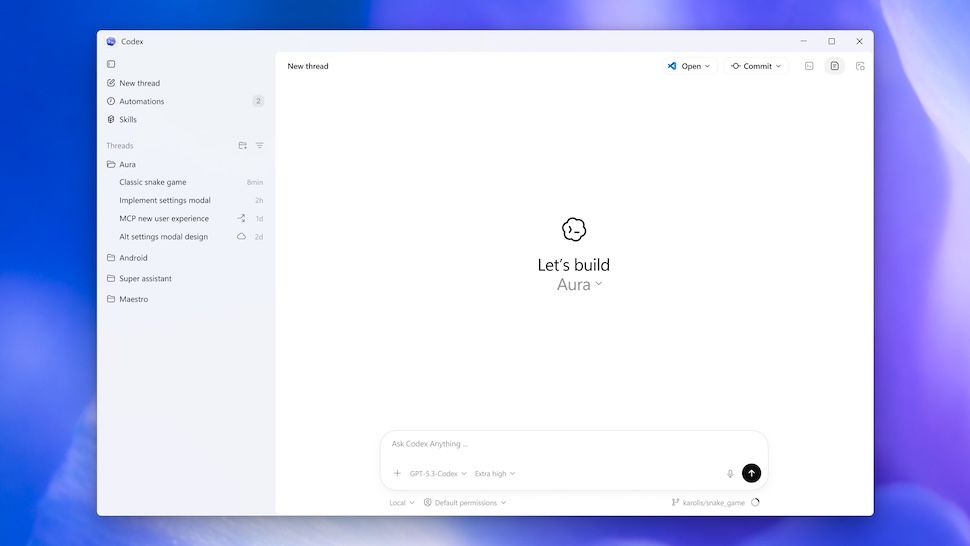
OpenAI releases a Windows version of Codex coding app
Around one month after launching Codex for Mac, OpenAI brings Codex to Windows with a new suite of IDEs supported.www.techradar.com
- Related coverage: windowsforum.com

Codex on Windows 11: Control Computer Use from ChatGPT Mobile
OpenAI said on May 29, 2026, that Codex app users on Windows 11 can now enable computer use and control active Codex work from the ChatGPT mobile app on iPhone and Android. The update sounds incremental, but it closes a conspicuous gap in OpenAI’s developer-agent strategy. Windows is where a... windowsforum.com
- Related coverage: igeeksblog.com
Loading…
www.igeeksblog.com - Related coverage: gigazine.net
Loading…
gigazine.net - Related coverage: aiweekly.co
Loading…
aiweekly.co - Related coverage: cincodias.elpais.com
Loading…
cincodias.elpais.com - Related coverage: axios.com

You can access Codex on your phone now
OpenAI is working to make its coding tool more accessiblewww.axios.com
- Related coverage: itpro.com

OpenAI's Codex app is now available on macOS – and it’s free for some ChatGPT users for a limited time
OpenAI has rolled out the macOS app to help developers make more use of Codex in their work www.itpro.com
- Related coverage: windowscentral.com
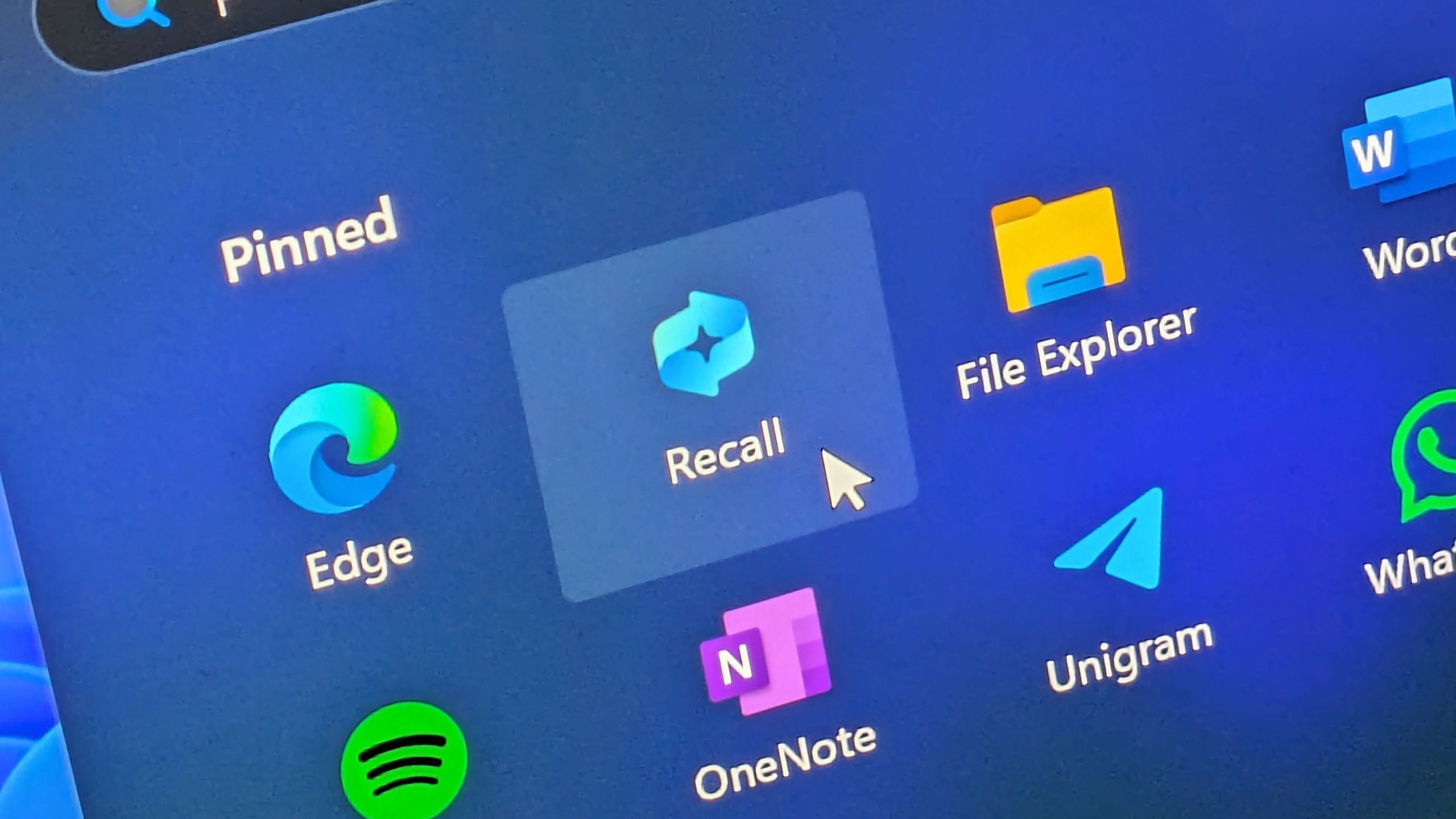
OpenAI’s new "Chronicle" feature is just like Windows Recall: Making Codex smarter by remembering your screen
OpenAI’s Codex gets Chronicle, a memory feature that recalls your screen activity for better developer productivity. www.windowscentral.com