

Microsoft’s Paint — the tiny bitmap editor that taught generations to click, drag and “paint” — is no longer just a nostalgic museum piece; it’s become a strategic testbed for Microsoft’s approach to democratized creativity, generative AI and the stewardship of legacy software. ])
Microsoft Paint first shipped with Windows 1.0 and for decades served as the canonical, low‑friction image tool: instant to open, trivial to luseful for screenshots, annotations and simple pixel art. That simple identity made any attempted change feel like a blow to a shared cultural artifact.
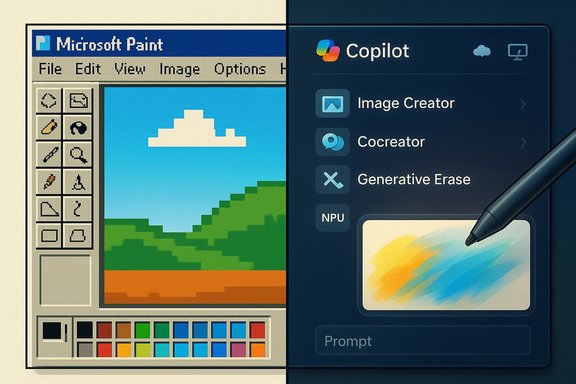
In recent years Microsoft took a few high‑profile swings. Paint 3D, introduced in 2017, tried to broaden the Paint brand into 3D and touch-first creation but never found mass adoption; it was officially deprecated and removed from the Microsoft Store on Novembting is now a clear part of the record and informs how Microsoft approaches successor experiences. At the same time, Paint on Windows 11 has been quietly evolving. Small UX improvements and more consequential generative features — Image Creator, Generative Erase/Fill, Cocreator and a Copilot hub inside Paint — are being experimented with in In Windows AI Labs. Those moves position Paint as more than a retro convenience; they make it a conduit for mainstreaming simple, prompt-driven creativity on the desktop.
Paint’s past shows what goes wrong when transformation is rushed: the Paint 3D episode proved that a replacement that breaks workflows and language of use will struggle. The path forward is incremental: ship small UX wins (collapsible toolbar, better stylus support), gate generative features behind Copilot/Labs with clear consent and admin toggles, and be explicit about data, provenance and entitlements. If Microsoft executes on that conservative, reversible playbook, Paint can be both a living icon and a useful modern creative tool — accessible to a first‑time painter and capable of accelerating a creator’s workflow when asked. If it mishandles data, fragments functionality across devices, or hides essential capabilities behind paywalls, the backlash will be swift and justified. The right answer is not nostalgia or reinvention alone; it’s stewardship that treats a cultural touchstone wnd user respect.
Source: MSN
 Background
Microsoft Paint first shipped with Windows 1.0 and for decades served as the canonical, low‑friction image tool: instant to open, trivial to luseful for screenshots, annotations and simple pixel art. That simple identity made any attempted change feel like a blow to a shared cultural artifact.In recent years Microsoft took a few high‑profile swings. Paint 3D, introduced in 2017, tried to broaden the Paint brand into 3D and touch-first creation but never found mass adoption; it was officially deprecated and removed from the Microsoft Store on Novembting is now a clear part of the record and informs how Microsoft approaches successor experiences. At the same time, Paint on Windows 11 has been quietly evolving. Small UX improvements and more consequential generative features — Image Creator, Generative Erase/Fill, Cocreator and a Copilot hub inside Paint — are being experimented with in In Windows AI Labs. Those moves position Paint as more than a retro convenience; they make it a conduit for mainstreaming simple, prompt-driven creativity on the desktop.
What changed: the recent technical facts
Collapsible toolbar and incremental UX work
Windows Insiders currently testing builds havlling UI tweak: a collapsible toolbar in Paint (version 11.2511.281.0) that lets users choose between an Always show toolbar mode and an Automatically hide toolbar for an unobstructed canvas. It’s the sort of incremental change that modernizes the experience without rewriting muscle memory.Generative features and a Copilot hub
Microsoft has consolidated AI tools — Image Cre, Cocreator (a sketch-plus-prompt hybrid that can steer image generation), and generative erase/fill workflows — behind a Copilot button in Paint. Some of these features run locally on NPU‑equipped devices; others use cloud services for safety filtering or higher-fidelity rendering. Microsoft’s support pages and Insider notes confirm staged rollouts, sign‑in requirements, and hybrid local/cloud processing.Hardware and gating realities
Certain advanced features — often bundled under Copilot+ or Cocreator labels — require modern NPUs or Copilot+ certified hardware (Intel Core Ultra, AMD Ryzen AI classes, Snapdragon X‑class, or Copilot+ flagged devices). Vendors and OEM FAQs reference minimum TOPS figures and driver versions, demonstrating this is not a purely marketing gate: it’s a performance and compatibility constraint.The case for reinventing Paint
Microsoft has several compelling reasons to push Paint forward rather than freeze it in amber.- Democratizing creativity: Integrating accessible, prompt-driven image creation and quick generative edits lowers the barrier for students, hobbyises to make visuals without paid creative suites.
- Reduced app switching: For short, common tasks (background removal, quick composite, simple animations), shipping those features inside Paint reduces friction and increases productivity.
- Platform signaling: Embedding Copilot experiences in an inbox app showcases Windows as a platform distinct from macOS or ChromeOS, emphasizing Copilot‑led capabilities as a differentiator.
- Incremental UX parity: Small modernizations (layers, project files, better stylus support and collapsible UI) bring a lot of perceived value without alienating legacy users.
The case for preserving nostalgia and simplicity
There’s a equally strong counterargument: Paint’s value is its minimalism, and changing that formula risks breaking important use cases.- Complexity creep: Adding layers of AI, settings, and premium options can transform a two‑click task into a fifteen‑click workflow.
- Device fragmentation: Tying core flows to NPUs or cloud services fragments functionality across the installed base; not everyone has a Copilot+ laptop or up‑to‑date drivers.
- Monetization concerns: Placing formerly free, core behaviors behind subscriptions or paywalls would damage trust. Microsoft’s Image Creator already uses an AI credits model and requires sign‑in in some scenarios, which makes clear where pay/entitlement decisions will matter.
- Enterprise and education impact: Administrators use Paint as a predictable, always‑available tool in lab images, training and scripts. Removing it from default installs, altering file behavior or gating basic functionality complicates images and adds helpdesk workload.
Privacy, governance and safety: non‑optional requirements
Generative tools bring a new set of obligations. The technical and policy choices Microsoft makes will determine whether reinvention is an improvement or a liability.- Data flow transparency: Users deserve clear, concise disclosures ats, images, metadata) is sent to the cloud, what’s logged, retention periods, and whether outputs are used to train models. Microsoft’s documentation already emphasizes hybrid processing and some safety filtering, but published, machine‑readable guarantees are still essential.
- Local‑only options: For sensitive or regulated environments, local inference modes or on‑device model options must exist. Otherwise enterprises and educators will simply disable the features en masse.
- Enterprise controls: Group Policy and MDM toggles to disable or limit AI features, plus installation packaging for a classic, minimal Paint should be available to IT administrators. Those controls reduce migration risk and support compliance.
- Safety & moderation: Image generation must carry robust content filters and provenance metadata that flags AI involvement. Preview modes and human‑in‑the‑loop approaches rellucinated or unsafe outputs.
UX design tradeoffs: modernity vs. muscle memory
Reinventing Paint hits a classic product design paradox: introduce power without overwhelming the user.- Preserve a classic default: Keep the legacy toolbar, keyboard shortcuts and file behaviors as the default experience. Allow toggling into an “expanded mode” for power features.
- Opt‑in advanced features: Put generative tools behind a clear Copilot hub, labs toggle or explicit “Enable creative features” onboarding. That reduces accidental exposure and preserves the core first‑time‑use experience.
- Progressive disclosure: Use contextual tips and minimal overlays to teach new capabilities — never replace muscle memory with modal dialogs.
- Accessibility parity: New UI metaphors must meet screen‑reader, keyboard navigation and high‑contrast requirements from day one.
Monetization and the danger of subscription creep
Paint’s history as a bundled, free utility creates a social contract. People expect core image editing behaviors without extra cost.- Distinguish free core from premium compute: Keep fundamental features (crop, resize, paint brush, save/export) free and local. Reserve high‑cost cloud renderingge generation or priority Copilot compute for paid tiers. Microsoft’s Image Creator documentation already references AI credits and sign‑in requirements, signposting where entitlement could appear. ([support.microsoft.com]( paywalls: Charging for features that users already rely on would breed distrust.
- Transparent entitlements: If certain features require Microsoft 365, Copilot Pro, or credits, make that explicit before the user starts any compute‑intensive flow.
Practical recommendations for Microprint)
- Preserve classic Paint by default. Ship a lightweight “Classic” toggle that restores the original ribbon, shortcuts and file semantics.
- Gate advanced feicit Copilot/“Labs” hub. Make generative tools opt‑in, and show clear onboarding about where processing happens and what’s logged.
- Provide roDeliver Group Policy/MDM templates and a standalone installer or Store package for classic Paint so organizations can manage deployment.
- Offer local and cloud options. Run inference locally on capable NPUs and provide cloud fallbacks only with explicit consent; document retention and filtering policies.
- Keep critical features free. Reserve subscriptions for high‑cost compute (fast, large images, priority rendering) — never charge for basic background removal, cropping, or the ability to save PNG/JPEG.
- Publish transparent provenance metadata. Tag generated or edited assets with machine‑readable markers so consumers and platforms can identify AI‑assisted content.
- Run large‑scale accessibility testing before wide rollout. Ensure keyboard navigation, voiceover and high‑contrast modes behave predictably.
What users, creatives and IT admins should do now
- Casual users: Try new features in Insider or Windows AI Labs if curious, but keep originals and export masters to standard formats (PNG, JPEG, TIFF). Treat generative edits as first drafts until you’re confident in the output.
- Power creators: Use Copilot tools to accelerate ideation but validate outputs for trademarks, faces and factual correctness before public use.
- IT admins and educa that assume Paint’s presence. Package a known good Paint installer into your images or configure policies to disable Labs features on managed devices. Preserve installers and documentation in your image library to reduce disruption from inbox app lifecycle changes.
- Privacy‑minded users: Prefer local NPU processing where icrosoft account sign‑in requirements; disable cloud features on devices handling sensitive images until you have institutional assurances.
Risks Microsoft must explicitly manage
- Fragmented experiences across hardware classes will create support headaches and user confusion. Provide parity fallbacks or equivalent server options where local NPUs are unavailable.
- Monetization missteps (putting core flow behind a paywall) will damage trust and incentivize third‑party migrations. Keep the core feature set free.
- Opacity in data processing invites regulatory and PR risk. Publish clear, concise, and legally vetted policies about what is sent to Azure, how long it’s kept, and whether it’s used for training.
- Accessibility regressions will exclude users with disabilities; prioritize conformance in every release.
Verdict: reinvent — but with stewardship
Microsoft should not leave Paint frozen as a nostalgia artifact. The operating system’s inbox apps are living tools: they teach, save time and shape expectations. Reinventing Paint to include demn UX benefits millions — but only if Microsoft respects the app’s core promises. Preserve the classic experience by default, make advanced features opt‑in and transparent, provide enterprise controls and avoid monetizing baseline capabilities.Paint’s past shows what goes wrong when transformation is rushed: the Paint 3D episode proved that a replacement that breaks workflows and language of use will struggle. The path forward is incremental: ship small UX wins (collapsible toolbar, better stylus support), gate generative features behind Copilot/Labs with clear consent and admin toggles, and be explicit about data, provenance and entitlements. If Microsoft executes on that conservative, reversible playbook, Paint can be both a living icon and a useful modern creative tool — accessible to a first‑time painter and capable of accelerating a creator’s workflow when asked. If it mishandles data, fragments functionality across devices, or hides essential capabilities behind paywalls, the backlash will be swift and justified. The right answer is not nostalgia or reinvention alone; it’s stewardship that treats a cultural touchstone wnd user respect.
Quick reference: the five most important facts to know today
- Paint 3D was deprecated and removed from the Microsoft Store on November 4, 2024.
- Paint in current Insider builds includes a collapsible toolbar in version 11.2511.281.0.
- Microsoft has added generative features (Image Creator, Cocreator, Generative Erase) under a Copilot hub; some run locally on NPUs while others use cloud services.
- Certain advanced Paint features require Copilot+ or NPU‑equipped devices; vendors and Microsoft document hardware and driver requirements.
- Microsoft’s official guidance emphasizes hybrid safety processing and sign‑in requirements for many AI features; clear admin controls and transparency are essential for safe enterprise rollouts.
Source: MSN
