

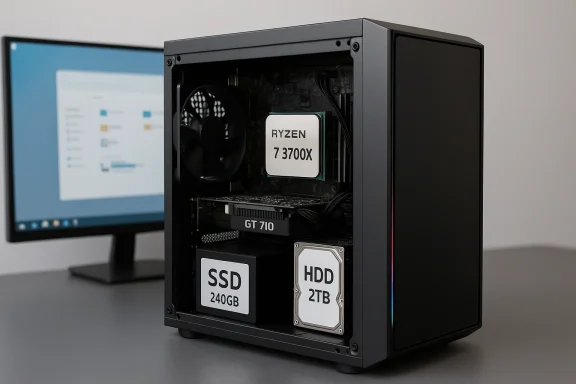
 PALICOMP Gaming PC: Ryzen 7 3700X, GT 710 and the curious case of a “gaming” desktop built for practicality
The PALICOMP desktop built around the AMD Ryzen 7 3700X is a reminder that not every “gaming PC” is really aimed at high-end gaming. With 16GB of DDR4 RAM, a 240GB SSD, a 2TB hard drive, Windows 11, and a GT 710 2GB graphics card, this machine is much better understood as a flexible everyday tower with room for productivity and light entertainment than as a true modern gaming rig. That distinction matters, because the value of this system depends far more on what it can do reliably than on what the marketing label suggests.At a glance, the spec sheet is a study in compromise. The processor is still a respectable 8-core, 16-thread chip, but the graphics card is one of the weakest discrete GPUs you can buy, and the storage mix leans heavily on a small boot SSD paired with a mechanical hard drive. For buyers who want a prebuilt PC that boots quickly, handles office work, and can run older or lighter titles, that may be enough. For anyone expecting smooth 1080p performance in current AAA games, it is not the right class of system.
Overview
The core attraction here is the Ryzen 7 3700X, a Zen 2 processor that originally earned a strong reputation for blending multithreaded performance with a modest 65W power envelope. AMD’s own current support page still identifies it as an 8-core processor, and third-party spec databases list it at 8 cores and 16 threads, with the platform supporting PCIe 4.0 x16 on compatible boards. That made it a compelling mainstream CPU when it launched, and it still has enough muscle for everyday multitasking, media work, and lightly threaded workloads.The GT 710, by contrast, is a very different proposition. NVIDIA launched it in 2016 as a low-cost graphics option, and reference-style specs from board partners show a tiny 64-bit memory interface, extremely modest power draw, and basic display capabilities. That makes it suitable for office desktops, web use, video playback, and fallback graphics when a CPU lacks integrated graphics, but not for contemporary gaming ambitions.
That mismatch is what defines the entire machine. It is a system where the CPU can do far more than the GPU can meaningfully support, which is fine if the buyer’s real priority is general computing rather than frame rates. In that sense, PALICOMP is not selling a balanced gaming tower so much as a prebuilt utility desktop with a gaming-themed case and a processor that still carries a lot of credibility.
This is also why the storage configuration matters. A 240GB SSD gives the operating system and a handful of essential apps a fast home, while the 2TB HDD provides capacity for downloads, archives, photos, and bulk game libraries. It is a classic cost-conscious setup, and it tells you the system is aimed at convenience and volume rather than all-flash speed.
Why this configuration exists
A build like this usually exists because the market still contains buyers who want a desktop that simply works out of the box. Those users may not be chasing benchmark charts; they may want a machine for work-from-home tasks, school, browsing, media, and occasional older games. By using an older but still capable Ryzen chip and a very inexpensive graphics card, the builder can keep the price manageable while preserving enough CPU headroom for years of ordinary use.- Strong CPU, weak GPU means the machine is better for productivity than modern gaming.
- Small SSD plus large HDD keeps cost down while offering decent storage capacity.
- Windows 11 pre-installed improves convenience for non-technical buyers.
- RGB styling signals the gaming aesthetic without adding performance.
- Prebuilt assembly and warranty appeal to buyers who do not want to troubleshoot parts.
The CPU story: Ryzen 7 3700X still carries the machine
The Ryzen 7 3700X is the reason this system can still be interesting. Even years after launch, 8 cores and 16 threads are enough for most mainstream productivity workloads, and that matters more than raw headline speed in many real-world tasks. Multitasking, browser tab sprawl, Office apps, casual photo work, and light video editing all benefit from extra threads in a way that older quad-core machines cannot match.What the chip does well
Its strengths are consistency and versatility. The 3700X is not the fastest CPU in modern terms, but it is efficient, cool-running, and still very competent when software can take advantage of multiple cores. AMD’s platform documentation continues to frame it as a modern desktop processor with support for current-generation connectivity on the right motherboard, which helps explain why it remains usable in 2026-era budget prebuilts.For creative work, the story is more nuanced. Short bursts of image editing, small batch exports, and light timeline work are all within reach, but heavy rendering jobs will naturally expose the age of the chip compared with newer Zen 4 or Intel Core Ultra options. Still, this is the kind of CPU that can make a budget desktop feel “snappy enough” even when the rest of the machine is built cautiously.
What buyers should not expect
What the 3700X does not provide is a modern integrated graphics fallback. That means the entire visual experience depends on the GT 710, which is the weak link in this system. The CPU can be excellent for general computing, but the overall feel of the PC will be limited by the graphics card whenever anything beyond simple desktop output is required. That is a critical distinction for anyone reading “gaming PC” too literally.- Excellent multitasking foundation for a prebuilt in this price class.
- Good thermal efficiency relative to older high-power chips.
- Still fine for light content creation and everyday productivity.
- No integrated graphics means the discrete GPU defines display performance.
- Age shows up in heavy workloads and modern software optimization.
The GPU problem: GT 710 is not a gaming card in 2026 terms
If the CPU is the selling point, the GT 710 2GB is the caveat. This card is best understood as display hardware, not gaming hardware. It exists to light up monitors, accelerate basic desktop tasks, and provide a cheap discrete output path; it does not meaningfully transform a machine into a gaming PC in the modern sense.Why the GT 710 changes the whole value equation
A gaming desktop lives or dies by GPU capability, and the GT 710 places this system at the bottom of the performance ladder. Even older esports titles will often need reduced settings, and new releases will be out of scope entirely unless the buyer is content with very low resolutions and extremely modest expectations. In practical terms, the card is a signal that the PC is optimized for having a graphics output, not for rendering complex 3D scenes.This also affects creative work. Simple video playback and office use are fine, but any workflow that expects GPU acceleration for editing, effects, or 3D tasks will quickly hit the ceiling. That makes the configuration suitable for light creator use, but not for demanding Adobe, DaVinci, Blender, or AI-adjacent workloads.
What it can still do
It would be unfair to suggest the GT 710 is useless. It still serves in low-demand environments where the machine’s primary task is browsing, conferencing, document work, and media consumption. It can also be helpful in situations where a buyer wants a prebuilt tower now and plans to upgrade the GPU later.- Basic desktop output is the GT 710’s real purpose.
- Light video playback and simple media use are realistic.
- Older esports and legacy titles may run only at low settings.
- AAA gaming is far beyond what this card is designed to deliver.
- GPU upgrade potential is the main reason to tolerate it.
Storage and memory: sensible, if dated, budget choices
The combination of 16GB RAM, a 240GB SSD, and a 2TB HDD is practical, even if it is no longer especially glamorous. Sixteen gigabytes is still the sweet spot for general-purpose Windows desktops, and it gives the system enough breathing room for multiple browser tabs, office apps, and light editing without immediate memory pressure.The RAM balance
For mainstream users, 16GB of DDR4 remains a good baseline. It is enough for Windows 11, productivity suites, cloud apps, and moderate multitasking, though creative users will appreciate more if they start dealing with large image files, multiple apps, or browser-heavy workflows. In this machine, RAM is not the bottleneck; it is a reasonable middle ground.That said, the phrase “fast DDR4” in marketing copy is doing a lot of work. Speed matters, but capacity and configuration matter just as much, and the real user experience will depend on whether the memory runs in a balanced dual-channel setup and at sensible timings. Buyers should care less about the adjective and more about the actual module layout.
SSD plus HDD: familiar, but not ideal
The 240GB SSD is the smallest part of this configuration that feels dated. It is enough for Windows 11 and a few essential programs, but it fills quickly once updates, cached data, and a couple of large applications enter the picture. The 2TB HDD restores capacity, but mechanical storage is slower, noisier, and less responsive than flash.That means the machine will feel responsive for booting and launching a small set of core apps, but bulk storage tasks and games installed on the hard drive will not feel especially modern. For budget buyers, this is a tolerable tradeoff. For anyone expecting a premium user experience, a larger SSD would be one of the first upgrades to consider.
- 16GB RAM is still a strong baseline for Windows 11.
- 240GB SSD is functional but cramped for power users.
- 2TB HDD adds useful mass storage at low cost.
- Upgrade priority should begin with a larger SSD.
- Game load times will depend heavily on where software is installed.
Windows 11 and the everyday desktop experience
The inclusion of Windows 11 is one of the machine’s most important convenience features. For many buyers, the appeal of a prebuilt is not raw component quality but the elimination of setup friction. A system that arrives configured, tested, and ready to log in has a real advantage over a self-build for non-enthusiasts.Why preinstallation matters
A Windows 11-ready desktop shortens the path from purchase to productivity. That is especially valuable for families, small offices, older buyers, and anyone who simply wants to avoid BIOS menus, driver hunts, and activation hassles. PALICOMP’s value proposition is therefore partly about labor, not just parts.It also helps that Windows 11 is now the default operating environment for most new consumer PCs. That means software compatibility, support familiarity, and update expectations are all aligned with what buyers are likely to encounter elsewhere. For many customers, that alone makes the PC feel current enough even if the underlying CPU is from an earlier generation.
Where the experience may feel less modern
The user experience is only as strong as the slowest component, and here the GT 710 and HDD matter more than the operating system branding. Animations, multitasking smoothness, and app responsiveness will be acceptable in simple tasks, but the machine will not feel luxurious. It is functional first, stylish second, and performance-led only in the CPU sense.- Windows 11 improves convenience and familiarity.
- Prebuilt setup reduces technical barriers for buyers.
- Everyday productivity should feel acceptable.
- Mechanical storage can still create delays in app-heavy workflows.
- The system’s feel depends more on storage and graphics than on the OS version.
Design, case, and the RGB factor
The Flash RGB case is doing aesthetic heavy lifting here. In the gaming PC market, visual identity matters almost as much as specifications, because many buyers want a tower that looks like it belongs in a gaming setup even when the internal parts are budget-conscious. RGB lighting helps create that impression immediately.The role of presentation
There is a clear marketing logic to the design. A black tower with illumination and a windowed look reads as “gaming” to a broad audience, which can be enough to justify the purchase emotionally even if the internals are modest. That is not necessarily a bad thing; for many consumers, the computer lives in a visible room and has to feel pleasant to own.However, it is worth recognizing the gap between appearance and performance. RGB lighting does not improve frame rates, and a stylish shell cannot compensate for an underpowered GPU. The design succeeds if the buyer understands it as a visual perk rather than a performance claim.
Build and service expectations
PALICOMP’s reported UK assembly and testing are also part of the appeal. A prebuilt from a known system integrator suggests a certain level of QA and reduces the risk of compatibility mistakes that can plague first-time builders. For budget buyers, that confidence can be worth as much as a small performance bump.- RGB case boosts perceived value.
- Windowed styling supports the gaming aesthetic.
- Aesthetic polish does not equal gaming performance.
- Factory assembly can reduce setup anxiety.
- Testing and packaging matter more than lighting effects.
Who this PC is really for
This system is not aimed at the enthusiast who wants max settings and high-refresh gaming. It is aimed at the buyer who values a complete, ready-made desktop with a strong CPU, lots of storage, and enough graphics capability to handle basic needs. That makes it a useful but narrowly defined product.Best-fit user profiles
The most obvious audience is the everyday home user who wants more flexibility than a bargain office PC provides. Students, remote workers, and casual users will likely appreciate the CPU’s headroom and the large hard drive. Light hobbyists who edit photos, rip media, or dabble in simple creative software may also find it adequate.A second audience is the upgrader. Someone may buy this PC because the base platform is decent and plan to replace the GT 710 with a more capable card later. In that scenario, the machine becomes a practical stepping stone rather than a final destination.
Users who should look elsewhere
Serious gamers should pass unless they are explicitly planning a GPU swap. So should creators who need sustained GPU acceleration or fast all-flash storage. If the main priority is gaming, the budget should be redirected away from the CPU glamour and toward the graphics card first.- Good for general users and non-technical buyers.
- Suitable for light productivity and casual media work.
- Potentially useful as an upgrade base.
- Poor fit for serious gaming in stock form.
- Not ideal for heavy creative workloads.
Competitive context: what this says about the budget-PC market
This kind of desktop reflects a familiar trend in the prebuilt market: builders often lean on a trusted CPU and trim cost elsewhere until the machine reaches an attractive price point. That strategy can work because many consumers shop emotionally first and technically second. A well-known AMD processor and an RGB case can carry a lot of perceived value.Why the formula persists
There are two market truths at work. First, many buyers still want a desktop that is immediately useful and avoids the uncertainty of assembling parts themselves. Second, low-cost discrete GPUs remain a common way to preserve a “gaming PC” identity even when actual gaming performance is minimal. The result is a machine that looks and sounds more capable than it is in GPU-bound scenarios.The broader competitive issue is that the market has become better informed. Buyers now compare specs more aggressively, and the presence of a GT 710 is likely to raise eyebrows among enthusiasts. That means sellers need clearer communication, because the old trick of hiding the GPU weakness behind a strong CPU is less effective than it once was.
The strategic upside
For PALICOMP, the strategy may still work if the pricing is honest and the target buyer is clear. Some customers want reliability, warranty coverage, and a simple ownership experience more than peak gaming numbers. In that lane, a conservative build can remain commercially sensible.- Budget prebuilts rely on perceived balance as much as actual balance.
- Strong CPU branding can mask a weak graphics subsystem.
- Informed buyers are more likely to notice the GT 710 immediately.
- Clear positioning is essential to avoid disappointment.
- Value depends heavily on price, not just specs.
Upgrade potential and long-term ownership
The best argument for this machine may be that it is not fixed in stone. A Ryzen 7 3700X platform can remain useful as a base if the owner later installs a better graphics card and perhaps expands storage. That makes the stock configuration less important than the upgrade path.What to upgrade first
If this were my own budget tower, the first change would almost certainly be the GPU. The second would be replacing or supplementing the 240GB SSD with a larger NVMe or SATA SSD, because that would improve daily responsiveness more than most cosmetic changes. After that, memory expansion would only be necessary for heavier workloads.A practical upgrade sequence would look like this:
- Replace the GT 710 with a much stronger entry-level or midrange GPU.
- Expand the SSD to at least 500GB or 1TB.
- Keep the 2TB HDD as secondary storage or retire it later.
- Reassess cooling and power headroom before adding more demanding parts.
- Only then think about CPU replacement, if needed at all.
Longevity considerations
The CPU should age more gracefully than the graphics card. That is useful, because gaming performance is usually the first thing to become obsolete in a desktop. If the rest of the platform is stable, the machine could remain a decent general-purpose PC for years while transforming into a far more capable game system after one or two targeted upgrades.- GPU is the obvious first upgrade.
- Larger SSD would improve the whole experience.
- CPU platform remains viable for general computing.
- Storage and cooling should be reviewed before major upgrades.
- Long-term value depends on whether the buyer plans to modify it.
Strengths and Opportunities
The PALICOMP system has real strengths, even if they are not where the “gaming” label would usually suggest. Its biggest virtue is that it offers a familiar, low-friction desktop experience built around a CPU that still has enough power to feel credible in 2026. That makes it a sensible starting point for users who want a stable prebuilt without entering the DIY rabbit hole.- Strong multitasking CPU for general computing.
- Ready-to-use Windows 11 setup reduces friction.
- Useful 2TB storage capacity for files and media.
- Affordable platform for future GPU upgrades.
- RGB case design gives it broad consumer appeal.
- Factory assembly and warranty increase confidence.
- Balanced enough for light productivity and home use.
Risks and Concerns
The main risk is simple: the product name may overpromise relative to the graphics hardware. A buyer who sees “Gaming PC” and assumes modern gaming performance could be disappointed almost immediately, because the GT 710 is fundamentally a display card, not a gaming accelerator. The other concern is that the small SSD and older storage approach may make the machine feel less responsive than the CPU alone would suggest.- Misleading expectations around gaming performance.
- Very weak GPU for modern titles.
- 240GB SSD is tight for today’s software footprints.
- Mechanical HDD can slow perceived responsiveness.
- Value depends heavily on pricing transparency.
- Light creative work only; demanding workloads will outgrow it.
- Upgrade path may require extra spending soon after purchase.
What to Watch Next
The real question is whether this kind of machine remains compelling at its likely price point. If it is positioned as a straightforward desktop with a good processor and enough storage, the formula makes sense. If it is pitched too aggressively as a gaming rig, then the gap between marketing and reality becomes the story.The other thing to watch is how buyers respond to older-but-capable CPUs in prebuilt systems. Many consumers are increasingly willing to accept a previous-generation processor if the build is stable, the warranty is decent, and the setup is painless. But they are far less forgiving when a weak GPU quietly defines the entire experience.
- Final street price versus alternative prebuilts.
- Whether PALICOMP clarifies the gaming limitations.
- How buyers perceive the GT 710 in 2026.
- Potential bundle or upgrade offers from the seller.
- Availability of larger SSD configurations in similar systems.
Source: ruhrkanal.news https://ruhrkanal.news/Ryzen-7-3700X-16GB-RAM-240GB-SSD-2TB-HDD-GT-710-2GB-658251/
