

Microsoft has recorded a new elevation-of-privilege entry tied to the Windows Cloud Files Mini Filter Driver — CVE-2026-20857 — and enterprise defenders must treat this class of kernel-mode bug as high priority: the Cloud Files mini-filter (cldflt.sys) sits at the privileged user→kernel boundary and, when mishandled, reliably converts modest local footholds into full SYSTEM compromises if not patched promptly.
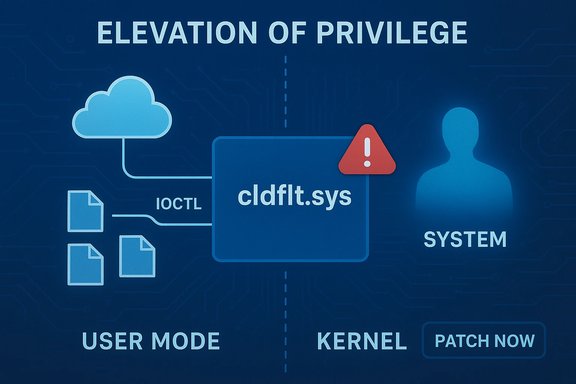
The Windows Cloud Files Mini Filter Driver (commonly cldflt.sys) provides the kernel-side plumbing that makes cloud-backed placeholder files behave like local files for OneDrive, Projected File System (ProjFS) providers and other cloud-sync integrations. Because it runs in kernel mode and processes complex inputs originating from user-mode sync clients (IOCTLs, reparse points, placeholder metadata), the component is a repeated target for local privilege escalation research and real-world exploitation.
Microsoft’s security index lists CVE-2026-20857 as an issue affecting the Cloud Files mini-filter; the vendor’s Update Guide is the authoritative mapping between CVE → KB → affected OS builds and should be consulted to identify the exact update(s) for each Windows SKU. Practical defensive work requires patch deployment plus short-term compensating controls on high-value hosts. Why this matters now
Immediate checklist
Caveat for readers: vendor advisories for kernel vulnerabilities intentionally withhold exploit mechanics; this reduces the precision of public technical analysis but does not reduce urgency. Treat CVE-2026-20857 as actionable: verify the KB mapping for every Windows build in your estate, deploy patches quickly, and harden local execution environments while your patch program completes. Conclusion
Cloud Files mini-filter vulnerabilities remain one of the most practical local escalation primitives available to attackers who have any degree of local presence. CVE-2026-20857 should be triaged and remediated with urgency consistent with prior incidents in this family: patch early, harden host controls, and rely on behavioral detection for hunting — those three actions together materially reduce the chance that a local foothold is converted into full system compromise.
Source: MSRC Security Update Guide - Microsoft Security Response Center
 Background / Overview
The Windows Cloud Files Mini Filter Driver (commonly cldflt.sys) provides the kernel-side plumbing that makes cloud-backed placeholder files behave like local files for OneDrive, Projected File System (ProjFS) providers and other cloud-sync integrations. Because it runs in kernel mode and processes complex inputs originating from user-mode sync clients (IOCTLs, reparse points, placeholder metadata), the component is a repeated target for local privilege escalation research and real-world exploitation.Microsoft’s security index lists CVE-2026-20857 as an issue affecting the Cloud Files mini-filter; the vendor’s Update Guide is the authoritative mapping between CVE → KB → affected OS builds and should be consulted to identify the exact update(s) for each Windows SKU. Practical defensive work requires patch deployment plus short-term compensating controls on high-value hosts. Why this matters now
- Kernel-mode drivers are inherently powerful: a flaw in a driver that handles user-supplied inputs can be escalated into SYSTEM privileges.
- Cloud sync features are ubiquitous on endpoints, increasing the attack surface across desktops, laptops, VDI images and some servers.
- Historically, Cloud Files / ProjFS / mini-filter bugs have been weaponized quickly after disclosure; defenders should assume high urgency.
What the public record says about CVE-2026-20857
The official vendor page for the CVE is published in Microsoft’s Security Update Guide; that page is the definitive place to map the CVE to the KB update(s) you must install. Because Microsoft’s Update Guide runs as a dynamic web application, defenders should query it directly from a secure admin workstation and use the KB→build mappings in their patch management tools to identify which images require the update. Independent coverage of the Cloud Files mini-filter driver as a recurring, high-impact target is robust: major security outlets, industry vulnerability trackers, and vendor advisories have documented multiple Cloud Files CVEs in recent months and emphasized the urgency of patching such EoP bugs. Several December 2025/January 2026 write-ups highlight the same operational pattern — local attackers leveraging a kernel driver bug to escalate to SYSTEM — reinforcing the practical risk profile of new Cloud Files entries such as CVE-2026-20857. Caveat — public detail level- Microsoft frequently omits low-level exploit mechanics from kernel bug advisories to avoid enabling attackers. This is expected and does not imply the vulnerability is low-risk.
- Some media and third‑party trackers label related Cloud Files CVEs as “actively exploited” when telemetry supports that claim; verify current exploitation status against vendor advisories and, where applicable, national incident catalogues (for example, CISA KEV listings) before assuming active exploitation.
Technical anatomy (high-level, vendor-approved stance)
Microsoft’s Update Guide entry is the canonical source for the vendor classification of the flaw — typically Microsoft will provide the impact (Elevation of Privilege) and an abstract description of the root cause class (e.g., use‑after‑free, out‑of‑bounds read, missing authentication). Public write-ups and community analysis of the Cloud Files family show three recurring technical failure modes that convert into EoP primitives:- Use‑after‑free (UAF) or double-free conditions that let an attacker reallocate freed kernel memory with attacker-controlled content, enabling read/write or function-pointer hijack.
- Out‑of‑bounds reads/writes from miscalculated lengths or unchecked metadata — these often yield information leaks that defeat KASLR or allow heap grooming.
- Time‑of‑check/time‑of‑use (TOCTOU) race windows in brokered user→kernel interactions (common in file-sync code) that let an attacker change a file or reparse target between validation and use.
- The Cloud Files driver handles file metadata, reparse points, placeholder resolution and IOCTLs — each is an input surface the kernel must validate.
- Kernel context magnifies impact: even small pointer errors may expose kernel pointers or enable arbitrary kernel writes, and once an attacker can alter kernel state they can swap tokens or create SYSTEM processes.
- The vendor’s Update Guide entry confirms the vulnerability’s existence and remediation package(s), but intentionally avoids exploit-level detail.
- Independent analysis from reputable trackers and security vendors consistently classifies Cloud Files mini-filter issues as local EoP with high operational impact. If additional low-level PoCs or exploit samples appear in public repositories, treat them as immediate accelerators for remediation.
Realistic exploitation scenarios
All realistic exploitation scenarios start from a foothold. Cloud Files mini-filter vulnerabilities are local attack vectors; an adversary needs to run code (even as an unprivileged user) or otherwise influence the file operations handled by cldflt.sys. Typical post-compromise chains look like:- Initial foothold: phishing, malicious installer, stolen credentials, or a compromised VM/guest OS.
- Local interaction: attacker process opens the Cloud Files device or performs crafted filesystem operations (placeholder metadata, reparse points) that reach the mini-filter.
- Trigger a memory-safety or authorization flaw (UAF/OOB/TOCTOU).
- Leak kernel pointers (information disclosure) and/or obtain a write primitive.
- Convert the primitive into SYSTEM-level control — token theft, SYSTEM process spawn, or kernel code execution.
- Post-exploit actions: persistence, tamper with security agents, credential harvest, lateral movement.
- Complexity: Low to Moderate. The initial triggers for Cloud Files flaws are often straightforward once local code execution exists; converting that into a reliable, stable escalation may require additional engineering (heap grooming, timing control), but those techniques are well-known and widely automated.
- Practical impact: High. A successful local EoP yields SYSTEM privileges and broad control over the host and any credentials stored or accessible from it.
Who’s most at risk
- End-user desktops and laptops with cloud sync enabled (OneDrive / SharePoint clients, ProjFS providers).
- Shared workstations, VDI and RDP hosts where multiple users run arbitrary code.
- Development machines and build servers where users have local execution rights.
- Administrative jump boxes and domain‑joined machines used for management — these systems are high-value escalation targets.
Immediate actions for administrators (0–72 hours)
Apply the vendor patch is the single best action. The vendor’s Update Guide must be used to map CVE→KB→SKU accurately. If you cannot patch immediately, apply compensating controls as described below.- Identify affected hosts
- Use inventory tools to enumerate Windows build numbers and confirm presence of the Cloud Files mini-filter driver. Search for cldflt.sys file version on endpoints:
- PowerShell quick check: (Get-Item 'C:\Windows\System32\drivers\cldflt.sys').VersionInfo | Select FileVersion, ProductVersion
- Prioritize admin workstations, jump hosts, developer laptops and shared VDI systems.
- Patch
- Retrieve exact KB numbers from Microsoft’s Security Update Guide for CVE-2026-20857 and deploy via your normal update channels (WSUS/SCCM/Intune/patch management).
- Validate patch success by confirming the updated driver file/version and rebooting where required.
- Compensating controls (if patching is delayed)
- Enforce least privilege: remove local admin rights from users who don’t need them.
- Reduce ability for untrusted code to run: implement WDAC/AppLocker, or restrict execution via EDR-based blocking.
- Disable or limit cloud sync features on high-risk endpoints (administrative machines, servers).
- Network isolation for unpatched high-value hosts until patches can be applied.
- Monitoring and detection
- Monitor for kernel crashes or BSOD dumps referencing cldflt.sys or Projected File System symbols.
- Watch EDR/telemetry for unusual DeviceIoControl/IOCTL calls to cloud-filter device objects, or low-privilege processes spawning SYSTEM processes.
- Hunt for rapid creation of placeholder files, excessive reparse point manipulation, or sudden creation of services/scheduled tasks from non-privileged accounts.
- Incident readiness
- If exploitation is suspected: isolate the host, collect full memory dumps and forensic artifacts (WER minidumps, Event Logs, driver lists), and preserve state before rebooting where possible.
- Engage IR and consider reporting requirements for your sector (e.g., CISA or regulatory obligations if applicable).
Detection and hunting playbook (practical rules)
- Kernel crash signatures: retain and triage full memory dumps; stack traces naming cldflt.sys or ProjFS handlers are high-value.
- IOCTL/Device activity: flag user-mode processes opening handles to cloud filter device objects or repeatedly issuing control codes.
- Token changes and process elevation: track sudden token duplications, SYSTEM process creations, and unexpected service installs that correlate with the above events.
- File-system anomalies: rapid manipulation of reparse points, frequent placeholder file materialization, or files appearing in startup/autostart paths should be reviewed.
- EDR rules: add behavioral rules for low-privilege processes performing driver-level interactions or spawn chains that result in SYSTEM privileges.
- Events: CreateFile/DeviceIoControl to device path names associated with cloud filters.
- Process lineage: non-privileged user process → opens handle to cldflt filter → creates SYSTEM process or scheduled task.
- Crash dumps: presence of cldflt.sys in kernel stack traces within dumps collected in the 24 hours before a suspicious elevation.
Operational impact and rollout guidance
Patch windows- Test the vendor KB in a representative pilot ring of endpoints, including VDI and jump boxes, before mass rollout.
- Confirm cloud sync functionality after patching; some updates may change driver behavior that could affect placeholder semantics in edge cases.
- Pilot: 50–200 endpoints representative of different hardware/roles.
- Priority: Admin workstations, servers with user logons, jump boxes, developer machines.
- Full deployment: All remaining endpoints in normal maintenance cadence.
- Keep an image of pre-update states for critical hosts and ensure you can reproduce any observed issues in pilot before large-scale rollback becomes necessary.
- Notify help desks and SOC with guidance on what elevated artifacts to collect (memory dumps, event logs) and provide a standard triage checklist to speed investigations.
Risk analysis — strengths and remaining uncertainties
Notable strengths in the public posture- Microsoft’s Update Guide provides the canonical remediation mapping and vendor-supplied fixes.
- Multiple independent security outlets and vendor trackers consistently identify the Cloud Files mini-filter as a recurring high‑leverage target, which increases confidence in the operational urgency.
- Low-level exploit details are often redacted in vendor advisories; without PoC or exploit examples, defenders must rely on behavioral detection rather than signature-based rules alone. Treat this as intentional vendor prudence, not lack of severity.
- Public claims of “active exploitation” should be validated against multiple telemetry sources (vendor notices, national incident catalogs, and trusted vendor blogs). Where active exploitation is asserted, assume the worst-case and accelerate remediation accordingly.
- If a specific media outlet or third-party tracker claims CVE-2026-20857 is being exploited in the wild, verify that claim against Microsoft’s advisory text and, where available, agency catalogs (for example, CISA’s KEV list). If no corroborating telemetry is present, label the claim as unverified while still treating the CVE as high priority for patching.
Longer-term defensive posture (beyond immediate patching)
- Principle of least privilege
- Enforce strict separation between admin tasks and daily user activities; minimize accounts that can install software or run arbitrary code.
- Application allowlisting
- Deploy WDAC or AppLocker on critical endpoints to reduce the ability of attackers to run exploit payloads while patch cycles complete.
- Kernel-mode exploit mitigations
- Enable virtualization-based protections, HVCI/memory integrity where hardware supports it, and keep firmware and platform drivers current.
- Supply-chain and image hygiene
- Harden developer and build workstations (where local code execution is frequent) with stronger controls, segmentation and immutable build pipelines.
- Continuous inventory and driver monitoring
- Track driver versions and file versions for cldflt.sys in your asset inventory; correlate changes with patch windows to ensure updates landed successfully.
Bottom line and recommended checklist
CVE-2026-20857 is one more reminder that kernel-mode components which bridge user and system contexts — like the Cloud Files mini-filter — are high-value escalation targets. Administrators must follow a fast, evidence-driven process: identify affected images, test KBs in a pilot, deploy prioritized patches to high-value hosts, and apply compensating restrictions where immediate patching is impossible. Use behavioral detection and kernel telemetry to hunt for exploits because vendor advisories for kernel bugs usually omit low-level exploit mechanics.Immediate checklist
- Query Microsoft’s Security Update Guide for CVE-2026-20857 and extract KB→SKU mappings.
- Inventory endpoints for cldflt.sys and target the most exposed hosts (admin/jump boxes, developer laptops, shared VDI).
- Patch verified pilot ring → prioritized hosts → full estate. Validate driver file versions post-patch.
- Apply short-term mitigations (WDAC/AppLocker, restrict local admin, isolate critical hosts) if patching is delayed.
- Hunt using kernel crash dumps, IOCTL/DeviceIoControl telemetry, and EDR process lineage indicators. Preserve forensic artifacts if compromise is suspected.
Caveat for readers: vendor advisories for kernel vulnerabilities intentionally withhold exploit mechanics; this reduces the precision of public technical analysis but does not reduce urgency. Treat CVE-2026-20857 as actionable: verify the KB mapping for every Windows build in your estate, deploy patches quickly, and harden local execution environments while your patch program completes. Conclusion
Cloud Files mini-filter vulnerabilities remain one of the most practical local escalation primitives available to attackers who have any degree of local presence. CVE-2026-20857 should be triaged and remediated with urgency consistent with prior incidents in this family: patch early, harden host controls, and rely on behavioral detection for hunting — those three actions together materially reduce the chance that a local foothold is converted into full system compromise.
Source: MSRC Security Update Guide - Microsoft Security Response Center
