

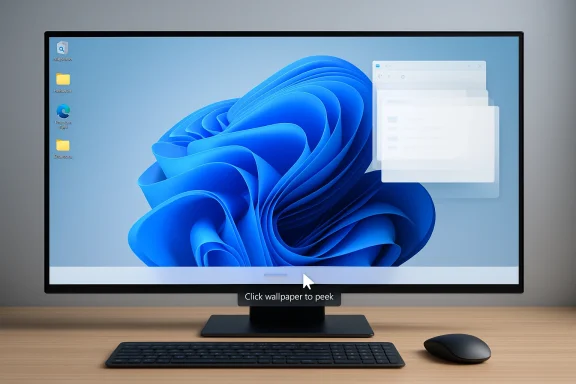
Microsoft engineer Scott Hanselman has turned one of macOS Sonoma’s most convenient desktop tricks into a tiny Windows 11 utility, and the result is more interesting than it sounds. PeekDesktop gives Windows users a way to click empty wallpaper and instantly get the same clear-the-screen behavior Mac users now take for granted, with a few thoughtful options that make it feel native rather than bolted on. It is a small app, but it lands in a very visible part of the Windows experience: the everyday choreography of getting windows out of the way, reaching desktop icons, and then restoring your workspace without friction.
The appeal of this kind of utility is easy to underestimate until you use it. Many users still rely on the taskbar’s Show Desktop affordance, a keyboard shortcut, or a corner gesture to reveal the desktop, but those methods all have trade-offs. They can be fiddly on large displays, awkward in multi-window workflows, or easy to trigger by accident, which is exactly why a wallpaper-click gesture feels so natural once you have it.
Apple made the idea especially visible in recent macOS releases, where clicking the wallpaper can temporarily move windows aside and reveal the desktop. The setting itself has become a familiar talking point because it changes a long-established desktop habit into something that is both more direct and more flexible. For some Mac users, it is an elegant time-saver; for others, it is a source of confusion, because the behavior intersects with widgets, Stage Manager, and desktop icon visibility in ways that are not always obvious.
PeekDesktop is best understood in that context. It is not trying to reinvent desktop management or replace the Windows shell. Instead, it borrows a small but genuinely useful interaction pattern and maps it onto Windows 10 and Windows 11, where the default desktop reveal options still feel comparatively old-fashioned.
The broader story is also about the way operating systems increasingly borrow from one another. Windows has spent years absorbing ideas that once felt distinctly macOS, while macOS has steadily refined a few workflows that make daily interaction less precise and more forgiving. In that sense, PeekDesktop is not a gimmick so much as a reminder that the best interface ideas tend to escape platform boundaries.
The utility also supports both single-click and double-click modes. That matters because the biggest complaint with gesture-like features is accidental activation, especially for users who habitually click around their desktop to select files, launch shortcuts, or drag icons. A double-click mode makes the feature deliberate rather than magical, and that is often the difference between a novelty and a daily-driver tool.
It also changes the mental model of the desktop. Instead of treating the desktop as a separate destination, PeekDesktop treats it like a layer you can uncover instantly. That is a small UI distinction with a large usability impact.
The feature also benefits from being tied to a visual outcome people instantly understand. When all the windows slide away and the desktop appears, the intent is obvious, even to less technical users. There is no need to explain taskbar peeking, keyboard chords, or hidden system controls.
At the same time, Apple’s implementation has introduced some confusion because desktop visibility can interact with widget settings and Stage Manager behavior. In other words, what feels effortless for many users is still a little policy-heavy under the hood.
This matters most on modern hardware. Ultra-wide displays, multiple monitors, and high-resolution desktops all make the classic corner-target model less satisfying. What was acceptable on a 1024x768 monitor can feel archaic when your pointer has to travel across a giant work surface.
PeekDesktop creates a more consistent “touch the wallpaper, get the desktop” behavior. That may sound trivial, but consistency is a major part of usability. A feature that behaves the same way every time quickly becomes muscle memory, and muscle memory is what makes a desktop feel efficient.
That openness matters. One of the strengths of the Windows ecosystem is that users can often fill gaps with lightweight tools instead of waiting for the platform itself to change. In this case, a small utility can ship faster than a platform feature request and still address a real pain point.
It also reflects a broader engineering truth: great UX often lives in the details. A single click target can change how a desktop feels more than a large architectural overhaul. That is why tiny utilities sometimes get outsized attention.
This return behavior is the key. The app is not merely a “hide everything” button. It is a reversible workspace gesture, which is much more useful because it preserves flow. That makes it better suited to people who jump between documents, files, and applications all day.
For many users, the desktop is still a staging area rather than a decorative backdrop. They use it to drop screenshots, move files, and stage downloads. A good utility must respect that reality.
That trend is especially strong on the Mac side, where Apple has spent years smoothing over small points of friction in the interface. Windows has often been more conservative, but it has not stood still. Windows 11 is full of refinements that aim to make common actions less awkward, even if some of the underlying shell behavior still feels inherited.
PeekDesktop works because the gesture is obvious in retrospect. Clicking the wallpaper is something users already do. Turning that into a command is the kind of interface trick that feels inevitable after you see it once.
Enterprise impact is more nuanced. IT departments generally prefer predictable, supportable behavior, and a third-party shell utility is not the kind of thing they rush to deploy broadly. Still, the idea behind PeekDesktop may influence how admins think about desktop ergonomics in environments where users rely heavily on multiple windows and remote collaboration.
Even so, enterprise users may appreciate the logic. A larger reveal target can reduce frustration on large workstations, and a reversible desktop peek can help when someone needs to locate a file quickly during a meeting or screen share.
Another concern is supportability. Third-party tweaks are often loved by enthusiasts and ignored by everyone else, which limits reach. If the app breaks after a Windows update or behaves unpredictably on multi-monitor setups, that could quickly overshadow its usefulness.
A second thing to watch is whether Microsoft itself notices the appetite for this sort of interaction. Windows already offers plenty of ways to expose the desktop, but the market signal from tools like this is that users still value ease more than feature count. The lesson is not that Windows lacks a show-desktop command; it is that its most convenient form is still not the most intuitive one.
The real significance of PeekDesktop is not that it copies a Mac feature, but that it identifies a tiny Windows friction point and removes it with almost no ceremony. That is the kind of improvement users remember because it changes behavior every day, not just once during setup. If Windows continues to evolve through these small, well-targeted utilities, the desktop experience will get better in the way that matters most: by feeling less like a system you manage and more like a workspace that responds to you.
Source: Neowin Microsoft engineer brings a useful Mac utility to Windows 11
 Overview
The appeal of this kind of utility is easy to underestimate until you use it. Many users still rely on the taskbar’s Show Desktop affordance, a keyboard shortcut, or a corner gesture to reveal the desktop, but those methods all have trade-offs. They can be fiddly on large displays, awkward in multi-window workflows, or easy to trigger by accident, which is exactly why a wallpaper-click gesture feels so natural once you have it.Apple made the idea especially visible in recent macOS releases, where clicking the wallpaper can temporarily move windows aside and reveal the desktop. The setting itself has become a familiar talking point because it changes a long-established desktop habit into something that is both more direct and more flexible. For some Mac users, it is an elegant time-saver; for others, it is a source of confusion, because the behavior intersects with widgets, Stage Manager, and desktop icon visibility in ways that are not always obvious.
PeekDesktop is best understood in that context. It is not trying to reinvent desktop management or replace the Windows shell. Instead, it borrows a small but genuinely useful interaction pattern and maps it onto Windows 10 and Windows 11, where the default desktop reveal options still feel comparatively old-fashioned.
The broader story is also about the way operating systems increasingly borrow from one another. Windows has spent years absorbing ideas that once felt distinctly macOS, while macOS has steadily refined a few workflows that make daily interaction less precise and more forgiving. In that sense, PeekDesktop is not a gimmick so much as a reminder that the best interface ideas tend to escape platform boundaries.
What PeekDesktop Actually Does
At its core, PeekDesktop listens for clicks on empty desktop space and triggers a desktop-reveal action. Depending on the configuration, that can mean minimizing windows, using a macOS-style fly-away animation, or invoking the classic Windows “Show Desktop” behavior from the taskbar corner. That sounds simple, but the practical difference is significant because the activation target is much larger and much easier to hit than a tiny corner hot zone.The utility also supports both single-click and double-click modes. That matters because the biggest complaint with gesture-like features is accidental activation, especially for users who habitually click around their desktop to select files, launch shortcuts, or drag icons. A double-click mode makes the feature deliberate rather than magical, and that is often the difference between a novelty and a daily-driver tool.
Why the interaction feels different
A wallpaper click is not the same as a taskbar command. It is an ambient gesture, meaning it happens exactly where the user is already looking, without forcing them to hunt for a specific control. On a big monitor or a multi-monitor setup, that is a meaningful ergonomics win.It also changes the mental model of the desktop. Instead of treating the desktop as a separate destination, PeekDesktop treats it like a layer you can uncover instantly. That is a small UI distinction with a large usability impact.
- Larger activation target than the taskbar corner
- Less precise pointer movement required
- Better fit for large displays
- Optional double-click reduces mistakes
- Designed to restore windows as well as hide them
Why macOS Made This Idea Popular
Apple’s desktop interaction has evolved toward directness in recent years, especially in Sonoma and later. Clicking wallpaper to reveal the desktop fits into a broader Apple pattern: remove a small layer of friction, make discovery easier, and let the interface respond to a gesture users already understand. That approach has real appeal in a world where most people spend their time juggling many overlapping windows.The feature also benefits from being tied to a visual outcome people instantly understand. When all the windows slide away and the desktop appears, the intent is obvious, even to less technical users. There is no need to explain taskbar peeking, keyboard chords, or hidden system controls.
Sonoma and the desktop as a workspace
Recent Mac behavior has sharpened the distinction between seeing the desktop and using the desktop. On Apple platforms, the desktop is no longer just a background; it can be a live workspace with widgets, files, and temporary access patterns layered together. That makes a simple click gesture feel more modern than the old “move to corner and hope” logic.At the same time, Apple’s implementation has introduced some confusion because desktop visibility can interact with widget settings and Stage Manager behavior. In other words, what feels effortless for many users is still a little policy-heavy under the hood.
- Clicking the wallpaper became a mainstream Mac habit
- Desktop visibility now blends with widgets and Stage Manager
- The feature has both convenience and discoverability value
- Some users still prefer old-school shortcut control
- The same gesture can behave differently depending on settings
The Windows Desktop Problem It Solves
Windows has long had several ways to show the desktop, but they are not equally elegant. The bottom-right corner affordance is tiny, the keyboard shortcut is not discoverable for casual users, and “show desktop” behavior can feel abrupt when you only want to reach a file or icon. PeekDesktop helps by making desktop access predictable and spatially intuitive.This matters most on modern hardware. Ultra-wide displays, multiple monitors, and high-resolution desktops all make the classic corner-target model less satisfying. What was acceptable on a 1024x768 monitor can feel archaic when your pointer has to travel across a giant work surface.
Windows 11 versus muscle memory
Windows 11 is visually polished, but the shell still inherits many habits from earlier eras. Users often rely on taskbar clicks, Win+D, or hover-based peeks, and each of those methods has a different consequence. Some minimize everything, some temporarily reveal the desktop, and some depend on settings users barely know exist.PeekDesktop creates a more consistent “touch the wallpaper, get the desktop” behavior. That may sound trivial, but consistency is a major part of usability. A feature that behaves the same way every time quickly becomes muscle memory, and muscle memory is what makes a desktop feel efficient.
- Helps users with large or multiple monitors
- Reduces reliance on tiny screen-edge targets
- Makes desktop access more discoverable
- Preserves icon interaction instead of blocking it
- Supports both temporary reveal and full minimize modes
Why a Microsoft Engineer Built It
Scott Hanselman is not just another hobbyist shipping a side project. His involvement gives PeekDesktop a certain credibility because he has long occupied the intersection of developer advocacy, Windows culture, and practical tooling. When a Microsoft engineer builds a tiny utility like this, the message is not that Windows is incomplete; it is that Windows is open enough to let useful ideas land quickly.That openness matters. One of the strengths of the Windows ecosystem is that users can often fill gaps with lightweight tools instead of waiting for the platform itself to change. In this case, a small utility can ship faster than a platform feature request and still address a real pain point.
The value of “small but useful”
The best personal utilities rarely look revolutionary. They solve a problem that is common enough to matter but niche enough that a giant platform team may not prioritize it quickly. PeekDesktop fits that pattern neatly, because it speaks to a familiar daily annoyance rather than a headline-grabbing missing feature.It also reflects a broader engineering truth: great UX often lives in the details. A single click target can change how a desktop feels more than a large architectural overhaul. That is why tiny utilities sometimes get outsized attention.
- It is lightweight, not bloated
- It solves a real, recurring annoyance
- It can be understood in seconds
- It demonstrates Windows extensibility
- It reinforces a culture of pragmatic tooling
How the Feature Works in Practice
The practical behavior is what will decide whether PeekDesktop becomes a staple or a curiosity. On paper, the app minimizes windows or triggers a desktop reveal when you click empty wallpaper. In use, that means you can quickly expose desktop icons, drag files around, or bring your open windows back just by interacting with the desktop again.This return behavior is the key. The app is not merely a “hide everything” button. It is a reversible workspace gesture, which is much more useful because it preserves flow. That makes it better suited to people who jump between documents, files, and applications all day.
Preserving desktop workflow
A poorly designed desktop utility would block icons, interfere with drag-and-drop, or leave users wondering why the desktop no longer behaves normally. PeekDesktop is specifically trying not to do that. According to the description, it does not compromise the ability to work with desktop items, and that separation is essential.For many users, the desktop is still a staging area rather than a decorative backdrop. They use it to drop screenshots, move files, and stage downloads. A good utility must respect that reality.
- Desktop icons remain usable
- Files can still be dragged normally
- Open windows can be restored to their prior state
- The app runs quietly in the background
- The behavior can be made more deliberate with double-click
The Broader Desktop-UX Trend
PeekDesktop is part of a larger trend in desktop operating systems: the move from rigid commands toward contextual gestures. We see it in window snapping, in trackpad multi-touch, in hot corners, in hover previews, and in various “peek” behaviors across platforms. The goal is always the same: reduce the amount of conscious navigation required to get from one state to another.That trend is especially strong on the Mac side, where Apple has spent years smoothing over small points of friction in the interface. Windows has often been more conservative, but it has not stood still. Windows 11 is full of refinements that aim to make common actions less awkward, even if some of the underlying shell behavior still feels inherited.
Gesture-driven design and user expectation
The challenge with gesture-driven design is discoverability. Users must either stumble across the feature or learn it from someone else. Once they do, though, it tends to stick because it maps to human behavior better than menu hunting does.PeekDesktop works because the gesture is obvious in retrospect. Clicking the wallpaper is something users already do. Turning that into a command is the kind of interface trick that feels inevitable after you see it once.
- Gestures reduce cognitive load
- Ambient interactions are easier to remember
- Users prefer direct manipulation over menu paths
- Discoverability remains the main hurdle
- Familiar gestures create faster adoption
Enterprise and Consumer Impact
For consumers, the value of PeekDesktop is immediate and obvious. It makes the desktop easier to reach, easier to understand, and less dependent on hidden shortcuts. For power users, it is one more way to reduce friction in a workflow that already involves dozens of interruptions a day.Enterprise impact is more nuanced. IT departments generally prefer predictable, supportable behavior, and a third-party shell utility is not the kind of thing they rush to deploy broadly. Still, the idea behind PeekDesktop may influence how admins think about desktop ergonomics in environments where users rely heavily on multiple windows and remote collaboration.
Consumer convenience versus enterprise control
Consumers care about feel. Enterprises care about supportability, consistency, and risk. That means a feature like this will usually spread bottom-up rather than top-down, through enthusiast adoption and personal recommendation rather than policy rollout.Even so, enterprise users may appreciate the logic. A larger reveal target can reduce frustration on large workstations, and a reversible desktop peek can help when someone needs to locate a file quickly during a meeting or screen share.
- Strong fit for personal Windows 11 setups
- Useful for large-screen and multi-monitor desktops
- Less likely to become a standard corporate deployment
- Could inspire internal tooling or automation
- Fits the pattern of user-led shell refinement
Strengths and Opportunities
PeekDesktop has several advantages that make it more than a novelty. It solves a familiar problem with minimal overhead, and it does so in a way that feels immediately understandable to anyone who has used a Mac or wished Windows had a larger desktop target. The opportunity here is not just adoption, but imitation: once users internalize the gesture, they may start expecting it everywhere.- Simple mental model: click blank wallpaper, reveal the desktop
- Low learning curve: the feature is obvious once seen in action
- Better ergonomics: larger target than the taskbar corner
- Cross-platform appeal: familiar to Mac users switching to Windows
- Flexible behavior: single-click or double-click options
- Workflow-friendly: preserves desktop icon interaction
- Lightweight footprint: small utility, not a shell replacement
Risks and Concerns
The main risk is that any background utility touching desktop behavior can become annoying if it misfires or conflicts with other shell functions. Users who drag icons, use screen-recording tools, or rely on desktop-specific workflows may find accidental activations frustrating, which is why the double-click option matters so much. The success of the app will depend on whether it remains invisible until deliberately invoked.Another concern is supportability. Third-party tweaks are often loved by enthusiasts and ignored by everyone else, which limits reach. If the app breaks after a Windows update or behaves unpredictably on multi-monitor setups, that could quickly overshadow its usefulness.
- Accidental triggers if single-click is too sensitive
- Possible conflicts with desktop drag-and-drop habits
- Dependence on shell behavior that could change
- Limited appeal for users who rarely touch the desktop
- Background utilities can raise trust concerns for cautious users
- Third-party maintenance may lag platform changes
- Mac-like behavior may not suit every Windows workflow
What to Watch Next
The next question is whether PeekDesktop remains a neat one-off or becomes part of a broader family of small Windows refinements inspired by macOS and other systems. If the app gains traction, it could encourage more utilities that modernize the feel of the Windows desktop without changing the core shell. If it does not, it will still have demonstrated that there is real demand for better reveal-and-restore behavior.A second thing to watch is whether Microsoft itself notices the appetite for this sort of interaction. Windows already offers plenty of ways to expose the desktop, but the market signal from tools like this is that users still value ease more than feature count. The lesson is not that Windows lacks a show-desktop command; it is that its most convenient form is still not the most intuitive one.
Key signals
- Whether users adopt the double-click mode over single-click
- Whether desktop-focused utilities gain broader attention
- Whether the app evolves into a more configurable shell helper
- Whether Microsoft adopts similar interaction ideas natively
- Whether large-screen users drive the strongest demand
The real significance of PeekDesktop is not that it copies a Mac feature, but that it identifies a tiny Windows friction point and removes it with almost no ceremony. That is the kind of improvement users remember because it changes behavior every day, not just once during setup. If Windows continues to evolve through these small, well-targeted utilities, the desktop experience will get better in the way that matters most: by feeling less like a system you manage and more like a workspace that responds to you.
Source: Neowin Microsoft engineer brings a useful Mac utility to Windows 11
