

Pennsylvanians hunting for holiday bargains can now buy refurbished phones, laptops and other electronics with greater confidence thanks to the PennPIRG Education Fund’s newest Fixed for the Holidays shopping guide — a practical playbook that pairs deal-hunting tactics with safety checks, repairability advice and a sharp warning about devices that no longer receive security updates.
The Fixed for the Holidays guide is part consumer checklist, part policy brief. It directs shoppers toward reputable refurbishers, explains which categories of devices make the most sensible refurbished gifts, and lays out step-by-step checks for condition, warranty and software support. PennPIRG’s campaign frames buying refurbished as both a consumer saving and an environmental necessity — especially in a year when many older PCs have reached the end of vendor support. The timing matters. Microsoft officially ended mainstream support for Windows 10 on October 14, 2025, meaning most machines still running that operating system stopped receiving routine security patches and feature updates on that date. Microsoft has outlined upgrade and Extended Security Updates (ESU) options for users, but the practical consequence is straightforward: a refurbished PC that cannot be upgraded to a supported operating system becomes a short-term bargain and a long-term security risk.
Source: Lower Bucks Times Consumer Guide Helps Pennsylvanians Shop for Used Electronics, Save Money During Holiday Season
 Background
The Fixed for the Holidays guide is part consumer checklist, part policy brief. It directs shoppers toward reputable refurbishers, explains which categories of devices make the most sensible refurbished gifts, and lays out step-by-step checks for condition, warranty and software support. PennPIRG’s campaign frames buying refurbished as both a consumer saving and an environmental necessity — especially in a year when many older PCs have reached the end of vendor support. The timing matters. Microsoft officially ended mainstream support for Windows 10 on October 14, 2025, meaning most machines still running that operating system stopped receiving routine security patches and feature updates on that date. Microsoft has outlined upgrade and Extended Security Updates (ESU) options for users, but the practical consequence is straightforward: a refurbished PC that cannot be upgraded to a supported operating system becomes a short-term bargain and a long-term security risk. Why PennPIRG’s guide matters now
The economics of refurbished tech
Refurbished electronics generally trade a few percentage points of lifespan or cosmetic perfection for much deeper discounts — often 20–60% off a comparable new model depending on device class and seller. For shoppers on tight budgets, that math is compelling: you can get a like‑new smartphone, a well-tested laptop or a gaming console at levels of savings that make high-quality gifts accessible. PennPIRG lays out which vendors and device types historically offer the best combination of price and reliability, and it pushes shoppers to validate warranties and testing standards before buying.The environmental case
E‑waste is a global problem that gives the refurbished market a moral dimension. The UN’s Global E‑waste Monitor reports roughly 62 million tonnes of e‑waste generated in 2022, and only about 22% was documented as properly collected and recycled — a statistic that underlines why extending device lifetimes matters. PennPIRG emphasizes that buying refurbished reduces the need for new manufacturing (which accounts for the lion’s share of a device’s carbon footprint) and diverts functioning hardware from landfills.What’s in the PennPIRG guide — practical highlights
PennPIRG’s shopping checklist is compact, actionable and oriented toward avoiding the common traps marketplace shoppers face during holiday sales.- Recommended vendors and marketplace channels that vet and certify devices.
- Device classes that are good refurbished gifts (smartphones, mainstream laptops, tablets, consoles) and ones to avoid (cheap printers, low-end routers and monitors with unknown panel aging).
- How to judge software support — check OS version, security update eligibility, and upgrade pathways.
- Warnings about sealed battery devices and hardware that is expensive or impossible to repair.
- Steps to secure refunds and returns when the product fails to meet the advertised standard.
The technical landmine: Windows 10 and end-of-support devices
What "end of support" actually means
When Microsoft declared October 14, 2025 as Windows 10’s end-of-support date, it meant the company would stop issuing regular security updates, security guidance and mainstream technical support for most Windows 10 editions. The OS will continue to boot and run, but attackers will increasingly find unpatched weaknesses to exploit. Microsoft has provided an Extended Security Updates (ESU) path for consumers and businesses to buy extra coverage or, in limited cases, receive transitional updates — but ESU is a stopgap, not a long-term fix.Why that matters for refurbished shopping
Many refurb units are older machines that ship with Windows 10 or earlier. If a refurbisher sells such a machine as “ready to use” without a path to a current, supported OS, buyers are inheriting a security liability. For example:- A low-cost laptop that cannot meet Windows 11 hardware requirements (TPM 2.0, Secure Boot, supported CPU families) will not get the free Windows 11 upgrade.
- If a refurbished machine remains on unsupported Windows 10 and the owner does not enroll in ESU, the machine will stop receiving routine security patches.
- Even with ESU, consumers face extra steps and potential costs — and ESU typically focuses on security fixes, not new features or deep compatibility support.
How to vet refurbished devices — a buyer’s checklist
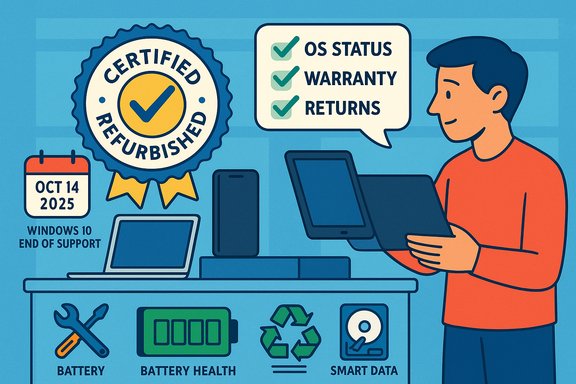
The guide and independent consumer experts converge on an easy-to-follow checklist that reduces risk and raises the odds of a good outcome.- Confirm the SKU and serial number. Make sure the listing identifies the exact model (not just a model family name).
- Verify the OS and update status. Ask whether the device is on Windows 11, Windows 10 with valid ESU, or a supported OS like a recent ChromeOS or Linux distribution. Look for proof of a recent feature and security update.
- Check the warranty and returns window. Prefer vendors that offer a minimum 90‑day warranty and a clear return process for defects.
- Inspect battery health and storage. Ask for battery cycle counts and storage SMART reports on HDDs/SSDs. Avoid drives with suspiciously reset SMART values.
- Confirm repairability and parts availability. Devices with sealed batteries or glued displays may be cheaper now but harder/expensive to repair later. PennPIRG recommends favoring models with known repair pathways.
Spotting bad actors and common pitfalls
Holiday season listings can hide problems in plain sight: ambiguous “like-new” labels, unclear seller identity, or missing power adapters. The guide — and reporting from consumer-technology forums — emphasize these recurring red flags.- Price that’s too good to be true often signals a grey-market or “as-is” unit with no warranty. Verify the seller’s reputation and whether the manufacturer will honor a warranty claim.
- Missing firmware or BIOS/UEFI updates. Refurb units should have up-to-date platform firmware; unpatched firmwares can expose hardware-level exploitation vectors. Ask the seller for an update log.
- Reset SMART/serial numbers on storage devices. There's documented fraud where sellers resurface used HDDs/SSDs by tampering with SMART values or labels; run a SMART report immediately after purchase and be wary of drives with zeroed Power-On Hours.
Practical tools and tests to run on arrival
When a refurbished device arrives, the first 48 hours are decisive. Here are prioritized steps:- Run Windows Update (or your OS update utility) and ensure firmware updates are applied. If the device is offline or updates fail, contact the seller before you start using it for important work.
- For laptops and phones, check battery health tools (Windows’ battery report, iOS battery health or Android’s battery stats) and request replacement if health is below reasonable thresholds (commonly advised: 80% of original capacity or lower).
- For storage drives, capture SMART data with CrystalDiskInfo or equivalent and verify model/serial numbers against the product label. Use surface or extended tests if you suspect problems.
- Verify included accessories — power bricks, cables, and peripherals — are original or certified replacements, not unsafe third-party hardware. Cheap chargers are a fire risk.
Policy context: Right to Repair and Pennsylvania’s bills
PennPIRG’s guide does more than train consumers — it ties repairable electronics to state policy. In 2025, Pennsylvania’s House passed HB1512, a comprehensive Right-to-Repair bill that would require manufacturers to provide owners and independent repair providers access to parts, tools and documentation on fair terms. The Senate companion, SB833, mirrors these aims and remains under committee review. Advocates argue the laws will reduce waste, lower repair costs and expand the market for refurbished devices. Legislative momentum is real: HB1512 cleared the House floor with bipartisan support and was referred to the Senate’s consumer protection committee, while SB833 sits in committee awaiting further action. Both bills target the structural barriers that make devices hard to refurbish — proprietary repair tooling, withheld parts and opaque diagnostic software — not day-to-day retail practices. PennPIRG and allied groups frame Right to Repair as a market and environmental reform: when consumers and independent shops can fix devices, the lifespan of electronics extends and the refurbished sector scales without relying on manufacturers to provide every repair channel. Lawmakers supporting the bills have argued the policy would save families money and reduce unnecessary landfill contributions.Benefits and strengths of the refurbished approach
- Cost savings: Refurbished devices can offer large discounts compared with equivalent new models, making higher-end features affordable during the holidays.
- Lower carbon footprint: Extending device life avoids manufacturing emissions and raw-material extraction associated with new units. The Global E‑waste Monitor numbers make the environmental case compelling.
- Circular economy growth: By supporting refurbishers and independent repair, consumers help scale a reuse market that competes with rapid replacement cycles. PennPIRG points to growing refurbished smartphone shipments as evidence of market maturation.
Risks, trade-offs and what the guide cautions about
- Software obsolescence risk: A physically sound device that cannot run current OS versions or receive security patches can be more dangerous than buying new. PennPIRG explicitly warns shoppers to avoid unsupported Windows‑10 machines unless they plan to migrate OSs or enroll in ESU.
- Repair and parts scarcity: Some models are effectively sealed, meaning repair costs can approach the price of a newer device. The guide urges buyers to prioritize models with repair manuals, replaceable batteries and accessible parts.
- Marketplace variance: Not all “refurbished” labels are equal. Certified refurbishers (manufacturer‑backed or accredited third parties) usually offer better QA than anonymous marketplace sellers. The guide’s recommended-vendor list reflects that differentiation.
- Hidden fraud on storage and batteries: Sellers have been documented resetting SMART data or disguising battery health. The guide recommends immediate diagnostics and keeping return windows open.
What to do if you inherit a risky device
If you already own or receive a refurbished device with questionable support status, PennPIRG and consumer tech experts offer a range of mitigation strategies:- Enroll in the Windows 10 Consumer ESU (if eligible) to extend security updates for a limited period while you plan a migration. Microsoft documents the options on its support pages.
- Consider switching the machine to a supported alternative OS — lightweight Linux distributions (Ubuntu, Linux Mint) or Cloud‑based/terminal solutions (ChromeOS Flex, cloud desktops) can revive older hardware for web‑centric use. These choices have trade-offs in app compatibility and user training.
- Repurpose the device to offline, low-risk tasks (media playback, a dedicated kiosk or NAS) where exposure to external threats is limited and the absence of frequent security patches is less likely to be catastrophic.
A quick holiday checklist — what to do before you buy
- Confirm the exact model and SKU; ask for serial numbers and proof of recent firmware/OS updates.
- Validate seller reputation and minimum warranty (≥90 days preferred).
- Check OS upgrade eligibility (Windows 11) or ESU status for Windows 10 units.
- Request battery cycle counts and SMART reports for storage.
- Keep receipts and confirm return windows; photograph unboxing to document condition on arrival.
Final analysis — strengths, risks and policy implications
PennPIRG’s Fixed for the Holidays guide is a practical, timely resource that addresses both the micro-level needs of holiday shoppers and the macro-level policy problem of e‑waste. It combines clear shopping tactics with an advocacy angle — promoting Right to Repair as a durable, market-shaping solution. The guide’s major strength is its dual focus: empower consumers today, and push for structural fixes that make refurbishing viable at scale tomorrow. Yet caution is warranted. The largest structural risk is not buyer ignorance but the underlying software and hardware compatibility landscape: millions of older PCs cannot upgrade to Windows 11 and therefore may become security liabilities if sold and used without ESU. PennPIRG is right to flag this as both a consumer protection issue and an environmental threat — mass replacement without robust recycling and trade‑in programs will add to the global e‑waste burden quantified by the UN. Policy efforts like HB1512 and SB833 in Pennsylvania aim to reduce those risks by improving repairability and supply of spare parts — steps that would make refurbishing easier and more reliable. If enacted and enforced sensibly, Right to Repair legislation can both lower repair costs and keep functional devices in circulation longer. However, the bills alone won’t fix software-driven obsolescence, which also requires manufacturer cooperation on update lifecycles, better trade-in programs, and accessible ESU arrangements for consumers.Conclusion
For holiday shoppers in Pennsylvania and beyond, the PennPIRG Fixed for the Holidays guide is an essential resource that translates environmental urgency and legislative momentum into practical, risk‑aware shopping advice. Buying refurbished can be an excellent way to save money and shrink your carbon footprint — but only when you pair a good price with careful due diligence: confirm seller reputation, verify software update eligibility, run basic hardware diagnostics, and prefer vendors that include warranties and transparent return policies. Above all, shoppers should treat software support timelines — especially the October 14, 2025 end of Windows 10 support — as a core part of any refurbished purchase decision. The guide’s final, practical promise is simple and useful: with the right checks, refurbished tech can deliver the high-tech gifts you want for less money — and help keep functioning devices out of the landfill.Source: Lower Bucks Times Consumer Guide Helps Pennsylvanians Shop for Used Electronics, Save Money During Holiday Season
