

Microsoft’s decision to stop routine support for Windows 10 did not magically turn millions of still‑functional PCs into useless junk — but it did force an urgent question onto the agenda: obsolete to whom? For households, charities, hospitals and stretched school budgets, the end of Windows 10’s vendor‑supplied security updates on October 14, 2025 created a sudden governance problem: either pay for a short‑term patching bridge, buy replacement hardware, or find practical ways to keep perfectly usable machines secure and productive. Consumer advocates and repair groups treated that event as a call to action — running fix‑a‑thons, repurposing surplus machines with long‑lived open‑source software, and routing working devices into schools, clinics and community programs rather than to landfills. PIRG’s campaigns and community refurbish efforts give a clear, operational blueprint for turning forced obsolescence into social value while highlighting the policy and environmental failures that produced the crisis in the first place.
That said, community action is a mitigation, not a long‑term cure. Durable solutions require policy fixes that account for software servicing as part of product lifecycle and consumer protection:
What remains is a multi‑actor challenge: scale the refurbisher and ITAD infrastructure, align procurement and producer responsibility rules with realistic servicing windows, and ensure donations are paired with connectivity and support. When all those pieces are in place, abandoned software will remain a vendor decision — but abandoned hardware will become a rare, preventable outcome rather than the price of progress.
Source: PIRG Obsolete to whom? How abandoned technology can be passed on to others
 Background
What Microsoft changed and what it still offers
Microsoft formally ended mainstream support for Windows 10 on October 14, 2025. After that date, consumers no longer receive routine security patches, feature updates or standard technical assistance unless they enroll in an Extended Security Updates (ESU) pathway. Microsoft’s public guidance explicitly recommends upgrading eligible machines to Windows 11, using ESU as a short bridge, or replacing devices that cannot meet Windows 11’s hardware baseline. The consumer ESU program provided a limited one‑year window (through October 13, 2026) for security‑only updates under specific enrollment rules; those mechanics were intentionally narrow and in some cases tied to Microsoft account workflows. ESU was designed as a time‑boxed mitigation, not a durable servicing policy.Why many machines could not upgrade to Windows 11
Windows 11 enforces stricter hardware requirements than Windows 10: a 64‑bit‑only environment, at least 4 GB RAM and 64 GB storage, UEFI firmware with Secure Boot capability, and TPM 2.0. In practice, Microsoft also restricts upgrades to processors on its approved compatibility lists. Those choices edge the platform toward a higher security baseline, but they also exclude a wide swath of older, still‑serviceable devices. The hardware gate is deliberate and technically grounded — but it produces a simple operational fact: a lot of working PCs simply don’t qualify for a free in‑place migration. Market trackers and independent observers reported that, at the time of the cutoff, a substantial portion of the Windows installed base remained on Windows 10 — often in the high‑30s to mid‑40s percent range of Windows desktop installs — meaning hundreds of millions of PCs were part of that pool. Panel measurements differ by methodology (Steam, StatCounter, site telemetry), but the direction was clear: many users face an awkward choice between replacement, paid ESU, or a community‑driven reuse pathway.Overview of PIRG’s argument and practical response
Software was made obsolete — not the device
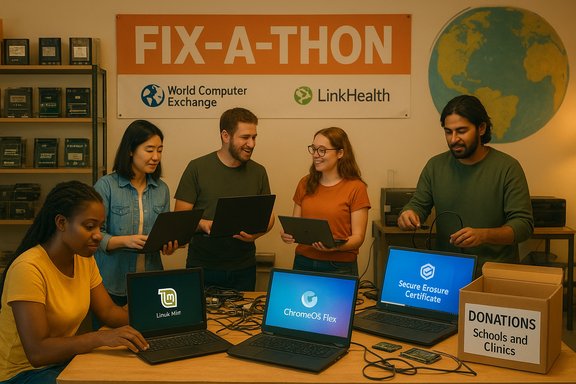
PIRG’s campaign framed the end‑of‑support moment as a policy problem with practical consequences: the vendor chose to stop servicing the operating system, but that does not mean the physical hardware is unusable. PIRG organized Fix‑a‑thons and partnered with refurbishers to rescue devices, install actively maintained alternative operating systems, and donate the machines to nonprofits and youth programs. Those events had measurable outputs: volunteers rescued more than 100 laptops for donation in a small set of pilot cities, and the organization used Linux Mint and other maintained OS channels to restore secure update paths. These on‑the‑ground efforts converted vendor policy pressure into social benefit while exposing the broader policy gap that created the churn.Partners in redistribution: World Computer Exchange and LinkHealth
PIRG did not work in isolation. Longstanding refurbish and redistribution actors were central to scaling donation pipelines:- World Computer Exchange (WCE) is a nonprofit that collects, refurbishes and ships used computers to underserved schools and NGOs globally. WCE’s public profiles state that it has distributed tens of thousands of laptops and PCs to thousands of recipient sites since 2001, and the organization offers free mail‑in donation options, documented data‑erasure certificates and logistics support for donors. WCE’s model is explicitly about connecting surplus hardware to education and community outcomes.
- LinkHealth focuses on the intersection of health and digital access: it works with healthcare sites to screen patients for connectivity and device needs, help enroll eligible households in benefits programs (Lifeline, LIHEAP, SNAP), and — in partnership models — place refurbished devices where they address both health‑ and access‑related needs. LinkHealth’s platform and partnership play a practical role in making donated devices reach medically vulnerable and economically constrained households.
Why reuse works: technical, social and environmental logic
Technical reality: many tasks don’t need Windows 11
A surprising number of everyday computing tasks are web‑centric: email, document editing, video calls, forms, and online learning platforms. For these workloads, lightweight, actively maintained operating systems such as ChromeOS Flex and mainstream Linux distributions (Ubuntu LTS, Linux Mint) provide robust security updates and sufficiently modern application support. Converting widely available Windows 10 machines to such platforms restores a secure update path without hardware replacement in many cases. Google’s ChromeOS Flex and Linux Mint both publish maintenance channels and update cadences that make them suitable choices for refurbish‑and‑donate workflows.Social impact: devices unlock practical gains
Donated devices support education, job search, benefit enrollment and telehealth use cases. When paired with connectivity assistance and onboarding, a refurbished laptop can be the decisive factor in a household’s ability to access benefits, complete coursework, or manage care. Organizations that route devices through trusted charity partners and clinical touchpoints can target distribution toward high‑impact use cases such as supporting low‑income families, patients leaving hospitals, or youth in after‑school programs. LinkHealth’s model of enrolling patients for benefits and then linking device access is an example of how device distribution and social services can interlock to produce measurable outcomes.Environmental logic: reuse delays embodied emissions
Manufacturing a laptop accounts for most of its lifecycle greenhouse‑gas footprint. Extending device life by even a few years amortizes that embodied carbon over more useful years and reduces the demand for new manufacturing. Refurbishment avoids the energy‑intensive processes of raw material extraction and component production. Advocacy groups have modeled worst‑case e‑waste scenarios if mass replacement is the default outcome — those models underline urgency rather than provide precise tonnages — but they consistently point to a measurable climate and pollution benefit when reuse is prioritized.What PIRG and partners did — the operational playbook
How a Fix‑a‑thon works (practical checklist)
PIRG’s events followed a replicable pattern that community groups and civic IT teams can use:- Intake and triage: document model, CPU, RAM, storage, battery health and firmware/TPM status. Prioritize SSD‑equipped or upgradable devices for refurbishment.
- Data hygiene: perform secure backups where needed and a documented secure wipe (certificate issued) before repurposing. Certified ITAD standards mitigate donor risk.
- Live trials: boot ChromeOS Flex or a Linux live USB to validate Wi‑Fi, webcam and peripherals before committing to an installation.
- Low‑cost upgrades: where feasible, swap an HDD for an SSD and increase RAM to 8 GB — these two changes often revive an older machine’s responsiveness.
- Install and test: install the chosen OS, apply updates, and run a short acceptance test including connectivity and peripheral checks.
- Onboarding and support: include a one‑page guide for recipients and offer a short local support window (30–90 days) to reduce returns and maximize successful adoption.
Security and legal safeguards
Donations must come with auditable secure‑erasure certificates and a clear chain of custody. For corporate donors this is non‑negotiable: failure to properly erase devices exposes organizations to serious compliance and reputational risk. PIRG and refurbish partners insist on standardized ITAD processes and documentation before redeployment.Alternatives to donation and when they’re appropriate
- ESU as a time‑boxed bridge: For consumers with a small number of legacy machines that must remain on Windows for specific apps, ESU can buy controlled time to plan migrations — but it is explicitly temporary and conditional.
- Cloud or hosted Windows: Older machines can act as thin clients for Windows 365 or Azure Virtual Desktop, moving the security and OS lifecycle into the cloud while preserving local hardware as an access device. This is viable where reliable broadband exists but shifts costs to subscriptions.
- Certified recycling / ITAD: Machines that fail hardware triage or are unsafe to transport (severely swollen batteries, cracked chassis, irreparable storage) should be recycled through certified firms that provide material recovery and follow environmental and occupational safety standards. WCE and other groups publish recycling guidance for items that cannot be refurbished.
Critical analysis: strengths, weaknesses and systemic risks
Strengths of the reuse model
- Immediate impact: Refurbishment reroutes functioning machines into productive use quickly, producing measurable benefits for education and social services.
- Security improvement: For many devices, migrating away from unsupported Windows 10 to ChromeOS Flex or a maintained Linux distribution yields better long‑term security than continuing to operate an unpatched Windows image.
- Climate advantage: Extending device lifetimes reduces embodied carbon per year of service and avoids the higher emissions of manufacturing replacements.
Weaknesses and operational fragilities
- Capacity constraints: Refurbishers and certified ITAD firms need logistics, warehouse space, skilled volunteers/technicians and parts inventories. A sudden surge of corporate refreshes can create backlogs and degrade quality.
- Compatibility and usefulness limits: Some Windows‑only applications and proprietary exam or healthcare software cannot run on Linux or ChromeOS Flex. Careful beneficiary triage is essential to avoid mismatches.
- Hidden costs: Long‑term support and spare‑parts budgets are often overlooked. Recipients and charities need connectivity, technical support and occasional repairs to keep devices useful. Donation without follow‑up support reduces long‑term value.
Policy and equity risks
- Distributional inequity: Microsoft’s hardware gating and ESU design shift cost burdens toward lower‑income households and underfunded institutions that are more reliant on older kit. Advocates argue that software servicing policy should be treated as part of product durability and not as a short vendor decision.
- E‑waste leakage: If refurbish and donation pipelines cannot scale or are mismanaged, retired devices may still flow into informal recycling channels with poor environmental controls. Strong, transparent ITAD rules are necessary to prevent leakage.
On the statistics and the “40%” claim — a caution
Headline numbers such as “40% of Windows 10 machines can’t upgrade to Windows 11” are useful to describe scale, but they are estimates with meaningful methodological variance. Trackers differ (Steam, StatCounter, other telemetry), and Microsoft has not published a single audit that converts installed base counts into a definitive incompatibility census. Use such estimates as directional indicators: it is clear that many machines cannot upgrade, but the exact count depends on the data source and the definitions used (TPM availability, firmware updates, CPU lists, and region). Treat single‑number headlines with caution and prefer localized device inventories for operational planning.A pragmatic guide for donors, IT teams and community groups
For households and individuals
- Run the PC Health Check to test Windows 11 eligibility. If ineligible, consider ESU (as a bridge) or installing ChromeOS Flex or Linux for continued security.
- If you plan to donate, remove personal accounts, perform a device backup, and choose a reputable refurbisher or nonprofit that issues a secure‑erasure certificate. WCE and similar organizations provide mail‑in options with tracking and donation receipts.
For corporate IT teams
- Inventory and triage: capture model, CPU, TPM status, RAM, storage, and Windows build to decide whether devices are upgradeable, repurposable, or recyclable.
- Pilot a reuse pipeline with a trusted refurbisher; require erasure certificates, per‑device test reports and a documented matching plan to beneficiary organizations.
- Pair donations with modest connectivity or training budgets so devices are not useful in name only.
For community organizers and refurbishers
- Maintain a small parts inventory (SSDs, 8 GB RAM modules, common connectors).
- Use live‑USB testing to validate candidate devices quickly.
- Offer simple guides and a short local support window for recipients. These operational moves dramatically increase successful reuse rates.
Final assessment and what must change
The practical work done by PIRG, WCE and LinkHealth shows that community repair and redistribution are not merely charitable stops on the way to replacement — they are viable, measurable strategies to protect security, reduce emissions, and close the digital divide. Fix‑a‑thons and donation pipelines turn vendor policy-induced churn into social benefit, and they demonstrate the operational feasibility of sustained reuse programs.That said, community action is a mitigation, not a long‑term cure. Durable solutions require policy fixes that account for software servicing as part of product lifecycle and consumer protection:
- Longer and clearly disclosed software‑support windows aligned with typical hardware lifetimes.
- Regulatory incentives for refurbishment and robust, certified ITAD capacity.
- Firmware and update pathways that enable legitimate upgrades (for example, enabling fTPM where hardware supports it) rather than relying solely on new silicon.
Conclusion
Obsolescence is not a single binary state declared by a vendor; it is a negotiated outcome shaped by technical rules, market incentives and public policy. Microsoft closed the Windows 10 update tap on October 14, 2025, and that decision has real, immediate consequences — but it did not make hardware worthless. PIRG’s on‑the‑ground refurbish events, together with partners like World Computer Exchange and LinkHealth, provide a practical, scalable alternative to mass replacement: secure erasure, modest hardware refreshes, and the installation of actively maintained operating systems that restore a secure update path. That model reduces e‑waste, protects users, and redirects corporate refresh waves into measurable social benefits.What remains is a multi‑actor challenge: scale the refurbisher and ITAD infrastructure, align procurement and producer responsibility rules with realistic servicing windows, and ensure donations are paired with connectivity and support. When all those pieces are in place, abandoned software will remain a vendor decision — but abandoned hardware will become a rare, preventable outcome rather than the price of progress.
Source: PIRG Obsolete to whom? How abandoned technology can be passed on to others
