

Organisations facing the end of Windows 10 support now have a clear, pragmatic option to protect operations and buy time for a controlled Windows 11 migration: virtualisation — used strategically — can deliver centrally managed Windows 11 desktops to legacy endpoints while IT teams sequence hardware refreshes and modernise management.
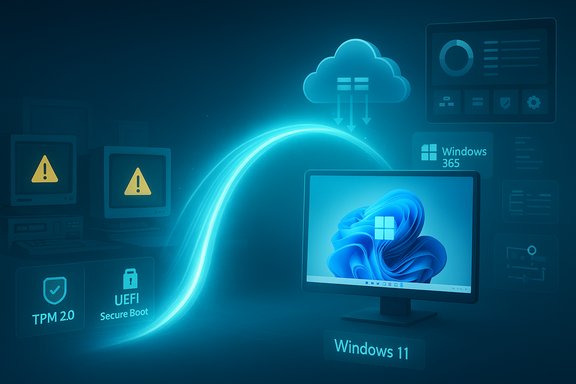
Microsoft ended mainstream support for Windows 10 on October 14, 2025, a hard milestone that changes the operational and security calculus for enterprises still running large fleets of legacy devices. After that date security updates, feature updates and mainstream technical support cease for standard Windows 10 installations unless the organisation pays for Extended Security Updates (ESU). That ticking clock collides with another reality: many business-critical endpoints — industrial HMIs, clinical imaging stations, bespoke finance workstations, and certain point-of-sale units — are reliable but architecturally unsuited to Windows 11’s hardware gating (UEFI Secure Boot, TPM 2.0, supported CPU families). The result is three practical options for IT leaders: refresh at scale, buy time with ESU where feasible, or adopt hosted Windows 11 delivery to decouple OS strategy from physical device capability. The latter is the focus of this briefing and the practical playbook offered by recent commentary on the topic.
When executed with disciplined discovery, pilot testing, Trusted Launch/vTPM enablement, and clear governance for identity and AI, virtualised Windows 11 desktops transform a compliance cliff into a staged modernisation program. Virtualisation is the bridge that buys time and stabilises risk—but it should be used to enable a future state of modern devices, not to justify indefinite hardware deferral.
Source: African Insider Leveraging Virtualisation for Enterprise Migration to Windows 11
 Background / Overview
Microsoft ended mainstream support for Windows 10 on October 14, 2025, a hard milestone that changes the operational and security calculus for enterprises still running large fleets of legacy devices. After that date security updates, feature updates and mainstream technical support cease for standard Windows 10 installations unless the organisation pays for Extended Security Updates (ESU). That ticking clock collides with another reality: many business-critical endpoints — industrial HMIs, clinical imaging stations, bespoke finance workstations, and certain point-of-sale units — are reliable but architecturally unsuited to Windows 11’s hardware gating (UEFI Secure Boot, TPM 2.0, supported CPU families). The result is three practical options for IT leaders: refresh at scale, buy time with ESU where feasible, or adopt hosted Windows 11 delivery to decouple OS strategy from physical device capability. The latter is the focus of this briefing and the practical playbook offered by recent commentary on the topic.Why Windows 11 matters for modern enterprises
Windows 11 is more than a UI update — it is a platform built around modern security, cloud-first management, and a hardware profile that enables on-device and cloud-assisted AI features. Key enterprise advantages include:- Hardware-backed security primitives: TPM 2.0, UEFI Secure Boot and virtualization‑based security (VBS) form the backbone of Windows 11’s hardened posture. VBS and Hypervisor‑protected Code Integrity (HVCI) isolate critical security functions from the main OS, reducing exploitability of kernel attacks.
- Cloud integration and lifecycle automation: Windows 11 is engineered to work tightly with Microsoft 365, Intune, Autopatch and Entra ID for automated provisioning, conditional access and telemetry-driven policy enforcement — capabilities that streamline large-scale fleet management.
- AI and productivity readiness: New Windows 11 features and the Copilot ecosystem increasingly depend on modern silicon and, in some cases, on-device NPUs. Enterprises planning AI-driven workflows benefit from devices designed for those workloads or from cloud-hosted Windows 11 environments that provide the necessary runtimes.
The compatibility floor: what Windows 11 requires
Before designing a migration plan, IT teams must understand the technical gating that defines Windows 11 eligibility. The minimum requirements are straightforward and non‑negotiable for many devices:- 64‑bit, dual‑core CPU at 1 GHz or faster
- 4 GB RAM and 64 GB storage minimum
- UEFI firmware with Secure Boot capability
- Trusted Platform Module (TPM) version 2.0
Virtualisation as the migration bridge
Virtualisation is not a silver bullet, but it is a highly practical bridge that lets organisations realise many Windows 11 benefits immediately while they plan device replacement in a controlled way. The two principal hosted models to evaluate are:- Azure Virtual Desktop (AVD) / self‑managed VDI — infrastructure level control with flexible session host sizing, multi‑session Windows 11 Enterprise support, GPU acceleration and full image control.
- Windows 365 Cloud PCs — managed per‑user Cloud PC (DaaS) with predictable per‑user costs, automatic provisioning through Microsoft Intune and a simplified lifecycle model.
Core benefits of virtualisation during migration
Virtualisation supports migration to Windows 11 in three practical ways:- Containment of risk and data — run sensitive data and LOB apps in hardened datacentre images rather than on local disks, reducing data exposure and simplifying compliance controls.
- Centralised patching and image hygiene — manage a small set of golden images and session hosts rather than thousands of disparate endpoints, accelerating baseline enforcement and reducing drift.
- Phased hardware procurement — decouple OS lifecycle from physical replacement, allowing procurement to align with business criticality and budget cycles rather than a forced mass refresh.
Security mechanics: what makes hosted Windows 11 safer — and where the risks move
Delivering Windows 11 from a hardened datacentre or cloud tenant enables enterprises to import modern Windows security primitives into legacy endpoints, but with important caveats.Why hosted Windows 11 retains modern security
- Virtual desktops and Cloud PCs can run with VBS, HVCI and TPM‑backed keys, because the host VM is configured with vTPM and Secure Boot (Trusted Launch on Azure). This restores many of the hardware‑anchored protections that legacy endpoints lack.
- Cloud management ties into Defender for Endpoint, Purview DLP and Entra conditional access, allowing policy parity between physical and cloud desktops and enabling centralised telemetry and remediation.
New concentration and operational risks
- Centralisation creates high‑value targets: compromised session hosts or Cloud PC backends can expose many users simultaneously. Mitigation requires layered hardening — Trusted Launch, vTPM, strict identity and conditional access, micro‑segmentation and robust logging/alerting.
- Operational surface grows: IT must run image pipelines, autoscale, storage IO performance, GPU assignment, license management and peripheral passthrough programs. These are non‑trivial investments in skills and tooling.
- vTPM and disk encryption caution: BitLocker keys protected by a vTPM require careful recovery planning — losing vTPM state or mismanaging snapshots can cause unrecoverable volumes if procedures aren’t tested. Trusted Launch and cloud VM policies help, but testing and documentation are essential.
Practical migration playbook — a ten‑step programme for IT leaders
Virtualisation works best when implemented as a phased programme, not a one‑off project. Below is a pragmatic, sequential playbook to run in 120–180 day sprints, adaptable to longer timelines for large estates.- Run authoritative discovery (0–30 days)
- Automated inventory of CPU family, TPM state, UEFI/Secure Boot, RAM, storage, peripheral mappings and application dependencies. Use agent discovery and Intune/MDM telemetry to build a canonical dataset.
- Risk‑rank endpoints (30 days)
- Prioritise by exposure (internet-facing, privileged users), regulatory impact and application criticality. Produce three cohorts: immediate replace, virtualise, ESU-only bridge.
- Containment and compensating controls (30–60 days)
- Segment remaining Windows 10 systems, tighten EDR, enforce least privilege and network ACLs, and document ESU windows as strictly time‑boxed exceptions.
- Pilot both models (60–120 days)
- Run small cohorts: 10–50 Windows 365 Cloud PCs and an AVD session host pool representing different user personas. Validate logon times, USB/serial passthrough, printer and token behaviour, and app performance.
- Validate compliance & DLP integration (concurrent)
- Integrate Defender for Endpoint and Purview DLP across Cloud PCs and on‑device agents to ensure consistent telemetry and policy enforcement.
- Scale with governance (90–180 days)
- Move to staged rollouts, convert suitable endpoints to thin clients, and sequence device purchases by criticality. Use automation (Autopilot, Autopatch, Intune) to reduce manual overhead.
- Harden hosting plane
- Enable Trusted Launch and vTPM on hosts where possible, implement privileged identity management, and run regular integrity attestation checks.
- Test recovery and rollback
- Document BitLocker + vTPM recovery procedures, test snapshot rollback for images and validate explosion scenarios for vTPM state changes.
- Procurement and sustainability
- Engage channel partners early to secure SLAs, negotiate trade‑in and refurbishment options and design e‑waste disposal into procurement. This reduces CapEx and supports ESG goals.
- Metrics and continuous improvement
- Track inventory coverage, pilot CSAT, support ticket volume, MTTR and image drift. Iterate images and scaling rules based on telemetry.
Sector playbooks — where virtualisation offers the largest win
- Manufacturing: Factory floor HMIs and PLC consoles often use drivers and PCI(e) cards that require vendor recertification. Virtualising GUIs on robust hosts with thin clients minimizes production risk while a planned hardware refresh is scheduled. Passthrough must be limited to carefully auditable exceptions (IOMMU/VFIO, HCI with direct I/O).
- Healthcare and regulated environments: Clinical devices and imaging workstations can be hosted in validated VM images to preserve audit trails and controlled patch windows. Use vTPM and Trusted Launch patterns to preserve attestation guarantees and facilitate certification.
- Finance and legal: High‑value desks can be standardised with Cloud PCs or AVD, combined with stringent DLP and EDR policies to keep sensitive data in a controlled tenant rather than on local drives.
Cost, procurement and market context — realism matters
Public estimates about the installed base and upgrade readiness vary widely and are often directional rather than definitive. Industry voices suggest a very large install base remains on Windows 10 and that many machines are either upgradeable but not yet upgraded, or not upgradeable at all due to hardware gating. Some vendor statements (for example recent remarks from major OEMs) indicate hundreds of millions of devices in these categories; treat such numbers as market context, not precise inventory for procurement planning. Validate everything with your own discovery telemetry before signing purchase orders. From a procurement vantage point, staggered purchasing, DaaS/managed replacement, refurb channels and negotiated SLAs reduce both CapEx spikes and supply risk. Early engagement with distributors and VARs pays off — particularly in regions with constrained supply chains.The unstated truth: virtualisation buys time, it does not replace hardware renewal
Virtualisation is a strategic lever to stabilise operations and accelerate security posture, not a permanent substitute for modern hardware. Over time, applications become more demanding, AI features proliferate and suppliers deprecate older device support. Running Windows 11 in the cloud secures immediate benefits, but IT leaders must still commit to a device lifecycle roadmap that delivers modern Windows 11‑capable devices for the most critical users and workloads.Strengths, caveats and governance priorities
Strengths- Rapid security uplift for users on legacy endpoints without immediate device purchase.
- Lower operational variability: fewer images to manage and centralised patch cadence.
- Predictable DaaS cost models (Windows 365) simplify budgeting for knowledge worker classes.
- Concentration risk: a successful compromise of the hosting plane is higher impact.
- Peripheral compatibility: USB tokens, serial devices and bespoke drivers often require carefully engineered passthrough — not all peripheral cases are solved by default.
- vTPM and BitLocker complexity: recovery procedures must be validated and documented; missteps can render volumes irrecoverable.
- Identity and conditional access first: enforce device attestation, least‑privilege and privileged identity controls.
- Image hygiene: minimise image sprawl, automate patching, maintain snapshot rollback plans.
- AI governance: define telemetry, residency and model access rules before enabling Copilot or on‑device AI features broadly.
Executive checklist: five immediate actions
- Run a full automated endpoint inventory and risk‑rank devices by exposure and regulatory impact.
- Pilot a mixed virtualisation approach: Windows 365 for knowledge workers, AVD for GPU/sensitive workloads.
- Integrate hosted desktops with Defender for Endpoint, Purview DLP and Entra conditional access before scaling.
- Test BitLocker + vTPM recovery paths and document snapshot/rollback playbooks.
- Engage procurement partners and schedule staged device refreshes, using trade‑in/refurb channels and DaaS to reduce CapEx.
Conclusion
The retirement of Windows 10 forces a strategic inflection point for enterprise IT: act now to avoid scrambling later. Virtualisation provides a measured, security‑first pathway to deliver Windows 11 capabilities to users on legacy hardware while procurement and device lifecycle planning proceed on a disciplined timetable. It reduces immediate risk and capital pressure, but it also creates a new operational surface that must be hardened and governed.When executed with disciplined discovery, pilot testing, Trusted Launch/vTPM enablement, and clear governance for identity and AI, virtualised Windows 11 desktops transform a compliance cliff into a staged modernisation program. Virtualisation is the bridge that buys time and stabilises risk—but it should be used to enable a future state of modern devices, not to justify indefinite hardware deferral.
Source: African Insider Leveraging Virtualisation for Enterprise Migration to Windows 11
