

The window to act on the Windows 10 retirement is short, and virtualisation is emerging as the most pragmatic route for enterprises to preserve business continuity while they modernise endpoints and adopt Windows 11 on a realistic timetable.
Microsoft formally ended mainstream support for Windows 10 on October 14, 2025, meaning ordinary security and feature updates no longer ship to unmanaged devices and organisations must choose a migration, extended-support, or containment strategy. The practical consequence is stark for many industries that still run mission‑critical, long‑lived endpoints—manufacturing HMI consoles, point‑of‑sale terminals in retail, specialised finance workstations, and clinical devices in healthcare. These devices often cannot meet Windows 11 hardware gating (TPM 2.0, UEFI/Secure Boot, newer CPU families), so enterprises face a choice: replace en masse, extend support temporarily, or virtualise workloads to buy time and reduce operational risk. The argument for virtualisation as an enabling bridge is the subject of current industry coverage and the piece provided by IT News Africa that frames virtual desktops and hosted Windows 11 as a measured migration pathway.
The commentary and migration playbook discussed by practitioners and channels reflect this balanced posture—virtualisation as a bridge to a secure, cloud‑first Windows 11 estate rather than an indefinite substitute for modern devices.
For organisations that act now—inventorying aggressively, piloting VDI and Cloud PCs, and sequencing hardware refresh by risk—Windows 10’s retirement can become a catalyst for a more resilient, manageable, and future‑ready endpoint estate rather than a sudden compliance crisis.
Source: IT News Africa Leveraging Virtualisation for Enterprise Migration to Windows 11 - IT News Africa | Business Technology, Telecoms and Startup News
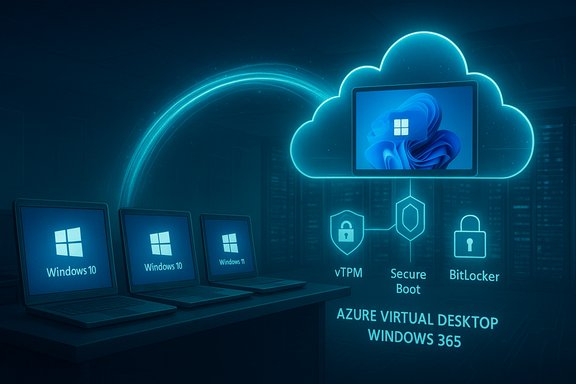 Background / Overview
Microsoft formally ended mainstream support for Windows 10 on October 14, 2025, meaning ordinary security and feature updates no longer ship to unmanaged devices and organisations must choose a migration, extended-support, or containment strategy. The practical consequence is stark for many industries that still run mission‑critical, long‑lived endpoints—manufacturing HMI consoles, point‑of‑sale terminals in retail, specialised finance workstations, and clinical devices in healthcare. These devices often cannot meet Windows 11 hardware gating (TPM 2.0, UEFI/Secure Boot, newer CPU families), so enterprises face a choice: replace en masse, extend support temporarily, or virtualise workloads to buy time and reduce operational risk. The argument for virtualisation as an enabling bridge is the subject of current industry coverage and the piece provided by IT News Africa that frames virtual desktops and hosted Windows 11 as a measured migration pathway.Why Windows 11 matters for enterprises
Security features that change the risk calculus
Windows 11 is not merely a UI refresh; it includes hardware‑anchored protections and default hardening designed for modern threat models. Virtualization‑based security (VBS) and Hypervisor‑protected Code Integrity (HVCI / memory integrity) are central to that posture—these features isolate critical security components from the main kernel and make kernel‑level compromises significantly harder. Microsoft documents that VBS and HVCI run in an isolated environment (VTL1) and are enabled by default on many Windows 11 installations meeting the required hardware baseline. Other baseline requirements — UEFI with Secure Boot and TPM 2.0 — underpin features such as BitLocker automation, credential protection, and device attestation that integrate with conditional access and modern identity tooling. These capabilities directly support zero‑trust architectures and reduce the operational burden of compensating controls that organisations must run on unsupported Windows 10 endpoints.Productivity, cloud integration and AI readiness
Windows 11 is engineered for tighter native integration with Microsoft 365, cloud identity and device management (Intune/Autopatch), and on‑device and cloud‑assisted AI features. For organisations planning to adopt Copilot, on‑device AI accelerators, or advanced collaboration tools, supported hardware and the Windows 11 platform reduce friction and unlock functionality that legacy hardware cannot reliably host.Virtualisation as the migration bridge: the core proposition
Virtualisation (on‑premises VDI or cloud‑hosted Cloud PCs / DaaS) lets organisations expose a centrally managed Windows 11 desktop to users while the physical endpoint remains underpowered or restricted by legacy firmware. The big picture benefits are:- Centralised security and patching: updates, agents and configuration are managed in one place rather than across thousands of heterogenous devices.
- Data residency and containment: sensitive data and business apps live inside a hardened datacentre or cloud tenant rather than on local disks.
- Gradual hardware refresh: virtual desktops enable a phased procurement plan, so organisations can prioritise replacements by criticality and budget cycles rather than being forced into a cliff‑edge rip‑and‑replace.
Types of virtualisation to consider
- Azure Virtual Desktop (AVD) / on‑premises VDI — full VDI model, gives IT total control over session hosts and the environment.
- Windows 365 Cloud PCs — managed, per-user Cloud PC service (DaaS) that simplifies provisioning and ties directly into Microsoft management tooling.
- Hybrid models — host sensitive apps in internal VMs and use Cloud PCs for knowledge workers; mixed approaches reduce cost while keeping the most critical workloads isolated.
Where virtualisation wins: sector use‑cases
Manufacturing and industrial control
Factory floor terminals frequently run legacy control suites and bespoke drivers tied to specific PCI(e) cards or serial devices. Direct upgrades often demand vendor recertification and system revalidation. Virtualisation enables operational continuity: host control GUIs on a secure server or cloud VM and use thin clients or repurposed devices as remote consoles. When PCI passthrough is required, careful host planning (IOMMU, VFIO, or on‑prem HCI with direct I/O) is critical. This approach reduces the risk of disrupting production during a full device refresh cycle.Healthcare and regulated environments
Regulated environments have strict audit, certification and validation needs. Running legacy clinical apps in an isolated, centrally patched VM can maintain compliance while allowing IT teams to schedule formal migration, certification, or replacement over longer windows. For the highest‑sensitivity workloads, the recommended pattern is to virtualise on validated host hardware and use vTPM / trusted launch to preserve attestation and chain‑of‑trust guarantees.Finance and professional services
Financial desks and legal teams often use specialised apps with rigid vendor support matrices. Virtual desktops let firms standardise Windows 11 images and deliver them with strict endpoint controls and DLP policies while minimizing disruption to daily workflows. Integration with Defender for Endpoint and Purview DLP on Cloud PCs enables the same policy enforcement as on physical devices.Practical mechanics: how IT should design a virtualisation‑led migration
Phase 1 — Discover and classify
- Build an authoritative hardware and application inventory: CPU family, TPM status, UEFI/Secure Boot state, drivers, attached peripherals and business criticality. Automated discovery tools and Intune/endpoint agents accelerate this step.
- Risk‑rank every device by exposure and regulatory impact: internet‑facing, privileged, or clinical/financial endpoints go to the front of the replacement schedule.
Phase 2 — Containment and compensating controls
- For devices that must remain on Windows 10 temporarily, apply compensating controls: strict network segmentation, hardened EDR policies, least privilege, and restricted connectivity. Use ESU only as a tight, time‑boxed bridge.
- Plan out which workloads will move to VDI, which will use Cloud PCs, and which must be replaced or re‑engineered.
Phase 3 — Pilot VDI and Cloud PCs
- Start small (10–50 Cloud PCs or AVD session hosts) with representative user profiles. Validate network latency, USB/serial peripheral passthrough if required, printer and token behaviour, and user experience metrics (logon times, application performance). Adjust image configuration and storage/IO sizing before scaling.
Phase 4 — Staged rollout and hardware cadence
- Use virtual desktops to decouple OS baseline from device replacement cadence. Prioritise high‑risk users for hardware replacement and scale VDI for knowledge workers or contractors who can tolerate slightly higher latency. Where thin clients suffice, convert existing endpoints where practical to delay capital spend.
Phase 5 — Validation, audit and decommission
- Maintain rollback images, collect telemetry through a full update cycle, validate BitLocker/TPM states and confirm EDR/AV operation. Decommission physical devices responsibly with secure wipe and recycling programs to reduce e‑waste.
Security trade‑offs and operational risks of a virtualisation approach
Virtualisation reduces many endpoint risks but introduces a new set of threats and operational responsibilities.- Concentration risk: centralised session hosts become high‑value targets. Mitigate by layered hardening (trusted launch, vTPM, Azure confidential computing where available) and strict identity + conditional access controls.
- Latency and peripheral constraints: real‑time control systems, GPU‑heavy workflows or devices requiring low‑level hardware access may not perform well without careful design (GPU passthrough or edge compute). Test and define exceptions early.
- Licensing and cost nuance: DaaS/Cloud PC pricing and on‑premises VDI TCO vary by user profile and scale. Gartner and market analyses show DaaS spending rising and that for many use cases DaaS total cost of ownership can be lower than laptop refresh cycles—but procurement must be modelled precisely to avoid surprise costs.
- Operational expertise: running a robust VDI stack (or integrating Windows 365 at scale) requires skills in image management, storage and IOPS planning, identity and conditional access, and remote display optimisation. Partner selection and managed services can offset internal skills gaps.
Economics: when virtualisation saves money — and when it doesn’t
Virtual desktops can reduce short‑term capital expense by allowing organisations to keep older endpoints as thin clients or repurposed nodes. For many use cases, Gartner’s research and market signals indicate Desktop as a Service (DaaS) and Cloud PC solutions can lower TCO when paired with disciplined lifecycle management and thin‑client strategies. However:- For compute‑heavy users, the incremental cloud compute and GPU costs may exceed the cost of a new device over a 3‑year lifecycle. Model real workloads.
- ESU and one‑off vendor support fees can balloon if used as a long‑term crutch; treat them as bridges only and budget for eventual replacement.
Technical checklist for a secure virtual desktop deployment
- Use secure, modern host hardware that supports Trusted Launch, vTPM and measured boot where possible.
- Integrate Cloud PCs / VDI with Microsoft Defender for Endpoint and Purview DLP to maintain parity with on‑device security telemetry and policy enforcement.
- Implement conditional access with device attestation and health signals (BitLocker state, antivirus posture, VBS/HVCI status) before allowing access to sensitive resources.
- Validate peripheral and driver compatibility for line‑of‑business devices in the virtual environment (USB token, smartcard readers, lab instrumentation). Where passthrough is required, build a narrow exception program with strong logging and monitoring.
- Maintain image hygiene: a small set of golden images, automated patching, and a snapshot‑based rollback plan for testing and upgrades.
Cross‑checking the claims and the limits of available data
The argument that virtualisation eases migration to Windows 11 is widely supported across vendor guidance and analyst commentary; Microsoft explicitly recommends Cloud PC and Azure Virtual Desktop approaches as migration and security tools for the post‑Windows‑10 era. Adoption and market figures cited in public commentary vary and should be treated as estimates. For example, recent vendor statements suggest hundreds of millions of PCs remain on Windows 10, with splits between upgradable units and those blocked by hardware gating; these figures are useful for trend‑analysis but differ by source and methodology and therefore require caution as precise counts. Industry press coverage and vendor commentary illustrate the scale of the challenge but are not a substitute for each organisation’s own inventory data. Flagged: large public figures about device counts and upgrade eligibility are estimates and should be validated with in‑house discovery tools before they are used for procurement decisions.Actionable next steps for IT leaders (ten‑point sprint)
- Run a full automated inventory of endpoints: CPU family, TPM state, UEFI/BIOS, RAM, storage, attached peripherals.
- Risk‑rank devices by exposure and regulatory impact; create a short list for immediate replacement and a medium list for virtualisation.
- Pilot a Cloud PC and an Azure Virtual Desktop cohort (different user profiles) and measure UX, cost and peripheral compatibility.
- Define compensating controls and isolate remaining Windows 10 systems on segmented networks while migration proceeds.
- Engage procurement and channel partners early—the market for bulk Windows 11 devices and migration services tightens as deadlines compress.
- Build governance for AI features and telemetry (Copilot, Recall) before enabling them broadly.
- Integrate Cloud PCs/VDI with Defender for Endpoint and Purview DLP for consistent policy enforcement.
- Test BitLocker + vTPM recovery procedures thoroughly for hosted images—losing vTPM state can lock volumes.
- Create a time‑boxed ESU plan for unavoidable holdouts and publish a migration schedule for each device covered.
- Track cost, support ticket volume and user satisfaction as KPIs during pilot and rollout phases; iterate images and sizing accordingly.
Conclusion — virtualisation is a bridge, not a destination
Virtualisation is a highly practical, security‑first strategy to manage the end of Windows 10 support and to stage a deliberate migration to Windows 11. It enables continuity for legacy apps, reduces immediate capital pressure, and gives IT teams the breathing room required to choose the right hardware and modernise applications on a controlled timetable. That said, virtual desktops are a new operational surface that demands investment in design, identity, monitoring and recovery. For the majority of organisations the best outcome blends containment, targeted refresh, and phased adoption of Cloud PC/VDI so that security gains from Windows 11 are realised without operational shock.The commentary and migration playbook discussed by practitioners and channels reflect this balanced posture—virtualisation as a bridge to a secure, cloud‑first Windows 11 estate rather than an indefinite substitute for modern devices.
For organisations that act now—inventorying aggressively, piloting VDI and Cloud PCs, and sequencing hardware refresh by risk—Windows 10’s retirement can become a catalyst for a more resilient, manageable, and future‑ready endpoint estate rather than a sudden compliance crisis.
Source: IT News Africa Leveraging Virtualisation for Enterprise Migration to Windows 11 - IT News Africa | Business Technology, Telecoms and Startup News
