

After years of paying for Figma as a lone designer, I finally canceled my subscription — not because Figma disappeared or stopped being excellent, but because a mature, free, open‑source alternative called Penpot now covers the workflows I actually need without vendor lock‑in, opaque billing, or unnecessary feature tax. erview
Figma transformed UI design with cloud collaboration, real‑time multiplayer editing, and a modern, web‑native UI. For many teams it remains the fastest path from concept to polished prototype. But the subscription model and recent billing changes pushed a lot of independent designers and small teams to rethink whether the platform still made economic and operational sense. In March 2025 Figma adjusted pricing and reworked seats and billing in ways that increased the cost of the Professional plan and changed how monthly billing and seat assignments operate — a move that triggered a wave of community concern.
At the same time, open‑source, browser‑based design tools have steadily improved. Penpot — built by Kaleidos under a permissive open‑source license — has invested heavily in developer handoff, design systems, and standards compliance. That combination of usable features and portable file formats is what finally let me pull the trigger and ditch Figma for my solo work. The community conversation around migrating off commercial suites to open alternatives underscores that this is not an isolated choir shift toward self‑hosted, vendor‑resilient workflows.
Penpot’s commercial offering, by contrast, focuses on a simple model:
If you try a migration, start small, verify handoff output with your developers, and treat tokens as your canonical source of truth. That disciplined approach turned what looked like a risky change into a sustainable workflow — and ultimately justified canceling my Figma subscription.
Source: MakeUseOf This free open-source design tool finally made me cancel my Figma subscription
Figma transformed UI design with cloud collaboration, real‑time multiplayer editing, and a modern, web‑native UI. For many teams it remains the fastest path from concept to polished prototype. But the subscription model and recent billing changes pushed a lot of independent designers and small teams to rethink whether the platform still made economic and operational sense. In March 2025 Figma adjusted pricing and reworked seats and billing in ways that increased the cost of the Professional plan and changed how monthly billing and seat assignments operate — a move that triggered a wave of community concern.
At the same time, open‑source, browser‑based design tools have steadily improved. Penpot — built by Kaleidos under a permissive open‑source license — has invested heavily in developer handoff, design systems, and standards compliance. That combination of usable features and portable file formats is what finally let me pull the trigger and ditch Figma for my solo work. The community conversation around migrating off commercial suites to open alternatives underscores that this is not an isolated choir shift toward self‑hosted, vendor‑resilient workflows.
 What Penpot is and why it matters
An open‑source design and prototyping platform
Penpot is an open‑source, browser‑based UI/UX design and prototyping tool that targets the same basic workflow as Figma: vector design, components, prototyping, and developer handoff. Unlike single‑vendor SaaS tools, Penpot builds on open web standards — SVG, CSS, and HTML — and stores design artifacts in formats that are accessible outside any proprietary client. That matters for long‑term ownership: if the hosted service goes away, your assets remain readable and portable.Built for designers who hand code
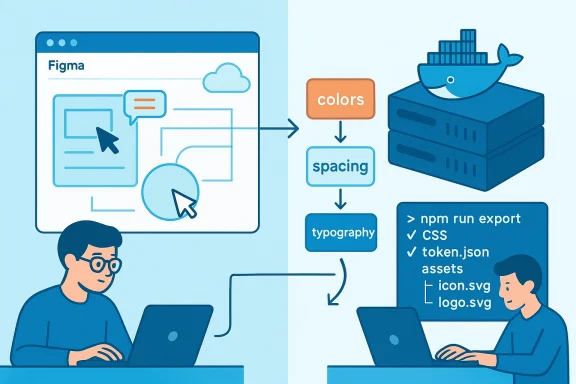
Penpot is explicitly designed to speak the same language as developers. Its layout tools (including a visual CSS Grid builder and flex‑style layouts) generate real CSS code that can be copied from the Inspect tab, giving developers production‑ready snippets for layout, spacing, and typography. For teams where designers and developers are the same person, or where handoff friction is the main bottleneck, that alignment is a productivity multiplier. Penpot’s Inspect and code exporters remove needlessly manual translation work between design and implementation.Native support for W3C design tokens
A major technical differentiator is Penpot’s native support for the W3C Design Tokens Community Group specification. Penpot stores tokens (colors, spacing, typography, etc.) using an open, standardized token format, which allows tokens to flow across design tools and developer environments without custom converters or proprietary variable systems. This is not marketing fluff — Penpot’s documentation and community posts explicitly reference the W3C token spec and its adoption as a first‑class feature. That makes theming, dark/light mode, and global design updates far less brittle.Features that matter in real work
Design tools are more than checklists; the right features remove friction in a day of work. Below are the practical strengths that made Penpot viable as a Figma replacement for me.- CSS Grid and Flex visual builders. Build responsive layouts visually and extract correct CSS. This drastically shortens the cycle from design idea to published page.
- Inspect tab with production‑ready code. Developers can copy CSS, spacing, and component structure directly from a design without third‑party plugins. This is free in Penpot; comparable developer tooling in Figma lives behind paid features.
- Native W3C design tokens. Tokens are JSON‑like, standard, and portable — enabling consistent theming and reuse across tools and codebases.
- Component libraries and design systems. Penpot supports components and shared libraries to scale design work across multiple projects and teams.
- Self‑hosting and open file formats. Deployable via Docker, Penpot can run on premises or on cloud VMs you control; files are stored in accessible formats, reducing vendor lock‑in risk.
Pricing, hosted tiers, and the economics of migration
One of the main motivations for migration was subscription creep. Figma’s pricing changes in 2025 moved the Professional plan from about $15/month to $20/month for monthly billing options in many regions and reorganized seats and billing behavior — effectively increasing costs for many small teams and freelancers. That specific change was a tipping point for many users who were already sensitive to per‑seat costs and billing complexity.Penpot’s commercial offering, by contrast, focuses on a simple model:
- A free tier with core design, prototyping, and collaboration tools (suitable for individual pros and many small teams).
- An Unlimited paid tier — reported at roughly $7 per editor per month with an organization‑wide cap (commonly quoted as not exceeding $175/month total), which adds storage, longer version retention, and early access perks.
- An Enterprise tier for compliance and scale, with a higher organization cap (often quoted in published docs at a figure around $950/month for enterprise support and SLAs).
Where Penpot still trails Figma
No migration is without tradeoffs. For teams considering a switch, be honest about the features you use today and how deeply they’re embedded in your workflow.Plugin ecosystem and integrations
Figma’s plugin ecosystem is vast and mature: content generators, design auditors, accessibility analyzers, and workflow automations exist for nearly every use case. Penpot’s plugin scene is younger and smaller. If your team depends on specific third‑party extensions today, you’ll either need to wait for equivalent tools to appear or accept a workflow change. That said, Penpot’s open architecture means integrations can be built without vendor permission.Collaborative polish and workshop tooling
Figma’s strengths in synchronous collaboration — live cursors, observation mode, FigJam integration for workshops, and advanced comment threading — remain more polished than Penpot’s equivalents. If your day involves frequent large workshops with external stakeholders who expect FigJam features, Penpot’s native capabilities might feel lighter. However, for solo practitioners or small design‑dev teams the gap is smaller.Enterprise ecosystem and third‑party affinity
Large organizations benefit from the deep integrations and vendor stability that platforms like Figma and its broader ecosystem bring. Penpot’s open model trades that for portability and control. If your project requires enterprise SSO federations, fine‑grained audit trails, or vendor SLA commitments, you’ll want to evaluate Penpot’s enterprise offerings and self‑hosting implications carefully.Migration: a pragmatic path from Figma to Penpot
Switching design tools is not instantaneous. I recommend a staged approach that reduces risk while proving the new workflow.- Inventory: Catalog the Figma features and plugins you rely on daily (components, auto‑layout usage, FigJam sessions, proprietary plugins).
- Pilot project: Choose a small but representative project (3–5 screens) and rebuild it in Penpot. Focus on layouts, tokens, components, and the Inspect workflow.
- Developer test: Have your dev teammate implement a page using only assets and code exported from Penpot. Measure the time saved (or lost) versus your Figma baseline.
- Workflow gap plan: For each missing plugin or collaboration feature, decide whether to adopt a third‑party tool, script a lightweight converter, or accept a manual step.
- Data migration: Export icons, images, and components. For bulk content, consider using SVG exports and token JSONs — Penpot’s open formats make this straightforward.
- Go‑live: After two successful projects and no critical blockers, migrate active work and archive Figma files for reference.
Self‑hosting: power and responsibility
Self‑hosting Penpot is a true differentiator but it’s not free from operational cost.- Benefits:
- Data sovereignty and compliance. Keep PII and IP on infrastructure you control.
- Predictable costs. Avoid per‑seat surprises and annual escalation clauses.
- Resilience against vendor changes. Your assets remain accessible regardless of commercial shifts.
- Responsibilities:
- Ops overhead. You must provision servers, manage backups, configure TLS, and plan for scaling.
- Maintenance burden. Upgrades, security patching, and monitoring are your team’s job.
- Availability SLAs. If uptime matters, you’ll need a high‑availability design and incident plans.
Security, compliance, and IP considerations
Moving off a SaaS design platform touches legal and security boundaries.- Intellectual property: Export a files in a versioned internal repository. Penpot’s open formats simplify preservation.
- Access control: If self‑hosting, integrate SSO (OIDC/SAML) and enforce role‑based access; for hosted plans, check the vendor’s admin controls.
- Data residency: For regulated industries, self‑host in a compliant region or cloud provider.
- Backups and retention: Setup automated backups and periodic exports — an insurance policy against accidental deletions or corruption.
The ecosystem and long‑term viability
One reasonable concern is whether an open‑source project can sustain feature development and community momentum.- Governance and contributors: Penpot has an active community and a commercial backer that provides development momentum and optional hosted services. Community threads show growing adoption and contributions, which is a positive signal for longevity.
- Interoperability bet: Penpot’s use of web standards and the W3C design tokens spec reduces single‑vendor risk; even if the project’s hosted service changed, the files remain usable elsewhere. This is a strategic bet on standards over lock‑in.
- Plugin growth: A smaller plugin ecosystem today doesn’t preclude rapid growth; open‑source projects often see ecosystem acceleration as adoption climbs.
When you should (and shouldn’t) switch
Penpot is a great fit if you match most of the following:- You’re a freelancer, solo designer, or a small team where per‑seat costs matter.
- Developer handoff is a bottleneck and you want code‑centric exports.
- You care about data portability, self‑hosting, or avoiding venn’t depend heavily on specific Figma plugins or FigJam‑native workshops.
- Your organization requires advanced enterprise integrations or an SLA that only a large vendor provides.
- Your team relies heavily on a particular mature plugin that has no equivalent.
- You run large, synchronous brainstorms that leverage FigJam’s ecosystem deeply.
Practical tips from my migration
- Start with design tokens: Export your color, spacing, and typography tokens first. Rebuild the token set in Penpot and link components to tokens; this reduces rework across screens.
- Recreate atomic components first: Buttons, inputs, and card systems are the highest ROI to migrate.
- Test Inspect parity: Have a developer confirm that CSS generated from Penpot matches expectations in a staging branch.
- Keep Figma read‑only for a month: Export final assets from Figma and keep it as an archival fallback while the team ramps up.
- Document naming conventions and token structure: Consistency pays off and reduces merge conflicts when multiple designers contribute.
Risks and cautionary notes
- Feature parity is not guaranteed: Expect functionality gaps; plan mitigations.
- Hosting costs and ops are real: Self‑hosting trades license cost for infrastructure cost and responsibility.
- Data migration can be imperfect: Complex component logic and plugin‑generated content may not translate verbatim.
- Vendor stability: While open‑source reduces single‑vendor lock‑in, commercial hosted options can still change pricing or caps; evaluate contract terms carefully.
Final verdict: who wins and why it mattered enough for me to cancel Figma
For my solo, client‑facing work the math and the workflow aligned. Penpot gives me:- Immediate cost relief and predictable billing options that scale without surprise seat escalations.
- Freedom from proprietary .fig lock‑in and the assurance that design tokens and assets remain portable.
- Developer‑friendly output that meaningfully shortens the implementation loop — less guesswork, fewer pixel wars.
- Optional self‑hosting so I can keep sensitive client work on infrastructure I control.
Conclusion
The subscription economy has pushed many creators to reassess where they spend recurring dollars. Penpot is the clearest example yet that open‑source design tooling has matured past hobby projects and into production‑ready infrastructure for UI/UX work. By pairing standards‑first design tokens, developer‑grade Inspect outputs, and optional self‑hosting with a simple hosted pricing model, Penpot removes two common blockers: cost and vendor lock‑in. If you’re a freelancer, indie studio, or a development team that wants design and code to speak the same language, Penpot deserves a serious trial.If you try a migration, start small, verify handoff output with your developers, and treat tokens as your canonical source of truth. That disciplined approach turned what looked like a risky change into a sustainable workflow — and ultimately justified canceling my Figma subscription.
Source: MakeUseOf This free open-source design tool finally made me cancel my Figma subscription
