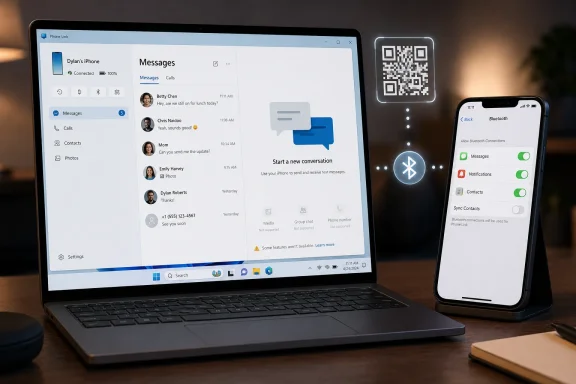
Microsoft’s Phone Link lets iPhone owners send and receive basic Apple Messages from a Windows 11 PC by pairing the iPhone over Bluetooth, installing Link to Windows on iOS, signing into a Microsoft account, and granting message, contact, and notification permissions in iPhone Bluetooth settings. That sounds like the long-awaited bridge between Apple’s messaging fortress and the Windows desktop. In practice, it is something narrower and more revealing: a useful notification-and-reply pipe that exposes just how little of iMessage Apple allows outside its own hardware ecosystem. For Windows users, the feature is worth setting up — but only if expectations are adjusted before the first QR code is scanned.
For years, “iMessage on Windows” has been a phrase that promised more than any mainstream product could deliver. Apple’s Messages app is deeply tied to the company’s identity system, device trust model, and platform lock-in. A Mac gets the full experience because it is inside Apple’s tent; a Windows PC does not.
Phone Link works because Microsoft is not really running Apple Messages on Windows. It is pairing with the iPhone over Bluetooth and surfacing a subset of what the phone can expose: notifications, contacts, calls, and limited messaging. That distinction matters because it explains both why the setup feels surprisingly simple and why the resulting experience feels strangely incomplete.
The PCMag UK guide captures the consumer-facing version of this reality. Open Phone Link, choose iPhone, scan a QR code, pair over Bluetooth, grant permissions, and the Windows app starts showing recent conversations. For someone who just wants to avoid typing a quick reply on a small phone screen, that may be enough.
But the strategic story is bigger than a setup wizard. Microsoft has spent years trying to make Windows feel less isolated from the mobile world, first through Android integration and then through a more constrained iPhone bridge. Apple, meanwhile, has little incentive to make Windows a first-class Messages client. Phone Link lands in the gap between those two positions: useful, compromised, and politically revealing.
The permissions step is where the real product boundary appears. After pairing, the iPhone user must go into Settings, open Bluetooth, tap the information icon next to the Windows PC, and enable options such as message notifications, contact syncing, and system notification sharing. This is not a normal “install an app and log in” arrangement. It is a Bluetooth relationship with carefully delegated privileges.
That architecture has practical consequences. The Windows PC is not becoming a trusted Apple Messages endpoint in the same way a Mac, iPad, or Apple Watch can be. It is receiving what the iPhone is allowed to share through the channels iOS exposes. If the connection is flaky, the phone is out of range, Bluetooth misbehaves, or permissions are reset, the illusion of a desktop messaging client collapses quickly.
Microsoft has done a decent job smoothing the path for ordinary users. The QR-code flow is straightforward, the app tells users what to enable, and the Windows interface looks like a modern desktop messaging pane rather than a bolted-on Bluetooth utility. The problem is that clean onboarding can make the feature look more complete than it is.
That mismatch is where disappointment begins. Users see “Messages” in Phone Link and reasonably expect something close to Messages on macOS. What they get is a live bridge to recent one-to-one conversations, not a full archive, not a cloud-synced mailbox, and not Apple’s rich messaging stack transplanted onto Windows.
That makes the Windows experience useful for quick transactional texting and awkward for real social messaging. If a spouse asks what time dinner is, Phone Link is fine. If a family group chat is trading photos, reactions, and follow-up replies, the PC becomes a spectator rather than a participant.
This is why the word “iMessage” can be misleading in this context. Technically, some iMessages may be involved because the iPhone is the device sending and receiving them. Experientially, though, this is not iMessage as Apple users understand it. It is closer to a remote message-notification console with reply support.
The difference becomes obvious the moment the user moves between devices. On a Mac, Messages behaves as though the conversation belongs to the user’s Apple account and follows them across Apple hardware. On Windows, the conversation belongs to the iPhone, and the PC is allowed to glimpse a narrow slice of it while the relationship remains intact.
That is not a failure of interface design. It is a platform boundary made visible.
Microsoft can build a companion app. It can polish Windows notifications. It can guide users through iOS permission screens. What it cannot do, without Apple’s cooperation, is turn Windows into a peer of macOS in Apple’s messaging network.
That reality should temper the recurring waves of “iMessage comes to Windows” headlines. The more accurate version is less glamorous: Windows can now participate in a limited iPhone-mediated messaging workflow. That is still meaningful, especially for the many people who own an iPhone but work all day on a Windows machine. It is just not the same thing as Apple opening Messages.
The tension is especially visible because Phone Link is better with Android. On many Android phones, Windows can reach deeper into messages, photos, notifications, and app experiences. That is not because Microsoft likes Android users more. It is because Android’s integration model and partner relationships allow more surface area.
For iPhone users, Phone Link is a reminder that the most important software boundary is not always the app window in front of you. Sometimes it is the policy decision made by the platform owner several layers below.
That is particularly true for people who use iMessage less as a rich media environment and more as a simple texting system. If most of your conversations are one-to-one exchanges about schedules, codes, pickups, reminders, or quick confirmations, Phone Link can feel like a small but welcome productivity upgrade. It keeps your hands on the keyboard and your eyes on the monitor.
The app also fits Microsoft’s broader Windows strategy. The company has been trying to make Windows feel more like a hub for the user’s digital life rather than merely the place where Office, browsers, and games run. Phone Link, Windows notifications, cloud clipboard features, OneDrive, Copilot, and Microsoft account syncing all push in that direction.
But Phone Link’s iPhone support also reveals the ceiling of that strategy. Microsoft can make Windows a better companion to an iPhone, but it cannot make Windows an Apple device. Users who want full Messages continuity still need Apple hardware somewhere in the chain.
That leaves Windows in an odd middle position. It is no longer cut off from iPhone messaging, but it is still not invited fully inside.
For consumers, that may simply mean occasional troubleshooting. Remove the PC from the iPhone’s Bluetooth list, remove the iPhone from Phone Link, pair again, and hope the permissions stick. For IT departments, the calculus is more complicated.
Corporate Windows fleets are rarely designed around ad hoc personal phone bridges. Bluetooth may be disabled or restricted in some environments. Microsoft account requirements may clash with workplace identity policies. Sensitive SMS messages, including one-time passcodes, can appear on a PC screen if permissions are enabled.
That does not make Phone Link dangerous by default. It does make it a feature administrators should understand rather than ignore. A convenience feature that mirrors notifications and messages is also a data-flow feature, and data-flow features belong in policy conversations.
The consumer setup guide tells users which toggles to turn on. The enterprise version of the story asks who should be allowed to turn them on, on which machines, and under what conditions.
This is not unique to Phone Link. Windows 11 has steadily pushed users toward Microsoft accounts during setup, while Microsoft’s services increasingly assume that the PC is part of a signed-in ecosystem. Phone Link is one more benefit attached to that model.
The trade-off is familiar. Sign in, and Windows can coordinate more of your life across devices. Stay local, and some of the connective tissue disappears. Phone Link makes that bargain visible in a particularly personal way because text messages feel more intimate than settings sync or app-store entitlements.
There is also a subtle competitive angle. Apple uses Apple ID to bind together iPhone, Mac, iPad, Watch, and Messages. Microsoft cannot own the iPhone, but it can make the Windows PC more useful if the user brings the iPhone into Microsoft’s account orbit. Phone Link is not just a utility; it is a small act of ecosystem diplomacy.
The user gets convenience. Microsoft gets another reason for Windows users to remain signed in. Apple keeps the crown jewels.
Those definitions overlap just enough to be useful and diverge just enough to frustrate. A user can send a text from the PC and see it on the iPhone. That feels like messaging continuity. But the missing archive, absent media support, and group-chat limitations make clear that Windows is not truly hosting the Messages experience.
This distinction matters for coverage, because casual headlines can overstate what has happened. Apple Messages has not become a Windows app. Microsoft has not broken open iMessage. The user has gained a constrained bridge to a phone that remains the real messaging endpoint.
In a way, that makes Phone Link more honest than some third-party workarounds that promise full iMessage access through relays, servers, or unofficial architectures. Microsoft is operating within the boundaries available to it. The result is less thrilling than a hack and more sustainable as a mainstream Windows feature.
It is also less likely to satisfy users who came looking for blue-bubble liberation.
A Windows laptop on a desk, an iPhone nearby, Bluetooth enabled, and a few active one-to-one conversations: that is the sweet spot. Phone Link gives those users enough of a messaging surface to stay focused. It does not require a browser tab, a third-party relay service, or a second Apple device.
The weak fit is just as clear. Heavy iMessage users, group-chat regulars, people who trade media constantly, and anyone who depends on searchable message history will hit the wall quickly. For them, Phone Link is not a substitute for a Mac. It is a convenience panel.
That distinction should guide whether users bother setting it up. If the goal is full Apple Messages on Windows, disappointment is almost guaranteed. If the goal is “let me answer a couple of texts from my keyboard,” the feature is easy to recommend.
The best version of Phone Link is boring in the way good utilities are boring. It removes a small irritation without pretending to solve the larger platform war.
That is especially relevant because Phone Link relies on notification and message permissions that users may enable casually during setup. Once the toggles are on, the PC can surface information that previously lived only on the phone. On a personal desktop at home, that may be acceptable. On a shared family PC, a workplace machine, or an unmanaged laptop, it deserves more thought.
The old advice still applies: do not treat SMS as a high-security authentication method when better options are available. But many services still use SMS, and many people still receive sensitive codes that way. Phone Link can make those codes easier to copy — and easier to expose.
Windows itself also becomes part of the privacy equation. Lock-screen behavior, notification previews, account separation, malware hygiene, and physical access all matter more when personal messages are mirrored to the PC. The more convenient the bridge becomes, the more important those basics become.
Phone Link is not uniquely reckless. It simply turns the PC into another surface where phone data can appear, and users should treat it accordingly.
Apple’s problem is different. It wants the iPhone to be indispensable and the Mac to be the obvious computer for iPhone owners who care about continuity. Full iMessage parity on Windows would weaken one of the quiet advantages of owning a Mac. Apple has little reason to volunteer that.
That is why Phone Link feels both impressive and constrained. Microsoft has solved as much of the problem as it can from its side of the wall. Apple has allowed enough interoperability for basic user convenience but not enough to erase platform differentiation.
This is the modern desktop ecosystem in miniature. Users mix devices across vendors, but the deepest integrations still reward loyalty to a single stack. The open web softened some old platform boundaries; messaging, identity, and notifications rebuilt new ones.
Phone Link does not end that dynamic. It makes it easier to live with.
The future of Apple Messages on Windows is unlikely to hinge on a cleverer setup wizard. It will depend on whether Apple ever sees real value — commercial, regulatory, or competitive — in making its messaging service more open than it is today. Until then, Microsoft’s Phone Link will remain what it is now: a useful compromise for iPhone owners who live at a Windows desk, and a reminder that the most important walls in computing are often the ones hidden behind a friendly permission prompt.
 Microsoft Found the Side Door, Not the Front Gate
For years, “iMessage on Windows” has been a phrase that promised more than any mainstream product could deliver. Apple’s Messages app is deeply tied to the company’s identity system, device trust model, and platform lock-in. A Mac gets the full experience because it is inside Apple’s tent; a Windows PC does not.Phone Link works because Microsoft is not really running Apple Messages on Windows. It is pairing with the iPhone over Bluetooth and surfacing a subset of what the phone can expose: notifications, contacts, calls, and limited messaging. That distinction matters because it explains both why the setup feels surprisingly simple and why the resulting experience feels strangely incomplete.
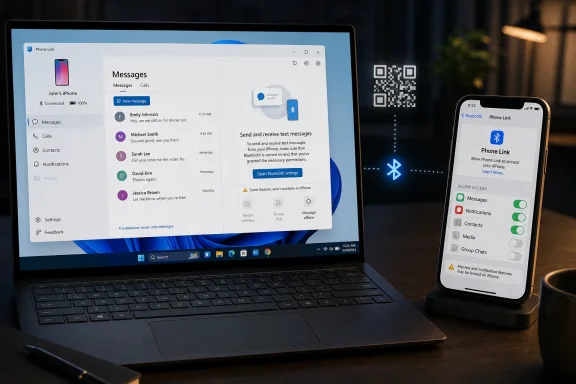
The PCMag UK guide captures the consumer-facing version of this reality. Open Phone Link, choose iPhone, scan a QR code, pair over Bluetooth, grant permissions, and the Windows app starts showing recent conversations. For someone who just wants to avoid typing a quick reply on a small phone screen, that may be enough.
But the strategic story is bigger than a setup wizard. Microsoft has spent years trying to make Windows feel less isolated from the mobile world, first through Android integration and then through a more constrained iPhone bridge. Apple, meanwhile, has little incentive to make Windows a first-class Messages client. Phone Link lands in the gap between those two positions: useful, compromised, and politically revealing.
The Setup Flow Is Easy Because the Compromise Is Hidden
The pairing process is the least interesting part of Phone Link, which is exactly what Microsoft wants. Launch the app from Windows 11, select iPhone, scan the QR code with the iPhone camera, open Link to Windows, and approve the Bluetooth pairing prompts on both devices. The ritual is familiar to anyone who has connected earbuds, a smartwatch, or a car infotainment system.The permissions step is where the real product boundary appears. After pairing, the iPhone user must go into Settings, open Bluetooth, tap the information icon next to the Windows PC, and enable options such as message notifications, contact syncing, and system notification sharing. This is not a normal “install an app and log in” arrangement. It is a Bluetooth relationship with carefully delegated privileges.
That architecture has practical consequences. The Windows PC is not becoming a trusted Apple Messages endpoint in the same way a Mac, iPad, or Apple Watch can be. It is receiving what the iPhone is allowed to share through the channels iOS exposes. If the connection is flaky, the phone is out of range, Bluetooth misbehaves, or permissions are reset, the illusion of a desktop messaging client collapses quickly.
Microsoft has done a decent job smoothing the path for ordinary users. The QR-code flow is straightforward, the app tells users what to enable, and the Windows interface looks like a modern desktop messaging pane rather than a bolted-on Bluetooth utility. The problem is that clean onboarding can make the feature look more complete than it is.
That mismatch is where disappointment begins. Users see “Messages” in Phone Link and reasonably expect something close to Messages on macOS. What they get is a live bridge to recent one-to-one conversations, not a full archive, not a cloud-synced mailbox, and not Apple’s rich messaging stack transplanted onto Windows.
The Missing Features Are the Product
The limitations are not small print; they define the feature. Phone Link for iPhone does not provide a full message history. It does not support group messaging in the way users expect from iMessage. It does not handle attachments like photos, videos, GIFs, or Memoji as a native Apple client would.That makes the Windows experience useful for quick transactional texting and awkward for real social messaging. If a spouse asks what time dinner is, Phone Link is fine. If a family group chat is trading photos, reactions, and follow-up replies, the PC becomes a spectator rather than a participant.
This is why the word “iMessage” can be misleading in this context. Technically, some iMessages may be involved because the iPhone is the device sending and receiving them. Experientially, though, this is not iMessage as Apple users understand it. It is closer to a remote message-notification console with reply support.
The difference becomes obvious the moment the user moves between devices. On a Mac, Messages behaves as though the conversation belongs to the user’s Apple account and follows them across Apple hardware. On Windows, the conversation belongs to the iPhone, and the PC is allowed to glimpse a narrow slice of it while the relationship remains intact.
That is not a failure of interface design. It is a platform boundary made visible.
Apple’s Walled Garden Still Sets the Terms
There is a reason Microsoft’s iPhone support arrived as a Bluetooth bridge rather than a true Messages client. Apple controls the Messages ecosystem, and it has historically treated full-featured messaging as a reason to stay inside the Apple hardware family. The blue-bubble economy is not an accident; it is part of the company’s retention machinery.Microsoft can build a companion app. It can polish Windows notifications. It can guide users through iOS permission screens. What it cannot do, without Apple’s cooperation, is turn Windows into a peer of macOS in Apple’s messaging network.
That reality should temper the recurring waves of “iMessage comes to Windows” headlines. The more accurate version is less glamorous: Windows can now participate in a limited iPhone-mediated messaging workflow. That is still meaningful, especially for the many people who own an iPhone but work all day on a Windows machine. It is just not the same thing as Apple opening Messages.
The tension is especially visible because Phone Link is better with Android. On many Android phones, Windows can reach deeper into messages, photos, notifications, and app experiences. That is not because Microsoft likes Android users more. It is because Android’s integration model and partner relationships allow more surface area.
For iPhone users, Phone Link is a reminder that the most important software boundary is not always the app window in front of you. Sometimes it is the policy decision made by the platform owner several layers below.
Windows Users Get Relief, Not Parity
The practical case for using Phone Link is still strong. Many Windows users spend eight hours a day in front of a PC and do not want to break focus every time a text arrives. Even a limited desktop reply box can reduce friction.That is particularly true for people who use iMessage less as a rich media environment and more as a simple texting system. If most of your conversations are one-to-one exchanges about schedules, codes, pickups, reminders, or quick confirmations, Phone Link can feel like a small but welcome productivity upgrade. It keeps your hands on the keyboard and your eyes on the monitor.
The app also fits Microsoft’s broader Windows strategy. The company has been trying to make Windows feel more like a hub for the user’s digital life rather than merely the place where Office, browsers, and games run. Phone Link, Windows notifications, cloud clipboard features, OneDrive, Copilot, and Microsoft account syncing all push in that direction.
But Phone Link’s iPhone support also reveals the ceiling of that strategy. Microsoft can make Windows a better companion to an iPhone, but it cannot make Windows an Apple device. Users who want full Messages continuity still need Apple hardware somewhere in the chain.
That leaves Windows in an odd middle position. It is no longer cut off from iPhone messaging, but it is still not invited fully inside.
The Bluetooth Dependency Is a Feature and a Fragility
The use of Bluetooth is both the magic trick and the weak point. It lets Microsoft avoid pretending to be Apple’s cloud service while still giving Windows enough proximity-based access to make messaging possible. It also means the whole arrangement inherits the familiar annoyances of Bluetooth pairing, permissions, range, and device state.For consumers, that may simply mean occasional troubleshooting. Remove the PC from the iPhone’s Bluetooth list, remove the iPhone from Phone Link, pair again, and hope the permissions stick. For IT departments, the calculus is more complicated.
Corporate Windows fleets are rarely designed around ad hoc personal phone bridges. Bluetooth may be disabled or restricted in some environments. Microsoft account requirements may clash with workplace identity policies. Sensitive SMS messages, including one-time passcodes, can appear on a PC screen if permissions are enabled.
That does not make Phone Link dangerous by default. It does make it a feature administrators should understand rather than ignore. A convenience feature that mirrors notifications and messages is also a data-flow feature, and data-flow features belong in policy conversations.
The consumer setup guide tells users which toggles to turn on. The enterprise version of the story asks who should be allowed to turn them on, on which machines, and under what conditions.
The Microsoft Account Requirement Is More Than a Login Box
Phone Link also sits inside Microsoft’s larger account strategy. The setup flow expects a Microsoft account, which helps connect Windows services, app state, and device relationships. For home users, that is increasingly normal. For local-account holdouts, it is another nudge toward Microsoft’s cloud identity layer.This is not unique to Phone Link. Windows 11 has steadily pushed users toward Microsoft accounts during setup, while Microsoft’s services increasingly assume that the PC is part of a signed-in ecosystem. Phone Link is one more benefit attached to that model.
The trade-off is familiar. Sign in, and Windows can coordinate more of your life across devices. Stay local, and some of the connective tissue disappears. Phone Link makes that bargain visible in a particularly personal way because text messages feel more intimate than settings sync or app-store entitlements.
There is also a subtle competitive angle. Apple uses Apple ID to bind together iPhone, Mac, iPad, Watch, and Messages. Microsoft cannot own the iPhone, but it can make the Windows PC more useful if the user brings the iPhone into Microsoft’s account orbit. Phone Link is not just a utility; it is a small act of ecosystem diplomacy.
The user gets convenience. Microsoft gets another reason for Windows users to remain signed in. Apple keeps the crown jewels.
The Name “Messages” Does a Lot of Work
One reason Phone Link can be confusing is that “messages” means different things depending on where you stand. To Apple users, Messages is an app, a service, a history, an identity system, and a social status marker all at once. To Microsoft’s Phone Link, messages are a set of phone-originated communications that can be displayed and acted upon within Windows.Those definitions overlap just enough to be useful and diverge just enough to frustrate. A user can send a text from the PC and see it on the iPhone. That feels like messaging continuity. But the missing archive, absent media support, and group-chat limitations make clear that Windows is not truly hosting the Messages experience.
This distinction matters for coverage, because casual headlines can overstate what has happened. Apple Messages has not become a Windows app. Microsoft has not broken open iMessage. The user has gained a constrained bridge to a phone that remains the real messaging endpoint.
In a way, that makes Phone Link more honest than some third-party workarounds that promise full iMessage access through relays, servers, or unofficial architectures. Microsoft is operating within the boundaries available to it. The result is less thrilling than a hack and more sustainable as a mainstream Windows feature.
It is also less likely to satisfy users who came looking for blue-bubble liberation.
For Everyday Users, the Best Use Case Is Boring
The people who will like Phone Link most are not the ones trying to recreate a Mac on a Windows machine. They are the ones who want to answer a text without picking up a phone. That is a modest goal, but modest goals are often where platform integration becomes genuinely useful.A Windows laptop on a desk, an iPhone nearby, Bluetooth enabled, and a few active one-to-one conversations: that is the sweet spot. Phone Link gives those users enough of a messaging surface to stay focused. It does not require a browser tab, a third-party relay service, or a second Apple device.
The weak fit is just as clear. Heavy iMessage users, group-chat regulars, people who trade media constantly, and anyone who depends on searchable message history will hit the wall quickly. For them, Phone Link is not a substitute for a Mac. It is a convenience panel.
That distinction should guide whether users bother setting it up. If the goal is full Apple Messages on Windows, disappointment is almost guaranteed. If the goal is “let me answer a couple of texts from my keyboard,” the feature is easy to recommend.
The best version of Phone Link is boring in the way good utilities are boring. It removes a small irritation without pretending to solve the larger platform war.
The Security Trade-Off Is Hiding in Plain Sight
Text messaging is not just social. It is also a delivery channel for bank alerts, medical reminders, account recovery links, shipping notices, and verification codes. Bringing those messages onto a Windows PC may be convenient, but it expands where sensitive information can appear.That is especially relevant because Phone Link relies on notification and message permissions that users may enable casually during setup. Once the toggles are on, the PC can surface information that previously lived only on the phone. On a personal desktop at home, that may be acceptable. On a shared family PC, a workplace machine, or an unmanaged laptop, it deserves more thought.
The old advice still applies: do not treat SMS as a high-security authentication method when better options are available. But many services still use SMS, and many people still receive sensitive codes that way. Phone Link can make those codes easier to copy — and easier to expose.
Windows itself also becomes part of the privacy equation. Lock-screen behavior, notification previews, account separation, malware hygiene, and physical access all matter more when personal messages are mirrored to the PC. The more convenient the bridge becomes, the more important those basics become.
Phone Link is not uniquely reckless. It simply turns the PC into another surface where phone data can appear, and users should treat it accordingly.
Apple and Microsoft Are Solving Different Problems
Microsoft’s problem is that Windows must remain central in a world where the smartphone is the primary personal computer for many tasks. If Windows cannot participate in calls, texts, notifications, photos, and mobile workflows, it feels less complete. Phone Link is one answer to that structural pressure.Apple’s problem is different. It wants the iPhone to be indispensable and the Mac to be the obvious computer for iPhone owners who care about continuity. Full iMessage parity on Windows would weaken one of the quiet advantages of owning a Mac. Apple has little reason to volunteer that.
That is why Phone Link feels both impressive and constrained. Microsoft has solved as much of the problem as it can from its side of the wall. Apple has allowed enough interoperability for basic user convenience but not enough to erase platform differentiation.
This is the modern desktop ecosystem in miniature. Users mix devices across vendors, but the deepest integrations still reward loyalty to a single stack. The open web softened some old platform boundaries; messaging, identity, and notifications rebuilt new ones.
Phone Link does not end that dynamic. It makes it easier to live with.
The Real Setup Checklist Is a Reality Check
Before users scan the QR code, they should understand what they are agreeing to and what they are not getting. The feature is simple enough to configure, but the expectations need more setup than the software does.- You need a Windows PC with Phone Link, Bluetooth support, an iPhone with Link to Windows, and a Microsoft account to complete the pairing flow.
- You must approve Bluetooth pairing on both devices and enable the relevant iPhone Bluetooth permissions for notifications, contacts, and messages.
- You should expect recent one-to-one messaging, not a complete Apple Messages archive replicated on Windows.
- You should not expect full group-chat support, rich attachment handling, or a Mac-equivalent iMessage experience.
- You should think about privacy before allowing personal messages, notifications, and possible verification codes to appear on a Windows screen.
The future of Apple Messages on Windows is unlikely to hinge on a cleverer setup wizard. It will depend on whether Apple ever sees real value — commercial, regulatory, or competitive — in making its messaging service more open than it is today. Until then, Microsoft’s Phone Link will remain what it is now: a useful compromise for iPhone owners who live at a Windows desk, and a reminder that the most important walls in computing are often the ones hidden behind a friendly permission prompt.
References
- Primary source: PCMag UK
Published: Tue, 26 May 2026 17:22:37 GMT

Stop Squinting at Your iPhone. Here's How to Use Apple Messages on a Windows PC
The Messages app is built into macOS, but what about Windows? With Microsoft's Phone Link app, you can respond to texts right from your computer as you work.uk.pcmag.com
- Official source: support.microsoft.com
Setting up messages in the Phone Link - Microsoft Support
Setting up and using messages with Phone Link support.microsoft.com
- Official source: learn.microsoft.com

Phone Link iPhone text notifications no longer work on paired PC - Microsoft Q&A
I use Phone Link paired with iPhone iOS on a Win 11 laptop (using Bluetooth). Previously, iPhone text NOTIFICATIONS appeared on my PC when paired with Phone Link. But iPhone text NOTIFICATIONS stopped appearing several weeks ago. I have repeatedly…learn.microsoft.com - Related coverage: techyorker.com
How to get iMessage on Windows 11/10 PC - TechYorker
If you’re on a Windows 11 or Windows 10 PC and wondering how to get iMessage, the short answer is... techyorker.com
- Related coverage: clawmessenger.com
iMessage on Windows in 2026: Every Method That Actually Works
Six methods for getting iMessage on Windows, from basic notification mirroring to full programmatic APIs. Honest trade-offs for each approach.www.clawmessenger.com - Related coverage: makeuseof.com

Microsoft's Phone Link App: What Is It and How Do You Use It?
Connect and sync with your Android or iOS phone from your PC in seconds with the Phone Link app. www.makeuseof.com
- Related coverage: scscc.club
- Related coverage: aztcs.apcug.org