

PhotoDemon’s December 2025 update continues the project’s steady evolution as a compact, portable, and surprisingly powerful photo editor for Windows, reinforcing its position as a viable Photoshop alternative for users who prefer a local-first, subscription-free workflow.
PhotoDemon is a free, open‑source, portable photo editor that ships as a single ZIP you extract and run — no installer, no admin privileges, and no hidden telemetry. The project emphasizes a small footprint (the stable builds are reported at about 20 MB for the portable ZIP) while offering a wide set of photographic and raster‑editing tools that hobbyists and many pros find useful.
The editor exposes more than 200 tools, with layered editing, PSD/XCF compatibility, RAW support, batch processing, a macro recorder, color‑management features (ICC profile handling), and content‑aware operations such as fill and resize. These capabilities make PhotoDemon a pragmatic alternative for workflows that don’t require the full commercial ecosystem of Adobe or the paid polish of desktop alternatives.
PhotoDemon’s design philosophy is explicitly portable and privacy‑focused: a single executable plus support libraries, optional codec downloads for niche formats, and a permissive BSD‑style license with full source on GitHub, allowing auditability and community contributions.
Practical benefits:
At the same time, portability increases the user’s responsibility to practice binary provenance. Because PhotoDemon doesn’t install system services, it avoids many attack surfaces but also places the burden of verifying authenticity (checksums, release signatures) on the user. For security‑sensitive environments, prefer official GitHub releases and verify SHA‑256 checksums before executing downloaded binaries.
However, several practical caveats deserve emphasis:
PhotoDemon remains one of the most compelling portable photo editors for Windows in 2025: small, local, and feature‑dense, with sensible tradeoffs that reward users who value control, privacy, and portability over vendor ecosystems and cloud‑first workflows.
Source: Neowin https://www.neowin.net/amp/photodemon-202512/
 Background / Overview
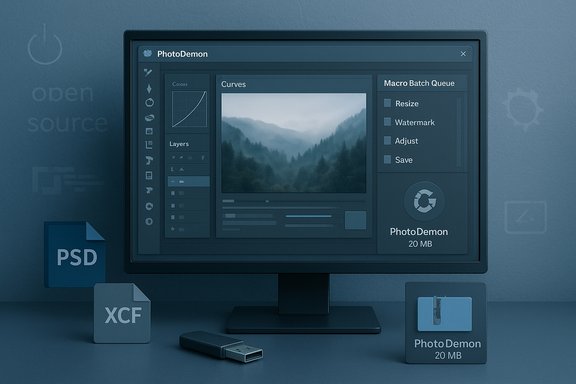
PhotoDemon is a free, open‑source, portable photo editor that ships as a single ZIP you extract and run — no installer, no admin privileges, and no hidden telemetry. The project emphasizes a small footprint (the stable builds are reported at about 20 MB for the portable ZIP) while offering a wide set of photographic and raster‑editing tools that hobbyists and many pros find useful.The editor exposes more than 200 tools, with layered editing, PSD/XCF compatibility, RAW support, batch processing, a macro recorder, color‑management features (ICC profile handling), and content‑aware operations such as fill and resize. These capabilities make PhotoDemon a pragmatic alternative for workflows that don’t require the full commercial ecosystem of Adobe or the paid polish of desktop alternatives.
PhotoDemon’s design philosophy is explicitly portable and privacy‑focused: a single executable plus support libraries, optional codec downloads for niche formats, and a permissive BSD‑style license with full source on GitHub, allowing auditability and community contributions.
What the 2025.12 coverage highlights
Key messaging from the recent coverage
Recent reports on the 2025.12 timeframe underline two broad messages: PhotoDemon remains lightweight and portable while continuing to expand practical feature depth, and the project positions itself as a local, privacy‑preserving tool that can slot into many Windows workflows without subscription friction. Coverage emphasizes the app’s small download size, broad format support, and productivity features like macros and batch processors that scale it beyond casual editing.Notable feature set reiterated by reviews
- Layered editing with blend modes and editable text layers.
- PSD and XCF compatibility, enabling interoperability with Adobe Photoshop and GIMP projects, albeit with caveats on very complex files.
- RAW development powered by LibRaw for broad camera support.
- Content‑aware fill/resize, perspective correction, denoising, and standard photographic adjustments (curves, levels, white balance).
- Macro recorder and batch processor for deterministic, repeatable operations across folders.
- ICC color management for color‑critical workflows.
Deep dive: architecture, portability, and practical limits
A true portable app
PhotoDemon’s single‑ZIP distribution is central to its appeal. You extract, run PhotoDemon.exe, and the app operates without modifying the registry or installing background services. That makes it ideal for USB workflows, locked-down machines, and travelers who need editor functionality on the go. The small download and lack of installer are repeatedly noted as defining characteristics.Memory and file‑size realities: the 32‑bit constraint
To achieve wide portability, PhotoDemon’s primary portable build targets 32‑bit Windows. That design decision has practical consequences: a 32‑bit process cannot address arbitrarily large memory regions, which can lead to limitations when working with extremely large layered documents or huge panoramas. In practice this means there are scenarios where files approaching or exceeding ~2 GB in total resource demand will hit the platform limits; PhotoDemon mitigates this with an option to suspend inactive images to disk to reduce RAM pressure, but disk I/O and storage performance then become the bottleneck. Users with very large, multi‑GB projects should test representative files before fully committing a production pipeline to PhotoDemon.Optional codecs and modular footprint
PhotoDemon keeps the base download small by making support for niche formats (AVIF, JPEG‑XL, HEIF/HEIC) optional via auxiliary libraries. The app will prompt or document how to fetch those optional libraries when a format is needed, keeping the initial ZIP compact while enabling advanced format support for users who require it.Interchange and color fidelity: how well does it play with others?
PSD and cross‑app workflows
PhotoDemon supports import/export of Adobe Photoshop PSD files and GIMP XCF files, which is a major practical strength for mixed workflows. However, interchange fidelity varies with file complexity: standard layers, masks, blend modes and many adjustment layers translate reasonably well, while extremely complex PSDs that use proprietary or plugin‑specific features may not survive round‑trip without manual adjustments. The advice across multiple write‑ups is consistent: validate critical PSDs before switching them into a new pipeline.RAW development and ICC support
The app integrates with LibRaw for RAW decoding and offers ICC profile handling so you can preserve color intent through camera → editor → export stages. For photographers doing print or color‑critical work, PhotoDemon can be part of a workflow, but independent verification (test shots → export → print or soft proof) is strongly recommended to confirm parity with existing color pipelines.Automation and batch work: where PhotoDemon shines
PhotoDemon includes a macro recorder and a batch processor, features that convert it from a one‑off editor into a productivity tool for event shooters and anyone who must apply deterministic, repeatable edits across large image sets. Typical macro sequences—resize → auto‑level → apply sharpen → export—can be recorded and run over entire folders, significantly reducing manual work. Reviewers consistently identify the macro system and batch processing as standout capabilities for the app’s target audience.Practical benefits:
- Faster culling and uniform edits for wedding/event photography.
- Deterministic reproducibility for archival or batch conversion tasks.
- Simple automation for social media or web image preparation.
Security, trust, and update model
PhotoDemon is published under a permissive BSD‑style license with the source available on GitHub, which provides important trust signals: reproducible code, public issue tracking, and the ability to inspect release artifacts. The project publishes checksums for releases and encourages users to verify downloads against those hashes to avoid tampered builds — a best practice that is especially important for portable single‑executable software distributed as ZIPs.At the same time, portability increases the user’s responsibility to practice binary provenance. Because PhotoDemon doesn’t install system services, it avoids many attack surfaces but also places the burden of verifying authenticity (checksums, release signatures) on the user. For security‑sensitive environments, prefer official GitHub releases and verify SHA‑256 checksums before executing downloaded binaries.
Strengths (shortform)
- True portability — runs from ZIP, no installation required.
- Compact footprint — small download (~20 MB) that still delivers advanced tools.
- Broad format support — PSD, XCF, RAW; optional AVIF/JPEG‑XL/HEIF support via add‑ons.
- Productivity features — macro recorder and batch processor for repeatable workflows.
- Color management — ICC profile support for color‑critical work.
- Open source — BSD license, public repo, checksums.
Limitations and risks (what to watch for)
- 32‑bit memory limits: The portable 32‑bit target can hit practical memory ceilings for huge images or many layers; test large files and be prepared to offload or use alternative tools for ultra‑large projects.
- Interchange fidelity: Complex PSDs with vendor‑specific effects or plugins may not translate perfectly; run representative tests before migrating production files.
- Smaller ecosystem: Compared with Photoshop, Affinity, or even GIMP, PhotoDemon has fewer third‑party plugins and a smaller userbase, which can slow troubleshooting and limit community resources.
- No integrated cloud AI: PhotoDemon is intentionally local-first and lacks built‑in cloud generative features; this is a privacy advantage for many users but a limitation for those who expect one‑click generative edits.
- User‑responsibility for updates and provenance: Portable binaries increase the need for checksum verification and prudent download hygiene.
Practical advice: testing, migration, and deployment
- Download the official ZIP from the project’s release page and verify the provided checksum (SHA‑256) before running. This reduces the risk of tampered binaries.
- Extract the ZIP to a controlled test folder (or portable drive) and run PhotoDemon.exe — no installer or admin rights should be necessary.
- Open representative PSD and RAW files you use in day‑to‑day work and compare results to your current toolchain: check layers, blend modes, masks, text layers, and metadata. Export sample TIFF/JPEG and compare visual parity.
- If you manage color‑critical projects, test ICC profile handling end‑to‑end (camera → PhotoDemon → export → print or soft‑proof) before using PhotoDemon as the final renderer.
- Test the macro recorder and batch processor on a small dataset to validate automation behavior and edge cases (metadata retention, filename collisions, color profile embedding).
- If you expect to work on very large layered files regularly, consider a 64‑bit native app (Affinity, GIMP x64 builds, or Photoshop) or evaluate whether PhotoDemon’s suspend‑to‑disk option is sufficient for your workload.
How PhotoDemon fits into the broader tool landscape
PhotoDemon occupies a pragmatic niche: a lightweight, portable, and open‑source editor that is powerful enough for many photographers, freelancers, and power users who refuse subscription models. Compared with other options:- Photoshop: industry standard with the deepest ecosystem and plugin support — still the choice for high‑end commercial studios and complex compositing. PhotoDemon cannot be considered a drop‑in replacement for very advanced Photoshop pipelines.
- GIMP: mature and extensible, but some users find its UX and workflows less approachable. PhotoDemon aims for a friendlier learning curve while still exposing advanced tools.
- Affinity Photo: commercial, polished native 64‑bit app with excellent PSD interchange; suitable for pros who prefer one‑time purchase or vendor support. PhotoDemon is free and portable but trades off some platform‑level advantages.
- Photopea: browser‑based PSD editor that’s instantly accessible and a good option for cross‑platform edits without installation, but relies on online operation and browser constraints. PhotoDemon’s local nature is its privacy advantage.
Critical analysis: strengths validated, claims to treat cautiously
PhotoDemon’s core claims — portability, compactness, and a surprisingly broad feature set — are corroborated by multiple independent write‑ups and community testing. The presence of a macro recorder, batch processor, PSD/RAW support, and ICC handling is repeatedly noted, giving confidence these are production‑use features rather than aspirational promises.However, several practical caveats deserve emphasis:
- Interchange fidelity with PSDs and the limits of a 32‑bit build are technical constraints that do impact production adoption for certain classes of work; these are not theoretical—they appear repeatedly in user reports and documentation. Treat these constraints as real and test accordingly.
- Claims about support for all modern formats should be checked against your specific camera models and codec needs; optional libraries may be required for HEIF/AVIF support. If your pipeline requires built‑in AVIF/HEIF handling without extra steps, factor that into tool selection and test the exact device and format variants you use.
Final verdict and recommendation
PhotoDemon’s 2025.12 era coverage confirms what long‑time users already appreciate: a compact, capable, and pragmatic photo editor that respects user privacy and removes subscription friction. For students, journalists, independent creators, and travelers who want powerful editing tools without installers or recurring fees, PhotoDemon is an outstanding option. It’s particularly strong for:- Batch jobs and automated workflows via macros.
- Portable editing on USB drives and transient machines.
- Workflows that require local RAW decoding and ICC profile handling without cloud dependence.
PhotoDemon remains one of the most compelling portable photo editors for Windows in 2025: small, local, and feature‑dense, with sensible tradeoffs that reward users who value control, privacy, and portability over vendor ecosystems and cloud‑first workflows.
Source: Neowin https://www.neowin.net/amp/photodemon-202512/
