

The clock is no longer a distant threat — it’s a scheduling problem that deserves your boardroom’s attention, because Windows Server 2016 reaches the end of extended support on January 12, 2027, and continuing to run production workloads on that platform after the date materially increases your security, compliance, and operational risk.
Microsoft’s published lifecycle calendar places Windows Server 2016 firmly in the “end of extended support” column on January 12, 2027. That means after that date Microsoft will stop issuing security fixes, non-security hotfixes, and coordinated vulnerability disclosures for the product under its standard support channels. For IT teams that still have 2016 on the rack, that date is the one to build every migration plan around.
The vendor guidance and commnow all push the same practical point: treat the deadline as a hard stop. The Cambridge Network advisory that surfaced this issue frames it the same way — as a hard deadline that should trigger planning for either an on‑premises OS upgrade or a move to cloud infrastructure.
Here’s what the cloud can deliver, in operational terms:
Note also that news reporting and vendor commentary in early 2026 suggested the ESU program was being prepared for some 2016‑era products and that the pricing and mechanics for consumer versus enterprise customers will differ; however, server ESU price points and eligibility for Server 2016 were not universally published in a single public price list at the time of this writing. That uncertainty is another reason to favour migration planning over hope.
If your organisation still runs Windows Server 2016, take these immediate actions this month:
Conclusion
Windows Server 2016’s end of extended support is both a risk to be mitigated and a deadline that should catalyse modernisation. Whether you elect to upgrade on‑premises, buy time with ESUs, or migrate to the cloud, start with a measured inventory, prioritise critical workloads, test everything, and avoid last‑minute scrambles. The choices made in the next 6–12 months will determine whether your organisation pays for a planned upgrade or pays a much higher price later in incident costs and lost uptime.
Source: Cambridge Network Using a Windows Server? | Cambridge Network
 Background
Microsoft’s published lifecycle calendar places Windows Server 2016 firmly in the “end of extended support” column on January 12, 2027. That means after that date Microsoft will stop issuing security fixes, non-security hotfixes, and coordinated vulnerability disclosures for the product under its standard support channels. For IT teams that still have 2016 on the rack, that date is the one to build every migration plan around.The vendor guidance and commnow all push the same practical point: treat the deadline as a hard stop. The Cambridge Network advisory that surfaced this issue frames it the same way — as a hard deadline that should trigger planning for either an on‑premises OS upgrade or a move to cloud infrastructure.
Why this matters: security, compliance, and business continuity
When a Microsoft product reaches end of extended support, the practical consequences for an organisation are immediate and measurable.- No more security patches. Newly discovered vulnerabilities will not receive vendor patches through normal channels, making exposed systems prime targets. Cybercriminals frequently scan for machines running unsupported OS builds and deploy automated exploits.
- Audit and compliance risk. Many regulatory frameworks and commercial contracts require production systems to be on supported software or to have documented compensating controls. Unsupported servers complicate audits and can be grounds for regulatory fines or failed attestations.
- Operational exposure. Without vendor fixes you lose the escalation path for critical bugs and hardware‑OS interactions. That raises recovery time and cost in an incident.
- Economic downside. The cost of a breach — forensic investigation, downtime, regulatory penalties, remediation, and reputational harm — typically dwarfs the controlled cost of an upgrade or migration project.
The options on the table
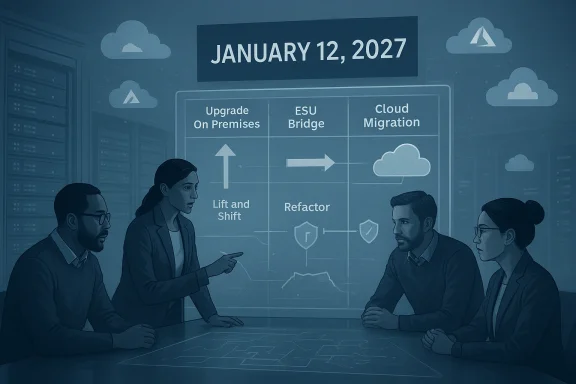
Organisations generally have three practical pathways to address the impending deadline. Each has trade‑offs in cost, time, and risk.1. Upgrade on‑premises to a newer Windows Server LTSC release
- Install Windows Server 2019, 2022, or Windows Server 2025/202x (as appropriate) on existing or refreshed hardware, then migrate workloads.
- Pros: Maintains on‑premises control and avoids some cloud costs; keeps familiar management tooling.
- Cons: Capital expenditure for hardware, the usual licence and support lifecycle constraints, and the effort involved in testing and validating application compatibility.
2. Purchase Extended Security Updates (ESU)
- ESUs provide a time‑limited bridge: security updates delivered for a defined period after end of support. Historically, Microsoft has offered ESUs for older server releases, but the mechanics, pricing, and eligibility can vary by product and year. As of early 2026 Microsoft’s public guidance and community channels indicate that ESU programs and pricing for pre‑2027 workloads may be limited, and details for Server 2016 were not broadly publicised in standard channels at the time of this analysis. Treat ESU as a last‑resort stopgap rather than a long‑term strategy.
- Pros: Buys time to plan and execute migrations without immediate re‑architecture.
- Cons: High and often escalating yearly cost; does not include feature updates or full support; eventual migration remains necessary.
3. Migrate to the cloud (IaaS/PaaS/hybrid)
- Rehost virtual machines in the cloud (lift and shift), refactor to managed platform services, or adopt hybrid models with Azure Arc.
- Pros: Elastic capacity, modernised security posture, options for free ESU on cloud‑hosted instanceand offloaded physical infrastructure management. Cloud providers also offer migration tooling and assessment services to reduce risk.
- Cons: Ongoing operational costs that must be controlled, potential licensing changes, and the effort to reconfigure or re‑architect applications to take advantage of cloud‑native services.
The cloud case: why migration is frequently the safer investment
The Cambridge Network article makes a practical appeal for cloud migration — and for good reasons: flexibility, operating‑expense conversion, disaster recovery improvements, and the ability to leverage vendor‑supported security lifecycles. Those are core cloud arguments, and they hold up under scrutiny.Here’s what the cloud can deliver, in operational terms:
- Security parity and ESU advantages. Microsoft’s Azure platform provides free Extended Security Updates for qualifying Windows Server versions when the workloads run on Azure virtual machine platforms. That means moving vulnerable instances to Azure can yield immediate protection options that are not available on bare metal on‑premises without purchasing ESU licences. Azure Arc also enables ESU deployment and management for hybrid estates.
- Faster recovery and higher availability. Replication and snapshot features in cloud platforms drastically reduce RTO and RPO compared with physical server recovery processes.
- Scalability and financial model. Pay‑as‑you‑use pricing removes the upfront outlay for physical capacity and enables organisations to right‑size resources after migration.
- Migration toolchain. Azure provides assessment and migration tooling — Azure Migrate and Server Migration — to discover, assess, and move both virtual and physical servers with dependency mapping and reporting to reduce surprises.
How to build a practical migration plan (a playbook you can follow)
If your estate includes Windows Server 2016, start with a disciplined plan that treats the January 12, 2027 date as the finish line.1. Inventory everything — the brutal truth
- Audit every physical host, VM, and service that runs on Windows Server 2016.
- Capture application owners, dependencies, third‑party vendors, and support contracts.
- Confirm which systems are business‑critical, which are archival, and which can be decommissioned.
- Use automated discovery tools where possible; Azure Migrate and other third‑party scanners can accelerate this.
2. Classify workloads and pick the migration path
- Triage workloads into three bins:
- Rehost (lift and shift) — good short‑term move for VMs with minimal change.
- Refactor/modernize — move to PaaS (databases, app services) where it reduces operating overhead and increases resilience.
- Replace/retire — some legacy apps are no longer needed or should be replaced by SaaS.
- Prioritise mission‑critical systems for earlier phases so rollback and remediation windows are generous.
3. Phased migration: don’t do a big bang
- Start with low‑risk workloads to validate tooling, networking, and identity integration.
- Proceed to medium‑risk workloads and refine resource sizing, security controls, and monitoring.
- Migrate high‑risk and business‑critical workloads only after exhaustive testing and user sign‑off.
- Communicate maintenance windows and expected impacts clearly with stakeholders to avoid operational surprises.
4. Validate and test extensively
- Confirm application functionality, authentication flows, backup/restore, and performance.
- Perform load and failover testing; the cloud behaves differently to on‑premises hardware.
- Retain a rollback plan for each migration phase and document known issues and mitigations.
5. Optimise after migration
- Right‑size VM families, adopt reserved capacity or savings plans where appropriate, and implement tagging and cost management to prevent bill shock.
- Harden servers with up‑to‑date endpoint protection, managed patching, and centralized logging/monitoring.
Practical checklist — summarised steps IT teams can use today
- Audit all hardware and software assets.
- Decide: on‑premises upgrade vs cloud migration vs ESU (temporary bridge).
- Back up everything and verify backup integrity.
- Use structured assessment tools (for example, Azure Migrate).
- Plan a phased migration timeline well before January 12, 2027.
- Test every workload and gain user acceptance before decommissioning the old server.
- Implement cost controls and governance in the cloud.
Questions about Extended Security Updates (ESU) — what we can say right now
ESUs are a transitional tool, not a long‑term strategy. Microsoft’s policy and product lifecycle documentation show that Azure-hosted VMs are typically entitled to ESUs free of charge by default, while hybrid and on‑premises arrangements generally require paid ESU licences or use of Azure Arc to enrol for ESU deployment. The precise commercial terms and availability can vary by product and by year, so do not assume ESU will be a cheap or permanent option for Server 2016 workloads — treat it as a controlled, time‑boxed bridge to migration.Note also that news reporting and vendor commentary in early 2026 suggested the ESU program was being prepared for some 2016‑era products and that the pricing and mechanics for consumer versus enterprise customers will differ; however, server ESU price points and eligibility for Server 2016 were not universally published in a single public price list at the time of this writing. That uncertainty is another reason to favour migration planning over hope.
Vendor and platform trade‑offs: Azure vs AWS vs on‑premises
- Azure: Strongest native path for Windows Server customers — free ESU for Azure VMs, Azure Migrate tooling, and Azure Hybrid Benefit to reduce licence costs. For many organisations, Azure reduces the friction of staying current with Microsoft server lifecycles.
- AWS / other clouds: Can host Windows Server workloads, but licensing and support terms for Microsoft products can be more complex; AWS and others sometimes require additional licensing fees or different migration approaches. Carefully model the licence and running costs before choosing a non‑Microsoft cloud for Windows Server workloads.
- On‑premises upgrade: Keeps control close to home but requires hardware refresh cycles, capacity planning, and ongoing capital expenditure. It can make sense when data residency, network latency, or regulatory constraints are strict.
Risks to call out explicitly
- Dependency risk: Legacy applications may depend on old APIs, drivers, or middleware that break on newer kernels. Expect some refactoring or vendor upgrades.
- Licensing surprises: Moving to cloud often changes licensing models; include licensing cost modelling in any TCO analysis.
- Operational capability: If your team lacks cloud skills, the migration itself can be a source of risk. Plan for training, staged adoption, and partner support where necessary.
- Rushed migrations: Leaving planning to the final quarter before the end-of‑support date almost always increases cost, operational risk, and the chance of business disruption.
What success looks like
A successful program treats the upcoming end of support not as a panic event but as a modernisation opportunity. Outcomes to aim for:- All business‑critical workloads moved to a supported platform or an Azure environment protected by current updates before January 12, 2027.
- A documented rollback and incident response plan for each migration cutover.
- Cost governance and tagging in the cloud to ensure predictable operating expenses.
- A decommissioning plan that safely removes old servers and reduces the attack surface.
Final analysis and recommendation
Time is the enemy here, not the technology. Microsoft’s official lifecycle dates are fixed: Extended support for Windows Server 2016 ends on January 12, 2027, and that date should be the anchor for all planning. The practical choice for most organisations will be migration to cloud infrastructure or an in‑place upgrade — with cloud migration offering two crucial advantages: operational flexibility and, in many cases, free or simplified Extended Security Update options for cloud‑hosted instances.If your organisation still runs Windows Server 2016, take these immediate actions this month:
- Produce a full inventory and risk ranking of 2016 workloads.
- Book an assessment project (use Azure Migrate or an equivalent tool) and begin testing a small pilot migration.
- Decide quickly whether ESU is a necessary short‑term bridge or whether you can accelerate migration instead.
- Allocate budget and staff time now — migrating at scale requires planning, validation, and test windows.
Conclusion
Windows Server 2016’s end of extended support is both a risk to be mitigated and a deadline that should catalyse modernisation. Whether you elect to upgrade on‑premises, buy time with ESUs, or migrate to the cloud, start with a measured inventory, prioritise critical workloads, test everything, and avoid last‑minute scrambles. The choices made in the next 6–12 months will determine whether your organisation pays for a planned upgrade or pays a much higher price later in incident costs and lost uptime.
Source: Cambridge Network Using a Windows Server? | Cambridge Network
