

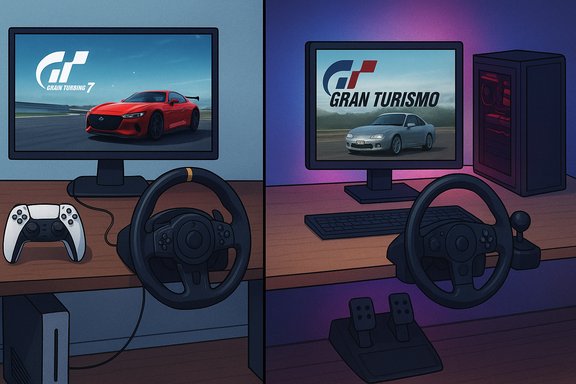
Gran Turismo fans who want to play Gran Turismo 7 on a Windows PC today have two practical routes: stream the PS5/PS4 game to your PC using Sony’s Remote Play (or PlayStation’s PC streaming options), or use emulation to run older PlayStation-era Gran Turismo titles — a compromise until (and unless) an official PC port arrives.
Background / Overview
Gran Turismo is a flagship PlayStation franchise created by Polyphony Digital and led by Kazunori Yamauchi. Since the series began in 1997, Gran Turismo has been tightly associated with PlayStation hardware and Sony’s first‑party strategy. Gran Turismo 7 launched on PS4 and PS5 in March 2022 and remains primarily a console release; there has been persistent speculation about a PC version, but Polyphony has repeatedly clarified that no PC port was actively in development at the time of those statements. Reporting around Yamauchi’s comments confirms he said the possibility “is not zero” in a theoretical sense, but that the team was not working on a PC port then. The practical guide published on racinggames.gg (the short explainer the user provided) correctly outlines the two workable options for Windows players today: Remote Play for GT7 streaming from a PlayStation console, and emulation for older entries like Gran Turismo 4. That page is a reasonable primer and forms the basis for this more comprehensive, verified walkthrough and analysis.How to play Gran Turismo 7 on PC right now
Option A — Remote Play (stream GT7 from your PS5/PS4 to Windows)
Remote Play is the most straightforward, officially supported way to play GT7 on a PC without buying a separate console copy of the game for the PC platform (because no PC build exists). It streams your PlayStation console’s video and audio to a Windows desktop or laptop while sending controller input back to the console.Key verified system requirements for the PS Remote Play app on Windows:
- OS: Windows 10 (64‑bit) or Windows 11.
- Processor: 7th Generation Intel Core processors or later.
- RAM: 2 GB or more.
- Storage: ~100 MB app space (the app is very small; the heavy lifting stays on the console).
- Display resolution: 1024 × 768 or higher.
- Recommended network: at least 5 Mbps minimum, but 15 Mbps or higher is recommended for a stable 1080p experience and lower latency. DualSense / DualShock 4 controllers are supported (connection via USB or Bluetooth as appropriate). These specifics are published by PlayStation.
- On your PS5, go to Settings > System > Remote Play and enable Enable Remote Play. On PS4 the option is in Settings > Remote Play Connection Settings.
- (Optional but recommended) In PS5 settings, allow Remote Play while in Rest Mode (Settings > System > Power Saving > Features Available in Rest Mode), so the console can be woken remotely.
- On Windows, download and install the PS Remote Play app from PlayStation, then sign in with the same PlayStation Network account used on the console.
- Connect a controller to the PC (DualSense and DualShock 4 supported). For the best input reliability and minimal latency, use USB rather than Bluetooth.
- Launch Remote Play, find your console, and connect. Once linked you’ll see your console’s home screen and can launch Gran Turismo 7; the game will run on the console while the PC receives the video/audio stream.
- For competitive or low‑lag play, use wired Ethernet on both the console and PC, or a strong 5 GHz Wi‑Fi connection for both. Close background network and disk activity that could impact encoding/decoding.
- Official, simple, and supported by Sony.
- Full parity with the console build (all game features and online services behave exactly as on PS).
- Low setup cost if a PS5/PS4 and copy of GT7 are already owned.
- Requires ownership of the PlayStation console and a copy of GT7.
- Performance is governed by network conditions — you may experience input lag, compression artefacts, or packet loss at lower bandwidths. For the smoothest experience plan for 15 Mbps+ and wired connections.
Option B — Emulation for older Gran Turismo titles
Emulation is the only path to playing legacy Gran Turismo games natively on PC when no official PC release exists. Common examples:- Gran Turismo (original PS1) and Gran Turismo 2 — playable via PS1 emulators (e.g., ePSXe, DuckStation).
- Gran Turismo 3 and Gran Turismo 4 — playable via PS2 emulators (PCSX2).
- Gran Turismo 5/6 and GT Sport — these are PS3/PS4 generations and are far harder or impossible to run reliably on PC via emulation (PS3 emulation exists but is still limited; PS4 emulation for modern games is not yet feasible in practical terms).
- Emulation itself is legal, but acquiring game ROMs/ISOs can violate copyright unless you own the original media and create a dump from your own discs. Use legal, personally owned backups only.
- Emulation quality varies — older GT games often run well on modern PCs; newer generation titles may be impractical or impossible to emulate with acceptable performance or online functionality.
- Emulators have their own system requirements and setup procedures (e.g., PCSX2 for PS2 titles benefits from a modern multi‑core CPU and a discrete GPU). Community guides and emulator documentation are essential.
- Native PC running of older GT games (often with improved resolution scaling and modding options).
- No need for a PlayStation console if you legally own the games.
- Legality and copyright risk if ROMs are sourced improperly.
- Limited to older entries — modern GT7 is not emulable on PC in any practical sense.
Performance, input, and peripheral support on PC via Remote Play
Playing GT7 via Remote Play hands nearly all rendering and physics work to the PS5/PS4, so the PC’s GPU/CPU are not the limiting factor — the network path, encoding latency, and controller mapping are.- Controller support: DualSense (PS5) and DUALSHOCK 4 (PS4) are supported by the Remote Play app on Windows; DualSense features like adaptive triggers and haptics are not fully supported through Remote Play in many cases. For best fidelity with force‑feedback wheels and pedals, connect those directly to the PlayStation console rather than the PC streaming client.
- Wheel and pedal rigs: Serious sim rigs (Fanatec, Thrustmaster, Logitech) work best when attached to the console itself. Some wheels can be connected to PC and mapped, but that adds complexity and may introduce input mapping issues. If competitive precision matters, use the wheel with the console hosting the game.
- Network tuning: Wired Ethernet (gigabit where possible) reduces jitter and latency; limit household bandwidth consumption (pause cloud backups, video streaming, large downloads) while playing. Many independent tests recommend 15–50 Mbps for higher quality 1080p streaming with stable latency; PlayStation’s published baseline is 5 Mbps minimum but recommends higher speeds for best experience.
Will Gran Turismo 7 ever come to PC? Analysis and timelines
The short, verifiable answer as of now is: No official PC version of Gran Turismo 7 has been released, and Polyphony stated a PC port was not being actively developed at the time of their comments. Reporting from multiple outlets and Yamauchi’s clarifications support this: he has said Polyphony is open to options but was not actively making a PC port when asked; many outlets reiterated that reality after the initial “considering it” coverage. How likely is a PC release in the medium term? Consider historical precedent:- Sony has ported several major first‑party titles to Windows in recent years (examples include Horizon Zero Dawn — PS4 in 2017 and PC in 2020 — and Marvel’s Spider‑Man remastered, which reached PC in 2022). These ports were often handled by external or specialized porting studios and released several years after the initial console launch.
- Typical port timing for major PlayStation exclusives has varied from around two to four years post‑console launch depending on business strategy, technical complexity, and studio capacity. If Polyphony or a partner were to undertake a GT7 PC port, a realistically conservative estimate — based on Sony’s historical cadence — would be roughly 12–36 months of engineering if the decision and resources were committed immediately; that timeline is speculative and depends heavily on staffing, feature parity goals (4K/60fps, ray tracing, wheel support, ultra‑wide displays), and QA. This is an informed estimate, not a claim of fact.
- Quality and parity goals: GT7 is marketed and tuned as a high‑fidelity, “finely tuned” experience for PlayStation hardware; porting while preserving that experience across wide PC hardware variance requires significant engineering (graphics presets, input layering, anti‑cheat and online services adaptation if any, wheel and peripheral support).
- Sales/marketing calculus: Sony often staggers PC ports to avoid cannibalizing console sales, and to extend a title’s revenue lifecycle. Any decision will weigh projected PC sales against potential impact on PlayStation ecosystem value.
- Porting studio availability: Sony has used external teams (Nixxes, Iron Galaxy, Bluepoint, etc. historically to implement PC ports; whether Polyphony would handle a port in‑house or allocate it to a partner affects timing.
Practical alternatives on PC while waiting
If the goal is an authentic high-fidelity racing sim on Windows now, these are strong, native alternatives:- Forza Motorsport / Forza Horizon series — high production values, native PC support, large car lists, and broad peripheral support.
- Assetto Corsa EVO — focuses on realistic physics and modding ecosystem; excellent wheel support and deep tuning.
- iRacing — subscription‑based sim with a strong competitive and online infrastructure.
- rFactor 2 — deep simulation mechanics and mod community.
Legal, safety, and ethical considerations
- Don’t pirate: Downloading unauthorised copies of Gran Turismo 7 or any PlayStation‑only game to run outside the platform is illegal and can expose machines to malware if files are sourced from dubious sites. Emulation should be restricted to media you legally own.
- Avoid “magical” workarounds: Claims that you can “run GT7 natively on PC” via a single executable or repack are almost always scams or illegal. Rely on official channels or established emulation communities and follow the law.
- Privacy and account safety: Remote Play requires signing into your PlayStation Network account; treat credentials securely, and enable 2FA for account protection.
Quick-start checklists
Fast Remote Play checklist
- Own a PS5/PS4 and a licensed copy of Gran Turismo 7.
- Update console to latest system software.
- Install PS Remote Play on Windows (Windows 10/11).
- Enable Remote Play on the console and allow Rest Mode wake if desired.
- Use wired Ethernet for console and PC wherever possible.
- Connect DualSense/DualShock 4 via USB for best input reliability.
Fast emulation checklist (older GT titles)
- Verify legal ownership of the original disc and make an archive image yourself, or use the original discs with a compatible optical drive.
- Choose a mature emulator (e.g., DuckStation for PS1, PCSX2 for PS2).
- Read the emulator’s documentation for BIOS requirements and plugins.
- Use a modern multi‑core CPU and discrete GPU for best results.
- Consider community guides for performance and compatibility tweaks.
Final verdict — what to expect and recommended actions
For readers seeking to “download Gran Turismo for PC” today, the honest, practical guidance is:- If the goal is Gran Turismo 7 specifically, the only safe and reliable way to run it on a Windows PC today is to stream it from a PlayStation console using PS Remote Play (or to wait for an official port if Sony announces one). The Remote Play route is verified by PlayStation and is the officially supported streaming client for Windows.
- If the aim is to experience historic Gran Turismo games natively on PC, emulation is a valid path for older entries (subject to legal ownership and emulator compatibility).
- For a native PC sim experience while waiting, choose titles like Forza Motorsport, Assetto Corsa EVO, or iRacing, which will give the best integration with wheels, ultrawide monitors, and PC‑centric features.
Gran Turismo on PC is possible today — but only indirectly. Remote Play offers an immediate, supported path for GT7 owners with a PlayStation console, while emulation opens the door to older entries for collectors and nostalgia seekers. A native PC port remains a realistic possibility given Sony’s recent strategy of selective PC releases, but it has not been confirmed as in development; the community should await official word from Polyphony or PlayStation before setting expectations or investing in platform‑specific upgrades.
Source: racinggames.gg How to Download Gran Turismo on PC
