

Microsoft’s latest PowerShell postmortem is a quiet but important admission: even one of Windows’ most trusted built-in tools can be slowed by packaging complexity, compliance changes, and fragile release plumbing. The company says PowerShell 7.6, its newest LTS build, slipped beyond its original target before finally shipping in March 2026, and it is now promising a more disciplined release process to avoid a repeat. For Windows users, enterprise admins, and developers who treat PowerShell as essential infrastructure, the story is less about a late download and more about how Microsoft intends to run a more reliable platform going forward.
PowerShell has long occupied a strange and powerful place inside the Windows ecosystem. It is at once a scripting language, an automation shell, a systems management framework, and a bridge between Microsoft’s Windows-centric past and its cross-platform present. That makes it more than a utility; for many organizations, it is a core operational dependency.
The modern PowerShell line has also become tightly synchronized with Microsoft’s broader platform cadence. Even-numbered versions are typically LTS releases, while odd-numbered versions serve as shorter-lived standard releases. Microsoft’s lifecycle page shows that PowerShell follows the Modern Lifecycle Policy, with version support tied to the release stream and the underlying .NET platform on which PowerShell is built.
That matters because PowerShell is not just a Windows-only component anymore. It ships across Windows, Linux, and macOS, and Microsoft has spent years trying to make the release process behave like a real cross-platform product pipeline rather than a Windows add-on. The company’s own release notes for PowerShell 7.5 and 7.6 emphasize reliability, stability, module updates, and alignment with newer .NET releases.
The latest postmortem also lands at a time when Microsoft has been publicly promising to improve Windows quality more broadly. That context makes the PowerShell release delay interesting because it mirrors a larger corporate theme: release engineering is now a product feature. When a platform vendor fails at its own automation tooling, the ripple effects can spread far beyond one package.
In practical terms, PowerShell 7.6 is important because Microsoft positions it as the recommended version for production automation environments. That means a delay in its delivery is not just a scheduling annoyance. It can alter upgrade plans, CI/CD standardization, script compatibility testing, and admin workflows across enterprises that rely on predictable maintenance windows.
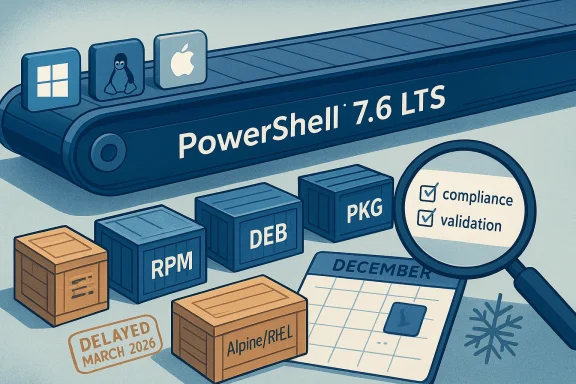
The bigger message is that PowerShell is now maintained as a broad software distribution ecosystem, not a single executable. In that model, a break in one packaging layer can affect Alpine, RPM, DEB, PKG, and Windows-adjacent distribution workflows at once. The result is release fragility by complexity, which is the opposite of what admins want from an automation platform.
By January 2026, the company was still untangling compatibility work, including a glibc-related mismatch affecting RHEL 8. The postmortem says the packaging changes required deeper rework than expected, so validation and backporting continued through February before the release could be stabilized in March.
That creates a very different risk profile than consumer-facing software. If a consumer app misses a launch window, users are annoyed. If a shell used by IT teams misses its release window, organizations can end up postponing standardization projects or delaying upgrades until their automation stack has been validated. A few weeks of delay can become a quarter of planning friction.
For consumers and enthusiasts, the story is more subtle. Most home users will never directly notice packaging workflows for Debian, RPM, or PKG. But they will benefit indirectly if Microsoft’s quality gates reduce weird regressions, broken preview builds, and inconsistent behavior across shells and modules. In other words, the boring parts of release engineering can improve the visible parts of the product.
That cross-platform ambition is also the source of much of the pain. The more operating systems, package types, and libc expectations you support, the more ways a late-stage change can go wrong. It is a reminder that platform neutrality comes with an administrative tax, and Microsoft is now paying that tax in public. This is the hidden cost of being everywhere.
Microsoft says a new build-system method used to produce the Microsoft.PowerShell.Native library was not compatible with Alpine, which forced additional work to restore package generation. Then compliance requirements arrived for non-Windows packaging tooling, forcing Microsoft to replace rather than merely tweak parts of the workflow. That is the kind of requirement that can instantly turn a routine release into a platform engineering project.
This is a classic release-engineering lesson: if the release pipeline itself is changing, you are effectively rebuilding the plane while flying it. Even when the underlying software is stable, the packaging layer can become the failure point because it controls how users receive the product. That distinction is easy to miss until it breaks.
The Alpine issue adds another layer because Alpine is frequently used in lightweight containers and minimal deployments. If your build system cannot reliably target Alpine, you are not just inconveniencing hobbyists; you are potentially disrupting container-centric CI environments where minimal base images are the norm.
That led to a list of procedural fixes, including clearer release ownership, more consistent preview schedules, increased automation, and better communication through repositories so risks can be flagged earlier. In practice, these are not glamorous changes, but they are exactly the sort of adjustments that determine whether a platform team can ship predictably.
That should help the company detect regressions sooner, before they metastasize into release-blocking issues. It also benefits the community, because consistent previews create a more reliable testing surface for admins and developers who want to confirm compatibility with their own scripts and dependencies. A healthy preview train is a sign of a healthy product line.
In this case, automation is especially relevant because the old manual process limited who could perform certain publication tasks. That created a hidden dependency on personnel availability during the holiday window, which is exactly the kind of operational risk large vendors try to eliminate. Bus factor problems do not just affect support; they affect shipping.
On the consumer side, the impact is mostly psychological and quality-related. Users who rely on PowerShell for scripting, customization, or troubleshooting benefit when Microsoft treats the shell like a serious product instead of a side project. A more stable PowerShell release process should translate into fewer regressions and a more predictable experience over time.
That can be acceptable, but it is not ideal. The lifecycle page shows support windows are finite, and organizations do not want to be forced into long holds because the next LTS version took longer than expected. Stable platform cadence is part of the value proposition of LTS in the first place.
That means every improvement in the PowerShell 7 pipeline strengthens Microsoft’s broader automation story. It also suggests that Windows users who still cling to older scripting habits may continue to see more emphasis placed on the modern line, particularly as new platform work lands on top of .NET 10. The center of gravity keeps shifting.
Microsoft’s willingness to discuss its own release failure is strategically useful because it shows maturity. In platform software, trust is built less by perfection than by visible process improvements. If Microsoft can ship PowerShell 7.6 reliably after this delay, it strengthens the argument that its tooling is suitable for serious enterprise automation.
Still, Microsoft has an advantage here because PowerShell is deeply integrated into Windows administration and supported across multiple operating systems. Even users who prefer other tools often keep PowerShell in the mix because it is unavoidable in Microsoft-centric environments. That stickiness gives Microsoft some forgiveness, but not infinite forgiveness.
That alignment also creates discipline. If Microsoft wants PowerShell to remain relevant, it must keep improving packaging, validation, and release predictability alongside runtime evolution. The shell is now part of the same strategic narrative as Windows quality work, cloud tooling, and developer platform modernization. That is a much bigger job than shipping a command prompt.
The reason packaging matters so much is that it affects trust. If a release pipeline cannot consistently produce RPMs, DEBs, PKGs, and Windows-compatible assets on schedule, then downstream customers start to worry about update predictability, environment parity, and change management. That is especially true for enterprise teams that automate upgrades across fleets.
That can be worth it because it broadens adoption and improves native integration on target platforms. But it also means the release team must think like a supply-chain operator, not just a product team. This is the price of cross-platform credibility.
Microsoft’s decision to rebuild rather than patch around the problem suggests the company judged the existing workflow too constrained to meet future requirements. That is a costly move in the short term, but it may be the only one that produces a stable long-term release pipeline. Sometimes the only fix is to replace the scaffolding.
It also creates an opportunity for PowerShell to emerge with a more mature release discipline than before. A better pipeline can mean fewer regressions, more reliable previews, and more confidence for organizations that depend on LTS timing.
Another concern is that the release delay may have already reduced trust among power users who plan their automation around predictable LTS availability. The company can recover that trust, but only through several cycles of better execution.
The real test will be whether Microsoft can convert the postmortem into a repeatable improvement in later 7.x releases. If preview pacing steadies, publication becomes more automated, and packaging changes are flagged earlier, this delay may end up being remembered as a painful but productive reset. That would be the best possible outcome.
Source: Neowin After Windows 11, Microsoft addressing "key" issues on one of its most powerful native tools
 Background
PowerShell has long occupied a strange and powerful place inside the Windows ecosystem. It is at once a scripting language, an automation shell, a systems management framework, and a bridge between Microsoft’s Windows-centric past and its cross-platform present. That makes it more than a utility; for many organizations, it is a core operational dependency.The modern PowerShell line has also become tightly synchronized with Microsoft’s broader platform cadence. Even-numbered versions are typically LTS releases, while odd-numbered versions serve as shorter-lived standard releases. Microsoft’s lifecycle page shows that PowerShell follows the Modern Lifecycle Policy, with version support tied to the release stream and the underlying .NET platform on which PowerShell is built.
That matters because PowerShell is not just a Windows-only component anymore. It ships across Windows, Linux, and macOS, and Microsoft has spent years trying to make the release process behave like a real cross-platform product pipeline rather than a Windows add-on. The company’s own release notes for PowerShell 7.5 and 7.6 emphasize reliability, stability, module updates, and alignment with newer .NET releases.
The latest postmortem also lands at a time when Microsoft has been publicly promising to improve Windows quality more broadly. That context makes the PowerShell release delay interesting because it mirrors a larger corporate theme: release engineering is now a product feature. When a platform vendor fails at its own automation tooling, the ripple effects can spread far beyond one package.
In practical terms, PowerShell 7.6 is important because Microsoft positions it as the recommended version for production automation environments. That means a delay in its delivery is not just a scheduling annoyance. It can alter upgrade plans, CI/CD standardization, script compatibility testing, and admin workflows across enterprises that rely on predictable maintenance windows.
What Microsoft Actually Said
Microsoft’s postmortem is notable because it does not hide behind vague language. The company says the release was delayed by packaging-related problems that emerged late in the cycle, compounded by a December holiday freeze and additional validation work in early 2026. That combination stretched a release that had originally been expected earlier into a final March 2026 shipment.A release that touched everything
One of the strongest themes in the post is scale. Microsoft says each PowerShell release spans 29 packages, eight package formats, four architectures, and eight operating systems, resulting in 287,855 total tests per release across platforms and packages. That number is not there just for drama; it underscores why a packaging bug can become a schedule catastrophe rather than a quick fix.The bigger message is that PowerShell is now maintained as a broad software distribution ecosystem, not a single executable. In that model, a break in one packaging layer can affect Alpine, RPM, DEB, PKG, and Windows-adjacent distribution workflows at once. The result is release fragility by complexity, which is the opposite of what admins want from an automation platform.
Why the delays mattered
Microsoft says the first major issue came in October 2025, when build changes introduced a bug in a preview that broke Alpine packages. In November 2025, new compliance requirements forced changes to the packaging tooling for non-Windows platforms, and then a holiday freeze in December slowed publication and narrowed the available response window.By January 2026, the company was still untangling compatibility work, including a glibc-related mismatch affecting RHEL 8. The postmortem says the packaging changes required deeper rework than expected, so validation and backporting continued through February before the release could be stabilized in March.
Why PowerShell Matters So Much
The important thing to understand is that PowerShell is not a niche developer tool. It is one of the most consequential pieces of software Microsoft ships because it influences how machines are configured, updated, audited, and automated. In enterprise environments, that often means PowerShell is embedded in standard operating procedures, deployment scripts, maintenance jobs, and incident response playbooks.That creates a very different risk profile than consumer-facing software. If a consumer app misses a launch window, users are annoyed. If a shell used by IT teams misses its release window, organizations can end up postponing standardization projects or delaying upgrades until their automation stack has been validated. A few weeks of delay can become a quarter of planning friction.
Enterprise reliability versus consumer convenience
For enterprise customers, the headline issue is not the delay itself but the signal it sends about process maturity. Microsoft is effectively saying that future PowerShell releases need better ownership, better preview timing, and earlier risk detection. That is exactly the kind of discipline large organizations expect from a platform they build automation around.For consumers and enthusiasts, the story is more subtle. Most home users will never directly notice packaging workflows for Debian, RPM, or PKG. But they will benefit indirectly if Microsoft’s quality gates reduce weird regressions, broken preview builds, and inconsistent behavior across shells and modules. In other words, the boring parts of release engineering can improve the visible parts of the product.
The cross-platform reality
PowerShell’s evolution away from being purely a Windows tool has been one of Microsoft’s most meaningful platform shifts of the last decade. The company’s own announcements repeatedly stress support for Linux and macOS, and the 7.6 release continues that pattern by aligning with .NET 10 and emphasizing broader platform consistency.That cross-platform ambition is also the source of much of the pain. The more operating systems, package types, and libc expectations you support, the more ways a late-stage change can go wrong. It is a reminder that platform neutrality comes with an administrative tax, and Microsoft is now paying that tax in public. This is the hidden cost of being everywhere.
What Broke in the Release Pipeline
The most interesting part of Microsoft’s explanation is that the delay did not come from a single catastrophic defect. Instead, it came from a chain of smaller but compounding issues that altered the packaging path late in the cycle. That kind of failure is often harder to fix because there is no one clean root cause.Microsoft says a new build-system method used to produce the Microsoft.PowerShell.Native library was not compatible with Alpine, which forced additional work to restore package generation. Then compliance requirements arrived for non-Windows packaging tooling, forcing Microsoft to replace rather than merely tweak parts of the workflow. That is the kind of requirement that can instantly turn a routine release into a platform engineering project.
The cost of late-cycle change
Late-cycle change is always dangerous, but it is especially dangerous for a release that must be validated across many operating systems and package formats. Microsoft admits that the packaging changes were more deeply coupled than expected, which limited the time available to test the replacement workflows under real-world conditions.This is a classic release-engineering lesson: if the release pipeline itself is changing, you are effectively rebuilding the plane while flying it. Even when the underlying software is stable, the packaging layer can become the failure point because it controls how users receive the product. That distinction is easy to miss until it breaks.
Alpine, RHEL, and compatibility pressure
Microsoft also highlights environment-specific compatibility concerns, including a glibc mismatch for RHEL 8. That detail matters because enterprise Linux users care deeply about ABI compatibility, package consistency, and long support windows, and packaging errors in that world are often treated as operational blockers rather than minor bugs.The Alpine issue adds another layer because Alpine is frequently used in lightweight containers and minimal deployments. If your build system cannot reliably target Alpine, you are not just inconveniencing hobbyists; you are potentially disrupting container-centric CI environments where minimal base images are the norm.
The New Commitments Microsoft Is Making
Microsoft’s response is not just “we’ll do better.” It is trying to articulate the mechanics of “doing better” in ways that sound operational rather than aspirational. The company says the release exposed a key gap: the lack of early signals showing that packaging changes would significantly affect the timeline.That led to a list of procedural fixes, including clearer release ownership, more consistent preview schedules, increased automation, and better communication through repositories so risks can be flagged earlier. In practice, these are not glamorous changes, but they are exactly the sort of adjustments that determine whether a platform team can ship predictably.
Better previews, better signals
Preview cadence matters more than many users realize. When preview releases are regular and informative, they serve as an early warning system for packaging and compatibility problems. Microsoft explicitly says the slowed preview cadence reduced opportunities to validate changes incrementally, which suggests that future releases will lean harder on preview discipline.That should help the company detect regressions sooner, before they metastasize into release-blocking issues. It also benefits the community, because consistent previews create a more reliable testing surface for admins and developers who want to confirm compatibility with their own scripts and dependencies. A healthy preview train is a sign of a healthy product line.
Automation as a quality lever
Microsoft also points to more automation. That is unsurprising, but it is still important because automation in release engineering is not only about speed. It is about reducing human bottlenecks, eliminating fragile manual steps, and giving release managers more confidence that the same process is being executed the same way every time.In this case, automation is especially relevant because the old manual process limited who could perform certain publication tasks. That created a hidden dependency on personnel availability during the holiday window, which is exactly the kind of operational risk large vendors try to eliminate. Bus factor problems do not just affect support; they affect shipping.
How This Affects Windows Users
Windows users may be tempted to shrug because the most visible drama involved Linux packaging and release coordination. But PowerShell is deeply tied to Windows administration, and a delay in the latest LTS release can still reverberate through the Windows ecosystem in indirect ways.On the consumer side, the impact is mostly psychological and quality-related. Users who rely on PowerShell for scripting, customization, or troubleshooting benefit when Microsoft treats the shell like a serious product instead of a side project. A more stable PowerShell release process should translate into fewer regressions and a more predictable experience over time.
The admin angle
For IT admins, the stakes are higher. PowerShell is often used in deployment scripts, compliance automation, endpoint management, and cloud operations, which means version timing affects real rollout decisions. When the LTS line slips, administrators may extend support for older releases while they wait for a stable target.That can be acceptable, but it is not ideal. The lifecycle page shows support windows are finite, and organizations do not want to be forced into long holds because the next LTS version took longer than expected. Stable platform cadence is part of the value proposition of LTS in the first place.
Windows PowerShell versus PowerShell 7
There is also an important distinction between Windows PowerShell and the newer cross-platform PowerShell 7 line. Microsoft has been steering users toward PowerShell 7 for years, and the 7.6 release reinforces that trajectory by being the recommended production automation version.That means every improvement in the PowerShell 7 pipeline strengthens Microsoft’s broader automation story. It also suggests that Windows users who still cling to older scripting habits may continue to see more emphasis placed on the modern line, particularly as new platform work lands on top of .NET 10. The center of gravity keeps shifting.
Competitive Implications
PowerShell may not be a consumer product with obvious rivals, but it exists in a competitive landscape all the same. On Windows, it competes with older command-line habits and third-party automation approaches. Across the broader industry, it competes with the idea that scripting and orchestration should live entirely in external tools rather than inside the operating system vendor’s own stack.Microsoft’s willingness to discuss its own release failure is strategically useful because it shows maturity. In platform software, trust is built less by perfection than by visible process improvements. If Microsoft can ship PowerShell 7.6 reliably after this delay, it strengthens the argument that its tooling is suitable for serious enterprise automation.
Rival ecosystems win when Microsoft slips
The practical competitive risk is that delays create openings for alternative automation frameworks to look more dependable. That does not mean PowerShell is in danger, but it does mean every stumble reinforces the appeal of ecosystems that advertise faster iteration or simpler packaging models. Reliability is a competitive feature, not just a technical one.Still, Microsoft has an advantage here because PowerShell is deeply integrated into Windows administration and supported across multiple operating systems. Even users who prefer other tools often keep PowerShell in the mix because it is unavoidable in Microsoft-centric environments. That stickiness gives Microsoft some forgiveness, but not infinite forgiveness.
The .NET alignment story
The alignment of PowerShell 7.6 with .NET 10 is another strategic point. By tying its shell more tightly to the newest long-term .NET platform, Microsoft keeps the product aligned with modern runtime support and the broader Microsoft developer ecosystem. That makes PowerShell feel less like a legacy shell and more like a contemporary managed platform component.That alignment also creates discipline. If Microsoft wants PowerShell to remain relevant, it must keep improving packaging, validation, and release predictability alongside runtime evolution. The shell is now part of the same strategic narrative as Windows quality work, cloud tooling, and developer platform modernization. That is a much bigger job than shipping a command prompt.
Why the Packaging Story Matters More Than It Sounds
Packaging is easy to dismiss because it lacks glamour. Users notice features, not the machinery that delivers them. But in the software supply chain era, packaging is part of the product surface, and Microsoft’s postmortem treats it that way.The reason packaging matters so much is that it affects trust. If a release pipeline cannot consistently produce RPMs, DEBs, PKGs, and Windows-compatible assets on schedule, then downstream customers start to worry about update predictability, environment parity, and change management. That is especially true for enterprise teams that automate upgrades across fleets.
The hidden cost of packaging diversity
The more package formats you support, the more policy, tooling, and validation layers you must maintain. Microsoft’s own numbers on package counts and test volume show that PowerShell is no longer shipped as a simple monolithic app; it is a distribution matrix. Each additional format expands the test burden and the possibility of mismatch.That can be worth it because it broadens adoption and improves native integration on target platforms. But it also means the release team must think like a supply-chain operator, not just a product team. This is the price of cross-platform credibility.
Compliance and release engineering
The postmortem’s mention of compliance requirements is particularly revealing. Compliance often appears at the end of a release story, but here it became a central forcing function that required tooling replacement. That is a useful reminder that enterprise software is shaped as much by auditability and policy constraints as by code quality.Microsoft’s decision to rebuild rather than patch around the problem suggests the company judged the existing workflow too constrained to meet future requirements. That is a costly move in the short term, but it may be the only one that produces a stable long-term release pipeline. Sometimes the only fix is to replace the scaffolding.
Strengths and Opportunities
Microsoft’s response has several strengths, and the biggest one is that it is concrete. Rather than merely apologizing for the delay, the company has described the mechanics of the failure and the process changes it plans to adopt. That transparency gives enterprise users something tangible to evaluate.It also creates an opportunity for PowerShell to emerge with a more mature release discipline than before. A better pipeline can mean fewer regressions, more reliable previews, and more confidence for organizations that depend on LTS timing.
- Clearer release ownership should reduce ambiguity around who is accountable when the pipeline slips.
- Improved internal tracking can surface risks earlier in the cycle.
- Consistent preview schedules should improve community validation and feedback quality.
- More automation can reduce manual bottlenecks and publication delays.
- Better repository communication should help developers spot issues sooner.
- Cross-platform reliability gains may strengthen PowerShell’s position in mixed Windows/Linux/macOS environments.
- LTS credibility improves if Microsoft proves it can ship on time after this hiccup.
Risks and Concerns
The obvious concern is that the underlying complexity has not gone away. Microsoft can improve process controls, but PowerShell still ships across many platforms, architectures, and packaging formats, and that alone means future releases will remain exposed to similar failure modes.Another concern is that the release delay may have already reduced trust among power users who plan their automation around predictable LTS availability. The company can recover that trust, but only through several cycles of better execution.
- Late-cycle changes can still overwhelm even improved processes.
- Packaging diversity remains a structural source of risk.
- Holiday freezes and staffing constraints can still disrupt publication if manual steps remain.
- Preview cadence slippage could again weaken early warning signals.
- Enterprise customers may delay adoption until the new process proves itself.
- Cross-platform compatibility differences like libc and distro-specific behavior can reappear in future cycles.
- Perception risk remains: a platform tool that slips on its own packaging can look less dependable than it actually is.
Looking Ahead
The most likely near-term outcome is that PowerShell 7.6 becomes less important for what was delayed and more important for what Microsoft learned. The release itself now serves as a case study in how enterprise-grade software shipping breaks when compliance, packaging, and validation all collide late in a cycle. That is not a flattering story, but it is a useful one.The real test will be whether Microsoft can convert the postmortem into a repeatable improvement in later 7.x releases. If preview pacing steadies, publication becomes more automated, and packaging changes are flagged earlier, this delay may end up being remembered as a painful but productive reset. That would be the best possible outcome.
What to watch
- Whether preview releases arrive on a steadier schedule.
- Whether Microsoft exposes earlier risk signals in its repositories and release notes.
- Whether packaging for RPM, DEB, and PKG remains stable in future cycles.
- Whether enterprise admins treat PowerShell 7.6 as a genuine production default.
- Whether Microsoft’s broader Windows quality push follows the same pattern of public accountability.
Source: Neowin After Windows 11, Microsoft addressing "key" issues on one of its most powerful native tools
Last edited:
