

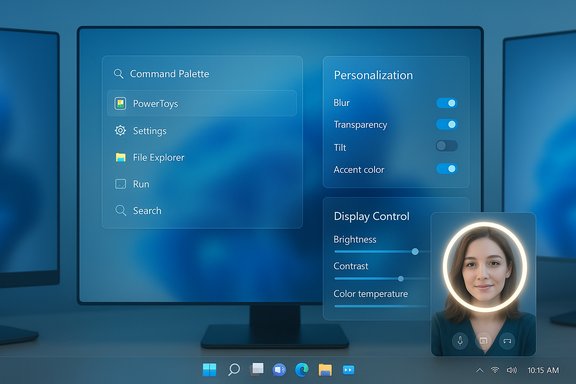
Microsoft’s PowerToys is about to make one of its most visible utilities — the Command Palette — significantly more personal, and the wider toolkit is quietly expanding with two new experimental utilities that aim to control displays and even improve how users look on video calls.
Background / Overview
PowerToys has matured rapidly into the premier power-user toolkit for Windows 10 and Windows 11, evolving from small desktop utilities into a polished, extensible platform. The Command Palette (the successor to PowerToys Run) has been a focal point of recent development: performance improvements, a new fuzzy matcher, extension plumbing, and multiple bug fixes shipped in the 0.90–0.96 release cycle. Work on the next feature update — marketed internally as version 0.97 — is now showing up in developer activity and early reporting, and it promises deep personalization controls for the Command Palette plus two brand-new utilities that expand PowerToys’ remit into display control and video-call lighting.This feature looks at what’s in the pipeline, what users can expect from the personalization features, the scope of the two new utilities (display controls and a virtual light ring), and the trade-offs and risks power users should weigh before upgrading or testing preview builds.
Why this matters: PowerToys and personalization in Windows
PowerToys has long been the place where Windows power users get system-level convenience without waiting for Microsoft to add native features. As Windows 11’s native UI choices drift between conservative and experimental, PowerToys fills gaps with fast-moving, user-facing tools: quick launchers, improved context preview, better color pickers, and accessibility helpers.- The Command Palette is a daily driver feature for many users: it’s the fast keyboard launcher and command runner that replaces (or augments) the Start menu and search for keyboard-centric workflows.
- Adding visual personalization to the Command Palette makes it both more pleasant and more useful: users can tailor contrast, transparency and accent behavior to improve legibility, reduce distraction, or match corporate theming.
- The two new utilities expand PowerToys from “productivity add-ons” into system personalization and video-call tooling, which could make PowerToys a larger surface area for OS-level interactions.
What’s coming to the Command Palette: personalization explained
Early developer notes and reporting indicate a new Personalization page in Command Palette settings. The promised controls aim to let users tune nearly every visible aspect of the launcher’s presentation. Expect the following capabilities (exact names in the Settings UI may change):- Background selection
- Set a solid color, a translucent blurred background, or a full image as a backdrop for the palette window.
- Toggle whether the background follows the system wallpaper or uses a dedicated image.
- Blur and transparency control
- Adjust the degree of blur behind the palette to reduce visual clutter or increase contrast with the underlying desktop.
- Fine-grain opacity slider for the smoke/overlay behind the search box and results list.
- Tilt and subtle transform
- A small tilt/angle control that changes the perspective of the palette window for a “floating” look.
- These are likely subtle transforms intended for aesthetics rather than accessibility.
- Accent and system color integration
- Option to have the palette reflect the system accent color (match Windows personalization color) so the UI feels consistent with the rest of the desktop.
- Alternatively, choose a separate accent specifically for the palette.
- Intro/outro animation toggles
- Early discussion by the product team indicates animations are under consideration; the team appears sensitive to animation preferences and may make these optional (on/off) to respect users who prefer instantaneous UI without motion.
- Reorganization of existing settings
- Several settings that previously lived under the general Command Palette configuration will be grouped into the new Personalization page for clarity — activation keys, extension appearance options, and other cosmetic toggles may be relocated.
- Improving the clarity of results: higher contrast plus blur/opacity tuning can make text and icons in the Command Palette easier to read regardless of underlying wallpaper.
- Reducing visual distraction: users who want an “invisible” palette that blends into the desktop can push opacity/blur higher; others can make it stark and command-focused.
- Visual identity: matching the palette to system accents or corporate colors helps with consistency for those who use branded desktops or themed environments.
- The personalization work surfaced from an early pull request and developer commentary. The Command Palette has received numerous UI refinements across recent releases, and the new settings are actively being worked on by the PowerToys team. The precise settings names, defaults, and the timeline for release are still subject to change while the team tests stability and accessibility.
Two new utilities: display control and virtual lighting
Alongside Command Palette personalization, Microsoft’s PowerToys engineering activity is showing work on two new utilities that broaden PowerToys’ functional scope.PowerDisplay / Power Monitor: per-screen display controls
What it is- A small PowerToys utility to control display-level settings directly from Windows: brightness, contrast, color temperature, and volume per monitor.
- Designed to provide a convenient, centralized place to manage multiple monitors without opening vendor-specific OSDs or third-party monitor control apps.
- Per-screen brightness and contrast sliders.
- Per-display volume control (for monitors with speakers).
- Quick actions for turning displays off or adjusting color temperature.
- Taskbar or context-menu access for fast adjustments.
- Multi-monitor setups are common for power users; hardware OSDs are inconsistent and often awkward for quick changes.
- Centralized controls will save time when switching between bright and dim rooms, moving between presentations and coding, or switching color temperature for long-hour ergonomics.
- Hardware compatibility varies. Some monitors expose full control through standard interfaces (DDC/CI), others require vendor drivers. Expect the feature to work best with DDC/CI-compliant displays.
- Accessibility and security: giving an app control over monitor settings requires careful permission handling; PowerToys will need to be explicit about what it changes and why.
Virtual light ring (Edge Light / virtual ring light) for video calls
What it is- A software “light ring” that draws a halo or vignette around the display edges, simulating an extra rim light to improve on-camera face lighting for video conferencing.
- The effect emulates hardware ring-lights or the new virtual-edge lighting seen in other OS previews: it subtly brightens the user’s face area by casting ambient light from screen edges.
- Many users have suboptimal webcam lighting, especially on laptops or in dim rooms.
- A software-based solution helps remote workers and streamers quickly improve on-camera presence without buying hardware.
- The effect is purely visual and faked by overlaying a halo on-screen; it doesn’t change camera exposure or replace proper key lighting.
- The overlay must not interfere with interactive content, full-screen applications, or accessibility tools. Implementation will require per-app exclusions and careful z-order management.
- Performance and GPU impact: drawing a dynamic overlay, especially with blur/soft edges, can consume GPU resources; on lower-end machines this might be noticeable.
- The virtual light idea has been discussed publicly and appears in early-stage conversation around PowerToys. Integration plans indicate potential collaboration with existing open-source “edge light” utilities. Implementation timing and exact feature set remain tentative until formal release.
Developer and community perspective
PowerToys is developed in the open with strong community engagement, and the Command Palette has been one of the most visible axes of community feedback.- The team has iterated quickly on accessibility and stability (hotkey hooks, extension handling, fallback commands).
- Community feedback pushed the team to add settings like “low-level keyboard hook” for activation and discussed issues around elevated privileges and extension behavior.
- Personalization features are a natural community request: users wanted both function and form — not just faster search, but also a palette that fits their desktop.
Risks, technical caveats, and privacy considerations
PowerToys adds powerful OS-level controls. That always carries trade-offs.Stability and shell integration
- Historically, some PowerToys changes that hook into system shell behavior have caused headaches. The Command Palette’s integration with shell components has produced issues for a subset of users in prior releases (e.g., edge cases when running elevated, or when shell registrations persist after uninstall).
- Any surface that modifies window styling, adds overlays, or registers a new app resource needs robust testing across Windows versions (and build channels). Power users should expect to encounter edge behavior in early preview builds.
- Visual personalization (blur/animated intro/outro, tilt) can increase GPU and compositor load.
- The virtual light ring overlay may add additional GPU work; users on low-power systems may need to opt out.
- Display controls depend on monitor support for standardized protocols. Some features may be limited on older or vendor-locked monitors.
- Volume control for displays requires proper audio routing and may conflict with system audio devices.
- PowerToys’ Advanced Paste now supports multiple AI endpoints and local model hosts; that same concern applies when PowerToys expands its reach:
- Any tool that collects or processes user content (e.g., clipboard contents, camera image overlays) must clearly document telemetry, data flow, and local vs cloud processing.
- Users should verify endpoint configuration and be mindful of sending confidential content to third-party cloud models.
- The Command Palette extension model has seen issues when PowerToys runs elevated versus not; extension discoverability and permission scoping are still improving. Users who rely heavily on extensions should be cautious around major UI or settings refactors.
How to try it (install channels and compatibility)
PowerToys offers several distribution channels:- Microsoft Store package — convenient for most users and auto-updates in the Store.
- GitHub releases — the canonical source for release packages and preview assets.
- winget — a scripted installer route that PowerToys and many users prefer for automation.
- PowerToys supports both Windows 11 and Windows 10. Microsoft has indicated no immediate plans to drop Windows 10 support in the near term; support continues for currently maintained Windows 10 builds.
- If using preview builds (insider/preview channels), expect a higher chance of regressions. Backup settings or know how to roll back to a stable release if you rely on PowerToys for daily workflows.
- Install PowerToys from the Microsoft Store or download the installer from the GitHub releases page.
- Enable only the Command Palette and switch to a preview channel if available (or wait for the formal 0.97 release).
- Test personalization settings at low intensity (small blur, disabled animations) and observe any performance or interaction issues.
- For the display utility, check monitor support for DDC/CI and test brightness/contrast control with one monitor first.
- For the virtual light effect, restrict testing to non-critical apps and verify overlay exclusion works for full-screen and secure apps.
Timeline and release expectations
- Recent release cadence: PowerToys advanced to 0.96 in late 2025 with significant Command Palette polish and Advanced Paste endpoints work.
- The team signalled that the next iteration will be 0.97, with personalization and additional features planned for an upcoming feature update. Public commentary from product leads suggests the team aims for an early-cycle feature release window; the date may slip based on stability and QA.
- Because PowerToys is actively developed in public, feature timing can change — preview commits and pull requests will surface ahead of formal release notes.
- The personalization UI and the two new utilities are actively in development and have been reported through early previews and developer comments. Some reporting surfaced via community outlets and an early pull request; however, precise UI labels, final defaults, and shipping timelines are subject to change while the team iterates. Users and administrators should treat the feature set as preview-level until it appears in the official release notes for version 0.97.
Practical recommendations for administrators and power users
- For daily production machines: prefer the stable PowerToys releases rather than preview builds if command reliability and system stability are critical.
- For testers and enthusiasts:
- Use a virtual machine or a non-critical test machine to try the new personalization and the display utilities.
- Keep logs and provide feedback via the PowerToys GitHub repository if any regressions occur.
- For teams using company-managed PCs:
- Evaluate whether the display control utility conflicts with existing IT-managed monitor configurations or vendor utilities.
- Consider policy controls — PowerToys is user-level software, and corporate deployment strategies should include a review of telemetry and installed features.
What to watch next
- Formal release notes for PowerToys 0.97 — the authoritative place for finalized features, defaults, and known issues.
- The PowerToys GitHub repository for merged pull requests that implement the Personalization settings and the two new utilities.
- Community feedback channels (issues and discussions) to surface early compatibility reports, especially around multi-monitor hardware and Command Palette extension behavior.
- Accessibility testing to ensure that personalization features (tilt, blur, animations) don’t harm users with vestibular or motion sensitivities.
Conclusion
PowerToys’ upcoming personalization controls for the Command Palette mark an important step: bringing visual polish and user-level theming to a utility that millions use daily. The addition of a display-management utility and the virtual light ring concept reflect PowerToys’ widening ambitions — it’s moving from a collection of productivity helpers into an omnibus personalization and system-control suite.The potential benefits are clear: fewer context switches to vendor menus, better on-camera presence, and a launcher that both looks and behaves the way users want. The risks are familiar: system integration wobbliness, hardware compatibility gaps, and the perennial preview-versus-stable trade-off.
For power users, the path forward is straightforward: test the new features in safe environments, follow the official release notes for 0.97, and provide actionable feedback to the project. For everyone else, expect these incremental but meaningful improvements to land in the next PowerToys feature release once the team finalizes accessibility, performance, and compatibility checks.
Source: Neowin Next PowerToys update will bring a lot of customization to one of the best modules
