

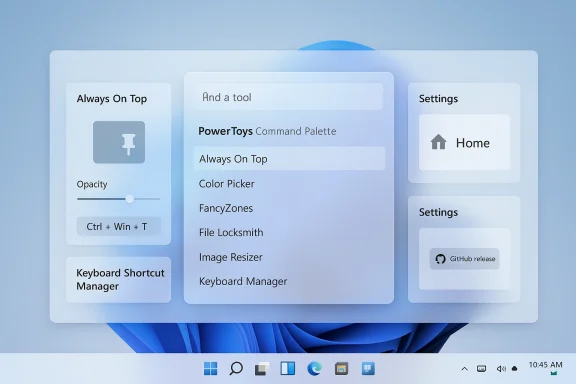
PowerToys 0.98.1 is a classic maintenance release: not flashy, but exactly the kind of update that keeps Microsoft’s growing Windows utility suite feeling dependable. Arriving shortly after the larger 0.98 milestone, the new build focuses on the rough edges that users notice fastest in day-to-day use, especially in Command Palette, Always On Top, Keyboard Shortcut Manager, and Settings. If 0.98 was about broadening the platform, 0.98.1 is about making that platform stable enough to trust. PowerToys itself remains Microsoft’s long-running collection of power-user utilities, and the 0.98 family builds on that foundation with a stronger emphasis on Command Palette and a more modern, integrated workflow across the suite. (github.com)
PowerToys has always occupied a peculiar but valuable place in Windows. It is not a single app in the usual sense; it is a toolbox, a testing ground, and increasingly a product strategy in miniature. The collection now spans more than two dozen utilities, from FancyZones and Color Picker to Keyboard Manager, Always On Top, and the newer Command Palette experience. Microsoft’s GitHub repository describes PowerToys as a collection of utilities for customizing Windows and streamlining everyday tasks, which is exactly why even “small” updates matter so much: the app is only as useful as the confidence users have in each module working without friction.
Version 0.98 was the meaningful inflection point. Microsoft highlighted a refreshed Keyboard Manager Editor and a big set of Command Palette improvements, including UI customization, fallback ranking, built-in PowerToys controls, and support for drag and drop. It also introduced broader productivity features such as CursorWrap and additional CLI control across several utilities. In other words, 0.98 was a feature release with a clear thesis: PowerToys is moving from a collection of loose utilities toward a more unified operating layer for Windows power users. (github.com)
That makes 0.98.1 important even though it is a point release. Stability updates often reveal where a product is under the most stress, and the patches in this build tell that story plainly. Microsoft is fixing crashes, repairing UI behavior, and cleaning up integration bugs in places that are becoming central to the product’s identity. The fact that Command Palette gets so much attention is not accidental; it is now one of the most ambitious pieces of PowerToys, and it behaves like a product Microsoft wants users to rely on every day rather than experiment with occasionally. (github.com)
The changelog also shows a subtler pattern: PowerToys is increasingly balancing feature velocity with platform discipline. A utility suite that can launch from anywhere, manage windows, expose commands, and sit in the tray has to be predictable above all else. A bug in a settings page, a crash in a popup, or a stale shortcut dependency can make a powerful tool feel unreliable very quickly. That is why releases like 0.98.1 often deserve more attention than their size suggests. They are the difference between “interesting” and habit-forming. (github.com)
That is especially true for Command Palette, which has quickly become the strategic center of gravity in PowerToys. The 0.98 release introduced deep changes to the experience, and the 0.98.1 patch addresses bugs that would be especially painful in a launcher-style interface: missing context menu actions, scrolling issues, resource cleanup failures, popup crashes, and visual blinking during settings changes. Those are not cosmetic annoyances alone; they are trust problems. A launcher is supposed to feel instant, precise, and always available. (github.com)
Microsoft’s release notes also show that the company is still actively shaping how users interact with PowerToys’ older utilities. The Always On Top change — separating increase/decrease opacity hotkeys from the main pin hotkey — suggests that Microsoft wants to make advanced behaviors more configurable without forcing users into a rigid shortcut model. That kind of refinement matters to users who keep multiple workflows on muscle memory and want fewer conflicts with other hotkeys. (github.com)
There is also a practical signal in the Keyboard Shortcut Manager update. Temporarily removing the ability to toggle the Keyboard Manager service separately from the module is a stability-first decision, and stability-first decisions often mean Microsoft found enough edge cases to justify a short-term simplification. That is not a retreat; it is a sign that the team is trying to keep one of PowerToys’ most system-sensitive components from becoming a support burden. (github.com)
The fixes are telling. Context menu actions not appearing, missing primary commands, and docking-related crash conditions all suggest that Microsoft is hardening a complex UI layer that now has to deal with extensions, asynchronous loading, and multiple window states at once. A lightweight launcher can hide a lot of sins, but a feature-rich palette with extensions, providers, and nested commands cannot. The more Command Palette does, the more it needs robust lifecycle management. (github.com)
One of the more important corrections is the restoration of scrolling in the container, along with the right caret glyph on the scroll-down button. That sounds minor, but it points to a broader truth: usability regressions in a launcher are disproportionately disruptive because users often interact with it in bursts and expect immediate visual feedback. When even the scroll affordance misbehaves, the interface starts to feel unfinished. (github.com)
In 0.98.1, Microsoft added support for configuring the increase and decrease opacity hotkeys independently from the main pin hotkey. That gives users more room to tailor the feature around their own keyboard habits and accessibility preferences. It also reduces the odds that one shortcut family will collide with another, which is important in a suite where shortcuts are a core selling point. (github.com)
This is a good example of the PowerToys philosophy at its best. The utility is not being reinvented; it is being made less opinionated. The more Microsoft can expose customization without creating unnecessary complexity, the more likely the feature is to stick in daily use. For desktop power users, that kind of small control surface often matters more than flashy new capabilities. (github.com)
Keyboard Manager is one of the most sensitive PowerToys modules because it sits close to the input layer. Microsoft’s documentation notes that shortcuts and remappings are handled through the PowerToys settings experience, and the utility has to deal with both remapping keys and shortcuts in ways that remain predictable across applications. In that environment, even a minor service-state bug can become a system-wide annoyance.
The whitespace shortcut support is a more interesting detail than it first appears. It suggests Microsoft is refining the editor to accommodate edge cases and perhaps unusual input patterns, which is the sort of work that improves the polish of a tool without changing its headline capabilities. In a keyboard remapping utility, robustness around corner cases is not optional; it is the product. (github.com)
Microsoft’s General settings documentation shows how central update behavior is to the app: users can control update checks, notifications, and whether release notes are shown after an update. That makes the Settings experience a critical part of PowerToys, not just a configuration side panel. If the update flow is confused, the app’s credibility takes a hit immediately.
This is also where PowerToys differs from many hobbyist utility suites. The app has become sufficiently broad that users are not simply consuming features; they are managing a platform. That requires better navigation, more reliable page transitions, and fewer dead ends. A broken settings page on a tool like this is more harmful than the same bug in a one-off utility because it interrupts access to the rest of the ecosystem. (github.com)
The important takeaway is that PowerToys is not just a pile of shell utilities anymore. It is increasingly a modern Windows application with lifecycle management, dependency handling, thread safety concerns, and visual-state coordination. That makes sense given the direction of Command Palette and the broader move toward more integrated experiences. It also means the engineering bar is higher than it used to be. (github.com)
One of the more notable fixes was the PowerToys Run crash tied to a missing PowerDisplay.Lib.dll dependency, which Microsoft resolved by decoupling Settings.UI.Library from PowerDisplay.Lib. That is exactly the sort of behind-the-scenes coupling problem that can live quietly until a user stumbles into it. Fixing it improves modularity, but it also reveals how intertwined some pieces of the app had become. (github.com)
For enterprises, the value is a little different. Stability fixes in input management, settings navigation, and dependency handling matter because they lower support noise. A fleet of managed Windows PCs does not need more novelty; it needs a utility suite that can be approved, rolled out, and left alone without generating odd tickets. That makes maintenance builds disproportionately useful in business environments. (github.com)
The mixed audience is part of what makes PowerToys so interesting. It is enthusiast software with enterprise-adjacent implications. Power users install it to move faster, but IT teams care because the app touches input, windows, shortcuts, and system behavior in ways that can either reduce or increase friction. This update leans toward reducing friction. (github.com)
It will also be worth watching how the team handles the Keyboard Manager service story. Temporarily removing a toggle is a pragmatic fix, but users who depend on deep customization will want reassurance that the capability returns in a better form rather than disappearing entirely. In a tool built around control, even temporary simplifications carry a reputational cost if they linger too long. (github.com)
Finally, the broader PowerToys roadmap will tell us whether Microsoft sees these utilities as discrete modules or as components of a more unified Windows command layer. The 0.98 release leaned hard into the latter idea, and 0.98.1 suggests the company is now paying down the technical debt that comes with it. That is usually a good sign for users, even if it makes the release notes look a little less exciting. (github.com)
Source: Neowin PowerToys 0.98.1 is out with improvements for one of the best Windows tools and more
 Overview
PowerToys has always occupied a peculiar but valuable place in Windows. It is not a single app in the usual sense; it is a toolbox, a testing ground, and increasingly a product strategy in miniature. The collection now spans more than two dozen utilities, from FancyZones and Color Picker to Keyboard Manager, Always On Top, and the newer Command Palette experience. Microsoft’s GitHub repository describes PowerToys as a collection of utilities for customizing Windows and streamlining everyday tasks, which is exactly why even “small” updates matter so much: the app is only as useful as the confidence users have in each module working without friction.Version 0.98 was the meaningful inflection point. Microsoft highlighted a refreshed Keyboard Manager Editor and a big set of Command Palette improvements, including UI customization, fallback ranking, built-in PowerToys controls, and support for drag and drop. It also introduced broader productivity features such as CursorWrap and additional CLI control across several utilities. In other words, 0.98 was a feature release with a clear thesis: PowerToys is moving from a collection of loose utilities toward a more unified operating layer for Windows power users. (github.com)
That makes 0.98.1 important even though it is a point release. Stability updates often reveal where a product is under the most stress, and the patches in this build tell that story plainly. Microsoft is fixing crashes, repairing UI behavior, and cleaning up integration bugs in places that are becoming central to the product’s identity. The fact that Command Palette gets so much attention is not accidental; it is now one of the most ambitious pieces of PowerToys, and it behaves like a product Microsoft wants users to rely on every day rather than experiment with occasionally. (github.com)
The changelog also shows a subtler pattern: PowerToys is increasingly balancing feature velocity with platform discipline. A utility suite that can launch from anywhere, manage windows, expose commands, and sit in the tray has to be predictable above all else. A bug in a settings page, a crash in a popup, or a stale shortcut dependency can make a powerful tool feel unreliable very quickly. That is why releases like 0.98.1 often deserve more attention than their size suggests. They are the difference between “interesting” and habit-forming. (github.com)
Why 0.98.1 matters
The headline improvement in 0.98.1 is not a new feature but a reinforcement of existing ones. Microsoft is explicitly improving the experience around Always On Top, Command Palette, Keyboard Shortcut Manager, and Settings, which are all areas that can shape the user’s impression of the whole suite. When a utility app starts to centralize workflows, the cost of a rough edge rises sharply because it affects more than one feature path. (github.com)That is especially true for Command Palette, which has quickly become the strategic center of gravity in PowerToys. The 0.98 release introduced deep changes to the experience, and the 0.98.1 patch addresses bugs that would be especially painful in a launcher-style interface: missing context menu actions, scrolling issues, resource cleanup failures, popup crashes, and visual blinking during settings changes. Those are not cosmetic annoyances alone; they are trust problems. A launcher is supposed to feel instant, precise, and always available. (github.com)
Microsoft’s release notes also show that the company is still actively shaping how users interact with PowerToys’ older utilities. The Always On Top change — separating increase/decrease opacity hotkeys from the main pin hotkey — suggests that Microsoft wants to make advanced behaviors more configurable without forcing users into a rigid shortcut model. That kind of refinement matters to users who keep multiple workflows on muscle memory and want fewer conflicts with other hotkeys. (github.com)
There is also a practical signal in the Keyboard Shortcut Manager update. Temporarily removing the ability to toggle the Keyboard Manager service separately from the module is a stability-first decision, and stability-first decisions often mean Microsoft found enough edge cases to justify a short-term simplification. That is not a retreat; it is a sign that the team is trying to keep one of PowerToys’ most system-sensitive components from becoming a support burden. (github.com)
What changed at a glance
- Always On Top now supports separate increase/decrease opacity hotkeys.
- Command Palette fixes multiple menu, scrolling, docking, and crash issues.
- Keyboard Shortcut Manager gets a temporary service-toggle removal for stability.
- Settings fixes a blank-page issue from the What’s New page.
- PowerToys Run crash behavior tied to a missing dependency has been corrected. (github.com)
Command Palette becomes even more central
If there is one feature that explains why 0.98.1 exists, it is Command Palette. Microsoft’s earlier 0.98 release made clear that the launcher is no longer a side project; it is the front door for a new generation of PowerToys workflows. The point release then comes in to repair precisely the kinds of failures that would undermine that ambition. (github.com)The fixes are telling. Context menu actions not appearing, missing primary commands, and docking-related crash conditions all suggest that Microsoft is hardening a complex UI layer that now has to deal with extensions, asynchronous loading, and multiple window states at once. A lightweight launcher can hide a lot of sins, but a feature-rich palette with extensions, providers, and nested commands cannot. The more Command Palette does, the more it needs robust lifecycle management. (github.com)
One of the more important corrections is the restoration of scrolling in the container, along with the right caret glyph on the scroll-down button. That sounds minor, but it points to a broader truth: usability regressions in a launcher are disproportionately disruptive because users often interact with it in bursts and expect immediate visual feedback. When even the scroll affordance misbehaves, the interface starts to feel unfinished. (github.com)
Why launchers are unforgiving
Command Palette competes not just with alternative utilities, but with habit. Users who rely on keyboard-driven workflows are often less forgiving of interface inconsistency than casual users, because they notice broken flow instantly. A launcher that stutters, hides a context menu, or flashes its backdrop at the wrong moment loses the very advantage that makes it useful. (github.com)- Crash resistance matters more than decorative polish in a launcher.
- Extension loading needs lifecycle discipline to avoid disappearing commands.
- Scroll behavior is part of perceived performance.
- Backdrop changes can create visual noise if handled too aggressively.
- Docking logic must be stable across XAML and windowing states. (github.com)
Always On Top gets more flexible
The Always On Top utility has long been one of PowerToys’ most practical features because it solves a universal annoyance: keeping a window visible when you need it. Microsoft’s own documentation frames it around a customizable activation shortcut and a persistent pinned-window behavior, which makes any shortcut improvement worth noting.In 0.98.1, Microsoft added support for configuring the increase and decrease opacity hotkeys independently from the main pin hotkey. That gives users more room to tailor the feature around their own keyboard habits and accessibility preferences. It also reduces the odds that one shortcut family will collide with another, which is important in a suite where shortcuts are a core selling point. (github.com)
This is a good example of the PowerToys philosophy at its best. The utility is not being reinvented; it is being made less opinionated. The more Microsoft can expose customization without creating unnecessary complexity, the more likely the feature is to stick in daily use. For desktop power users, that kind of small control surface often matters more than flashy new capabilities. (github.com)
A small change with outsized practical value
The useful thing about Always On Top is that it works best when it disappears into muscle memory. If the pin shortcut and opacity controls all behave the same way every time, the utility becomes a quiet productivity layer rather than a novelty. By separating hotkey behavior, Microsoft is nudging the feature closer to that ideal. (github.com)- More flexible shortcut assignment.
- Better fit for accessibility and custom workflows.
- Lower chance of shortcut collisions.
- Improved long-term viability for heavy keyboard users.
- Easier separation between window state and visual feedback. (github.com)
Keyboard Manager prioritizes stability
The Keyboard Shortcut Manager changes in 0.98.1 are less glamorous but arguably more revealing. Microsoft temporarily removed the ability to toggle the Keyboard Manager service separately from the module in the interest of stability, while also adding support for whitespace-only shortcuts in the new editor. That is the kind of update that sounds modest but speaks volumes about the underlying engineering tradeoffs. (github.com)Keyboard Manager is one of the most sensitive PowerToys modules because it sits close to the input layer. Microsoft’s documentation notes that shortcuts and remappings are handled through the PowerToys settings experience, and the utility has to deal with both remapping keys and shortcuts in ways that remain predictable across applications. In that environment, even a minor service-state bug can become a system-wide annoyance.
The whitespace shortcut support is a more interesting detail than it first appears. It suggests Microsoft is refining the editor to accommodate edge cases and perhaps unusual input patterns, which is the sort of work that improves the polish of a tool without changing its headline capabilities. In a keyboard remapping utility, robustness around corner cases is not optional; it is the product. (github.com)
Input tools live and die by reliability
Keyboard remapping utilities have a simple promise but a complicated implementation burden. They must feel instantaneous, remain invisible when not in use, and never leave the user wondering whether a shortcut is still active. That is why Microsoft’s choice to simplify service toggling, even temporarily, is a reasonable move if it reduces instability. (github.com)- Service complexity can create hidden failure modes.
- Shortcut editors need to handle odd inputs cleanly.
- Stability fixes are often more valuable than new buttons.
- Input-layer utilities must avoid state confusion.
- The fastest way to lose trust is a remapper that behaves inconsistently. (github.com)
Settings and update flow matter more than they seem
The Settings fixes in 0.98.1 may appear administrative, but they are part of the product’s user experience story. Microsoft fixed the What’s New page so the Settings button opens the Home page instead of a blank page, and that matters because a blank page in a maintenance release can make the whole update feel broken even when the underlying feature set is intact. (github.com)Microsoft’s General settings documentation shows how central update behavior is to the app: users can control update checks, notifications, and whether release notes are shown after an update. That makes the Settings experience a critical part of PowerToys, not just a configuration side panel. If the update flow is confused, the app’s credibility takes a hit immediately.
This is also where PowerToys differs from many hobbyist utility suites. The app has become sufficiently broad that users are not simply consuming features; they are managing a platform. That requires better navigation, more reliable page transitions, and fewer dead ends. A broken settings page on a tool like this is more harmful than the same bug in a one-off utility because it interrupts access to the rest of the ecosystem. (github.com)
Why the “What’s New” experience matters
The What’s New page is not just marketing. For a large utility suite, it teaches users what changed, what is safe to rely on, and where they should look first after an update. When that entry point fails, the product’s internal communication breaks down. That is a bigger issue than it may look like at first glance. (github.com)- Update pages guide user discovery.
- A blank destination page feels like a broken install.
- Home-page routing should be resilient after updates.
- Settings is now a first-class part of the PowerToys experience.
- Release-note presentation shapes adoption of new features. (github.com)
The engineering story behind the bug fixes
A point release like this often looks random from the outside, but the specific fixes hint at the architecture underneath. Microsoft addressed memory cleanup in DockWindow, crash conditions tied to unparented popups and XamlRoot timing, and unnecessary backdrop recreation that caused blinking when settings changed. Those are all signs of a UI framework operating under rapid growth pressure. (github.com)The important takeaway is that PowerToys is not just a pile of shell utilities anymore. It is increasingly a modern Windows application with lifecycle management, dependency handling, thread safety concerns, and visual-state coordination. That makes sense given the direction of Command Palette and the broader move toward more integrated experiences. It also means the engineering bar is higher than it used to be. (github.com)
One of the more notable fixes was the PowerToys Run crash tied to a missing PowerDisplay.Lib.dll dependency, which Microsoft resolved by decoupling Settings.UI.Library from PowerDisplay.Lib. That is exactly the sort of behind-the-scenes coupling problem that can live quietly until a user stumbles into it. Fixing it improves modularity, but it also reveals how intertwined some pieces of the app had become. (github.com)
Stability bugs often expose structural debt
The best maintenance updates are often the ones that quietly reduce architectural debt. In this release, Microsoft is not just fixing visible bugs; it is loosening the coupling between parts of the system and improving disposal logic so UI components do not linger longer than they should. That is the kind of work that pays off later in fewer regressions and faster iteration. (github.com)- Better cleanup reduces long-tail memory and crash issues.
- Fewer unnecessary backdrop recreations means smoother UI transitions.
- Decoupling libraries can reduce future dependency breakage.
- Thread safety improvements help prevent intermittent failures.
- Popup lifecycle fixes are essential in modern WinUI applications. (github.com)
Consumer impact versus enterprise impact
For consumers, 0.98.1 mostly means fewer annoyances and a smoother daily experience. If you use PowerToys for window pinning, command launching, keyboard remapping, or general desktop tuning, the update reduces the odds that a new version will interrupt your routine. That is especially important because the most loyal PowerToys users are often the ones who integrate multiple modules into their work habits. (github.com)For enterprises, the value is a little different. Stability fixes in input management, settings navigation, and dependency handling matter because they lower support noise. A fleet of managed Windows PCs does not need more novelty; it needs a utility suite that can be approved, rolled out, and left alone without generating odd tickets. That makes maintenance builds disproportionately useful in business environments. (github.com)
The mixed audience is part of what makes PowerToys so interesting. It is enthusiast software with enterprise-adjacent implications. Power users install it to move faster, but IT teams care because the app touches input, windows, shortcuts, and system behavior in ways that can either reduce or increase friction. This update leans toward reducing friction. (github.com)
Two different user stories
The consumer story is about confidence: the tools still work, they feel smoother, and the new launcher-centric workflows do not break on the way to becoming indispensable. The enterprise story is about control: fewer crashes, fewer dependency surprises, and fewer module-state inconsistencies to explain to users or troubleshoot at scale. (github.com)- Consumers benefit from smoother interactions.
- Enterprises benefit from lower support overhead.
- Keyboard-heavy users gain shortcut flexibility.
- IT teams gain a more predictable upgrade path.
- PowerToys’ broader usefulness increases when the edge cases shrink. (github.com)
Strengths and Opportunities
PowerToys 0.98.1 shows that Microsoft understands the value of incremental hardening. The release addresses real friction in the areas that users will encounter most often, and it does so without muddying the product vision that 0.98 established. That is a strong sign that the team is treating PowerToys as a long-lived platform rather than a novelty project. (github.com)- Command Palette keeps moving toward the center of the suite.
- Always On Top becomes more configurable without becoming harder to use.
- Keyboard Manager gets safer for stability-sensitive workflows.
- The Settings experience is more reliable after updates.
- Dependency cleanup should reduce future fragility.
- The release reinforces Microsoft’s iteration-over-reinvention approach.
- Better module separation can support future feature growth. (github.com)
Risks and Concerns
The biggest risk is that Command Palette grows faster than its support systems. The more extensions, providers, and UI states it accumulates, the easier it becomes for small bugs to surface as visible instability. Microsoft is doing the right maintenance work, but the product’s ambition means the burden of correctness will only increase from here. (github.com)- Rapid feature growth can outpace UI stabilization.
- Launcher bugs are highly visible and can undermine confidence.
- Temporary simplifications may frustrate advanced users.
- Dependency coupling can create release-sensitive regressions.
- Visual glitches may seem minor but shape perception.
- Frequent changes can make documentation lag behind reality.
- Power users may expect more polish after each major release. (github.com)
Looking Ahead
The next thing to watch is whether Microsoft keeps using point releases to reinforce the new Command Palette direction. That would be the healthiest outcome, because it suggests the company is willing to stabilize the new model before piling on additional complexity. If the 0.98 line is a sign of where PowerToys is headed, then reliability work will remain as important as feature work for some time. (github.com)It will also be worth watching how the team handles the Keyboard Manager service story. Temporarily removing a toggle is a pragmatic fix, but users who depend on deep customization will want reassurance that the capability returns in a better form rather than disappearing entirely. In a tool built around control, even temporary simplifications carry a reputational cost if they linger too long. (github.com)
Finally, the broader PowerToys roadmap will tell us whether Microsoft sees these utilities as discrete modules or as components of a more unified Windows command layer. The 0.98 release leaned hard into the latter idea, and 0.98.1 suggests the company is now paying down the technical debt that comes with it. That is usually a good sign for users, even if it makes the release notes look a little less exciting. (github.com)
- Watch for continued Command Palette stabilization.
- See whether Keyboard Manager regains the service toggle in a refined form.
- Monitor whether settings/navigation fixes remain a recurring theme.
- Track how quickly Microsoft extends PowerToys’ new launcher-centric workflows.
- Look for more modular cleanup in future point releases. (github.com)
Source: Neowin PowerToys 0.98.1 is out with improvements for one of the best Windows tools and more
