

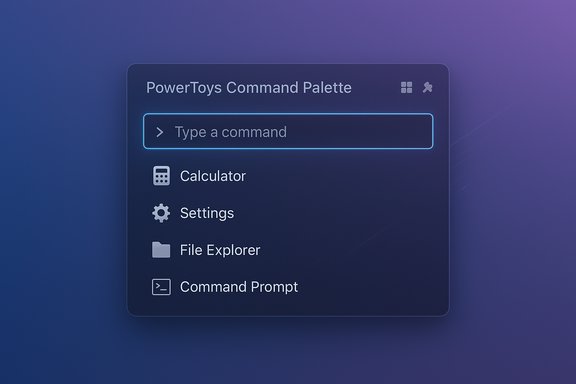
Microsoft's PowerToys has quietly delivered one of the most persuasive arguments yet that the traditional Start menu and Windows Search are overdue for a rethink: the new Command Palette is faster, cleaner, and far more extensible than the built‑in search box — and for many everyday workflows it already outperforms Windows Search.
Windows has long offered multiple entry points for “find and launch” tasks — the Start menu, the taskbar search box, Cortana in earlier years, and the indexing subsystem running in the background. Over time those components accumulated features: web results, suggestions, online content, and telemetry-driven prompts. The result is a general‑purpose portal that can be useful for casual users but is often noisy and slow for keyboard‑centric workflows.
PowerToys, Microsoft’s official open‑source utility suite, has been serving as a fast iteration surface for features that could one day be part of Windows. The Command Palette is the latest and most focused product of that incubation: a compact, keyboard‑first launcher that prioritizes speed, local-first results, and plugin‑style extensibility. Independent coverage and change logs show that Microsoft has been investing heavily in this module — polishing fuzzy matching, improving performance, and adding new personalization and extension plumbing.
The real story is not whether Command Palette kills Windows Search; it’s that Microsoft has invested in a feature that power users actually want to use. If the company treats it with stewardship — an official extension store, enterprise controls, robust QA, and a considered indexer strategy — Command Palette could legitimately graduate from PowerToys novelty to core Windows productivity infrastructure. Until then, it remains one of the fastest, most useful productivity upgrades an experienced Windows user can install.
Source: Neowin https://www.neowin.net/news/closer-look-command-palette-in-powertoys-puts-windows-search-to-shame/
 Background
Windows has long offered multiple entry points for “find and launch” tasks — the Start menu, the taskbar search box, Cortana in earlier years, and the indexing subsystem running in the background. Over time those components accumulated features: web results, suggestions, online content, and telemetry-driven prompts. The result is a general‑purpose portal that can be useful for casual users but is often noisy and slow for keyboard‑centric workflows.PowerToys, Microsoft’s official open‑source utility suite, has been serving as a fast iteration surface for features that could one day be part of Windows. The Command Palette is the latest and most focused product of that incubation: a compact, keyboard‑first launcher that prioritizes speed, local-first results, and plugin‑style extensibility. Independent coverage and change logs show that Microsoft has been investing heavily in this module — polishing fuzzy matching, improving performance, and adding new personalization and extension plumbing.
What the Command Palette is — and what it isn’t
A concise definition
The Command Palette is PowerToys’ modern replacement for the older PowerToys Run launcher. It surfaces with a single hotkey (default: Win + Alt + Space, configurable) and offers a small, centered prompt for:- launching applications and files,
- switching windows,
- running shell commands,
- performing quick calculations and unit conversions,
- invoking Windows Settings pages,
- integrating with winget and other system utilities,
- and hosting plugin extensions (clipboard history, bookmarks, custom actions).
What it does not (yet) replace
The Command Palette is designed as a command surface, not a full replacement for enterprise‑grade indexing engines. For many day‑to‑day tasks — launching apps, executing short commands, performing quick math, or opening a particular settings page — it’s dramatically faster than the Start menu. However, for large‑scale, filesystem‑wide filename searches measured in milliseconds across tens or hundreds of thousands of files, specialized indexers such as Everything still hold the edge. Command Palette’s file lookups in some cases still depend on the system indexing pipeline or third‑party indexers to achieve the same millisecond responsiveness. That nuance is important: the claim that Command Palette “makes Windows Search irrelevant” is overstated if your usage requires extreme, index‑level performance.Key features and day‑to‑day benefits
Speed and flow
Command Palette is optimized for keyboard flow. The launcher opens instantly with the hotkey and uses a tuned fuzzy matcher to surface likely results without filtering through web suggestions or ads. For users who live on the keyboard — developers, sysadmins, and power users — that reduced friction is a measurable productivity gain. The interface is intentionally minimal to keep you in flow and minimize cognitive overhead.Tokens and quick modes
The palette supports prefixes and tokens to switch modes quickly:-
(greater‑than) to run shell commands,
- $ (dollar) to jump to Windows Settings pages,
- ? (question mark) to bias toward file and folder lookups,
- = (equals) for calculator mode.
Built‑in utilities that matter
Out of the box, Command Palette bundles useful capabilities that make it more than a program launcher:- Window switching (incorporating Window Walker functionality),
- Inline calculations and unit conversions,
- Winget integration for searching and installing packages,
- Shell/terminal invocation with argument passing,
- Bookmarks and quick actions,
- Clipboard history via extensions,
- File and folder launching with contextual actions like “open containing folder.”
Extensibility
The plugin model is central: Command Palette is evolving into a platform where discrete pieces of functionality can be added without bloating the core. That means teams and individuals can install only what they need (package manager integrations, OCR snippets, custom scripts), which keeps the core experience fast while enabling deep customization. Multiple independent reports and the project’s release notes show a strong focus on extension plumbing and metadata improvements (for example, richer clipboard metadata for image clips).How it compares to Windows Search and third‑party launchers
Windows Search — breadth vs. focus
Windows Search is built to serve a broad audience and a broad set of scenarios — from searching web results to enterprise content. That breadth introduces latency, web results, and surface area that can distract keyboard‑first workflows. Command Palette intentionally chooses a different trade‑off: local‑first, keyboard‑first, minimal UI, and no ads. For many daily tasks this design is objectively superior, but for scenarios that require deep indexed search across massive datasets, Windows Search (with its integrated indexer or enterprise solutions) and dedicated tools still have a role.Everything and other dedicated indexers
Everything is the most frequently recommended tool for file name lookups because it maintains an in‑memory database that returns results in milliseconds. Many launchers, including Flow Launcher and Wox, integrate with Everything to provide near‑instant filename queries. Command Palette can play nicely in this mix: use Everything for millisecond filename lookups and Command Palette for the broader command and launcher surface. That hybrid strategy often delivers the best of both worlds.Third‑party launchers (Raycast, Flow Launcher, Wox)
Third‑party launchers often prioritize extensibility and plugin ecosystems earlier and more aggressively than PowerToys. Raycast (macOS), Flow Launcher, and Wox are examples of projects that offer deep plugin libraries and highly customizable behavior. The advantage Command Palette brings is first‑party trust, easier discovery through official channels, and tighter Windows integration — which matters for enterprise rollout and consistency. However, third‑party launchers may still provide richer or more specialized plugin markets for certain workflows.Technical and operational caveats
Indexer reliance
While Command Palette improves result latency and matching logic, it does not, by default, replace the underlying indexing architecture for every scenario. Some file lookups still rely on Windows’ indexing pipeline, and achieving Everything‑like speeds requires a dedicated indexer to be present and running. If Microsoft were to bake a high‑performance indexer into Command Palette, that would close a gap — but it would also introduce new tradeoffs around privacy, telemetry, CPU usage, and battery life. For enterprise environments, that trade‑off must be carefully managed and opt‑in controls would be essential.Extension security and governance
The plugin model is a double‑edged sword: it brings power and flexibility, but it expands the attack surface. Enterprises and security teams will want:- an official extension store,
- signing and vetting policies,
- the ability to whitelist/blacklist extensions via Group Policy or Intune,
- controls on which plugins can access network resources or run elevated commands.
Hotkey conflicts and accessibility
Global hotkeys are convenient but can conflict with IMEs, other launchers, or assistive technologies. PowerToys includes conflict detection, but admins and users should test hotkeys during rollout. Accessibility testing (screen readers, keyboard navigation) must also be prioritized to ensure the palette is genuinely usable by everyone. Historically, some PowerToys shortcuts have interfered with other apps, which is solvable but requires attention.Installer, deployment, and enterprise readiness
PowerToys releases are frequent and iterative. Recent updates have included installer infrastructure changes (for example, migration to newer WiX versions) and logging improvements designed to ease enterprise deployment. Nonetheless, IT teams should pilot new PowerToys releases and verify behavior against corporate baselines before broad rollout. The PowerToys team recommends official distribution channels (GitHub Releases, Microsoft Store, winget) and verification of checksums for any managed installs.A pragmatic roadmap for a built‑in Command Palette
If Microsoft were to fold Command Palette into Windows itself, a sensible, risk‑managed path looks like this:- Ship Command Palette as an optional, on‑by‑default feature that can be toggled by admins (Group Policy / Intune).
- Provide an official extension store and signing model to reduce supply‑chain risk and support curated enterprise catalogs.
- Offer policy controls for extension behaviors (network use, elevation, telemetry), and hotkey management to resolve conflicts automatically where possible.
- Expose an interoperability layer with external indexers such as Everything or Fluent Search, and provide an optional native high‑performance indexer for customers who require it.
- Invest in accessibility and QA specifically for systemwide integration scenarios; treat the launcher as an OS surface with the same QA guarantees expected of core Windows features.
Practical advice: how to adopt Command Palette today
- Install PowerToys from an official channel (Microsoft Store, GitHub Releases, or winget). Use the documented winget identifier to script installs if needed.
- Start with a small set of modules enabled (Command Palette, FancyZones, Text Extractor) to reduce background footprint.
- Rebind the hotkey if you have conflicts with existing shortcuts or language IME toggles.
- If you need millisecond file name lookups, pair Command Palette with Everything and configure the palette’s Files plugin to use Everything.
- For enterprise deployments, pilot on a test cohort, create an approved extension list, and document a rollback plan (uninstall or revert to a previous MSI).
Strengths, risks, and the long view — critical analysis
Strengths
- Speed and ergonomics: For many daily tasks, Command Palette meaningfully reduces context switches and keystrokes.
- Extensibility: The plugin model transforms a simple launcher into a flexible workflow engine.
- First‑party trust: Microsoft backing reduces friction for enterprise adoption versus unknown third‑party launchers.
- Low visual noise: The focus on a compact, keyboard‑first UI avoids the distractions found in web‑integrated search front ends.
Risks
- Indexer and scale: Command Palette currently doesn’t fully replace specialized file indexers for massive datasets.
- Extension governance: Without an official extension store and signing, the plugin ecosystem could create supply‑chain and security concerns.
- Integration churn: Moving a fast‑moving open‑source project into the stable OS release cadence requires balancing innovation with enterprise stability expectations.
Verdict
For everyday keyboard‑centric workflows — app launching, quick commands, window switching, inline calculations, and package installation — Command Palette is already a superior alternative to the Start menu and Windows Search front end. The bold claim that it renders Windows Search irrelevant is too broad; however, the more defensible statement is that for the majority of daily productivity interactions that power users care about, Command Palette is better. For comprehensive file indexing at massive scale, specialized indexers still lead. The sensible path for Microsoft is to treat it as a first‑class OS feature while investing in extension governance, indexer strategy, and enterprise controls.Flagging unverifiable or uncertain claims
- Some enthusiastic headlines assert that Command Palette “makes Windows Search irrelevant” across all scenarios — that overreaches. The available release notes and coverage show decisive wins in many daily workflows but do not show a universal, one‑size‑fits‑all replacement for indexing engines like Everything. Treat absolute replacement claims with caution.
- Reports of new personalization features (tilt, blur, background image for the palette) and a future PowerDisplay/monitor control module are present in developer activity and pull requests; these are credible but still subject to change until shipped in a stable release. Pilot and verify on test systems before assuming they will match early previews exactly.
Conclusion
PowerToys’ Command Palette is a clear, practical answer to long‑standing friction in how people search, launch, and run small commands in Windows. It restores the keyboard‑first fluency that many users crave and ties together a set of micro‑utilities into a compact, extensible surface. For most daily productivity tasks it outperforms the Start menu and Windows Search front end; for extreme, enterprise‑scale file indexing, the best approach remains a hybrid — pair Command Palette with a dedicated indexer such as Everything, or wait for a managed, OS‑level indexer integration.The real story is not whether Command Palette kills Windows Search; it’s that Microsoft has invested in a feature that power users actually want to use. If the company treats it with stewardship — an official extension store, enterprise controls, robust QA, and a considered indexer strategy — Command Palette could legitimately graduate from PowerToys novelty to core Windows productivity infrastructure. Until then, it remains one of the fastest, most useful productivity upgrades an experienced Windows user can install.
Source: Neowin https://www.neowin.net/news/closer-look-command-palette-in-powertoys-puts-windows-search-to-shame/
