
Microsoft’s PowerToys continues to evolve beyond a grab-bag of power-user niceties into a serious productivity layer for Windows 11, with recent updates delivering substantive feature upgrades that matter in daily workflows: multi‑provider AI paste support in Advanced Paste, richer search and performance work in the Command Palette, photo‑aware batch renaming in PowerRename, and a string of usability and accessibility improvements across the suite. These changes arrived as part of the late‑2025 PowerToys releases and are now rolling out to users via the usual channels — GitHub, Microsoft Store, and winget — bringing both practical gains and a new set of tradeoffs administrators and privacy‑minded users should weigh.
PowerToys is Microsoft’s open‑source toolkit for Windows power users: a modular set of utilities that sit on top of Windows to add features not included in the base OS. Over the past few years PowerToys has matured from a handful of convenience tools into a well‑engineered platform where Microsoft prototypes productivity ideas that sometimes migrate into core Windows. The project ships monthly-ish releases and publishes full release notes on GitHub, which makes it straightforward to confirm what changed and when. What’s notable about the latest wave of updates is not just incremental polish but targeted expansions that touch both the UI and the data layer: advanced clipboard formatting that can now call multiple AI providers, a command launcher (the Command Palette) that’s been reworked for speed and extensibility, and renaming tools that can read camera metadata to automate file naming for photo libraries. Those are functional changes with immediate usefulness to creators, IT pros, and power users alike.
PowerToys’ latest updates deliver a clear set of productivity upgrades that are more than cosmetic; they push the suite toward becoming an integrated productivity layer that can adapt to both cloud and local AI models while improving speed and discoverability across the desktop. The technical changes are verifiable in the official GitHub release notes and confirmed by multiple independent outlets reporting on the Command Palette and Advanced Paste advancements. Deploy thoughtfully: these are practical, visible gains — but they come with governance and security considerations that should be handled deliberately in managed environments. Conclusion
PowerToys remains one of the best productivity investments for Windows 11 power users. The recent feature set advances — multi‑provider Advanced Paste, Command Palette performance and metadata enhancements, and PowerRename’s photo metadata support — are practical, impactful, and engineered with real workflows in mind. They represent a meaningful step in PowerToys’ evolution from a collection of handy utilities into a coherent productivity platform; just be mindful of data flows when enabling AI features and test updates in controlled environments before wide deployment.
Source: Neowin https://www.neowin.net/news/some-of...indows-11-are-getting-important-new-features/
 Background
PowerToys is Microsoft’s open‑source toolkit for Windows power users: a modular set of utilities that sit on top of Windows to add features not included in the base OS. Over the past few years PowerToys has matured from a handful of convenience tools into a well‑engineered platform where Microsoft prototypes productivity ideas that sometimes migrate into core Windows. The project ships monthly-ish releases and publishes full release notes on GitHub, which makes it straightforward to confirm what changed and when. What’s notable about the latest wave of updates is not just incremental polish but targeted expansions that touch both the UI and the data layer: advanced clipboard formatting that can now call multiple AI providers, a command launcher (the Command Palette) that’s been reworked for speed and extensibility, and renaming tools that can read camera metadata to automate file naming for photo libraries. Those are functional changes with immediate usefulness to creators, IT pros, and power users alike. What changed — the headline features
Advanced Paste: multi‑provider AI and local model support
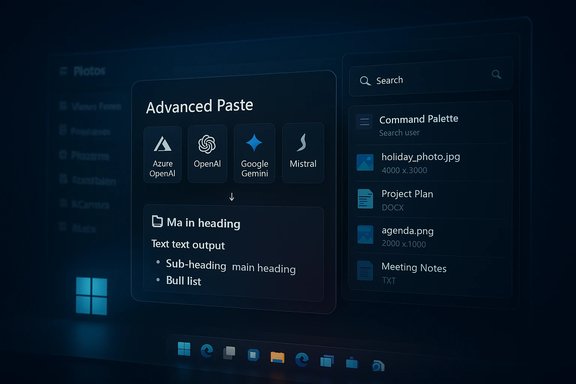
One of the biggest functional upgrades is to Advanced Paste, PowerToys’ clipboard formatting tool. Rather than being limited to a single cloud provider, Advanced Paste now supports connecting to multiple AI backends — Azure OpenAI, OpenAI, Google Gemini, Mistral, Foundry Local and Ollama — and it supports both online and on‑device models where available. This turns Advanced Paste from a plain “strip formatting / paste as Markdown” helper into a small, extensible text‑transformation pipeline that can apply model‑driven rewrites, summarization, or formatting of copied content. Why this matters: users who copy text from web pages, PDFs, or screenshots can now paste cleaned, summarized, or formatted content in one keystroke. The addition of on‑device providers (Foundry Local, Ollama) is particularly important for scenarios where sending sensitive text to the cloud is unacceptable. That said, connecting to cloud APIs still requires credentials (API keys) and will transmit data outside the device unless you configure otherwise — a key privacy consideration covered in the analysis section below.Command Palette: speed, metadata and extensibility
PowerToys’ Command Palette — the successor and expansion of PowerToys Run — received a substantial engineering overhaul focused on performance and developer‑facing extensibility. The release notes call out a new fuzzy matcher, Ahead‑of‑Time (AOT) compilation for extensions, dramatically faster startup and smaller install size, and richer clipboard‑item metadata (image dimensions, file names, titles) that make search results more useful at a glance. Those changes reduce memory footprint and improve perceived responsiveness, bringing the launcher closer to the polished experience of Spotlight or similar macOS tools. Practical outcomes include faster file searches, more meaningful clipboard history entries, and an improved extension API that simplifies third‑party integrations (for example, adding a custom web search provider or installer integration). The Command Palette also gained UI improvements — context menu styling, keyboard shortcuts for pinned items, and accessibility fixes — elevating it from a developer toy to a general‑purpose productivity hub.PowerRename: photo metadata (EXIF/XMP) in renaming rules
Photographers and anyone managing large photo collections get a significant productivity gain: PowerRename can now read photo metadata (EXIF and XMP) and use those fields in renaming patterns — think patterns like %Camera, %Lens, or %ExposureTime. That lets you automate descriptive filenames (e.g., 2025‑10‑05_SonyA7R5_35mm_f2.8.jpg) without manually inspecting files. This feature surfaces in the release notes and is a classic example of PowerToys addressing a real, repetitive pain point for creators.Minor but practical upgrades across the suite
Several smaller but widely useful changes landed in the same releases:- Light Switch: a new utility to automatically toggle Windows light/dark mode on a schedule or at sunset/sunrise.
- Peek: can be activated with the Space bar for instant file previews.
- Image Resizer: localization fixes and improved stability.
- Mouse utilities: new spotlight modes, gliding cursor, and accessibility enhancements.
- Settings improvements: ability to delete shortcuts entirely, ignore conflicts, and toggle the system tray icon.
How to get the updates and what to check before installing
- Check your installed PowerToys version in the app Settings; releases in late 2025 were published as v0.95 / v0.96 depending on channel and build. Confirm which build you have.
- Install or update via one of three supported routes:
- Microsoft Store (auto‑update friendly)
- GitHub releases (manual installers / MSIX / MSI)
- winget (suitable for scripted deployments) — winget commands are commonly documented and supported in release notes.
- Review enabled modules after updating; PowerToys is modular — only turn on what you need to limit hooks into keyboard, clipboard, or window events.
- For Advanced Paste: configure provider credentials carefully. Use local / on‑device providers if you must avoid sending clipboard text to the cloud.
Deep dive: benefits and real‑world use cases
Productivity wins that compound
- FancyZones, Command Palette, and PowerRename address different layers of a typical workflow: window arrangement, quick access and search, and file management. Each saves seconds per operation; for heavy users these seconds become measurable time reclaimed per day. Community reports and user tests consistently show FancyZones and the launcher tools yield outsized ROI in multitasking and developer workflows.
- Advanced Paste turns clipboard operations into transformation steps. For example: copy a messy email thread, hit Advanced Paste to strip signatures and format as Markdown, and paste clean content into documentation or your task tracker. That pattern replaces a multi‑step manual cleanup with a single, repeatable action.
Creators and administrators
- If you manage photo archives, PowerRename’s metadata tokens let you standardize naming for archiving and search without a heavy DAM tool.
- IT administrators and power users can script installation via winget and control which modules are enabled, making PowerToys easier to audit and deploy in managed environments.
Risks, caveats and mitigations
Privacy and data leakage with AI providers
Advanced Paste’s new multi‑provider support is powerful, but it raises immediate privacy and compliance considerations.- Using cloud providers (OpenAI, Azure OpenAI, Google Gemini) will send copied text to those services. That may violate internal data policies if clipboard contents include customer data, credentials, or PII.
- On‑device providers (Foundry Local, Ollama) mitigate leakage but require local model installation and enough disk/compute resources to run models. These provide a safer alternative for sensitive workflows.
- Prefer on‑device providers for regulated data.
- Restrict Advanced Paste usage via policy or by disabling the module in managed deployments.
- Educate users that clipboard content may be transmitted and require them to avoid copying sensitive materials before using AI transformations.
Security posture: low‑level hooks and enterprise detection
PowerToys achieves functionality by registering global hooks (keyboard, clipboard, window management). In some environments, endpoint detection and response tools may flag these hooks as suspicious.- Organizations with strict EDR or Application Control policies should test PowerToys in a staging environment and use the modular approach to only enable safe features.
- Consider whitelisting the PowerToys installer hash or the binary path if deemed safe after review.
Release cadence and regressions
Open development plus frequent releases means PowerToys moves fast; that’s a strength and a risk. Users can expect rapid bug fixes but also occasional regressions. The team actively publishes release notes and fixes, and test coverage has increased in recent releases, but conservative organizations should delay updates by a release or two.Unproven or experimental features
Some items reported in community threads — such as prototypes for monitor control utilities or “PowerDisplay” that manage external monitor brightness via software — are experimental and not part of mainstream releases yet. Treat these as lab features until they appear in official GitHub release notes or stable builds.Hands‑on tips and configuration recommendations
- After upgrading, open PowerToys Settings → General and verify the version and update channel. Check the changelog summary shown in the Settings UI for quick context.
- Command Palette:
- Pin commonly used folders and apps to the palette for instant access.
- Toggle the “Clipboard History primary action” in settings to prefer Paste over Copy when reusing items.
- Advanced Paste:
- Choose your provider in Settings → Advanced Paste.
- For sensitive environments, select an on‑device provider or disable cloud access.
- Create a small test profile: copy a deliberately non‑sensitive chunk of text and test different transformations (strip formatting, markdown conversion, summarize).
- PowerRename:
- Try a dry run using the preview window before committing a mass rename.
- Combine EXIF tokens with date tokens (e.g., %DateTaken%Camera%Lens) to create searchable filenames.
- FancyZones:
- Save per‑monitor layouts and bind them to hotkeys or Workspaces to switch contexts quickly.
- For mixed‑DPI setups test zone spanning; consider per‑monitor layouts where DPI mismatch causes odd resizing.
Why this update matters for Windows 11 users
PowerToys has always been a productivity multiplier, but the recent updates mark a shift into higher‑value automation and cognitive assistance. Advanced Paste brings AI directly into a core desktop action — copying and pasting — which is a clever place to add value because it’s a near‑universal task. Command Palette’s performance and extension work positions PowerToys as a central keyboard‑first control surface for the OS. And photographic metadata in PowerRename solves a niche but time‑consuming problem for creators and archivists. At the same time, these additions raise governance questions: where should AI be allowed to touch end‑user data, and how should enterprise admins balance convenience against policy? The answer will depend on organizational risk tolerance, but PowerToys’ modular design and the addition of on‑device providers give teams options rather than forcing a single path.Final assessment — strengths and limitations
Strengths- High utility for power users: The combination of window management, fast launcher functionality, and file tools addresses common workflow pain points.
- Engineering focus on performance and extensibility: Command Palette’s AOT improvements and reduced memory usage make it more viable for everyday use.
- Flexible AI integration: Multi‑provider Advanced Paste plus on‑device options give choices for privacy and capability.
- Data leakage potential: Cloud AI providers will transmit clipboard contents off‑device; enterprises must enforce policy or use local providers.
- Potential for EDR/AV flagging: Global hooks can trigger security tools; test before broad rollout.
- Active release cadence: Frequent updates mean faster fixes but also occasional regressions; conservative users should delay one release cycle.
PowerToys’ latest updates deliver a clear set of productivity upgrades that are more than cosmetic; they push the suite toward becoming an integrated productivity layer that can adapt to both cloud and local AI models while improving speed and discoverability across the desktop. The technical changes are verifiable in the official GitHub release notes and confirmed by multiple independent outlets reporting on the Command Palette and Advanced Paste advancements. Deploy thoughtfully: these are practical, visible gains — but they come with governance and security considerations that should be handled deliberately in managed environments. Conclusion
PowerToys remains one of the best productivity investments for Windows 11 power users. The recent feature set advances — multi‑provider Advanced Paste, Command Palette performance and metadata enhancements, and PowerRename’s photo metadata support — are practical, impactful, and engineered with real workflows in mind. They represent a meaningful step in PowerToys’ evolution from a collection of handy utilities into a coherent productivity platform; just be mindful of data flows when enabling AI features and test updates in controlled environments before wide deployment.
Source: Neowin https://www.neowin.net/news/some-of...indows-11-are-getting-important-new-features/
