

Microsoft’s latest PowerToys release, v0.97.0, delivers a conspicuous mix of ergonomic polish and ambitious UI expansion: a brand-new mouse utility called CursorWrap that “teleports” the pointer across screen edges, and a sweeping overhaul of Command Palette that pushes the feature toward becoming a true control center for PowerToys. The update also widens command-line control across modules, brings a handful of thoughtful quality-of-life fixesxes, and continues the project’s ongoing refactor and telemetry work aimed at maintainability and usage insight.
PowerToys is Microsoft’s open-source toolkit of small utilities for power users and IT pros. It’s maintained in public on GitHub and updated on a rapid cadence, with each release pairing user-facing features and bug fixes with internal engineering changes such as build-tool updates, dependency bumps, and testing improvements. The v0.97.0 cycle centers on two high-impact surface areas: mouse ergonomics (CursorWrap) and the Command Palette ecosystem.
Source: gHacks Technology News Microsoft Releases PowerToys v0.97.0 With New CursorWrap Utility - gHacks Tech News
 Background
PowerToys is Microsoft’s open-source toolkit of small utilities for power users and IT pros. It’s maintained in public on GitHub and updated on a rapid cadence, with each release pairing user-facing features and bug fixes with internal engineering changes such as build-tool updates, dependency bumps, and testing improvements. The v0.97.0 cycle centers on two high-impact surface areas: mouse ergonomics (CursorWrap) and the Command Palette ecosystem. Overview of the v0.97.0 headline features
- CursorWrap — A new mouse utility that wraps the cursor at screen edges so moving off one edge places the cursor on the opposite edge. This is primarily targeted at multi-monitor and ultrawide monitor workflows.
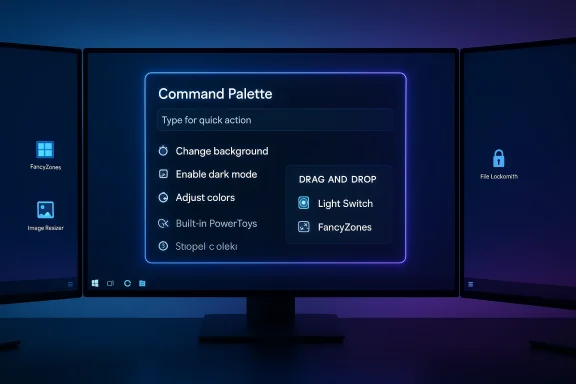
- Command Palette — Major expansion with UI personalization, improved ranking and result management, drag & drop, a Remote Desktop extension, and an embedded PowerToys extension to control light, FancyZones layouts, and other utilities without leaving the palette.
- Expanded CLI — New command-line interfaces for FancyZones, Image Resizer, File Locksmith (and earlier Peek additions), enabling scripted workflows and automation.
- Polish & refactor — Quick Access flyout detached from core settings process for speed, mixed-DPI fixes in FancyZones, telemetry additions, and ongoing module refactors such as Mouse Without Borders migration work.
CursorWrap: what it does, how it works, and why it matters
What CursorWrap is designed to solve
On modern desktops—especially ultrawide monitors and multi-monitor arrays—moving the mouse pointer from one side of your workspace to the other can be physically demanding or slow. CursorWrap solves this by letting the pointer “wrap” around display edges: pass the right-most edge and the cursor reappears at the left-most edge, and similarly for top/bottom edges. The effect reduces travel time and can make switching between distant windows feel almost instantaneous.Behaviors and configuration (what’s confirmed)
- CursorWrap wraps the cursor on all four axes (left/right and top/bottom) when enabled; it works with both multi-monitor configurations and large single displays.
- The PowerToys team explicitly improved CursorWrap’s multi-monitor behavior to wrap only at outer edges of a monitor layout, limiting unexpected teleports between adjacent internal monitor boundaries. That change reduces erroneous wrapping inside complex monitor grids.
Reported settings and UX controls (what to check after you update)
Multiple outlets and early changelog summaries indicate there are additional configuration options in the CursorWrap settings pane—including a keyboard shortcut to toggle CursorWrap on/off and a switch to disable wrapping while dragging items—but the product blog does not enumerate those individual toggles in full. Users should inspect the Mouse utilities → CursorWrap page in PowerToys settings after installing to confirm available options and keybindings on their system. Because the implementation is new and user experience edge cases (for example, web-browser tab flicks and laptop-clamshell transitions) are being actively reported, turning the feature on selectively and testing with your own workflow is advisable.Practical implications and early caveats
- Strengths: CursorWrap delivers a genuine productivity win for users with long horizontal or vertical pointer journeys. For many, it will feel like drastically less “travel time” and fewer hand movements.
- Risks and friction: The wrap behavior can produce undesired teleports—particularly when users throw the cursor to hit browser tabs, the taskbar, or other UI elements at an edge. Early user reports and international tech coverage highlight scenarios where top/bottom wrapping may interfere with precise UI interactions. The outer-edge-only improvement reduces but does not eliminate these cases. Administrators planning rollouts should test CursorWrap in their multi-monitor setups before mass deployment.
Command Palette: from launcher to control surface
What changed
Command Palette has received one of the most significant overhauls in recent PowerToys history. The update emphasizes:- Personalization: background image selection and color tints to make the palette visually customizable.
- Result ranking control: a fallback ranking UI that allows users to manage ordering when multiple extensions or commands produce overlapping results.
- Built-in PowerToys extension: toggle and control many PowerToys utilities (Light Switch, FancyZones layouts, color pickers, etc. directly from the palette. This reduces context switching and positions the palette as a centralized control surface.
- Drag & drop: file indexer and clipboard history items can now be dragged from Command Palette into other apps, and extension authors can implement drag-and-drop for their own extensions.
Why this matters
Command Palette’s expansion shifts it from a quick launcher into something approaching a mini-control hub. For keyboard-centric users and those who favor rapid, command-based workflows (developers, sysadmins, and power users), this reduces friction: fewer clicks, fewer context switches, and more customizable behavior. The addition of built-in PowerToys control means administrators and advanced users can script or macro the palette to accelerate repetitive tasks.Accessibility and performance
Microsoft reports improvements to Command Palette’s performance and accessibility, including changes to result ranking and a move to more robust packaging for extensions. The team also bumped the extension SDK and improved AOT (Ahead-of-Time) compatibility for first-party extensions—changes intended to reduce startup time and memory usage for the palette. Users who rely on Command Palette should notice smoother behavior and more predictable results.Automation, scripting, and enterprise considerations
CLI expansion
PowerToys continues to add command-line control across the suite. In v0.97.0, FancyZones, Image Resizer, and File Locksmith gain CLI entry points—enabling automation for layout switching, batch image resizing, and file-unlock operations. For IT teams and power users, that makes PowerToys more amenable to scripted workflows, environment provisioning, and integration into deployment or testing pipelines.Installer and packaging improvements
Alongside feature work, the team updated build tooling and tested one-step local build scripts that generate signed installers. These updates reduce friction for developers building PowerToys locally and help administrators verify installation artifacts. There are also published installer hashes for secure installs. These are important improvements for organizations that vet packages before internal distribution.Additional notable changes and bug fixes
- Crop & Lock: added a screenshot-freezing mode that can freeze a cropped region in its own window—handy for presentations, screenshots, and annotation workflows.
- Find My Mouse: visual rendering improvements and telemetry hooks to better understand trigger usage.
- FancyZones: mixed-DPI positioning fixes and a new CLI for layout management. This addresses a frequent pain point for hybrid displays and docking station scenarios.
- Refactors: modules like Mouse Without Borders are being refactored for long-term maintainability; PowerToys continues to add telemetry to measure feature adoption and to prioritize engineering work.
Strengths: where v0.97.0 really shines
- High-impact ergonomics: CursorWrap targets a real, recurring productivity friction for multi-monitor and ultrawide users. When it works for a given workflow, it saves time and reduces physical strain.
- Command Palette maturation: The palette’s move toward a control surface, with personalization and fallback ranking, is a major usability step—this both reduces context switching and makes PowerToys more extensible.
- Scriptability: Expanded CLI support is a practical win for automation, testing, and enterprise deployments. This turns PowerToys from a personal toolkit into an automation-friendly component of enterprise desktop tooling.
- Quality-of-life and maintenance: The detached Quick Access flyout, mixed-DPI fixes, and the continued refactor of legacy modules demonstrate a focus on stability and long-term engineering health.
Risks, unknowns, and deployment guidance
- Edge-case UX friction with CursorWrap: The same mechanism that accelerates movement can cause mis-clicks and unexpected teleports—especially with top-edge gestures to browser tabs, or in clamshell/docking transitions. Test CursorWrap in representative user setups before enabling it widely. Also, check the settings for drag-disable options and keyboard toggles (reported but not exhaustively documented in the official release notes).
- Telemetry and privacy: PowerToys continues to add telemetry hooks to better understand usage. Organizations with strict telemetry policies should audit PowerToys’ data collection and consider configuring or blocking telemetry as part of their deployment process. Microsoft documents PowerToys’ telemetry, but the precise set of events added in each release should be reviewed by privacy-conscious teams.
- Stability in early adopters’ environments: Historically, major Command Palette changes have been the source of early edge-case bugs on some Windows builds. While the team has patched many issues, administrators should wait at least one minor point release or pilot the update with a small group before deploying broadly.
How to approach updating and testing PowerToys 0.97.0
- Back up current PowerToys settings (the settings JSON in your AppData profile) before upgrading. This makes it easy to revert or reapply preferred configurations.
- Install v0.97.0 through the built-in updater or download the installer from the official release page; verify installer hashes if your organization requires artifact signing verification.
- In a pilot group, focus testing on:
- Multi-monitor layouts (mixed DPI, rotated displays, docking/undocking behaviors).
- CursorWrap usability scenarios (drag & drop, browser tab selection, remote desktop sessions).
- Command Palette extensions and any internal automation that relies on the palette’s behavior.
- Review telemetry settings and documentation, and apply organizational telemetry policies as needed.
Verification & fact-checking notes
- The feature list and developer commentary referenced here are drawn from the official PowerToys release post authored by the PowerToys team, published on Microsoft’s Windows Command Line blog on January 20, 2026, and the corresponding GitHub release notes. These are the authoritative sources for what the team shipped in v0.97.0.
- Independent coverage from reputable technology outlets confirms the major additions (CursorWrap, Command Palette enhancements, CLI expansion) and reports on UX tradeoffs observed by early hands-on testers. Because some outlets also mention user-facing configuration toggles (keyboard toggle, “disable while dragging”), readers are advised to confirm the exact controls in their installed PowerToys settings, as the primary release blog does not itemize every control. Where multiple secondary outlets reported configuration options not enumerated in the main blog, those claims are flagged here as reported by press but recommended for direct verification in the app settings.
Verdict: who should install and when
- Power users with complex monitor setups and keyboard-first workflows should install or pilot v0.97.0 promptly to benefit from CursorWrap and the Command Palette improvements. These features can materially reduce friction.
- Administrators and enterprise IT teams should pilot the release with a small group first, validate CursorWrap behavior across the target hardware matrix (docking, mixed DPI, clamshell), and review telemetry and installer verification steps before mass deployment.
- Users who rely on precise edge interactions (e.g., heavy browser-tab usage, stylus-driven workflows, or remote-control sessions) should enable CursorWrap selectively and evaluate whether the feature helps or hinders their day-to-day tasks.
Final thoughts
PowerToys v0.97.0 continues the project’s pattern of shipping pragmatic, community-driven enhancements that amplify Windows productivity. CursorWrap is a clever, tactile improvement that addresses a persistent pain point for many modern desktop users, albeit with UX tradeoffs that warrant cautious testing. The Command Palette expansion moves PowerToys further down the path of becoming a unified control surface, improving extensibility and lowering the friction of desktop management. Together with the increased CLI reach and ongoing engineering refactors, v0.97.0 is both a practical upgrade for end users and a meaningful step in PowerToys’ evolution as a more automatable, maintainable toolkit. Users and administrators should evaluate the new capabilities against their own workflows and deployment policies, verify configurable options in the settings UI, and pilot before widescale adoption.Source: gHacks Technology News Microsoft Releases PowerToys v0.97.0 With New CursorWrap Utility - gHacks Tech News
