

When manufacturers once packed new Windows laptops with trial antivirus, toolbars, and a garden of “helpful” utilities, users learned a simple rule: uninstall first, ask questions later. The AI era is complicating that instinct. Recent reporting suggests PC makers — and a new generation of on-device AI startups — are betting that some of the software that arrives on your machine will be valuable enough that you’ll keep it. That shift matters for Windows users, OEMs, and the broader AI ecosystem: it reshapes the debate over preinstalled software from nuisance-versus-privacy into one about utility, control, and vendor lock‑in. /aifund.ai/portfolio/irisgo/)
In the 2010s and early 2020s, “bloatware” became shorthand for publisher-funded preloads that squeezed storage, triggered nags for subscriptions, or quietly ran background tasks that drained battery and CPU. For many users, the answer was simple: wipe and reinstall a clean Windows image, or remove the offending apps one by one. The pain point was not just performance — it was control. Users felt they didn’t ownience.
Fast forward to 2026. Two converging forces change the calculus:
IrisGo’s demos include:
This matters for readers because startups often overstate or accelerate partnership narratives during early commercial conversations. Public OEM preinstall deals — the type that commit thousands or millions of devices to ship with a bundled agent — usually appear in formal press releases from the OEM. At time of writing, IrisGo’s narrative is corroborated by investor and founder posts and press writeups, but large‑scale, confirmed device‑ship commitments from vendors like Acer are still limited in public documentation. Treat any single claim as provisional until confirmed by the OEM or by a widely trusted outlet.
But there’s nuance. OEMs increasingly ship machines as “Copilot+” Windows devices — meaning Microsoft’s own assistant is a first‑party, tightly integrated option. For an OEM to preinstall a third‑party assistant and expect users to keep it, the third party must deliver value where Microsoft’s Copilot either can’t or won’t — for example, deep local automation that taps into non‑Microsoft apps and private files without routing data to the cloud. That’s IrisGo’s exact pitch, but it’s also a difficult engineering and trust problem. The UX must be nearly flawless: an inconvenient or intrusive assistant will be uninstalled before it can show value.
Key considerations for consumers:
Keep an eye on three signals over the coming 12–18 months:
Conclusion
The “bloatware” era taught a generation of Windows users that preinstalled software is often a liability. The AI era offers a new possibility: that some preinstalled agents will be worth keeping. Startups like IrisGo are building that promise; OEMs and nations are testing whether the model scales; and industrial investments are underwriting the hardware backbone. The difference between nuisance and necessity will be set by product quality, transparency, and user control. For Windows enthusiasts, the sensible posture is cautious optimism: test the new assistants, demand transparency, and keep the uninstall option close at hand.
Source: Tech in Asia https://www.techinasia.com/bloatware/
 Background
In the 2010s and early 2020s, “bloatware” became shorthand for publisher-funded preloads that squeezed storage, triggered nags for subscriptions, or quietly ran background tasks that drained battery and CPU. For many users, the answer was simple: wipe and reinstall a clean Windows image, or remove the offending apps one by one. The pain point was not just performance — it was control. Users felt they didn’t ownience.Fast forward to 2026. Two converging forces change the calculus:
- The arrival of capable on-device and on‑PC AI experiences (Copilot in Windows, hardware NPUs, local LLM runtimes) means preinstalled services can offer immediate and tangible productivity gains.
- OEMs and startups see the same trend as a commercial opportunity to differentiate hardware, deliver privacy‑friendly on‑device AI, and — candidly — create new channels for monetization and partnerships.
IrisGo, the “AI butler” aiming to live on your desktop
What IrisGo claims to do
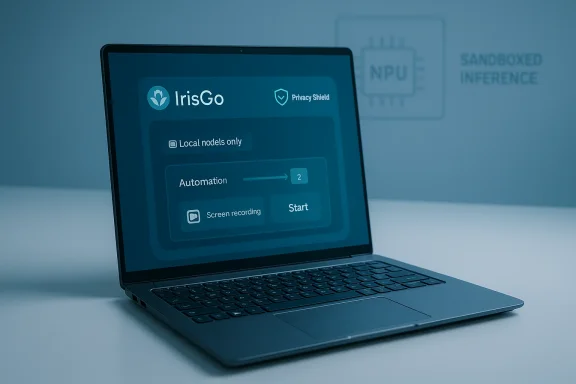
IrisGo, a Palo Alto startup led by Jeffrey Lai (an ex‑Siri engineer), positions itself as an on‑device, context‑aware “AI butler” for Windows PCs. Its pitch is deliberately different from a cloud-centric Copilot: IrisGo emphasizes local models, the ability to watch and learn from user actions (screen recordings to teach automations), and fine‑grained control over workflows outside Microsoft 365. AI Fund — Andrew Ng’s venture vehicle — has publicly showcased IrisGo in its portfolio, and the founders publicly highlight partnerships with chip vendors and PC partners to preinstall IrisGo on OEM devices.IrisGo’s demos include:
- Screen recording plus “watch-and-learn” automation that mimics a user’s sequence of clicks and keystrokes.
- Local document summarization and file querying using on‑device models.
- Mouse and keyboard control for automated workflows (scheduling repetitive tasks without explicit prompts).
Funding, partnership claims, and reality check
Some outlets and industry newsletters report that IrisGo’s early financing includes a seed round of around US$2.8 million and close involvement from AI Fund and other investors. AI Fund’s public portfolio page and LinkedIn posts confirm the organization’s early support for the company and that co‑founders joined AI Fund’s studio or Founders‑in‑Residence programs. However, public filings and mainstream press articles about IrisGo’s precise round size are sparse or inconsistent, and independent coverage varies by report. In short: IrisGo is real, well‑connected, and building fast — but the exact funding numbers and firm OEM commitments are still best treated as evolving.This matters for readers because startups often overstate or accelerate partnership narratives during early commercial conversations. Public OEM preinstall deals — the type that commit thousands or millions of devices to ship with a bundled agent — usually appear in formal press releases from the OEM. At time of writing, IrisGo’s narrative is corroborated by investor and founder posts and press writeups, but large‑scale, confirmed device‑ship commitments from vendors like Acer are still limited in public documentation. Treat any single claim as provisional until confirmed by the OEM or by a widely trusted outlet.
Why OEM preinstalls are appealing — and risky — for an AI assistant
Benefits:- Immediate reach. Preinstallation bypasses discoverability problems for software startups; every device shipped is a potential user.
- Onboarded context. An on‑device agent can access local files and app context (with permission) to provide more helpful, personalized assistance.
- Offline functionality & privacy. Keeping models and inference local can reduce latency and address corporate privacy concerns.
- User backlash. Decades of bad bloatware experiences make consumers suspicious; a poorly behaved agent could be removed, disabled, or worse, harm brand trust.
- Data & security. Local automation that records screen interactions must be engineered to avoid leaking credentials or sensitive content, and it must robustly sandbox actions across apps.
- Competition with platform incumbents. Microsoft’s Copilot and preinstalled Microsoft services already enjoy deep OS integration. Startups must find use-cases that materially improve on those experiences without becoming redundant. (theinformation.com)
Acer and the “preinstalled but useful” experiment
Acer’s recent push into Copilot+ PCs and a flurry of AI‑ready hardware announcements over the last two years show the company is serious about building AI experiences into hardware. Acer’s Copilot+ portfolio is broad, spanning thin‑and‑light Swift devices to Aspire AI machines; many of those models include NPUs and other silicon designed to accelerate local inference workloads. Against that backdrop, the possibility of OEMs testing third‑party butlers or assistants on their devices fits logically with their product strategy: offering unique preloaded value on top of Windows and Copilot.But there’s nuance. OEMs increasingly ship machines as “Copilot+” Windows devices — meaning Microsoft’s own assistant is a first‑party, tightly integrated option. For an OEM to preinstall a third‑party assistant and expect users to keep it, the third party must deliver value where Microsoft’s Copilot either can’t or won’t — for example, deep local automation that taps into non‑Microsoft apps and private files without routing data to the cloud. That’s IrisGo’s exact pitch, but it’s also a difficult engineering and trust problem. The UX must be nearly flawless: an inconvenient or intrusive assistant will be uninstalled before it can show value.
Singapore’s S$1 billion (≈US$786 million) public AI research pledge: what it buys — and what it doesn’t
Singapore recently announced a plan to invest more than S$1 billion across 2025–2030 into public AI research under the National AI Research and Development Plan (NAIRD). The program is explicitly targeted at three priorities: fundamental AI research (resource‑efficient algorithms, responsible AI), applied AI for industry adoption, and talent development from pre‑university to faculty levels. The announcement was made at Singapore AI Research Week and positions the funding as a follow‑on to earlier investments in AI research infrastructure.Putting the number in context
US$786 million spread over six years is notable for a city‑state, but it is not “scale” money by global tech industry standards. For comparison, a single large private AI company can spend multiple billions per year on cloud compute and engineering; public press coverage of hyperscalers’ cloud rent and AI compute commitments runs to the multibillion range annually. Singapore’s approach is deliberately public‑research‑focused, prioritizing responsible AI and local talent and aiming to seed centers of excellence and industry adoption programs rather than competing toe‑to‑toe with the deep pockets of major US or Chinese tech firms. That is a defensible strategy for an economy of Singapore’s size, but it means outcomes must be judged on impact (spin‑out startups, enterprise adoption, retained talent) rather than headline totals.The adoption gap and regional models
Singapore’s funding also comes with a practical problem: getting regional companies, startups, and government agencies to adopt locally built models and tools. AI Singapore’s SEA‑LION model — an open, regionally trained LLM intended for Southeast Asian languages — is a case study. While SEA‑LION demonstrates a path to region-specific models and has public assets on platforms like GitHub and Hugging Face, developer interest as measured by stars or watchers is modest relative to global players; community metrics and commentary indicate that models like SEA‑LION, SeaLLM, and others still need stronger adoption and ecosystem tooling to gain traction. GitHub star counts and other proxies are imperfect, but they are useful early signals of community interest. (Star counts fluctuate and are a noisy metric, so treat them as directional rather than decisive.)Two core questions for policymakers
- Talent retention: Can targeted research funding and visiting professorships keep early‑career and senior researchers from migrating to Western or Chinese labs where salaries and scale are larger?
- Industry adoption: Will Singapore’s public models and centers create enterprise tools that regional firms actually integrate into production — or will adoption lag because commercial cloud offerings remain more mature and easier to deploy?
Micron’s $24 billion Singapore commitment: supply‑side industrialization for AI
Micron’s ten‑year, roughly US$24 billion investment to expand wafer fabrication in Singapore is one of the largest industrial commitments in the region’s recent history. The plan includes a new double‑story wafer fab and an expected production start in the latter half of 2028, with projections of about 1,600 new jobs tied to the new facility. This expansion is pitched as a response to AI‑driven memory demand — NAND, HBM, and other high‑performance memory used in AI servers are capital‑intensive to produce, and memory makers need to scale capacity to keep up with datacenter demand.Why it matters for the AI ecosystem
- Hardware pipeline stabilization. Memory shortages and the frenetic demand for HBM and low‑latency NAND have been a choke point for AI infrastructure. A major fab expansion increases long‑term capacity and reduces supply‑risk.
- Talent and industrial spillovers. Micron’s presence boosts local skill development in process engineering, advanced robotics, and manufacturing software, which in turn supports wider AI infrastructure needs.
- Geopolitical diversification. Adding substantial capacity in Singapore diversifies the global supply chain beyond the usual concentration in Taiwan, Korea, and the U.S., which matters to customers seeking resilience.
The fiscal and execution risks
Spending US$24 billion across a decade is capex‑intensive; returns are uncertain and tightly coupled to cyclical memory markets. The facility’s design — including multi‑story fabs in space-constrained Singapore — is technically ambitious and increases complexity and risk. Nevertheless, for national industrial strategy and for local deep tech career pathways, the project is transformative.What this shift toward “useful preinstalls” means for Windows users
If OEMs and third‑party AI agents become standard preinstall partners, Windows users will face new choices when unboxing a PC. Those choices will shape performance, privacy, and vendor relationships.Key considerations for consumers:
- Value vs. intrusion. Keep an AI preload only if it demonstrably solves real tasks faster than existing tools. If it constantly asks for permissions, nags for subscriptions, or runs background jobs, uninstall.
- Privacy posture. On‑device models limit cloud exposure, but automation that records screen content can inadvertently capture secrets. Examine privacy settings and default data‑sharing options before consenting.
- Uninstallability and defaults. Prefer vendors that make opt‑out easy and transparent; systems that lock an agent into privileged system roles are riskier. OEMs should document what the agent can and cannot access.
- Inspect preinstalled software list in Settings → Apps and note what launches at startup.
- Run Task Manager and Resource Monitor for the first 24 hours to spot surprising background activity.
- Audit the privacy permissions of any new AI assistant — especially clipboard, screen recording, and file access.
- If you want the hardware vendor’s service but not the preinstall, ask whether a clean Windows image or a vendor‑sanctioned “clean setup” option exists.
Strengths, weaknesses, and recommendations — a critical appraisal
Strengths
- Potential user value: On‑device assistants that learn workflows could save hours of repetitive work across productivity apps.
- Privacy-forward designs: Local inference and local LLMs give companies credible differentiation for privacy‑sensitive customers.
- Ecosystem growth: National R&D funding and big industrial investments (Singapore’s NAIRD, Micron’s fab) build the supply- and talent-side foundations needed for sustainable AI growth.
Weaknesses / Risks
- Trust deficit: Years of bloatware missteps make users skeptical; a single intrusive AI agent could set back adoption for other genuinely useful preinstalls.
- Fragmentation and lock‑in: Multiple OEM agents with proprietary hooks could fragment the ecosystem, confusing users and creating switching costs.
- Overstated partnerships: Early announcements and investor posts sometimes outpace signed OEM shipping deals; readers should treat early partnership narratives as “in conversation” rather than ironclad.
Recommendations for stakeholders
- For OEMs: Run transparent, opt‑in trials and publish clear privacy/security whitepapers for any preinstalled agent. Make uninstallation straightforward.
- For startups: Focus on one killer automation that showcases the agent’s value before pursuing broad OEM preloads. Invest heavily in security engineering and safe defaults.
- For policymakers and researchers: Use public R&D funding (like Singapore’s NAIRD) to create evaluation and benchmarking infrastructure that measures local model adoption and safety, not only model checkpoints.
The takeaway for Windows fans and buyers
We’re at a turning point where preinstalled software on Windows devices can be a genuine productivity asset rather than just a nuisance. But whether that promise materializes depends on execution: trustworthy privacy safeguards, clear user control, meaningful differentiation from platform assistants, and careful product design that proves value quickly.Keep an eye on three signals over the coming 12–18 months:
- Which OEMs formally announce confirmed shipping partnerships (not just pilots) with third‑party AI agents.
- Hard data on user retention and active engagement for preinstalled AI assistants — not just downloads or trial activations.
- Independent audits and security reviews of on‑device automation systems that record or replay user actions.
Conclusion
The “bloatware” era taught a generation of Windows users that preinstalled software is often a liability. The AI era offers a new possibility: that some preinstalled agents will be worth keeping. Startups like IrisGo are building that promise; OEMs and nations are testing whether the model scales; and industrial investments are underwriting the hardware backbone. The difference between nuisance and necessity will be set by product quality, transparency, and user control. For Windows enthusiasts, the sensible posture is cautious optimism: test the new assistants, demand transparency, and keep the uninstall option close at hand.
Source: Tech in Asia https://www.techinasia.com/bloatware/
