

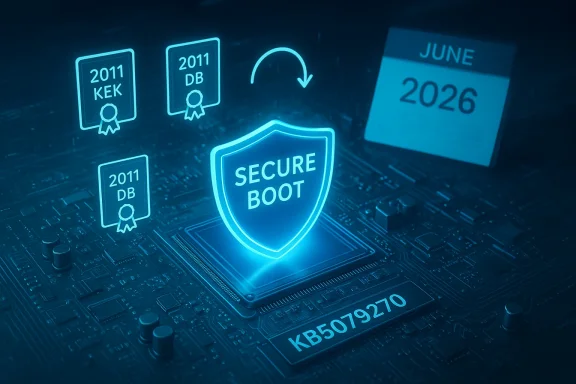
Microsoft’s February Safe OS bulletin — framed in the short public entry you supplied as KB5079270 and dated February 24, 2026 — is not just another quiet WinRE refresh: it is a targeted reminder and operational trigger for a platform-wide task that every Windows administrator and many power users must treat as urgent. The update reiterates that Microsoft’s original Secure Boot certificates (the 2011-era KEK/DB certificates) begin to expire in June 2026, explains the potential consequences for boot-level security and updateability, and points teams at Microsoft’s certificate‑rotation guidance so they can prepare in advance. This article explains what that means, why it matters, and how to plan and execute the work safely across desktops, laptops, and servers. ([support.microsoft.microsoft.com/en-us/topic/windows-secure-boot-certificate-expiration-and-ca-updates-7ff40d33-95dc-4c3c-8725-a9b95457578e)
Secure Boot is a UEFI firmware feature that prevents unsigned or tampered pre‑boot components (bootloaders, Option ROMs, and other EFI applications) from executing during system startup. The mechanism relies on a small set of signing certificates and chains stored in the firmware (KEK, DB, DBX), and Microsoft historically used a set of certificates created around 2011 to sign Windows boot components. Those certificates were never meant to be permanent — they have finite lifetimes — and Microsoft announced a planned rotation to a new set of 2023 certificates to preserve the same model of trust going forward. The 2011 certificates start expiring in June 2026, and other related certs phase out by October 2026. If devices are not updated to the new 2023 certificates, they will enter a degraded boot‑security state and will not be able to receive future Secure Boot updates for boot components.
Microsoft has implemented parts of this rotation across multiple servicing channels over the last several months: discrete dynamic updates (Safe OS / WinRE updates and Setup dynamic updates) and monthly cumulatives have been used to (aages and setup binaries and (b) prepare devices to accept the new certificate set when the vendor rollout is gated by eligibility and telemetry. Many of those KBs explicitly warn administrators about the Secure Boot certificate expiration and instruct teams to follow Microsoft’s central guidance. Examples include recent Safe OS and Setup DUs that embed identical cautionary text and verification scripts for WinRE versions.
But practical risks remain and must be acknowledged:
Source: Microsoft Support KB5079270: Safe OS Dynamic Update for Windows 11, versions 24H2 and 25H2: February 24, 2026 - Microsoft Support
 Background / Overview
Secure Boot is a UEFI firmware feature that prevents unsigned or tampered pre‑boot components (bootloaders, Option ROMs, and other EFI applications) from executing during system startup. The mechanism relies on a small set of signing certificates and chains stored in the firmware (KEK, DB, DBX), and Microsoft historically used a set of certificates created around 2011 to sign Windows boot components. Those certificates were never meant to be permanent — they have finite lifetimes — and Microsoft announced a planned rotation to a new set of 2023 certificates to preserve the same model of trust going forward. The 2011 certificates start expiring in June 2026, and other related certs phase out by October 2026. If devices are not updated to the new 2023 certificates, they will enter a degraded boot‑security state and will not be able to receive future Secure Boot updates for boot components.Microsoft has implemented parts of this rotation across multiple servicing channels over the last several months: discrete dynamic updates (Safe OS / WinRE updates and Setup dynamic updates) and monthly cumulatives have been used to (aages and setup binaries and (b) prepare devices to accept the new certificate set when the vendor rollout is gated by eligibility and telemetry. Many of those KBs explicitly warn administrators about the Secure Boot certificate expiration and instruct teams to follow Microsoft’s central guidance. Examples include recent Safe OS and Setup DUs that embed identical cautionary text and verification scripts for WinRE versions.
What the February 24 (KB5079270) notice actually says — and what it likely means
- The public summary you provided states: “Secure Boot certificates used by most Windows devices are set to expire starting in June 2026.” That line is consistent with Microsoft’s central Secure Boot guidance and with the language Microsoft has repeated in multiple KBs and cumulatives this winter. It is not a new policy change — it’s the vendor calling attention to a preannounced certificate lifecycle event and the practical steps administrators must take.
- The notice urges organizations to “review the guidance and take action to update certificates in advance.” This is not optional for managed fleets where Secure Boot is required by policy, compliance, or where BitLocker / attestation features assume intact boot‑time protections. Microsoft’s guidance calls for a combination of Windows Update delivery and OEM firmware updates; servers and special-purpose devices may require manual intervention.
- If you cannot find an authoritative KB page for the label KB5079270 on Microsoft’s site, treat the text you provided as an accurate excerpt from Microsoft guidance — but also cross-reference the canonical Microsoft Secure Boot pages and the other Safe OS KBs (KB5074110, KB5074111, KB5077180, etc.) that embed the same advisory language. Multiple public Microsoft pages and the vendor’s server guidance confirm the June→October 2026 expiration window and rollout behavior. Where a particular KB ID cannot be located in Microsoft’s index, rely on the canonical guidance pages for the mechanics and the KBs that are verifiable today.
The technical facts you need to verify today
These are the load‑bearing claims you should confirm in your environment; each one is supported by Microsoft documentation and vendor guidance.- Expiration window: the legacy 2011 certificates begin expiring in June 2026, and additional certificates tied to the Windows boot chain phase out through October 2026. This is the operative deadline that drives the remediation timeline.
- New certificates: Microsoft has published and is rolling out new 2023 certificates (for example, “Microsoft Corporation KEK 2K CA 2023” and separate 2023 UEFI CA variants). These certificates replace the functions of the older certs (KEK/DB roles) and are distributed by Microsoft and OEMs.
- Delivery model: Most consumer and business devices will receive the new certificates automatically via Windows Update, but some classes — notably certain servers, appliances, and OEM‑locked firmware — will require manufacturer-supplied firmware updates or manual certificate enrollment. Microsoft also uses staged, telemetry‑based targeting to ensure devices are eligible before inserting new boot components signed with the 2023 certificates.
- Operational consequence if you do nothing: affected devices will continue to boot initially, but they will no longer be able to receive new Secure Boot security protections or DB/DBX updates after the certs expire, leaving them exposed to future boot‑level vulnerabilities and potentially preventing future upgrade paths. For some managed devices that intentionally toggle Secure Boot or reset the DB, the transition may lead to “Secure Boot violation” scenarios unless recovery media and tests have been prepared.
- Server call to action: Microsoft explicitly asks server administrators to verify and, where necessary, manually initiate the certificate update process for Windows Server machines that did not ship with the new 2023 certs or have not already been updated via firmware. This is a different operational path from the largely automatic consumer flow.
Who is affected — an operational classification
- Desktop and laptop fleets running supported Windows 11 builds and connected to Windows Update: Most devices will be updated automatically through Windows Update when Microsoft’s phased rollout determines they are eligible. Prioritize machines that are not centrally managed or that rely on WSUS configurations that may block the rollout.
- Managed enterprise fleets behind WSUS, SCCM, or private approval processes: You must explicitly plan deployment. The update may be available in the Microsoft Update Catalog and can be injected into images, but image hygiene and testing are mandatory because Safe OS and Setup dynamic updates can modify pre‑boot bits and are not always removable once applied.
- Servers, appliances, and special-purpose devices (including many OEM‑custom servers and some IoT/embedded systems): Manual intervention is likely required. Microsoft’s server guidance asks administrators to ensure their firmware and servicing stack are current and to follow step‑by‑step instructions to initiate and verify certificate updates. Plan maintenance windows.
- Unsupported Windows 10 installations or devices outside Microsoft’s update graph: Windows 10 devices will only receive the updates if they are enrolled in an active Extended Security Updates (ESU) program; otherwise, the vendor cannot guarantee automatic certificate updates. Vendors and independent reporting note this limitation for older devices. If you have Windows 10 fleets, confirm ESU status and OEM support.
Practical checklist — what to do now (priority ordered)
- Inventory and classify (days 0–7)
- Identify all devices with Secure Boot enabled across your estate: workstations, laptops, servers, and specialized appliances.
- Flag devices that are firmware‑locked (no user access to UEFI), devices with custom OEM images, and devices managed by third‑party controllers.
- Confirm OS versions and patch levels; devices must be on supported OS builds to receive automatic certificate update flows.
- Verify current Secure Boot cert state (days 0–14)
- Run the PowerShell checks on representative machines:
- Confirm-SecureBootUEFI — verifies Secure Boot is enabled and functioning.
- Get-SecureBootPolicy — enumerates the active Secure Boot policy and can help determine DB/KEK composition.
- For WinRE verification, use the vendor-provided script or the DISM/WinRE checks recommended in the Safe OS KBs (many KBs ship a GetWinReVersion.ps1 or equivalent).
- Engage OEMs and firmware teams (days 0–30)
- Contact OEMs for BIOS/UEFI updates that include the 2023 certificates, especially for servers and branded appliances.
- For mass‑deployed devices (thin clients, imaging labs, kiosks), coordinate firmware flash windows and pre‑verify recovery media.
- Build test beds and validate (days 7–45)
- Create lab images with the latest Safe OS and Setup dynamic updates applied and validate boot, BitLocker unlock, and Windows Update behavior.
- Test toggling Secure Boot, resetting DB/DBX, and applying OEM firmware updates. Confirm that restoration using Secure Boot recovery media works as expected.
- Plan rollout and monitoring (days 14–90)
- For managed WSUS/SCCM environments, enable the required update classifications in WSUS and preload the catalog packages into deployment rings for pilot groups.
- Track telemetry and Microsoft release notes for phased targeting indicators; Microsoft uses eligibility telemetry to gate certificate insertion to minimize risk.
- Prepare remediation playbooks (ongoing)
- Document a recovery procedure that includes creating Secure Boot recovery media and steps to re-enroll certificates through firmware UI or vendor tools.
- For servers, prepare maintenance windows to perform manual updates where automatic flows are not applicable.
Step‑by‑step commands and verification (concise, repeatable)
- Check Secure Boot status:
- In an elevated PowerShell session run:
- Confirm-SecureBootUEFI
- Get-SecureBootPolicy
- These return whether Secure Boot is present, enabled, and the policy details. Use them as your baseline before any firmware or binary change.
- Verify WinRE / Safe OS update:
- Many Safe OS KBs include a GetWinReVersion.ps1 or guidance for DISM checks. After applying a Safe OS DU, verify that WinRE reports the expected build string referenced in the KB (for example, a KB might set WinRE to 10.0.26100.xxxx). Use the vendor script or DISM to confirm.
- Confirm presence of new 2023 certificates (where tools permit):
- Some vendor tools and UEFI interfaces list KEK/DB content. Use the OEM utility or firmware UI to verify that the Microsoft UEFI CA 2023 / Microsoft Corporation KEK 2K CA 2023 entries are present. Not all firmware exposes a friendly list — when they don’t, rely on Microsoft updates and OEM guidance for verification.
Imaging and deployment notes — do this before broad rollouts
- Inject updates into offline images: Safe OS dynamic updates and some setup DUs can be applied to offline images (for example, with DISM or by importing the package from the Microsoft Update Catalog). But be warned: some Safe OS changes are persistent and cannot be removed from an image once applied. Test image behavior carefully.
- Pre-seeding devices: If you manage an OEM imaging service, ensure new images are updated to include the 2023 certificates and the latest WinRE. This reduces the risk of late-stage failures during deployment and speeds recovery operations in the field.
- WSUS/SCCM considerations: Synchronize the Microsoft Update Catalog and ensure the classification for “Updates” and “Dynamic Updates” is enabled. Pilot rings should include diversity of hardware models to catch vendor-specific edge cases early.
Server‑specific recommendations
Servers deserve special attention:- Don’t assume automatic rollout: Microsoft’s guidance explicitly notes that Windows Server instances that did not ship with the 2023 certs or haven’t had firmware updates may require manual initiation of the certificate update. That means service windows, verification runs, and backups.
- Test BitLocker and HSM attestation workflows: Some server security scenarios (measured boot, secure attestation, or hardware attestation for virtualized hosts) rely on specific KEK/DB states. Validate those workflows after any certificate change.
- Coordinate with OEM/metal vendors: Server firmware updates (BMC or UEFI) are the most common path for installing the 2023 certs on servers. Get the vendor’s recommended method and an explicit rollback/restore plan.
Known risks and operational gotchas (what breaks and why)
- Secure Boot violations after DB resets or toggles: If you reset the DB or flip Secure Boot on/off at an inopportune time, you can create a mismatch between firmware trust anchors and on-disk boot components (bootmgr, bootmgfw.efi) that were signed under the new 2023 chain. That mismatch produces a Secure Boot policy violation and can leave systems unbootable until remediation. The KBs and setup DUs warn explicitly not to toggle Secure Boot in production without recovery media.
- Image immutability: Some Safe OS DUs are persistent inside images. If you apply them to offline images and later need to roll back, you may be unable to remove those changes cleanly. This is why image testing is critical.
- Unsupported devices and Windows 10: If you’re still running non‑ESU Windows 10, you may not receive updates that include certificate changes and may be forced into manual OEM firmware enrollment or hardware replacement to maintain Secure Boot parity. This is also a compliance risk for regulated environments.
- Third‑party bootloaders and Option ROM trust separation: Microsoft split the 2011‑era UEFI CA roles into separate 2023 certs (e.g., bootloader signing vs. Option ROM signing) to allow finer trust granularity. As a result, some third‑party boot components may require explicit trust entries or vendor updates. Review vendor guidance for enterprise bootloaders and hypervisor boot chains.
If you discover a device with problems — stepwise remediation
- Don’t panic. In most cases the device will still boot, and Microsoft’s phased rollouts are designed to avoid large‑scale failures.
- Boot to recovery media you created in advance (Windows recovery USB) to access WinRE and confirm Disk/Boot configuration.
- Use OEM recovery or firmware tools to re-enroll the new 2023 certificates if the firmware allows it; if not, coordinate with the OEM for a firmware update or a vendor-supplied procedure.
- For servers, follow Microsoft’s manual initiation steps and verify using the server‑specific command sequence in Microsoft’s guidance. Always document each change and keep a rollback path.
Monitoring, telemetry, and how Microsoft stages the rollout
Microsoft will not flip the new certificates on every device in a single wave. Instead, the vendor has said it will use a phased, telemetry‑informed rollout that prioritizes devices with successful update histories and safe signals. That approach reduces risk but does not eliminate the need for proactive verification. For enterprise fleets, monitor the Release Health dashboard, Windows Update for Business telemetry, and WSUS synchronization logs. KBs and blog posts that accompany each dynamic update will include the WinRE and boot component signatures you should look for.Special notes for IT leadership and compliance officers
- Treat certificate rotation like any other cryptographic lifetime event — it’s not a single‑server job. Your compliance paperwork, incident response runbooks, and security baselines (CIS, NIST checklists) should reflect the date windows and your remediation milestones.
- Prioritize servers and critical‑path infrastructure that rely on measured boot, remote attestation, or appliance services. These systems often have a longer firmware lead time and may be exposed to longer windows of degraded boot protection if not prioritized.
- If you manage many devices across multiple OEMs, centralize firmware update tracking and ensure procurement teams understand the firmware lifecycle when refreshing hardware. For procurement: prefer SKUs that shipped with 2023 certificates where possible.
What to tell end users and helpdesk teams (brief template)
- Communicate that Microsoft and OEMs are rotating Secure Boot certificates to maintain boot-level protections.
- Explain that most devices will be updated automatically, but some specialized machines may need a scheduled firmware update.
- Advise users to avoid toggling Secure Boot or running UEFI resets without guidance from IT; doing so can trigger Secure Boot errors that require recovery media and support intervention.
Final analysis: strengths, risks, and a recommended timeline
Microsoft’s plan to rotate Secure Boot certificates is technically sound: renewing certificate chains and splitting signing scopes are good cryptographic hygiene. The strength of the vendor approach is twofold: automatic delivery for the majority of devices via Windows Update, and explicit server guidance for manual paths where automation is impractical. The phased, telemetry‑driven rollout reduces the blast radius of bad firmware interactions.But practical risks remain and must be acknowledged:
- Firmware heterogeneity means some devices will require manufacturer action — and real‑world firmware timelines can be slow.
- Dynamic updates that change pre‑boot binaries and WinRE are persistent and hard to roll back inside images; poor testing can create large operational headaches.
- Legacy and unsupported systems (non‑ESU Windows 10, specialized embedded builds) will create pockets of devices in a degraded security state unless hardware refreshes or manual enrollment are completed.
- Now–30 days: inventory, vendor engagement, and lab validation.
- 30–60 days: pilot the update on diversified hardware rings (laptops, desktops, servers).
- 60–90 days: staged deployment to production rings and servers with manual maintenance windows where required.
- Before June 2026: complete critical deployments and ensure fallback/rollback plans are in place.
Conclusion
The February Safe OS advisory you shared (KB5079270 text) is a timely and actionable alarm: the Secure Boot trust fabric underlying Windows will begin losing its legacy certificates in June 2026, and the work required to preserve full boot‑time protections is operational, not academic. Treat this as a project with a deadline. Inventory your estate, validate firmware and WinRE state, coordinate with OEMs for firmware updates, test images in lab rings, and stage the rollout under tight monitoring. With deliberate planning and a few weeks of prioritized work, most organizations can avoid service disruption and preserve the integrity of their boot chains. Don’t wait for the expiration date to arrive before you act.Source: Microsoft Support KB5079270: Safe OS Dynamic Update for Windows 11, versions 24H2 and 25H2: February 24, 2026 - Microsoft Support
