

Microsoft’s Project Aion, described in leaked materials published July 3, 2026, is reportedly an experimental AI-first operating system concept that replaces much of the familiar Windows desktop with a Copilot-centered interface, Edge-based shell, cloud-streamed legacy apps, and natural-language workflows. It is not Windows 12, and it is not a shipping product. But it is the clearest sign yet that Microsoft’s internal argument about the PC has moved from “How do we add AI to Windows?” to “What would Windows look like if AI came first?”
That distinction matters. For three decades, Windows has been a place: a desktop, a Start menu, a taskbar, a file system, a control panel, a graveyard of compatibility hacks, and a thousand tiny behaviors that users learn once and then resent changing forever. Aion suggests Microsoft is at least exploring a future where the operating system becomes less like a place and more like a broker: an agent that interprets intent, summons apps, retrieves state, and hides the machinery behind a conversational layer.
The most striking thing about the Aion leak is not that Microsoft is putting Copilot at the center. That has been the company’s public direction since Copilot became the umbrella brand for almost every AI feature across Windows, Microsoft 365, Edge, GitHub, and Azure. The striking part is that Aion reportedly treats the traditional desktop as optional infrastructure rather than the central metaphor.
That is a much bigger break than another Start menu redesign. Windows has survived because it is an accumulation machine. Every new generation of PC hardware, software distribution, security policy, input device, and enterprise management model gets layered onto the same conceptual base: apps live somewhere, files live somewhere, settings live somewhere, and the user is expected to know enough geography to make it all work.
Aion appears to attack that geography directly. If the leak is accurate, the user does not begin by hunting for a program or remembering where a document was saved. The user begins with a request. Copilot becomes the switchboard, and the OS becomes the set of services needed to fulfill that request.
That sounds futuristic until one remembers that users have already been trained to work this way on the web. They no longer navigate directories of websites; they search, ask, autocomplete, and let recommendation systems collapse choice into a single next action. Aion applies that logic to the PC itself, which is both the obvious next step and the reason Windows traditionalists will hate the idea on sight.
Aion reportedly does. In this model, Copilot is not merely a chatbot sitting near the desktop. It is the front door. It can launch applications, find files, search the web, navigate tasks, and mediate workflows that would normally require the user to understand which app, file, setting, or service is responsible for a job.
That is the real shift behind the phrase agentic OS. The agent is not just answering questions; it is acting across system boundaries. It needs permissions, context, memory, access to files, access to apps, and enough trust from the user to make changes without turning every action into a confirmation dialog.
This is where Microsoft’s ambitions collide with Microsoft’s history. Windows users have already seen how messy it gets when a feature with broad system visibility is introduced before its privacy model feels airtight. Recall’s early backlash was not merely about screenshots or indexing; it was about whether users believed Microsoft had earned the right to build an always-aware memory layer into the PC. Aion would raise the same issue at a larger scale, because an agentic operating system is only useful if it can see enough to help.
The company can sell this as convenience, but the trade is deeper. A Copilot-first OS asks users to exchange manual control for interpreted intent. That exchange can be liberating when it works and infuriating when it fails. Anyone who has watched a voice assistant confidently misunderstand a simple command knows the difference between automation and agency is not branding. It is reliability.
Microsoft has spent years embedding web technology more deeply into Windows. WebView2 is now a common foundation for modern Windows app surfaces. The Microsoft Store, Widgets, Teams, parts of Office, and plenty of third-party enterprise apps already blur the line between native and web. Copilot itself has often behaved more like a web service wrapped in an app than a traditional Windows component.
The Aion idea takes that pattern and stops pretending it is merely a convenience. If the shell itself is web-derived, Microsoft gets a cross-platform interface layer, faster iteration, and a development model that aligns with cloud services. It also gets a way to make the same Copilot-centered experience appear on Windows PCs, Android devices, and reportedly a lightweight Windows variant known internally as Win3.
This would not be unprecedented in computing history. ChromeOS proved that a browser-first operating system can be viable for education, kiosks, lightweight productivity, and managed fleets. The difference is that Microsoft cannot simply copy ChromeOS without abandoning the very thing that makes Windows valuable: the installed base of Win32 applications, drivers, enterprise policy, and user expectations.
That is why the Edge shell is both pragmatic and risky. It gives Microsoft a modern canvas for an AI interface. But every time a Windows surface feels like a webpage pretending to be a native app, users notice. They notice latency. They notice inconsistent menus. They notice when right-click behaves differently, when keyboard shortcuts break muscle memory, and when the system feels less like their PC and more like a service endpoint.
Aion reportedly reimagines Start as an AI command center. That is a radical idea wrapped in a familiar word. Instead of browsing through pinned apps or typing the exact name of a tool, the user describes an outcome: open the spreadsheet from yesterday’s meeting, continue the research on laptop procurement, find the PDF from legal, summarize the Teams thread, pull up the app needed to edit this image.
In some ways, this is the old command line reborn for civilians. Power users have always known that typing can be faster than pointing, if the system understands the command. The difference is that natural language removes the need to memorize syntax. The user does not need to know whether the action lives in File Explorer, Outlook, OneDrive, Edge, Excel, or a remote Cloud PC. The system is supposed to infer the route.
That is why the Start menu is the right battlefield for this experiment. Start is where Microsoft can replace navigation with intent without immediately discarding the entire desktop. If Aion’s Start experience works, it becomes the place users go before they know which app they need. If it fails, it becomes Clippy with administrator privileges.
The challenge is that Start is also where user trust is most fragile. Windows users already complain when the menu promotes web results, recommended files, ads, account nudges, or Microsoft services they did not ask for. An AI Start menu would need to be astonishingly good at distinguishing assistance from upsell. Microsoft’s recent consumer Windows record does not give skeptics much reason to relax.
In traditional Windows, the installed application is the atom. It has an executable, an installer, a location on disk, a set of permissions, a versioning model, and usually some relationship with the registry, the file system, and update services. That model is powerful, but it is also messy. It creates support burdens, compatibility landmines, and security exposure that enterprises spend entire careers managing.
Web apps offer Microsoft a cleaner abstraction. They can be updated continuously, deployed centrally, sandboxed more consistently, and made to roam across devices. If they open in their own windows and integrate with task switching, notifications, identity, and file pickers, many users may not care whether the app is “native” in the old sense.
Developers and IT pros will care, though. Native software is not just legacy baggage; it is how entire industries run specialized tools, hardware integrations, offline workflows, and high-performance applications. Aion’s web-first model may be perfectly adequate for knowledge work and thin-client environments, but it cannot wish away CAD suites, lab equipment software, industrial controls, media production tools, or line-of-business applications written before half the current workforce was born.
That is why Microsoft’s likely path is not replacement but stratification. The everyday productivity layer becomes web-like and AI-mediated. The heavy legacy layer remains Windows, but increasingly remote, virtualized, streamed, or contained. The PC becomes less a box that runs everything and more a portal that decides where the work should run.
For Aion, that solves a structural problem. If the local OS is lightweight, web-based, AI-first, and cross-platform, it cannot also carry the full historical weight of Windows compatibility. Streaming legacy apps from Windows 365 allows Microsoft to preserve the Windows value proposition while changing the local computing model underneath it.
This is elegant from Redmond’s perspective. It turns compatibility into a cloud service. It gives enterprises centralized control. It creates recurring revenue. It reduces dependence on powerful local hardware for many roles. It lets Microsoft argue that nothing has been abandoned, merely relocated.
From an administrator’s perspective, the picture is more complicated. Cloud PCs are useful, but they introduce cost, networking dependency, latency sensitivity, identity complexity, and another layer of service availability risk. A local app that breaks is one kind of problem. A cloud-streamed app that fails because of conditional access, bandwidth, region availability, licensing, profile sync, or graphics performance is another.
This is the bargain enterprise IT will scrutinize hardest. Aion’s local simplicity may be purchased with backend complexity. Microsoft can hide that complexity from users, but it cannot hide it from the teams responsible for keeping work running on Monday morning.
The traditional desktop is spatial, but not semantic. Windows knows which windows are open and where they are placed. It does not truly know that a Word document, a browser tab, a Teams chat, a PDF, and an Excel workbook are all part of the same hiring plan, incident response, budget review, or school project. Users supply that meaning manually through folders, naming conventions, pinned apps, and muscle memory.
Aion appears to make context a first-class OS object. If Spaces can understand work as a bundle of intent, state, documents, communications, and applications, then the PC becomes much better at interruption recovery. That matters because modern knowledge work is not a clean sequence of tasks. It is a stack of half-finished threads constantly preempted by meetings, alerts, authentication prompts, and context switches.
Microsoft has a natural advantage here because so much work already flows through Microsoft 365. Outlook, Teams, OneDrive, SharePoint, Loop, Planner, Word, Excel, PowerPoint, and Edge create a graph of activity that could feed an AI workspace model. The company knows who sent the document, where it was stored, which meeting discussed it, which chat linked it, and which files were opened around it.
That same advantage is also the privacy problem. A context-aware OS must collect and infer context. The more useful Spaces becomes, the more sensitive the underlying model becomes. For regulated industries, the question will not be whether the feature is clever. It will be where the data goes, how it is indexed, who can audit it, how retention works, and whether sensitive material can be excluded with policy rather than hope.
This is not just interface minimalism. It is a claim that the boundaries between local, cloud, app, file, and web are becoming less important to the user than the task itself. If the system can interpret the request, the user should not need to decide whether the next step belongs to Windows Search, Edge, File Explorer, Copilot, Outlook, or a streamed app.
The risk is that omniboxes become junk drawers. The more a single input field can do, the more ambiguous every command becomes. “Open the budget” might mean a local Excel file, a SharePoint document, a recent email attachment, a Power BI dashboard, a Teams tab, or a browser bookmark. A useful AI shell must not only retrieve the right thing; it must explain just enough of its reasoning that users can correct it when it guesses wrong.
That is where Microsoft’s design discipline will be tested. The company has often struggled to balance power and clarity in Windows. Settings and Control Panel overlapped for years. Search mixed local files with web results in ways that irritated users. Widgets and recommendations frequently felt more like engagement surfaces than productivity aids. Aion’s omnibox would need to avoid becoming another place where Microsoft’s priorities and the user’s intent fight for the same pixels.
Project Aion may never appear as a retail operating system. It may never be called Aion outside internal documents. It may have been a design exploration, a prototype, a strategic exercise, or one of several competing visions for AI-era Windows. The leak itself reportedly frames the project as experimental, which is an important caveat.
But prototypes still reveal priorities. Aion shows Microsoft thinking seriously about an OS where Copilot is not an accessory, Edge is not merely a browser, Windows 365 is not merely a remote desktop product, and local apps are not necessarily the default form of software. That is a coherent strategy even if Aion never ships.
The more likely outcome is that Windows absorbs Aion in pieces. We may see a more agentic Start menu, richer Copilot actions, deeper Windows 365 app streaming, better restoration of work contexts, and web apps that look increasingly indistinguishable from native ones. Microsoft does not need to launch a new OS to move users in this direction. It only needs to keep changing the default path of least resistance.
That changes the threat model. If Copilot can find documents, summarize content, launch apps, and execute workflows, then attackers will try to manipulate Copilot, poison its context, steal its tokens, abuse its permissions, or trick users into approving harmful actions described in friendly language. Prompt injection stops being a weird chatbot parlor trick and becomes an operating-system concern.
Microsoft knows this, and its enterprise AI messaging has increasingly leaned on governance, identity, compliance, and data boundary assurances. But an OS-level agent is harder than a productivity assistant because the blast radius is larger. The assistant is not just summarizing a document; it may be bridging local state, cloud identity, remote apps, browser sessions, and corporate data repositories.
The company will need policy controls as granular and boring as the feature is flashy. Admins will want to decide which file locations are indexable, which apps can be controlled, which actions require confirmation, which data can leave the device, which models can process regulated content, and how every agent action is logged. The winners in enterprise AI will not be the systems that merely dazzle executives in demos. They will be the systems auditors can understand.
This is where Aion’s leak should be read less as science fiction and more as a governance warning. If Microsoft wants Copilot to become the operating surface of work, then Copilot must become governable like an operating system component. Anything less will be a nonstarter for serious environments.
That tension is not accidental. Local AI is useful for latency, privacy, offline work, and battery-efficient inference. Cloud AI is useful for scale, model freshness, enterprise control, and revenue. Aion seems designed to sit between those worlds, using the local device for interaction and context while relying on cloud services for heavier computation, app compatibility, and continuity.
For consumers, that may look like magic when it works. Buy a lightweight machine, sign in, ask for what you need, and your work follows you. Apps appear when needed. Old software streams from elsewhere. Documents surface by meaning rather than location. The PC becomes less fussy.
It may also feel like another loss of ownership. If more of the computing experience depends on identity, subscriptions, network availability, cloud policy, and Microsoft-hosted intelligence, the user’s relationship to the PC changes. The machine on the desk is no longer the whole computer. It is the local edge of a service.
That is not inherently bad. Many users already live this way across phones, browsers, and cloud storage. But Windows carries a different cultural expectation. A Windows PC is supposed to be general-purpose, locally powerful, moddable, backward-compatible, and occasionally chaotic. Aion’s cleaner future may appeal to Microsoft, enterprises, and ordinary users who just want less friction. It will alarm the people who value the PC precisely because it is not an appliance.
The new Microsoft wants the platform to be identity, cloud, AI, and graph. Windows still matters enormously, but less as a standalone product and more as the most important client surface for Microsoft’s services. Aion makes that logic visible. If Copilot is the interface, Edge is the shell, Microsoft 365 is the work graph, and Windows 365 is the compatibility layer, then “Windows” becomes a brand for a continuum rather than a single local OS.
This explains why Aion reportedly targets not just Windows PCs but Android devices and a lightweight Windows variant. Microsoft lost the smartphone OS war, but it did not lose the ability to put Microsoft experiences on every screen. An AI-first shell gives the company another shot at cross-device continuity without needing to own the entire device stack.
It also explains why the project looks unlike Windows. Looking like Windows may be the problem it is trying to solve. The desktop metaphor is powerful, but it is also crowded with historical obligations. Aion lets Microsoft imagine a user experience where the interface is portable, service-driven, and not anchored to the affordances of 1995.
The irony is that Microsoft has tried to escape Windows before, and Windows usually pulls it back. Windows RT, Windows 10X, Windows 8’s Metro-first ambitions, and various shell experiments all ran into the same gravity well: users and enterprises want modernization, but not at the cost of compatibility, control, and familiarity. Aion’s cloud legacy layer is the cleverest answer yet to that problem, but it is still an answer that must survive contact with actual users.
The AI search features arriving across Windows, the Copilot Runtime, Copilot+ PC requirements, Windows 365 integration, Edge-powered app surfaces, and deeper Microsoft 365 context all point in the same direction. Microsoft is teaching Windows to become less of a manual tool chest and more of an intent interpreter. Aion simply shows what that looks like when the idea is allowed to dominate the whole shell.
For administrators, that means the next several years of Windows planning will not just be about hardware refreshes and version upgrades. It will be about policy boundaries for AI actions, data indexing, cloud app delivery, identity controls, and user training around systems that can act rather than merely display. The management plane becomes as important as the desktop image.
For developers, the message is equally blunt. Apps that expose intent, state, and actions to AI surfaces may become more discoverable than apps that merely sit behind icons. The operating system of the AI era will reward software that can be invoked, queried, summarized, automated, and restored as part of a larger workflow.
For users, the change will feel gradual until it suddenly does not. One day Copilot is a button. Then it is a search enhancement. Then it opens apps. Then it restores projects. Then it mediates settings, files, meetings, and cloud software. At that point the question will no longer be whether AI is in Windows. It will be whether Windows is still the thing the user is operating.
That distinction matters. For three decades, Windows has been a place: a desktop, a Start menu, a taskbar, a file system, a control panel, a graveyard of compatibility hacks, and a thousand tiny behaviors that users learn once and then resent changing forever. Aion suggests Microsoft is at least exploring a future where the operating system becomes less like a place and more like a broker: an agent that interprets intent, summons apps, retrieves state, and hides the machinery behind a conversational layer.
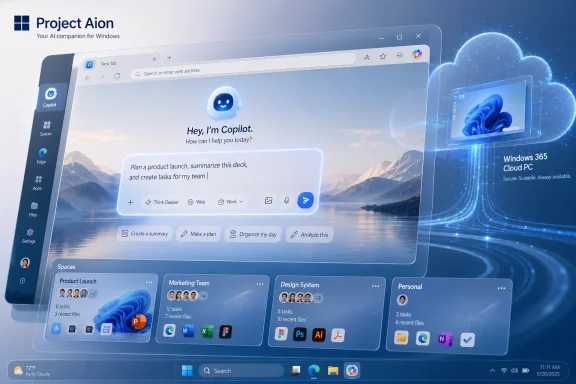 Microsoft’s AI OS Is Less a New Windows Than an Escape Plan From Windows
The most striking thing about the Aion leak is not that Microsoft is putting Copilot at the center. That has been the company’s public direction since Copilot became the umbrella brand for almost every AI feature across Windows, Microsoft 365, Edge, GitHub, and Azure. The striking part is that Aion reportedly treats the traditional desktop as optional infrastructure rather than the central metaphor.That is a much bigger break than another Start menu redesign. Windows has survived because it is an accumulation machine. Every new generation of PC hardware, software distribution, security policy, input device, and enterprise management model gets layered onto the same conceptual base: apps live somewhere, files live somewhere, settings live somewhere, and the user is expected to know enough geography to make it all work.
Aion appears to attack that geography directly. If the leak is accurate, the user does not begin by hunting for a program or remembering where a document was saved. The user begins with a request. Copilot becomes the switchboard, and the OS becomes the set of services needed to fulfill that request.
That sounds futuristic until one remembers that users have already been trained to work this way on the web. They no longer navigate directories of websites; they search, ask, autocomplete, and let recommendation systems collapse choice into a single next action. Aion applies that logic to the PC itself, which is both the obvious next step and the reason Windows traditionalists will hate the idea on sight.
Copilot Moves From Sidebar to System Boundary
Microsoft’s first wave of Windows AI features often felt bolted on. Copilot appeared as an assistant, Recall arrived as an indexed memory layer for Copilot+ PCs, and AI showed up in search, Paint, Photos, Settings, and File Explorer. Some of those features were useful. Some were controversial. None of them fundamentally changed the contract between the user and the PC.Aion reportedly does. In this model, Copilot is not merely a chatbot sitting near the desktop. It is the front door. It can launch applications, find files, search the web, navigate tasks, and mediate workflows that would normally require the user to understand which app, file, setting, or service is responsible for a job.
That is the real shift behind the phrase agentic OS. The agent is not just answering questions; it is acting across system boundaries. It needs permissions, context, memory, access to files, access to apps, and enough trust from the user to make changes without turning every action into a confirmation dialog.
This is where Microsoft’s ambitions collide with Microsoft’s history. Windows users have already seen how messy it gets when a feature with broad system visibility is introduced before its privacy model feels airtight. Recall’s early backlash was not merely about screenshots or indexing; it was about whether users believed Microsoft had earned the right to build an always-aware memory layer into the PC. Aion would raise the same issue at a larger scale, because an agentic operating system is only useful if it can see enough to help.
The company can sell this as convenience, but the trade is deeper. A Copilot-first OS asks users to exchange manual control for interpreted intent. That exchange can be liberating when it works and infuriating when it fails. Anyone who has watched a voice assistant confidently misunderstand a simple command knows the difference between automation and agency is not branding. It is reliability.
The Edge Shell Is the Most Microsoft Thing About This Leak
Aion is reportedly built around a modified Microsoft Edge shell, which will immediately trigger a familiar set of reactions. Some users will see another attempt to make Edge unavoidable. Others will see the logical end point of Windows’ long march toward web-powered interfaces. Both readings can be true.Microsoft has spent years embedding web technology more deeply into Windows. WebView2 is now a common foundation for modern Windows app surfaces. The Microsoft Store, Widgets, Teams, parts of Office, and plenty of third-party enterprise apps already blur the line between native and web. Copilot itself has often behaved more like a web service wrapped in an app than a traditional Windows component.
The Aion idea takes that pattern and stops pretending it is merely a convenience. If the shell itself is web-derived, Microsoft gets a cross-platform interface layer, faster iteration, and a development model that aligns with cloud services. It also gets a way to make the same Copilot-centered experience appear on Windows PCs, Android devices, and reportedly a lightweight Windows variant known internally as Win3.
This would not be unprecedented in computing history. ChromeOS proved that a browser-first operating system can be viable for education, kiosks, lightweight productivity, and managed fleets. The difference is that Microsoft cannot simply copy ChromeOS without abandoning the very thing that makes Windows valuable: the installed base of Win32 applications, drivers, enterprise policy, and user expectations.
That is why the Edge shell is both pragmatic and risky. It gives Microsoft a modern canvas for an AI interface. But every time a Windows surface feels like a webpage pretending to be a native app, users notice. They notice latency. They notice inconsistent menus. They notice when right-click behaves differently, when keyboard shortcuts break muscle memory, and when the system feels less like their PC and more like a service endpoint.
The Start Menu Becomes a Command Line for Everyone
The Start menu has always been more than a launcher. It is the symbolic center of Windows, which is why Microsoft gets punished whenever it changes too much. Windows 8 learned that lesson brutally. Windows 11 softened the menu and moved it, but the basic premise remained recognizable: installed apps, recent files, search, power controls, and some recommendation logic.Aion reportedly reimagines Start as an AI command center. That is a radical idea wrapped in a familiar word. Instead of browsing through pinned apps or typing the exact name of a tool, the user describes an outcome: open the spreadsheet from yesterday’s meeting, continue the research on laptop procurement, find the PDF from legal, summarize the Teams thread, pull up the app needed to edit this image.
In some ways, this is the old command line reborn for civilians. Power users have always known that typing can be faster than pointing, if the system understands the command. The difference is that natural language removes the need to memorize syntax. The user does not need to know whether the action lives in File Explorer, Outlook, OneDrive, Edge, Excel, or a remote Cloud PC. The system is supposed to infer the route.
That is why the Start menu is the right battlefield for this experiment. Start is where Microsoft can replace navigation with intent without immediately discarding the entire desktop. If Aion’s Start experience works, it becomes the place users go before they know which app they need. If it fails, it becomes Clippy with administrator privileges.
The challenge is that Start is also where user trust is most fragile. Windows users already complain when the menu promotes web results, recommended files, ads, account nudges, or Microsoft services they did not ask for. An AI Start menu would need to be astonishingly good at distinguishing assistance from upsell. Microsoft’s recent consumer Windows record does not give skeptics much reason to relax.
Web Apps Pretending to Be Native Apps Are a Strategy, Not a Compromise
The leak’s description of web apps behaving like native Windows applications may sound like another technical footnote, but it is central to the Aion story. Microsoft is not merely trying to make websites prettier on the desktop. It is trying to reduce the importance of the local app as the unit of computing.In traditional Windows, the installed application is the atom. It has an executable, an installer, a location on disk, a set of permissions, a versioning model, and usually some relationship with the registry, the file system, and update services. That model is powerful, but it is also messy. It creates support burdens, compatibility landmines, and security exposure that enterprises spend entire careers managing.
Web apps offer Microsoft a cleaner abstraction. They can be updated continuously, deployed centrally, sandboxed more consistently, and made to roam across devices. If they open in their own windows and integrate with task switching, notifications, identity, and file pickers, many users may not care whether the app is “native” in the old sense.
Developers and IT pros will care, though. Native software is not just legacy baggage; it is how entire industries run specialized tools, hardware integrations, offline workflows, and high-performance applications. Aion’s web-first model may be perfectly adequate for knowledge work and thin-client environments, but it cannot wish away CAD suites, lab equipment software, industrial controls, media production tools, or line-of-business applications written before half the current workforce was born.
That is why Microsoft’s likely path is not replacement but stratification. The everyday productivity layer becomes web-like and AI-mediated. The heavy legacy layer remains Windows, but increasingly remote, virtualized, streamed, or contained. The PC becomes less a box that runs everything and more a portal that decides where the work should run.
Windows 365 Is the Compatibility Crutch That Makes the Fantasy Plausible
Aion reportedly leans on Windows 365 to handle legacy apps, and that may be the most commercially important part of the leak. Microsoft has been building toward this for years: Cloud PCs, Windows App, Windows 365 Link, and cloud-hosted desktops that can be accessed from local hardware with minimal state. The pitch is simple: the Windows environment no longer has to live on the device in front of you.For Aion, that solves a structural problem. If the local OS is lightweight, web-based, AI-first, and cross-platform, it cannot also carry the full historical weight of Windows compatibility. Streaming legacy apps from Windows 365 allows Microsoft to preserve the Windows value proposition while changing the local computing model underneath it.
This is elegant from Redmond’s perspective. It turns compatibility into a cloud service. It gives enterprises centralized control. It creates recurring revenue. It reduces dependence on powerful local hardware for many roles. It lets Microsoft argue that nothing has been abandoned, merely relocated.
From an administrator’s perspective, the picture is more complicated. Cloud PCs are useful, but they introduce cost, networking dependency, latency sensitivity, identity complexity, and another layer of service availability risk. A local app that breaks is one kind of problem. A cloud-streamed app that fails because of conditional access, bandwidth, region availability, licensing, profile sync, or graphics performance is another.
This is the bargain enterprise IT will scrutinize hardest. Aion’s local simplicity may be purchased with backend complexity. Microsoft can hide that complexity from users, but it cannot hide it from the teams responsible for keeping work running on Monday morning.
Spaces Shows Microsoft Wants the OS to Understand Work, Not Just Windows
The reported Spaces feature may be the most quietly important idea in Aion. The leak describes Spaces as a way to group related apps, files, and tasks so users can return to previous workflows without manually reconstructing them. That sounds like virtual desktops with more memory, but the ambition is broader.The traditional desktop is spatial, but not semantic. Windows knows which windows are open and where they are placed. It does not truly know that a Word document, a browser tab, a Teams chat, a PDF, and an Excel workbook are all part of the same hiring plan, incident response, budget review, or school project. Users supply that meaning manually through folders, naming conventions, pinned apps, and muscle memory.
Aion appears to make context a first-class OS object. If Spaces can understand work as a bundle of intent, state, documents, communications, and applications, then the PC becomes much better at interruption recovery. That matters because modern knowledge work is not a clean sequence of tasks. It is a stack of half-finished threads constantly preempted by meetings, alerts, authentication prompts, and context switches.
Microsoft has a natural advantage here because so much work already flows through Microsoft 365. Outlook, Teams, OneDrive, SharePoint, Loop, Planner, Word, Excel, PowerPoint, and Edge create a graph of activity that could feed an AI workspace model. The company knows who sent the document, where it was stored, which meeting discussed it, which chat linked it, and which files were opened around it.
That same advantage is also the privacy problem. A context-aware OS must collect and infer context. The more useful Spaces becomes, the more sensitive the underlying model becomes. For regulated industries, the question will not be whether the feature is clever. It will be where the data goes, how it is indexed, who can audit it, how retention works, and whether sensitive material can be excluded with policy rather than hope.
The Multimodal Omnibox Is the Browser Address Bar Eating the Desktop
Aion’s reported multimodal omnibox is the clearest expression of the project’s philosophy. The browser address bar already became a search box, calculator, history tool, navigation shortcut, and command surface. Aion extends that same idea across the operating system: one box to launch apps, search files, find web content, start workflows, and execute AI tasks.This is not just interface minimalism. It is a claim that the boundaries between local, cloud, app, file, and web are becoming less important to the user than the task itself. If the system can interpret the request, the user should not need to decide whether the next step belongs to Windows Search, Edge, File Explorer, Copilot, Outlook, or a streamed app.
The risk is that omniboxes become junk drawers. The more a single input field can do, the more ambiguous every command becomes. “Open the budget” might mean a local Excel file, a SharePoint document, a recent email attachment, a Power BI dashboard, a Teams tab, or a browser bookmark. A useful AI shell must not only retrieve the right thing; it must explain just enough of its reasoning that users can correct it when it guesses wrong.
That is where Microsoft’s design discipline will be tested. The company has often struggled to balance power and clarity in Windows. Settings and Control Panel overlapped for years. Search mixed local files with web results in ways that irritated users. Widgets and recommendations frequently felt more like engagement surfaces than productivity aids. Aion’s omnibox would need to avoid becoming another place where Microsoft’s priorities and the user’s intent fight for the same pixels.
Aion Makes More Sense as a Fork in Strategy Than a Product Roadmap
It is tempting to treat every leak as a preview of a product. That is usually a mistake, and it is especially risky here. Experimental Microsoft projects often function as idea mines rather than shipping blueprints. The company tests shells, prototypes interaction models, explores hardware assumptions, and absorbs the surviving pieces into mainstream Windows when the market is ready or the internal politics line up.Project Aion may never appear as a retail operating system. It may never be called Aion outside internal documents. It may have been a design exploration, a prototype, a strategic exercise, or one of several competing visions for AI-era Windows. The leak itself reportedly frames the project as experimental, which is an important caveat.
But prototypes still reveal priorities. Aion shows Microsoft thinking seriously about an OS where Copilot is not an accessory, Edge is not merely a browser, Windows 365 is not merely a remote desktop product, and local apps are not necessarily the default form of software. That is a coherent strategy even if Aion never ships.
The more likely outcome is that Windows absorbs Aion in pieces. We may see a more agentic Start menu, richer Copilot actions, deeper Windows 365 app streaming, better restoration of work contexts, and web apps that look increasingly indistinguishable from native ones. Microsoft does not need to launch a new OS to move users in this direction. It only needs to keep changing the default path of least resistance.
The Security Model Is the Product, Whether Microsoft Admits It or Not
For enthusiasts, the first reaction to an AI-first OS may be aesthetic: Is it fast? Is it ugly? Can I turn it off? For IT pros, the first serious reaction will be security. An agent that can act across files, apps, cloud services, and legacy environments is not merely a feature. It is a privileged actor.That changes the threat model. If Copilot can find documents, summarize content, launch apps, and execute workflows, then attackers will try to manipulate Copilot, poison its context, steal its tokens, abuse its permissions, or trick users into approving harmful actions described in friendly language. Prompt injection stops being a weird chatbot parlor trick and becomes an operating-system concern.
Microsoft knows this, and its enterprise AI messaging has increasingly leaned on governance, identity, compliance, and data boundary assurances. But an OS-level agent is harder than a productivity assistant because the blast radius is larger. The assistant is not just summarizing a document; it may be bridging local state, cloud identity, remote apps, browser sessions, and corporate data repositories.
The company will need policy controls as granular and boring as the feature is flashy. Admins will want to decide which file locations are indexable, which apps can be controlled, which actions require confirmation, which data can leave the device, which models can process regulated content, and how every agent action is logged. The winners in enterprise AI will not be the systems that merely dazzle executives in demos. They will be the systems auditors can understand.
This is where Aion’s leak should be read less as science fiction and more as a governance warning. If Microsoft wants Copilot to become the operating surface of work, then Copilot must become governable like an operating system component. Anything less will be a nonstarter for serious environments.
The Consumer PC Is Becoming a Thin Client With Better Marketing
Aion also fits a broader shift in personal computing: the local device is becoming simultaneously more powerful and less sovereign. Copilot+ PCs pushed NPUs into the mainstream Windows conversation, promising local AI features that run on-device. At the same time, Microsoft continues to expand cloud desktops, cloud apps, web-first productivity, and subscription services that make the device a terminal into a larger Microsoft environment.That tension is not accidental. Local AI is useful for latency, privacy, offline work, and battery-efficient inference. Cloud AI is useful for scale, model freshness, enterprise control, and revenue. Aion seems designed to sit between those worlds, using the local device for interaction and context while relying on cloud services for heavier computation, app compatibility, and continuity.
For consumers, that may look like magic when it works. Buy a lightweight machine, sign in, ask for what you need, and your work follows you. Apps appear when needed. Old software streams from elsewhere. Documents surface by meaning rather than location. The PC becomes less fussy.
It may also feel like another loss of ownership. If more of the computing experience depends on identity, subscriptions, network availability, cloud policy, and Microsoft-hosted intelligence, the user’s relationship to the PC changes. The machine on the desk is no longer the whole computer. It is the local edge of a service.
That is not inherently bad. Many users already live this way across phones, browsers, and cloud storage. But Windows carries a different cultural expectation. A Windows PC is supposed to be general-purpose, locally powerful, moddable, backward-compatible, and occasionally chaotic. Aion’s cleaner future may appeal to Microsoft, enterprises, and ordinary users who just want less friction. It will alarm the people who value the PC precisely because it is not an appliance.
The Leak’s Real Message Is That Windows Is No Longer the Center of Windows
The old Windows business was built around the operating system as the platform. Developers targeted Windows. Users bought Windows PCs. Enterprises managed Windows images. Microsoft’s job was to keep the platform stable enough that everyone could build on it.The new Microsoft wants the platform to be identity, cloud, AI, and graph. Windows still matters enormously, but less as a standalone product and more as the most important client surface for Microsoft’s services. Aion makes that logic visible. If Copilot is the interface, Edge is the shell, Microsoft 365 is the work graph, and Windows 365 is the compatibility layer, then “Windows” becomes a brand for a continuum rather than a single local OS.
This explains why Aion reportedly targets not just Windows PCs but Android devices and a lightweight Windows variant. Microsoft lost the smartphone OS war, but it did not lose the ability to put Microsoft experiences on every screen. An AI-first shell gives the company another shot at cross-device continuity without needing to own the entire device stack.
It also explains why the project looks unlike Windows. Looking like Windows may be the problem it is trying to solve. The desktop metaphor is powerful, but it is also crowded with historical obligations. Aion lets Microsoft imagine a user experience where the interface is portable, service-driven, and not anchored to the affordances of 1995.
The irony is that Microsoft has tried to escape Windows before, and Windows usually pulls it back. Windows RT, Windows 10X, Windows 8’s Metro-first ambitions, and various shell experiments all ran into the same gravity well: users and enterprises want modernization, but not at the cost of compatibility, control, and familiarity. Aion’s cloud legacy layer is the cleverest answer yet to that problem, but it is still an answer that must survive contact with actual users.
The Aion Playbook Is Already Spreading Through Windows
The practical takeaway is not to wait for Project Aion as a product. It is to watch current Windows features for Aion-shaped behavior. Microsoft rarely needs a clean break when it can ship the future as a sequence of defaults.The AI search features arriving across Windows, the Copilot Runtime, Copilot+ PC requirements, Windows 365 integration, Edge-powered app surfaces, and deeper Microsoft 365 context all point in the same direction. Microsoft is teaching Windows to become less of a manual tool chest and more of an intent interpreter. Aion simply shows what that looks like when the idea is allowed to dominate the whole shell.
For administrators, that means the next several years of Windows planning will not just be about hardware refreshes and version upgrades. It will be about policy boundaries for AI actions, data indexing, cloud app delivery, identity controls, and user training around systems that can act rather than merely display. The management plane becomes as important as the desktop image.
For developers, the message is equally blunt. Apps that expose intent, state, and actions to AI surfaces may become more discoverable than apps that merely sit behind icons. The operating system of the AI era will reward software that can be invoked, queried, summarized, automated, and restored as part of a larger workflow.
For users, the change will feel gradual until it suddenly does not. One day Copilot is a button. Then it is a search enhancement. Then it opens apps. Then it restores projects. Then it mediates settings, files, meetings, and cloud software. At that point the question will no longer be whether AI is in Windows. It will be whether Windows is still the thing the user is operating.
The PC Future Hiding Inside Microsoft’s Leak
The most concrete lesson from Aion is that Microsoft is no longer treating AI as a feature category. It is treating AI as an interface model, and that has consequences beyond any single leaked prototype.- Project Aion reportedly remains experimental, so it should be read as a strategic signal rather than a confirmed Windows successor.
- Copilot’s proposed role in Aion moves it from assistant to operating surface, which would require a much stronger trust, permissions, and audit model.
- The reported Edge-based shell suggests Microsoft wants faster, cross-platform interface development, but it also risks the familiar backlash against web-heavy Windows experiences.
- Windows 365 integration is the key to making a lightweight AI-first OS plausible without abandoning legacy Windows applications.
- Features like Spaces and a multimodal omnibox show Microsoft trying to organize computing around work context and user intent rather than apps, folders, and windows.
- The biggest adoption barrier will not be whether the demos look impressive, but whether users and administrators believe the agent can be controlled.
References
- Primary source: thewincentral.com
Published: 2026-07-03T00:50:08.731896
Loading…
thewincentral.com - Related coverage: windowscentral.com
Microsoft Copilot OS revealed in LEAKED video: Lightweight Windows OS exploration features new desktop UI built entirely around Copilot and agentic AI | Windows Central
A leaked video from 2024 has revealed all about Microsoft's internal explorations for a Copilot OS running on a stripped back Windows codebase.www.windowscentral.com - Official source: support.microsoft.com
Loading…
support.microsoft.com - Official source: learn.microsoft.com
Loading…
learn.microsoft.com - Official source: microsoft.com
Shop High-Performance Laptops, Computers, PCs, and Tablets | Microsoft Windows
Shop high-performance laptops, PCs, and tablets built for multitasking, advanced AI capabilities, powerful graphics, and all-day performance. Explore premium, high-spec Windows devices.www.microsoft.com - Official source: blogs.microsoft.com
Introducing Copilot+ PCs - The Official Microsoft Blog
An on-demand recording of our May 20 event is available. Today, at a special event on our new Microsoft campus, we introduced the world to a new category of Windows PCs designed for AI, Copilot+ PCs. Copilot+ PCs are the fastest, most intelligent Windows PCs ever built. With powerful new...blogs.microsoft.com
- Official source: blogs.windows.com
Loading…
blogs.windows.com - Related coverage: techradar.com
Not ready for Cloud PCs just yet? Microsoft will still let you stream individual apps to get you started | TechRadar
Windows 365 Cloud Apps are now in public previewwww.techradar.com - Related coverage: tomshardware.com
Microsoft is reportedly testing Copilot+ AI features with discrete GPUs instead of NPUs — a feature available on Windows App SDK with a Windows Insider Experimental Channel build and Developer Mode turned on | Tom's Hardware
Is this the beginning of the end for Copilot+ PCs?www.tomshardware.com - Related coverage: pcgamer.com
Microsoft says it's making 'every Windows 11 PC an AI PC' with a dizzying array of Copilot upgrades, including voice activation | PC Gamer
'All with your permission and built upon the security of Windows 11.'www.pcgamer.com - Related coverage: axios.com
Loading…
www.axios.com - Related coverage: help.syspro.com
- Official source: news.microsoft.com