

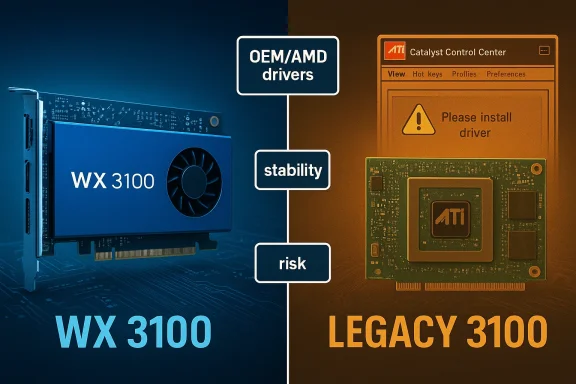
The arrival of the compact, low‑power AMD Radeon Pro WX 3100 to secondhand and OEM channels has renewed interest — and confusion — around similarly named legacy parts (ATI/Radeon “3100” references) and the right drivers for Windows 10. Buyers and technicians must separate two very different realities: the modern, supported Radeon Pro WX 3100 professional card (4 GB GDDR5, boost to ~1.22 GHz, single‑slot, half‑length) and older “3100” family entries or integrated chips that live in the legacy driver world. Many marketplace listings and blog posts conflate these products and advertise “Windows 10 drivers” in ways that are misleading or unverifiable. Community guidance and vendor documentation agree on one pragmatic rule: treat the Radeon Pro WX 3100 as a supported product with clear specs and vendor drivers, and treat any claim about “ATI Radeon 3100 Windows 10 driver” (without OEM/AMD provenance) with caution.
The Radeon Pro WX 3100 is a compact workstation card AMD released for professional workloads in 2017. It is built on the Lexa (Polaris family) GPU, ships with 4 GB of GDDR5, and offers a low TDP (around 50–65 W depending on board variant), a single‑slot profile, and a half‑length PCB that fits many small workstations and entry‑level rack or mini‑ITX systems. These are the facts most vendors and hardware databases list consistently.
By contrast, several historically common “3100” labels belong to much older solutions (integrated Intel GMA X3100 or ATI/AMD HD/ES series variants). Those legacy devices were produced in a very different driver era (Catalyst/legacy drivers and the early days of Adrenalin) and often lack modern, AMD‑provided Windows 10 drivers. Community and vendor guidance documents strongly recommend different approaches for each case: use AMD/OEM drivers for the Radeon Pro WX 3100, and rely on Microsoft Update / OEM fallback drivers or carefully vetted legacy archives for older 3100‑class parts.
Key practical points:
A critical warning: marketplace posts that mix “Radeon Pro WX 3100” with “ATI Radeon 3100” or that advertise “latest Windows 10 driver included” without linking to AMD/OEM pages should be treated as suspicious. Several community archives explicitly flagged the Born2Invest listing provided with the original query as unverified; do not trust file download claims on third‑party sites without cryptographic checksums or an official vendor redirect.
The bottom line: the AMD Radeon Pro WX 3100 is a small, efficient, and well‑documented professional card with verifiable specs (4 GB GDDR5, ~1.22 GHz boost, single‑slot/half‑length) and a clear vendor driver path. The more perilous territory is the generic phrase “ATI Radeon 3100” — that wording points at multiple, older devices and a legacy driver landscape where Windows Update or OEM packages are your safest bets. Treat marketplace driver claims skeptically, verify downloads against official pages, and follow conservative installation workflows (backup → Windows Update → OEM → AMD archive only when necessary). Those steps minimize risk and keep your small workstation running predictably.
Source: Born2Invest https://born2invest.com/?b=style-236949312/
 Background / Overview
The Radeon Pro WX 3100 is a compact workstation card AMD released for professional workloads in 2017. It is built on the Lexa (Polaris family) GPU, ships with 4 GB of GDDR5, and offers a low TDP (around 50–65 W depending on board variant), a single‑slot profile, and a half‑length PCB that fits many small workstations and entry‑level rack or mini‑ITX systems. These are the facts most vendors and hardware databases list consistently. By contrast, several historically common “3100” labels belong to much older solutions (integrated Intel GMA X3100 or ATI/AMD HD/ES series variants). Those legacy devices were produced in a very different driver era (Catalyst/legacy drivers and the early days of Adrenalin) and often lack modern, AMD‑provided Windows 10 drivers. Community and vendor guidance documents strongly recommend different approaches for each case: use AMD/OEM drivers for the Radeon Pro WX 3100, and rely on Microsoft Update / OEM fallback drivers or carefully vetted legacy archives for older 3100‑class parts.
What the Radeon Pro WX 3100 actually is
Key hardware specifications (verified)
- GPU architecture: Lexa (Polaris family); 14 nm process.
- Shaders / Cores: 512 stream processors (8 compute units).
- Base / Boost clocks: ~925 MHz base, up to ~1,219 MHz boost (often listed as 1.22 GHz boost).
- Memory: 4 GB GDDR5, 128‑bit bus, ~96 GB/s theoretical bandwidth.
- Form factor: Single‑slot, half‑length board (~168 mm / 6.6 in reported length on many retail boards).
- TDP / power: Typical TDP around 50–65 W depending on board variant; no external power connector on many OEM/retail designs.
- Display connectivity: Common retail variants expose DisplayPort / mini‑DisplayPort outputs (1× DP + 2× mini‑DP in many SKUs).
Use cases and realistic expectations
- Ideal for: CAD viewers, 2D/entry 3D CAD workloads, media editing acceleration, multi‑display setups in space‑constrained workstations, and hardware‑accelerated professional viewport tasks where 4 GB of VRAM suffices.
- Not ideal for: Modern AAA gaming at high resolution or heavy GPU compute workloads that require more memory or higher FLOPS. The WX 3100 targets price/performance and stability for pro apps, not high‑end gaming.
Driver reality — Windows 10 support and what to install
Radeon Pro WX 3100 — supported driver path
If you have a Radeon Pro WX 3100, the recommended driver source is AMD’s Radeon Pro Software (PRO editions or the unified AMD Software where the Pro SKUs are listed). AMD hosts enterprise/pro drivers and archives for this series. Retail vendors (HP, Dell) may also ship OEM‑tuned versions for branded workstations. For the WX 3100, match the driver release to the card family and your OS (Windows 10 x64) and prefer the PRO/enterprise driver builds when possible.Key practical points:
- Use AMD’s Radeon Pro drivers for certified professional application support and ISV optimizations.
- If you bought an OEM board (HP Smart Buy or prebuilt workstation), check the vendor page first — it may provide a tested image that includes OS hotfixes and BIOS/firmware compatibility notes.
Legacy “ATI / Radeon 3100” naming — the danger zone
When people search “ATI Radeon 3100 driver Windows 10,” results often point at legacy downloads, third‑party driver aggregators, or repackaged installers claiming Windows 10 compatibility. These legacy parts may refer to very different hardware (integrated chipsets, older HD series discrete chips), and AMD’s official position for many older families was to rely on Microsoft’s fallback drivers or archived Catalyst packages — not to publish new Windows 10‑targeted feature drivers. Community investigation and vendor guidance repeatedly emphasize this trust order: Windows Update → OEM → AMD legacy archive → community/third‑party sites (last resort).A critical warning: marketplace posts that mix “Radeon Pro WX 3100” with “ATI Radeon 3100” or that advertise “latest Windows 10 driver included” without linking to AMD/OEM pages should be treated as suspicious. Several community archives explicitly flagged the Born2Invest listing provided with the original query as unverified; do not trust file download claims on third‑party sites without cryptographic checksums or an official vendor redirect.
Is Windows 10 still supported by AMD drivers?
After Microsoft’s end of mainstream support dates, vendor documentation changed their phrasing; some recent AMD Adrenalin release notes omitted Windows 10 from headlines and focused on Windows 11. That led to confusion, but AMD clarified (and independent reporting confirmed) that while documentation language shifted, driver compatibility for many products remains available for Windows 10 users through the existing installer packages and legacy/pro driver channels. Still, expect support to transition to a maintenance mode for older OSes over time. For production systems, plan an OS migration if long‑term support is required.A safe, practical workflow: installing drivers for both realities
Below are two separate workflows — one for the modern Radeon Pro WX 3100, and one for a legacy “3100” device where you only have an old or ambiguous card.A. Installing drivers for a Radeon Pro WX 3100 (recommended path)
- Inventory and backup:
- Record your Windows build (Settings → System → About). Create a System Restore point and a full disk image if the machine is critical.
- Check OEM first:
- If the card came with an HP/Dell/Lenovo workstation, visit the vendor’s support page and download any recommended driver/firmware packages first. OEM images sometimes include platform fixes not present in the generic driver.
- Download AMD Radeon Pro driver:
- From AMD’s Radeon Pro Software pages, choose the PRO/enterprise driver that matches Windows 10 x64 and the WX x100 series. Prefer WHQL or certified PRO builds for stability.
- Install cleanly:
- Close background apps, run the installer as Administrator, and reboot when prompted. Monitor Device Manager → Display adapters to confirm the correct driver is active.
- Validate:
- Confirm multi‑monitor output, hardware acceleration in target apps (CAD, video editors), and run a short stress or sanity test to validate stability.
B. Trying to revive an older / ambiguous “ATI Radeon 3100” or integrated 3100‑class device (conservative, safe path)
- Assume legacy; backup first:
- Take a full image. Driver experiments on the display stack can render a system temporarily unusable.
- Try Windows Update (lowest risk):
- Settings → Update & Security → Windows Update → Check for updates → View optional updates → Driver updates. Microsoft’s signed fallback driver is the safest first step for old GPUs.
- Check OEM support:
- If the system is a branded laptop/desktop, prefer the vendor’s driver for your exact model. OEM packages account for hybrid graphics and power management.
- Advanced: manual legacy driver install (only for confident users)
- If you must use an archived Catalyst/legacy package, extract the installer and inspect Display.Driver*.inf to verify your hardware ID (PCI\VEN_1002&DEV_xxxx) is present. If it isn’t, do not force the install. Use Device Manager → Update Driver → Have Disk if the INF contains your device.
- Clean the driver state if switching:
- Use Display Driver Uninstaller (DDU) in Safe Mode to remove remnants before installing a different archive. This reduces the risk of partial installs where the control panel appears but the actual driver is the Microsoft Basic Adapter.
Technical verification: cross‑checking the load‑bearing claims
Because product names and driver claims are often conflated online, verification matters. I verified the WX 3100’s core specs against multiple independent sources and AMD’s own driver pages:- TechPowerUp lists the WX 3100 with 512 shaders, 4 GB GDDR5, and a boost up to 1,219 MHz.
- AMD’s support pages list Radeon Pro Drivers and archived release notes (Radeon Pro Software: each release references WX‑series support).
- Retail spec sheets (HP / B&H retail listings) corroborate the single‑slot, half‑length design and TDP ranges for many vendor boards.
Marketplace and buyer guidance — what to watch for
- Precision in naming: Listings that say “Radeon 3100” without “Pro WX” may refer to an older or integrated part. Confirm the SKU, part number (board number), and a clear photo of the PCB/label.
- Driver claims: If a seller claims “Windows 10 driver included,” ask for the specific download source (AMD, Microsoft Update catalog, or OEM page). If the seller only supplies a third‑party file or an installer hosted on their site, treat it as unverified unless backed by checksums and signatures. Community files flagged Born2Invest listings in the original query as unverified — that’s a good example of why you should demand provenance.
- Physical fitment: Confirm card length and slot profile. Many WX 3100 retail boards are ~168 mm long and single‑slot, but partner variations exist. Measure your chassis clearance and confirm display output workflows (mini‑DP adapters may be needed).
- Power and thermal expectations: The WX 3100 is low‑power for a discrete workstation card, but check your PSU and airflow if you’re packing several cards in a small chassis.
Security and risk considerations
- Unsigned / repackaged drivers: Avoid third‑party repackagers unless you have cryptographic checksums and a verified signature. Repackaged installers have historically bundled PUPs or even unsigned kernel modules. The community and vendor guidance place third‑party archives at the bottom of the trust hierarchy for a reason.
- Windows 10 lifecycle: Microsoft’s official lifecycle milestones affect vendor testing priorities. Even when drivers remain available, the OS itself may not receive security updates without Extended Security Updates. For production machines, plan an OS upgrade path or vendor‑recommended ESU options.
- Testing before deployment: On business or critical workstations, validate a driver update in an isolated test machine before rolling to production. Keep a rollback image ready. Use DDU for major driver swaps.
When something goes wrong — practical troubleshooting
- If Device Manager shows Microsoft Basic Display Adapter after an install:
- Reboot and allow Windows Update to complete post‑install steps.
- Use DDU in Safe Mode to clean existing drivers, then reinstall the chosen AMD/OEM package.
- If an archived Catalyst package won’t install:
- Extract the package and inspect the Display.Driver.inf for your device’s PCI\VEN and DEV* IDs. If your ID isn’t listed, the package won’t match and you should not force it.
- If a seller provides a driver file with no provenance:
- Treat it as untrusted. Ask for the original OEM/AMD link or refuse the file. For critical systems, request the vendor or AMD support to reproduce the driver installation steps.
Final recommendations — a short, actionable checklist
- If you own a Radeon Pro WX 3100: get your driver from AMD’s Radeon Pro pages or your OEM. Validate with a small application test and keep the installer archived.
- If you have an older “3100” (integrated or legacy discrete): use Windows Update first; then OEM; only consider AMD legacy archives if you can verify the INF contains your hardware ID and you’re prepared for an advanced manual install.
- Avoid unknown driver mirrors and unverified marketplace downloads. If a listing links only to a non‑vendor host (for example, Born2Invest or similar third‑party pages without clear provenance), treat claims about “latest Windows 10 drivers” as unverified until proven.
- For production deployments, plan for OS migration (Windows 11 or vendor‑supported alternatives) if you require long‑term security and vendor testing guarantees.
The bottom line: the AMD Radeon Pro WX 3100 is a small, efficient, and well‑documented professional card with verifiable specs (4 GB GDDR5, ~1.22 GHz boost, single‑slot/half‑length) and a clear vendor driver path. The more perilous territory is the generic phrase “ATI Radeon 3100” — that wording points at multiple, older devices and a legacy driver landscape where Windows Update or OEM packages are your safest bets. Treat marketplace driver claims skeptically, verify downloads against official pages, and follow conservative installation workflows (backup → Windows Update → OEM → AMD archive only when necessary). Those steps minimize risk and keep your small workstation running predictably.
Source: Born2Invest https://born2invest.com/?b=style-236949312/
