

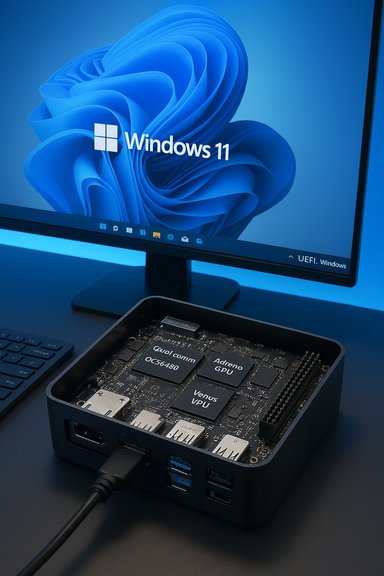
Radxa’s Dragon Q6A has taken a notable step toward making Arm single‑board computers (SBCs) a practical option for Windows users: Radxa released an official Windows 11 preview image for the Dragon Q6A, and the early preview already supports core I/O and accelerated multimedia when the vendor drivers are installed.
Radxa’s Dragon Q6A is a compact SBC built around Qualcomm’s QCS6490 SoC, a purpose‑built edge/AI platform that combines octa‑core CPU clusters, an Adreno GPU, a VPU capable of 4K decode, and a Hexagon AI engine. Radxa’s product documentation and downloads pages list the Q6A’s core capabilities — LPDDR5 memory up to 16 GB, HDMI output, multiple MIPI CSI connectors, M.2 NVMe expansion, eMMC/UFS options, and a UEFI boot firmware that supports SD, USB, NVMe, eMMC and UFS. Historically, enthusiasts and integrators have run Linux on Arm SBCs almost exclusively; Windows on Arm has been limited to a handful of OEM platforms or experimental ports. That changed in recent Windows updates: Microsoft’s Windows 11 24H2 introduced the Prism emulator and expanded Arm support, improving the practical viability of running x86/x64 applications on Arm hardware — but the biggest blocker for many SBCs has been driver support (GPU, VPU, Wi‑Fi/Bluetooth, camera ISP, etc.. Radxa’s preview image is one of the first vendor‑supplied Windows images aimed specifically at a commodity Qualcomm‑based SBC, and it shows where the ecosystem is headed.
Conclusion
Radxa’s Dragon Q6A Windows 11 preview shows that Windows on Arm is not only a laptop story anymore — it’s entering the SBC and edge computing world, with tangible multimedia and camera capabilities when the vendor drivers are installed. The preview is a valuable, publishable proof point for the platform’s potential, but it remains a preview: test thoroughly, plan for the missing wireless stack, and measure your real workloads before choosing an Arm SBC as the Windows host for any production system.
Source: CNX Software Radxa Dragon Q6A Arm SBC get official Windows 11 preview - CNX Software
 Background / Overview
Radxa’s Dragon Q6A is a compact SBC built around Qualcomm’s QCS6490 SoC, a purpose‑built edge/AI platform that combines octa‑core CPU clusters, an Adreno GPU, a VPU capable of 4K decode, and a Hexagon AI engine. Radxa’s product documentation and downloads pages list the Q6A’s core capabilities — LPDDR5 memory up to 16 GB, HDMI output, multiple MIPI CSI connectors, M.2 NVMe expansion, eMMC/UFS options, and a UEFI boot firmware that supports SD, USB, NVMe, eMMC and UFS. Historically, enthusiasts and integrators have run Linux on Arm SBCs almost exclusively; Windows on Arm has been limited to a handful of OEM platforms or experimental ports. That changed in recent Windows updates: Microsoft’s Windows 11 24H2 introduced the Prism emulator and expanded Arm support, improving the practical viability of running x86/x64 applications on Arm hardware — but the biggest blocker for many SBCs has been driver support (GPU, VPU, Wi‑Fi/Bluetooth, camera ISP, etc.. Radxa’s preview image is one of the first vendor‑supplied Windows images aimed specifically at a commodity Qualcomm‑based SBC, and it shows where the ecosystem is headed. What Radxa announced — the essentials
What works immediately (no extra drivers)
Radxa’s preview image for the Dragon Q6A boots Windows 11 and exposes several hardware functions out of the box because the board’s UEFI/GOP and basic firmware handle them. According to the vendor’s preview notes (published via CNX Software summarizing Radxa’s post), the following are available without additional driver installation:- HDMI output (via UEFI GOP)
- PCIe (M.2 NVMe visible)
- eMMC and UFS boot/storage support
- USB 2.0
- USB 3.0 (with the caveat that some USB3 devices must be present before boot)
What becomes available after installing Radxa/Qualcomm drivers
Once Radxa’s Windows drivers are installed, the preview unlocks a deeper feature set aimed at real‑world multimedia and embedded uses:- Hardware video acceleration:
- Decoding via D3D11VA (recommended) or DXVA2 — Radxa reports support up to 4096×2160 @ 60 fps (H.264 / HEVC 10‑bit / VP9 10‑bit) at up to ~250 Mbps.
- Encoding via Media Foundation — up to 3840×2160 @ 30 fps, ~150 Mbps.
- Test applications reported to work: Windows Media Player, mpv (using D3D11VA flags), VLC, GStreamer, and community builds of OBS Studio.
- GPU feature set:
- Direct3D 12, Feature Level 12_1
- OpenCL 3.0 (ARM64/x64 only)
- Vulkan 1.3 (ARM64/x64 only)
- OpenGL 4.1
- Camera/Capture:
- MIPI CSI camera support via Qualcomm Spectra ISP (Spectra 570L) with tested operation at 4K@30fps 10‑bit and hardware JPEG encode through Windows Imaging Component (WIC).
- GPIO and firmware:
- 40‑pin GPIO header support with tooling on GitHub; firmware flashing via edl‑ng from Windows is supported.
- Networking caveat:
- Ethernet via onboard Realtek RTL8111K is supported, but Radxa notes the connection may become unreliable when CPU load is very high (e.g., heavy Steam downloads).
The technical context: why this matters
Qualcomm SBCs + UEFI + Windows 11 = new possibilities
Radxa’s Dragon Q6A uses the Qualcomm QCS6490 platform — a family member of Qualcomm’s edge/AI chips that have robust Linux support, modern multimedia IP (Adreno GPU + Venus VPU + Spectra ISP), and official UEFI boot firmware. The board’s UEFI approach (flashable SPI ROM and an EFI payload) is one reason a Windows image can boot cleanly: the platform exposes a standard UEFI environment and GOP (Graphics Output Protocol) so Windows Setup can display video and proceed with installation. Radxa’s documentation and downloads show they publish UEFI firmware and tools for SPI/QSPI and EDL updates, which underpins the board’s multi‑OS flexibility.Windows on Arm has better emulation and developer tooling
Microsoft’s Prism emulator in Windows 11 24H2 substantially improves the ability to run x86 and x64 apps on Arm, and it’s tuned for Qualcomm Snapdragon processors. Prism does not translate drivers — kernel‑mode binaries must be native ARM64 — but it makes user‑mode x86/x64 applications usable in more cases. That means the Dragon Q6A’s Windows preview is most practical with native ARM64 applications (or x64 apps via Prism), while driver‑dependent stacks (e.g., kernel drivers for Wi‑Fi) still require vendor driver ports.Deep dive: multimedia acceleration and realistic limits
What Radxa claims the driver enables
Radxa’s driver bundle reportedly exposes the Adreno GPU and Venus VPU to Windows via standard APIs, enabling:- GPU acceleration features (Direct3D 12 FL12_1, OpenCL 3.0, Vulkan 1.3).
- Video decode offload through D3D11VA/DXVA2 and Media Foundation encoding.
- GStreamer/VLC/mpv playback with hardware offload.
The real bottleneck: memory bandwidth and thermal envelope
Radxa and CNX stress a critical constraint: memory bandwidth. The QCS6490 supports LPDDR5 at high MT/s rates, but the accessible memory bandwidth on a small SBC (with a single memory channel or limited bus width) is far lower than slots in larger laptops or desktops. Radxa quotes roughly 22 GB/s of usable memory bandwidth on their tested configuration, which makes high‑bit‑depth, high‑frame‑rate video decoding (4K60 10‑bit, high bitrate streams) challenging; under those workloads the system may fall back to CPU assistance or drop frames. The vendor recommends Windows Media Player and mpv for reliable playback, presumably because they can be tuned to use the supported hardware path. This is an important design constraint: SBCs are optimized for low power and compact form factors, not sustained high‑throughput media pipelines. When planning to use the Dragon Q6A as a 4K video player, transcoder or as a capture device, system integrators should profile real content and accept throttling, or offload heavy tasks to higher‑bandwidth platforms.Networking, peripherals, and camera: what to expect
Ethernet and Wi‑Fi
- Ethernet: works with the onboard Realtek RTL8111K, but Radxa warns of potential unreliable behavior under sustained CPU loads. For embedded use this may require either offload tuning (QoS, staggered transfers) or using an external USB/Ethernet adapter in heavy‑traffic scenarios.
- Wi‑Fi/Bluetooth: not supported in the preview image — a significant omission for headless / wireless deployments and for any scenario that expects on‑board wireless out of the box. Expect Radxa to release updated drivers or firmware in future preview builds or through Windows Update channels on their forum.
Camera and Spectra ISP
Radxa reports that the board’s MIPI CSI interfaces and the Qualcomm Spectra 570L ISP are accessible under Windows after driver installation, supporting 4K 30 fps 10‑bit capture and hardware JPEG encode via Windows Imaging Component (WIC). The vendor tested the Radxa Camera 12M (Sony IMX577) using Windows Camera and GStreamer flows — a promising result for vision or capture applications that need native Windows support. Still, expect camera support to be more brittle than display/codec support: MIPI/CSI drivers and UEFI/ACPI overlays are often configuration sensitive.Installation & practical steps (what you’ll actually do)
Radxa’s published install notes, summarized by CNX, and standard Windows on Arm guidance together give the following practical installation path:- Update the board’s UEFI/boot firmware to the latest release from Radxa (firmware and tools are published on Radxa’s downloads pages).
- Download a Windows 11 Arm64 ISO (Windows 11 24H2 is recommended for Prism and the latest Arm on Windows features) from Microsoft or UUPDump.
- Use Rufus or another USB writer to create bootable installation media (UEFI/GPT). Note: for some SBC configurations the guest USB3 stack has timing sensitivity — Radxa notes certain USB3 peripherals should be connected before boot.
- Boot the Dragon Q6A, press F12 for the boot menu, and select the USB drive to run Windows Setup.
- After Windows is installed, install Radxa’s driver bundle (Radxa’s forum and downloads page host the preview drivers). Then reboot and validate GPU/VPU and camera functionality.
- Expect incremental fixes: community feedback will likely prompt newer driver revisions, so keep firmware and driver bundles updated via Radxa’s forum and the downloads section.
Strengths: why this preview is a meaningful advance
- Vendor‑supplied Windows image: an official preview from Radxa removes much of the guesswork and DIY ISO‑hacking required to boot Windows on many Arm SBCs. This accelerates experimentation and reduces bricking risk for enthusiasts and integrators.
- Real multimedia capability: GPU/VPU acceleration for 4K decode and Media Foundation encode — even at the limits noted — is a substantive step beyond “it boots” demos. This enables light desktop, kiosk, and edge‑media scenarios on Windows without resorting to x86 hardware.
- UEFI + standard Windows stack: using a UEFI boot firmware that exposes GOP and PCIe means the Dragon Q6A behaves more like a small PC than a firmware‑locked embedded device — helpful for IT workflows and recovery images.
- Broader ecosystem signal: Qualcomm‑based SBCs running Windows natively (with vendor drivers) could make Arm a realistic choice for Windows‑centric edge appliances, low‑power kiosks, and specialized Windows applications that previously required x86 hardware.
Risks, limitations, and gotchas you must plan for
- Wi‑Fi/Bluetooth missing in preview: this is a nontrivial gap for many use cases (mobile, retail, field deployments). Expect to delay production decisions until wireless drivers and stable firmware arrive.
- Memory bandwidth and performance ceiling: the board’s limited memory bandwidth (~22 GB/s as quoted by Radxa/CNX) is a hard ceiling for certain multimedia or ML workloads; design accordingly. Sustained 4K60 10‑bit playback or simultaneous heavy I/O will stress the system.
- Driver maturity: vendor drivers for Windows on Arm are still evolving. Ethernet reliability under high CPU load, camera edge cases, or GPU behavior in particular apps may require multiple driver updates. Plan pilot testing and driver validation before rolling out an SBC‑based Windows solution.
- Security/patch lifecycle: Windows on Arm, like any branch of Windows, needs maintenance. For embedded deployments, confirm availability of security updates and whether your image can be managed via Windows Update or requires custom servicing. Microsoft’s Arm guidance and Prism improvements are helpful, but vendor commitment to long‑term updates should be verified.
- Emulation caveats: Prism improves app compatibility, but emulated apps will not run drivers, and 32‑bit x86 legacy apps are best avoided. For best results, prefer native ARM64 apps or plan to test x64 apps under Prism thoroughly.
Recommended workflows and deployment advice
- Proof of Concept (PoC) first:
- Set up a test Dragon Q6A and install the Radxa Windows preview image.
- Install the Radxa driver bundle and run representative workloads (media playback, camera capture, Ethernet transfer, GPIO toggling).
- Measure real memory bandwidth and thermal behavior under your expected workload to confirm feasibility.
- Prefer native ARM64 apps where possible:
- Use ARM64 builds of key applications (Edge/Chromium, VLC/OBS, native ML runtimes) to avoid the performance and compatibility variability of emulation. When emulation is necessary, use the Prism settings to tune per‑app compatibility.
- Prepare fallback networking:
- If Wi‑Fi is required but unavailable in preview, plan external USB Wi‑Fi or USB Ethernet adapters that have Windows Arm64 drivers, or plan wired deployments until wireless drivers reach parity.
- Vendor monitoring and update cadence:
- Track Radxa’s forum and downloads page for driver/firmware updates; these previews are iterative and improvements arrive via firmware and driver revisions.
What to watch next
- Radxa driver rollouts: Microsoft‑style servicing (Windows Update distribution) or Radxa driver packages will determine how quickly missing features (Wi‑Fi/Bluetooth) appear in stable builds. Watch Radxa’s downloads and forum threads.
- Prism/Windows 11 updates: Microsoft continues to refine Prism (Windows 11 24H2 and cumulative updates) and may add platform optimizations tied to Snapdragon chips; improvements in emulation will benefit the Dragon Q6A’s ability to run legacy apps.
- Community ports and tooling: expect community‑built tools for driver installation, edl‑based firmware flashing, and GPIO tooling on GitHub to mature and simplify the setup process.
Final assessment — practical verdict for WindowsForum readers
Radxa’s Windows 11 preview for the Dragon Q6A is an important milestone: it’s the first reliable vendor‑supplied Windows image for a low‑cost Qualcomm SBC that goes beyond “it boots” and delivers usable GPU/VPU acceleration, camera support, NVMe storage and a UEFI based workflow. That said, it’s still a preview and not a production release — the absence of Wi‑Fi/Bluetooth, the memory‑bandwidth limits, and immature drivers for some subsystems are real constraints that rule out immediate deployment in many production scenarios. For hobbyists and developers, this is exciting: you can test native ARM64 Windows software, prototype Windows‑based embedded solutions, and help shape the driver stack via feedback to Radxa’s forum. For system designers and integrators considering devices for customer deployments, treat this preview as a proof of concept. Require driver and wireless parity, confirm long‑term update commitments, and validate workloads under real content and thermal conditions before committing to a Dragon Q6A Windows‑based product. This moment also signals a broader industry trend: Arm SBCs with first‑party Windows support shrink the gap between embedded Linux prototyping and Windows integration. If Radxa and other vendors continue to close driver gaps, the result could be a meaningful new class of low‑power, Windows‑capable edge devices — but that future depends on driver maturity, firmware stability, and a real commitment to Windows‑platform updates from SBC vendors and chipset partners.Conclusion
Radxa’s Dragon Q6A Windows 11 preview shows that Windows on Arm is not only a laptop story anymore — it’s entering the SBC and edge computing world, with tangible multimedia and camera capabilities when the vendor drivers are installed. The preview is a valuable, publishable proof point for the platform’s potential, but it remains a preview: test thoroughly, plan for the missing wireless stack, and measure your real workloads before choosing an Arm SBC as the Windows host for any production system.
Source: CNX Software Radxa Dragon Q6A Arm SBC get official Windows 11 preview - CNX Software
