

Microsoft is rolling AI agents into the Windows 11 taskbar in the latest Insider preview, introducing visible, monitorable agent tasks, a developer-facing Agent Launchers framework, and a new Ask Copilot taskbar experience — all delivered as opt‑in previews in build 26220.7523 for Insiders in the Dev and Beta channels.
Microsoft’s Copilot strategy has been steadily evolving from a chat-centric assistant to an operating‑system level capability that can not only suggest but act — launching workflows, manipulating files and apps, and running multi‑step automations on behalf of a user. The latest Windows Insider preview represents the clearest move yet toward an “agentic” Windows: agents that can be discovered, launched, tracked, and governed directly from the taskbar via the Ask Copilot composer. This rollout is explicitly experimental and staged. Microsoft is exposing these experiences to a subset of Insiders — starting with U.S. commercial Insiders who have Microsoft 365 Copilot licensing — and is using Controlled Feature Rollout to gradually expand availability. The company also reminds Insiders that these features are opt‑in and may change or be removed as testing continues.
That promise comes with responsibilities. The architecture introduces new privilege boundaries, a novel runtime model, and a new class of auditable principals (agents). The path to safe, trustworthy agentic computing requires:
Windows is moving beyond “Copilot in a corner” toward an operating system that can orchestrate assistance and action at the system level. The taskbar‑centric agent model is a decisive first step; whether it becomes a net productivity multiplier or an operational headache will depend on how diligently Microsoft and its partners build governance, how quickly independent testing validates safety and performance, and how disciplined organizations are when they enable agents at scale.
Source: Thurrott.com Microsoft Prepares Windows Insiders for the Arrival of AI Agents on the Taskbar
 Background
Microsoft’s Copilot strategy has been steadily evolving from a chat-centric assistant to an operating‑system level capability that can not only suggest but act — launching workflows, manipulating files and apps, and running multi‑step automations on behalf of a user. The latest Windows Insider preview represents the clearest move yet toward an “agentic” Windows: agents that can be discovered, launched, tracked, and governed directly from the taskbar via the Ask Copilot composer. This rollout is explicitly experimental and staged. Microsoft is exposing these experiences to a subset of Insiders — starting with U.S. commercial Insiders who have Microsoft 365 Copilot licensing — and is using Controlled Feature Rollout to gradually expand availability. The company also reminds Insiders that these features are opt‑in and may change or be removed as testing continues. What Microsoft shipped in build 26220.7523
Ask Copilot on the taskbar: a unified entry point
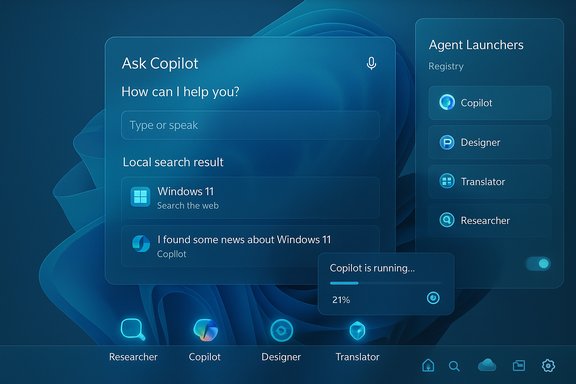
- Ask Copilot replaces or augments the familiar taskbar search pill with a compact composer that accepts text and voice and connects local search, Copilot responses, and registered agents in one place.
- Agents can be invoked from Ask Copilot using a tools menu or the “@” syntax; search results blend indexed local hits with Copilot‑generated recommendations.
- The experience is opt‑in and can be enabled from Settings → Personalization → Taskbar → Ask Copilot.
Agents visible on the taskbar: Researcher leads the way
- Long‑running agents, starting with Microsoft 365 Copilot’s Researcher, will appear on the taskbar while they run. Hovering the Copilot or Researcher icon surfaces a progress hover card with real‑time status updates.
- When an agent finishes, the taskbar shows a completed state and a notification to return to the result (for example, a generated report in Microsoft 365 Copilot). This flow aims to let users run background automations without interrupting their primary work.
Agent Launchers: a standard for discoverability
- Agent Launchers are a new framework that lets apps register interactive AI agents so those agents become discoverable and invokable across Windows (for example, from Ask Copilot).
- Agents can be registered statically at install time or dynamically at runtime, and can be gated by authentication or subscription state — enabling both first‑party and third‑party agent scenarios.
Other noteworthy Lab additions
- File Explorer now shows people icons and People Cards in the Home view and Activity columns, mirroring previously released experiences for work and school accounts.
- A new Discover Windows widget is being tested to surface tips throughout the day on the Widgets Board and Lock Screen.
- A Paint update is rolling out in Canary and Dev that adds a hideable toolbar option.
- Known issues were called out in the release, including a Researcher responsiveness bug and several taskbar-related anomalies.
How the taskbar agent experience works (technical essentials)
Agent discovery and invocation
Ask Copilot acts as the primary discoverability surface. When a user types a goal or an @Agent name, the composer queries local search and the Agent Launchers registry to present available agents, Copilot conversations, and short actions. Selecting or addressing an agent launches its interactive experience — often in the Copilot app or a registered chat window — and, for long jobs, surfaces a running task on the taskbar.Agent runtime and containment (what’s known)
Microsoft’s broader previews have introduced an Agent Workspace model and a set of containment primitives intended to keep agent activity auditable and isolated from the user’s main session. Agents run under distinct, low‑privilege agent accounts and operate in a sandboxed runtime that can interact with a limited set of known folders (Documents, Downloads, Desktop, Pictures) unless additional permissions are granted. These primitives are being tested behind an explicit experimental toggle in Settings and are designed to be opt‑in for both consumers and organizations. Note: the Insider blog for build 26220.7523 focuses on the taskbar UX and Agent Launchers; Agent Workspace and account details have been described across prior Insider briefings and preview documentation that accompany the agentic feature set.Developer model: registration and MCP compatibility
Agent Launchers let developers register agents so Windows and other apps can discover them. Microsoft is also pushing a Model Context Protocol (MCP) to standardize how agents discover and call tools and services, enabling safer, more predictable integrations between agents and apps. The Agent Launchers framework complements that model by making agents visibly available in system experiences.Why this matters: productivity and platform implications
Putting agents into the taskbar is a deliberate UX and platform decision. The taskbar is the most visible, least disruptive surface on Windows; making agents first‑class citizens there addresses three practical goals:- Reduce friction: launch multi‑step automations without switching apps or writing scripts.
- Improve transparency: show progress and completion on a UI surface users already monitor.
- Broaden discoverability: let both Microsoft 365 Copilot agents and third‑party agents be found from a single composer.
Risks, unknowns, and governance concerns
The potential gains are substantial, but the features surface new attack vectors, governance demands, and operational challenges. The preview’s documentation and independent reporting consistently stress experimental, opt‑in defaults — a recognition of the risks — yet organizations and power users need to prepare for new threat surfaces.Privacy and data access
- Agents that act on a user’s files necessarily expand the surface for data exposure. Microsoft’s preview currently restricts agents to known folders and emphasizes least‑privilege defaults, but third‑party connectors and elevated permissions could change that calculus.
- The Ask Copilot composer uses existing Windows Search APIs and Microsoft says the taskbar composer does not grant Copilot extra access beyond search; nevertheless, the interplay between local indexing, cloud retrieval and Copilot‑driven reasoning warrants scrutiny.
Attack surface and integrity
- Agents will run automated UI interactions, type into apps, and manipulate files. If an attacker compromises an agent process or its registration, they could leverage automation primitives to execute unwanted changes.
- Agent accounts and the Agent Workspace sandbox are designed to limit damage, but sandbox escapes, misconfigurations, or weak signing/registration controls would magnify risk. Independent verification and continuous red‑team testing will be essential.
Auditing, logging, and compliance
- The shift makes robust audit logging non‑optional. Enterprises will need agent‑level logs, provenance metadata (which agent did what, when, and under which user consent), and integration with SIEMs to meet compliance needs.
- Organizations must consider retention policies, forensics, and how to map agent actions to business approvals. Early guidance from enterprise analysts urges pilots with strict telemetry and least‑privilege connectors.
Usability tradeoffs and trust
- Visible taskbar agents aim to improve trust by making automation observable. That’s a good start, but transparency requires more than icons; users must be able to see step‑by‑step actions, pause or cancel workflows, and review a tamper‑evident action log.
- Microsoft’s experimentation with how agent tasks appear (grouping under Copilot vs. separate agent icons) shows the UX is still in flux; user testing will determine whether the affordances actually reduce surprises or simply add noise.
Dependency on cloud and hardware claims
- Some Copilot experiences degrade to cloud reasoning; others will aim for on‑device inference on Copilot+ devices with NPUs. The balance between cloud and local compute affects latency, privacy, and cost — and many of the vendor hardware performance claims will require independent benchmarking.
Independent verification and cross‑checks
Key claims in the build announcement were verified against Microsoft’s Windows Insider blog post for build 26220.7523 and contemporaneous reporting from major Windows observers. Microsoft’s official release notes confirm:- The Ask Copilot composer is being rolled out as an opt‑in taskbar experience for commercial Insiders with Microsoft 365 Copilot licensing, and
- Agents on the taskbar (beginning with Researcher) and the Agent Launchers framework are included in this controlled rollout.
Practical guidance: what Insiders and IT teams should do now
For individual Insiders who want to try the preview
- Join the Windows Insider Program in the Dev or Beta channel (choose Dev for earlier flights; Beta for more stable previews).
- Update to build 26220.7523 when it appears in Windows Update.
- Turn on the Opt‑in toggle for Ask Copilot at Settings → Personalization → Taskbar → Ask Copilot.
- If you have Microsoft 365 Copilot licensing and are in the targeted geography (initially the U.S., try assigning a Researcher task from Microsoft 365 Copilot and observe the taskbar hover progress and notification flow.
For IT teams and security professionals
- Treat agentic features as a new class of platform service: establish AgentOps oversight that spans security, identity, compliance and business owners.
- Pilot on a small fleet with thorough telemetry: enable audit logs, collect agent action traces, and integrate with SIEM tools.
- Apply least‑privilege: limit agent permissions to required known folders and deny broad write‑back until connector behavior is validated.
- Harden registration and signing controls for third‑party agents; vet marketplaces and vendor attestation practices before approving agents in production.
- Update incident response playbooks to handle agent‑specific misuse scenarios, including malicious registrants or compromised agent runtimes.
UX and developer implications
Ask Copilot and Agent Launchers open a new developer surface: apps that expose agents can reach users system‑wide, and well‑designed agents could dramatically simplify repetitive tasks. But developers must adapt to new expectations:- Provide clear consent flows when an agent needs file access or write operations.
- Design agents to be interruptible and transparent: show steps, log actions, and surface undo options.
- Consider tenancy, licensing, and dynamic registration: Agent Launchers permit registration at install time or runtime, so subscription state or user authentication can be used to gate availability.
Known issues and preview caveats
The Windows Insider release notes explicitly call out known problems in this flight:- Researcher may appear unresponsive if clicked while a task is in progress; switching conversations in the Microsoft 365 Copilot app is a suggested workaround.
- A handful of taskbar and Start menu anomalies exist in this build, and other stability issues remain under investigation.
These caveats underscore that the feature is experimental and should be used cautiously on production devices.
Verdict: promising, but governance and verification must come first
Microsoft’s decision to surface agents directly on the taskbar is a bold and pragmatic UX move: it reduces friction for automation while making agent activity visible where users already look. The Agent Launchers framework and Ask Copilot composer create a single control plane for first‑party and third‑party agents, which could unlock meaningful productivity gains.That promise comes with responsibilities. The architecture introduces new privilege boundaries, a novel runtime model, and a new class of auditable principals (agents). The path to safe, trustworthy agentic computing requires:
- Mature administrative controls and signing/registration governance.
- Independent performance and security verification for any claims about on‑device inference or Copilot+ hardware acceleration.
- Robust audit logging, retention, and SIEM integration for enterprises.
Windows is moving beyond “Copilot in a corner” toward an operating system that can orchestrate assistance and action at the system level. The taskbar‑centric agent model is a decisive first step; whether it becomes a net productivity multiplier or an operational headache will depend on how diligently Microsoft and its partners build governance, how quickly independent testing validates safety and performance, and how disciplined organizations are when they enable agents at scale.
Source: Thurrott.com Microsoft Prepares Windows Insiders for the Arrival of AI Agents on the Taskbar
